
Our readers keep the lights on and my morning glass full of iced black tea. As an Amazon Associate, I earn from qualifying purchases.
Specs are compiled from manufacturer listings and verified buyer reviews and can change over time — please confirm the key details on the product page before buying.
Most computer speakers under do one thing badly: they sacrifice clarity for bass, or size for volume. You end up with either a tinny box on your desk or a bulky plastic monster that fights for space with your monitor. The right pair does none of that — giving you rich, balanced sound that makes music, movies, and gaming come alive without taking over your workspace. This guide breaks down the real-world differences between the best affordable computer speakers, so you can pick the pair that actually fits your desk, your ears, and your needs.
I’m Min — the founder and writer behind Gadgets Feed. This guide is built by comparing the manufacturers’ published specifications and the patterns across verified customer reviews, so you get each pick’s real strengths and trade-offs instead of marketing spin.
if you need USB-powered simplicity, Bluetooth flexibility, or studio-grade accuracy, the right affordable computer speakers deliver a massive upgrade over built-in monitor audio without emptying your wallet.
Our Picks at a Glance


How To Choose The Best Affordable Computer Speakers
Buying your first pair of desktop speakers can feel overwhelming with all the spec numbers and connector types. Focus on these three things and you will get the right fit.
Power Source: USB vs. AC Power
Your speaker’s power source determines how loud and clear it can get. USB-powered models, like the Amazon Basics and Creative Pebble, draw power directly from your computer, making them incredibly easy to set up. However, they output less power — typically around 3-10 watts per channel — which limits maximum volume and bass depth. AC-powered speakers plug into a wall outlet and can deliver 30 watts or more per channel, giving you significantly more headroom for louder, fuller sound without distortion at higher volumes.
Connectivity: How Many Devices Do You Need?
The more connection options a speaker offers, the more devices you can use it with. A simple 3.5mm aux input works with virtually any device, but Bluetooth is essential if you want to stream music from your phone without cables. Models like the Edifier R19BT and Ortizan C7 include both, plus USB sound card support for a pure digital signal. If you plan to use studio gear, look for balanced TRS inputs like those on the Ortizan C7. The Mackie CR3.5 also adds a dedicated headphone output for private listening.
Audio Quality: Drivers, Tweeters, and Cabinet Build
Speaker drivers — the actual cones that produce sound — come in different sizes and materials. A larger driver, such as 3.5-inch woven woofers in the Mackie CR3.5, pushes more air and creates richer bass than a smaller 2-inch driver. A dedicated tweeter, like the 0.75-inch silk dome tweeter found in the OHAYO and Ortizan models, handles high frequencies with more clarity than a single full-range driver. The cabinet material also matters: MDF (medium-density fiberboard) and wood enclosures reduce unwanted vibrations and boxy resonance far better than plastic, giving you cleaner, more accurate sound.
Quick Comparison
| Model | Best For | Power Output | Driver Size | Connectivity | Amazon |
|---|---|---|---|---|---|
| Amazon Basics Stereo 2.0★ Best Overall | Simple, cheap laptop audio | USB-powered | Dynamic driver (size unlisted) | USB, 3.5mm AUX | Amazon |
| Mackie CR3.5Also Great | Studio monitoring & mixing | AC-powered, 30W+ per channel | 3.5″ woofer + 0.75″ silk dome tweeter | TRS, RCA, 3.5mm, headphone out | Amazon |
| BlueAnt Soundblade | Space-saving desk setup | 120W total, AC-powered | 80mm subwoofer + dual neodymium drivers | USB-C, Bluetooth 5.3, 3.5mm AUX | Amazon |
| Ortizan C7 | Near-field production & desktop creators | AC-powered, 24-bit DAC | 3.5″ carbon fiber + 0.75″ silk dome | Bluetooth 5.3, USB-C, RCA, TRS, AUX | Amazon |
| Edifier R19BT | Budget-friendly Bluetooth desk setup | USB-powered, built-in sound card | 2.75″ full-range driver | Bluetooth 5.3, USB soundcard, AUX | Amazon |
| OHAYO 60W | Loud desktop audio for gaming | 60W total, AC-powered | 3″ carbon fiber + 0.75″ silk dome tweeter | Bluetooth 5.3, RCA, AUX, USB | Amazon |
| Creative Labs Pebble V2 | Ultra-compact travel & budget desk audio | USB-powered, 2 x 8W | 50.8mm dynamic driver | USB-C, 3.5mm AUX | Amazon |
In‑Depth Reviews
1. Amazon Basics Stereo 2.0 Speakers for PC or Laptop
The no-frills USB-powered pair that costs less than a pizza and gets the job done with surprising volume.
The Amazon Basics Stereo 2.0 speakers are the ultimate entry point into desktop audio. Priced at the very bottom, these are USB-powered and connect via a 3.5mm aux cable — plug them into any laptop or PC and they work immediately. The inline volume control hangs on the speaker cable, letting you adjust levels without reaching behind your monitor. With a 4.4-star rating from over 81,000 reviews, they have one of the highest review counts of any computer speaker on Amazon. A buyer said “I adjusted everything to full volume and it was way too loud,” confirming they can get very loud for their class — though “way too loud” for a USB-powered budget pair still falls short of what AC-powered speakers can do.
The speakers feature blue LED lights, a metal finish, and a scratched-free padded base. One reviewer called them a “simple, affordable fix for a computer without speakers” and said they were “exactly what I needed — not looking for a high-end sound system, just something simple that worked well.” Another buyer noted that while they are “of better quality than they seem” when used with a laptop, the quality and especially bass drops “almost non existent” when plugging into a gaming system like a PS5. This aligns with their intended use: they are great for general PC work, YouTube, and casual music at your desk, but they are not gaming speakers or audiophile tools.
At this price, you get what you pay for: clear mids and highs but very little bass, a plastic build with a metal finish, and no wireless connectivity. If you just need sound — any sound — from a computer that lacks built-in speakers, these are the cheapest reliable option. For a bit more money, the Creative Pebble V2 above offers a step up in audio clarity and driver quality.
The good
- Incredibly easy setup — USB power, 3.5mm audio, no drivers needed
- Surprisingly loud for a USB-powered pair, according to buyers
- Proven reliability with over 81,000 reviews and a 4.4-star rating
The not-so-good
- Very little bass — the bottom radiator provides a “springy” sound, not deep lows
- Inline volume knob on the cable can dangle awkwardly under the desk
- No Bluetooth or USB audio — requires a separate 3.5mm cable
Who it is for: Absolute budget buyers who need functional speakers for basic PC audio — web browsing, YouTube, video calls — and nothing more.
Who should pass: Gamers, music lovers, or anyone who wants Bluetooth, bass, or enough volume to fill a room.
2. Mackie CR3.5 Creative Reference Powered Studio Monitors
The studio-grade choice that doubles as your everyday desktop companion with zero compromise.
The Mackie CR3.5 is the pick for anyone who wants accurate, honest sound rather than hyped-up bass. You get a 3.5-inch woven woofer for rich lows and a silk dome tweeter for smooth, clear highs — a combination that buyers report delivers “fantastic sound in a compact package” with “clear highs, balanced mids, surprisingly solid bass for 3.5-inch speakers.” The tone knob lets you shape the sound: turn it for more bass and treble sparkle when you are gaming or watching a movie, or leave it flat for transparent studio monitoring during music production.
A standout feature is the location switch, which tune the speaker’s output depending on whether it is placed close to you (desktop mode) or across the room (bookshelf mode). This level of tuning is rare at this price. Weighing 10.21 pounds for the pair, these speakers feel substantial and well-built — far more solid than the plastic competitors in the same range. The front volume knob and headphone out make daily control easy. A buyer noted these are “great for mixing and just hearing music in a different light.” Unlike the USB-powered picks below, you will need to plug these into a wall outlet for power, but the trade-off is significantly louder, cleaner sound.
Owners mention “they are small but so loud” and that they are “great entry-level monitors for nearfield listening.” One honest review mentioned upgrading only because they wanted “more power/bigger sound,” confirming the CR3.5 performs well for its class. This set connects via TRS and RCA inputs — it lacks Bluetooth, so if wireless streaming is essential, look at the Ortizan C7 or Edifier R19BT further down. For anyone building a home studio or just wanting the most faithful reproduction of their audio, the Mackie CR3.5 is the benchmark in this lineup.
Real-world verdict: If accuracy matters more than convenience features, the Mackie CR3.5 is the clear leader for under.
One honest limitation: No Bluetooth means you are always tethered by a cable — skip it if wireless streaming from your phone is a priority.
Reach for this if: You want studio-monitor accuracy for mixing, content creation, or simply hearing your music the way the artist intended.
Look elsewhere if: You need Bluetooth, a built-in subwoofer, or the absolute smallest footprint on your desk.
3. BlueAnt Soundblade Under-Monitor Soundbar

A thundering 120-watt soundbar that slides under your monitor and transforms your desktop into a mini cinema.
If your desk is too cluttered for two separate speakers, the BlueAnt Soundblade is the answer. This single under-monitor soundbar packs 120 watts of total power, an 80mm neodymium subwoofer, and dual neodymium drivers into a sleek, low-profile chassis that sits neatly under any monitor. It delivers a true 2.1-channel audio experience — meaning you get a dedicated subwoofer for deep bass alongside stereo drivers for clear dialogue and music — all from one box. Connectivity is through USB-C, Bluetooth 5.3, or a 3.5mm AUX cable, and it comes with a remote control for volume and EQ adjustments.
Reviewers describe it as a “desktop audio powerhouse” that provides “crisp dialogue, rich music, and dynamic sound effects.” The inclusion of three EQ presets lets you tailor the sound between movies, music, and gaming. For gamers and movie lovers who want an rich experience without multiple speaker boxes taking up space, this is the most practical solution here. It is also noticeably louder than every USB-powered option on this list — the 120W total output crushes the 8W per channel of the Creative Pebble V2, for example. The catch is that it does not offer the pinpoint stereo separation of physical left-right speakers, so audiophiles who value a wide soundstage may prefer the Mackie CR3.5 or Ortizan C7.
Customers note that the Soundblade “complements and enhances any desktop setup,” with an elegant design that integrates smoothly under a monitor. The package includes a USB-C to USB-C cable, a USB-C to USB-A cable, a 3.5mm AUX cable, an AC power cable, and two AAA batteries for the remote, so you do not need to buy anything extra.
Who it suits: Gamers, streamers, and anyone with limited desk space who wants big, rich sound without the footprint of two separate speakers.
The trade-off: Not ideal for critical music listening — the single-soundbar design cannot match the stereo imaging of dedicated left-right studio monitors.
Best for: Space-constrained desktops where a 2.1 soundbar with a built-in subwoofer delivers the most cinematic experience per square inch.
Not for: Audiophiles who want precise stereo separation or balanced near-field monitoring for production work.
4. Ortizan C7 Dual-Mode 2.0 Studio Monitors
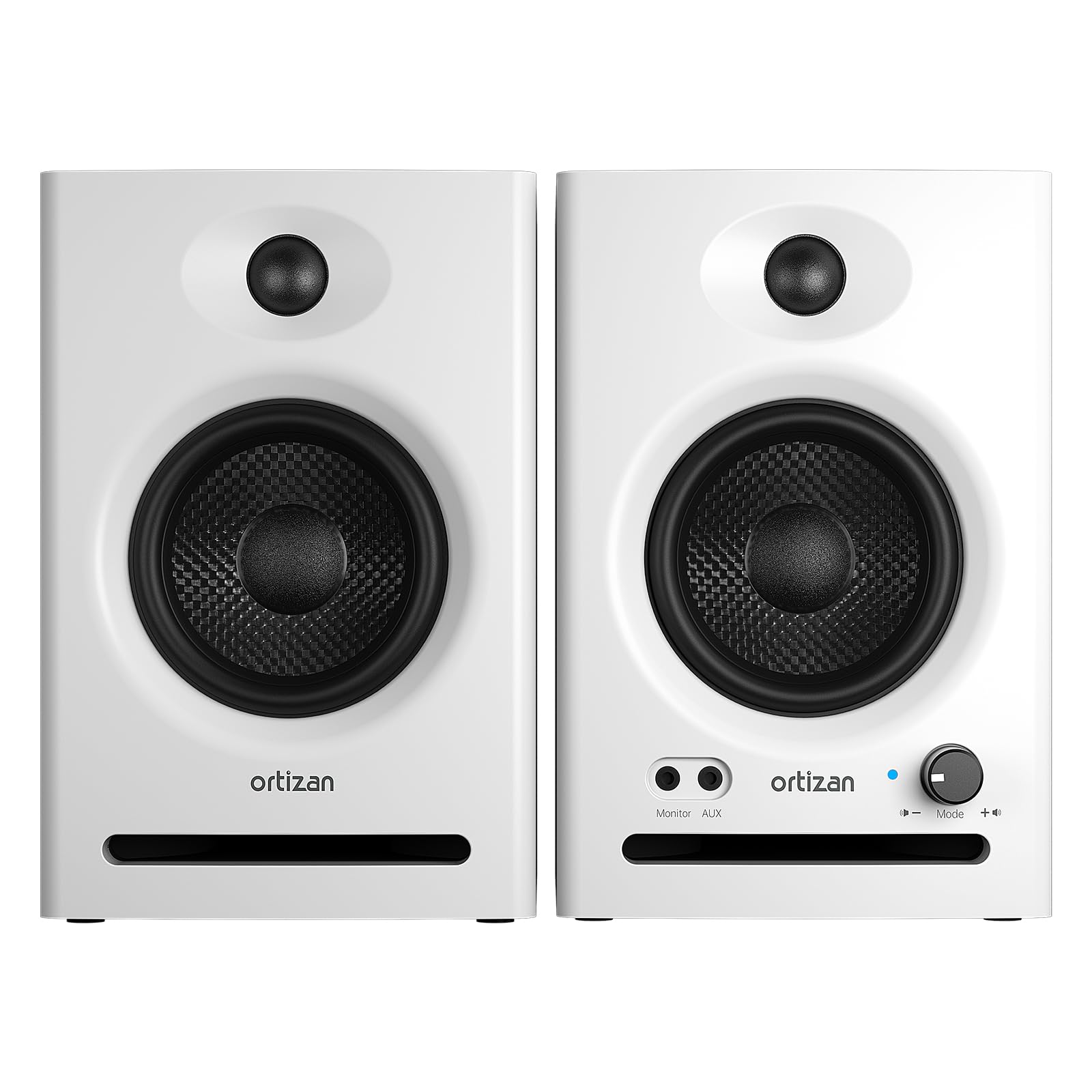
The budget monitor speakers that punch well above their weight with pro-grade inputs and a flat frequency response.
The Ortizan C7 is a bridge between consumer desktop speakers and serious studio monitors. You get a 3.5-inch carbon fiber mid-bass driver paired with a 0.75-inch silk dome tweeter, delivering a balanced, near-flat frequency response that reviewers call “surprisingly accurate” with bass extending down to around 45Hz. The built-in 24-bit DAC (digital-to-analog converter) captures audio directly via USB-C, minimizing signal loss — a feature normally found on much more expensive gear. For connectivity, it has Bluetooth 5.3, USB-C, RCA, 3.5mm AUX, and critically, 6.35mm TRS balanced inputs that let you connect to a mixer or audio interface, making it genuinely suitable for small music production setups.
Many reviewers point out the C7 “exceeded expectations” and “easily competes at all levels with familiar offerings, at a considerably lower price point.” The front-panel headphone output is a nice touch for switching between speakers and cans. Unlike the Mackie CR3.5 above, the Ortizan C7 includes Bluetooth 5.3 with an 18-meter range, so you can stream from your phone without being tied to the desk. On the downside, a few reviewers mentioned that the volume dial can subtly alter the audio character as it turns, and the speakers have a slight “honkyness” in the upper midbass region that loses a touch of detail compared to professional monitors. Still, for a pair that costs a fraction of typical studio monitors, these are a steal.
The build uses a mix of ABS, metal, and wood materials, and the white finish stands out if you are building a clean, modern desk aesthetic. If you are a content creator, podcaster, or bedroom producer who needs accurate sound without spending hundreds, the Ortizan C7 is the most versatile pick under.
Why it stands out
- TRS balanced inputs let you connect professional audio gear (mixers, audio interfaces)
- Built-in 24-bit DAC over USB-C preserves audio detail better than standard aux
- Bluetooth 5.3 with 18-meter range for wireless streaming
Things to consider
- Some upper-midbass honkiness reduces detail compared to true pro monitors
- Volume dial can subtly affect sound character as you turn it
Perfect for: Bedroom producers, podcasters, and desktop creators who want studio-like accuracy and pro inputs on a budget.
Watch out for: Critical listeners may find the midbass slightly colored; consider the Mackie CR3.5 if pure neutrality is your priority.
5. Edifier R19BT 2.0 PC Speaker System

The USB-powered pair that adds Bluetooth 5.3 and a sleek wood cabinet to your desk for under.
The Edifier R19BT is the most affordable way to get Bluetooth 5.3 into a pair of desktop speakers without dealing with a separate power brick. The speakers are USB-powered — just a single USB cable to your computer handles both power and audio (thanks to the built-in sound card), and the Bluetooth means you can stream from your phone, tablet, or laptop without a wired connection. The 2.75-inch full-range drivers are housed in wooden cabinets, which reduce boxy resonance and give the sound a warmer, more natural character than the plastic Amazon Basics or Creative Pebble.
Shoppers say truly plug-and-play setup: “True plug-and-play via USB” with Bluetooth that “pairs smoothly with Amazon Music.” One reviewer noted they run the volume at just 25-50% for sufficient sound, so these can get plenty loud despite being USB-powered. The front oval bass-reflex port is designed to produce deeper bass than you would expect from the size. However, a small number of owners experienced a unit that stopped working after 6 months — though Edifier replaced it for free under warranty without requiring a return, which speaks to their customer support. Another reviewer noted these are “less crisp than Logitech mm50” and that volume becomes inadequate for outdoor use after 4 months, so these are strictly for indoor desk listening.
At 6.99 centimeters (about 2.75 inches) per driver, these are smaller than the 3-inch and 3.5-inch drivers on the AC-powered picks above, meaning they reach their limits sooner at high volumes. If you need loud, room-filling sound, step up to the OHAYO or Ortizan. For a tidy, wireless-ready desk where you want to switch between your PC and phone audio smoothly, the Edifier R19BT is the smartest budget choice.
Bottom line: The best entry-level Bluetooth speakers for a clean, cable-free desk setup — especially if you value a two-year warranty and wood cabinet build.
Know this: USB power limits maximum loudness, so skip these if you want to fill a large room or play music outdoors.
Grab these if: You want Bluetooth without spending a lot, and your desk space is tight enough that a single USB cable is a big plus.
Skip them if: You need wall-filling volume or plan to use them in a large room — the AC-powered options below will serve you better.
6. OHAYO 60W Computer Speakers for Music and Gaming

The AC-powered desktop speakers that deliver 60 watts of clear, adjustable sound with dedicated tone controls.
The OHAYO 60W set is for you if the USB-powered options above just do not get loud enough. With 30 watts per channel running off AC wall power, these can drive a much bigger, fuller sound than the Edifier R19BT or Creative Pebble. You get a 3-inch carbon fiber full-range driver paired with a 0.75-inch carbon fiber silk dome tweeter in each speaker, handling highs and mids with clarity. The rear bass port amplifies lower frequencies, and the MDF (medium-density fiberboard) wooden enclosure keeps cabinet vibrations low for cleaner audio — a noticeable step up in build quality from cheaper plastic sets.
What sets the OHAYO apart is its physical tone control: separate treble and bass knobs on the back of the main speaker let you fine-tune the sound to your room and taste, an uncommon feature at this price point. Buyers report the speakers sound “great via Bluetooth and USB Input,” with one noting the 3.5mm input sounds “more hollow and slightly less volume.” Another reviewer loved the “small footprint, fair price, LEGIT output — energy efficient” and bought three pairs for different rooms. The only downside mentioned by some is that, at maximum volume, the sound begins to lose composure, though this is typical for budget-powered speakers.
This pair offers Bluetooth 5.3 plus RCA, AUX, and USB inputs, making it compatible with everything from your gaming PC to a turntable or TV. If you want a significant volume and bass upgrade over USB-powered speakers without jumping to studio monitor territory, the OHAYO hits the balance.
What we like
- Separate treble and bass knobs let you dial in the exact sound you want
- 60W total output fills a medium-sized room with ease
- MDF wooden enclosure reduces distortion for cleaner audio
What to note
- Loses composure at maximum volume; best kept below 90%
- 3.5mm input is noticeably less clear than USB or Bluetooth
Best suited for: Gamers and music listeners who want AC-powered loudness with the flexibility to tweak the tone — a clear step up from USB-powered options above.
Consider instead: The Mackie CR3.5 or Ortizan C7 if you need greater accuracy for production; this is more about power than precision.
7. Creative Labs Pebble V2 2 Channel Stereo USB Computer Speakers

The grapefruit-sized desktop speaker that proves tiny boxes can still sound surprisingly good for the price.
The Creative Pebble V2 is the go-to pick when you need something small, cheap, and immediately functional. These are USB-C powered — plug the USB cable into your computer and the 3.5mm AUX cable into your sound output, and you are done. The 50.8mm (2-inch) dynamic drivers sit in a compact wedge-shaped housing that directs sound upward toward your ears, an unusual design that works well on a desk. The high-gain switch on the side offers an extra boost of volume and perceived depth, which owners mention “adds some depth” to the audio.
A buyer who owns speakers worth “thousands of dollars” and “spent on Adam Audio desktop speakers” said the Pebble V2 still impressed them: “for and the size of a softball you cannot go wrong.” Another reviewer described them as a “desktop bargain” that delivers “clear, acceptable sound” that easily outperforms built-in monitor speakers. The 4.5-star rating from over 11,700 reviews confirms this is among the most consistently praised budget speakers on the market. However, these are strictly for near-field listening — they lack the power and bass to fill a living room, and the USB power means they cannot compete with AC-powered models like the OHAYO or Mackie for volume.
Despite their name, the V2 uses USB-C for power and a 3.5mm port for audio, with no Bluetooth or wireless option. If you want a nearly invisible speaker pair that just makes your PC sound better without any fuss, the Pebble V2 is the best-value buy in this list. For a step up in bass and clarity that still costs under, this is the one.
Summed up: The most cost-effective upgrade from built-in monitor audio — compact, reliable, and surprisingly capable for its tiny size and minimal setup.
One catch: No Bluetooth, no heavy bass, and very limited maximum volume; not for room-filling or bass-heavy genres.
Perfect for: Anyone who just needs basic desktop audio that sounds good — especially if your desk space is extremely limited.
pass on it if: You want to stream wirelessly or need loud, bass-heavy audio for movies or gaming — step up to an AC-powered model above.
Understanding the Specs
Driver Size & Type
The driver is the part of the speaker that physically moves to produce sound, and its size is measured in inches or millimeters. A larger driver, like a 3.5-inch woofer, pushes more air and creates richer bass than a smaller 2-inch driver. Some speakers use a dedicated tweeter — a second, smaller driver (often 0.75 inches) made of silk or carbon fiber — to handle high frequencies with more clarity. When you see a spec like “3.5-inch woven woofer + 0.75-inch silk dome tweeter,” it means the speaker has separated the work: the woofer handles lows and mids, while the tweeter handles highs. Pairs that lack a tweeter (like the Edifier R19BT) rely on a single full-range driver, which is simpler and cheaper but compromises on detail at the top end.
Power Output (Watts)
Power output, measured in watts, tells you how loud a speaker can get before distorting. USB-powered speakers typically deliver 3-10 watts per channel, which is enough for close-up desk listening at moderate volumes. AC-powered speakers plug into a wall outlet and can deliver 30 watts or more per channel, giving you significantly more headroom for louder, fuller sound. A pair rated at 60W total (like the OHAYO) will be drastically louder than a USB-powered pair rated at 16W total (like the Creative Pebble). If you plan to fill a room, watch movies, or game with rich audio, an AC-powered set is worth the extra investment. If you only need sound for a quiet desk, USB-powered is simpler and cheaper.
FAQ
Can I use computer speakers with a TV or gaming console?
What is the difference between USB-powered and AC-powered speakers?
Do I need a separate subwoofer for good bass?
What does Bluetooth 5.3 bring to a desktop speaker?
How long should affordable computer speakers last?
Can I use studio monitor speakers like the Mackie CR3.5 for gaming?
What does a 2.0 channel system mean versus a 2.1 system?
How important is the speaker cabinet material?
What is the difference between a dynamic driver and a carbon fiber driver?
Why are some computer speakers called “studio monitors”?
Final Thoughts: The Verdict
For most people, the affordable computer speakers winner is the Mackie CR3.5 because it delivers studio-monitor accuracy, a tone knob for shaping the sound, and excellent build quality — all while staying affordable. If you want powerful, room-filling audio and dedicated tone controls, grab the OHAYO 60W. And for the absolute best value in a tiny USB-powered package, the standout is the Creative Pebble V2.
How We Picked
We do not accept paid placement. Every pick is matched to a real buyer and a real use-case; we do not hands-on test units.
Sources & Methodology
Specifications: manufacturer listings and product documentation. Review insights: verified customer reviews, as of July 2026. Pricing: not shown on this page (it changes often); check the current price via the retailer link.
As an Amazon Associate, Gadgets Feed earns from qualifying purchases. This does not affect which products we feature.