
Dismissing a curved monitor as a gimmick is easy until you sit in front of a 1500R or 1000R panel and realize your peripheral vision just got a purpose. The wrap-around effect isn’t about looking cool—it reduces eye-strain from constantly refocusing across a flat plane and pulls you into the content, whether that’s a spreadsheet, a cinematic cutscene, or a competitive shooter. For anyone spending hours staring at a screen, the curvature directly addresses the physical disconnect between our natural binocular field of view and the rigid rectangle most monitors force upon us.
I’m Min — the co-founder and writer behind Gadgets Feed. My method for this guide involved cross-referencing refresh rate latency claims, contrast ratios, color gamut coverage, and real-world user reports from over a hundred verified purchasers to separate marketing hype from actual panel performance.
The true test of any sub- monitor is whether it delivers immersive geometry without sacrificing sharpness or speed. After weeks of research, I’ve built a list of the best affordable curved monitor options that prove curve depth and pixel density can coexist without breaking the bank.
How To Choose The Best Affordable Curved Monitor
Buying a curved monitor on a budget means prioritizing the specs that actually matter for immersion and clarity while ignoring the marketing fluff about “gamer aesthetics.” The real decisions come down to three factors: curvature radius, panel technology, and the resolution-to-refresh-rate balance.
Curvature Radius: 1000R, 1500R, or 1800R
The number measures the radius of the imaginary circle the curve forms—lower numbers mean a tighter bend. A 1000R curve mimics the human eye’s natural field of view and creates a true wraparound effect, but requires a closer seating distance (arm’s length) to work properly. A 1500R curve is more relaxed and suits most desk depths (60-80 cm) without distorting straight lines in productivity apps. The 1800R curve is the most subtle, often feeling almost flat unless you’re sitting very close. For an affordable monitor, 1500R offers the best compromise between immersion and versatility.
Resolution and Pixel Density
At 27 inches, 1080p yields roughly 82 PPI—serviceable but visibly soft for text. A 27-inch 1440p (WQHD) panel pushes 109 PPI, providing the sharpness upgrade most buyers actually notice. On a 32-inch screen, 1440p lands at about 92 PPI, which equals the pixel density of a 24-inch 1080p monitor. That’s not a downgrade, but it’s not a visual leap either. If you want a true clarity upgrade at 32 inches, 4K is the target, but that typically pushes the price beyond the affordable tier.
Refresh Rate and Adaptive Sync
Refresh rate matters most in fast-paced genres like first-person shooters and racing sims. A 165Hz panel delivers a noticeable smoothness improvement over 60Hz, while 240Hz offers diminishing returns for most people but genuine competitive edge for esports. More important than the raw number is whether the monitor supports Adaptive-Sync (FreeSync or G-Sync Compatible) to eliminate screen tearing. Budget monitors often lock higher refresh rates to DisplayPort only, so verify the port specs match your graphics card.
Panel Type and Contrast
Virtually every affordable curved monitor uses VA (Vertical Alignment) panel technology because VA produces native contrast ratios of 2500:1 to 5000:1, delivering deep blacks and high dynamic range that IPS panels in the same price bracket cannot match. The trade-off is slower pixel response in dark transitions (black smearing or ghosting), though most modern VA panels at 165Hz+ mitigate this with overdrive settings. Avoid TN panels for curved monitors—they offer no contrast advantage and poor viewing angles.
Quick Comparison
On smaller screens, swipe sideways to see the full table.
| Model | Category | Best For | Key Spec | Amazon |
|---|---|---|---|---|
| ASUS TUF Gaming VG32WQ3B | QHD | Competitive Gaming | 2560×1440, 180Hz, 0.5ms | Amazon |
| LG 32GS60QC-B Ultragear | QHD | Immersive Gaming | 1000R, 2560×1440, 180Hz | Amazon |
| Samsung Odyssey G55C | QHD | Balanced Gaming/Work | 1000R, 2560×1440, 165Hz | Amazon |
| Gawfolk 32 Inch 240Hz | 1080p | High-FPS Esports | 1920×1080, 240Hz, 1800R | Amazon |
| Samsung S39GD 32-inch | 1080p | Productivity & Media | 1920×1080, 100Hz, 1800R | Amazon |
| ZZA 34 Inch Ultrawide | Ultrawide | Ultrawide Gaming | 3440×1440, 240Hz, 1500R | Amazon |
| Sceptre 34-Inch Ultrawide | Ultrawide | Multitasking Workflows | 3440×1440, 180Hz, 1500R | Amazon |
| Acer Nitro XZ270 | 1080p | Ergonomic Gaming | 1920×1080, 280Hz, 1500R | Amazon |
| SANSUI ES-G27C1Q | QHD | Budget QHD | 2560×1440, 180Hz, 1500R | Amazon |
In‑Depth Reviews
1. ASUS TUF Gaming VG32WQ3B

The ASUS TUF Gaming VG32WQ3B distinguishes itself with a 31.5-inch QHD VA panel that hits a 0.5ms GTG response time—the fastest in this price bracket. At 180Hz with FreeSync, it eliminates motion blur during fast strafes in competitive shooters, and the 1500R curve strikes a natural balance that doesn’t distort spreadsheet grids during office hours. The 120% sRGB and 90% DCI-P3 coverage produce vibrant colors out of the box without requiring manual calibration for most users.
Shadow Boost technology is genuinely useful here, raising visibility in dark game areas without washing out bright highlights—a feature many budget monitors advertise but few execute well. The built-in DisplayWidget software allows profile switching without fumbling through the OSD joystick. Connectivity includes two HDMI 2.0 ports and one DisplayPort 1.4, though the 180Hz maximum requires DisplayPort.
The stand is the primary compromise: it offers tilt adjustment but lacks height swivel, and the base footprint is relatively wide. VESA 100×100 support solves this for those using monitor arms. Customer feedback highlights the exceptional clarity and speed for the price point, with some concern about long-term durability. For gamers demanding sub-1ms response with QHD sharpness, this is the most complete package in the affordable segment.
Why it’s great
- 0.5ms GTG response eliminates smearing in fast-paced titles
- QHD resolution at 31.5 inches delivers sharp text and rich detail
- Shadow Boost lifts dark areas without blowing out highlights
Good to know
- Stand lacks height adjustment and is fairly wide
- HDR performance is limited by 300-nit brightness ceiling
2. LG 32GS60QC-B Ultragear

The LG 32GS60QC-B uses an aggressive 1000R curvature that genuinely wraps the 32-inch QHD panel around your peripheral vision—ideal for sim racing and single-player titles where environmental immersion matters. The 3000:1 VA contrast ratio delivers deep blacks that IPS panels at this price can’t match, and HDR10 support adds enough dynamic range to make explosions and neon-lit scenes pop. The 180Hz refresh rate with 1ms GTG response keeps motion clean during competitive play.
Color accuracy is respectable with 99% sRGB coverage, though the panel ships with slightly oversaturated reds that may require calibration for color-critical work. The gamer-centric OSD includes Dynamic Action Sync for input lag reduction and a Black Stabilizer for shadow detail—both are functional rather than marketing fluff. The borderless three-side design works well for multi-monitor setups, though the stand only offers tilt adjustment and no height or swivel.
Customer feedback consistently praises the price-to-performance ratio, noting the VA contrast eliminates the need for local dimming in dark rooms. Some users report minor ghosting in dark scene transitions at default overdrive settings, which can be mitigated by lowering the response time setting. Power users note the joystick control for the OSD is sometimes unresponsive when powering off. For anyone who prioritizes curve depth and contrast quality, this is the immersive champion of the budget tier.
Why it’s great
- 1000R curve offers the most immersive wraparound effect available
- 3000:1 native contrast produces inky blacks and high perceived HDR
- 180Hz refresh with FreeSync ensures tear-free, smooth motion
Good to know
- Stand is tilt-only with no height or swivel adjustment
- Minor VA ghosting in dark transitions at default settings
3. Samsung Odyssey G55C 32-inch

The Samsung Odyssey G55C combines a 32-inch QHD VA panel with a 1000R curve and 165Hz refresh rate, creating a package that feels more premium than its price suggests. The 2500:1 contrast ratio isn’t as high as LG’s offering, but Samsung’s color tuning produces excellent out-of-box accuracy with HDR10 content, making games and movies look vibrant without oversaturation. The anti-glare coating effectively reduces reflections without introducing the sparkle effect that plagues cheaper matte finishes.
AMD FreeSync support is standard, and the monitor includes Eye Saver Mode and Flicker-Free technology for reducing eye strain during long sessions—certified by TÜV for blue light reduction. The connectivity is minimal with two HDMI and one DisplayPort, and the 165Hz maximum requires DisplayPort. The stand is the weakest component: a plastic base with tilt-only adjustment that feels less sturdy than the metal stands on competitors.
User reviews highlight the monitor’s smooth performance and excellent picture quality relative to cost, with particular praise for how it pairs with console gaming at 120Hz. The lack of built-in speakers is a minor inconvenience, but the VESA mount compatibility and lightweight construction make it easy to mount on an arm. The OSD is intuitive with a five-way joystick for navigation. For those who want Samsung’s panel calibration expertise without paying premium prices, this is a strong contender.
Why it’s great
- Samsung’s color tuning delivers accurate HDR10 reproduction out of box
- Anti-glare coating minimizes reflections without degrading sharpness
- 1000R curve provides immersive depth for gaming and movies
Good to know
- Plastic stand feels cheap and offers only tilt adjustment
- Contrast ratio (2500:1) is lower than some VA competitors
4. Gawfolk 32 Inch 240Hz

The Gawfolk 32-inch 240Hz monitor prioritizes raw speed over resolution, using a 1920×1080 VA panel with a 1800R curvature and 2ms GTG response. At 240Hz, the motion clarity in esports titles like Valorant and Overwatch 2 is exceptional—tearing and stutter are eliminated by FreeSync support, and the high frame rate makes tracking fast-moving targets feel fluid. The 4000:1 contrast ratio is a standout spec for the price, delivering deeper blacks than many 1080p curved monitors in this tier.
The 8-bit panel covers 100% sRGB, which is adequate for gaming but lacks the wide gamut needed for creative work. The stand offers tilt adjustment only, and the 250-nit brightness is serviceable indoors but struggles in brightly lit rooms. Connectivity includes DisplayPort (supports 240Hz) and HDMI (limited to 120Hz), so a DisplayPort cable is essential for hitting the full refresh rate. The monitor is VESA 100×100 compatible for arm mounting.
Customer feedback is mixed regarding build quality, with some users reporting backlight uniformity issues and unreliable customer support. However, for pure frame-rate chasers on a tight budget who prioritize 240Hz over pixel density, this monitor delivers the fluidity needed for competitive play without breaking the bank. The 1800R curve is subtle enough that it won’t distort 2D UI elements or productivity apps, though text clarity at 1080p on 32 inches is noticeably softer than 1440p alternatives.
Why it’s great
- 240Hz refresh rate provides elite-level motion smoothness in esports
- 4000:1 VA contrast ratio delivers rich blacks and good depth
- FreeSync support eliminates tearing at high frame rates
Good to know
- 1080p resolution on 32 inches results in lower pixel density (69 PPI)
- Customer support responsiveness is reportedly inconsistent
5. Samsung S39GD 32-inch

The Samsung S39GD targets productivity users and casual gamers who want an immersive curved display without chasing triple-digit refresh rates. The 32-inch 1080p VA panel features a 1800R curve and a 100Hz refresh rate, which is enough to make desktop navigation feel smooth and casual gaming enjoyable. The 3000:1 contrast ratio ensures deep blacks for movie watching and document reading, and the 95% sRGB coverage provides accurate color reproduction for office tasks.
Built-in speakers are a genuine differentiator here—they free up desk space and eliminate the need for external audio for conference calls and video playback. The audio quality is adequate for speech but lacks bass for music. Eye Saver Mode and Flicker-Free certification reduce strain during extended work sessions. Connectivity includes HDMI and D-Sub (VGA) ports, which is fine for productivity but limits gaming to 100Hz over HDMI. The VESA 100×100 mount support allows for arm mounting.
Customer reviews consistently praise the build quality and clarity for the price, with several users noting it works well for 3D modeling and detailed work due to the curve providing better depth perception. The stand offers tilt adjustment only, and the 250-nit brightness is sufficient for indoor use but not bright enough for sunlit rooms. For non-competitive users who value curve immersion, brand reliability, and built-in speakers above raw gaming specs, this Samsung delivers a mature, well-rounded package.
Why it’s great
- Built-in speakers save desk space and eliminate external audio needs
- 3000:1 VA contrast produces excellent black levels for media consumption
- TÜV-certified eye comfort features reduce fatigue during long sessions
Good to know
- 100Hz refresh rate and 1080p limit competitive gaming potential
- 250-nit brightness is mediocre for bright ambient lighting
6. ZZA 34 Inch Ultrawide
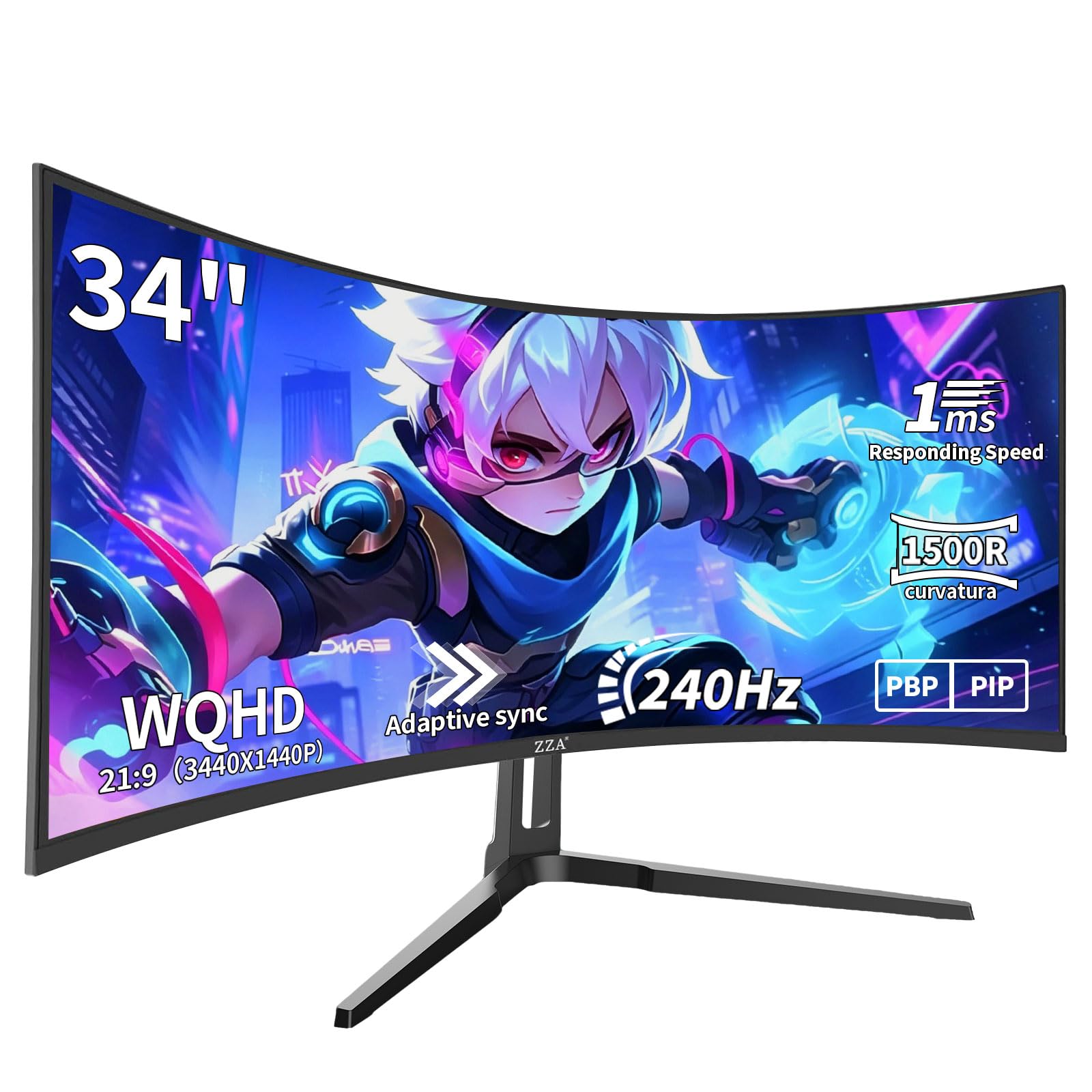
The ZZA 34-inch Ultrawide punches well above its price tier by offering a native 3440×1440 WQHD resolution at 240Hz on a 1500R VA panel. This combination is rare in the budget segment, where ultrawide monitors typically cap at 180Hz or use 1080p panels. The 4000:1 contrast ratio provides deep blacks and good HDR perception, and the 99% sRGB coverage ensures colors look accurate out of the box for both gaming and content consumption.
The 21:9 aspect ratio delivers 30% more horizontal screen space compared to a 16:9 monitor, making this ideal for immersive gaming in titles like Cyberpunk 2077 and for productivity workflows with multiple windows side by side. The 1ms response time with Adaptive Sync eliminates tearing during fast action. The design features a floating V-shaped base with tilt adjustment and VESA 100×100 mount compatibility. The 250-nit brightness is on the low side but adequate for typical indoor lighting.
Customer feedback highlights the exceptional value of the 240Hz ultrawide spec combination, though some users reported backlight failures within the first month and found customer support slow to respond. The display comes with dual HDMI 1.4 and dual DisplayPort 1.2, with the full 240Hz rate requiring DisplayPort. For buyers who want ultrawide immersion and high refresh rates without jumping to premium pricing, the ZZA offers the most aggressive spec sheet in this class.
Why it’s great
- 3440×1440 ultrawide with 240Hz is an unbeatable spec at this price
- 4000:1 VA contrast ratio delivers excellent depth and black levels
- 21:9 aspect ratio provides immersive viewing and multitasking space
Good to know
- Some units experience backlight issues within the first month
- Stand lacks height and swivel adjustment, limited to tilt only
7. Sceptre 34-Inch Curved Ultrawide

The Sceptre 34-inch Curved Ultrawide (C345B-QUT168) delivers a 3440×1440 WQHD resolution with a 1500R curve and up to 180Hz refresh rate, making it one of the most affordable paths into ultrawide high-refresh gaming. The VA panel offers a 99% sRGB color gamut and a massive 1,000,000:1 dynamic contrast ratio, which enhances HDR content significantly despite lacking formal HDR certification. The 21:9 aspect ratio replaces a dual-monitor setup for many users, providing seamless horizontal workspace for code, timelines, and spreadsheets.
The monitor includes built-in speakers, which is unusual for an ultrawide at this price, though audio quality is basic and best suited for system sounds. The back cover features an LED light for aesthetic flair. Connectivity includes two HDMI ports and two DisplayPorts, with the 180Hz maximum requiring DisplayPort. The stand offers tilt adjustment only, and the single bottom joystick controls the entire OSD, which some users find awkward to navigate.
Customer reviews are largely positive, with many highlighting the sharpness and immersion for the price. However, some users report backlight bleed, horizontal line artifacts, and dead pixels after extended use, suggesting quality control varies. The 280-nit brightness is adequate for most indoor environments. For buyers who want ultrawide productivity space with gaming capability and are comfortable with potential QC variability, this Sceptre represents tremendous value.
Why it’s great
- 3440×1440 ultrawide at 180Hz provides excellent productivity and gaming
- Built-in speakers and LED backlight add convenience and aesthetics
- Wide color gamut and dynamic contrast enhance visual punch
Good to know
- Quality control can be inconsistent with backlight bleed or dead pixels
- Single joystick OSD control is less intuitive than button arrays
8. Acer Nitro XZ270

The Acer Nitro XZ270 stands out in the budget curved category by offering a 27-inch 1080p VA panel with a 280Hz refresh rate and a fully ergonomic stand that includes height adjustment, swivel, and tilt—a rarity at this price. The 1500R curve wraps the 27-inch screen comfortably for both gaming and productivity, and the 1ms VRB (Visual Response Boost) ensures minimal motion blur during fast-paced action. The FreeSync Premium certification guarantees tear-free gaming with low frame rate compensation.
The panel covers 99% sRGB and includes HDR10 support, though the peak brightness of 250 nits limits HDR impact. The zero-frame design minimizes bezels for a clean multi-monitor setup. Connectivity includes one DisplayPort 1.4 and two HDMI 2.0 ports, with the full 280Hz available over DisplayPort. The built-in speakers are functional for basic audio but lack any bass response. The stand offers 3.93 inches of height adjustment and 15 degrees of swivel, making it easy to find a comfortable viewing position.
Customer reviews praise the monitor’s exceptional image quality and smooth performance, with many noting it’s the best ergonomic value in the curved 1080p category. The lack of USB ports and the 1080p resolution limit on a 27-inch screen are the main compromises. For gamers who prioritize ergonomic adjustability and high refresh rates over pixel density, the Nitro XZ270 delivers a polished experience that many more expensive monitors fail to match in build flexibility.
Why it’s great
- Full ergonomic stand with height, swivel, and tilt adjustment
- 280Hz refresh rate with FreeSync Premium ensures buttery-smooth motion
- Zero-frame design reduces bezels for immersive multi-monitor setups
Good to know
- 1080p resolution on 27-inch results in 81 PPI—noticeably softer than QHD
- 250-nit peak brightness limits HDR10 effectiveness
9. SANSUI ES-G27C1Q
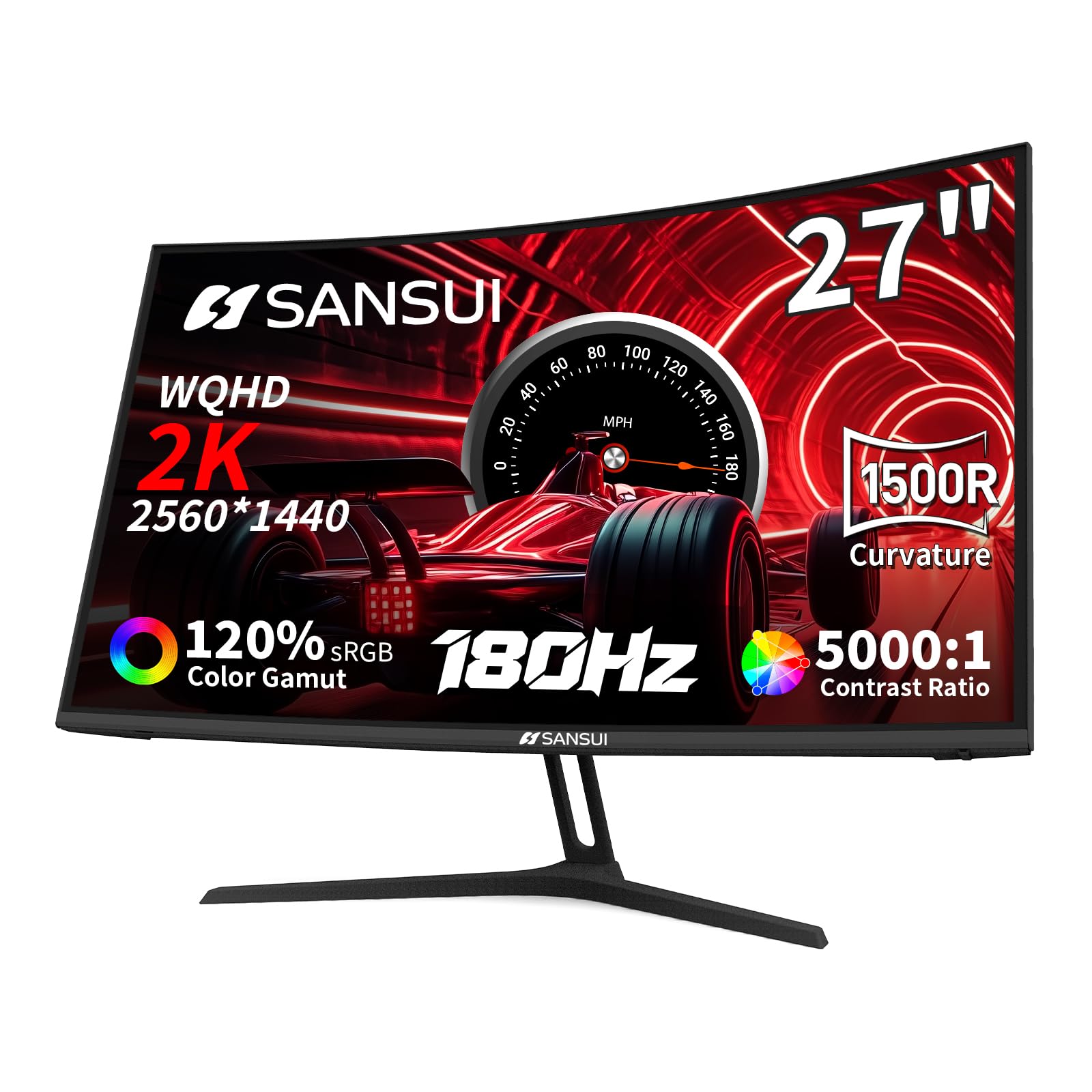
The SANSUI ES-G27C1Q delivers a sharp 27-inch QHD (2560×1440) resolution with a 1500R curve and 180Hz refresh rate at one of the lowest price points for a 1440p curved monitor. The VA panel offers a 5000:1 contrast ratio that produces deep blacks and rich shadow detail, significantly outperforming budget IPS panels in dynamic range. The 120% sRGB and 90% DCI-P3 color gamut coverage provide vibrant, punchy colors that make games and media look lively without requiring calibration.
The monitor includes features like a crosshair overlay, timer, and shadow booster for gaming convenience. Connectivity options are robust with two HDMI 2.0 ports (limited to 144Hz) and two DisplayPort 1.2 ports (full 180Hz). The stand offers tilt adjustment only, but VESA 100×100 mounting compatibility allows for arm upgrades. The build is lightweight, and assembly takes roughly 15 minutes. The included DisplayPort cable supports the full 180Hz bandwidth.
Customer feedback is overwhelmingly positive regarding image quality and value, with many users calling it the best bang-for-buck 1440p monitor they’ve purchased. Some users noted the power cord is flimsy and the large wall plug can become loose, causing intermittent power loss. The 300-nit brightness is adequate for most environments but not exceptional. For buyers seeking entry-level QHD sharpness and high refresh without sacrificing color quality, this SANSUI is a compelling budget champion.
Why it’s great
- 5000:1 VA contrast ratio provides exceptional black depth for the price
- QHD resolution at 27 inches delivers crisp text and detailed gaming
- 180Hz with FreeSync ensures smooth tear-free gameplay
Good to know
- Power cord and wall plug feel cheap and may cause connection issues
- Stand is tilt-only with no height or swivel adjustment
FAQ
Does a curved monitor cause distortion for productivity work like spreadsheets or coding?
Can I use a curved monitor for competitive esports gaming?
Final Thoughts: The Verdict
For most users, the best affordable curved monitor winner is the ASUS TUF Gaming VG32WQ3B because it delivers the sharpest QHD resolution paired with a 0.5ms response time and 180Hz refresh rate, striking the best balance between speed and clarity without reaching into premium pricing. If you want maximum immersion with an aggressive 1000R curve, grab the LG 32GS60QC-B Ultragear. And for budget-conscious buyers who want QHD sharpness at the lowest possible cost, nothing beats the SANSUI ES-G27C1Q.