
Our readers keep the lights on and my morning glass full of iced black tea. As an Amazon Associate, I earn from qualifying purchases.
Specs are compiled from manufacturer listings and verified buyer reviews and can change over time — please confirm the key details on the product page before buying.
Getting into flight simulation shouldn’t mean emptying your wallet on a complicated rig, but the cheap sticks on the market are a minefield of dead zones and broken drivers. The real challenge is finding an affordable flight stick that tracks accurately, feels solid, and actually works with the games you play — without you having to become a tech support agent. This guide separates the genuine budget gems from the frustrating paperweights by digging into the specs and the consistent patterns in thousands of owner experiences.
I’m Min — the founder and writer behind Gadgets Feed. This guide is built by comparing the manufacturers’ published specifications and the patterns across verified customer reviews, so you get each pick’s real strengths and trade-offs instead of marketing spin.
You’ll find the honest verdicts on seven of the most talked-about entry-level sticks, from the crowd-favorite Thrustmaster to the console-focused HORI, all in one clear breakdown of the best value in the affordable flight stick category today.
Our Picks at a Glance

How To Choose The Best Affordable Flight Stick
Before you click buy, you need to match the stick to your platform and the games you actually fly. A stick built for PC won’t light up on an Xbox, and a console-focused unit might not play nice with your favorite flight sim. Check the compatibility list twice — it’s the number one reason sticks get returned.
PC-Only vs Console Compatibility
Many budget sticks are strictly PC and Windows-only, refusing to work on Macs or game consoles. Some premium options are officially licensed for Xbox Series X|S and Xbox One, which is essential if you play on a console. The data shows that PlayStation and Mac support is rarely a priority in this price range, so verify your hardware before committing.
Button Count and Throttle Feel
Look for at least 12 programmable buttons and a dedicated throttle axis for a playable experience. The throttle is the heart of the stick — a sticky or loose throttle with a dead spot will ruin your ability to make fine speed adjustments during landing. A good throttle should have consistent resistance across its full travel.
Stick Precision and Resistance
Precision hinges on the sensor and the tension system. High-end models use contactless magnetic sensors (they detect movement without physical contact) to eliminate wear and dead zones, while budget sticks use mechanical potentiometers that can wear out. An adjustable resistance dial lets you tune the stick to feel tight or loose depending on what you’re flying.
Quick Comparison
| Model | Best For | Programmable Buttons | Control Axes | Platform | Amazon |
|---|---|---|---|---|---|
| Thrustmaster T-Flight Hotas X★ Best Overall | Budget HOTAS beginners | 12 | 5 | PC / PS3 | Amazon |
| PXN 2113PROBest Value | PC-only casual flyers | 12 | 4 | Windows only | Amazon |
| Thrustmaster TCA Sidestick Airbus | Airbus fans on PC | 17 | — | Windows | Amazon |
| Turtle Beach VelocityOne | Xbox and PC versatility | 27 | 8 | Xbox / PC | Amazon |
| PXN-2119Pro | Dual-throttle bargains | 16 | 4 | Windows only | Amazon |
| HORI HOTAS Flight Stick | Xbox players on a budget | 16 | — | Xbox / PC | Amazon |
| Honeycomb Foxtrot | Serious sim precision | 18 | — | PC / Mac | Amazon |
In‑Depth Reviews
1. Thrustmaster T-Flight Hotas X
Our pick — over 4★ from 8,000+ verified ratings; the strongest balance of quality and price.
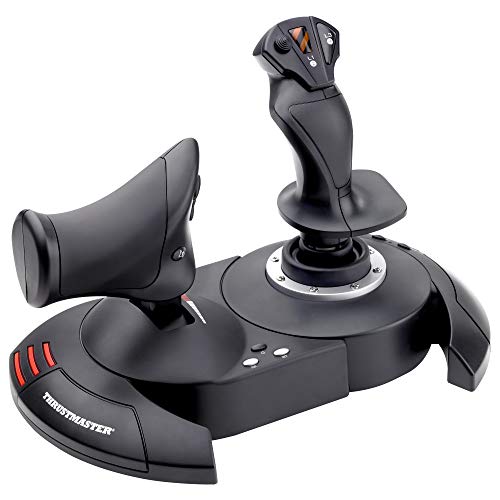
The full HOTAS setup that turns a desk into a cockpit while staying affordable.
This is the stick that keeps showing up in the “where do I start” conversations, and there’s a reason: it packages a real throttle and stick together for roughly the cost of a mid-range controller. Owners overwhelmingly praise its build quality, with over 1,300 highlighting it as the standout trait. It’s the rare budget rig that feels like a keeper, not a stopgap.
You get 12 fully programmable action buttons spread across 5 axes (the movable control dimensions), plus a resistance dial on the joystick that lets you tune the stick tension to your liking. The throttle is a real, full-size unit that detaches from the stick so you can set them up in a cockpit-style configuration, or keep them locked together for a tidy desktop. The wide hand rest is designed for hours of play, and an onboard memory saves your custom button mappings even when the stick is unplugged.
Buyers report the throttle has a sticky neutral spot that can hinder forward thrust — a small hiccup in an otherwise smooth travel. It feels less precise than high-end systems, but for entry-level simming it’s the value king, holding the top spot with 4.4 stars from over 8,000 owners. It’s also notably more compact than the PXN 2113PRO, with a footprint of 10.39 x 9.53 x 10.43 inches versus the PXN’s more square 7.28 x 7.28 x 8.86 inches.
Why It Wins
- True HOTAS setup with detachable, full-size throttle for cockpit-style play
- Adjustable resistance dial lets you fine-tune stick tension
- 12 programmable buttons across 5 axes with onboard memory
Know Before You Fly
- Throttle has a sticky neutral spot affecting forward thrust
- Feels less precise than high-end systems
- Cable between stick and throttle is on the short side
Pick this up if: you want the genuine HOTAS feel with a separate throttle for the lowest possible entry price.
Look elsewhere if: you’re after a stick that can grow with you into high-end precision simming.
2. PXN 2113PRO
A featherweight stick with vibration motors for pilots who want game feel on a shoestring.
If you’re on a tight budget and hungry for feedback, the PXN 2113PRO packs vibration motors into a compact frame that weighs just 0.5 kg. Its comfortable single-hand design with all controls within reach is the most-praised feature. It’s also significantly smaller than the Thrustmaster above, so it suits a cramped desk setup.
You get 12 programmable buttons and a 4-axis control scheme with an 8-way hat switch for looking around the cockpit. The vibration intensity is adjustable through the driver — below 20% you’ll barely feel it, so owners recommend setting it to 50% or higher. Four suction cups on the bottom grip a smooth desk firmly, though they’re non-removable and awkward on fabric surfaces.
The catch here is compatibility: it’s strictly PC and Windows 7/8/10/11 only. It won’t work on Mac, Xbox, or PlayStation, and setup is the most-discussed issue. Owners mention that “Doesn’t work with Xbox, but it works fine otherwise” — keep it on a Windows PC and it’s a solid budget pick. It’s best for casual flyers in War Thunder or World of Warplanes who don’t need console flexibility.
What Shines
- Built-in vibration motors for rich engine and turbulence feedback
- Comfortable, ergonomic single-hand design
- Very compact frame saves desk space
Fair Warning
- Windows PC only — no Mac, Xbox, or PlayStation support
- Suction cups are non-removable and poor on fabric surfaces
- Driver setup is a common sticking point
Reach for this if: you fly exclusively on a Windows PC and want vibration feedback at the lowest price.
skip it if: you need a stick that works across consoles or a Mac.
3. Thrustmaster TCA Sidestick Airbus Edition

The officially licensed Airbus A320 sidestick for pilots who crave cockpit authenticity.
This is the stick for the Airbus enthusiast — it’s an officially licensed, ergonomic 1:1 scale replica of the iconic A320 sidestick. Owners most praise its build quality, evident in details like braille-style button identification. It’s also lighter than it looks at just 7.68 ounces, making it easy to move between setups.
The defining tech under the hood is a drift-free magnetic sensor system (contactless detection that eliminates physical wear), giving it effectively unlimited lifespan with no potentiometer drift. You get 17 action buttons, 12 of which are remappable, plus 4 swappable joystick head modules so you can change the layout. A built-in throttle axis with a thrust reverser mechanism, and rudder control via a rotating handle with a lockable twist, means you don’t need extra peripherals.
It’s a big upgrade over older mechanical sticks — customers note no rudder wobble and no dead zone, with buttery smooth landings. However, the twist rudder and throttle control are the most common complaints, with some owners reporting major rudder issues and a weak thrust-reverser detent that requires holding a button. It’s a PC and Windows-only device, and the most-discussed aspect is functionality, which gets mixed feedback. At 4.3 stars from over 800 owners, it’s a great fit for the Airbus purist, but a questionable buy for those who want a flexible all-rounder.
Precision pick: The magnetic sensor and swappable button modules make this the most technologically advanced stick in the budget tier, ideal for long-haul A320 simming.
Watch out: The twist rudder has a history of issues, and the throttle’s thrust-reverser detent is weak — treat both gently.
4. Turtle Beach VelocityOne Flightstick

The console-ready stick with an onboard OLED screen and a button for nearly everything.
For Xbox players, the VelocityOne is the one to beat. It’s officially compatible with Xbox Series X|S, Xbox One, and PC, and it packs a staggering 27 programmable buttons and 8 axes (control dimensions) — far more than any other stick here. A real pilot praised its build quality as excellent compared to the Thrustmaster, making it the most-praised aspect. It also has an integrated OLED flight management display for on-stick configuration.
The standout features are the customizable multi-function throttle and flap levers, a POV hat, and a rapid-fire trigger. It’s ambidextrous with an adjustable palm rest, so it works for fighter jets and airliners alike. The included 10ft USB-A to USB-C cable gives you plenty of reach to your console. The largest footprint of the bunch at 1.8 pounds, it’s also the heaviest, so it stays planted during aggressive maneuvers.
The trade-off is the spring stiffness — reviewers point out it requires significant force to move initially, and the base can lift if you don’t clamp it down. The responsiveness is the mixed bag here, with some finding it smooth and others noting the heavy spring. Its stiff spring is the most-cited downside, unsuitable for those preferring a light touch. At 4.3 stars from just under 2,000 owners, this is the most feature-dense stick in the list, though the firmware configuration relies on a smartphone Bluetooth app rather than a PC program.
Feature Monster
- 27 programmable buttons and 8 axes — the most of any pick here
- Integrated OLED display for on-stick configuration
- Officially compatible with Xbox Series X|S, Xbox One, and PC
Before You Commit
- Stiff spring demands real force; base needs clamping to stay put
- Firmware set up via smartphone Bluetooth app only
- Slider controls have a few mm of dead travel
Get this if: you fly on Xbox and want the most buttons and a premium-feeling, console-native setup.
Think twice if: you have a light touch and dislike a stiff stick that needs breaking in.
5. PXN-2119Pro
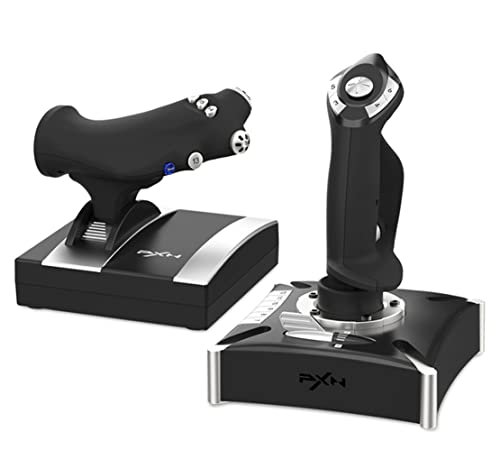
The dual-vibration, dual-throttle rig that promises immersion but delivers mixed skies.
This one’s a gamble. The PXN-2119Pro looks great on paper — built-in dual vibration motors for authentic airflow and turbulence, a separate throttle unit with a damping feel, and a hefty base with strong suction cups. It’s a heavy unit at 1.92 kg, which means it stays planted. You get 16 fully programmable function keys, an 8-way POV hat switch, and a rapid-fire trigger, plus a heavy-duty base for long sessions.
But the compatibility is the most discussed negative by far, and it’s a doozy. It’s PC and Windows only (XP/7/8/10), and the driver situation is a serious red flag — some shoppers say the driver software is flagged as malware by Windows 10 and Norton. This isn’t a “one owner had a problem” situation; the value-for-money aspect is also rated negatively, with several owners calling it a paperweight after the PC wouldn’t recognize inputs.
There is a positive camp — some owners found it sturdy with a smooth throttle and twist yaw, and were pleasantly surprised it worked well. The mixed quality feedback and negative compatibility make this a risky buy at its premium price point. It’s best for the tinkerer who’s willing to hunt down drivers and doesn’t mind a project, but it’s a harder sell when the PXN 2113PRO solves a similar problem with fewer headaches.
Immersion first: You feel every bump and engine strain through the dual vibration motors (two built-in rumble packs), and the separate damping throttle (a throttle lever with resistance that stays where you set it) makes landings and climbs feel more real—when the game supports it.
Proceed with caution: Driver malware flags and poor game compatibility make this the riskiest pick — only for patient Windows users.
6. HORI HOTAS Flight Stick

The officially licensed Xbox stick that’s plug-and-play for console pilots on a budget.
If you’re an Xbox Series X|S or Xbox One player wanting a HOTAS without the PC headaches, the HORI is the direct route. It’s officially licensed by Microsoft, which means native compatibility and no driver drama — just plug in the USB and play. It features 16 buttons and adjustable sensitivity in the settings, plus an integrated headset jack for in-game comms. The separate joystick and throttle give you full HOTAS controls.
The simplicity is the strength here. The light, simple design means there’s no software to install — buyers report it’s truly connect-and-use, which is a relief after the driver nightmares of the PXN units. However, the feature set is thinner than the price suggests. The throttle’s limited functionality is the top complaint, with only one trigger working and several buttons being non-functional plastic.
The critical downside for sim fans: it doesn’t work with Ace Combat 7, a major flight title. And some owners warn it’s essentially a basic Xbox controller dressed up as a HOTAS, with less functionality than a standard gamepad in some ways. At 3.3 stars with a low review count, it’s a polarizing pick — great for casual console flyers who want simplicity, but a frustrating buy for anyone expecting deep sim controls.
Console simple: Because Microsoft officially licenses this stick, it plugs straight into your Xbox without extra adapters or setup, and the built-in headset jack (a 3.5mm port on the stick) lets you chat without reaching for your console.
Manage expectations: Limited throttle functionality and no Ace Combat 7 support mean it’s not for serious simmers.
7. Honeycomb Foxtrot Aviation Stick
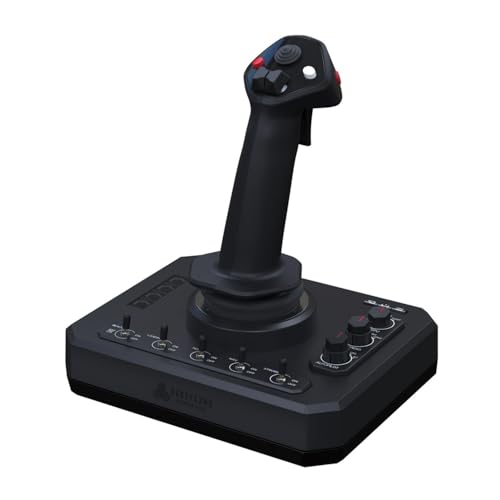
The sim-enthusiast’s stick with linear resistance and no center detent for silky-smooth aerobatics.
For the serious simmer who wants a stick that behaves like a real aircraft, the Honeycomb Foxtrot is a different animal. It’s designed for stick-controlled planes like Airbus jets and aerobatics aircraft, featuring a linear resistance system with no center detent — meaning there’s no notch at the center, so small adjustments around neutral are smooth and precise. Owners consistently praise its flight precision, making it the most-praised aspect.
The switch layout is genuinely aviation-grade: five two-way switches, four programmable action buttons, a four-way switch with rotary encoder, and a five-way switch with rotary encoder. That’s 18 buttons total, including the trigger and left/right twist. It’s PC and Mac compatible, working great on both platforms according to owners, and it’s heavier than it looks at 1600 g, giving it a solid, planted feel at 8 x 5 x 10 inches.
The trade-off is build quality, which gets mixed reviews. One owner reported the trigger button broke after a month despite good sensitivity — clearly a durability concern. The precision also has its quirks, with one report of excessive bounce and oscillation. It’s the premium pick here, best for the sim enthusiast who prioritizes smooth, accurate movement over console compatibility, but it demands careful handling given the reported fragility.
Sim precision: The no-center-detent, linear resistance system and dense switch panel make it feel like a real aircraft stick.
Handle with care: Build quality is mixed, with a trigger breaking after a month — durability is the question mark.
Understanding the Specs
Programmable Buttons & Axes
The button count tells you how many functions you can map, but the axes matter more for control. An axis is a movable dimension — like the stick’s pitch and roll, or a separate throttle slider. More axes mean more independent controls without reaching for the keyboard. Look for at least 12 buttons and 4 axes for a playable experience.
Sensor Type & Dead Zones
Budget sticks use mechanical potentiometers (physical wipers that wear down over time, creating drift and dead zones). Premium sticks use contactless magnetic sensors, which detect position without physical contact, eliminating wear and drift for a longer lifespan. A dead zone is the area around the center where the stick doesn’t register movement — smaller is better for precision.
Adjustable Resistance
A resistance dial lets you tune how stiff the stick feels. Heavier tension suits precise fighter-jet maneuvers, while lighter tension reduces fatigue over long flights. Sticks without this feature are locked to whatever spring tension the factory set, which may be too loose or too stiff for your flying style.
Compatibility & Platform
This is the dealbreaker spec. Many budget sticks are Windows-only and refuse to work on Macs or consoles. If you play on Xbox Series X|S or Xbox One, you need an officially licensed stick like the Turtle Beach or HORI. Check the game compatibility too — some sticks don’t work with specific titles like Ace Combat 7 or MSFS 2024.
FAQ
What does HOTAS stand for and why does it matter?
Will an affordable flight stick work with my Xbox or PlayStation?
What is a POV hat switch used for?
How do I fix a stick that has a dead zone or drifts?
Does a more expensive flight stick mean better precision?
Is it worth getting a stick with vibration feedback?
Do I need rudder pedals if my stick has a twist handle?
Will a flight stick work with Microsoft Flight Simulator 2024?
How many buttons do I really need on a flight stick?
Why does my flight stick move around on my desk during use?
Final Thoughts: The Verdict
The smart money is on the affordable flight stick winner — the Thrustmaster T-Flight Hotas X — because it delivers a genuine separate throttle and stick at a budget price with the strongest owner satisfaction in the group. If your setup is Xbox-first, the Turtle Beach VelocityOne is the one to reach for with its 27 buttons and console license. And for the Windows-only tinkerer chasing vibration feedback at rock-bottom cost, the PXN 2113PRO earns its place — as long as you’re ready for a driver or two along the way.
How We Picked
We do not accept paid placement. Every pick is matched to a real buyer and a real use-case; we do not hands-on test units.
Sources & Methodology
Specifications: manufacturer listings and product documentation. Review insights: verified customer reviews, as of August 2026. Pricing: not shown on this page (it changes often); check the current price via the retailer link.
As an Amazon Associate, Gadgets Feed earns from qualifying purchases. This does not affect which products we feature.