
Our readers keep the lights on and my morning glass full of iced black tea. As an Amazon Associate, I earn from qualifying purchases.
Specs are compiled from manufacturer listings and verified buyer reviews and can change over time — please confirm the key details on the product page before buying.
An affordable gaming keyboard and mouse combo is the fastest way to dump a mushy office set for something that actually responds mid-fight, without draining your wallet. The hard part is that a low price tag often hides weak wireless links, short battery life, or membrane keys that feel dead after a month. This guide cuts through that noise to show you which budget combos hold up under real daily play.
I’m Min — the founder and writer behind Gadgets Feed. This guide is built by comparing the manufacturers’ published specifications and the patterns across verified customer reviews, so you get each pick’s real strengths and trade-offs instead of marketing spin.
You want a gaming keyboard and mouse that won’t break your budget, but you also need them to last. The affordable gaming keyboard and mouse sets below are ranked by real-world durability and value, so you can pick the one that fits your desk and your play style.
Our Picks at a Glance


How To Choose The Best Affordable Gaming Keyboard And Mouse
Before you click buy, you need to know what separates a solid budget combo from a frustrating one. The biggest mistake is focusing only on RGB lights and ignoring how the keys feel and how the mouse tracks. Here are the three decisions that matter most.
Wireless vs. Wired: The Real Trade-off
Wireless combos usually run on a 2.4G receiver (a small USB dongle that sends a dedicated signal, not Bluetooth) for lower latency, or they offer Bluetooth as a second option. Many budget sets use one shared dongle for both keyboard and mouse, which is convenient but can cause mouse lag in fast games. Wired is cheaper and never has battery anxiety, but it clutters your desk.
Membrane vs. Mechanical: Feel and Lifespan
Membrane keyboards use a rubber dome under each key and are quiet and soft, but they wear out faster and feel mushy. Mechanical keyboards use individual switches that click and are rated for millions of presses. In budget land, watch for “mechanical feel” marketing that is actually membrane, and check the switch type if you want that satisfying click.
DPI and Programmable Buttons
DPI (dots per inch) measures how far the cursor travels per inch of mouse movement. Higher DPI means faster cursor speed, which many gamers prefer for quick flicks. Also check if the mouse has side buttons you can remap and if the keyboard has multimedia keys for quick volume and skip controls.
Quick Comparison
| Model | Best For | Max DPI | Keyboard Type | Connection | Amazon |
|---|---|---|---|---|---|
| Redragon S101M-KS★ Best Overall | Wireless freedom on a budget | 4800 | Membrane | Tri-Mode (2.4G/Bluetooth/Wired) | Amazon |
| DGG ComboBudget Champion | Full kit with headset | — | Membrane | Wired USB | Amazon |
| Redragon S136 (K628 PRO) | Compact hot-swap mechanical | 7200 | Mechanical (Hot-swap) | 2.4G/Bluetooth/Wired | Amazon |
| MSI Forge GK110 | Reliable brand-name entry | 12800 | Membrane | Wired USB | Amazon |
| Taiahiro Typewriter | Clicky retro typing feel | 3200 | Mechanical (Blue Switch) | Wired USB | Amazon |
| RedThunder 60% | Ultra-compact desk setup | — | Membrane | 2.4G Wireless | Amazon |
| Logitech G213 + G203 | Trusted brand, precise sensor | 8000 | Membrane | Wired USB | Amazon |
In‑Depth Reviews
1. Redragon S101M-KS Gaming Keyboard and Mouse
Our pick — 4.5★ from 51,500+ verified ratings; the strongest balance of quality and price.
The wireless all-rounder that kills cable clutter with one shared dongle.
The Tri-Mode connection (wired, Bluetooth, or a shared 2.4G receiver) cuts dongle clutter and gives you desk freedom, making it the top pick for most.
The RGB backlight offers 8 patterns, and owners praise the soft, comfortable keys. You also get 4800 DPI with 5 adjustable levels (800/1200/1600/3200/4800), plus 10 independent multimedia keys and 12 combination keys for quick in-game management.
You will need to stay on top of charging. The rechargeable keyboard runs up to 300 hours with the RGB lighting (the backlight effect) turned off, but buyers report it “requires occasional charging for keyboard and mouse.” Reviews are split on long-term durability, with some mentioning it only lasted 4 months, so treat it gently and it should hold up for you.
crowd favorite pick
- One 2.4G receiver controls both keyboard and mouse
- 300 hours of keyboard battery with RGB off
- Silent, smooth keys that feel great in dark rooms
basic build feel
- Mixed durability reports, some say 4 months
- Mouse RGB cannot be turned off
- PS5 menu mouse lag noted by some
grab it for: a versatile wireless setup that works across PC, laptop, and even PS5, with the freedom of multiple connection modes.
think twice if: you demand mechanical switches — this is a membrane board, and the durability feedback is genuinely mixed.
2. DGG Gaming Combo with Headset
The whole starter setup — keyboard, mouse, headset, mousepad — in one box.
If you are building a first gaming station from scratch, this bundle skips the headache of buying peripherals separately. You get a 104-key membrane keyboard, a game mouse with 7-color breathing LED, a lightweight headset with a 40mm driver, and a mousepad, all plug-and-play with no drivers needed.
Buyers love the fun factor and cool look at this price. Owners mention it is “durable after months of daily use,” and the backlit keys are a hit for night-time use. The 104-key design is light and thin, with a floating key layout that is easy to clean.
The honest catch is the headset. Sound quality gets mixed reviews — it is decent for some, poor for others — and the cords are on the short side. The mouse lights also cannot be turned off, which might annoy you in a dark room. As a gift for a young gamer, it is a home run.
headset included deal: a kid or teen getting their first gaming setup, where the whole kit arriving in one box beats chasing high-end specs.
peripheral quality gap: the headset is the weak link — budget for a separate headset later if audio matters to you.
3. Redragon S136 Combo (K628 PRO)

A true mechanical board you can hot-swap switches on, without soldering.
This is the pick for players who actually want a mechanical feel on a budget. The 75% layout keeps a compact footprint while retaining dedicated arrow keys and a numpad, so moving from a full-size board feels instant. Even better, the socket accepts almost any 3-pin or 5-pin switch, meaning you can tune the key feel later without buying a new keyboard.
At 7200 DPI, the mouse has a clear edge over the 4800 DPI of the S101M-KS above — a 50% higher ceiling for precise, fast aim. Owners praise the build quality and value for money. A single shared 2.4GHz dongle connects both devices, and there is also a USB-C wired option.
The downside is the shared dongle. In fast shooters like COD or Battlefield, some customers note mouse lag that disappears when using separate dongles. Battery life is also mixed — some owners get days, others only 2. The bundled software can trigger false virus warnings, though the combo works fine without it.
reach for: you want a real mechanical keyboard you can customize with new switches and a high-DPI mouse, all in a compact frame.
look elsewhere: you play competitive shooters over the shared 2.4G connection — the occasional lag reports make a wired option safer.
4. MSI Forge GK110 Combo
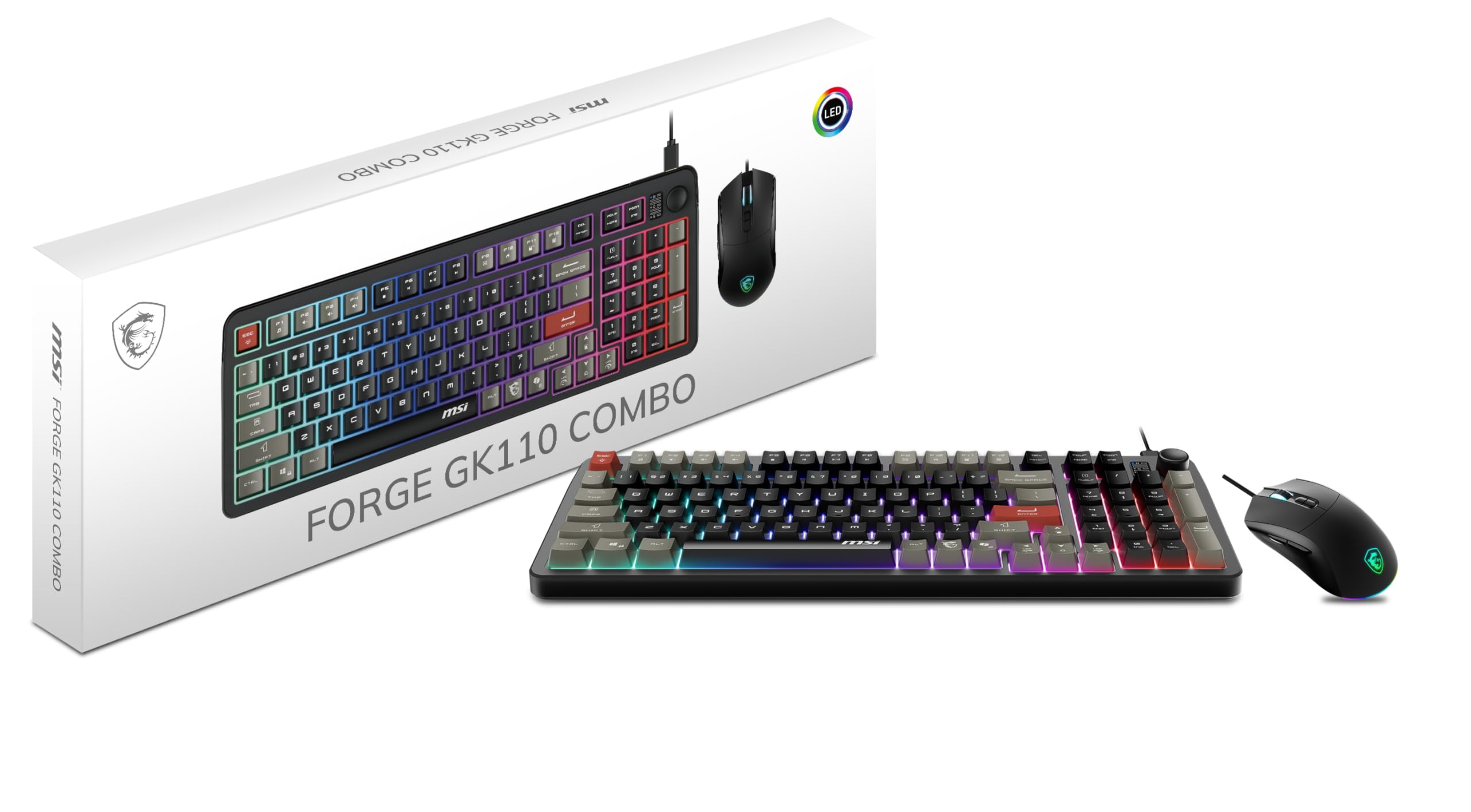
A trusted brand name with a blistering 12800 DPI sensor at a budget price.
MSI brings name-brand reliability here, and the headline spec is the optical sensor that hits up to 12,800 DPI — far beyond what most budget mice offer. That means ultra-precise tracking for fast flicks, and the mouse switches are rated for over 20 million clicks, so it is built to survive years of play.
The quiet membrane keys feel soft and muted, punching above their price. The dedicated volume scroll wheel is a genuinely useful touch for adjusting audio on the fly without pausing your game. The keyboard also features 26-key anti-ghosting, so multiple simultaneous presses register correctly.
The main compromises are the RGB and the layout. Lighting is controlled via hotkeys only, not software, so you cannot do deep customization. Some reviewers point out the compact 96-key spacing is tighter than standard, and the taller keycaps mean you will likely want a wrist rest.
durable gaming set: a gamer who wants a dependable brand, a very high-DPI mouse, and a quiet keyboard for shared or late-night spaces.
wired only option: RGB tinkerers will find the hotkey-only lighting controls basic, and the keys are spaced tighter than a full-size board.
5. Taiahiro Typewriter Mechanical Combo

The retro stunner that delivers a genuinely satisfying click with every keystroke.
If you want your desk to spark conversation, this set delivers. The metallic silver aluminum alloy panel and round, double-shot-molded ABS keycaps give it that vintage typewriter look, and the blue mechanical switches produce the crisp click that typists and gamers alike rave about. The crisp click of the blue switches is the first thing owners mention.
The build is heavy-duty, with the aluminum frame feeling solid and durable. The system includes the keyboard, a wired mouse with 4 adjustable DPI levels (800/1600/2400/3200), and a free mousepad. The mouse features 7-color breathing RGB, and the keyboard offers 11 lighting modes with adjustable brightness and breathing speed.
The key trade-off is long-term reliability. Some shoppers say that after about a year of heavy use, certain keys become unresponsive and need harder presses. The backlight also cannot be set to a single color — it is always cycling through rainbow — which is a minor annoyance if you prefer a clean white setup.
pick for: the satisfying click and the head-turning retro look — it is as fun to type on as it is to look at.
know before: the rainbow-only backlight and the possibility of keys wearing out after a year mean this is more about style and feel than decade-long durability.
6. RedThunder 60% Wireless Combo

The ultra-compact setup that frees your whole desk for mouse movement.
Space is the name of the game here. This 60% keyboard ditches the numpad and function row entirely, leaving you maximum room to swing your mouse. The honeycomb shell mouse weighs only 65 grams (±5), making it feather-light and easy to flick around for hours without fatigue.
Battery life is a standout: the keyboard’s 1850 mAh and mouse’s 500 mAh deliver up to 8 hours with lights on. The keyboard packs a 1850 mAh battery and the mouse a 500 mAh battery, giving you up to 8 hours of continuous use with the lights on. Both devices sleep automatically after 2 minutes of inactivity to save power, and owners consistently praise the long battery life and quick charging.
Connectivity is where opinions split. Some find it works well, including on Xbox, while others report occasional key unresponsiveness and one owner’s mouse stopped charging entirely after three weeks. The lighting is decent — 4 RGB modes plus 7 monochrome modes — but note the mouse scroll wheel only lights up while charging, not during use.
compact wireless ease: a minimal desk setup where battery life and a light mouse matter more than having a numpad.
small key layout: the shared receiver and the occasional reliability complaints mean this suits casual gaming more than intense competitive play.
7. Logitech G213 + G203 Bundle

The reliable name-brand pairing that just works, backed by mature software.
Logitech G is the safe bet when you want something that works without fuss. The G213 keyboard lets you set per-key RGB (individual backlight colors) across over 16.8 million colors using Logitech gaming software, and the G203 mouse has a precise 8000 DPI optical sensor (a sensor that tracks movement at up to 8000 dots per inch) with up to 5 DPI levels you can tune in G HUB. Both devices let you customize key assignments and lighting effects to match your setup.
The G213 is spill-resistant, so crumbs and liquid wipe off easily, and it has dedicated media controls to play, pause, mute, or skip tracks mid-game. The G203’s mechanical tensioned buttons are rated for reliability and give an excellent feel. Owners call it one of the best, with an “always works and feels great” reputation.
The catch is simple — this is the priciest set here, and it is wired only, so you get no battery anxiety but also no wireless freedom. A small number of buyers also reported flimsy wires on some units, though the vast majority have zero complaints. You are paying for the brand, the software ecosystem, and the reliability.
invest here: you want a dependable, brand-backed combo with deep software customization and a fast 8000 DPI sensor.
pass on: you need wireless — this bundle is strictly wired, and the premium price buys polish rather than extra features.
Understanding the Specs
DPI and Sensor Quality
DPI (dots per inch) is how far your cursor travels for every inch you move the mouse. A higher DPI like 7200 or 12800 means faster cursor speed, which helps in fast-paced shooters where you flick your wrist. But high DPI is useless if the sensor tracks poorly, so look for a known optical sensor and adjustable DPI levels you can switch on the fly.
Switch Type and Feel
Membrane keyboards use rubber domes that feel soft and quiet but wear out faster. Mechanical switches, like the blue switches in the Taiahiro, give a tactile click and are rated for millions of presses. “Hot-swap” means you can pull out the switches and replace them without soldering, letting you change the feel of your keyboard later.
FAQ
What is the difference between a shared dongle and separate dongles for keyboard and mouse?
How long does a rechargeable keyboard and mouse battery last?
Is a membrane keyboard okay for gaming, or do I need mechanical?
Will these keyboard and mouse combos work with a gaming console?
What does hot-swap mean on a gaming keyboard?
How many DPI levels do I actually need for gaming?
Why does the RGB lighting sometimes only work via hotkeys and not software?
Are wired or wireless keyboard and mouse combos better for gaming?
What is anti-ghosting and why does it matter?
Final Thoughts: The Verdict
For most people, the affordable gaming keyboard and mouse winner is the Redragon S101M-KS because it gives you true wireless freedom with Tri-Mode connectivity (three ways to connect: wired, 2.4GHz wireless, and Bluetooth) and a 4800 DPI mouse at a price that is tough to top. If you want a real mechanical feel you can customize, grab the Redragon S136 Combo with its hot-swap switches (switches you can replace without soldering) and 7200 DPI sensor. And for a trusted brand with deep software support and a precise 8000 DPI sensor, the Logitech G213 and G203 bundle is the one to reach for.
How We Picked
We do not accept paid placement. Every pick is matched to a real buyer and a real use-case; we do not hands-on test units.
Sources & Methodology
Specifications: manufacturer listings and product documentation. Review insights: verified customer reviews, as of August 2026. Pricing: not shown on this page (it changes often); check the current price via the retailer link.
As an Amazon Associate, Gadgets Feed earns from qualifying purchases. This does not affect which products we feature.