
Our readers keep the lights on and my morning glass full of iced black tea. As an Amazon Associate, I earn from qualifying purchases.
Specs are compiled from manufacturer listings and verified buyer reviews and can change over time — please confirm the key details on the product page before buying.
You want a keyboard and mouse that feel fast in a game without paying flagship money for them. A wired combo in the value-to-mid range now covers what most players actually need. A comfortable full-size keyboard, a mouse that tracks where you point it, and lighting you can turn down when the room gets dark. The picks below are ordered so the strongest all-round set sits first, then the specialist options, with the budget-tier choices at the bottom.
I’m Min — the founder and writer behind Gadgets Feed. This guide is built by comparing the manufacturers’ published specifications and the patterns across verified customer reviews, so you get each pick’s real strengths and trade-offs instead of marketing spin.
Most buyers overpay for sensitivity numbers they will never use, so the smarter move is to match the layout and the mouse sensor to how you actually play. That thinking runs through every pick in this affordable gaming mouse and keyboard shortlist.
Our Picks at a Glance


How To Choose The Best Affordable Gaming Mouse And Keyboard
A combo set is a package deal, so the keyboard and the mouse have to pull their weight together. One half usually carries the other. Knowing which half matters for your games saves you from paying for features you will never touch.
Start with the layout, not the lighting
A full-size board gives you a number pad and dedicated macro keys, which suits work by day and games by night. A 60% board (a compact layout with no number pad and no arrow cluster) frees up desk space for wide mouse sweeps. If you play shooters with low sensitivity, that extra room matters more than a glowing logo.
Match the mouse sensor to your grip
Sensitivity is measured in DPI (dots per inch — how far the cursor travels per inch of mouse movement). A high DPI number sounds impressive but most players settle far lower. What matters more is a sensor that tracks cleanly and a shape that fits your hand. Lightweight mice suit fast flick shots. Heavier bodies feel steadier for slower, deliberate aiming.
Check the anti-ghosting count
Anti-ghosting means the keyboard registers several key presses at once instead of dropping one. A 25-key or 26-key anti-ghosting spec covers the combos you use in-game. On a basic board without it, holding forward, crouch and fire together can fail. That is the single most common reason a cheap keyboard feels wrong in an action game.
Decide if you want wires
Wired USB sets skip charging entirely and tend to keep response consistent. A wireless set frees your desk but adds a battery to think about. In this price band, wired is the safer bet for a set you will use daily.
Quick Comparison
| Model | Best For | Mouse DPI | Connectivity | Weight | Amazon |
|---|---|---|---|---|---|
| Redragon S101-3 PRO★ Best Overall | All-round value | 800–7200 | USB wired | 0.98 kg | Amazon |
| Redragon Updated S107Top Performer | Highest sensitivity for the money | 10000 | Wired | 0.93 kg | Amazon |
| Cakce Wireless RGB ComboCable-Free Pick | Cable-free desk | 800–2400 | 2.4G wireless | — | Amazon |
| AULA T102 | Console and PC crossover | 1200–7200 | USB-A wired | 2.2 lb | Amazon |
| MSI Forge GK110 | Sharpest mouse sensor | 12800 | USB wired | — | Amazon |
| RedThunder 60% Combo | Small desk, big mouse swings | 7200 | USB-A wired | — | Amazon |
| MSI Vigor GK30 Combo White | A white-themed setup | 5000 | USB wired | 1.3 kg | Amazon |
| Lenovo Legion KM310 | Quiet play and work | 8000 | USB-A wired | — | Amazon |
In‑Depth Reviews
1. Redragon S101-3 PRO Gaming Keyboard and Mouse Combo
Our pick — 4.5+★ from 51,500+ verified ratings; the strongest balance of quality and price.
A full-size board with five macro keys and a wrist rest, at a price that stings nobody.
This is the set to buy if you want one box that covers gaming, homework and spreadsheets without a second thought. The keyboard is full-size with a number pad and a QWERTY layout, so your hands already know where they are. Five dedicated macro keys let you record a string of commands once and fire it with one press. The bundled wrist rest props your palms up during long sessions. Most combos at this price leave the wrist rest out.
You get the most value from the mouse in this set. A button on the body switches sensitivity from 800 up to 7200 DPI (dots per inch — how far the cursor moves per inch of travel), so you can slow it for sniping and speed it up for menu work. That 7200 DPI ceiling trails the Redragon S107’s 10000 DPI, so if raw sensitivity is your headline number the S107 wins on paper. The S101-3 PRO makes up for it elsewhere: it adds 10 mouse lighting effects against the S107’s 8, and it carries a slightly heavier 0.98 kg body against 0.93 kg. Heavier here means a keyboard that shifts around less when you type hard.
The RGB lighting is what buyers praise most. The RGB lighting and colour range draw the most praise of anything in this set. The quieter soft-touch membrane keys make late-night sessions easy on anyone sharing the room. The honest catch is long-term reliability — mixed reports include a set that stopped working down the line, and some keys giving up. That is not universal, and with tens of thousands of owners the vast majority are clearly happy. Still, treat this as a great-value starter kit rather than a buy-it-for-a-decade board.
What the set does well
- 5 dedicated macro keys record complex command sequences for one-press use
- Wrist rest plus soft-touch keys cut fatigue over long sessions
- Settings save to the hardware, so your DPI and lighting survive a restart
- Plug-and-play on Windows 10/11 with Linux and MacOS listed as compatible
Where to set expectations
- 7200 DPI ceiling trails the S107’s 10000 DPI
- Some buyers report keys failing or the set dying within weeks
- Lighting is dimmer than some buyers expect
Buy it for: a first proper gaming setup that also handles school or office work, with macros you will actually use.
Look past it if: you want the highest DPI number on the shelf — the S107 has that covered.
2. Redragon Updated S107 Gaming Keyboard and Mouse Combo
The combo that gives you the most mouse sensitivity per dollar of anything on this list.
If you like a fast cursor and you play games where tracking matters, the S107 is the strongest mid-tier pick here. Its mouse software pushes sensitivity to 10000 DPI, which is the highest ceiling of any Redragon in this guide and well above the 7200 on the S101-3 PRO. A dedicated DPI button on the body changes speed without opening software, up to 5000 on the fly. The polling rate (how often the mouse reports its position to the PC) can also be raised to 1000 Hz in the driver, which keeps movement smooth during quick turns.
Typing on it carries a mechanical feel even though the board is membrane, and the 25-key anti-ghosting means pressing forward, crouch and fire together all register. Twelve multimedia function keys put volume and playback within reach. The keyboard also carries a foldable stand and a skin-friendly coating on the keys. What owners praise most is the build quality — the set feels more substantial than the money suggests, and the smooth key strokes get called out alongside it. A 36-month warranty backs that up, which is a long promise for a combo at this level.
The trade-off worth knowing is colour brightness. Some lighting shades come out dimmer than others, so the rainbow effect is not equally vivid across every setting. Reliability also reads mixed, as it does on most budget boards — a few keys can act up over time. Neither issue changes what this set is: the value leader for pure gaming specs, with the S107’s DPI ceiling beating the S101-3 PRO’s by a wide margin.
The spec that decides it: 10000 DPI in software and a 1000 Hz polling rate put this mouse on footing that usually costs more.
Second look: some colour modes glow weaker than others, and mixed durability reports mean you should treat the board with a little care.
Reach for this if: you want serious mouse speed on a tight budget and you game more than you type.
Look elsewhere if: a bright, even rainbow across every key is the reason you want a gaming board.
3. Cakce Wireless RGB Gaming Keyboard and Mouse Combo
One nano receiver, two devices, and no cable trailing across your desk.
This is the pick for a desk you want to keep clean. The keyboard and mouse share a single USB nano receiver, so you give up one port instead of two. Its 2.4G wireless link reaches 8 meters, which is plenty for a couch or a second monitor setup. The board itself is a 104-key layout with a built-in metal panel that gives it a heavier, sturdier feel than plain plastic. Both halves recharge through a built-in battery, and smart energy saving drops them into sleep after 2 minutes of no input. Press any key and they wake.
The lighting is the standout. The marketing leans on it because it works — the FN key combinations cycle through running water, horse racing, colour breathing and single-colour modes. Those lighting modes are the standout feature on an otherwise plain set. The keys are rated for 26 no-conflict presses at once, and 12 multimedia keys mean playback controls are always a keystroke away.
Now the part a buyer has to know. Battery life is the weak spot: as owners mention, “the battery life is concerning as the keyboard dies within a couple of hours.” The mouse also drops out for some owners, and build quality splits between well-built and disappointing. That makes this the right set for someone who keeps it plugged into a charger on a desk and uses lighting as a mood piece. It is a harder sell if you need to game all evening without a cable nearby.
The honest read: wireless freedom and vivid RGB are real, but runtime and mouse reliability keep this a desk-with-a-cable handy kind of set.
Best suited to: a tidy desk where you can keep the receiver close and charge during breaks.
Steer away if: you want to game for hours untethered with zero worry about the mouse dropping out.
4. AULA T102 Gaming Keyboard and Mouse Combo

The one combo here that lists PS4 and Xbox support right on the box.
Most combos in this price band are a PC-only story. The T102 is the exception. Its compatibility list runs from Windows 2000 through Windows 10, plus Mac and iOS, and it works with PS4, Xbox, smart TVs and Google TV. If you switch between a laptop and a console in the same room, this is the set that follows you. The 26-key anti-ghosting covers your in-game combos, and the all-metal panel gives the board a stiff, planted feel.
Typing is quiet. The 2.0mm keystroke (how far the key travels before it registers) gives a fast, snappy rebound, and the soft touch keeps the clicking down. That suits a shared room, a dorm, or a late session. The mouse steps through four sensitivity levels — 1200, 2400, 4800 and 7200 — with the 7200 top end putting it level with the S101-3 PRO’s ceiling. Rainbow backlighting offers 3 modes and 3 brightness levels, so you can go full glow or drop it to a faint wash.
Quality is what buyers talk about most, and the smooth, responsive keys and bright, steady lighting back that up. The board also sleeps after 5 minutes of idle time and wakes on the first keypress, which saves wear when you leave it sitting. Size is the thing to weigh — at 2.2 pounds it is a solid slab, so it is not the kit to buy if you carry gear between houses every week.
Why it earns a spot
- Compatible with PS4, Xbox, PC, Mac, iOS and smart TVs from one set
- 26-key anti-ghosting keeps multi-key combos registered
- Quiet 2.0mm keystrokes suit shared rooms
- 3 brightness levels and 3 backlight modes to tune the glow
Trade-offs to accept
- At 2.2 pounds, it is heavy to move around
- Sleeps after 5 minutes idle, which may catch you mid-pause
Pick this one for: a mixed console-and-PC room where one set has to serve both.
Leave it if: you swap between desks often and want something lighter in the bag.
5. MSI Forge GK110 Combo
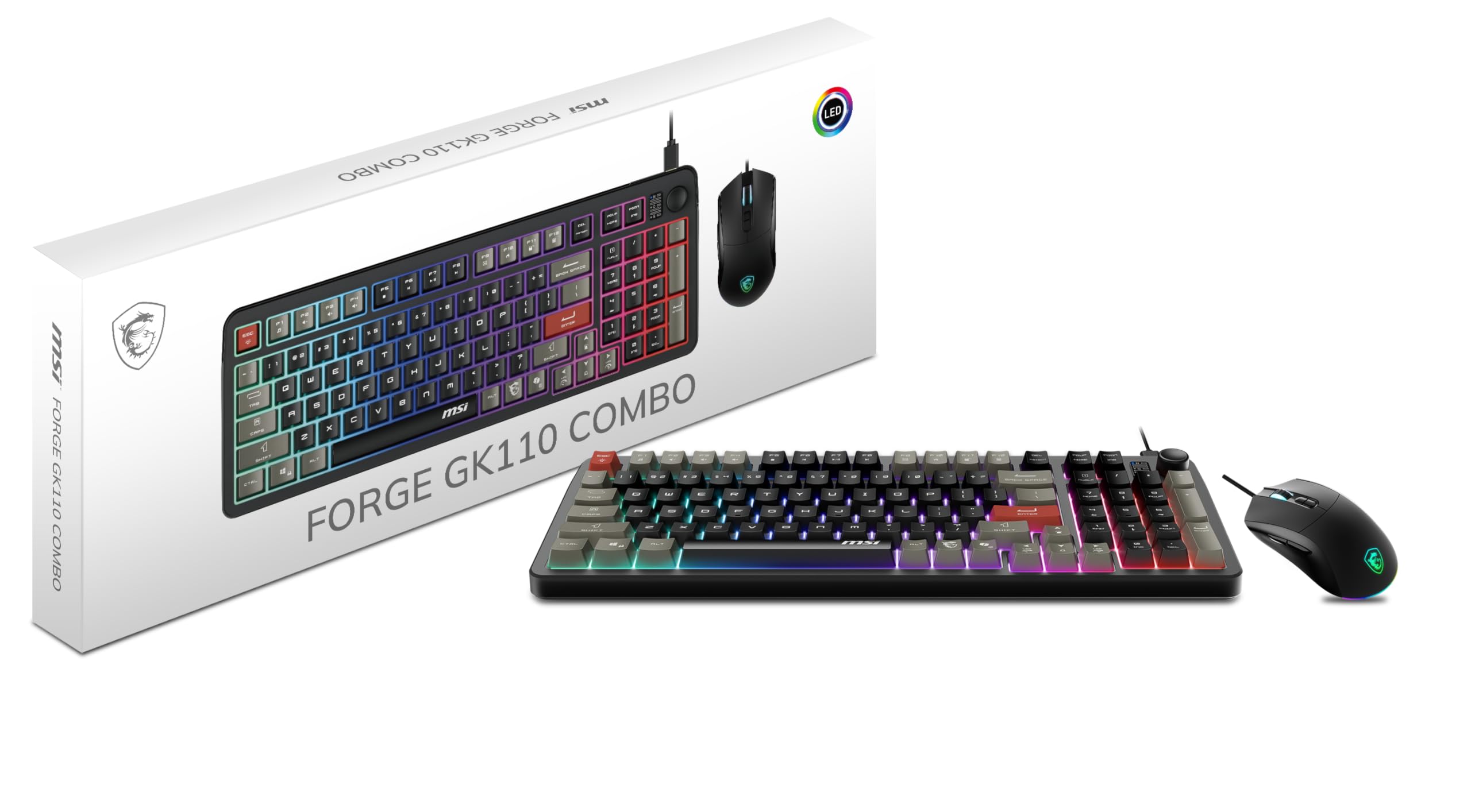
A 12,800 DPI optical sensor in a set that also gives you a dedicated volume wheel.
The mouse is the reason to look at this one. Its optical sensor (the part that reads the surface beneath it) reaches up to 12,800 DPI, the highest ceiling of any combo in this roundup. Compare it to the AULA T102, which tops out at 7200 — this is meaningfully sharper tracking for players who aim with small, fast movements. The mouse switches are rated for more than 20 million clicks, so the buttons are built to take a beating.
On the keyboard, the standout detail is the dedicated volume scroll wheel. You can adjust audio without leaving your game or alt-tabbing out. The membrane keys are quiet and responsive, and the 26-key anti-ghosting keeps your combos clean. RGB effects run across both halves for a matched look.
The set works as a straight plug-and-play unit, and the sensitivity steps give you several usable speeds rather than one harsh jump. Size opinions split both ways, so check the footprint if your desk is small. Honest read: this is a solid mid-tier set that leans on its mouse, and if the sensor is what you care about, it delivers that in spades.
Sensor-first thinking: 12,800 DPI plus 20-million-click switches makes the mouse the star, and the volume wheel is a genuinely useful keyboard touch.
Watch the desk space: the footprint splits opinion, so measure before you buy if space is tight.
Go for this if: the mouse sensor is your priority and you want a dedicated volume control within reach.
Skip past it if: you have a small desk and need a compact board that leaves room for big swings.
6. RedThunder 60% Gaming Keyboard and Mouse Combo

Tiny board, featherweight mouse, and a wide open lane for your aiming hand.
Sixty-percent boards are an acquired taste, and this is a clean way to try one. The 61-key layout drops the number pad and arrow cluster to give your mouse far more travel room across the desk. That is why FPS players drift toward compact boards — your aiming arm never hits the keyboard edge. The whole set stays water-resistant with a triple-protection design, so a spilled drink is a wipe-down, not a dead board. A magnet ring on the cable and a gold-plated connector help keep the data signal steady.
The mouse is the hidden value. It uses a perforated honeycomb shell that brings weight down to 65 grams (give or take 5), so quick flicks take less effort. It is symmetrical, so left- and right-handed players both get a usable grip. Inside, the optical sensor hits 7200 DPI, a 12000fps scan rate, a 1000Hz polling rate, and tracks up to 400 inches per second with 40G acceleration. Those are real gaming-mouse numbers wrapped in a lightweight body.
Customers note it works right from the start. Functionality gets the most positive feedback, which is exactly what you want from a compact set you buy sight unseen. The catch is adjustment — dropping the number pad means relearning a few shortcuts. If you do spreadsheet work daily, that learning curve is a fair trade to weigh.
The 60% advantage: no numpad means more desk for mouse sweeps, and the 65g honeycomb shell makes those sweeps lighter to start.
Who should hesitate: anyone who types numbers all day will miss the pad.
The fit for: an FPS player with a small desk who wants a light mouse and a clean surface.
Not the fit for: someone who relies on the number pad for daily data entry.
7. MSI Vigor GK30 Combo White

The white combo built for a bright setup, with six lighting zones doing the work.
The white GK30 board and GM11 mouse are a matched set built for a light desk. The Vigor GK30 pairing gives you a white GK30 board and the GM11 gaming mouse, a matched set that looks intentional on a light desk rather than an afterthought. The keyboard runs 6-zone RGB with 8 lighting effects, and supports MSI Mystic Light, so you can tie the colours into the rest of a compatible MSI setup. Its special membrane switches are tuned for a mechanical feel, so presses carry that crisp snap without the loud clack.
What owners consistently like is the RGB and the white finish — the look is the headline. Responsiveness and clickiness get good words too, and the set reads as a fair buy for the money. The mouse brings 5000 DPI, which is modest next to the lens on the GK110, but plenty for most players settling into a comfortable sensitivity.
The caution here is keycaps. Some reviewers point out them popping off during use, so if you game with a heavy hand, treat the caps with a little restraint. That is a fit note rather than a deal-breaker — most buyers are happy, and the set does exactly what the photos promise.
The look wins: 6-zone RGB, 8 effects and a full white finish make this the set you buy when aesthetics lead the purchase.
Treat it gently: keycaps can pop off for a rough typist, so use a light touch on the keys.
Ideal buyer: someone building a white setup who wants MSI lighting synced across the desk.
Think twice if: you hammer keys and want caps that stay put through heavy use.
8. Lenovo Legion KM310 Keyboard & Mouse Combo

Built for a shared room where the game should be heard by nobody but you.
Quiet is the whole point here. The keyboard uses silent membrane switches, so late-night play will not carry through a wall. The layout is compact and space-saving, which pairs well with the low-noise pitch. If you share a flat or game next to a sleeping partner, this is the set to look at first. It also lists 20 million click key lifecycles on the keyboard.
The mouse is a strong partner. Its optical sensor runs 8,000 DPI with a five-level on-the-fly switch, so you move between fine aim and fast navigation without software. It tracks at 220 IPS and 30g acceleration. A 57g body and 100% PTFE feet (a smooth low-friction material on the base) let it glide on the pad, and the shape is tuned for claw and fingertip grips. Six programmable buttons — left, right, wheel, DPI and two sides — give you room to set it up your way. The left and right switches use Omron mechanical microswitches.
Legion lighting spreads across 5 zones with pre-programmed colours and Fn effects, plus Fn volume and multimedia controls. The mouse DPI of 8000 sits between the Cakce’s 2400 ceiling and the GK110’s 12800, which lands it squarely in the middle for a quiet-focused set. Keep in mind this is a newer listing with a smaller review base than the Redragon sets, so the track record is shorter. The hardware is solid — it just has less history behind it.
Where it leads: silent keys and a 57g mouse with PTFE feet make this the quiet-desk specialist.
The honest gap: its review history is thinner than the Redragon combos, so you are trusting the spec sheet more than a long track record.
Choose this when: silence matters more than anything and you share the room with a light sleeper.
Move on if: you want a combo with years of owner feedback behind it.
Understanding the Specs
DPI (Dots Per Inch)
DPI tells you how far the cursor moves for each inch you slide the mouse. A 2400 DPI setting moves quickly with small hand motions. A 12800 DPI sensor can be dialled down to a comfortable speed. High numbers matter less than a sensor that tracks cleanly and a body that fits your grip. When you compare sets, pick the mouse shape first, then weigh the DPI ceiling.
Anti-Ghosting
Anti-ghosting means the keyboard registers several keys pressed at once instead of dropping one. A 25-key or 26-key rating covers the combinations you use in a game, like moving, crouching and firing together. Without it, a cheap board can miss a press at the worst moment. Look for the number in the listing, and treat a higher count as more headroom.
Polling Rate and Scan Rate
Polling rate is how often the mouse reports its position — 1000 Hz means it updates a thousand times a second. Scan rate and IPS describe how the sensor tracks fast movement. Higher figures mean fewer stutters during quick turns. These numbers matter most for fast-paced games, and less for work or slow strategy play.
Layout and Weight
A full-size board includes a number pad and macro rows. A 60% board trims those to free desk space for mouse sweeps. Weight tells you whether the board and mouse move with you or stay put. A lighter mouse feels quicker to flick, and a heavier keyboard stays planted when you type hard. Match both to how much desk space and carry weight you can live with.
FAQ
Will a wired combo work with both a gaming PC and a console?
Is 12800 DPI better than 7200 DPI for gaming?
Do I need anti-ghosting on a gaming keyboard?
Will a wireless gaming keyboard work well for fast games?
What does a 60% keyboard actually leave out?
Can I change the DPI on these mice without software?
How do I know which grip style a mouse suits?
Are membrane gaming keyboards quieter than mechanical ones?
What should I check before buying a combo for a small desk?
Final Thoughts: The Verdict
For most people, the winner in this affordable gaming mouse and keyboard roundup is the Redragon S101-3 PRO. Five macro keys, a wrist rest and a full-size layout give it the best all-round balance of gaming and work, and it is the set most buyers will happily keep on their desk. If raw mouse sensitivity is what you care about, the Redragon S107 reaches 10000 DPI and edges the S101-3 PRO on speed. And for a console-and-PC crossover, the AULA T102 is the one set here that lists PS4 and Xbox support alongside PC, Mac and smart TVs.
How We Picked
We do not accept paid placement. Every pick is matched to a real buyer and a real use-case; we do not hands-on test units.
Sources & Methodology
Specifications: manufacturer listings and product documentation. Review insights: verified customer reviews, as of November 2026. Pricing: not shown on this page (it changes often); check the current price via the retailer link.
As an Amazon Associate, Gadgets Feed earns from qualifying purchases. This does not affect which products we feature.