
You need a simple landline phone that is easy to use for an elderly parent, works as a reliable emergency backup, or just handles calls without fuss when the power cuts. But many models that promise simplicity end up with confusing setups, muffled audio, or buttons too small for aging fingers. This guide compares real specs and verified customer reviews to find the straightforward, well-built landline phones that get the basics right.
I’m Min — the co-founder and writer behind Gadgets Feed. This guide is built by comparing the manufacturers’ published specifications and the patterns across verified customer reviews, so you get each pick’s real strengths and trade-offs instead of marketing spin.
Here you will find an honest breakdown of six popular models, from large-button senior phones to classic office handsets, ranked by value and real-world performance to help you find the best affordable landline phone for your situation.
How To Choose The Best Affordable Landline Phone
Finding the right landline phone means matching its features to the user’s needs, especially if that user is elderly or has vision or hearing challenges. A few key specs can make a huge difference in daily comfort and safety, without adding features you will never use.
Button Size and Dialing Ease
This is the most critical factor. Look for phones with extra-large buttons (over an inch wide). Buttons should have high-contrast numbers — black on white is ideal for macular degeneration, cataracts, or other vision loss. Raised keys also help users with arthritis or Parkinson’s, as they reduce the chance of pressing two numbers at once.
One-Touch Speed Dial and Memory Features
For seniors or those with memory loss, calling a loved one with a single button press is a standout. Many phones offer photo memory keys where you place a picture under a clear button, making it instantly obvious who will be called. Look for at least two emergency or speed-dial buttons (often labeled M1, M2, and SOS).
Ringer and Volume Adjustability
A loud ringer — measured in decibels — is essential for anyone with hearing loss. Look for models that offer over 100dB (roughly as loud as a lawnmower from a few feet away). Adjustable handset volume is equally important, and the best phones separate the volume controls for the ringer and the earpiece. A flashing LED light indicator for incoming calls is a huge plus for the hearing impaired.
Quick Comparison
On smaller screens, swipe sideways to see the full table.
| Model | Category | Best For | Key Spec | Amazon |
|---|---|---|---|---|
| AT&T CL2940 | Premium | Overall best with tilt screen & big buttons | Extra-large buttons & tilt display | Amazon |
| Panasonic KX-TSC11B | Mid-Range | Business/office use with Caller ID | 50-number Caller ID memory | Amazon |
| Sacumea Memory Phone | Premium | Dementia/Alzheimer’s with picture dialing | 9 one-touch photo memory keys | Amazon |
| Sacumea Large Button Phone | Mid-Range | Simple, loud ringer & large buttons | 1.06″ x 1.18″ oversized buttons | Amazon |
| Excelltel EX-LD-858HF | Budget-Friendly | Photo dialing for assisted living | 9 one-touch speed dial with photos | Amazon |
| Blue Donuts Big Button Phone | Budget | Basic backup phone for the price | 10 two-touch memory locations | Amazon |
In‑Depth Reviews
1. AT&T CL2940 Corded Phone with Speakerphone

The AT&T CL2940 earns the top spot because it nails the two things that matter most: you get a tiltable LCD display that you can angle to reduce glare, and extra-large buttons that are easy to press — so you never have to squint or misdial, even without reading glasses.
Its Audio Assist feature boosts incoming volume for those with hearing loss, while the extra-loud ringer (adjustable) ensures you won’t miss a call. The 50-name Caller ID history lets you screen calls effectively. Buyers report the display is readable from six feet away, and one buyer commented on its “excellent sound quality,” adding that it is a “terrific phone for the money.”
The honest limit here is that the speakerphone quality is described as “poor but acceptable for the price,” and the Caller ID display does not light up, making it hard to read in a dark room. Still, for a reliable, senior-friendly desk phone from a trusted brand, this is the best all-around choice.
Why it’s great
- Extra-large buttons and a tiltable display reduce eye strain and misdials
- Audio Assist volume boost helps users with hearing difficulties
- Reliable corded operation works during power outages
Good to know
- Speakerphone audio quality is only passable
- Caller ID screen is not backlit, making it hard to see in dim light
- Requires 4 AA batteries for Caller ID functions (not included)
2. Panasonic 1-Line Corded Telephone KX-TSC11B

While the AT&T CL2940 focuses on oversized accessibility, the Panasonic KX-TSC11B is a different animal: a compact, no-nonsense office-grade phone that leads on Caller ID performance. Its 50-number Caller ID memory and call log are more robust than the AT&T’s, and its footprint is noticeably smaller (9.1 x 8.4 inches vs the AT&T’s 8.8 x 7.9 inches), making it better for a cluttered desk.
This is a straightforward phone for a home office or as a dedicated line for a fax machine. It features one-touch dialer memory buttons, a multi-function LCD display, and can be mounted on a wall or set on a desk. Reviewers call it “a nice corded phone at a great price” and note it is “durable” and works as expected with zero issues.
For a solid, traditional landline with proper Caller ID features, the Panasonic is the pick over the AT&T if you don’t need the oversized buttons and are willing to trade a tilt screen for a more compact, business-focused design.
Where it shines
- Reliable Caller ID with a 50-name directory and call log
- Compact design fits easily on a small desk or wall
- One-touch memory dialing for frequently called numbers
Worth noting
- Caller ID display is not backlit and can be hard to read
- Buttons are standard size, not extra-large for seniors
- Speakerphone quality is basic
3. Sacumea Corded Landline Phone for Seniors (Memory Phone)
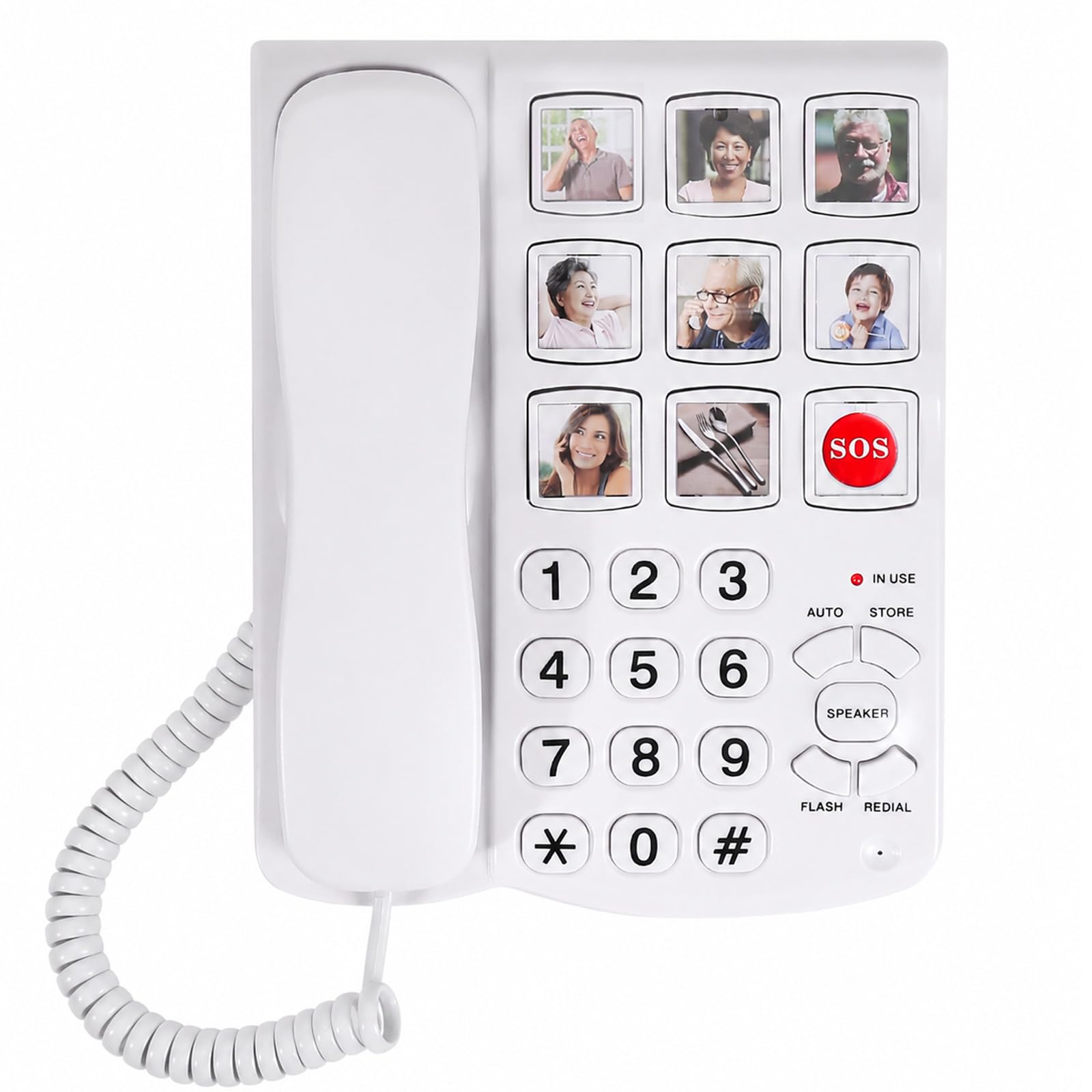
For someone living with dementia or Alzheimer’s, memorizing numbers or even recognizing a list of names can be impossible. This Sacumea memory phone tackles that head-on with nine one-touch photo memory keys. You place a small photo of the person under the clear button, and pressing that photo makes the call — no guesswork needed.
The phone backs this up with an extra-loud handset volume (exceeding 90dB) and a ringer over 110dB, making it suitable for those with hearing aids. It also includes a hands-free speakerphone, which is a significant convenience for users with limited mobility or arthritis. Buyers confirm it is “great for my elderly parent” and “easy to program” the one-touch numbers, with the large picture buttons being the standout feature.
Note that, like the simple Sacumea model, it does not support Caller ID, voicemail, or internet connections — its sole purpose is simple one-touch calling.
What stands out
- Nine one-touch photo memory keys eliminate the need to remember numbers
- Extra-loud ringer (over 110dB) and adjustable earpiece volume (over 90dB)
- Hands-free speakerphone aids users with limited mobility
The trade-offs
- Does not support Caller ID, voicemail, or internet connections
- Stored numbers are lost if the phone line is disconnected
- Some users wish the cradle had better visibility in the dark
4. Sacumea Large Button Phones for Seniors
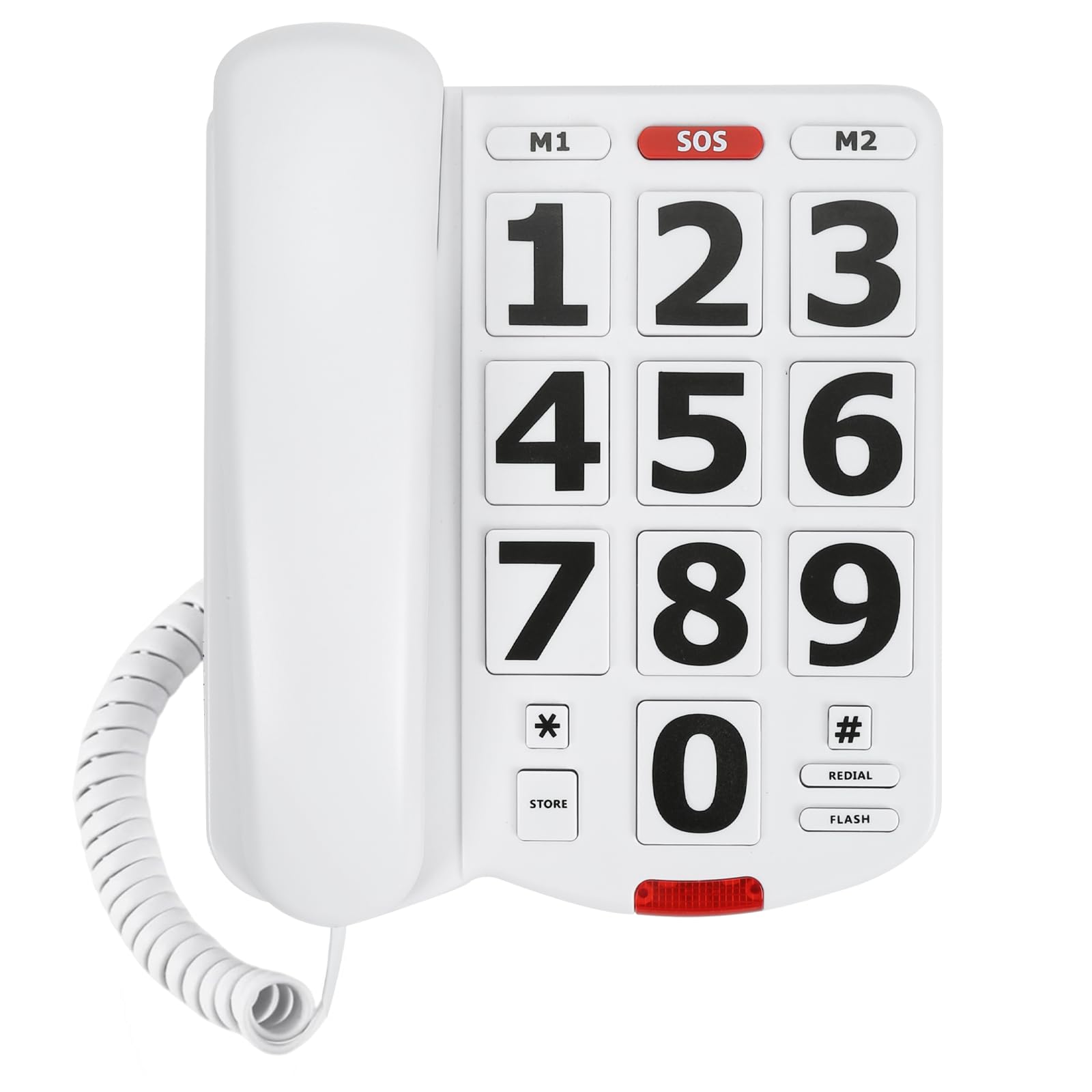
The single number that matters most in this category is button size, and this Sacumea model has the largest of the bunch at 1.06 x 1.18 inches — roughly the size of a US dollar coin — making them the easiest to see and press for someone with severe vision loss.
The catch is that this phone has no speakerphone and no photo memory keys. It does offer one-touch memory dialing via two M1/M2 keys and a red SOS button, all of which take about 20 seconds to program. The ringer can be adjusted up to over 110dB, and there is a bright flashing light for incoming calls, making it a great fit for someone with both vision and hearing challenges. Buyers call it a “simple, solid phone for the price” and note it is “great for elderly” users.
If your top priority is the absolute largest, most readable buttons and a screamingly loud ringer, this model delivers the best bang for your buck in that specific regard.
The upsides
- Massive 1.06″ x 1.18″ buttons are the largest in this guide
- Extremely loud ringer (over 110dB) for the hearing impaired
- Simple SOS and two one-touch memory keys are easy to program
Keep in mind
- No speakerphone function is available
- No photo memory keys for visual dialing
- Does not support Caller ID or voicemail
5. Excelltel Big Button Phone for Seniors (EX-LD-858HF)

The Excelltel EX-LD-858HF gives you nine one-touch speed dial buttons that can hold photos, an emergency SOS key, and a lightweight ABS plastic body at 1.3 pounds.
Its simplicity suits assisted living settings; one reviewer called it “excellent for sister in assisted living with dementia,” noting it is “very easy to set up big buttons with memory and pictures.” It also includes a three-way conference call capability absent in the Sacumea phone, though the speakerphone has a “tinny echo” and the ringer is “too loud and abnormal” according to some buyers.
For a budget-friendly choice that gets the photo-dialing job done, the Excelltel is a solid, easy-to-set-up option for anyone needing visual one-touch dialing, but be prepared for slightly less refined audio quality than the Sacumea.
Why we’d pick it
- Photo one-touch dialing makes calling instinctive for dementia patients
- No batteries required — works on phone line power alone
- Lightweight and easy to set up with clear instructions
A few caveats
- Speakerphone audio is tinny and echoes
- Ringer volume is abnormally loud and not easily adjustable
- May not work with some modern VoIP landline modems
6. Blue Donuts Big Button Phone for Wall or Desk
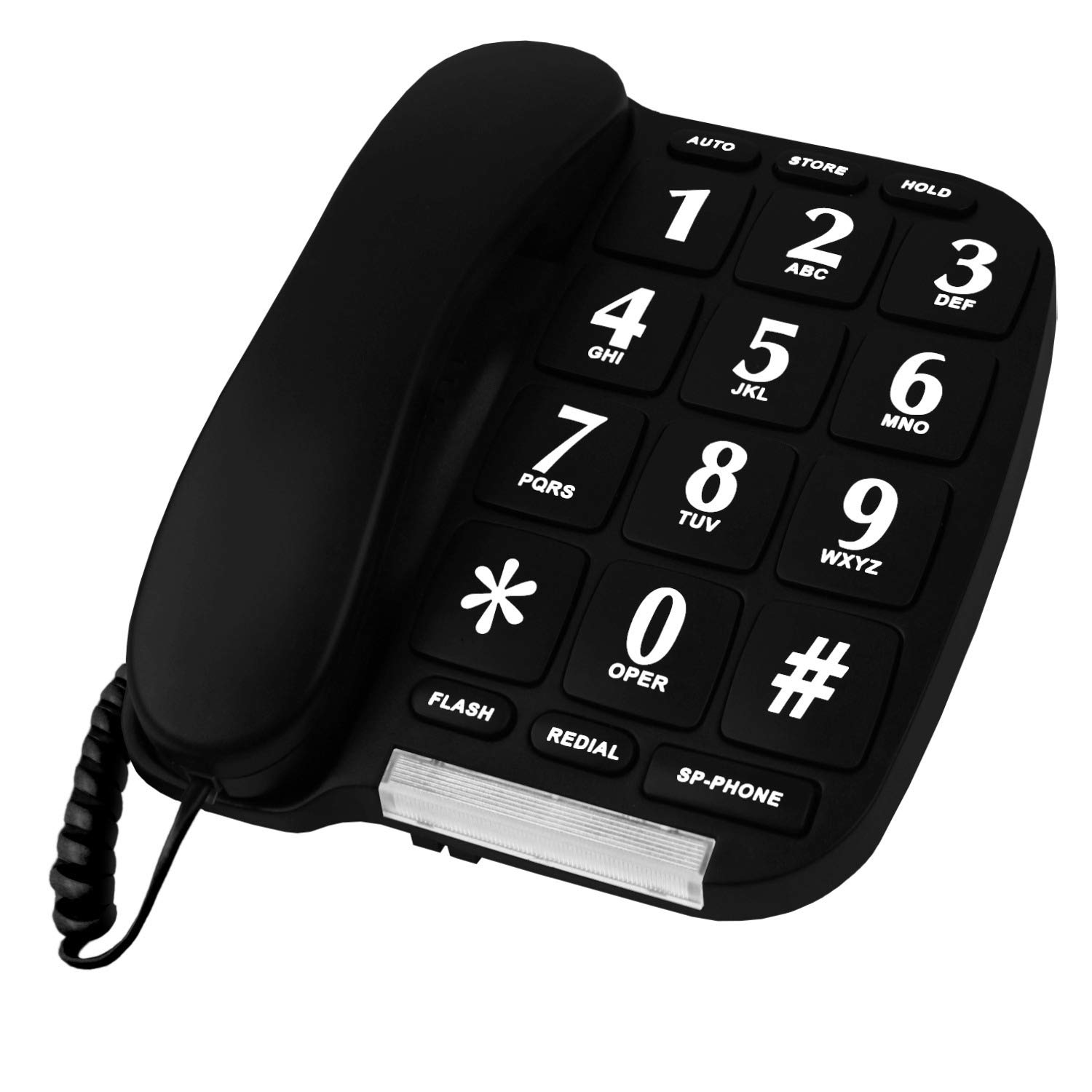
This is the perfect pick for someone who needs the absolute cheapest backup phone for a guest room or a rarely-used line and is willing to accept the risk that it may not last long. At the lowest price point, the Blue Donuts phone delivers the basic promise: extra-large buttons, a speakerphone, and ten two-touch memory storage slots for easy dialing. It is powered entirely by the phone line, so it works during power outages, and it can be mounted on a wall or placed on a desk.
What you give up is reliability and quality control. Multiple owners mention serious issues, with one stating it “stopped working after 4 months” and another noting the “memory dial doesn’t work.” The speakerphone has been described as engaging “with noise on answer.” While the initial user experience is good — reviewers praise the “comfortable handset” and “good sound quality” — the failure rate is too high to recommend without caution.
For daily use by a senior, spend a little more on a more durable model, but be aware that this phone’s one weakness is its high failure rate, making it a gamble for anything beyond occasional backup use.
Strong points
- Lowest price point delivers big buttons and speakerphone
- Works without batteries or power supply
- Can be mounted on a wall or placed on a desk
Before you buy
- Frequent reports of failure after 4-6 months of use
- Memory dialing function often does not work properly
- No Caller ID or photo memory features
Understanding the Specs
Button Size
Measured in inches, button size is the single most important spec for seniors and the visually impaired. A button that is 1.06 inches wide is significantly easier to hit than a standard one. Look for buttons that are raised and have high-contrast numbers (black on white) to minimize misdials.
Ringer Volume (Decibels)
Measured in dB (decibels), this tells you how loud the phone rings. Standard phones ring at around 70-80dB. Senior-friendly models offer over 100dB, which is as loud as a car horn, ensuring the user hears it even in another room or with hearing aids turned down.
One-Touch Memory
This refers to dedicated buttons (often labeled M1, M2, SOS) that can be programmed to dial a specific number instantly. Some phones take this further with photo memory keys, where a picture of the person is placed under a clear plastic button, making the phone truly intuitive for those with dementia or memory loss.
Caller ID
This feature displays the name and number of the incoming caller on a screen. It requires batteries in most corded phones. A backlit display is a huge plus for readability in dim light. If Caller ID is not essential, you can save money by choosing a simpler, battery-free model.
FAQ
Will a corded landline phone work during a power outage?
What is the difference between photo memory keys and standard one-touch dialing?
Why does my new landline phone not work with my internet phone service?
Final Thoughts: The Verdict
Across the board, the best overall affordable landline phone is the AT&T CL2940 because it combines extra-large buttons with great Caller ID features and build quality from a trusted brand. If you need a phone for a loved one with dementia or memory loss, the photo memory keys on the Sacumea Memory Phone are unbeatable for simplicity. And for a no-frills compact office line with excellent Caller ID, the Panasonic KX-TSC11B is the reliable workhorse you can count on.