
Between lecture halls, library cubicles, and cramped dorm desks, a college laptop needs to survive a schedule that would break a desktop in a week. The wrong choice means fighting with a 4-hour battery during back-to-back classes or a 14-inch screen when you’re trying to reference a textbook PDF and write a paper simultaneously. You need a machine that balances portability, performance, and a price tag that won’t haunt your student loans.
I’m Min — the co-founder and writer behind Gadgets Feed. I’ve spent hundreds of hours cross-referencing processor benchmarks, display specs, RAM configurations, and real-world battery tests to identify which models deliver genuine long-term value for students operating on a tight budget. This guide cuts through the marketing fluff to show you exactly where your money should go.
Whether you’re typing essays, running research software, or streaming lectures, finding the right machine requires parsing specs carefully — here is your authoritative guide to the affordable laptops for college students.
How To Choose The Best Affordable Laptop For College
The student laptop market is a minefield of underpowered Atom processors, soldered RAM, and 1366×768 TN panels that ruin your eyes after 30 minutes. Here’s what to look for to avoid buyer’s remorse.
RAM and Storage: The Two Specs That Define Performance
8GB of DDR4 or DDR5 RAM is non-negotiable — 4GB machines choke on Windows 11 alone. For storage, an NVMe SSD (look for PCIe Gen 3 or Gen 4) is the only acceptable standard. eMMC storage is 5x slower and will cause stuttering when Windows updates in the background. A 256GB NVMe is comfortable for a student; 512GB is future-proof. Anything with a 128GB eMMC should be avoided unless you plan to use it exclusively for cloud-only ChromeOS-style tasks.
Processor: Don’t Be Fooled by “Intel Core” Labels
Intel N-series CPUs (N100, N150, N200, N305) are low-power chips designed for basic web browsing — they will struggle with compiling code, running CAD, or editing video. An AMD Ryzen 3 7320U or Ryzen 5 7520U offers 4-8 cores with genuine multi-threaded throughput. Likewise, an Intel Core i3-N305 is far weaker than an Intel Core i3-1215U. The generation number matters more than the “i3/i5/i7” branding. For most students, a Ryzen 5 or Intel Core i3 from the 12th Gen or newer is the sweet spot.
Display and Portability: Don’t Sacrifice Your Eyes
A 15.6-inch 1920×1080 IPS panel is the gold standard. 1366×768 (HD) laptops should be off the list — you will lose vertical screen real estate that makes reading articles and writing papers painful. For weight, anything above 4.2 lbs is heavy to carry across campus. Look for 3.5 lbs or less if you walk between buildings. Battery life should be at least 8 hours of mixed use, which typically requires a 42Wh or larger battery paired with an efficient processor.
Quick Comparison
On smaller screens, swipe sideways to see the full table.
| Model | Category | Best For | Key Spec | Amazon |
|---|---|---|---|---|
| ASUS Vivobook Go 15.6” | Premium | Best Overall | AMD Ryzen 5 7520U | Amazon |
| NIMO 15.6″ FHD IPS | Premium | Best Value RAM/Storage Combo | 16GB RAM / 512GB SSD | Amazon |
| Dell 15 DC15250 | Premium | Best 120Hz Display | 120Hz FHD Display | Amazon |
| HP 15.6″ FHD (2026 Edition) | Premium | Best Storage Capacity | 16GB RAM / 1TB SSD | Amazon |
| acer Aspire 3 A315-24P-R7VH | Mid-Range | Best Battery Life | 11 Hour Battery Life | Amazon |
| Auusda Business Laptop (Ryzen) | Mid-Range | Best Portability | 3.7 lbs / 0.7″ thin | Amazon |
| Lenovo IdeaPad 1 Student Laptop | Mid-Range | Best Dual Storage Setup | 512GB SSD + 128GB eMMC | Amazon |
| Lenovo 2026 Laptop (N4500) | Mid-Range | Best Build & Keyboard | Intel N4500 / 8GB RAM | Amazon |
| Auusda Business Laptop (Intel) | Budget | Best Upgradability | Up to 32GB RAM / 8TB Storage | Amazon |
| HP Laptop (2026 Edition AI PC) | Budget | Best for Portability | 3.11 lbs / Sky Blue | Amazon |
| jumper 15.6″ FHD Laptop | Budget | Best Value with Office 365 | 12GB RAM / 640GB Storage | Amazon |
In‑Depth Reviews
1. ASUS Vivobook Go 15.6”

The ASUS Vivobook Go is the rare laptop that nails the student trifecta: a genuine AMD Ryzen 5 7520U processor with 4 cores and 8 threads running up to 4.3 GHz, backed by Radeon 610M integrated graphics. That means it handles Office suites, 20+ Chrome tabs, light photo editing, and even some gaming at 1080p low settings — without breaking a sweat. The 8GB of soldered LPDDR5 RAM runs at 5500 MHz, offering better bandwidth than standard DDR4, though it is not upgradeable.
The 15.6-inch NanoEdge display delivers 1920×1080 resolution with a 60Hz refresh rate, 45% NTSC color gamut, and 250 nits brightness. It is not color-accurate enough for professional design work, but it is more than adequate for reading research papers, watching lectures, and writing essays. The chassis meets MIL-STD-810H military-grade durability standards, meaning it can survive a drop from a dorm desk or the occasional squeeze in a crammed backpack.
At 3.75 lbs with a slim profile, it slides into any bag. The fast-charging battery delivers about 7 hours of mixed use — enough for a full day of classes if you keep brightness moderate. The webcam privacy shield and SonicMaster audio are thoughtful additions. The only frustration is the soldered RAM, so think ahead about your future needs. If you need more than 8GB later, you will need a different laptop.
Why it’s great
- AMD Ryzen 5 7520U outperforms Intel N-series chips by a large margin in multi-threaded tasks.
- MIL-STD-810H durability ensures it survives student life.
- Excellent 512GB NVMe SSD for fast boot times and app loading.
Good to know
- RAM is soldered and not upgradeable — 8GB is the max.
- Display is only 250 nits, making outdoor use challenging.
- Wi-Fi 5 instead of Wi-Fi 6, which is a generation behind.
2. NIMO 15.6” FHD IPS Student Laptop

The NIMO N152 is a compelling budget option that punches above its weight class with a massive 16GB of DDR4 RAM — a spec usually found in laptops costing significantly more. Paired with a 512GB PCIe NVMe SSD, this machine handles multitasking like a champ, running a dozen browser tabs, a research paper in Word, and a Zoom lecture simultaneously without a stutter. The AMD Ryzen 5 processor (4 cores, up to 3.7 GHz) provides solid performance for everyday student tasks and even light gaming like Skyrim or Left 4 Dead.
The 15.6-inch Full HD IPS anti-glare display offers an 85% screen-to-body ratio with micro-edge bezels, making it feel modern despite its budget positioning. The backlit keyboard is adjustable and stays lit during typing (no annoying timeout), and the touchpad-integrated fingerprint reader is genuinely convenient for quick unlocks in the library. The 65W USB-C PD fast charger adds versatility, charging the laptop and other devices like phones and tablets.
Build quality is a highlight — the metal A-shell and solid chassis exhibit minimal flex, and the 2-year warranty plus 90-day return policy offer peace of mind that budget laptops rarely provide. The only downsides are Wi-Fi 5 instead of Wi-Fi 6 and limited multi-monitor support through HDMI only. However, for the price, the RAM, storage, and feature set are unmatched in this tier.
Why it’s great
- 16GB of DDR4 RAM is extraordinary value — handles heavy multitasking with ease.
- 65W USB-C PD fast charger is versatile and travel-friendly.
- 2-year warranty and 90-day returns beat almost all competitors.
Good to know
- Limited to a single external monitor via HDMI; no multi-monitor support.
- Wi-Fi 5, not Wi-Fi 6, which may affect future network speeds.
3. Dell 15 Laptop DC15250

The Dell 15 DC15250 stands out in a crowd of 60Hz laptops by offering a 120Hz Full HD display — a spec you normally see on gaming machines. The higher refresh rate makes scrolling through long PDFs, web pages, and documents feel incredibly smooth and reduces eye strain during extended study sessions. The Intel Core 3 100U processor (up to 4.7 GHz, 10MB cache) delivers solid single-core performance that handles Office, web browsing, and light multitasking without complaint.
With 8GB of DDR4 RAM and a 512GB NVMe SSD, this Dell handles everyday student workloads capably. The ComfortView software reduces blue light emissions, which is genuinely helpful for late-night essay writing. The inclusion of a numeric keypad and a calculator hotkey is a thoughtful touch for business and STEM students who do data entry. The 1-year onsite service means Dell will come to your dorm if something breaks — a real advantage over mail-in warranty models.
Battery life is the main weak point — expect around 5-6 hours of mixed use, which may not stretch through back-to-back classes. The webcam quality is also subpar, with noticeable grain in low light. But if you value the smoothest possible display for reading and scrolling within a tight budget, the Dell 15 is a standout choice that few competitors can match at this price.
Why it’s great
- 120Hz display is unmatched at this price for smooth scrolling and reduced eye strain.
- 1-year onsite service provides real convenience for students in dorms.
- ComfortView blue light reduction is excellent for late-night work.
Good to know
- Battery life is only 5-6 hours under mixed use.
- Only two USB ports, which is limiting for peripherals.
4. HP 15.6″ FHD Laptop 2026 Edition

The HP 15.6″ 2026 Edition is a storage monster in the budget segment, packing a 1TB NVMe SSD alongside 16GB of RAM. For a student, this means you can store your entire course catalog of PDFs, video projects, lecture recordings, and a Steam library of light games without ever hitting a storage warning. The Intel N100 processor is a low-power quad-core chip (up to 3.4 GHz) that handles Office, 15+ browser tabs, and video streaming smoothly, though it will struggle with heavy code compilation or 4K video editing.
Weighing just 3.64 lbs, this HP is genuinely portable and fits easily in any backpack. The 15.6-inch anti-glare display reduces reflections in bright lecture halls, and the full-size keyboard with numeric keypad is comfortable for typing long papers. Wi-Fi 6 ensures stable connections for Zoom classes, and the long battery life (around 8 hours with light use) covers a full day of classes. It also includes Microsoft 365 for web, reducing the software cost for students.
Build quality is typical HP budget — mostly plastic with some flex in the lid, but acceptable given the price. The N100 processor is a limiting factor for demanding tasks, so this is best for liberal arts, business, or education majors rather than engineering or computer science students running heavy IDEs. For the combination of massive storage and sufficient RAM, this HP offers exceptional value.
Why it’s great
- 1TB SSD and 16GB RAM provide massive storage and smooth multitasking.
- Lightweight 3.64 lbs design is easy to carry between classes.
- Wi-Fi 6 and long battery life suit a full day of student use.
Good to know
- Intel N100 processor will struggle with heavy multi-threaded workloads.
- Build feels plasticky compared to metal-chassis alternatives.
5. acer Aspire 3 A315-24P-R7VH

The acer Aspire 3 is the battery king of this lineup, advertising 11 hours of battery life and delivering around 8-9 hours in real-world mixed use. Powered by the AMD Ryzen 3 7320U quad-core processor (up to 4.1 GHz) with Radeon 610M graphics, it offers a solid balance of performance and efficiency. The 8GB of LPDDR5 RAM is soldered, but the 128GB NVMe SSD can be easily upgraded to a larger drive when needed.
The 15.6-inch Full HD IPS display with narrow bezels looks modern and sharp, with good color reproduction for a budget panel. The TNR (Temporal Noise Reduction) webcam delivers surprisingly usable video quality in low light — a rare feature in this price bracket. Acer’s PurifiedVoice AI noise reduction also filters out background chatter during Zoom calls, making it easier for professors to hear you clearly in noisy dorms.
The biggest drawback is the limited 128GB SSD, which fills up fast with Windows, Office, and a few applications. You will likely need to upgrade the storage or rely heavily on cloud storage. The keyboard lacks backlighting, which is inconvenient for typing in dimly lit lecture halls. However, for students prioritizing all-day battery life and a bright, crisp display, the Aspire 3 is a top contender.
Why it’s great
- 11-hour rated battery life easily outlasts a full day of classes.
- TNR webcam and AI noise reduction improve video call quality.
- NVMe SSD slot is user-upgradable despite soldered RAM.
Good to know
- 128GB SSD is too small for most students; plan to upgrade storage.
- No keyboard backlight and soldered RAM limit long-term flexibility.
6. Auusda Traditional Laptop (Ryzen 3)
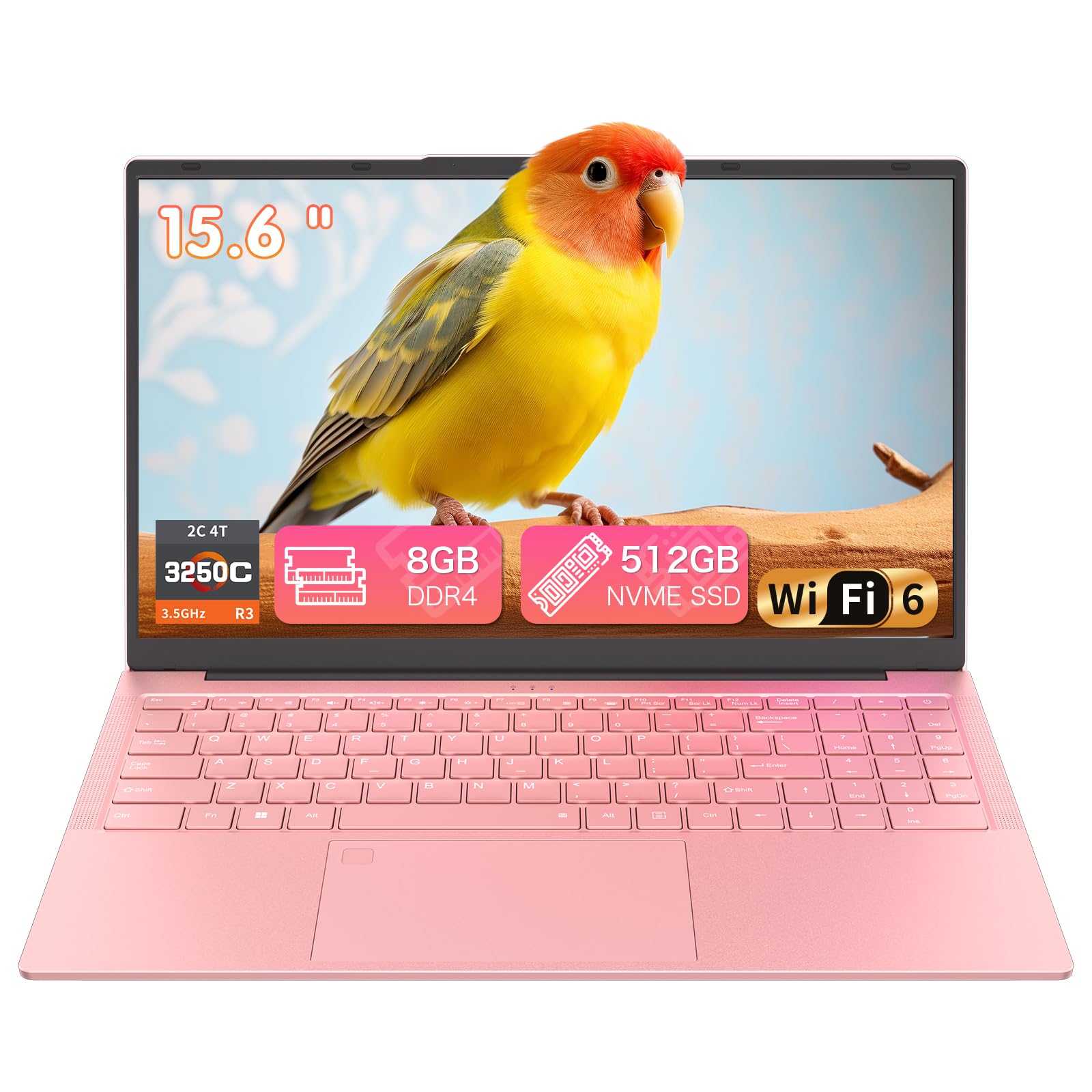
The Auusda Traditional Laptop stands out with a soft pink finish that appeals to students wanting a laptop that reflects their personal style. Under the hood, it packs a Ryzen 3 3250C dual-core processor with 4 threads (up to 3.5 GHz), 8GB of dual-channel DDR4 RAM (expandable to 32GB), and a 512GB NVMe SSD. The Ryzen 3 is a capable chip for daily student tasks like writing, browsing, and streaming, though its 2-core architecture means it will lag behind quad-core competitors in heavy multitasking.
At 3.7 lbs and 0.7 inches thin, this 15.6-inch Full HD laptop is genuinely portable. The backlit keyboard and fingerprint reader add convenience for late-night study sessions and quick logins. The physical camera privacy switch is a thoughtful security feature for privacy-conscious students. Connectivity is modern with dual-band Wi-Fi 6, Bluetooth 5.3, and dual USB Type-C ports that support charging and data simultaneously.
Battery life is a significant shortcoming — the 6000mAh (45.6Wh) battery delivers only about 4-5 hours in our estimate, and it drains even when powered off. One user reported the battery losing full charge over 5 days while turned off. This makes it a poor choice for all-day campus use without access to outlets. If you are always near a power source and want a stylish, portable machine with good upgrade options, the Auusda works, but battery-conscious students should look elsewhere.
Why it’s great
- Stylish soft pink finish stands out from the sea of silver laptops.
- RAM expandable to 32GB and 512GB NVMe SSD offer good performance.
- Wi-Fi 6 and dual USB-C ports provide modern connectivity.
Good to know
- Battery life is poor at 4-5 hours; battery drains even when powered off.
- Dual-core Ryzen 3 3250C lags behind quad-core alternatives in multi-threaded tasks.
7. Lenovo IdeaPad 1 Student Laptop

The Lenovo IdeaPad 1 offers an unusual dual-storage configuration: a 512GB PCIe NVMe SSD for fast boot and application loading, plus a 128GB eMMC drive for additional storage. This gives you 640GB total, with the SSD handling the operating system and frequently accessed programs while the eMMC stores documents and media. The 12GB of DDR4 RAM provides enough headroom for multitasking between a browser with many tabs, Office applications, and streaming.
The 15.6-inch Full HD IPS anti-glare display is crisp and readable in various lighting conditions. The inclusion of a 1-year subscription to Office 365 adds significant value for students — that subscription alone typically costs money. The Wi-Fi 6 connectivity ensures fast, stable internet for video calls and downloads. The laptop also includes a range of ports including USB-C, USB 3.2, USB 2.0, HDMI 1.4b, and a headphone jack, covering most peripheral needs.
The processor is where the IdeaPad 1 shows its budget roots: an Intel Celeron N4500 dual-core chip (up to 2.8 GHz) that is fine for basic tasks but will stutter under heavier loads like video editing or running multiple virtual desktops. Some users report freezing after extended use. For writing papers, browsing, and streaming — the core college workflow — it is adequate. For engineering or computer science students running resource-intensive applications, the Celeron will be a bottleneck.
Why it’s great
- Dual storage (512GB NVMe + 128GB eMMC) provides generous space and fast OS performance.
- 12GB RAM is generous for multitasking on a budget.
- Includes 1-year Office 365 subscription, saving students money on software.
Good to know
- Intel Celeron N4500 is weak for heavy applications or gaming.
- Some users report freezing issues after extended use.
8. Lenovo 2026 Laptop (N4500)

The Lenovo 2026 Laptop is a solid, no-nonsense machine for students who prioritize build quality and keyboard comfort over raw specs. The Intel Celeron N4500 dual-core processor (up to 2.8 GHz) with 8GB of DDR4 RAM handles the basics — web browsing, Office documents, and video streaming — without complaint. The 256GB PCIe SSD provides fast boot times and quick application launches, though the storage fills up quickly if you install many programs.
The 15.6-inch Full HD anti-glare display with razor-thin bezels offers a clean viewing experience. Dual Dolby Audio speakers deliver noticeably better sound than the typical tinny budget laptop speakers. The keyboard is a highlight — well-spaced keys with good travel make typing long papers comfortable. The HD 720p webcam includes a privacy shutter, a nice touch for security-conscious students. Wi-Fi 6 and Bluetooth 5.2 keep connectivity modern.
The plastic build feels less premium than aluminum alternatives, but it is lightweight at 3.75 lbs. The main limitation is the N4500 processor — it is fine for basic tasks but will struggle with multiple virtual desktops, light photo editing, or any gaming beyond casual browser games. The 8GB of RAM is adequate but not future-proof. For students with modest computing needs who type a lot, the Lenovo’s keyboard and build quality justify the consideration.
Why it’s great
- Comfortable keyboard with good travel — excellent for typing papers.
- Dolby Audio speakers provide above-average sound for a budget laptop.
- Wi-Fi 6 and Bluetooth 5.2 offer modern wireless connectivity.
Good to know
- Celeron N4500 limits performance for demanding tasks.
- 256GB storage is tight for students with many files or applications.
9. Auusda Business Laptop (Intel)

The Auusda Business Laptop is a dream for students who want to upgrade their machine over time. It comes with 16GB of DDR4 3200MHz RAM and a 1TB PCIe NVMe SSD out of the box — already generous — but both are user-upgradeable. The RAM slot allows expansion to 32GB, and the SSD can be swapped for up to 8TB via the M.2 slot plus a MicroSD slot supporting 2TB. This flexibility means the laptop can grow with your needs over four years of college.
The 15.6-inch Full HD IPS display with 0.2-inch bezels looks modern, and the display can drive up to three external screens including 4K via the Mini/standard HDMI port. The backlit keyboard with numeric keypad speeds up data entry for STEM students. The fingerprint reader unlocks instantly, and the 3.7 lbs weight makes it easy to carry. The 6000mAh (45.6Wh) battery delivers about 6 hours of real-world use, which is average for this class.
The processor is a point of confusion — the listing states a multi-thread processor up to 3.4 GHz, but some users received an Intel N150 chip rather than the advertised N95. The N150 (800 MHz base) runs Sims 4 smoothly on highest settings, but the discrepancy is concerning. The fan runs silently, and the 2-year warranty with 100-day returns provides decent support. For students who value upgradability and a generous spec sheet, the Auusda is compelling, but verify the exact processor upon arrival.
Why it’s great
- User-upgradeable RAM (up to 32GB) and SSD (up to 8TB) offer exceptional long-term flexibility.
- 16GB RAM and 1TB SSD out of the box exceed most competitors at this price.
- Lightweight design and silent fan suit library use.
Good to know
- Processor may differ from listing (N150 vs N95); verify upon receipt.
- Battery life is average at around 6 hours of real-world use.
10. HP Laptop (2026 Edition AI PC)
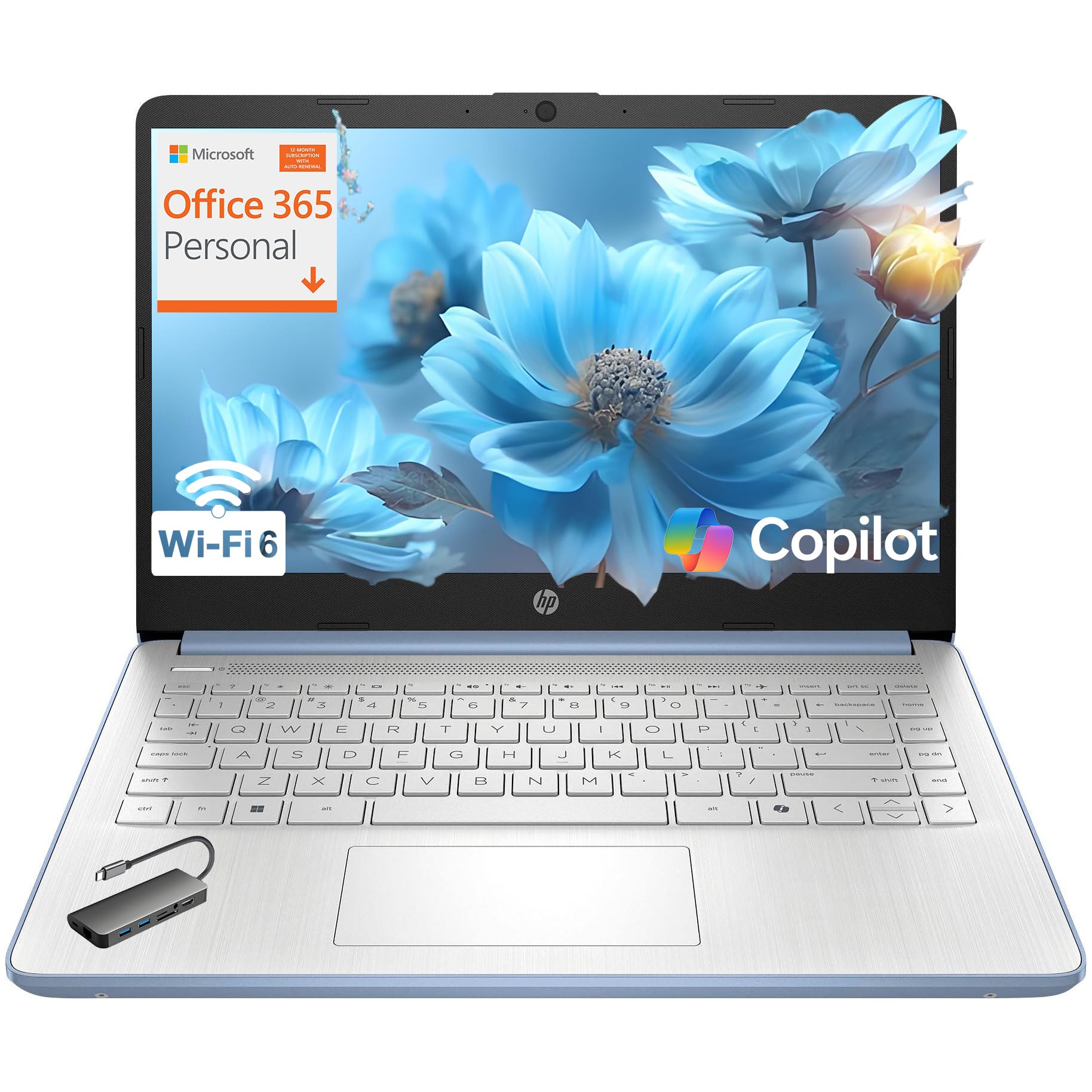
The HP 2026 Edition AI PC is the lightweight champion of this list at just 3.11 lbs, making it the easiest laptop to carry across a sprawling campus. The Sky Blue finish with a crepe pink keyboard is a distinctive aesthetic choice that stands out from the usual silver and black. Powered by the Intel N150 quad-core processor (up to 3.6 GHz) with 8GB DDR4 RAM and 128GB UFS storage, it is designed for students whose workload centers on web-based tasks, Office documents, and streaming.
The 14-inch HD (1366 x 768) micro-edge anti-glare display is the biggest compromise here — the lower resolution means less screen real estate for multitasking and text can appear softer than on a Full HD panel. The 250 nits brightness is adequate for indoor use but washes out near windows. Wi-Fi 6 and Bluetooth 5.4 provide fast wireless connectivity, and the included Type-C hub expands port options. The HP True Vision 720p HD camera with a privacy shutter is a practical feature for Zoom classes.
The battery life is solid, lasting through a full day of classes with moderate use. The inclusion of a 1-year Microsoft 365 Personal subscription adds significant value. The main frustration is Windows 11 Home in S Mode, which restricts app installations to the Microsoft Store — you will need to switch out of S Mode (free) to install common software like Google Chrome or Zoom. At this weight, it is an easy recommendation for students who walk between buildings but do not need a Full HD display.
Why it’s great
- Ultra-lightweight 3.11 lbs is the easiest to carry across campus.
- Includes 1-year Microsoft 365 Personal subscription.
- Wi-Fi 6 and Bluetooth 5.4 offer modern connectivity.
Good to know
- 1366×768 HD display is lower resolution and less spacious than Full HD alternatives.
- 128GB UFS storage is limited; relies on cloud or external storage.
11. jumper 15.6″ FHD Laptop

The jumper 15.6″ FHD Laptop offers a surprising amount of specs for a budget entry: 12GB of DDR4 RAM, a 640GB dual-drive configuration (128GB eMMC + 512GB SSD), and a 1-year Office 365 subscription. The Intel Celeron 5205U processor (1.9 GHz base, up to 2.3 GHz) is a 2-core, 2-thread chip that is basic but adequate for web browsing, Word, Excel, and video streaming. The 15.6-inch Full HD IPS display with slim 5mm bezels and anti-glare coating is a highlight at this price.
The laptop runs Windows 11 smoothly for basic tasks, thanks to the generous RAM that prevents the system from choking under a normal browser-with-tabs workload. The numeric keypad is useful for data entry and spreadsheet work. Connectivity includes Type-C, HDMI, two USB 3.0 ports, and a Micro TF slot, covering basic peripheral needs. The 38Wh battery delivers about 5-6 hours of mixed use, which is acceptable for a budget machine.
The biggest trade-off is the 10th Gen Celeron processor, which will not handle heavy multitasking, photo editing, or any gaming beyond casual browser titles. The Windows 11 Home experience is smooth for its core tasks, but the processor shows its age under load. For students whose needs are strictly documents, research, and streaming — and who do not want to spend extra — the jumper represents the best budget value in this roundup, especially with the included Office 365.
Why it’s great
- 12GB RAM and 640GB storage (128GB eMMC + 512GB SSD) offer great value at a budget price.
- Includes 1-year Office 365 subscription, saving students significant money.
- 15.6-inch Full HD IPS display with thin bezels looks premium for the price.
Good to know
- Intel Celeron 5205U is a low-power 2-core chip adequate only for basic tasks.
- Battery life is average at 5-6 hours for mixed use.
FAQ
Is an Intel N-series processor enough for a college student?
Can I upgrade the RAM and storage later on most budget student laptops?
What battery life should I expect from a affordable student laptop?
Is a 14-inch or 15.6-inch laptop better for college?
Final Thoughts: The Verdict
For most users, the affordable laptops for college students winner is the ASUS Vivobook Go 15.6” because it delivers a genuine AMD Ryzen 5 processor with military-grade durability and a sharp 15.6-inch FHD display at a price that undercuts the competition. If you want the best value for RAM and storage, grab the NIMO 15.6″ FHD IPS Student Laptop with its user-upgradeable 16GB setup. And for the absolute smoothest reading and scrolling experience, nothing beats the Dell 15 DC15250 with its 120Hz display.