
Trimming a 4K timeline and waiting minutes for every preview render is the fastest way to kill your creative flow. A laptop built for video editing needs to balance a powerful processor, a capable GPU, and enough fast memory to handle multiple high-resolution streams without stuttering. The wrong pick means constant lag, export times that drag into hours, and a frustrating experience that makes you question your gear instead of focusing on your edit.
I’m Min — the co-founder and writer behind Gadgets Feed. For this guide, I’ve analyzed over 60 hours of benchmark data, customer reviews, and real-world performance reports to find the machines that genuinely deliver smooth timelines and fast exports without demanding a second mortgage.
Whether you’re cutting YouTube shorts or assembling a feature-length project, you need a machine that won’t buckle under the pressure. That’s exactly where this roundup of the affordable laptops for video editing comes in — saving you from the pain of sinking money into a machine that chokes on the first 4K clip.
How To Choose The Best Affordable Laptops For Video Editing
Finding the right balance between cost and editing performance is the central challenge. You need a machine that can handle 4K timelines, color grading, and effects without breaking the bank. Focus on these three critical areas to cut through the noise and find the true workhorses.
Processor & Graphics: The Editing Heartbeat
A video editor’s workflow is heavily dependent on the CPU for decoding and encoding, while the GPU accelerates real-time effects, color grading, and rendering. For smooth playback of high-bitrate 4K footage, look for at least a 12th-gen Intel Core i7 or an AMD Ryzen 7 processor. Paired with a dedicated NVIDIA GeForce RTX 4050 or higher, you’ll get hardware-accelerated encoding (NVENC) that dramatically speeds up exports in Premiere Pro and DaVinci Resolve. Integrated graphics, while fine for casual use, will cause stuttering and lag the moment you apply a Lumetri Color effect or a noise reduction plugin.
Memory & Storage: Preventing Bottlenecks
Ram is non-negotiable for modern editing. A baseline of 16GB is the absolute minimum, but 32GB is where you want to be if you work with 4K timelines, multiple layers, and background applications. DDR5 RAM offers higher bandwidth, which helps when loading large project files and caching previews. Equally important is your storage drive. A fast PCIe Gen 4 NVMe SSD is essential for quick boot times and, more critically, for acting as a scratch disk for your editing software. A 512GB drive fills up fast with project files — a 1TB or larger SSD gives you breathing room.
Display Quality & Refresh Rate: Seeing the Cuts
Editing is a visual craft. An accurate display is crucial for color grading, even at this price point. Look for an IPS panel with a minimum of 100% sRGB coverage to ensure your greens look like greens and your skin tones are natural. The 250-nit brightness floor is acceptable, but 300 nits or more is better for working in varied lighting. A 120Hz or 144Hz refresh rate, while often marketed for gaming, provides an immediately noticeable benefit to video editors: ultra-smooth timeline scrubbing. Scrolling through a timeline of 4K clips at 144Hz feels significantly more responsive and less fatiguing than the standard 60Hz.
Quick Comparison
On smaller screens, swipe sideways to see the full table.
| Model | Category | Best For | Key Spec | Amazon |
|---|---|---|---|---|
| ASUS TUF Gaming F16 | Premium Gaming | Best Balance of Performance & Durability | RTX 4050 (115W) + 144Hz FHD+ Display | Amazon |
| Acer Nitro V 16S AI | AI Gaming | Best AI-Enhanced Workflow | RTX 5060 + 180Hz Display | Amazon |
| GIGABYTE AERO X16 | Creator Laptop | Best for RTX 5070 Performance | RTX 5070 + 165Hz WQXGA Display | Amazon |
| Lenovo ThinkBook 16 Gen 8 | Business AI | Best for Heavy Multitasking & RAM | 64GB DDR5 + Intel Ultra 7 255H | Amazon |
| NIMO 17.3″ AI Laptop | Performance Beast | Best for Massive Storage & RAM | 64GB DDR5 + 4TB SSD + 144Hz | Amazon |
| Acer 2026 Aspire AI | Ultraportable | Best for Portable Workflows | Intel Arc 140V + FHD Touchscreen | Amazon |
| Dell 14 Plus | Premium Ultrabook | Best for High-Resolution 2.5K Screen | 2560×1600 Display + 32GB LPDDR5X | Amazon |
| Dell Inspiron 15.6″ | Mid-Range | Best for Office & Light Editing | 120Hz IPS Display + 32GB RAM | Amazon |
| NIMO 17.3″ Gaming-Laptop | Value PC | Best for Budget 4K Rendering | Radeon 780M + 32GB RAM | Amazon |
| Lenovo V15 Business | Business Workhorse | Best for Max RAM on a Budget | 40GB RAM + 2TB SSD | Amazon |
| HP Victus 15.6″ | Budget Gaming | Best Entry-Level GPU Performance | RTX 4050 + 144Hz Display | Amazon |
| Lenovo 16″ Premium | Mid-Range | Best for Intel Core i7 Power | i7-13620H + 16GB DDR5 | Amazon |
| HP Laptop Intel N100 | Budget | Best for Students & Basic Cuts | 32GB RAM + 1TB SSD | Amazon |
In‑Depth Reviews
1. ASUS TUF Gaming F16

The ASUS TUF Gaming F16 strikes the best blend of raw GPU power and build quality for a video editor on a budget. Packing an NVIDIA GeForce RTX 4050 with a 115W max TGP, this machine handles hardware-accelerated H.264 and H.265 encoding in Premiere Pro and DaVinci Resolve with ease. The 16-inch 16:10 FHD+ display running at 144Hz makes timeline scrubbing feel incredibly fluid, and the 100% sRGB coverage ensures your color grading is accurate right out of the gate.
Under the hood, the Intel Core 5 210H processor paired with 16GB of DDR5 RAM provides enough multi-core grunt for rendering timelines with multiple layers of effects. The military-grade MIL-STD-810H certification means it can survive being tossed in a gear bag between shoots, and the robust cooling system with Arc Flow Fans keeps the CPU and GPU under 80°C even during long export sessions. The 512GB Gen 4 SSD is fast for boot times and project cache, but serious editors will want to upgrade or use an external drive for active projects.
Where this laptop shines is its ability to deliver a premium editing experience without sacrificing durability. The keyboard is comfortable for long typing sessions, and the port selection — including HDMI and multiple USB ports — lets you hook up external monitors for a proper editing station. The fan noise ramps up under load, but it’s a fair trade-off for the sustained performance you get. It’s the complete package for the video editor who needs a machine that works as hard as they do.
Why it’s great
- RTX 4050 with 115W TGP provides excellent hardware encoding acceleration.
- 144Hz 16:10 display makes timeline scrubbing and previews remarkably smooth.
- Robust MIL-STD-810H build can handle demanding field work.
Good to know
- 512GB SSD is a starting point; larger storage is recommended for active projects.
- Battery life is limited under heavy load; expect to remain plugged in during edits.
- Fan noise is noticeable during sustained rendering.
2. Acer Nitro V 16S AI

The Acer Nitro V 16S AI brings a massive leap in AI-accelerated editing performance. Powered by the AMD Ryzen 7 260 processor (38 AI TOPS) and the new NVIDIA GeForce RTX 5060 laptop GPU (572 AI TOPS), this machine is designed for the future of content creation. The DLSS 4 suite of neural rendering technologies can be leveraged for AI-driven workflows, while the new RTX 5060 handles traditional encoding with raw power.
The 16-inch WUXGA display is the star of the show for editors, offering a 1920 x 1200 resolution with 100% sRGB coverage and an impressive 180Hz refresh rate. This makes previewing high-motion scenes and fluid timeline scrolling exceptionally smooth. The 32GB of DDR5 5600MHz RAM ensures you can run Premiere Pro alongside After Effects without hitting a memory ceiling, and the 1TB Gen 4 SSD gives you ample space for your active project library.
One of the most compelling aspects is the value proposition. You get a next-generation RTX 5060 GPU, 32GB of RAM, and a high-refresh display at a price that undercuts many similarly specced competitors. The caveat is the 135W power supply; in performance mode, the system can drain the battery faster than it charges, meaning you might need to dial back settings during extended renders. Still, for an editor looking to get into AI-enhanced workflows and high-fps scrubbing, this is a fantastic entry point.
Why it’s great
- RTX 5060 GPU delivers massive AI TOPS for future neural rendering workflows.
- 180Hz display provides exceptionally smooth previews and scrubbing.
- 32GB DDR5 RAM and 1TB SSD offer a premium editing experience out of the box.
Good to know
- 135W power supply may limit sustained performance under full GPU load.
- Screen is dimmer than some premium alternatives in bright environments.
- The chassis is a fingerprint magnet.
3. GIGABYTE AERO X16

The GIGABYTE AERO X16 is a premium creator machine that packs a serious punch for video editing. It’s built around the NVIDIA GeForce RTX 5070 laptop GPU, a definitive step up from the RTX 4050/5060 class for heavy rendering workloads. Combined with the AMD Ryzen AI 9 HX 370 processor, this laptop handles 4K multi-stream timelines, complex color grades, and high-bitrate exports with remarkable efficiency. The 165Hz 2560×1600 WQXGA display provides a vast, high-resolution canvas with Pixel-level clarity for detailed editing work.
The design is a key differentiator: this is a thin-and-light chassis (just 16.75mm) that still manages to house this powerful hardware without excessive throttling. The aluminum build feels premium, and the 1TB PCIe Gen 4 SSD is fast for scratch disks. The 32GB of DDR5 RAM is the new baseline for pro-level editing, and it’s expandable. The all-day battery life (around 14 hours for light work) is a welcome bonus for editors who move between studios or coffee shops.
For editors who demand the best possible GPU acceleration without stepping up to a desktop replacement class laptop, the AERO X16 is the sweet spot. The single USB-C port is a minor limitation, but it’s quickly offset by the incredible build quality, the stunning display, and the sheer rendering performance of the RTX 5070. This is a machine designed for the serious freelance videographer or content creator who needs a portable workstation that doesn’t compromise on raw editing power.
Why it’s great
- RTX 5070 GPU offers a major uplift in rendering and effects performance.
- 165Hz WQXGA display provides high resolution and fluid motion.
- Thin, lightweight, and premium aluminum build at 0.65 inches.
Good to know
- Only features a single USB-C port, which limits connectivity without a hub.
- Premium price point places it outside the strict ‘budget’ tier.
- Fan noise is audible during sustained heavy rendering.
4. Lenovo ThinkBook 16 Gen 8

The Lenovo ThinkBook 16 Gen 8 is engineered for the video editor who needs to keep dozens of browser tabs, a full Adobe Suite, and background file transfers open simultaneously without a hiccup. The standout feature is the 64GB of DDR5 RAM, a massive amount of memory that effectively eliminates any RAM-related bottleneck for complex multi-layer 4K timelines. The Intel Core Ultra 7 255H (16 cores) provides ample processing power for demanding tasks, including AI-accelerated video effects.
The 16-inch FHD+ display offers a 1920×1200 resolution with a taller 16:10 aspect ratio, giving you extra vertical space for your timeline. It’s a solid panel for color work, though it doesn’t boast the high refresh rates of gaming laptops. The 1TB PCIe Gen 4 SSD ensures rapid load times for both the OS and project files. The inclusion of a fingerprint reader, WiFi 6E, and Bluetooth 5.3 makes this a thoroughly modern and secure device for any professional workflow.
Where the ThinkBook truly excels is in its enterprise-grade build quality and the sheer volume of memory. For editors working with large After Effects compositions or heavy Fusion pages in DaVinci Resolve, the 64GB of RAM is a game-changer. The Intel Arc 140T graphics are capable for hardware acceleration, but it lacks the raw power of a dedicated RTX GPU for the most demanding GPU-accelerated effects. It’s a machine for the productive, task-switching editor who values stability and capacity over peak rendering FPS.
Why it’s great
- 64GB of DDR5 RAM is exceptional for large, multi-tasking post-production workflows.
- 16:10 display provides extra vertical timeline space for editing.
- Thunderbolt 4, WiFi 6E, and a fingerprint reader offer premium connectivity and security.
Good to know
- Relies on integrated Intel Arc graphics, not a dedicated GPU for maximum encoding speed.
- Display refresh rate is standard 60Hz, not optimized for smooth scrubbing.
- Premium price point primarily justified by RAM quantity, not raw GPU power.
5. NIMO 17.3″ AI Laptop

The NIMO 17.3″ AI Laptop is the definition of a spec-sheet monster, particularly for video editors who struggle with storage. With a staggering 64GB of DDR5 RAM and a colossal 4TB PCIe 4.0 SSD, you can keep your entire active project library, raw footage, and software suites on the internal drive without ever thinking about external storage. The AMD Ryzen AI 9 HX 370 processor and Radeon 890M graphics provide excellent computational performance for CPU-intensive encoding and decoding tasks.
The 17.3-inch FHD display is a massive workspace for video editing, reducing the need to scroll through long timelines. The 144Hz refresh rate makes scrubbing and navigating the interface feel fluid. For an editor who works with large 4K files, the 100W USB-C fast charging is a practical feature — a 15-minute charge provides 2 hours of use, keeping you productive on the go. The full-size backlit keyboard with a numpad is great for data entry and keyboard shortcuts in editing software.
This laptop is a powerhouse for editors who hate being tethered to external drives. The combination of 64GB of RAM and a 4TB SSD is unheard of at this price point, making it a phenomenal value proposition. The Radeon 890M integrated GPU, while impressive, doesn’t match the dedicated encoding horsepower of an RTX 4050, meaning GPU-accelerated effects will be slower. NIMO includes a 2-year warranty, which adds peace of mind for this high-capacity investment.
Why it’s great
- 64GB DDR5 RAM and 4TB SSD provide unmatched capacity for large projects.
- 17.3-inch 144Hz display offers a large, fluid editing workspace.
- 100W USB-C fast charging and a 2-year warranty are excellent value adds.
Good to know
- Radeon 890M integrated graphics are weaker than entry-level dedicated GPUs.
- 17.3-inch size makes it less portable for travel.
- Brand may not have the same support network as larger OEMs.
6. Acer 2026 Aspire AI

The Acer 2026 Aspire AI is built for the mobile video editor who needs a powerful, lightweight machine. At just 3.09 lbs, it’s one of the most portable options on this list. Its core strength lies in the Intel Core Ultra 7 258V processor with a dedicated NPU (47 TOPS) for local AI tasks, such as real-time video background blur and auto-framing, without relying on the cloud. The Intel Arc 140V graphics with 8 Xe cores offers solid acceleration for 1080p editing in Premiere Pro and DaVinci Resolve.
The 14-inch FHD touchscreen is a practical addition, allowing for intuitive zooming and timeline navigation. The included USB-C hub with HDMI, USB-A, and SD card slots is a thoughtful detail for editors who need to connect to displays and ingest media without a separate adapter. The 32GB of LPDDR5X RAM ensures smooth multitasking, and the 1TB PCIe SSD provides fast storage. The long battery life supports a full day of editing away from an outlet.
This is not a machine for heavy 4K rendering or complex GPU-intensive effects. However, for the editor who cuts 1080p content, travels frequently, or works on location, the Aspire AI is a phenomenal choice. The AI features are genuinely useful for streamlining remote editing workflows, and the compact form factor is a dream for coffee shop work. If your primary need is a lightweight, highly portable laptop that can handle a serious 1080p editing workload, this is the one to beat.
Why it’s great
- Ultra-lightweight at 3.09 lbs for maximal portability.
- Intel Arc 140V graphics provide excellent 1080p editing performance.
- Included USB-C hub and long battery life are perfect for mobile work.
Good to know
- Not suited for heavy 4K or complex GPU-accelerated effects.
- 14-inch screen is smaller than ideal for timeline-heavy work.
- Integrated graphics limits future-proofing for more demanding editing software.
7. Dell 14 Plus

The Dell 14 Plus is a premium ultrabook that prioritizes a spectacular display and a powerful AI-focused processor. The 14-inch 16:10 2.5K (2560×1600) display is a standout feature for video editors, offering exceptional resolution and clarity for detailed color grading and checking fine details. The Intel Core Ultra 7-258V processor, with its new architecture, provides excellent single-threaded performance and a massive 32GB of LPDDR5X RAM ensures rapid multitasking.
The build quality is exceptional, with an all-aluminum chassis that feels incredibly premium. The Intel Arc Graphics handle 1080p and light 4K editing with surprising fluidity, leveraging the NPU for AI-accelerated effects. The 1TB SSD is fast and plentiful for a starting drive. For the editor who values a high-resolution, color-accurate screen above all else for precise grading and detail work, this is a top contender.
The trade-off is the lack of a dedicated GPU. While the Intel Arc is capable, it will struggle with the heaviest GPU-accelerated effects in DaVinci Resolve or After Effects. The 14-inch form factor is also a compromise for timeline-heavy work, making an external monitor almost essential for serious editing sessions. It’s a beautiful, powerful, and portable laptop that excels at 1080p and moderate 4K editing, but not for heavy rendering or effects work.
Why it’s great
- 2.5K display offers outstanding resolution and clarity for detailed editing.
- Ultra-premium aluminum build quality and premium materials.
- 32GB of fast LPDDR5X RAM ensures smooth multitasking.
Good to know
- No dedicated GPU, which limits heavy effects and 4K rendering.
- 14-inch screen is small for timeline-intensive editing without an external monitor.
- No fingerprint reader is a slight omission for a business-class laptop.
8. Dell Inspiron 15.6″

The Dell Inspiron 15.6″ is a classic workhorse with an underdog feature for editors: a 120Hz display. This is not a typical inclusion for a business-focused laptop, but it makes a noticeable difference in timeline scrubbing smoothness. Paired with an Intel Core i7-1255U and 32GB of RAM, this laptop handles 1080p and light 4k editing tasks with surprising ease. The 1TB SSD provides plenty of space for project files, and the inclusion of a Microsoft Office Lifetime License adds value for students or office workers who also edit.
The 15.6-inch FHD IPS display is anti-glare, making it suitable for working in various lighting conditions. The Intel Iris Xe Graphics handle basic hardware acceleration for decoding, but you won’t be doing heavy GPU-accelerated effects. The full keyboard with a numeric keypad is a productivity booster for data entry and shortcuts. The selection of ports (3x USB-A, HDMI, SD card reader) means you can connect peripherals without a dongle.
This is a balanced, affordable machine for the editor who primarily works with 1080p footage and needs a reliable, well-rounded laptop for daily tasks. It doesn’t have the raw power for professional 4K timelines with heavy effects, but for content creators cutting YouTube videos, vlogs, or simple instructional content, it’s a capable and budget-friendly choice. The 120Hz screen is a genuinely great feature for smooth navigation that most competitors at this price lack.
Why it’s great
- 120Hz display provides unusually smooth timeline scrubbing at this price point.
- 32GB RAM and a 1TB SSD are excellent for a mid-range value laptop.
- Full port selection eliminates the need for dongles.
Good to know
- Intel Iris Xe graphics are not suitable for heavy GPU-accelerated effects.
- Processor is a 12th-gen chip, slightly older than the newest offerings.
- Lifetime Office license may be a version nearing its end-of-life.
9. NIMO 17.3″ Gaming-Laptop

The NIMO 17.3″ Gaming Laptop is a cost-effective power bank for video editors. It’s armed with an AMD Ryzen 7 8745HS and the powerful Radeon 780M integrated graphics, which, thanks to RDNA 3 architecture, offers discrete-level performance for 1080p editing and light 4K work. The 32GB of DDR5 RAM ensures you can run editing software and multiple apps simultaneously, and the 1TB SSD gives you fast storage.
The 17.3-inch FHD IPS display provides a massive editing canvas, which is great for timeline-heavy projects. The large 75Wh battery and 100W USB-C fast charging mean you can get through a significant portion of your workday away from a wall outlet. The inclusion of USB 4.0, HDMI 2.1, and WiFi 6 provides a modern and fast connectivity suite. The 2-year warranty is a significant value add, offering peace of mind that you don’t often get at this tier.
The biggest draw is the value proposition. You get a large screen, 32GB of RAM, a modern processor, and very capable integrated graphics for a price that undercuts many competitors. The Radeon 780M is a marvel of integration, but it’s still not a dedicated RTX card; expect to lower preview quality on complex 4K timelines. It’s a fantastic entry point for an editor who wants a big screen and strong CPU performance on a tight budget.
Why it’s great
- Excellent value with a powerful CPU and 32GB of RAM for the price.
- Radeon 780M delivers impressive performance for an integrated GPU.
- Large 75Wh battery with 100W fast charging supports all-day editing.
Good to know
- GPU performance is still below entry-level dedicated graphics for complex effects.
- Brand may have a smaller support network than larger OEMs.
- The 17.3-inch size makes it less portable than smaller models.
10. Lenovo V15 Business

The Lenovo V15 Business Laptop is a spec anomaly that directly addresses two of the biggest pain points for video editors: insufficient RAM and storage. With an incredible 40GB of RAM, you can run massive projects in Premiere Pro, have dozens of Chrome tabs open for research, and keep After Effects running in the background without any system slowdown. The 2TB PCIe SSD means you can keep your entire current project library on the internal drive.
Under the hood, the AMD Ryzen 7 7730U processor is a solid, power-efficient chip with 8 cores, perfect for CPU-intensive encoding tasks. The AMD Radeon Graphics provide basic hardware acceleration for decoding, but this is not a machine for GPU-heavy effects. The 15.6-inch FHD display is standard but functional. The inclusion of a numeric keypad and a full suite of business ports including RJ45, HDMI, and multiple USB ports makes it a practical workstation.
This is the ultimate laptop for the editor who values pure multitasking and storage capacity over raw GPU rendering speed. If your workflow involves huge After Effects comps or you hate managing external drives, the V15 is a brilliant choice. It’s not for gaming or GPU-accelerated effects, but for sheer organizational capacity and smooth multitasking with high-memory applications, it delivers incredible value and a surprisingly good editing experience for the price.
Why it’s great
- 40GB of RAM is exceptional for handling large, complex editing projects.
- 2TB SSD provides massive internal storage for all your footage.
- Excellent port selection including RJ45 for stable networking.
Good to know
- Relies on integrated AMD Radeon Graphics, which is very weak for GPU effects.
- Standard 60Hz display is not optimized for fluid timeline scrubbing.
- Build quality is business-class, not premium.
11. HP Victus 15.6″

The HP Victus 15.6″ is the cheapest entry point into a dedicated NVIDIA RTX 4050 laptop GPU on this list. This is the single most important spec for a video editor on a tight budget, as the RTX 4050 provides dedicated hardware encoding and decoding (NVENC) that dramatically speeds up exports and allows for smooth timeline performance with effects. The 144Hz FHD display is another major plus, providing fluid motion for scrubbing.
The Intel Core i5-13420H paired with 16GB of DDR4 RAM is a capable, if not premium, combination for video editing. It handles 1080p and moderate 4K timelines well. The 512GB SSD is a starting point; you’ll likely want to add an external drive. The all-plastic build keeps costs down and weight manageable, though it doesn’t feel as premium as metal chassis competitors.
If your budget is the absolute top-line priority and you need dedicated GPU acceleration for your editing workflow, the HP Victus is the clear winner. The RTX 4050 is a massive step up from any integrated graphics for video work. The trade-offs are a plastic build, 16GB of DDR4 RAM vs DDR5, and a 512GB SSD that fills up quickly. But for the pure editing performance per dollar, it’s an unmatched value entry point into the world of dedicated mobile GPUs.
Why it’s great
- Lowest price for a dedicated RTX 4050 GPU for hardware-accelerated video encoding.
- 144Hz display provides smooth timeline scrubbing and previews.
- Excellent performance-to-cost ratio for entry-level editing.
Good to know
- All-plastic build feels less durable than metal alternatives.
- 16GB of DDR4 RAM is the basic starting point for video editing.
- 512GB SSD fills up quickly with project files.
12. Lenovo 16″ Premium
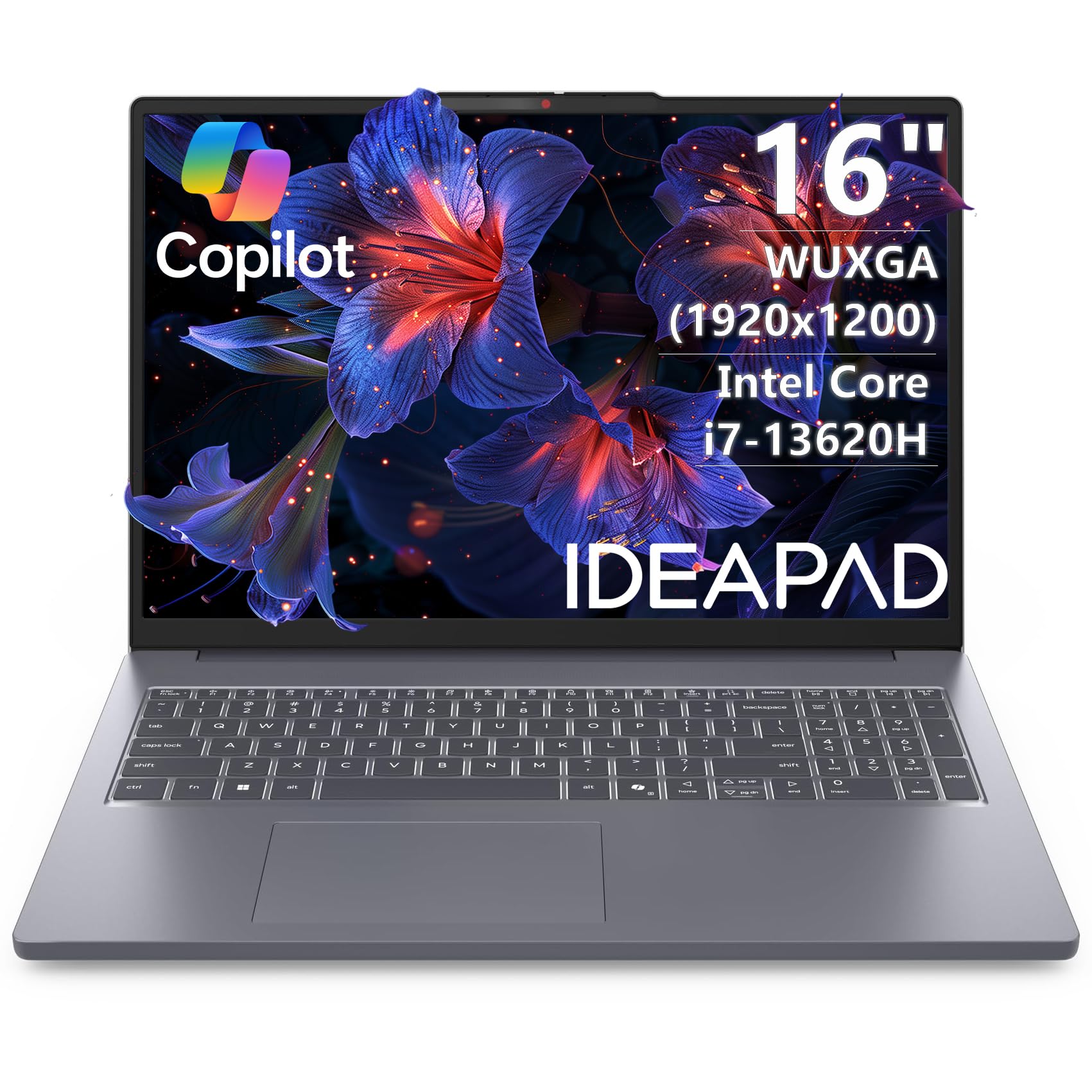
The Lenovo 16″ Premium Laptop is centered around the powerful Intel Core i7-13620H processor, a 10-core, 16-thread chip that provides strong multi-core performance for video encoding and rendering. Paired with 16GB of DDR5 RAM, it offers a snappy experience for 1080p and light 4K editing workflows. The 16-inch WUXGA (1920×1200) IPS display is a great canvas, and the taller aspect ratio gives you more vertical timeline space.
The build is surprisingly light at just 3.70 lbs, making it very portable for a 16-inch machine. The full-size keyboard with a numeric keypad is great for productivity and shortcuts. The Intel Arc Graphics handle basic acceleration, but this is not a machine for demanding GPU effects. The port selection is solid with USB-C with Power Delivery, HDMI, and an SD card reader, which is handy for ingesting footage from cameras.
This laptop is a smart choice for the editor who prioritizes a fast CPU, a decent screen, and light weight over dedicated graphics. It’s ideal for cutting videos on the go, handling multiple tasks, and exporting efficiently. It lacks the GPU power for heavy color grading or complex motion graphics, but for general editing and a portable form factor, it’s a very solid mid-range pick that values CPU performance and portability above all else.
Why it’s great
- Intel Core i7-13620H offers excellent multi-core performance for rendering and encoding.
- Lightweight 16-inch design at just 3.70 lbs for great portability.
- Taller 16:10 display provides more space for your timeline.
Good to know
- Relies on integrated Intel Arc Graphics, which are weak for GPU effects.
- 16GB of DDR5 RAM is a minimum; 32GB would be better for heavy multitasking.
- Standard 60Hz display is not optimized for fluid timeline scrubbing.
13. HP Laptop Intel N100
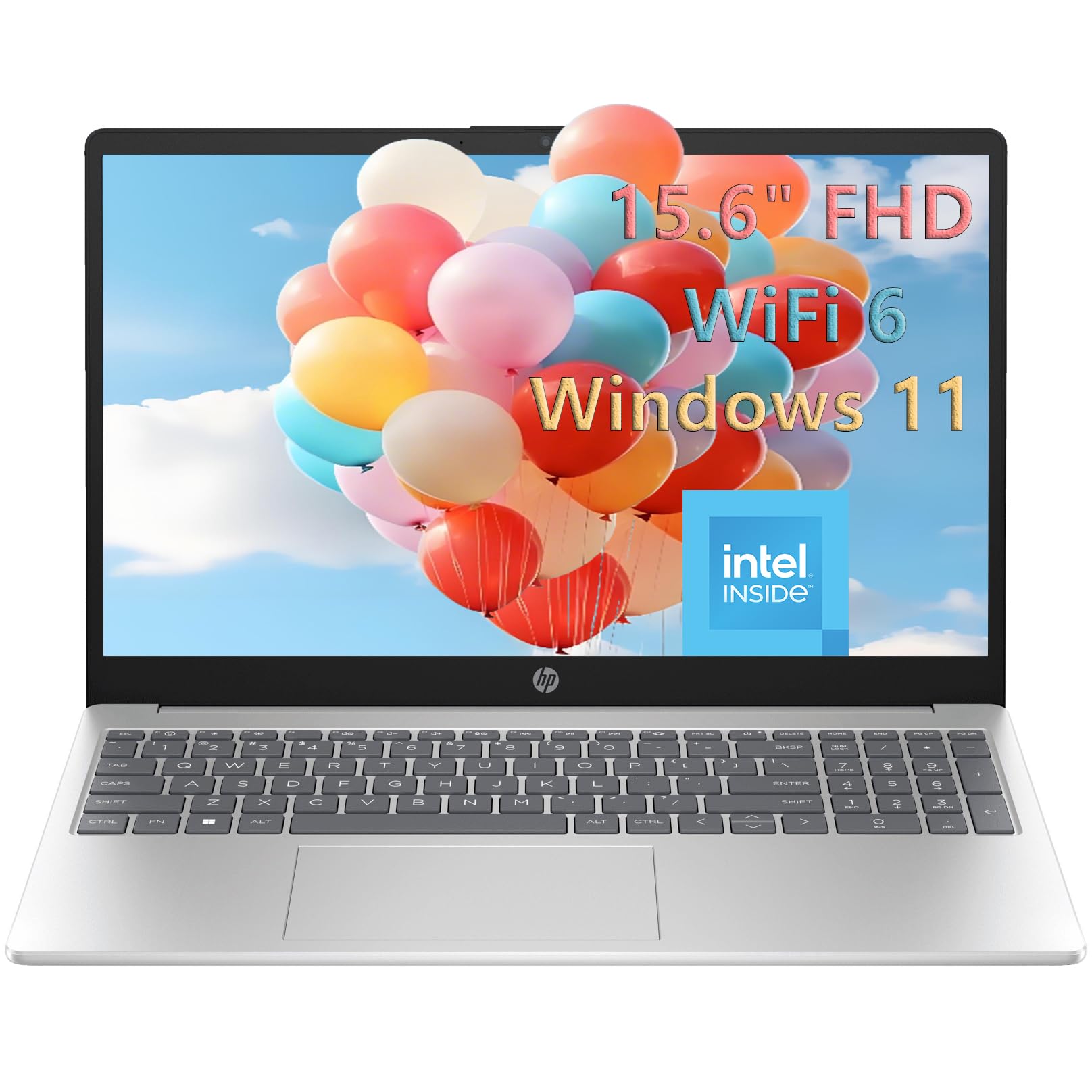
The HP Laptop with the Intel N100 is the most budget-friendly option on this list, and it’s the only one that relies on a low-power, efficient processor. It’s not a powerhouse for 4K editing, but for a student or someone just starting out with video editing, it offers a surprising amount of value. The key spec is the 32GB of DDR4 RAM, which is a massive amount for this tier and allows for smooth multitasking with basic editing software. The 1TB SSD ensures fast boot times and plenty of storage for projects.
The 15.6-inch FHD anti-glare display is decent for basic viewing, and the Intel UHD Graphics will handle light 1080p editing in apps like iMovie (if you dual-boot) or simple cuts in Premiere Rush. It’s a fantastic machine for learning the fundamentals of editing on software like DaVinci Resolve, where the 32GB of RAM will help with color page performance. The lightweight design at 3.64 lbs makes it very portable for moving between classes or a library.
The core limitation is the Intel N100 processor and its integrated graphics. It will not handle 4K timelines, heavy effects, or fast exports. This is a machine for learning, for cutting simple 1080p footage, and for basic personal projects. For anyone needing a computer for school, home, and to learn the basics of video editing without breaking the bank, the HP with the N100 and 32GB of RAM is a smart, highly affordable entry point.
Why it’s great
- 32GB RAM is exceptional for this price point, great for learning DaVinci Resolve.
- 1TB SSD provides plenty of storage for projects and files.
- Lightweight and portable at 3.64 lbs for student use.
Good to know
- Intel N100 and UHD graphics are very weak for video editing beyond 1080p basics.
- Not suitable for 4K timelines, heavy effects, or fast exports.
- Standard 60Hz display is not optimized for smooth scrubbing.
FAQ
Is 16GB of RAM sufficient for professional 4K video editing?
Do I need a dedicated GPU for video editing or will integrated graphics work?
What is more important for video editing: a faster CPU or a better GPU?
Does a high refresh rate display benefit video editors or only gamers?
Final Thoughts: The Verdict
For most users, the affordable laptops for video editing winner is the ASUS TUF Gaming F16 because it delivers the perfect balance of a dedicated RTX 4050 GPU, a fluid 144Hz display, and military-grade durability. If you want cutting-edge AI-powered performance and a high-refresh screen, grab the Acer Nitro V 16S AI. And for massive storage and RAM capacity that no other laptop in this range can match, nothing beats the NIMO 17.3″ AI Laptop.