
Our readers keep the lights on and my morning glass full of iced black tea. As an Amazon Associate, I earn from qualifying purchases.
You want to shave strokes off your game, but your wallet is not ready for a five-thousand-dollar pro unit. The problem is that many affordable launch monitors sacrifice accuracy on key metrics like carry distance or spin rate (how fast the ball rotates), leaving you to guess whether that 8-iron actually went 150 yards. This guide cuts through the hype to find the models that deliver consistent, usable data for every club in your bag.
I’m Min — the co-founder and writer behind Gadgets Feed. This guide is built by comparing the manufacturers’ published specifications and the patterns across verified customer reviews, so you get each pick’s real strengths and trade-offs instead of marketing spin.
The best affordable launch monitor should give you reliable carry distance (how far the ball flies through the air), ball speed, and launch angle (the angle the ball leaves the clubface) without demanding a second mortgage or a PhD in radar technology to operate.
How To Choose The Best Affordable Launch Monitor
Picking an affordable launch monitor means balancing the data you actually need against the cost of subscription fees and the space you have available. Here are the factors that separate a useful training tool from a frustrating gadget.
Tracking Technology: Radar vs. Camera
Doppler radar systems (like the Garmin Approach R10) bounce radio waves off the ball and club to measure speed and direction from behind the hitting area. Photometric (camera-based) systems (like the SkyTrak) take high-speed photos of the ball at impact, which can be more accurate indoors but usually require careful alignment with the ball position. Most affordable monitors in this range use Doppler radar because it is simpler to set up and works in both indoor nets and outdoor ranges.
Key Metrics: What Actually Helps You Improve
Carry distance is the single most important number for dialing in your irons — it tells you how far the ball actually flies through the air, not how far it rolls. Ball speed and club speed let you calculate smash factor (ball speed divided by club speed), which reveals how efficiently you are transferring energy to the ball. Spin rate and launch angle matter for controlling trajectory and stopping power on greens. Skip monitors that only show total distance; you need the component numbers to diagnose real swing issues.
Software and Subscription Costs
Many affordable monitors include a basic driving range app for free but charge extra for simulator course play or advanced stats. The Garmin Golf app costs roughly /month or /year for access to 42,000 courses. The SkyTrak Game Improvement package runs about /year, with third-party course software like E6 or TGC 2019 adding –600/year. Factor these subscription costs into your total budget, or look for options like the SC4 Pro that include five E6 courses with no monthly fee.
Quick Comparison
On smaller screens, swipe sideways to see the full table.
| Model | Category | Best For | Key Spec | Amazon |
|---|---|---|---|---|
| IZZO Swami Launch Master Pro | Mid-Range | Full swing data suite | 430-yard sensing range | $399.99$499.99Amazon |
| Garmin Approach R10 | Mid-Range | Portable range practice | 10-hour battery life | $407.99$484.63Amazon |
| SC4 Pro | Premium | Built-in screen & no subscriptions | 5 free E6 courses | $498.99$599.99Amazon |
| Rapsodo MLM2PRO | Premium | Video swing capture & impact vision | Dual camera + Doppler radar | $599.98$699.99Amazon |
| SkyTrak | Premium | Photometric indoor accuracy | Camera-based tracking | $599.00Amazon |
| SkyTrak with Metal Case | Premium | Indoor simulator with stable setup | Incl. metal protective case | $678.84Amazon |
In‑Depth Reviews
1. Garmin Approach R10
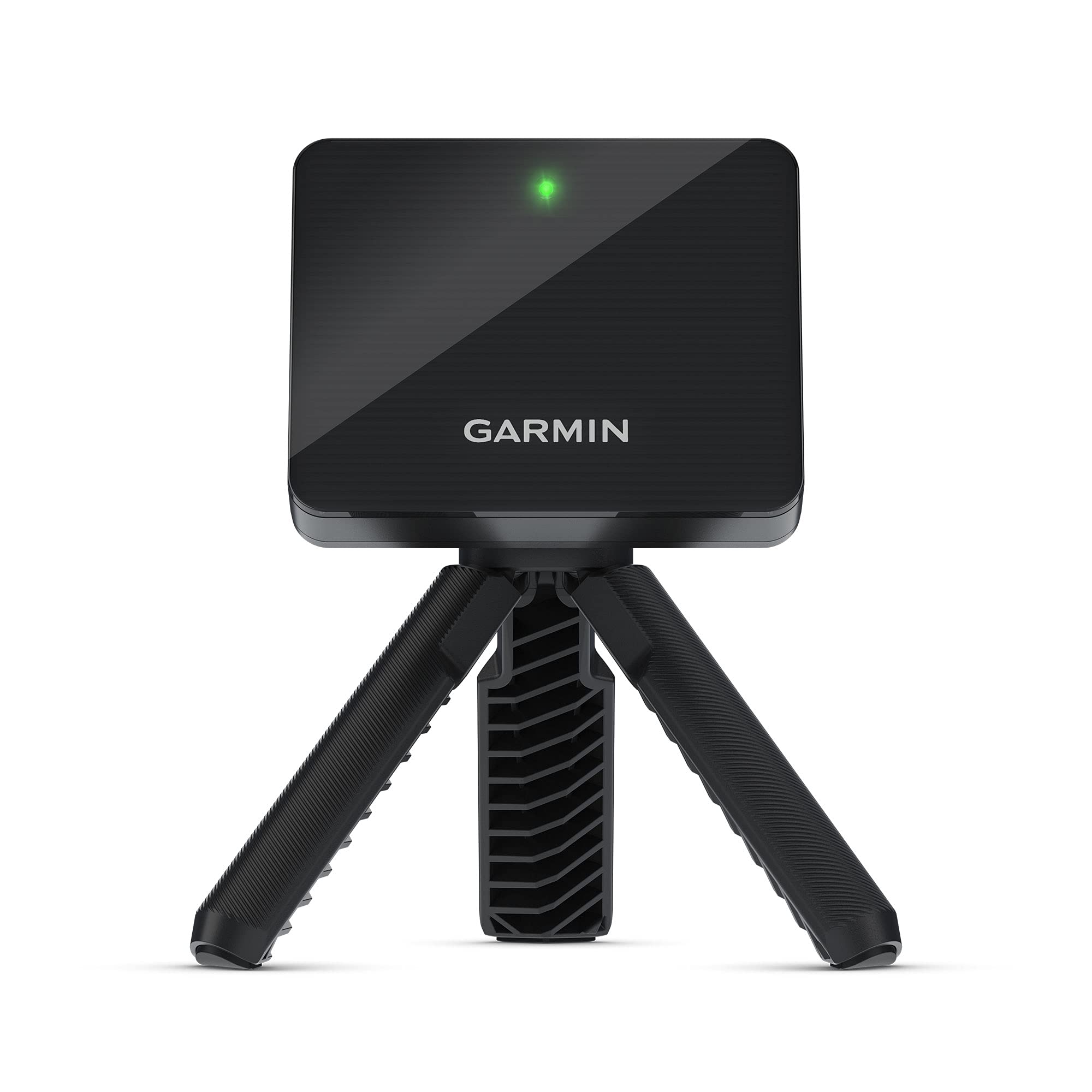
The Garmin Approach R10 earns the top spot because it gives you reliable club head speed, ball speed, spin, and launch angle from a package that weighs only 340 grams — 74% lighter than chunkier alternatives like the SC4 Pro, so you can toss it in your bag for range sessions without a second thought. This monitor suits the golfer who wants accurate feedback without wrestling with a heavy carry case or spending hours on setup.
Buyers report that the R10 is roughly 98% as accurate as monitors costing five times as much, meaning you can trust the numbers to dial in your iron distances. The 10-hour battery lasts multiple range trips without charging, and the included phone mount attaches to your bag so you see your metrics on the Garmin Golf app hands-free. It tracks ball spin axis and swing tempo through Doppler radar, giving you a complete picture of each shot.
The catch is that the Garmin Golf app itself is mediocre — many users prefer connecting to third-party apps like E6 or Awesome Golf for better graphics, which adds a monthly subscription of roughly . Also, it does not measure club face angle at impact (whether the face was open or closed), so you miss that diagnostic data. For most amateurs who want reliable carry distances and a portable setup, this is the best affordable entry point.
Why it’s great
- Excellent portability at just 340 grams
- 10-hour battery covers a full day of practice
- Pairs with multiple simulator apps for flexibility
Good to know
- Does not measure club face angle at impact
- Garmin Golf app is basic; best features require third-party subscriptions
- Requires precise alignment down the target line
2. Izzo Swami Launch Master Pro

Compared to the top-pick Garmin R10, the Izzo Swami Launch Master Pro delivers more raw metrics — including attack angle and smash factor — at a similar price, but its consistency lags: driver and wood readings are accurate, while irons from 7-iron down to wedge can be off by 10-15 yards, a meaningful gap when dialing in your 150-yard club.
Where the Izzo shines is its 430-yard sensing range, which covers every club from wedge to driver without any setup fuss, and its built-in live weather sensors that adjust readings for temperature, humidity, and altitude. If you practice outside on varying conditions, you get real-world shot analysis that reflects what the ball actually does in that environment. The integrated voice output and hands-free club selection also make it easy to use without constantly looking at a phone screen.
Choose the Izzo Swami over the Garmin R10 if you mostly hit driver and woods and want attack angle and smash factor data without any app subscription — it has no recurring fee for basic use. Avoid it if you need reliable wedge and short-iron numbers to tighten up your approach shots, where the R10 is more trustworthy.
Where it shines
- Tracks attack angle and smash factor for deeper swing analysis
- 430-yard sensing range covers every club type
- Live weather sensors adjust for temperature, humidity, and altitude
Worth noting
- Short iron and wedge distances reported 10-15 yards off by multiple users
- No companion app for detailed stat tracking or simulator courses
- Larger and heavier than the Garmin R10
3. SC4 Pro

If you are building a home simulator and want to avoid monthly subscription fees, the SC4 Pro is the only monitor in this price range that includes five free E6 Connect courses and a 3D driving range with no recurring cost. The built-in screen and voice output let you see your shot data directly on the device, so you do not need a phone or tablet running for basic practice — just set it on the ground and hit.
The SC4 Pro uses the Prometrics Engine to track ball speed, club speed, carry distance, spin rate, launch angle, and smash factor. Buyers confirm it delivers reliable data for both indoor net practice and outdoor use. It needs about 14 feet of space between the monitor and the net for best results, typical for Doppler radar units, and it works with standard golf balls — no special marked balls required. Multiple training modes including speed training and target practice keep sessions focused.
Not every shot is perfect, though — one reviewer noted carry distances being off by up to 40 yards on a driver, with wedges also reading short by 10-15 yards. The SC4 Pro weighs 590 grams, noticeably heavier than the Garmin R10, so it is less convenient for throwing into a bag. If you want a dedicated home simulator tool with no subscription worry and can live with occasional accuracy quirks, this is the only monitor in its price class that gives you five free courses and a 3D range with zero recurring cost.
What stands out
- Five free E6 Connect courses included with no monthly fee
- Built-in screen shows data without needing a separate device
- Multiple training modes for speed, practice, and target work
The trade-offs
- Heavier than competitors at 590 grams; less portable
- Some users report significant carry distance errors on driver and wedges
- Requires 14-foot clearance to net for best accuracy
4. Rapsodo MLM2PRO

The single number that matters most in this category is the number of metrics tracked, and the Rapsodo MLM2PRO tracks 15 metrics including spin axis (the tilt of the spin), club path (the direction the club swings), and carry distance, but its standout feature is the dual camera setup that captures your actual swing on video and shows slow-motion impact vision — something no other monitor under offers. It also includes a 45-day premium trial that unlocks over 30,000 simulated courses for you to test before subscribing.
The downside you accept for this feature depth is connection reliability. Multiple owners mention that the WiFi connection frequently drops mid-round, requiring you to reset the unit or switch to direct WiFi mode for stable operation. The monitor also needs special Callaway RPT Chrome Soft X golf balls for accurate spin data, and these balls are expensive and wear out after a few sessions. Short chips under 10 yards often do not register at all.
Price-to-performance, the MLM2PRO is the most feature-rich affordable monitor if you are willing to manage its quirks — customers note it helped them shave 10-15 strokes off their game. The video capture of swing and impact is genuinely useful for visualizing what your body is actually doing. Just budget for replacement balls and expect occasional connectivity frustration, which gives it a price-to-value read that rewards patience over plug-and-play convenience.
The upsides
- Dual camera captures swing video and slow-motion impact for deep analysis
- Tracks 15 metrics including spin axis, club path, and smash factor
- 45-day premium trial lets you test simulator courses before subscribing
Keep in mind
- Frequent WiFi disconnections reported; direct mode required for reliability
- Requires expensive special golf balls for accurate spin data
- Does not read short chip shots under about 10 yards
5. SkyTrak

What you actually get at this lower price is a photometric (camera-based) launch monitor that takes high-speed photos of the ball at impact, giving it an edge over Doppler radar units for indoor use where ceiling fans or garage clutter can interfere with radar signals. It measures ball speed, launch angle, spin rate, and carry distance with real-time 3D ball flight visualization on your connected device.
What you give up is portability — the SkyTrak requires careful alignment with the ball position, and the laser alignment can stop working if the unit is not perfectly level. Some users report it reads carry distances about 10-15 yards short, which you can partially compensate for by adjusting elevation and temperature settings in the software. It also has a high rate of missed shots — one reviewer says it only tracks about half of their swings despite careful setup.
The price-to-performance read here is that the SkyTrak is an established name in the home simulator community with a loyal following, and when it works well, the data is solid. The base unit only includes driving range software; the Game Improvement package costs roughly /year, and third-party course software adds another -600/year. For the indoor-only golfer who wants photometric accuracy and is willing to tinker with alignment, the SkyTrak remains a viable option — it is perfect for the budget buyer who prioritizes indoor photometric accuracy over portability and is willing to accept setup fuss and occasional missed shots.
Why we’d pick it
- Photometric tracking is less affected by indoor interference than radar
- Real-time 3D ball flight visualization for immediate feedback
- Strong community and third-party software ecosystem
A few caveats
- High rate of missed shots and alignment fussiness reported
- Software subscriptions add -700/year for full simulator access
- Carry distance can read 10-15 yards short without manual compensation
6. SkyTrak with Metal Protective Case

The SkyTrak with Metal Protective Case exists for one specific buyer: the home simulator builder who has an uneven garage or basement floor and needs a rock-solid, level surface for the photometric camera to work reliably. The metal case includes three leveling legs that let you adjust for floor slopes, which directly addresses the most common complaint about the base SkyTrak — that it misses shots when not perfectly level.
What that extra money actually gets you is the same SkyTrak unit with the same accuracy and the same software limitations, now bundled with a case that solves the alignment stability problem. Buyers confirm the metal case is essential if your hitting area has any floor unevenness, and the leveling legs make setup much faster than trying to shim the base unit with cardboard. The package weight jumps to 3.43 kilograms, so this is a stationary home setup, not a portable range companion.
The one reason to choose this bundle over the base SkyTrak is if you know your practice space has an uneven floor and you want to eliminate the biggest variable in missed-shot frustration. Just keep in mind that the subscription cost trap still applies — you will need the /year Game Improvement package plus third-party course software for a full simulator experience, and some users report the device still only reads 1 in 10 shots even with proper leveling.
Strong points
- Metal case with leveling legs solves the alignment issue on uneven floors
- Same photometric accuracy as the standard SkyTrak in a stable package
- Protects the unit from impact damage from stray shots
Before you buy
- Heavy bundle at 3.43 kg; not portable for range use
- Same read-rate issues as base SkyTrak — some users still see missed shots
- Subscription costs for simulator access add up to hundreds per year
Understanding the Specs
Doppler Radar vs. Photometric
Doppler radar units like the Garmin R10 and SC4 Pro bounce radio waves off the ball and club to measure speed, direction, and spin. They work well outdoors or in spaces with at least 8-14 feet of clearance behind the ball. Photometric (camera-based) units like the SkyTrak use high-speed photography to track the ball at impact, which can be more accurate indoors but require careful ball placement and level alignment to avoid missed readings.
Smash Factor and Spin Rate
Smash factor is a simple calculation (ball speed divided by club speed) that tells you how efficiently your swing transfers energy to the ball — a number above 1.45 generally indicates a well-struck shot. Spin rate measures how fast the ball rotates in revolutions per minute (RPM); too low and the ball won’t hold greens, too high and you lose distance. A launch monitor that gives you both numbers lets you diagnose whether a poor shot was from mishitting or poor swing mechanics.
FAQ
Do I need special golf balls for an affordable launch monitor?
How much space do I need indoors for a launch monitor?
Can I use an affordable launch monitor for putting practice?
Final Thoughts: The Verdict
For the majority of shoppers, the best affordable launch monitor winner is the Garmin Approach R10 because it combines lightweight portability at 340 grams, 10-hour battery life, and verified accuracy that is roughly 98% as good as professional units — without needing special balls or constant fussing with alignment. If you want a dedicated home simulator unit with zero subscription fees and a built-in screen, grab the SC4 Pro. And for the golfer who needs swing video analysis and 15 tracked metrics to shave strokes, the Rapsodo MLM2PRO delivers the most features — if you can tolerate its connection quirks.
Product prices and availability are accurate as of the date/time indicated and are subject to change. Any price and availability information displayed on Amazon at the time of purchase will apply to the purchase of this product. As an Amazon Associate I earn from qualifying purchases.
CERTAIN CONTENT THAT APPEARS ON THIS SITE COMES FROM AMAZON. THIS CONTENT IS PROVIDED "AS IS" AND IS SUBJECT TO CHANGE OR REMOVAL AT ANY TIME.
Amazon and the Amazon logo are trademarks of Amazon.com, Inc. or its affiliates.