
Our readers keep the lights on and my morning glass full of iced black tea. As an Amazon Associate, I earn from qualifying purchases.
Specs are compiled from manufacturer listings and verified buyer reviews and can change over time — please confirm the key details on the product page before buying.
You want a first MIDI keyboard that feels natural under your fingers, not a maze of key counts, pads, knobs, and software bundles that leaves you fighting your gear. For most beginners, the balance is a 25-key controller with a responsive keybed and enough pads and knobs to shape your sound—without emptying your wallet. This guide cuts through the spec sheet noise so you can match the controller to your studio setup and playing style.
I’m Min — the founder and writer behind Gadgets Feed. This guide is built by comparing the manufacturers’ published specifications and the patterns across verified customer reviews, so you get each pick’s real strengths and trade-offs instead of marketing spin.
We’ve analyzed the top contenders to bring you the definitive list of the affordable midi keyboard options that deliver premium features without the premium price tag.
Our Picks at a Glance



How To Choose The Best Affordable MIDI Keyboard
The first decision is about your workflow, not the price tag. If you’re producing beats and electronic music, a compact 25-key controller with drum pads is your best friend. If you’re learning piano or playing chord-heavy parts, you’ll want the extra range of a 49-key model.
Key Count: 25 Keys vs 49 Keys
A 25-key controller is perfect for a cramped desk and for triggering samples and basslines, as it fits easily in a backpack. A 49-key board gives you two full octaves of range for two-handed playing, which is why piano-style players and hobbyists tend to prefer the larger format.
Pads, Knobs, and Control
Beyond the keys themselves, the control surface defines your creative flow. Drum pads let you finger-drum beats and launch clips, while assignable knobs let you tweak synth filters and plugin settings in real time without reaching for your mouse. Consider how many physical controls you need for your specific DAW workflow before you commit.
Quick Comparison
| Model | Best For | Key Count | Drum Pads | Connectivity | Amazon |
|---|---|---|---|---|---|
| Akai MPK Mini IV★ Best Overall | Beat Making & Production | 25 | 8 | USB-C | Amazon |
| Arturia MiniLab 3Premium Pick | Premium Pads & Keys | 25 | 8 | USB-C, MIDI Out | Amazon |
| Novation Launchkey MiniTop Performer | Ableton Live Workflow | 25 | 16 | USB | Amazon |
| Arturia MicroLab Mk3 | Ultra-Portable Travel | 25 | 0 | USB-C | Amazon |
| Korg nanoKEY2 | Budget Travel Keys | 25 | 0 | USB | Amazon |
| M-VAVE SMK-25 | Wireless Bluetooth Use | 25 | 8 | Bluetooth, USB | Amazon |
| RockJam RJMK25 | Budget All-Rounder | 25 | 8 | Bluetooth, USB | Amazon |
| midiplus AK490+ | 49-Key Piano Style | 49 | 0 | USB | Amazon |
| Nektar SE61 | DAW Integration Control | 61 | 0 | USB | Amazon |
In‑Depth Reviews
1. Akai Professional MPK Mini IV
Our pick — over 4.5★ from 850+ verified ratings; the strongest balance of quality and price.
The MPC pads and arpeggiator turn this tiny board into a full beat lab.
Owners consistently call this the best value in the mini category, and the build quality is the first thing that wins them over—it packs a lot into a compact frame that’s still big enough to use properly. The 25 mini velocity-sensitive keys (keys that respond to how hard you press) respond well, and the 8 iconic MPC pads with RGB feedback (color-coded lights that show pad activity) give you a genuine finger-drumming experience.
What sets the MPK Mini apart is the real-time control: 8 assignable 360° knobs and a full-color screen with a push/turn encoder let you tweak presets without reaching for your computer. It comes pre-mapped for Ableton Live Lite 12, Logic Pro, and FL Studio, so you’re producing within 15 minutes. The bundle includes 1000+ pro-grade sounds from AIR, Akai Pro, and Moog, plus a 30-day Melodics trial and 2 months of Splice.
Owners coming from other controllers note the pitch/mod wheels beat the old joystick designs, making this feel like a real instrument rather than a toy. The trade-off is the mini key size—players used to weighted piano actions will find them cramped, and the plastic build is sturdy but not premium.
What Wins People Over
- MPC pads deliver a punchy, responsive finger-drumming feel with visual feedback
- Built-in arpeggiator with Pattern, Freeze, and Mutate functions sparks instant ideas
- USB-C with a full-size MIDI Out for connecting to external gear
Know Before You Buy
- Mini keys feel cramped for players coming from weighted pianos
- You can’t hear pad sounds while editing them on the device
Reach for this if: you want an all-in-one beat-making tool where pads, keys, and knobs all shine at a value price.
Think twice if: you have large hands and hate mini-sized keys—you’ll be fighting the layout.
2. Arturia MiniLab 3
A new mini display and fader make this the most control-packed 25-key board.
The MiniLab 3 steps up from the MicroLab with 8 multi-color drum pads and 8 knobs, all wrapped in a solid, responsive frame—the keys and pads are the thing everyone raves about for immediate response. It includes a new mini display and a fader, giving you high control and ease of use that punches well above its size.
Arturia bundles Analog Lab Intro with 500 curated presets and Ableton Live Lite, so you can start creating the day it arrives. The USB-C connection works with computers and iPads, and the 5-pin DIN MIDI out lets you control external hardware synths directly. The eco design uses over 50% recycled materials without sacrificing durability.
Owners find it instantly usable with Reaper and standalone synths, with one noting a song was made within 10 minutes of unboxing. The catch is that auto-mapping for knobs may not work perfectly on iPad with Logic or GarageBand, requiring some manual setup. It’s pricier than the MicroLab, but you’re paying for the extra pads, fader, and display.
The Upgrade That Matters
- 8 multi-color pads and a fader add a new dimension of live control
- USB-C plus 5-pin MIDI Out connects to computers and external synths
- Keys and pads get praised for being super responsive from the start
The Catch
- Knob auto-assign may not work on iPad without manual mapping
- Support response is slow if you run into setup hurdles
Choose it for: the most polished 25-key experience with the best software bundle from Arturia.
Look elsewhere if: you only need basic keys and want to save money—the MicroLab covers that.
3. Novation Launchkey Mini 25 MK4
Sixteen FSR pads with aftertouch make this a clip-launching, drumming powerhouse.
The Launchkey Mini is built for deep Ableton Live integration, but it works with all major DAWs including Logic, Cubase, Reason, Reaper, and FL Studio. The standout feature is its 16 responsive FSR drum pads with polyphonic aftertouch—these don’t just finger-drum, they also serve as step sequencers, clip launchers, and chord triggers.
Creative tools are everywhere: Scale Mode keeps you from hitting wrong notes, Chord Mode triggers lush chords from a single key, and the arpeggiator creates and mutates wild patterns. It’s NKS-ready, meaning it integrates with Native Instruments software for hands-on control.
The box includes Ableton Live Lite, Cubase LE, Novation Play, plus sounds from GForce, Klevgrand, and Orchestral Tools. Owners say the hardware and pads are great value, small enough to fit in a backpack, and one complete beginner noted it made them “seem like a pro dj in minutes” when combined with Ableton. The main friction point is the bundled software—it requires signing up for separate accounts with invasive permissions.
The Creative Engine
- 16 FSR pads with polyphonic aftertouch for expressive drumming and clip launching
- Scale and Chord modes make it impossible to hit a wrong note
- NKS-ready with smooth Native Instruments integration
What to Expect
- Bundled software requires separate account sign-ups with privacy concerns
- No built-in sound—you need a computer with monitors to hear anything
Grab this for: clip launching and finger drumming, especially if you live inside Ableton Live.
skip it if: you want a simple keys-only controller without the extra pad surface.
4. Arturia MicroLab Mk3

The upgraded keybed gives you the best slim keys at a budget-friendly price.
This is the keys-first controller for musicians who value portability above all else. The MicroLab Mk3 uses the same upgraded keybed as the MiniLab 3, which owners describe as the best quality slim keys you’ll find at this price point. It’s small, lightweight, and USB-powered, fitting easily into a backpack for mobile music-making.
Instead of pads and knobs, you get four buttons and two touch strips for intuitive control, plus a massive bundle: 500 curated presets from Analog Lab Intro and Ableton Live Lite for instant production. As buyers report, it’s “pretty plug and play,” working with FL Studio easily right from the start.
The honest trade-off is the key size—it’s designed for on-the-go, so the keys are slim. If you don’t care about portability, a larger controller with standard-sized keys will feel more like a real piano. But for a travel companion that feels genuinely good to play, this is the pick.
The Verdict: The most portable pick with the best slim keybed in its class, bundled with 500 presets and Ableton Live Lite.
Fit Check: Best for travelers and hobbyists—not for players who need standard-sized piano keys.
5. M-VAVE SMK-25

A built-in 2000 mAh battery and Bluetooth free you from the desk entirely.
This is the wireless workhorse of the group. The M-VAVE SMK-25 packs a built-in 2000 mAh battery that runs for about 16 hours, plus Bluetooth connectivity, so you can slip it into a bag and compose at a cafe, hotel, or studio without a single cable. Owners find it ideal for rehearsing with iPhone or iPad via Bluetooth with minimal latency.
You still get 25 velocity-sensitive keys, 8 RGB backlit velocity-sensitive pads, 8 assignable rotary encoders, and 2 capacitive touch strips for pitch bend. It’s compatible with Windows, Mac OS, Android, and iOS, and works with Ableton Live, FL Studio, Cubase, Logic Pro X, and more. The smart chord and scale functions are great for live performance.
The main frustration is the editor software—owners mention the CubeSuite app is hard to find and fails on older Mac OS versions. The pads, touchpads, and endless encoders are excellent, though the keybed is average. For wireless freedom at this price, it’s a standout.
The Freedom Factor: 16 hours of battery and Bluetooth make this the best pick for mobile, cable-free composing.
Fair Warning: The editor software is frustrating to locate and may not work on all Mac OS versions.
6. Korg nanoKEY2

A pocketable, no-frills 25-key board that travelers swear by.
This is the no-nonsense budget pick that has earned a loyal following for its sheer portability—it’s tiny, cheap, and sturdy, fitting into a computer bag without a second thought. The low-profile 25-key design uses chiclet-style keys that some owners find more accurate for typists, and it’s pressure-sensitive for expressive playing.
Functionality is the thing everyone praises, with the board being completely plug-and-play via USB with no setup issues on PC, Mac, Android, or iOS. A dedicated sustain button makes entering piano parts simple. The keys feel reminiscent of a laptop keyboard—great for beginners and on-the-go recording.
The trade-off is the key size and feel. Owners note the keys wiggle sideways slightly, and piano players find the laptop-style keys awkward. It’s ultra-portable and no-frills by design, so if you need pads or knobs, this isn’t it. For a durable, pocketable travel companion at a budget price, it’s hard to fault.
The Bottom Line: The most affordable, durable, pocketable 25-key option for beginners and travelers.
Not For: Piano players needing real keys or producers needing drum pads and knobs.
7. Nektar SE61

Five full octaves with deep DAW integration for serious keyboard players.
If you need range, the SE61 delivers with 61 full-size keys, making it the best pick for playing two-handed piano parts and classical pieces. Owners specifically praise its touch sensitivity—one noted it works beautifully when playing actual classical piano pieces with sample plug-ins. The keybed is solid with no flex.
Nektar’s DAW integration is the headline feature, giving you deep control over most popular DAWs like Cubase, Logic, Reason, Reaper, and Studio One. It’s Mac, PC, and iOS compatible everywhere. The box includes a Bitwig Studio 8-track DAW license plus a sound content package, so you get a full production suite from the start.
The build is light and portable for a 61-key board, though the construction feels budget-oriented. A rare unit may have a key that doesn’t work or takes 30 seconds to respond on startup. For the price, you’re getting a lot of keys and excellent DAW integration, which is why owners call it amazing value.
The Big Win: The most keys for the money with professional DAW integration and impressive touch sensitivity.
Occasional Hiccup: A few units arrive with a dead key or slow startup—worth testing immediately.
8. midiplus AK490+

A 49-note semi-weighted keybed for budget-conscious piano-style players.
This is the budget route to a larger keybed. The AK490+ is a 49-note semi-weighted piano-style controller that includes pitch and modulation wheels, octave buttons, and a sustain pedal input—all powered by a single USB cable. It’s a compact footprint that’s ideal for tight desk spaces, as owners note it’s better than mini 25-key options.
You get a surprising amount of features for the price: arpeggiator, chord modes, transposing controls, and programmable knobs. The controls work with most DAWs including MAGIX Music Maker, Melodics, LMMS, and FL Studio. The included AKM322 editor allows deep customization, though it downloads as a RAR file that needs 7-Zip to extract.
The honest caveat is the key feel. Owners consistently note the keys are stiff with a short hinge, making fast playing difficult and velocity control tricky—there’s a VEL mode to help. This is a functional, feature-packed starter keyboard, not a performance instrument. If key feel matters most, this isn’t the one.
The Value Pitch: The cheapest way to get 49 semi-weighted keys with arpeggiator and chord features.
The Catch: Keys are stiff and hard to control for fast, expressive playing.
9. RockJam RJMK25
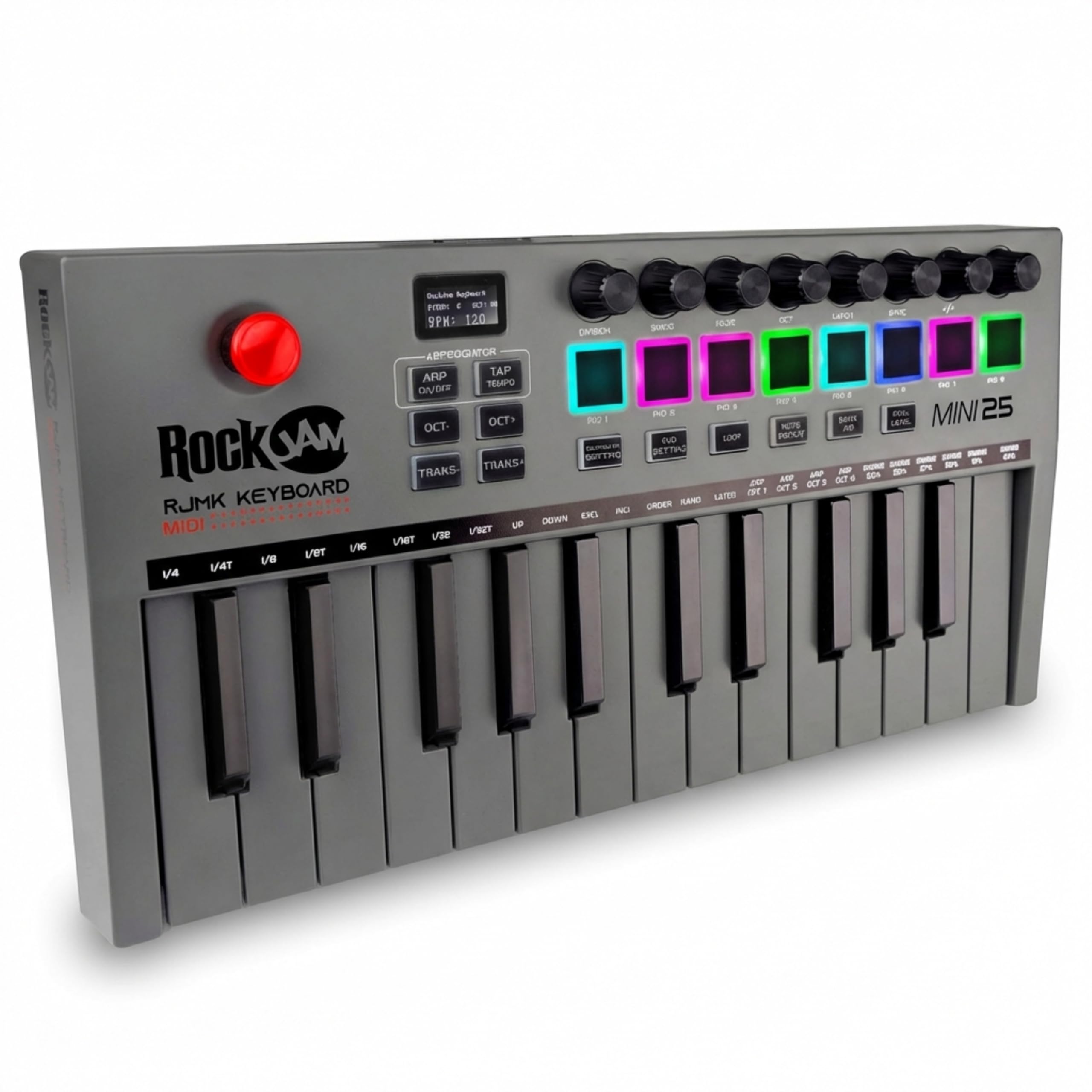
A rechargeable 25-key board with pads and knobs for a rock-bottom price.
The RockJam delivers core features at a budget price: 25 velocity-sensitive mini keys, 8 backlit MPC-style drum pads with note repeat, and 8 assignable 360° knobs. It’s rechargeable with a built-in battery and a compact 13.5 x 6.89 x 1.89-inch frame weighing 1.8 pounds, making it genuinely portable for studio and travel.
Quality is the thing owners praise most at this price point, and the value is excellent for basic DAW note and beat input. The USB MIDI connection is plug-and-play with major music production software, and Bluetooth works for wireless tablet connection, though some owners note initial connection issues.
The compromises are clear: the trigger pads need hard hits to respond reliably, the keys are small and springy, and Bluetooth doesn’t connect well with GarageBand or Logic Pro. This is a functional budget tool for recording beats, not a performance instrument—ideal if you’re just starting out and want to test the waters.
The Deal: The most affordable way to get keys, pads, knobs, and rechargeable battery in one package.
Set Expectations: Pads need hard hits and Bluetooth is unreliable with some DAWs.
Understanding the Specs
Velocity-Sensitive Keys
This means the keyboard senses how hard you press a key, just like a real piano, so you can play softly for quiet notes or hit hard for a loud, aggressive sound. It’s the difference between a keyboard that feels like a toy and one that responds to your playing dynamics, making your performances sound more human and expressive.
DAW Integration and Bundled Software
A DAW is your digital audio workstation—the software where you record and arrange your music. Bundled software like Ableton Live Lite gives you a full production suite free, and DAW integration means your keyboard’s buttons automatically map to that software’s controls, so you can start recording within minutes without messy manual setup.
FAQ
What is the difference between 25-key and 49-key MIDI controllers?
Do I need drum pads on a MIDI keyboard?
Can I use a MIDI keyboard with my iPad or phone?
What does velocity-sensitive mean and why does it matter?
How do arpeggiator and chord modes help beginners?
What is the difference between a semi-weighted and a synth-action keybed?
Is an affordable MIDI keyboard durable enough for travel?
Should I buy a keyboard with knobs and faders or just keys?
Final Thoughts: The Verdict
For most buyers, the affordable midi keyboard winner is the Akai MPK Mini IV because it delivers the best combination of pads, keys, knobs, and bundled software at a value price. If you want the most polished keybed and premium feel, grab the Arturia MiniLab 3. And for deep Ableton Live integration and clip launching, the Novation Launchkey Mini is the one to reach for.
How We Picked
We do not accept paid placement. Every pick is matched to a real buyer and a real use-case; we do not hands-on test units.
Sources & Methodology
Specifications: manufacturer listings and product documentation. Review insights: verified customer reviews, as of August 2026. Pricing: not shown on this page (it changes often); check the current price via the retailer link.
As an Amazon Associate, Gadgets Feed earns from qualifying purchases. This does not affect which products we feature.