
Settling for a blurry, low-refresh screen isn’t a requirement when your budget is tight. The current monitor market offers a surprising wealth of high-resolution panels with refresh rates that make scrolling feel buttery smooth, all without demanding a premium investment. The key is knowing where to look and which specs matter for your specific blend of productivity and play.
I’m Min — the co-founder and writer behind Gadgets Feed. I’ve spent countless hours analyzing the latest panel technology, combing through customer feedback on color accuracy, build quality, and real-world refresh rate performance to separate marketing hype from genuine value in this crowded market.
For anyone looking to upgrade their workspace or gaming setup without breaking the bank, this guide provides a definitive breakdown of the best affordable monitor choices available today.
How To Choose The Best Affordable Monitor
An affordable monitor isn’t just about the lowest sticker price. It’s about finding the perfect intersection of resolution, panel quality, refresh rate, and ergonomic features that match your daily use case. Making the wrong compromise here can mean eye strain, poor color reproduction, or the need to upgrade again sooner than expected.
Resolution: The Core Trade-Off
1080p (Full HD) remains the budget-friendly standard, offering sharp text for office work and easy driving for any graphics card. A step up to QHD (2560×1440) dramatically increases pixel density, providing a much sharper image for productivity tasks like coding or photo editing without the GPU demands of 4K. For most users on a budget, QHD hits the sweet spot. 4K offers the ultimate sharpness but requires a more powerful GPU for gaming and can make standard text look small at 27 inches.
Refresh Rate: Beyond Gaming
A 60Hz monitor feels jittery once you’ve used a 100Hz or 120Hz panel. A higher refresh rate isn’t just for competitive gamers; it makes every cursor movement, window drag, and web page scroll feel fluid and responsive, reducing eye fatigue over a long workday. Most modern affordable monitors now start at 100Hz, a significant baseline improvement.
Panel Technology: IPS is King
IPS (In-Plane Switching) panels have become the standard for affordable monitors. They offer superior color accuracy and wide viewing angles compared to older TN panels, and better color consistency than many budget VA panels. For a general-purpose or creative display, always prioritize an IPS panel for the most vibrant and true-to-life image.
Quick Comparison
On smaller screens, swipe sideways to see the full table.
| Model | Category | Best For | Key Spec | Amazon |
|---|---|---|---|---|
| MSI PRO MP275Q | QHD | Office & Media | 27″ QHD IPS, 100Hz, 1300:1 Contrast | Amazon |
| Dell SE2725HM | FHD | Home Office | 27″ FHD IPS, 100Hz, ComfortView Plus | Amazon |
| Samsung S40GD | FHD | Ergonomic Setup | 27″ FHD IPS, 100Hz, Height/Pivot Adjust | Amazon |
| Acer Nitro KG271U | QHD | Gaming & Media | 27″ QHD IPS, 180Hz, 0.5ms | Amazon |
| Amazon Basics 27 | FHD | Simple Office Setup | 27″ FHD IPS, 100Hz, Built-in USB Hub | Amazon |
| AOC Q27G41ZE | QHD | High-Performance Gaming | 27″ QHD IPS, 240Hz (OC 260Hz), 0.3ms | Amazon |
| Alienware AW2725DM | QHD | Competitive Gaming | 27″ QHD IPS, 180Hz, 400 nits, VESA HDR400 | Amazon |
| ASUS ProArt PA278CV | QHD | Color-Critical Work | 27″ QHD IPS, 75Hz, ΔE < 2, USB-C 65W | Amazon |
| Dell S2725QS | 4K | High-Resolution Productivity | 27″ 4K IPS, 120Hz, 1500:1 Contrast | Amazon |
In‑Depth Reviews
1. MSI PRO MP275Q

This monitor delivers on its promise of high-value imaging. The 27-inch IPS panel running at a native QHD resolution of 2560 x 1440 provides a pixel density that makes text razor-sharp for coding and document work. With a contrast ratio of 1300:1 and 300 nits of brightness, blacks appear deeper and colors more vibrant than typical budget IPS offerings.
The 100Hz refresh rate with FreeSync support is the real standout here. It transforms the daily computing experience from the standard 60Hz jitter to a fluid glide, making window management and web browsing feel significantly more responsive. The tool-free stand assembly and integrated cable management clip are thoughtful touches that reduce setup friction.
While the 2W built-in speakers are acceptable for system sounds and conference calls, they lack the depth for media consumption. The stand offers tilt adjustment only, so users needing height or pivot will require a VESA arm. For anyone prioritizing sharp QHD resolution and a superior refresh rate at an entry-level price, this is the clear leader.
Why it’s great
- Sharp QHD resolution for enhanced productivity
- 100Hz refresh rate with FreeSync for smooth motion
- Excellent 1300:1 contrast ratio for deeper blacks
Good to know
- Stand only adjusts for tilt
- Built-in speakers are basic
- HDMI cable included instead of DisplayPort
2. Dell 27 Monitor SE2725HM

Dell brings its enterprise-grade consistency to the budget market with the SE2725HM. The 27-inch Full HD 1080p IPS panel is calibrated for a uniform color temperature and features a matte anti-glare coating that handles bright office lighting without washing out the image. The 100Hz refresh rate and FreeSync support ensure that desktop navigation feels modern and tear-free.
ComfortView Plus is the headline feature here, minimizing harmful blue light emissions to below 35% without the yellow cast that plagues software-based filters. This makes it an excellent choice for users who spend long hours reading or editing documents. The small-footprint stand and integrated cable holder contribute to a clean, organized desk.
The main trade-off for this price is the resolution cap at 1920×1080, which means text won’t be as sharp as QHD panels. It also lacks built-in speakers and a DisplayPort input. For a straightforward, eye-friendly workhorse monitor that prioritizes comfort and reliability, this Dell is a very solid choice.
Why it’s great
- Excellent anti-glare coating for bright rooms
- Always-on ComfortView Plus reduces eye strain
- Enterprise build quality and color consistency
Good to know
- Limited to 1080p resolution
- No built-in speakers
- Lacks DisplayPort and USB ports
3. Samsung 27” S40GD Business Monitor
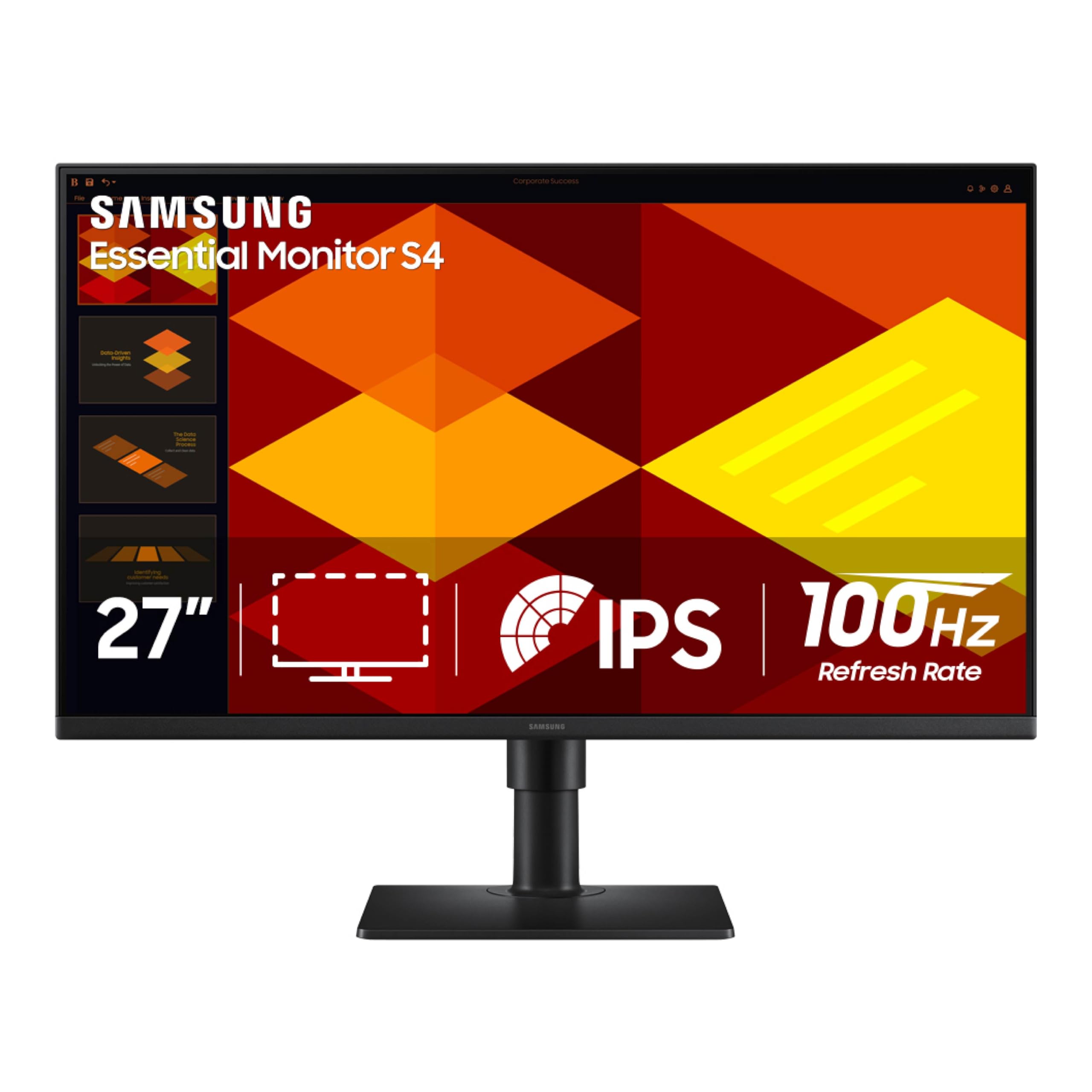
Samsung’s S40GD is the rare affordable monitor that doesn’t skimp on ergonomics. The stand offers full height adjustment, tilt, swivel, and a 90-degree pivot to portrait mode, making it a dream for coders and document reviewers. The 27-inch IPS panel delivers bright, consistent colors from any angle, and the 100Hz refresh rate adds a fluid feel to all interactions.
The inclusion of a dedicated Game Picture Mode and Eye Saver Mode makes this a versatile display for both work and casual gaming. Connectivity is generous with two HDMI ports and a DisplayPort input, along with a built-in USB hub and headphone-out. The ultra-thin bezels give it a premium look that belies its price.
The primary caveat is the standard Full HD 1080p resolution, which is less sharp than competing QHD options. Some users have also reported backlight bleed caused by adhesive issues during shipping. For those whose desk setup demands a fully adjustable stand without an aftermarket VESA arm purchase, this is the top pick.
Why it’s great
- Full ergonomic stand with height, pivot, and swivel
- Generous port selection with USB hub
- Thin bezels for a modern aesthetic
Good to know
- Limited to 1080p resolution
- Potential for backlight bleed on some units
- OSD joystick may be inconvenient for some
4. Acer Nitro KG271U N3bmiipx

The Acer Nitro KG271U delivers a massive performance punch for its position in the market. It features a 27-inch QHD IPS panel with a blistering 180Hz refresh rate and a 0.5ms response time, making it an excellent choice for fast-paced gaming where motion clarity is paramount. The 2560×1440 resolution provides the sharpness needed for immersive single-player titles and detailed creative work.
Color performance is a highlight, with the panel supporting 95% DCI-P3 coverage, which rivals monitors costing significantly more. AMD FreeSync is supported to eliminate screen tearing, and the inclusion of two HDMI 2.0 ports and a DisplayPort 1.2 provides flexible connectivity. The built-in speakers are a bonus for casual use.
The main compromise is the stand, which feels cheap, flexes noticeably, and lacks height adjustment. A VESA arm is almost a necessity for a stable setup. The 250-nit brightness is adequate indoors but can feel dim in very bright rooms. For users who want speed and high resolution above all else, this is a fantastic find.
Why it’s great
- Blazing fast 180Hz refresh rate and 0.5ms response
- Excellent color accuracy with 95% DCI-P3
- Sharp QHD resolution for gaming and work
Good to know
- Stand is wobbly and lacks ergonomic adjustments
- Brightness is capped at 250 nits
- HDR support is basic
5. Amazon Basics 27 Inch Monitor

The Amazon Basics 27 Inch Monitor is designed to deliver the essentials without any unnecessary frills. It features a standard 27-inch Full HD IPS panel with a 100Hz refresh rate, providing a noticeably smoother desktop experience than the 60Hz norm. The 1500:1 contrast ratio is a strong point, giving blacks more depth than many competing IPS panels.
The standout functional feature is the inclusion of four USB-A ports, allowing you to plug your keyboard, mouse, and other peripherals directly into the monitor for a cleaner desk setup. The built-in speakers provide clear audio for calls and basic media, and the VESA compatibility ensures easy mounting. The matte screen coating does a solid job of cutting down on reflections.
The build quality is a mixed bag; some units have been reported to lean forward slightly due to a non-adjustable tilt mechanism. The 1080p resolution on a 27-inch screen will feel less sharp than smaller or higher-resolution alternatives. For a no-nonsense, plug-and-play monitor for a simple home office, it offers exceptional value.
Why it’s great
- Integrated 4-port USB hub for peripherals
- High 1500:1 contrast ratio for an IPS panel
- 100Hz refresh rate and built-in speakers
Good to know
- Lacks tilt adjustment out of the box
- 1080p resolution is less sharp on a 27″ screen
- Build is functional but feels basic
6. AOC 27 Inch QHD Gaming Monitor Q27G41ZE

AOC pushes the boundary of what “affordable” can mean for a gaming monitor with the Q27G41ZE. This 27-inch QHD IPS panel offers a native 240Hz refresh rate that can be overclocked to a staggering 260Hz, paired with a 0.3ms MPRT response time. This level of speed is typically reserved for much more expensive displays, making it a clear winner for competitive gamers.
The 300-nit brightness is a welcome upgrade over budget alternatives, ensuring HDR content has enough punch to be enjoyable. It features Adaptive-Sync compatibility with both G-Sync and FreeSync for a completely tear-free experience. The OSD menu is intuitive and includes gaming-specific features like a sniper mode, crosshair overlay, and customizable color profiles.
The stand is a weak point, offering only tilt adjustment and feeling somewhat flimsy. The 1000:1 contrast ratio is standard, and the HDR implementation is decent but not true high dynamic range. For the absolute highest refresh rate and smoothest motion available at this price tier, the AOC is an unbeatable choice.
Why it’s great
- Class-leading 240Hz (OC 260Hz) refresh rate
- Fast 0.3ms MPRT for zero motion blur
- Higher 300-nit brightness for better image pop
Good to know
- Stand is basic with tilt-only adjustment
- HDR is not true high dynamic range
- Build quality feels slightly cheap
7. Alienware 27 Gaming Monitor AW2725DM

The Alienware AW2725DM brings a touch of premium design and robust build quality to the affordable segment. Its 27-inch QHD IPS panel is VESA DisplayHDR 400 certified and covers 95% of the DCI-P3 color space, resulting in vivid, punchy visuals that easily handle both immersive gaming and creative work. The 180Hz refresh rate with a 1ms response time ensures fluid performance across all types of action.
NVIDIA G-Sync and AMD FreeSync compatibility guarantee a stutter-free experience regardless of your GPU brand. The stand is a significant step up, offering full height, pivot, swivel, and tilt adjustments with a solid, wobble-free base. The dedicated console mode and hardware-based low blue light solution add to its versatility for long sessions.
The main drawbacks are the lack of built-in speakers and a headphone jack, requiring a separate audio solution. It also requires a DisplayPort 1.4 connection to hit the full 180Hz refresh rate. For users who want a well-built, premium-feeling monitor with excellent color and smooth motion, the Alienware justifies its position.
Why it’s great
- Premium build with full ergonomic stand
- VESA DisplayHDR 400 with excellent color coverage
- Supports both G-Sync and FreeSync
Good to know
- No built-in speakers or headphone jack
- Requires DisplayPort for full 180Hz
- IPS glow present in dark scenes
8. ASUS ProArt Display PA278CV

The ASUS ProArt PA278CV is the definitive choice for budget-conscious content creators. It is Calman Verified with a Delta E < 2 color accuracy rating and covers 100% of the sRGB and Rec. 709 color spaces, ensuring that your edited photos and videos look exactly as intended. The 27-inch QHD IPS panel at 350 nits provides a bright and consistent canvas for detailed work.
Connectivity is where this monitor truly shines for professionals. It features a USB-C port with 65W Power Delivery, allowing you to charge a laptop and transfer video data through a single cable. It also supports DisplayPort daisy-chaining for a clean multi-monitor setup. The ergonomic stand with 90-degree pivot is perfect for switching between landscape and portrait coding or document review.
The 75Hz refresh rate is a small step up from 60Hz but isn’t a gaming-oriented speed. The 65W USB-C power delivery may not be sufficient to charge a high-performance workstation laptop under full load. For anyone whose workflow demands color accuracy and a clutter-free USB-C desk setup, the ProArt is the standard.
Why it’s great
- Top-tier color accuracy with Delta E < 2 certification
- USB-C port with 65W power delivery
- Full ergonomic stand and DisplayPort daisy-chaining
Good to know
- 75Hz refresh rate is modest for gaming
- 65W PD may not charge high-power laptops fully
- Premium price for the feature set
9. Dell 27 Plus 4K Monitor S2725QS

The Dell S2725QS brings 4K clarity to the affordable market without compromising on desk-friendly features. The 27-inch 3840×2160 IPS panel is incredibly sharp, making text look print-quality and providing massive screen real estate for video editing, data analysis, and creative work. The 1500:1 contrast ratio is excellent for an IPS display, delivering deep blacks and a punchy image.
It is future-proofed with a 120Hz refresh rate and AMD FreeSync Premium, which feels incredibly smooth for both productivity and casual gaming. The built-in speakers have been redesigned to offer more output power and a deeper frequency range than standard monitor audio. The ergonomic stand offers height, pivot, swivel, and tilt, and the ComfortView Plus reduces blue light without a yellow tint.
The 4K resolution means driving games at native resolution requires a powerful GPU. It also exhibits some ghosting in fast-paced scenes, making it less ideal for competitive FPS titles. For a productivity powerhouse that delivers stunning sharpness and smooth motion, the Dell S2725QS is the top choice.
Why it’s great
- Crisp 4K resolution for unparalleled productivity
- 120Hz refresh rate with FreeSync Premium
- Full ergonomic stand and improved built-in speakers
Good to know
- 4K gaming requires a powerful graphics card
- Noticeable ghosting in fast-paced competitive games
- Premium price in the affordable category
FAQ
Is a 27-inch 1080p monitor too pixelated?
What is the difference between IPS and VA panels for budget monitors?
Can I use a high refresh rate monitor for office work?
Final Thoughts: The Verdict
For most users, the best affordable monitor winner is the MSI PRO MP275Q because it delivers the ideal sharpness of QHD resolution with a smooth 100Hz refresh rate at a price that redefines entry-level value. If you want a fully ergonomic stand without an aftermarket purchase, grab the Samsung S40GD. And for the highest pixel density and productivity potential, nothing beats the Dell S2725QS 4K.