
Our readers keep the lights on and my morning glass full of iced black tea. As an Amazon Associate, I earn from qualifying purchases.
Specs are compiled from manufacturer listings and verified buyer reviews and can change over time — please confirm the key details on the product page before buying.
You want a gaming mouse that helps you land shots and survive daily use, but you do not want to overspend. The key specs that actually matter are the sensor’s native DPI (dots per inch — how precisely it tracks your hand), the switch type and its rated lifespan, and the mouse’s total weight including the cable. This guide skips the flashy RGB and zeroes in on those core traits that separate a good buy from a frustrating one.
I’m Min — the founder and writer behind Gadgets Feed. This guide is built by comparing the manufacturers’ published specifications and the patterns across verified customer reviews, so you get each pick’s real strengths and trade-offs instead of marketing spin.
Here is the breakdown of what makes each affordable mouse for gaming worth your desk space.
Our Picks at a Glance


How To Choose The Best Affordable Mouse For Gaming
Three specs decide whether a budget gaming mouse feels like a steal or a sore arm: the sensor’s native DPI (dots per inch — how precisely it tracks your hand movement), the switch type (the component under each button that registers a click) and its rated lifespan, and the overall weight including the cable. Ignore the flashy RGB and you are left with those core traits.
Sensor and DPI: Raw Tracking vs Marketing Numbers
A mouse’s DPI (dots per inch) tells you how many pixels the cursor moves per inch of physical movement. Higher DPI means faster cursor speed, but past a certain point — roughly 8,000 to 12,000 DPI — the number is just a headline. What matters more is the sensor’s native accuracy: does it skip, jitter, or add smoothing? Look for optical sensors from well-known makers (PixArt, Logitech’s HERO, Razer’s Focus+) that offer true 1-to-1 tracking, meaning your hand move equals the exact on-screen movement with no artificial correction.
Switch Durability: How Many Clicks Before It Fails
The switch underneath each button is the part that physically breaks. Mechanical switches use metal contacts and are rated for a certain number of clicks (often around 60 million). Optical switches use a light beam to register the click, which eliminates double-clicking issues and generally lasts longer (90 million or more). An optical switch also actuates faster — think 0.2 milliseconds — which can matter in competitive games where every millisecond counts.
Quick Comparison
| Model | Best For | DPI | Weight | Buttons | Amazon |
|---|---|---|---|---|---|
| Redragon M602 Griffin★ Best Overall | Budget Wireless Versatility | 8,000 | 102g | 9 | Amazon |
| Razer Cobra WiredAlso Great | Ultra-Light FPS | 8,500 | 58g | 6 | Amazon |
| Logitech G502 Hero | Customizable Control | 25,600 | 121g + weights | 11 | Amazon |
| Razer Basilisk V3 | Ergonomic All-Rounder | 26,000 | 101g | 11 | Amazon |
| Logitech G305 Lightspeed | Wireless Freedom | 12,000 | 99g | 6 | Amazon |
| UtechSmart Venus | MMO Button Monster | 16,400 | Adjustable | 19 | Amazon |
| SteelSeries Rival 3 Gen 2 | Low-Latency FPS | 8,500 | 77g | 5 | Amazon |
In‑Depth Reviews
1. Redragon M602 Griffin RGB Gaming Mouse
A tri-mode wireless mouse that covers Bluetooth, 2.4GHz, and wired USB-C for every setup.
The Redragon M602 Griffin is the most versatile connectivity option in this list. It offers three modes: 2.4GHz wireless for gaming-level response, Bluetooth for casual browsing on a laptop or tablet, and a USB-C wired connection for zero-lag sessions while charging. You can switch between modes on the fly, which is perfect if you move between a desktop and a work laptop. The wireless range reaches up to 10 meters (about 33 feet) — enough to control your PC from across the room.
The Griffin packs 9 programmable buttons, adjustable DPI from 250 to 8,000, and four polling rates (125Hz, 250Hz, 500Hz, and 1000Hz). Its rechargeable battery lasts between 35 hours with RGB lighting on and 70 hours with RGB off (averaging 52.5 hours). The mouse also has an auto-sleep feature after 1 minute of inactivity to save power. Reviewers praise the ergonomic shape and skin-friendly material for comfort during long sessions, though the DPI range (8,000 max) is lower than the UtechSmart Venus’s 16,400 DPI. The RGB has 9 lighting effects that can be customized through the Redragon software, but this is a right-handed design only.
Multi-Device Flexibility
- Tri-mode connectivity: 2.4GHz, Bluetooth, and USB-C wired
- Average 52.5-hour battery life (35h RGB on / 70h RGB off)
- 9 programmable buttons with macro support (250 to 8,000 DPI)
- Ergonomic right-handed shape with skin-friendly surface
Trade-offs
- 8,000 DPI maximum is lower than several competition picks
- Software required for full button remapping (from Redragon.com)
- Not as lightweight as the Razer Cobra (around 102g)
Ideal for: A gamer who shares their mouse between a desktop and a laptop, or wants a versatile wireless option without paying a premium. The Griffin is a solid entry-level wireless gaming mouse.
The trade-off: The 8,000 DPI cap and weight around 102g mean it is less specialized for ultra-light FPS, but the tri-mode flexibility is a genuine value-add.
2. Razer Cobra Wired Gaming Mouse
The featherweight that glides through flick shots without wearing your hand out.
The Razer Cobra is built for competitive FPS (first-person shooter) players who want the lightest possible mouse. At just 58g, it is 58g (the SteelSeries Rival 3 Gen 2 comes in at 77g), so you can lift and reposition faster during intense matches. This low-mass design — combined with 100% PTFE (polytetrafluoroethylene, a high-gloss, low-friction plastic) mouse feet — means it glides across your mousepad with almost no resistance.
The Razer Cobra uses Gen-3 Optical Switches, which use a light beam instead of a metal contact to register a click. These switches are rated for 90-million clicks and actuate in just 0.2 milliseconds, so you never deal with the dreaded double-click issue that plagues mechanical switches over time. Its 8,500 DPI optical sensor allows for precise sensitivity adjustments in 50 DPI increments (a small step that lets you fine-tune your aim). Buyers report that the Speedflex cable produces minimal drag, feeling nearly wireless during intense matches.
Speed and Feel
- Extremely light 58g frame reduces fatigue during long sessions
- Gen-3 Optical Switches rated for 90-million clicks with 0.2ms actuation
- 100% PTFE mouse feet provide smooth, low-friction glide
- 50 DPI step adjustments for fine-tuning aim
Trade-offs
- Only 6 programmable buttons — not suited for MMO players
- Wired connection only (the Speedflex cable is excellent, but not wireless)
- No adjustable weight system
Who it fits: Any competitive gamer who wants a virtually weightless mouse with ultra-responsive optical switches. The Razer Cobra is the pick if your priority is speed and fatigue-free play.
One thing to know: The ambidextrous shape works for right and left hands, but side buttons are set for right-handed use only.
3. Logitech G502 Hero High Performance Wired Gaming Mouse

The veteran gaming mouse that lets you dial in the exact heft you prefer.
The Logitech G502 Hero is among the most popular gaming mice ever. Its Hero 25K sensor tracks movement at up to 25,600 DPI with zero smoothing or acceleration, meaning your flicks and micro-adjustments are exactly what the cursor does — no filtering, no lag. The 11 programmable buttons include a dual-mode hyper-fast scroll wheel that free-spins to fly through long web pages or clicks into tactile notches for weapon switching in-game.
Where the G502 Hero truly stands out is its adjustable weight system. You can arrange up to five 3.6g weights inside the mouse to find your preferred balance (lighter for fast flicks, heavier for steady tracking). It also uses a mechanical switch button tensioning system with a metal spring, giving the left and right clicks a crisp, clean feel with rapid feedback. Buyers with larger hands consistently report the sculpted right-handed shape fits like a glove, though the 121g-plus-weight starting weight is noticeably heavier than the Razer Cobra’s 58g frame.
Control and Flexibility
- Hero 25K sensor delivers pinpoint tracking up to 25,600 DPI
- Adjustable weight system with five 3.6g tuning weights
- 11 programmable buttons including a hyper-fast scroll wheel
- Mechanical spring tensioning for crisp, responsive clicks
Trade-offs
- Heavier than the Cobra (121g base weight compared to 58g)
- Wired only — no wireless option in this model
- Right-handed shape only, not ambidextrous
Your pick if: You want total control over your mouse’s feel, from weight distribution to scroll wheel behavior. The G502 Hero is ideal for players who prefer a heavier, more planted glide.
Keep in mind: The weight tuning is a genuine boon, but if you are coming from a lightweight mouse, the G502 will feel like a brick at first.
4. Razer Basilisk V3 Customizable Ergonomic Gaming Mouse

The ergonomic shape with a scroll wheel that does double duty for work and play.
The Razer Basilisk V3 is built around one standout feature: the HyperScroll tilt wheel. You press a button and the wheel free-spins endlessly, letting you zip through spreadsheets or long documents. One more click returns tactile notches for precise weapon changes in games — a genuinely useful trick the G502 Hero also offers, but the Basilisk adds the tilt-click on top. Its Focus+ 26K DPI optical sensor is the highest DPI in this roundup, tracking even the smallest movement without smoothing.
Comfort is central here. The Basilisk V3 has a dedicated thumb rest, sculpted grooves for your ring and pinky fingers, and an ergonomic right-handed shape. The 11 programmable buttons let you assign macros or shortcuts like push-to-talk or pinging on the map. Under the hood, Gen-2 Optical Switches provide a 0.2ms actuation speed and are rated for 70-million clicks. Reviewers consistently praise how the shape feels natural after hours of use, though the RGB lighting across 11 separate zones is best enjoyed through Razer Synapse software.
Shape and Scroll
- HyperScroll tilt wheel with free-spin and tactile modes
- Focus+ sensor at 26,000 DPI for pixel-precise tracking
- Dedicated thumb rest for fatigue-free long sessions
- 11 programmable buttons with macro support
Trade-offs
- Heavier than the Cobra (around 101g) — not ideal for ultra-light fans
- Right-handed only design
- Requires Razer Synapse software for full customization
Who it suits: Gamers who also use their mouse for productivity. The Basilisk V3 is a comfortable all-rounder that bridges gaming and work with that excellent scroll wheel.
The trade-off: At roughly 101g, it is not the lightest, but the shape and wheel make the weight feel natural.
5. Logitech G305 Lightspeed Wireless Gaming Mouse

True wireless performance without the cable clutter, powered by a single AA battery.
The Logitech G305 proves that an affordable wireless gaming mouse can compete with wired alternatives. Its Lightspeed wireless technology delivers a 1ms report rate (the time it takes for your click to reach the PC), which matches the wired latency of most gaming mice. The HERO sensor tracks up to 12,000 DPI with 400 IPS (inches per second) precision, meaning fast swipes are captured without dropping out.
Battery life is the G305’s headline: a single AA battery powers it for 250 hours of continuous gaming. If you switch to Endurance mode via Logitech G HUB software, the brand claims that stretches to 9 months of normal use. The mouse weighs just 99g with the battery installed, keeping it light enough for competitive play. The compact design includes a built-in nano receiver slot for travel, making it a great laptop companion. One reviewer noted that the 6 programmable buttons are simple but sufficient for most games, though the G305 lacks the side-button density of the UtechSmart Venus.
Wireless Freedom
- 250-hour battery life on a single AA battery
- 1ms Lightspeed wireless with no perceptible lag
- HERO sensor with 12,000 DPI and 400 IPS tracking
- Lightweight at just 99g with battery
Trade-offs
- Only 6 buttons, no thumb rest
- Requires AA battery (recharge models like the G703 are pricier)
- Compact shape may feel small for palm-grip users
Ideal for: Gamers who prefer a clean, cable-free desk without sacrificing performance. The G305 is a fantastic entry-point into wireless gaming on a budget.
One caveat: The G305 uses a single AA battery which adds weight that some ultra-light fans will notice, but the 250-hour run time more than compensates.
6. UtechSmart Venus Gaming Mouse RGB Wired

The button-packed MMO mouse that gives you a full second keyboard under your thumb.
The UtechSmart Venus puts an astonishing 19 programmable buttons on your desk, including 12 side buttons arranged in rows for your thumb. That is 19 buttons compared to the SteelSeries Rival 3 Gen 2’s 5 buttons, and it makes a huge difference in MMOs (massively multiplayer online games) where you need to trigger skills, potions, and macros without taking fingers off the mouse. The Venus uses a high-precision Avago laser sensor with up to 16,400 DPI (compared to the Redragon M602’s 8,000 DPI), plus adjustable polling rates up to 1000 Hz.
The mouse also comes with an adjustable weight system: eight 2.4g weights are pre-installed, letting you tailor the heft. Its ergonomic right-handed design features a textured, frosted surface that resists sweat and keeps your grip firm during long sessions. The 6-foot braided-fiber cable with a gold-plated USB connector holds up well against wear. Owners mention that the “Auto Fire” button is a convenient extra for rapid-click games, though the driver software (downloadable from the Redragon website) is needed to fully map the 12 side buttons.
Macro Mastery
- 19 programmable buttons including 12 side buttons for MMO macros
- Up to 16,400 DPI laser sensor with 1000 Hz polling rate
- Adjustable weight system with 8 x 2.4g weights
- Frosted surface resists sweat and keeps grip firm
Trade-offs
- Wired only — no wireless option
- Software download required for full button mapping (listed on Redragon.com)
- Step learning curve for the 12 side buttons
Right for you if: You play MMOs or any game where having a dozen extra binds under your thumb is a standout. The UtechSmart Venus is the button king in this lineup.
The catch: That many buttons mean the mouse is wider and heavier than a pure FPS mouse. If you only play shooters, the Razer Cobra is a better choice.
7. SteelSeries Rival 3 Gen 2 Gaming Mouse
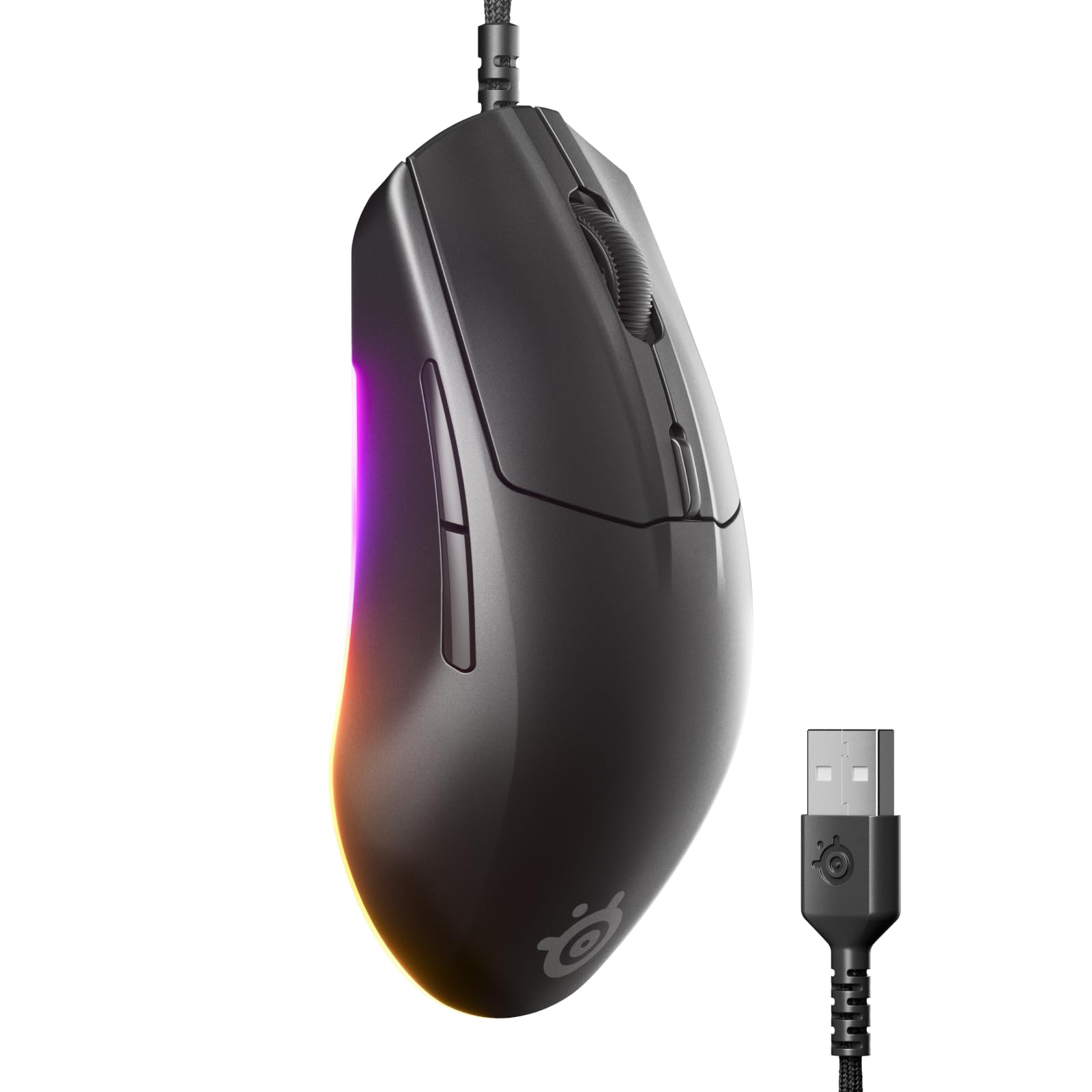
A speed-focused wired mouse that prioritizes click latency above all else.
The SteelSeries Rival 3 Gen 2 is built around one number: 1.35ms click latency. That is the time between you pressing the button and the game registering the action. For competitive shooters, that speed can mean the difference between landing the headshot or missing. Its TrueMove Core 8.5K DPI optical sensor gives you true 1-to-1 tracking, so your crosshair follows your hand without acceleration or smoothing.
At 77g, the Rival 3 Gen 2 is lighter than the Logitech G502 Hero by a noticeable margin, though it weighs 77g compared to the Razer Cobra’s 58g. The 5 buttons are minimal but well placed, and the Super Mesh Paracord cable braiding reduces drag during fast swipes. SteelSeries rates the switches for 60-million clicks, meaning you can expect years of crisp clicks. Customers note that the 3-zone RGB lighting adds a subtle desk flair without being overbearing. The right-handed shape is comfortable for claw and fingertip grips, though palm-grip users might find it a touch small.
Speed First
- Industry-leading 1.35ms click latency for faster reactions
- TrueMove Core 8.5K DPI sensor with 1-to-1 tracking
- Lightweight 77g design with Super Mesh Paracord cable
- Rated for 60-million clicks for long-term durability
Trade-offs
- Only 5 buttons — not enough for MMO players
- Right-handed shape only
- Plastic build feels less premium than the Basilisk V3
Reach for this if: You play fast-paced shooters where every millisecond matters. The Rival 3 Gen 2 delivers the quickest click latency in this price range.
Keep in mind: If you want more buttons or a heavier, planted feel, look at the Logitech G502 Hero or UtechSmart Venus.
Understanding the Specs
DPI and Sensor Native Accuracy
DPI (dots per inch) measures how many pixels the cursor moves per inch of hand movement. A higher DPI means the cursor moves faster, but the critical factor is sensor quality. A high-end sensor (like Logitech’s HERO or Razer’s Focus+) tracks without smoothing or acceleration, meaning your hand movements are reflected on screen exactly as you make them. Lower-end sensors may introduce jitter or skip at high speeds. For most gamers, a sensor in the 8,000–12,000 DPI range is plenty — anything above that is usually marketing headroom.
Switch Types and Click Lifespan
Every mouse button sits on a switch. Mechanical switches use metal contacts that can wear out or double-click over time — they are typically rated for 50-million to 60-million clicks. Optical switches use a light beam to register the press, which eliminates double-clicking and lasts longer (often 70-million to 90-million clicks). Optical switches also actuate faster (around 0.2 milliseconds), giving a slight edge in reaction-time scenarios. If you click heavily in games like Valorant or League of Legends, an optical switch is a long-term reliability upgrade.
FAQ
What is the difference between a gaming mouse and a regular mouse?
How many DPI do I need for gaming?
Is a wired or wireless gaming mouse better for latency?
What is a polling rate?
How long do gaming mouse switches last?
Can I use a gaming mouse for work?
Does the G502 Hero work with Mac?
What is the difference between a laser sensor and an optical sensor?
Are the side buttons on the UtechSmart Venus easy to reach?
How heavy should a gaming mouse be?
Final Thoughts: The Verdict
For most buyers, the affordable mouse for gaming winner is the Razer Cobra because its 58g featherweight frame, Gen-3 optical switches rated for 90-million clicks, and 8,500 DPI sensor deliver top-tier competitive speed without breaking the budget. If you want total customization with adjustable weights and a hyper-fast scroll wheel, grab the Logitech G502 Hero. And for MMO players who need a full macro keyboard under their thumb, the standout is the UtechSmart Venus with its 19 programmable buttons and 16,400 DPI laser sensor.
How We Picked
We do not accept paid placement. Every pick is matched to a real buyer and a real use-case; we do not hands-on test units.
Sources & Methodology
Specifications: manufacturer listings and product documentation. Review insights: verified customer reviews, as of July 2026. Pricing: not shown on this page (it changes often); check the current price via the retailer link.
As an Amazon Associate, Gadgets Feed earns from qualifying purchases. This does not affect which products we feature.