
Our readers keep the lights on and my morning glass full of iced black tea. As an Amazon Associate, I earn from qualifying purchases.
Specs are compiled from manufacturer listings and verified buyer reviews and can change over time — please confirm the key details on the product page before buying.
Picking a PC case on a budget is a game of trade-offs. You want enough room for a modern graphics card, airflow that keeps your CPU cool, and a side panel you are not embarrassed to show off — all without spending what you saved on the GPU itself. Budget cases now include pre-installed fans, tempered glass, and Type-C ports at prices that once bought bare metal.
I’m Min — the founder and writer behind Gadgets Feed. This guide is built by comparing the manufacturers’ published specifications and the patterns across verified customer reviews, so you get each pick’s real strengths and trade-offs instead of marketing spin.
Focus on the specs that actually matter—GPU clearance, CPU cooler height, and how many fans are included—since they decide if your components fit and stay cool. Here is your shortcut to finding the right affordable pc case.
Our Picks at a Glance

How To Choose The Best Affordable PC Case
You do not need an engineering degree to pick a good budget case. You just need to match the box to the parts you already own (or plan to buy) and know which shortcuts manufacturers take at this price. Here is what separates a great deal from a frustrating build.
GPU and CPU Cooler Clearance: The Numbers That Decide Fit
Before anything else, measure your graphics card and your CPU cooler. A case can look perfect and still refuse to close if your GPU is too long or your tower cooler is too tall. Budget cases usually list a maximum GPU length and a maximum CPU cooler height — check both against what you have. For example, the Lian Li V100 handles GPUs up to 420mm and coolers up to 178mm, while the DARKROCK EC2 tops out at 340mm for a GPU. If you run a three-fan card, that 80mm difference decides everything.
Pre-Installed Fans Versus Bare-Bones Boxes
Some cheap cases come with a single rear fan, and that often is not enough for a gaming PC. Others bundle four ARGB fans that would cost you a decent chunk on their own. If you pick a case with weak included cooling, budget for extra fans. A case with four 120mm fans and a mesh front panel, like the GAMDIAS AURA GC1, means you can skip that extra shopping trip entirely.
Glass, Cable Management, and the Compromises
Tempered glass side panels now appear on even entry-level cases, but the metal behind that glass is where corners get cut. Thin steel flexes and makes cable routing awkward. Look for mentions of rubber grommets, wide channels, and a PSU shroud — these small touches make a first build far less frustrating. Remember that at budget prices, something has to give: it might be the number of drive bays, the fan noise, or the sturdiness of the frame.
Quick Comparison
| Model | Best For | Max GPU Length | Pre-Installed Fans | Max CPU Cooler Height | Amazon |
|---|---|---|---|---|---|
| Lian Li V100★ Best Overall | Premium airflow and GPU fit | 420mm | 4x 120mm ARGB | 178mm | Amazon |
| MUSETEX Y6Best Showcase | Showcase builds with a wide view | 410mm | 4x 120mm Non-LED | 160mm | Amazon |
| Thermaltake View 270 PlusClean Aesthetic | Clean white aesthetics and ARGB | 420mm | 3x 120mm ARGB | — | Amazon |
| MONTECH XR | High airflow in a compact mid-tower | — | 3x 120mm ARGB | — | Amazon |
| CORSAIR 3500X | Premium fit, finish, and cable channels | — | None included | — | Amazon |
| Okinos Aqua 3 | Compact MATX builds with a fish-tank look | 320mm | 3x 120mm ARGB | 164mm | Amazon |
| DARKROCK EC2 | Balanced budget builds with Type-C | 340mm | None included | — | Amazon |
| GAMDIAS AURA GC1 | Value with four fans already installed | 340mm | 4x 120mm ARGB | 160mm | Amazon |
| Zalman T6 | Legacy parts and a tiny footprint | — | 1x 120mm rear | 160mm | Amazon |
In-Depth Reviews
1. Lian Li V100-ATX Mid-Tower PC Case
Our pick — over 4.5★ from 500+ verified ratings; the strongest balance of quality and price.
The premium-feeling case that swallows a giant GPU and still leaves room for four glowing fans.
The Lian Li V100 is the pick that makes a budget build feel like a flagship one. It arrives with four pre-installed 120mm ARGB fans (fans with adjustable multicolor lighting that can sync to your motherboard), and each side panel pops off without tools. The whole front and side are one expanse of tempered glass with no corner pillar, so your hardware sits on full display. At 4.8 stars from over 500 owners, the crowd favorite here is the case quality itself — over a hundred buyers call it out as the standout feature.
Clearance is the real headline. The V100 fits GPUs up to 420mm and CPU coolers up to 178mm, which handily beats the DARKROCK EC2’s 340mm GPU limit and the Zalman T6’s 160mm cooler ceiling. That 420mm of GPU room means even a chunky three-fan card slides in without a fight. Under heavy 1440p loads, buyers report GPU temps in the mid-high 60s°C, confirming solid airflow. The one compromise: this is an open, showcase-style design, so do not expect silent sound isolation — the fans are quiet but the case does not muffle noise the way a closed box would.
Cable management is genuinely easy thanks to modular panels, though the space behind the motherboard gets tight if you use a fan hub. Storage is basic at one HDD and one 2.5-inch slot, so it is not the pick for a spare-parts hoarder. Owners mention a top radiator up to 360mm fits, but a thick 280mm AIO can block your RAM access. For the best looks and cooling at this level, the V100 is the pick.
What wins people over
- Massive 420mm GPU clearance
- Four ARGB PWM fans included with 1800 RPM max speed
- Tool-less glass panels for easy building
- Great GPU thermals in real use
The honest trade-offs
- Open design means weak sound isolation
- Only one HDD and one 2.5-inch drive slot
- Thick top radiators can block RAM access
Grab it for: a showpiece build with a long GPU that you want to stay cool under load.
Look elsewhere if: you need several hard drives or you want a case that muffles fan noise.
2. MUSETEX Y6 PC Case
A dual-chamber design that gives your components a 270-degree glass stage and room for a 410mm GPU.
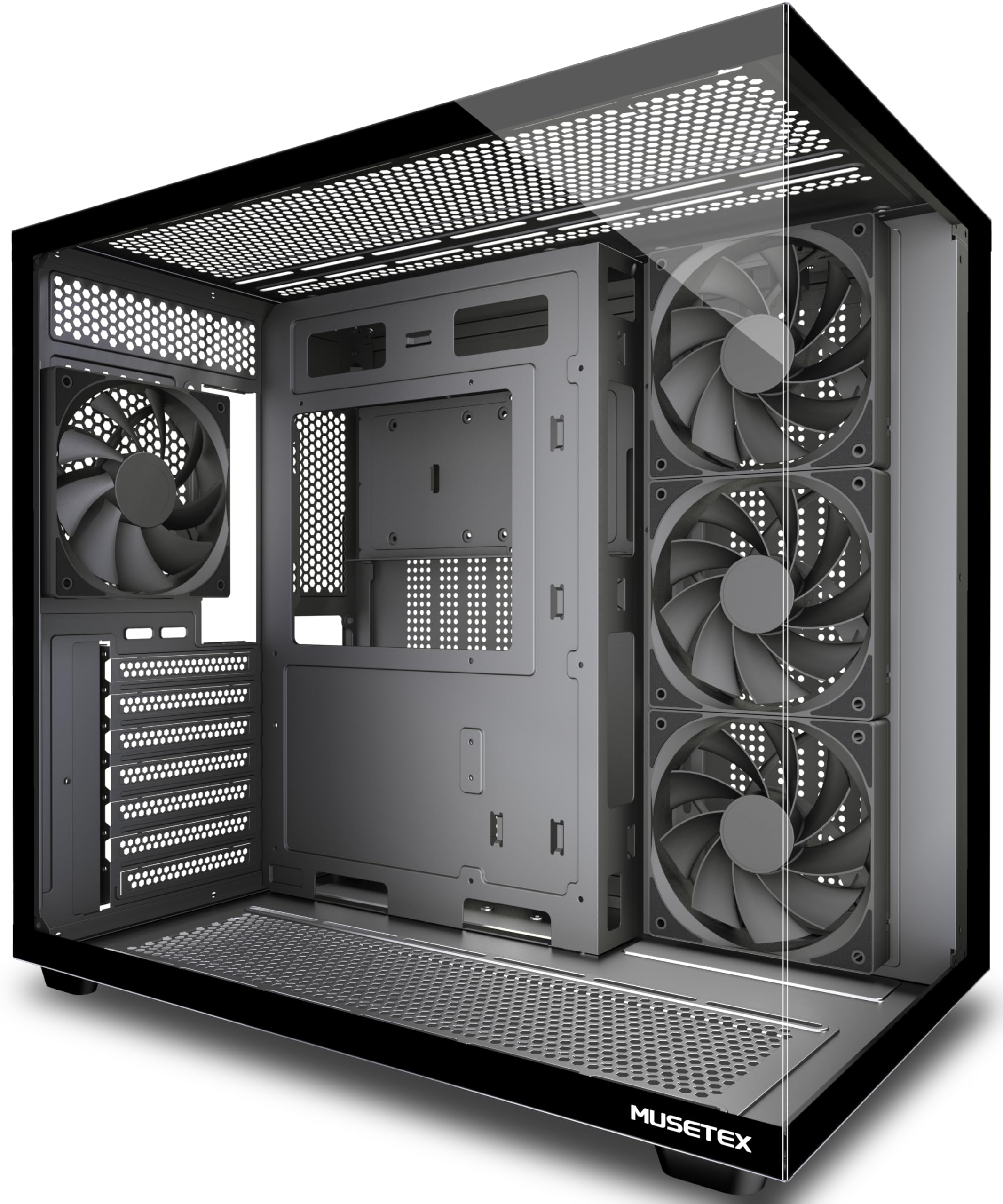
The MUSETEX Y6 turns your PC into a display piece. Its dual tempered glass panels wrap around the front and side for a 270-degree view, and the case uses a dual-chamber layout so the power supply hides behind the motherboard tray instead of cluttering the main compartment. It ships with four 120mm non-LED fans already installed — three reverse-blade on the side and one forward on the back — so you get solid airflow without buying extra cooling. The matte black finish keeps the whole thing looking high-end rather than flashy.
Compatibility is generous for the price. The Y6 supports GPUs up to 410mm and CPU coolers up to 160mm, and it can take a 360mm liquid cooler on top. That GPU number trails the Lian Li V100 by just 10mm, so most modern cards fit either way. The front I/O includes a Type-C port alongside USB 3.0 and USB 2.0, which is a welcome modern touch at this tier. Buyers describe the build as solid and easy to work in, with the magnetic dust filters on top and bottom keeping things clean. One voice calls it “a stellar purchase” after 20-plus years of building.
The gripes are minor but worth knowing. Screwless side panels make access easy — one buyer notes sharp edges can cut if you are careless. A veteran builder found a stripped standoff and a misaligned hole in his unit, so the factory QC is not flawless. There is no HDD activity LED, and the cable management area is snug if you pack in a non-modular power supply. For a clean, wide showcase, the Y6 delivers far above its price class.
Standout spec: the 270° glass view and 410mm GPU clearance make it the best-looking pick that still fits a monster card.
The catch: occasional build-quality slips like sharp edges or a stripped standoff — inspect before you screw.
3. Thermaltake View 270 Plus TG ARGB Snow
The all-white mid-tower that pairs pillarless glass with three colorful fans and a 420mm GPU limit.
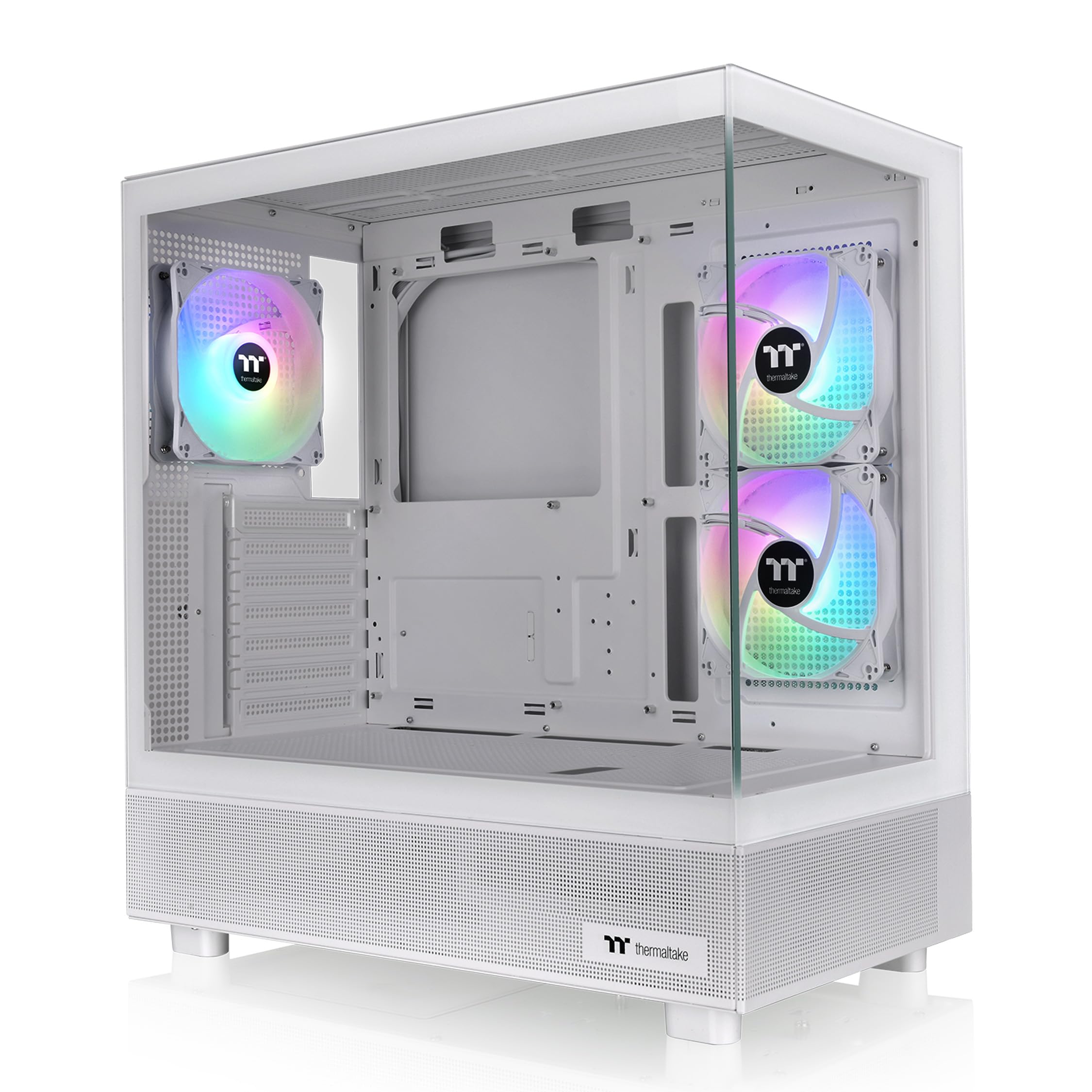
If you are building an all-white or minimalist rig, the Thermaltake View 270 Plus is a natural fit. It comes in a Snow white finish with front and side tempered glass panels that meet without a corner pillar, so the interior view stays uninterrupted. Three 120mm ARGB fans are included — fans you can sync to your motherboard for coordinated lighting — and the front I/O gives you a USB 3.2 Gen 2 Type-C port plus two USB 3.0 ports. Its Snow white finish and pillarless glass make it look far pricier than its mid-range tag.
Behind the glass, the View 270 handles serious hardware. Max VGA length is 420mm, matching the Lian Li V100, and it supports a 360mm radiator on top for liquid cooling. Owners call it one of the best cases they have owned, citing solid build quality, good airflow through the mesh panels, and easy assembly. The included fans sync cleanly for a unified light show, and the case stays at a decent noise volume even sitting right next to you on a desk. Customers note it fits full ATX boards and three-fan graphics cards without complaint.
The trade-offs are small. There is no tray for two 3.5-inch hard drives in the base, so mechanical-drive storage is limited. The front I/O sits on top, which some find awkward, and cable management works fine but lacks extra tie-down points. One builder found the CPU cooler plug-in gets tight if you install the upper fan first — mount the cooler before that fan. None of this stops the View 270 from being a gorgeous, capable case that earns its 4.6-star reputation.
Why it stands out: a clean white pillarless glass design with 420mm GPU room and a modern Type-C port.
Before you buy: storage is limited to SSD mounts, and top-mounted I/O is not for everyone.
4. MONTECH XR Panoramic ATX PC Case

A compact panoramic case with three reverse-blade ARGB fans and filters on every panel.
The MONTECH XR squeezes high-end compatibility into a smaller-than-average footprint. It comes with three pre-installed ARGB PWM fans — fans whose speed you can control — spinning up to 1500 RPM, with two reverse-blade fans on the side and one regular at the rear. Mesh and dust filters cover the top, bottom, and side panels, so airflow stays strong while dust stays out. There is even a wood-grain strip on the front I/O that gives the black case a touch of natural warmth.
Despite its compact dimensions, the XR accommodates a 360mm radiator on top and supports high-end GPUs like the 40 series. Over a hundred buyers rave about the design, with value for money a close second. Owners describe the magnetic glass side panel as click-in and tool-free, and the build process as straightforward with clear instructions. The included fans are bright and vibrant, and the frame feels rigid and high-quality. Most owners say it showcases components well while staying quiet.
The honest counterpoint: the glass is a fingerprint magnet, and the stock fans can get noisy for sensitive ears — one buyer returned it specifically because the fan noise was audible from outside the room, replacing it with a near-silent alternative. Your cooling results will depend heavily on your own setup, with an i9 13th gen needing the full 360mm AIO. If you want a compact, high-airflow showcase that fits modern hardware, the XR is a strong value — just budget for quieter fans if noise bothers you.
What makes it great
- Three ARGB PWM fans pre-installed
- Filters on top, bottom, and side panels
- Magnetic click-in glass side panel
- Compact footprint with 40-series GPU support
What to know first
- Stock fans can be noisy for sensitive users
- Glass shows fingerprints quickly
Choose it for: a dense, high-airflow build where you want tool-free access and strong stock cooling.
skip it if: you demand near-silent operation without swapping the fans.
5. CORSAIR 3500X Mid-Tower ATX PC Case

A premium-feeling build surface with wide cable channels and validation for reverse-connection motherboards.
The CORSAIR 3500X is what you pick when you want the polish of a flagship case without the flagship price. Its wraparound tempered glass gives that clean panoramic look, and the front and side panels lift off easily for building. The real headline is cable management — buyers call out the wide channels behind the motherboard and the pre-installed standoffs, which make a tidy first build far easier. It is also validated for reverse-connection motherboards like ASUS BTF and MSI Project Zero, where the power connectors sit on the back of the board, so your view stays clean of cables.
Cooling capacity is a strong suit here. The 3500X mounts up to ten 120mm fans across the side, roof, and PSU positions, and fits 360mm radiators in the roof and side. Owners note the side intakes and bottom fan mounts feed fresh air straight to the GPU, which is exactly the airflow path a modern graphics card wants. Despite the glass front, you are not sacrificing thermals for looks. The case supports everything from Mini-ITX up to EATX motherboards, and the two included SSD slots behind the motherboard tray cover most storage needs.
The catch is that no fans are included, so factor that into your budget — the MONTECH XR above ships with three ARGB fans for less money. Storage is also limited, with no hard drive support despite being a roomy case, and big GPUs can block access to PCI slots. The glass makes it heavy, so it is not a case you will move often. If you want a stunning, thoughtfully engineered case and already own fans, the 3500X is the pick that feels worth every dollar.
The verdict: exceptional build quality and cable channels make this a joy to build in — if you bring your own fans.
Think twice if: you need hard drive bays or you want a case that ships with cooling included.
6. Okinos Aqua 3 Micro ATX Case

A compact fish-tank MATX case with three ARGB fans, a Type-C port, and a 270-degree glass view.
The Okinos Aqua 3 is built for the smaller MATX crowd who still want the dramatic fish-tank look. Its 270-degree panoramic glass wraps around the front and side, and the design is compact at 350mm deep and 392mm tall — short enough to sit on a desk without dominating it. It ships with three 120mm 3-pin ARGB fans, two exhausting from the top and one at the rear, creating a vertical airflow path. A built-in 4-port ARGB controller at the back lets you sync the lighting without buying anything extra, and magnetic dust filters on top and bottom keep things clean.
For a small case, the compatibility is generous. The Aqua 3 supports graphics cards up to 320mm and CPU coolers up to 164mm, and it fits the 4070 GPU. The front I/O includes a Type-C 3.2 Gen 2 port rated at 10Gbps for fast transfers, plus two USB 3.0 ports. Buyers describe it as a “budget gem” that rivals much more expensive cases, praising the cable management space and the extremely clear glass. One owner adds two slim 120mm bottom intakes, keeping his 1080 Ti and Ryzen 5 8600G 10°C below thermal limits.
The main warning is for beginners: MATX is a smaller form factor, and the tight clearances show it. One first-time buyer found his B850M motherboard scraped the case during install and a couple of screws were nearly impossible to reach. The included fans are a mixed bag — some replace them for better control, and the LED button can override motherboard control until you reboot. If you are comfortable with a snug build, the Aqua 3 delivers a gorgeous compact system at a fantastic value.
What impresses
- Three ARGB fans and a 4-port controller included
- 10Gbps Type-C 3.2 Gen 2 front port
- Magnetic dust filters on top and bottom
- Compact fish-tank footprint
Who it is not for
- Tight MATX clearances frustrate first-time builders
- Stock fans are not the strongest for control
Best for: experienced builders who want a compact, stunning MATX rig with RGB and Type-C already handled.
Choose something else if: this is your first build — the tight fit is a real hurdle.
7. DARKROCK EC2 ATX Mid Tower Gaming PC Case

A balanced budget ATX case with a swinging glass door, Type-C, and room for a 340mm GPU.
The DARKROCK EC2 is the quiet overachiever of the budget tier. Its mesh front panel keeps airflow efficient, and the tempered glass side is hinged like a door that swings open — one buyer calls it a “swinging magnetic glass door” — for tool-free access to your hardware. Magnetic dust filters mount separately on the top and bottom to keep dust out of the interior. The front I/O is Type-C ready for modern connectivity, which is a rare find at this price. Case quality is the standout among owners, with over 150 buyers praising the construction.
Internally, the EC2 supports up to eight 120mm fans and a 360mm radiator up front, along with ATX, M-ATX, and ITX motherboards. GPU clearance tops out at 340mm, which fits a three-fan card like an RTX 4060Ti 16GB perfectly, per owners — but that is notably shorter than the 420mm the Lian Li V100 offers, so measure your GPU carefully. The PSU shroud is roomy with a drive bay, and cable management earns consistent praise for being easy. Half a dozen owners describe the build as straightforward with a mature, sturdy look.
The recurring caution involves radiator fit: while 360mm radiators are listed as supported, some reviewers point out compatibility headaches getting them to mount cleanly. The metal is thin enough to flex, and the magnetic glass door, while convenient, adds a moving part that some find fiddly. Noise also depends heavily on your fan setup, with several owners noting the stock configuration is not whisper-quiet. For a solid, good-looking ATX case with modern ports and honest value, the EC2 is a dependable choice — just double-check your cooler’s radiator fitment first.
The appeal: a Type-C-ready ATX case with a hinged glass door and easy cable management at a budget price.
Watch out for: reported fit issues with some 360mm radiators, and thin metal that flexes.
8. GAMDIAS AURA GC1 Elite ARGB

A value-packed tower that throws in four ARGB fans and a mesh front for serious intake.
The GAMDIAS AURA GC1 Elite is the case to grab when you want maximum value per dollar spent on cooling. It already comes with four 120mm ARGB fans mounted behind a mesh front panel — that is four color-syncing fans you will not have to buy separately. The full-sized tempered glass side panel uses tool-free installation for easy access, and the sleek stealth-black design keeps it looking sharp. It is a starter tower that owners say keeps temps around 25°C at idle and 40°C under gaming loads with a modest air cooler, which is excellent performance for the price.
Space is a highlight here. The GC1 supports up to six 120mm fans total, a 360mm AIO radiator, a 340mm GPU, and a 160mm CPU cooler — the same GPU and cooler numbers as the DARKROCK EC2, but with the fans already in the box you save real money. Owners call it “perfect” for a starter build, praising the cable spacing and the reliable metal frame. The seven PCIe slots give you room to use your motherboard fully, and the mesh front means the included fans actually pull air through, not just light up. Buyers describe great airflow and a quiet, sturdy build experience.
The honest trade-offs keep it out of the top spot. There is no USB-C port — just USB 2.0 and 3.0 — which matters if you want modern front-panel speed. The build quality is solid but not premium: the front plastic and fans feel cheap, with one owner breaking a fan frame, and the back panel is thin. A top front fan ships inverted by default, so flip it before building. The glass and generous fan bundle make this one of the best pure value picks, as long as you do not need Type-C.
Why it is a bargain
- Four 120mm ARGB fans included
- 340mm GPU and 360mm radiator support
- Excellent thermals for the price
- Tool-free tempered glass side
Where it cuts corners
- No USB-C on the front panel
- Cheap-feeling plastic on the front and fans
- Top front fan ships inverted
Perfect for: a first-time builder who wants a complete, cool-running system without buying extra fans.
Reconsider if: you need a Type-C port or you want components that feel more premium to the touch.
9. Zalman T6 ATX Mid Tower PC Case

A tiny mid-tower that still swallows a full ATX board, a DVD drive, and a standard power supply.
The Zalman T6 is the smallest full-ATX case you will find, and that is its whole appeal. Despite its compact 14.84 by 7.87 by 16.92-inch frame, it fits a full ATX motherboard, a Hyper 212 Evo cooler, three fans, SSDs and hard drives, a DVD drive, and a standard power supply — buyers call it a “very small” mid-tower that respects legacy parts. The powder-coated steel chassis resists corrosion, and the hairline-pattern mesh front and side panels let air circulate with the included 120mm rear fan. If you are holding onto an optical drive or want a small footprint, this is one of the few budget options that still has the external 5.25-inch bay for it.
Value for money is the most-praised trait, with over a hundred owners calling it a smart buy for a tight budget. It is genuinely lightweight, and one buyer even flew with it for a student PC-building class. Building inside is simple thanks to the open layout, and the clicky top power and reset buttons feel solid. The side panel has a subtle bulge that hides cable routing. For a home workstation, office PC, or a stealthy low-profile gaming build, the T6 gets the job done without taking over your desk.
The catch is the material. The steel is thin, and owners describe the case as flimsy-feeling even when it holds together fine — the build quality reads as mixed in the review data. The top-mounted PSU makes it top-heavy, and CPU cooler height tops out at 160mm, which is 18mm shorter than the Lian Li V100’s 178mm ceiling. Cooling is basic without extra fan mounts doing heavy lifting, and cable management is tight behind the motherboard. This is an entry-level case for entry-level expectations: more functionality per dollar than most, but you feel the economy in the metal. One owner’s advice stands: only buy it on a tight budget.
Why it endures: a rare compact ATX case that still fits legacy drives and standard parts for very little money.
The honest limit: thin steel and a top-heavy PSU layout mean it is best for a workstation, not a showpiece.
Understanding the Specs
Max GPU Length
This number tells you the longest graphics card the case can physically hold. It is the single most common reason a build fails — you buy a beautiful case and your three-fan GPU will not fit. Budget cases range from 320mm on the compact Okinos Aqua 3 up to 420mm on the Lian Li V100 and Thermaltake View 270. Measure your card first, then match it to the case. Most modern triple-fan cards land between 300mm and 360mm, so the 340-420mm range covers nearly everything on the market.
Max CPU Cooler Height
This is the tallest tower cooler that will fit under the side panel. Tall air coolers are often the best value for cooling a hot CPU, so this number matters as much as GPU clearance. The Zalman T6 and MUSETEX Y6 cap out at 160mm, while the Lian Li V100 stretches to 178mm — 18mm of extra room that can decide whether your preferred cooler fits or you have to switch to a liquid cooler. Check this against your cooler’s height before you commit.
FAQ
Will my three-fan GPU fit in an affordable case?
Do I need to buy extra fans with a budget case?
Should I worry about CPU cooler height?
Can a budget case support a 360mm liquid cooler?
Is tempered glass worth it on a budget case?
What is the difference between ATX and MATX cases?
Are pre-installed ARGB fans any good?
Do budget cases come with a front Type-C port?
How much weight can these cases handle?
Is the Lian Li V100 worth picking over cheaper cases?
Final Thoughts: The Verdict
The crowd favorite for an affordable pc case is the Lian Li V100 because it pairs the most generous 420mm GPU clearance with four ARGB fans and tool-less glass at a mid-range price. If you want a 270-degree glass showcase with a Type-C port, grab the MUSETEX Y6. And for the tightest budgets, the GAMDIAS AURA GC1 delivers four fans and a mesh front for very little money.
How We Picked
We do not accept paid placement. Every pick is matched to a real buyer and a real use-case; we do not hands-on test units.
Sources & Methodology
Specifications: manufacturer listings and product documentation. Review insights: verified customer reviews, as of September 2026. Pricing: not shown on this page (it changes often); check the current price via the retailer link.
As an Amazon Associate, Gadgets Feed earns from qualifying purchases. This does not affect which products we feature.