
Our readers keep the lights on and my morning glass full of iced black tea. As an Amazon Associate, I earn from qualifying purchases.
Specs are compiled from manufacturer listings and verified buyer reviews and can change over time — please confirm the key details on the product page before buying.
Building a PC on a budget usually means making peace with a boring, boxy case that runs hot. But the current crop of affordable PC cases proves you can have both style and serious airflow without emptying your wallet.
I’m Min — the founder and writer behind Gadgets Feed. This guide is built by comparing the manufacturers’ published specifications and the patterns across verified customer reviews, so you get each pick’s real strengths and trade-offs instead of marketing spin.
Whether you crave panoramic glass, silent fans, or space for a giant graphics card, these affordable pc cases deliver high-end features at prices that respect your build budget.
Our Picks at a Glance


How To Choose The Best Affordable PC Cases
Before you fall for a pretty face, check the three things that decide whether a case is a joy or a chore: airflow, component clearance, and what’s already in the box.
Airflow Is Everything
A case with a solid glass front looks sleek but strangles your components. Look for a mesh front panel, which lets fans pull in fresh air. The more open the design, the cooler your GPU and CPU will run under load.
Check Your Clearances
Your graphics card and CPU cooler have strict space requirements. The maximum GPU length tells you if a long modern card will fit, while the CPU cooler height matters for big air coolers. Measure twice, buy once.
Count the Included Fans
Cases that ship with several good fans save you a chunk of cash. Three or four pre-installed fans mean you can skip a separate purchase, while a single rear fan means you will likely need to buy more.
Quick Comparison
| Model | Best For | Pre-Installed Fans | Max GPU Length | Internal Bays | Amazon |
|---|---|---|---|---|---|
| MONTECH XR★ Best Overall | Panoramic value & airflow | 3 ARGB PWM | High-end GPUs | 3 | Amazon |
| Zalman T6Budget Champion | Basic workstation builds | 1 (rear) | Tight for large | 4 | Amazon |
| DARKROCK EC2Cooling Pick | Mesh cooling & value | 1 (rear) | 340mm | 3 | Amazon |
| CORSAIR 3500X | Panoramic glass builds | None included | Room for large | 5 | Amazon |
| FOIFKIN F1 | Dual-chamber RGB builds | 6 ARGB PWM | 400mm | Multiple | Amazon |
| Thermaltake View 380 | Hidden-connector boards | 4 ARGB | 415mm | 3 | Amazon |
| Antec C5 | Dual-chamber RGB | 7 ARGB PWM | Spacious | 5 | Amazon |
| Fractal Pop XL Air | Full-tower storage | 4 ARGB | Ample | 10 | Amazon |
| NZXT H7 Flow | Airflow & large radiators | 3 (front) | Spacious | 1 | Amazon |
In‑Depth Reviews
1. MONTECH XR Panoramic High Airflow ATX PC Case
Our pick — over 4.5★ from 750+ verified ratings; the strongest balance of quality and price.
The panorama-glass crowd-pleaser that delivers high-end looks and cooling at a value price.
You get the full fish-tank aesthetic here — three sides of tempered glass, clean lines, and no wide footprint. The crowd favorite — 4.8 stars across 700+ owners — earns top marks for its design, with value for money close behind.
Cooling comes ready to go: three pre-installed ARGB fans spin up to 1500 RPM, with two reverse-blade units on the side pulling air in and one regular fan at the rear exhausting. That layout keeps a 360mm radiator mount at the top open for liquid cooling, and the case supports up to nine fans total if you expand later. Buyers report “You get so much for only 70 bucks!!!!”
The XR keeps a compact body while still giving a 40-series GPU room to breathe. Top, bottom, and side dust filters cover every intake, so you spend less time cleaning. The trade-off is a thin frame — reviewers advise lifting it with both hands and note the glass is a fingerprint magnet.
What Wins People Over
- Spacious interior that fits full-size components without feeling cramped
- Bright reverse-blade ARGB fans deliver strong airflow straight from the start
- Tool-less drive bays and clear instructions make the first build easy
Who Should Think Twice
- Not for noise-sensitive ears — a few owners find the fans a bit audible
- Thin frame means you should lift from the bottom, not the top
Reach for this if: you want a panoramic glass showpiece with pre-installed RGB fans and top-tier airflow without a premium price tag.
Look elsewhere if: you demand dead-silent operation, since the stock fans have an audible whir at speed.
2. Zalman T6 ATX Mid Tower Computer PC Case
The featherweight workhorse that skips frills to hit the lowest possible price.
The T6 is the most-discussed budget case here, and buyers value its price-to-feature ratio most. It runs a hairline mesh front and side design with one pre-installed 120mm rear fan, and you can add up to three more including one on the side panel. The powder-coated steel chassis resists corrosion.
It fits ATX, mATX, and mini-ITX boards, and the internal layout offers real workspace for a home workstation or office build. There’s a 5.25″ optical drive bay plus two 3.5/2.5″ drive slots and two 2.5″ slots. One catch: it won’t fit ATX motherboards with side-facing SATA ports.
The honest verdict from owners — this is an ideal workstation case, not a gaming one. Owners mention “Cheap, lightweight ATX case; ideal for workstation, not gaming (poor cooling).” The thin metal and top-mounted PSU make it top-heavy, and there are no top or bottom vents. It also lacks USB-C, and only 6 of 9 standoffs come pre-installed.
Great for basics: a no-nonsense, lightweight shell for office builds and 1080p Linux gaming where cooling demands stay modest.
The honest catch: thin steel and limited airflow mean hot high-end components will struggle — this is a tight-budget pick, not a performance cage.
3. DARKROCK EC2 ATX Mid Tower Gaming Computer PC Case
A mesh-front cooling specialist that packs every modern convenience into a compact mid-tower.
The EC2 is all about airflow. A full mesh front panel pulls air straight through, and the case supports up to eight 120mm fans plus a 360mm radiator on the front. Owners single out case quality more than anything else, and the build feels solid for the money.
It handles a 340mm GPU in length and a 200mm PSU, with a hinged tempered glass side panel that swings open for easy access. The PSU shroud hides cables and even includes an HDD bay. Magnetic dust filters on the top and bottom keep the interior clean.
The rear panel already includes one fan to get you started. A few builders note the thin metal bends easily and that top fan mounting can be awkward, but the overall verdict is a solid budget case that handles RTX 2070 and 4070 Ti Super cards without drama.
Best for: builders who want heavy mesh airflow and a 340mm GPU slot with Type-C connectivity at a budget price.
Worth noting: the metal panels are on the thin side, and fitting 3.5″ drives asks for a little patience.
4. CORSAIR 3500X Mid-Tower ATX PC Case

A wraparound glass display case that keeps a slim footprint and top-tier build quality.
The 3500X gives you the panoramic look without adding width. Front and side glass panels lift off easily for building, and the design is the thing owners praise most. It runs from Mini-ITX up to EATX motherboards, so you have serious flexibility.
Cooling is the headline: side, roof, and PSU mounting points hold up to ten 120mm fans, and you can fit 280mm and 360mm radiators in the roof plus a 360mm in the side. It’s also validated for reverse-connection boards like ASUS BTF and MSI Project Zero, which hide all your cables behind the motherboard.
Here is the honest trade-off: this case ships with zero fans, so you will need to buy your own cooling. You are paying for the tempered glass and sturdy frame, not airflow. Customers note the two SSD slots behind the tray work fine, but there are no 3.5″ HDD slots for older hard drives, and the blank PSU cover looks plain in white. Even so, the rigid build and crisp glass win nearly everyone over.
Why It Shines
- Toolless front and side glass panels make access easy
- Up to ten 120mm fan mounts and dual 360mm radiator support
- Reverse-connection motherboard compatibility for ultra-clean builds
Plan Around These
- No fans included — budget for a separate cooling kit
- Only two SSD slots and no HDD bay for storage-heavy builders
Choose this if: you want a stunning panoramic glass centerpiece and already own fans or a liquid cooler.
skip it if: you need out-of-the-box cooling or lots of 3.5″ drive storage — you’ll want the NZXT H7 Flow instead.
5. FOIFKIN F1 PC Case

Six pre-installed ARGB fans and a dual-chamber layout make this the RGB value king.
The F1 is the pick for anyone who wants maximum light and airflow without buying fans separately. It ships with six 120mm ARGB PWM fans — five reverse-blade and one forward — so the interior glows immediately. Case quality is the top praise from owners, with value for money right behind.
The dual-chamber design separates your hardware from the PSU and drives, which keeps cables hidden and thermals cleaner. It fits GPUs up to 400mm (15.75 in) and PSUs up to 200mm (7.87 in), with a 360mm radiator supported on top. The I/O panel includes Type-C 3.0, USB 3.0, two USB 2.0 ports, and audio jacks.
Owners love how it looks expensive and stays whisper-quiet, and the mostly pre-assembled layout makes it ideal for first-time builders. The recurring caveat is fan quality — an occasional unit arrives with a faulty fan. A few also note the rear cable routing is limited, and an ATX board needs two extra standoffs.
Best for: RGB enthusiasts and new builders who want a glowing, spacious case with six fans already installed and a huge 400mm GPU allowance.
Mind the QC: fan quality is the main mixed note, so check each one spins early in the build.
6. Thermaltake View 380 TG ARGB Black ATX Case

A pillarless dual-glass case that swallows a 415mm GPU in a compact footprint.
The View 380 pairs a pillarless front and side tempered glass panel for an uninterrupted view of your components. Design is what owners praise most, and the compact chassis hides surprising capacity. It supports a max VGA length of 415mm, so even the longest modern graphics cards slide in easily.
It comes with four hydraulic bearing 120mm ARGB Lite fans pre-installed, and the dual-chamber layout puts the PSU in the back for clean cable routing. Hidden-connector motherboards from ASUS and MSI are also supported. The front I/O includes a Gen. 2 USB 3.2 Type-C port, two USB 3.0 ports, and HD audio.
Owners call it spacious despite the compact size, and the interior handles a 280mm plus 240mm radiator combo. The build quality is well-made with perfect threading, and the fans run whisper quiet. The one recurring gripe is the mesh PCI knockouts, which feel like a weak point compared to the rest of the case.
Standout spec: 415mm of GPU clearance and 360mm radiator support in a mid-tower that takes up less desk space than you’d expect.
Nice-to-know: first-time builders find it forgiving, but you may want three extra fans for the bottom to max out the airflow.
7. Antec C5 ARGB Mid-Tower ATX PC Case

Seven pre-installed fans and a built-in controller make this the turnkey RGB choice.
The C5 gives you the most complete cooling setup here. It ships with seven ARGB PWM fans (addressable RGB fans with pulse-width modulation, meaning they adjust speed automatically) — including six reverse fans that pull air inward from the back — plus a built-in ARGB and PWM fan controller, so the entire lighting and fan system works right from the start. The full-view front and side panels create a smooth edge-on look, so your components stay visible from every angle.
The dual-chamber design gives you wide space for cable management, and it fits everything from E-ATX down to ITX motherboards. A top-mounted PSU slot keeps the main chamber clean. Owners highlight the design and appearance most, and many note it handles a dual 360mm radiator setup with a Project Zero board.
Airflow is strong even without adding top fans, and reviewers point out no thermal throttling under load. The 280mm AIO top mount works well. The honest trade-offs: cable management gets mixed feedback despite the wide chamber, and the front and side panels snap off and on a little awkwardly. Overall, it’s a durable, substantial case at a strong value.
The Big Wins
- Seven ARGB PWM fans with a built-in controller for instant RGB
- Spacious dual-chamber design with room for dual 360mm radiators
- Quiet fans and effective dust filters from the start
The Trade-offs
- Cable management is great but not perfect — plan your routing
- Panels snap off and on with a slightly awkward fit
Grab it for: a complete RGB build with seven fans, a controller, and dual-chamber tidiness — no extra fan purchases needed.
Pass it up if: you need flawless cable management and hate adjusting panel fits, since the C5 asks for a little patience there.
8. Fractal Design Pop XL Air RGB Black Tempered Glass
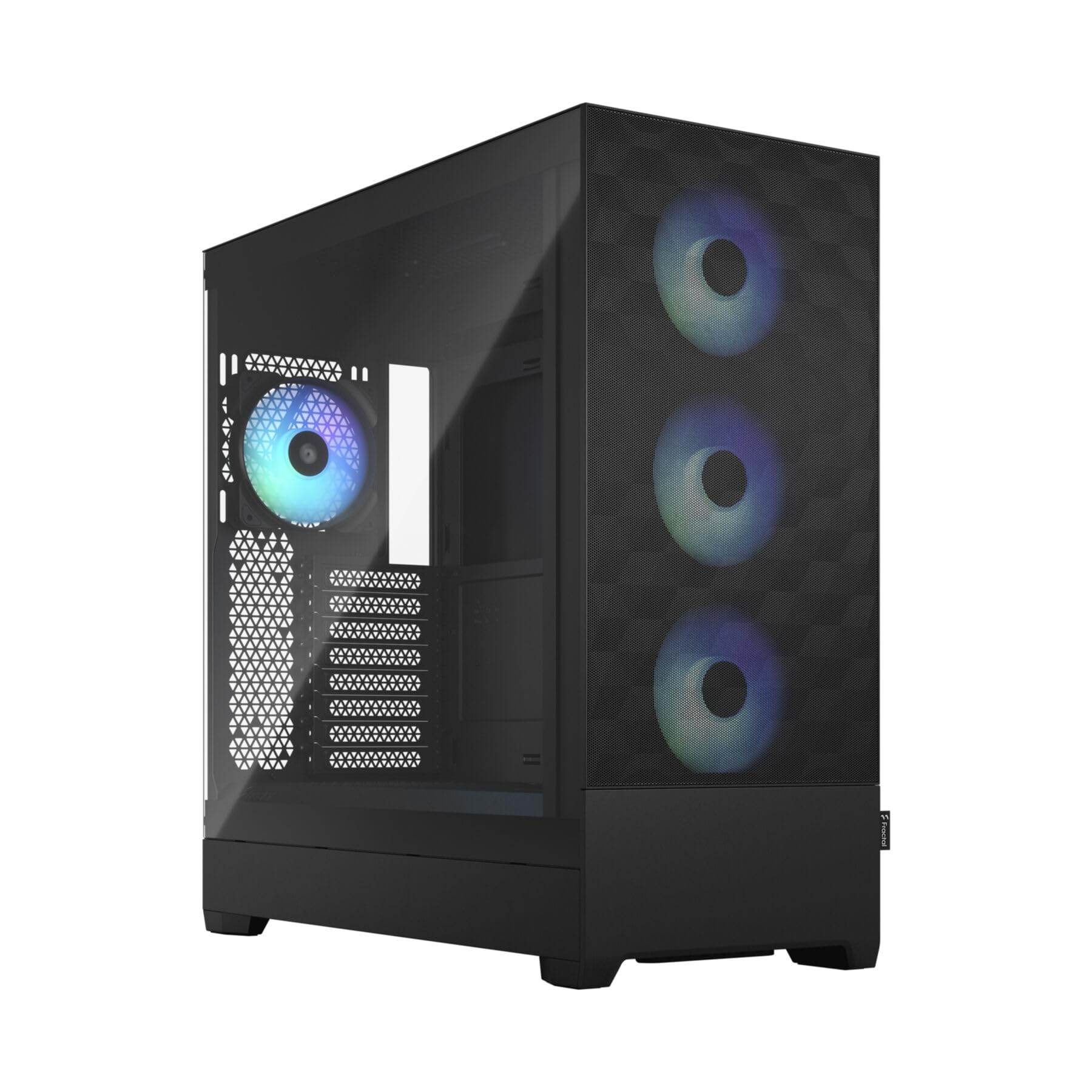
The full-tower workhorse that crams in ten drive bays and still flows air beautifully.
The Pop XL Air is the pick for storage hoarders. It accommodates E-ATX motherboards up to 280mm wide, and the internal layout holds up to four HDDs and six SSDs (or three HDDs and five SSDs with the optical bay in use). Two concealed 5.25″ bays hide behind a magnetic cover — a rarity in modern cases.
Cooling is handled by four pre-installed 120mm Aspect RGB fans, with support for two more for a total of six. Radiator mounts go up to 360mm in the front, 280mm in the top, and 140mm in the rear. Since it’s a full tower, the interior is wide open for big GPUs and cable routing.
Owners praise the clean RGB and solid premium build, with one reporting an 8°C temperature drop after switching cases. The honest notes: the USB-C port is not included and needs a separate Fractal cable, and the included ARGB fans are a bit weak at 1200rpm DC. But the front mesh design delivers the airflow you actually need.
Perfect for: builders with lots of drives and an optical drive who want a solid full tower with good airflow and a hidden bay.
Plan for: buying a separate USB-C cable if you want front-panel USB-C, and consider replacing the stock fans for max performance.
9. NZXT H7 Flow Mid-Tower ATX Airflow PC Case

The airflow-first mid-tower with monster radiator support and dedicated GPU cooling.
The H7 Flow is engineered around one goal: moving air. High-performance mesh panels cover every surface for intake and exhaust, and three front-mounted 120mm fans come pre-installed for out-of-the-box cooling. Quality is the top praise from owners, with space close behind.
It supports three bottom-mounted 120mm fans for direct GPU cooling while keeping a narrow mid-tower footprint. Radiator support is the real headline: up to 420mm in the front and 360mm in the top, so even the biggest liquid coolers fit. The cable management system includes wide channels, built-in hooks, and included straps.
Owners consistently call it one of the better cases to build in. The tool-less panels, spacious interior, and straightforward cable routes make assembly enjoyable. The honest downsides: the included fans are 3-pin non-PWM, so they don’t auto-adjust speed, and the instructions are thin. There are also no dust filters by design.
Choose it for: top-tier airflow, massive 420mm radiator support, and a clean build experience in a sturdy, quality shell.
Know before you buy: stock fans are non-PWM, so noise control means adding a fan hub or PWM fans later.
Understanding the Specs
Max GPU Length
This number tells you the longest graphics card that fits inside. A 340mm slot handles nearly every modern card, while 400mm+ gives you room for the absolute biggest flagships. Measure your GPU before you buy.
Pre-Installed Fans vs. Empty
Cases either ship with fans or expect you to buy them. ARGB PWM fans offer synchronized lighting with speed control, while non-PWM fans run at a fixed speed. More pre-installed fans mean less to spend later.
FAQ
Will my large graphics card fit in these cases?
How many fans do I need for a gaming build?
What is the difference between ARGB and regular RGB fans?
Can I use a 360mm liquid cooler in a budget mid-tower?
What does a dual-chamber case do for me?
Why do some cases not include a USB-C port?
Is a mesh front panel better than a glass one?
What does reverse-blade fan mean?
Final Thoughts: The Verdict
For most people, the affordable pc cases winner is the MONTECH XR because it blends panoramic glass, three pre-installed ARGB fans, and a 4.8-star track record into one value-packed package. If you want the most fans per dollar, grab the FOIFKIN F1. And for pure airflow with monster radiator support, the NZXT H7 Flow is the one to reach for.
How We Picked
We do not accept paid placement. Every pick is matched to a real buyer and a real use-case; we do not hands-on test units.
Sources & Methodology
Specifications: manufacturer listings and product documentation. Review insights: verified customer reviews, as of August 2026. Pricing: not shown on this page (it changes often); check the current price via the retailer link.
As an Amazon Associate, Gadgets Feed earns from qualifying purchases. This does not affect which products we feature.