
Finding a personal computer that balances capability with cost is a delicate act. The market is flooded with machines that promise speed for a steal, only to buckle under the weight of a few browser tabs or a standard video call. You need a system that handles your daily workflow—documents, streaming, research, and light creative projects—without demanding a second mortgage or the patience of a saint.
I’m Min — the co-founder and writer behind Gadgets Feed. I track the personal computer market closely, spending dozens of hours analyzing processor benchmarks, memory configurations, storage types, and real-world user feedback to separate the genuine values from the underpowered compromises.
This guide cuts through the noise to help you find a machine that delivers reliable performance for years. The right affordable personal computer combines a capable processor, ample RAM, fast storage, and a solid build without hidden flaws.
How To Choose The Best Affordable Personal Computer
Selecting an affordable PC is about prioritizing the right components for your specific tasks. An entry-level machine for basic office work has different requirements than one for light gaming or content creation. Understanding the core specs will help you avoid common pitfalls.
Processor: Look Beyond the Model Number
The CPU is the brain of the system. For an affordable build, a mid-range processor from the last few generations offers the best value. An Intel Core i5 (8th Gen or newer) or an AMD Ryzen 5 provides a strong balance of multi-core performance for multitasking and single-core speed for everyday apps. Be wary of older i7 chips (like the 4th Gen) that lack modern security features and efficiency, even if they have a higher number. A newer i3 or Ryzen 3 can often outperform a decade-old i7.
Memory (RAM) and Storage: The Speed Duo
RAM is your system’s short-term memory for active tasks. For an affordable PC, 16GB of DDR4 RAM is the sweet spot for smooth multitasking with multiple browser tabs, office suites, and light photo editing. 8GB is the bare minimum for basic use, but you will feel the limits. For storage, an SSD is non-negotiable. Prioritize an NVMe M.2 SSD over a SATA SSD; it dramatically improves boot times and application loading. A 256GB or 512GB NVMe drive is ideal for the operating system and key programs.
Form Factor and Connectivity
Consider the physical space you have. Traditional towers offer the most expansion potential, while Small Form Factor (SFF) and Mini PCs save desk space but limit internal upgrades. Check the ports for your needs—USB 3.0 ports for fast data transfer, HDMI or DisplayPort for monitors, and built-in Wi-Fi 6 or Bluetooth for wireless connectivity. Many affordable PCs, especially renewed office models, use DisplayPort for video out, so you may need an adapter for an HDMI monitor.
Quick Comparison
On smaller screens, swipe sideways to see the full table.
| Model | Category | Best For | Key Spec | Amazon |
|---|---|---|---|---|
| CyberPowerPC Gamer Master | Gaming Desktop | Entry-level gaming & multitasking | AMD Ryzen 5 5500, Radeon RX 6500 XT 4GB | Amazon |
| YAWYORE Gaming PC | Integrated Graphics | 1080p gaming & content creation | AMD R5 5600GT, 1TB NVMe, 16GB DDR4 | Amazon |
| HP ProDesk 600G4 Tower | Business Tower | Heavy multitasking & content creation | Intel i7-8700, 32GB DDR4, 1TB SSD | Amazon |
| bytespark Gaming PC | Gaming Tower | Budget gaming with dedicated GPU | Intel i7-4770, RX 590 8GB, 16GB RAM | Amazon |
| STGAubron Gaming Desktop | Entry Gaming | Casual gaming & office use | Intel i5, RX 550 4GB, 16GB RAM, 512GB SSD | Amazon |
| suevery Tower Desktop | Value Tower | Versatile home & office with RGB | Intel Core i7, 16GB RAM, NVMe 256GB | Amazon |
| Dell Optiplex 7060 SFF | Business SFF | Space-saving office workstation | Intel i7-8700, 32GB DDR4, 512GB NVMe SSD | Amazon |
| Core Innovations 24″ All-in-One | All-in-One | Simple, clutter-free basic computing | Intel Celeron N5095, 4GB RAM, 128GB | Amazon |
| Kroteaup Business Desktop | Budget Office | Office productivity & study | Intel i7-4770, 16GB DDR3, 512GB SSD | Amazon |
| GMKtec Mini PC G3 PRO | Mini PC | Ultra-compact HTPC & office | Intel Core i3-10110U, 16GB DDR4, 512GB | Amazon |
| HP Windows 11 Desktop Combo | Complete Bundle | Family all-in-one starter setup | Intel i5-8500, 16GB DDR4, 500GB SSD, 24″ Monitor | Amazon |
In‑Depth Reviews
1. CyberPowerPC Gamer Master Gaming PC

This system stands out as the most well-rounded option for an entry-level gamer or a power user who needs dedicated graphics without a premium price tag. The AMD Ryzen 5 5500 processor and Radeon RX 6500 XT 4GB GPU provide a solid foundation for playing popular titles like Fortnite and Valorant at 60+ FPS on medium settings. The 500GB PCIe 4.0 NVMe SSD is a speed demon, ensuring the system boots and loads games in seconds.
The 8GB of DDR4 RAM is the primary bottleneck here, but it is easily upgradable to 16GB, which is a recommended first step. The inclusion of a tempered glass side panel and custom RGB lighting gives it a modern gaming aesthetic. With WiFi 5 and Bluetooth 5.0, wireless connectivity is covered, and the B550 chipset motherboard offers a good upgrade path for the future.
Reviews consistently praise its ease of setup and out-of-box performance for the price point. While some users note the power supply is basic and the GPU is entry-level, it is a reliable machine that allows for simple component swaps down the line. It is the most future-proof affordable option for those who want to play games or run GPU-accelerated apps.
Why it’s great
- Strong CPU and dedicated GPU combo for 1080p gaming
- Blazing fast PCIe 4.0 NVMe storage
- Easy to upgrade RAM, storage, and GPU
Good to know
- 8GB RAM is the bare minimum; plan to upgrade to 16GB
- RX 6500 XT lacks hardware encoding for some streaming tasks
2. YAWYORE Gaming PC Desktop

This system offers incredible value by pairing a modern AMD Ryzen 5 5600GT processor with integrated Radeon Vega graphics and a massive 1TB NVMe SSD. The 5600GT is a 6-core, 12-thread powerhouse that handles heavy multitasking, streaming, and productivity software with ease. The integrated Vega graphics are surprisingly capable, running esports titles at 1080p with playable frame rates.
The 16GB of 3200MHz DDR4 RAM is the perfect amount for a smooth experience right out of the box. The 550W 80PLUS Bronze power supply provides a stable foundation for a future dedicated GPU upgrade. Users report excellent thermals thanks to the five ARGB fans, and the system runs quietly during normal use.
Customer reviews highlight that adding a used GPU like an RX 580 or GTX 1070 Ti transforms this into a very capable gaming machine. The pre-installed MSI A520M-A PRO motherboard is a quality component that offers good expansion options. For a user who wants a fast, quiet machine today with a clear upgrade path for tomorrow, this is a brilliant choice.
Why it’s great
- Fast and modern 6-core processor for heavy multitasking
- Excellent value with 16GB RAM and 1TB NVMe storage
- Quiet, efficient cooling with quality power supply
Good to know
- Relies on integrated graphics; dedicated GPU needed for AAA gaming
- RAM is not RGB, but performance is the focus here
3. HP ProDesk 600G4 Tower Desktop

For productivity and content creation, this renewed business-class tower is a monster. Packing an Intel 8th Gen i7-8700 (6 cores, 12 threads), a massive 32GB of DDR4 RAM, and a 1TB SSD, it is designed for heavy multitasking. Running multiple virtual machines, editing high-resolution photos, or compiling code is handled without breaking a sweat.
The full-size tower form factor provides excellent airflow and ample room for upgrades, including a dedicated GPU if needed. It comes with a plethora of ports: six USB 3.0, four USB 2.0, a USB Type-C, and dual DisplayPorts for multi-monitor setups. The build quality of an HP business machine is a step above consumer-grade plastic.
User feedback consistently notes the incredible speed and stability of this machine once set up, though many advise budgeting for an HDMI adapter as the monitors output via DisplayPort. Some units have reported cosmetic blemishes, but the internal hardware is a proven workhorse. For a pure office or creative workstation at this price point, it is unmatched.
Why it’s great
- Enormous 32GB RAM for extreme multitasking
- 1TB SSD provides massive, fast storage
- Business-class build quality and stability
Good to know
- Renewed unit; cosmetic condition may vary
- Requires DisplayPort adapter for HDMI monitors
4. abytespark Prebuilt Gaming PC

If your primary goal is playing games from the last few years on a tight budget, this tower delivers. The AMD Radeon RX 590 with 8GB of GDDR5 video memory is a capable 1080p gaming card, and the 16GB of RAM ensures you won’t be starved for memory in modern titles. The Intel Core i7-4770, while older, handles the CPU demands of most games adequately.
The 512GB SSD is sufficient for the operating system and a handful of your favorite games. The tower features a “sea view” tempered glass panel and four RGB fans for a flashy aesthetic. It comes with a gaming keyboard and mouse, so you truly have a complete setup right out of the box.
Be aware that the i7-4770 is a decade-old chip on a platform that does not officially support Windows 11’s TPM 2.0 and Secure Boot requirements. While it runs the OS using a bypass, buyers should be prepared for potential compatibility issues in the future. The dedicated GPU makes this a gaming-focused system, but the CPU is its clear limiting factor.
Why it’s great
- Strong dedicated GPU (RX 590) for budget 1080p gaming
- Ready to use with included keyboard, mouse, and pad
- 16GB RAM is sufficient for gaming
Good to know
- Old CPU platform may have future Windows compatibility issues
- No Bluetooth built-in; requires a separate adapter
5. STGAubron Prebuilt Gaming PC Desktop

This is an entry-level gaming desktop that focuses on providing a complete, colorful package at a low price. The Intel Core i5 processor (3.6GHz) paired with an AMD Radeon RX 550 4GB GPU is capable of running esports titles like League of Legends and CSGO smoothly at 1080p. It comes with 16GB of RAM and a 512GB SSD, a solid foundation for general use.
One of its strongest features is the inclusion of Wi-Fi 6 and Bluetooth 5.0, ensuring fast and modern wireless connectivity. The RGB gaming keyboard and mouse included mean no extra purchases are needed to get started. Reviews mention that customer support is responsive, often replacing faulty units without much hassle.
The RX 550 is an old, low-power GPU. It is not meant for modern AAA games, and some users have reported component failures after a few months. The build uses generic, non-brand parts for the power supply and cooling, which can impact long-term reliability. This is a true budget gaming PC—fine for very light, casual use, but buyers should have realistic expectations about its limits.
Why it’s great
- Includes modern Wi-Fi 6 and Bluetooth 5.0
- Good out-of-box performance for esports games
- Responsive customer service for replacements
Good to know
- Weak GPU and no-name PSU limit longevity and performance
- Not suitable for demanding modern games
6. suevery 16GB RAM Core i7 Tower

For users who want both performance and a striking visual aesthetic, this tower delivers. The Intel Core i7 processor runs at up to 3.6GHz and is paired with 16GB of RAM, making it a capable machine for demanding office tasks, light design work, and home entertainment. The inclusion of an NVMe 256GB drive ensures the system feels snappy for booting and launching key applications.
The most distinctive feature is its cooling and lighting setup, featuring five RGB fans and a tempered glass panel that creates a customizable light show. It includes built-in WiFi and HDMI output, and its compact tower design fits well on a desk without taking up too much space. The NVMe storage is a welcome inclusion for the price.
Customer feedback notes that the micro-ATX board makes internal expansion a bit tight, and installing a GPU or additional SATA SSDs can be fiddly. Reports of power issues and hard drive failures within the first three months suggest quality control can be inconsistent. It offers great value for its specs and looks, but durability may be a concern.
Why it’s great
- Excellent cooling and impressive RGB aesthetics
- Solid CPU and RAM combo for multitasking
- NVMe storage provides fast boot and load times
Good to know
- Tight interior makes upgrades challenging
- Some reliability concerns reported in user reviews
7. DELL Optiplex 7060 SFF Desktop

This renewed Dell Optiplex is a testament to the value of business-grade hardware. The Intel 8th Gen i7-8700 (6 cores up to 4.6GHz) and a whopping 32GB of DDR4 RAM make it a powerhouse for productivity, capable of handling massive spreadsheets, complex databases, and heavy multitasking with ease. The 512GB NVMe M.2 SSD provides lightning-fast storage.
Its Small Form Factor (SFF) design saves significant desk space while still offering plenty of ports, including 5 USB 3.0 and 2 DisplayPorts for dual monitors. It comes with a wireless keyboard and mouse, and Wi-Fi and Bluetooth are built-in. For a clean, powerful, and uncluttered office setup, it is hard to beat.
Reviews are extremely positive on performance, with users calling it an “amazing machine.” The included keyboard and mouse are often described as very basic, and the unit relies on DisplayPort (an HDMI adapter is a wise purchase). As a refurbished unit, conditions can vary, and some have reported issues with the power supply or storage, but the core machine is top-tier for work.
Why it’s great
- Extremely powerful CPU and 32GB RAM for heavy work
- Space-saving SFF design with great port selection
- Reliable business-class build quality
Good to know
- Renewed unit; cosmetic and hardware condition can vary
- Needs DisplayPort adapter for HDMI monitors
8. Core Innovations 24″ All-in-One Desktop

This is the ultimate computer for those who prioritize simplicity and a clean desk. The 24-inch 1080p IPS display is integrated into the chassis, eliminating the need for a separate tower and saving significant space. It is a true plug-and-play system; just plug it in, and you have a full computer with a decent screen.
The Intel Celeron N5095 processor, 4GB of RAM, and 128GB of storage make this strictly for the most basic tasks: web browsing, email, video calls, and document editing. The built-in microphone and included keyboard and mouse mean you have everything needed for a home office or student workstation right away. The IPS panel offers good viewing angles for its class.
Performance is the major limitation. Build quality is also a concern, with multiple reviews citing failures within the first year. It is a viable option only for the least demanding users who want a clutter-free experience and have no intention of multitasking heavily.
Why it’s great
- Space-saving all-in-one design with a 24″ IPS display
- Extremely simple setup, no tower to hide
- Complete with keyboard, mouse, and microphone
Good to know
- Severely underpowered for multitasking or modern apps
- Limited 4GB RAM and low storage capacity
9. Kroteaup Business Desktop PC

This desktop is designed for core productivity tasks like office work and studying. It features an Intel Core i7-4770 processor and 16GB of DDR3 RAM, which is more than enough for running Microsoft Office, web browsing, and video conferencing without lag. The 512GB NVMe SSD ensures fast boot times and quick file access.
It comes with a quiet, low-noise cooling system, making it suitable for a focused work environment. The inclusion of Wi-Fi 6 provides a stable, high-speed wireless connection for online meetings and streaming. It is marketed as a “ready to use” machine with Windows 11 pre-installed and a 2-year warranty for peace of mind.
The i7-4770 is an old processor from 2013. While it handles basic tasks fine, its lack of modern security features (TPM 2.0) means Windows 11 is running via a supported bypass, which could lead to issues with future updates. Some users have reported units arriving with faulty Windows installations or hardware that fails to boot. The 16GB of DDR3 RAM is also slower and older than the DDR4 standard found in more modern builds.
Why it’s great
- Good amount of 16GB RAM and 512GB SSD for office work
- Includes modern Wi-Fi 6 connectivity
- Quiet operation suitable for a focused environment
Good to know
- Uses an outdated CPU and slower DDR3 RAM
- Potential compatibility issues with future Windows 11 updates
10. GMKtec Mini PC G3 PRO
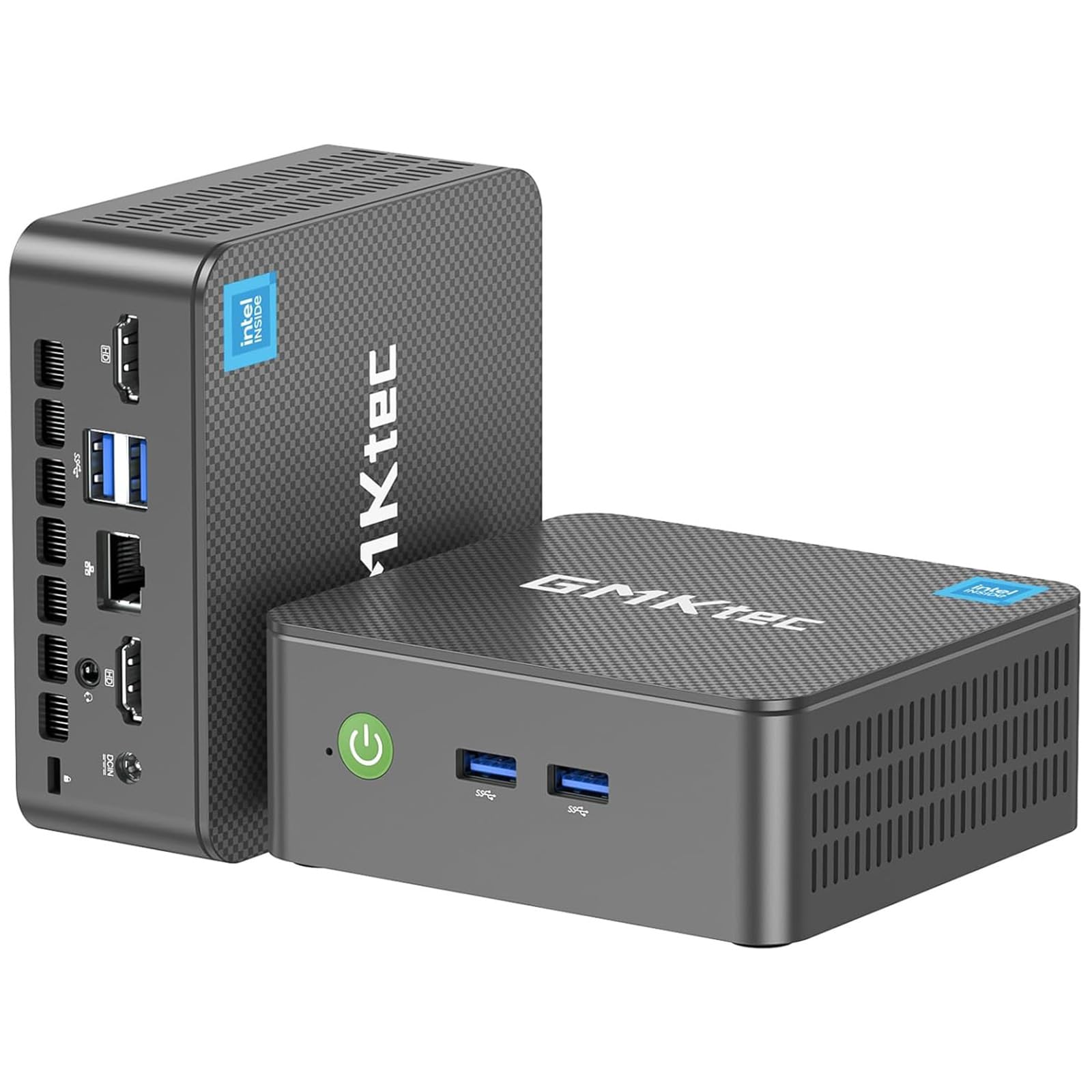
This is the champion of space-saving. The GMKtec G3 PRO is an ultra-compact mini PC that can be mounted behind a monitor, freeing up all desk space. Despite its tiny footprint, it features an Intel Core i3-10110U processor with 16GB of DDR4 RAM and a 512GB SSD, providing snappy performance for web browsing, office applications, and media streaming.
Connectivity is a strong point: it supports dual 4K displays via two HDMI 2.0 ports, has four USB 3.2 ports, Wi-Fi 6, Bluetooth 5.2, and a 2.5GbE Ethernet port for incredibly fast wired networking. The updated cooling fan and thermal paste keep it quiet and cool. It is a perfect candidate for a home theater PC (HTPC), a digital signage player, or a simple office workstation.
Reviews praise its quiet operation and excellent customer support, with the manufacturer often quickly replacing faulty units. However, the Core i3 processor is not a powerhouse; it struggles with 4K video at 60Hz and is generally underpowered for any kind of gaming or heavy video editing. The compact size also means performance is traded for portability and a near-silent footprint.
Why it’s great
- Incredibly small, space-saving design
- Excellent connectivity with Wi-Fi 6 and 2.5GbE
- Supports dual 4K displays
Good to know
- Limited processing power for gaming or heavy tasks
- Can struggle with smooth 4K video playback
11. HP Windows 11 Desktop Computer (Renewed)

This is the ultimate family-starter kit. The package includes a renewed HP ProDesk SFF with a 6-core Intel i5-8500, 16GB of RAM, and a 500GB SSD, coupled with a 24-inch 1080p monitor, an RGB keyboard and mouse, speakers, and a 2K webcam. Everything a family needs for school, work, and entertainment is in one box.
The computer itself is a dependable performer for everyday tasks. The 8th Gen i5 is a solid processor that handles multitasking between browser tabs, Office, and video calls with ease. The inclusion of an RGB gaming-style keyboard and mouse adds a fun touch for younger users, and the speakers and webcam mean you don’t have to buy anything extra to start video chatting or attending online classes.
As a renewed machine, the quality can vary. Reviews mention that while many units work great, others arrive defective or with compatibility issues, such as “WiFi-ready” meaning a missing adapter instead of integrated Wi-Fi. The monitor’s brand and model may vary, and the overall value hinges on getting a fully functional unit. It is a high-convenience option for those who want a single order for a complete setup.
Why it’s great
- Complete setup with monitor, speakers, and webcam
- Solid i5 processor with 16GB RAM for family use
- Fun RGB keyboard and mouse included
Good to know
- Renewed quality can be inconsistent
- “WiFi-ready” may not mean built-in Wi-Fi
FAQ
Is it safe to buy a refurbished or renewed personal computer?
How much RAM do I really need in an affordable PC in 2024?
Can an affordable PC be used for gaming?
Final Thoughts: The Verdict
For most users, the affordable personal computer winner is the CyberPowerPC Gamer Master because it offers a perfect balance of a modern CPU and a dedicated GPU, making it capable for both work and entry-level gaming. If you want the most future-proof system for multitasking and productivity, grab the YAWYORE Gaming PC for its fast processor and massive storage. And for a pure, compact office workstation that can handle heavy workloads, nothing beats the HP ProDesk 600G4 Tower.