
Our readers keep the lights on and my morning glass full of iced black tea. As an Amazon Associate, I earn from qualifying purchases.
Specs are compiled from manufacturer listings and verified buyer reviews and can change over time — please confirm the key details on the product page before buying.
The biggest mistake when buying a budget router is chasing speed specs while ignoring dead zones. A cheap router that drops calls in the kitchen or buffers streams in the bedroom is a hassle, not a bargain. This guide compares affordable routers on real-world reliability, setup ease, and coverage for everyday homes.
I’m Min — the founder and writer behind Gadgets Feed. This guide is built by comparing the manufacturers’ published specifications and the patterns across verified customer reviews, so you get each pick’s real strengths and trade-offs instead of marketing spin.
Whether you’re upgrading an old single-point router or replacing a rented ISP box, the best affordable router here delivers whole-home coverage, easy setup, and dependable speed while staying affordable.
Our Picks at a Glance

How To Choose The Best Affordable Router
Budget router shopping means matching technology to your home’s size and device count, not just price. Choose between a single router for small spaces or a mesh system for whole-home coverage.
Match the coverage to your home’s floor plan
Every router lists a coverage figure in square feet, but that number assumes clear air and few walls. In a real home, each wall, floor, and appliance soaks up signal strength. If you live in a single-level apartment or a small house, a single unit rated for 1,500 square feet is usually enough. For a two-story house or a place with thick walls, a mesh system with multiple nodes keeps the signal strong room to room.
Check the speed standard: WiFi 5 vs WiFi 6
The wireless standard matters more than the brand name. WiFi 6 (the 802.11ax standard) is the current generation, and it is built to talk to many devices at once without stuttering. If you have a house full of phones, TVs, laptops, and smart gadgets, a WiFi 6 router keeps everything running smoothly. Older WiFi 5 routers still work fine for lighter use, but they can choke when several devices pull data at the same time.
Count your wired and wireless needs
Look at the back of the router before you buy. Gigabit Ethernet ports (the wired jacks that hit speeds up to 1,000 Mbps) let you plug in a gaming console or a desktop PC for the most stable connection. On the wireless side, check whether the router handles both the 2.4 GHz band, which travels farther, and the 5 GHz band, which is faster but shorter-range. Dual-band support offers both range and speed.
Quick Comparison
| Model | Best For | Speed | Coverage | Ports | Amazon |
|---|---|---|---|---|---|
| TP-Link Deco S4 (2-Pack)★ Best Overall | Whole-home mesh coverage | 1200 Mbps | 3,800 sq. ft. | 4 Gigabit | Amazon |
| Tenda AX3000 (RX12 Pro)Top Performer | WiFi 6 speed and gaming | 3000 Mbps | Whole home | 4 Gigabit | Amazon |
| NETGEAR R6700AX | Small homes and apartments | 1.8 Gbps | 1,500 sq. ft. | 4 Gigabit | Amazon |
| D-Link DIR-1260 | Simple setup on a budget | 867 Mbps | Home | 4 Gigabit | Amazon |
| NETGEAR RAX30 (Renewed) | Renewed value and range | 2400 Mbps | 2,000 sq. ft. | 4 Gigabit | Amazon |
| TP-Link Archer AX21 | Reliable WiFi 6 at home | 1200 Mbps | Wide coverage | 4 Gigabit | Amazon |
| Amazon eero 6 | Smart home hub integration | 900 Mbps | 1,500 sq. ft. | — | Amazon |
In‑Depth Reviews
1. TP-Link Deco S4 Whole Home Mesh WiFi System (2-Pack)
Our pick — 4.5★ from 29,000+ verified ratings; the strongest balance of quality and price.
The two-unit mesh system that kills dead zones for homes up to 3,800 square feet.
If your home has dead zones where a single router just will not reach, this is the crowd favorite — 4.5 stars across 29,000+ owners. The Deco S4 pairs two units into one mesh network under a single network name, so your phone and laptop hop smoothly between them as you walk from the kitchen to the bedroom without ever reconnecting. Coverage is rated up to 3,800 square feet for the 2-pack, which is why it is the go-to pick for multi-story homes and layouts with thick walls.
The thing everyone raves about is how easy the setup is — owners call the Deco app turnkey, with a 12-minute install in a 1970s brick-and-plaster house delivering full bars everywhere and no reboots over 14 months. A network engineer ran six units across a four-building mountain property with no cables and still got over 100 Mbps at every point but one. Buyers report it handles 3,800 square feet of coverage at 1200 Mbps, and the 2 Gigabit Ethernet ports on each unit (4 total) give you wired backhaul options for the fastest path between nodes.
Where it falls short of the single-unit picks below is raw headline speed — it is not a WiFi 6 router, and it tops out around 1200 Mbps versus the 3000 Mbps of the Tenda. The recurring gripe is that performance varies with how you space the units, and a few owners hit connectivity hiccups that needed gentle coaxing. For homes that need coverage over raw top-end speed, though, this remains the most dependable all-rounder.
Why the mesh wins
- Two units cover up to 3,800 sq. ft. under one network name
- 12-minute setup via the app, with smooth roaming
- sturdy parental controls with per-family profiles
- Wired Ethernet backhaul keeps nodes fast
Where to be careful
- Speed tops out at 1200 Mbps, not WiFi 6 class
- Unit spacing changes performance, so placement matters
- A separate modem is required for most ISPs
Reach for this if: your home has dead zones and you want one smooth network with easy parental controls.
Look elsewhere if: you need the absolute fastest WiFi 6 speeds for heavy gaming and have no need for multi-unit coverage.
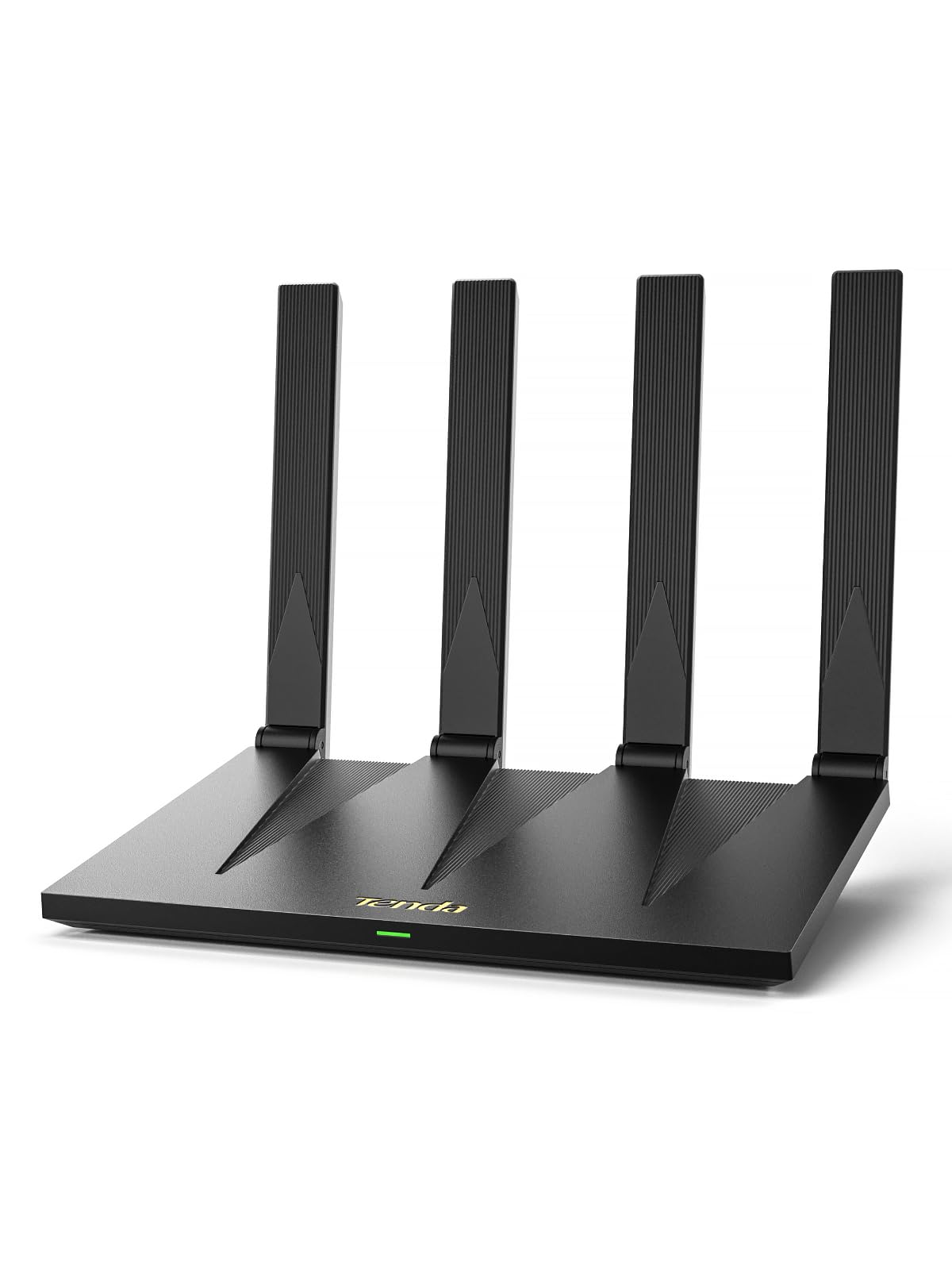
2. Tenda AX3000 WiFi 6 Router (RX12 Pro)
WiFi 6 speeds up to 3000 Mbps with security-minded extras like VPN and IoT isolation.
If you want the fastest wireless speed on a budget, this Tenda is a 2.5x gap ahead of the Deco S4 — 3000 Mbps versus 1200 Mbps — built on WiFi 6 (the 802.11ax standard) with up to 2402 Mbps on the 5 GHz band and 574 Mbps on 2.4 GHz. That makes it the pick for 4K streaming, Zoom calls, and gaming all at once, with 7 dBi high-gain 5GHz antennas and Beamforming (signal focusing aimed at your devices) to push coverage across a whole two-story home.
The standout features go beyond raw speed. It supports OpenVPN and WireGuard for secure remote access, plus an independent IoT Wi-Fi network to isolate smart cameras and doorbells from your main devices. Four full Gigabit ports with auto WAN/LAN detection let you plug in a console or PC without fussing over which jack is which, and the one-tap NFC connection lets Android guests join just by tapping their phone.
The honest catch: connectivity gets mixed feedback, and while many owners mention a stable full-home signal and a 4-minute app setup, a smaller number describe connection drops every 15 minutes that wrecked streaming and gaming. The reliability aspect is the most-discussed topic here, and a few units clearly struggle where others shine. No built-in modem either, so you need your ISP gateway, and OpenWRT is not supported on this version.
Where it stands out: WiFi 6 speed at 3000 Mbps, VPN built in, and an IoT network that keeps smart gadgets quarantined.
Know the risk: a minority of owners hit periodic drops, so buy where returns are easy if your unit is one of them.
3. NETGEAR WiFi 6 Router (R6700AX)

A compact WiFi 6 upgrade for apartments that want strong range without a mesh system.
For small homes and apartments, this NETGEAR delivers the WiFi 6 standard in a single compact box that covers up to 1,500 square feet — enough for a two-bedroom flat. It pushes wireless speeds up to 1.8 Gbps across the 2.4 GHz and 5 GHz bands, and it is backward compatible with older WiFi 5 devices, so your existing phones and TVs just work from the start. Quality is the most-praised aspect here, with owners calling it a strong replacement for the basic boxes ISPs rent out.
Plug-in options are solid: four 1 Gig Ethernet ports let you hardwire a gaming console, streaming player, or PC for the most stable connection, and it handles up to 20 connected devices at once. Security is on by default with WPA3 encryption (the latest Wi-Fi security standard) and automatic firmware updates, plus a guest network so visitors do not touch your main devices. Setup runs through the free Nighthawk app on iOS or Android, and free phone help is included if you get stuck.
The trade-off is scope: 1,500 square feet and 20 devices are plenty for an apartment but will not cover a big multi-story house. Connectivity gets mixed feedback, with a few owners reporting trouble linking Dell laptops, and the app functionality draws the occasional complaint. If your space is modest and you want WiFi 6 without buying two units, this is a clean, budget-friendly answer.
The compact strengths
- WiFi 6 speeds up to 1.8 Gbps across dual bands
- Four 1 Gig Ethernet ports for stable wired connections
- WPA3 security and guest network on by default
- Free Nighthawk app setup plus free expert help
The limits
- Coverage caps at 1,500 sq. ft., so big homes need more
- Handles 20 devices, not a house full of smart gadgets
- A few customers note connectivity quirks with some laptops
Grab it if: you live in an apartment or small home and want WiFi 6 speed in one simple box.
skip it if: your house spans multiple floors or you have more than 20 devices to connect.
4. D-Link WiFi Router AC1200 (DIR-1260)

A budget dual-band router that impresses with setup ease and strong range for the money.
This D-Link is the budget pick that wins people over with how painlessly it goes online. Setup is the most-praised aspect by far — owners call it easier and faster to install than pricier routers, working on the first try and running immediately. It is a dual-band AC1200 design with speeds up to 300 Mbps on 2.4 GHz and 867 Mbps on 5 GHz, and high-power amplifiers push coverage well beyond what its modest looks suggest.
For a home with lots of gadgets, it holds up: one owner ran 3 PCs, 3 consoles, and 12+ other devices through it with no slowdown, crediting a dual-core processor and MU-MIMO (technology that sends data to several devices at once). The four Gigabit LAN ports each deliver up to 1000 Mbps to wired devices, and profile-based parental controls let you manage kids’ online time. In a 1,000-square-foot apartment, reviewers point out smooth streaming on a TV, desktop, and two phones with no hiccups.
The reliability feedback is genuinely mixed, and the specific recurring complaint is the auto-band selection — it sometimes routes 5 GHz devices onto the slower 2.4 GHz band, which owners fix by manually splitting the network names. That is a real quirk to know about, not a dealbreaker, and it is the trade-off you accept for this price point.
Best for: first-time router buyers and small homes that want a fast, simple install with broad device support.
Fair warning: the auto-band routing can misfire, so expect to split your 2.4 and 5 GHz networks manually for the best speeds.
5. NETGEAR Nighthawk WiFi 6 Router (RAX30) Renewed

A renewed Nighthawk that brings solid range and easy setup at a friendlier price.
For shoppers who want a name-brand Nighthawk without the full retail price, this renewed RAX30 delivers. It is a 5-stream dual-band router with AX2400 wireless speed — up to 2.4 Gbps — and coverage rated at 2,000 square feet with support for 20 devices. Performance is the most-praised aspect here, with owners reporting the range reaches noticeably farther than their previous router and that it finds every device on the network quickly.
Setup earns consistent praise as very easy, and the router works with any ISP service up to 1Gbps, including cable, satellite, fiber, and DSL. Four 1G Ethernet ports let you hardwire a computer, game console, or streaming player for the fastest connection. Owners have found it a reliable everyday workhorse — one replaced a Linksys from the mid-2000s and called it solid and sufficient, another noted it shakes hands with cross-platform devices that their provider’s router would not connect.
The connectivity feedback is mixed, with several owners reporting issues when hooking it to Spectrum modems specifically, so if that is your provider, check your modem model first. As a renewed unit, your mileage depends on the condition of the specific unit you receive, but the value story is strong for the AX2400 speed and 2,000-square-foot reach.
The Nighthawk strengths
- AX2400 speed up to 2.4 Gbps across dual bands
- Covers 2,000 sq. ft. with support for 20 devices
- Easy setup and broad ISP compatibility up to 1Gbps
- Four 1G Ethernet ports for wired gaming and PCs
What to check first
- Some owners hit connection issues with Spectrum modems
- Renewed condition varies from unit to unit
- Range and speed depend on walls and home layout
Choose this if: you want Nighthawk reliability and 2,000 square feet of range at a renewed price.
Think twice if: you use Spectrum and cannot confirm your modem plays nice, or you prefer a brand-new unit.
6. TP-Link Archer AX21 WiFi 6 Router (AX1800)

A WiFi 6 router with beamforming and a quad-core processor that owners trust for years.
This Archer is a long-standing favorite — 4.4 stars across 24,000+ owners — and the reason is simple: it just works. It is a dual-band WiFi 6 router with AX1800 total bandwidth (up to 1200 Mbps on 5 GHz and 574 Mbps on 2.4 GHz), using Beamforming, 4 high-gain antennas, and a front-end module chipset to focus signal strength on devices that are far away. Reliability is the most-discussed positive, with owners reporting strong, stable WiFi in 1,500-square-foot homes and faster service recovery after outages.
what separates it from faster rivals is the polish. A quad-core processor keeps multiple streams smooth, the split 2.4 and 5 GHz networks fixed multi-room audio issues for one Spectrum customer while boosting their speeds from 310 to 360 Mbps down and 9 to 13 Mbps up. It supports a VPN server (OpenVPN and PPTP), works with Alexa voice commands, and comes with IP-based access control. The build is light, and you need to press the power button firmly after plugging it in, a small quirk owners mention.
Connectivity does get mixed feedback like most picks here, and a few owners found the initial setup slightly confusing, with the Tether app having some early hiccups. But the quality and value story is strong enough that it has earned tens of thousands of loyal owners, making it a dependable choice for a medium home that wants WiFi 6 without a mesh system.
Why people stick with it: rock-solid reliability, easy setup for experienced users, and a quad-core processor that handles a busy household.
The small quirks: the light build needs a firm power-button press, and a few owners found first-time setup a bit puzzling.
7. Amazon eero 6 Mesh WiFi Router

A mesh router with a built-in Zigbee hub that pulls double duty for Alexa smart homes.
This eero 6 is the choice if you live inside the Alexa ecosystem, because it packs a built-in Zigbee smart home hub right into the router — no separate hub needed for compatible smart devices. It covers up to 1,500 square feet (a 22-foot radius) with WiFi 6, supports speeds up to 900 Mbps, and handles 75+ connected devices, making it a solid single-unit start to a mesh system you can expand later with cross-compatible eero hardware.
Reliability and easy setup are the most-praised aspects, with owners describing a setup that takes minutes through the eero app and a signal that reaches impressively far — one owner says it even reaches their boat. TrueMesh technology routes traffic intelligently to cut drop-offs, and automatic updates keep the network secure without you lifting a finger. Shoppers say it replaces a rented ISP router and pays for itself in about 6 months.
Signal strength and connectivity both get mixed feedback — while many report strong coverage everywhere, others find the 1,500-square-foot rating optimistic, and a few hit occasional video-call freezing. Value for money is genuinely debatable among owners, and one quirk is that changing your password means reconnecting every device. If you already use Alexa and want a router that doubles as a smart home hub, this is a clean fit.
The smart-home edge
- Built-in Zigbee hub connects Alexa smart devices with no extra hardware
- Easy app setup in minutes with automatic security updates
- Handles 75+ devices and supports speeds up to 900 Mbps
- Expandable mesh system with cross-compatible hardware
The caveats
- Coverage caps at 1,500 sq. ft., so large homes need extra units
- Signal and connectivity get mixed owner feedback
- Password changes force every device to reconnect
Reach for this if: you want a router that also runs your Alexa smart home and prefer app-based management.
Choose something else if: your home is bigger than 1,500 square feet and you do not want to add more eero units.
Understanding the Specs
WiFi 6 vs WiFi 5
WiFi 6 is the current wireless standard (the technical name is 802.11ax), and its big real-world win is handling many devices at once without slowing down. It uses a technology called OFDMA to pack more data into the same airwaves, so a house with phones, TVs, laptops, and smart gadgets all running at once stays smooth. WiFi 5 routers still work fine for lighter use, but they are more likely to stutter as your device count grows.
Mesh vs Single Router
A single router broadcasts from one spot, which works well in apartments and small homes. A mesh system uses two or more units that talk to each other under one network name, so your devices switch between them as you move without reconnecting. Mesh is the better answer for multi-story houses, thick walls, or any layout where a single box cannot reach every corner.
FAQ
Will a mesh router work with my existing internet provider?
How much coverage do I really need for a two-story house?
Is WiFi 6 worth it on a budget router?
Can I use these routers with a gaming console?
What is the difference between 2.4 GHz and 5 GHz bands?
Do these routers have parental controls?
How long does it take to set up a budget router?
Do I still need a modem if I buy one of these routers?
Can I expand a mesh system later if my home grows?
Final Thoughts: The Verdict
For the majority of shoppers, the affordable router winner is the TP-Link Deco S4 because it solves the problem that frustrates people most — dead zones — with two units that cover up to 3,800 square feet under one simple network. If you want the fastest WiFi 6 speeds for gaming and streaming, grab the Tenda AX3000. And for an apartment or small home where one compact box is enough, the NETGEAR R6700AX is the one to reach for.
How We Picked
We do not accept paid placement. Every pick is matched to a real buyer and a real use-case; we do not hands-on test units.
Sources & Methodology
Specifications: manufacturer listings and product documentation. Review insights: verified customer reviews, as of August 2026. Pricing: not shown on this page (it changes often); check the current price via the retailer link.
As an Amazon Associate, Gadgets Feed earns from qualifying purchases. This does not affect which products we feature.