
Getting into sublimation printing means finally turning your designs into vibrant, permanent prints on mugs, T-shirts, and custom gear. But the wrong printer choice can bury you in recurring ink costs, clogged printheads, and faded transfers that undermine every project before it starts.
I’m Min — the co-founder and writer behind Gadgets Feed. I’ve spent hundreds of hours analyzing the technical specifications, ink yield data, and real-world transfer quality of entry-level to pro-sumer sublimation printers to separate the genuine workhorses from the overhyped bundles.
This guide breaks down the true contenders for the best affordable sublimation printer, focusing on printhead reliability, ink system efficiency, and the total cost of your first hundred transfers.
How To Choose The Best Affordable Sublimation Printer
Selecting an affordable sublimation printer is less about the upfront sticker and more about the ecosystem: ink refill costs, printhead durability, and how easily the unit converts from standard dye to sublimation inks. Beginning buyers often grab a cheap cartridge model only to discover replacement ink costs erase any savings.
Ink Delivery System: Supertank vs. Cartridge
Supertank printers — like the Epson EcoTank and Pinckney converted units — hold high-volume ink reservoirs that drop per-page costs dramatically. Cartridge-based units, even purpose-built ones, demand pricier consumables that can triple your operating cost per print. For consistent sublimation output, a supertank architecture is the smarter long-term play.
Printhead Technology and Resolution
The printhead determines how finely the sublimation dye is laid onto transfer paper. A minimum of 5760 x 1440 dpi optimized resolution ensures smooth gradients and sharp text after heat pressing. Micro-droplet ejection (around 3 picoliters) prevents graininess on fine details, a common issue in entry-level models.
Bundle vs. Build-Your-Own
Many affordable bundles pair a supertank printer with sublimation ink and paper. While convenient, double-check that the printer is a known conversion candidate — some unbranded bundles use off-shelf standard printers loaded with third-party ink, which can void warranties and struggle with color profile accuracy. A purpose-built or converted unit with genuine ink profiles yields more predictable results.
Quick Comparison
On smaller screens, swipe sideways to see the full table.
| Model | Category | Best For | Key Spec | Amazon |
|---|---|---|---|---|
| Sawgrass SG500 | Premium Purpose-Built | Professional-grade color accuracy | 1200×600 dpi / SubliJet UHD ink / Wi-Fi | Amazon |
| Brother Sublimation SP1 | Versatile Design | Artspira app integration & fast prints | CMYK ink / 41ml cartridges / USB+Ethernet | Amazon |
| Epson SureColor F170 | Compact OEM | Reliable OEM quality & small footprint | PrecisionCore printhead / 150-sheet tray | Amazon |
| Pinckney ET-3850 (Renewed) | Feature-Rich Refurb | Office-grade features + sublimation | 5760×1440 dpi / ADF / Ethernet / 250-sheet tray | Amazon |
| PC Universal Bundle | All-In-One Kit | Newcomers wanting a full starter setup | 33 ppm B&W / bundle includes heat press | Amazon |
| Pinckney ET-2800 Bundle | Converted Supertank | Low-cost entry to supertank sublimation | 5760×1440 dpi / 4 ink bottles / wireless | Amazon |
| Generic Subli Bundle | Starter Value Pack | Budget entry with paper & tape included | Epson 2400 base / 100 paper sheets / kit | Amazon |
| Epson EcoTank ET-2980 | General Purpose Tank | Everyday document printing + light sublimation | 6,600 pages B&W / auto 2-sided / 15 ppm | Amazon |
| OIIEE 5-in-1 Heat Press | Multi-Function Press | Heat press machine (not a printer) | 15×15″ platen / 360° swing-away / 5 attachments | Amazon |
In‑Depth Reviews
1. Sawgrass SG500 Sublimation Printer Starter Bundle

The Sawgrass SG500 is a purpose-built sublimation printer, not a converted standard inkjet — and that distinction matters for color consistency and printhead reliability. Its SubliJet UHD ink set (20 mL CMYK cartridges) is formulated specifically for vapor-phase transfer, delivering rich, repeatable results on both hard substrates like ceramic mugs and soft polyester fabrics. The bundled TruePix paper further smooths the workflow.
Print speed is rated at 25 ppm black and 10 ppm color, though actual throughput for high-quality sublimation runs at a more deliberate pace. The auto-maintenance cycle actively parks and cleans the printhead to prevent clogs — a common failure point in converted printers that sit idle between projects. Wi-Fi connectivity frees you from a direct USB tether, and the compact desktop footprint makes it accessible for home-based studios.
The MySawgrass software platform adds preset color profiles and template access, though some users report that the print utility adds extra steps versus a simple driver. Ink cost is higher per milliliter than supertank alternatives, but the reliability and color science may justify the premium for users who sell finished products and cannot tolerate color drift. The 1-year limited warranty covers printhead defects.
Why it’s great
- Auto-maintenance printhead reduces clogging
- Dedicated sublimation ink and paper included
- Wi-Fi and software color profiles save setup time
Good to know
- Starter ink only 20 mL — replacements run high per-page
- Software print manager adds extra steps to each job
2. Brother Sublimation Printer SP1

Brother enters the sublimation space with a dedicated printer that pairs with its Artspira mobile app, offering over 100 built-in sublimation designs and photo editing tools. The SP1 ships with larger 41 mL CMYK ink cartridges compared to Sawgrass’s 20 mL starter, giving more prints before the first replacement. The ink set is formulated to print in muted tones on paper and activate into vivid colors under heat and pressure.
This unit supports both USB and Ethernet connections, and its LCD touchscreen simplifies menu navigation without needing a computer for basic adjustments. The multi-purpose tray feeds letter-size paper from the front, while a rear specialty tray handles smaller cut sheets ideal for mug-sized transfers. Print speed is rated at 28 ppm black, though high-resolution sublimation jobs run slower for quality preservation.
Some users report that the initial setup is more complex than typical office printers due to the Artspira requirement and driver installation. The build feels slightly less robust than the Sawgrass, and paper jams on the rear feed have been noted when using thicker transfer paper. However, the lower per-cartridge cost and strong color vibrancy make it a compelling mid-range pick for hobbyists scaling up.
Why it’s great
- 41 mL cartridges yield more prints per set
- Artspira app includes templates for beginners
- Ethernet and USB offer stable wired connections
Good to know
- Setup requires Artspira app and driver downloads
- Rear paper feed can jam with thicker media
3. Epson SureColor F170 Dye-Sublimation Printer

The Epson SureColor F170 is an OEM dye-sublimation printer — it ships from Epson as a dedicated sublimation machine, not a converted office printer. Its PrecisionCore printhead with Precision Droplet Control delivers micro-fine ink droplets for sharp text and smooth gradients on transfer paper up to 8.5 x 14 inches. The included genuine Epson sublimation ink bottles carry OEKO-TEX certification for safe use on textiles.
The dust-resistant closed paper tray holds 150 sheets and minimizes lint contamination, a detail that improves printhead longevity in dusty workshop environments. Setup is streamlined for both Mac and Windows, with auto-stop ink refill bottles that prevent overfilling — a nice touch for beginners prone to spills. The printer is print-only (no scanner or copier), which saves desktop space but requires a separate scanning workflow for design editing.
Some users note that connecting to Wi-Fi can be temperamental, and the unit does not have Ethernet, so wireless reliability depends on router proximity. The ink yield is modest compared to supertank rivals, but the OEM nature means you avoid the warranty pitfalls of third-party conversions. For crafters who prioritize simple, reliable OEM hardware and don’t need multi-function extras, the F170 delivers consistent results.
Why it’s great
- OEM Epson sublimation ink with OEKO-TEX certification
- Dust-resistant 150-sheet paper tray
- Compact design for small workspaces
Good to know
- No Ethernet port — Wi-Fi only
- Ink yield lower than supertank alternatives
4. Pinckney Cartridge-Free Super-Tank w/ Sublimation Ink (Renewed)

The Pinckney renewed bundle takes an Epson ET-3850/3843 supertank all-in-one and converts it for sublimation with pre-filled CMYK ink bottles. Unlike stripped-down budget bundles, this unit retains the Auto Document Feeder (ADF), 250-sheet paper tray, and Ethernet port — making it the only sublimation-ready printer on this list that also serves as a capable office document scanner and copier.
Print resolution reaches 5760 x 1440 dpi optimized, and the automatic duplex printing saves paper when printing reference designs. The ink system uses auto-stop bottles that fit the tank inlets without syringes or squeezing, reducing the mess factor significantly. The 127 mL black bottle and 85 mL color bottles offer excellent mileage for the price tier, making per-page ink cost very low.
Being a renewed unit, cosmetic wear is possible, and the conversion means the standard Epson warranty may not cover third-party ink use. Some users report Wi-Fi connectivity hiccups requiring periodic reconnection. However, the combination of ADF scanning, Ethernet stability, and supertank economy makes this the best pick for users who need one device for both sublimation production and office paperwork.
Why it’s great
- 250-sheet tray and ADF for office tasks
- Ethernet port for wired network stability
- Low per-page ink cost from supertank bottles
Good to know
- Renewed unit may have cosmetic blemishes
- Wi-Fi connectivity can drop intermittently
5. PC Universal Super-Tank Wireless Sublimation Printer Bundle

This bundle goes beyond printer + ink by including a flat board heat press machine and all accessories, making it a true turnkey solution for someone starting from zero equipment. The printer itself is a supertank model rated at 33 pages per minute black and 15 ppm color, with a 4-color ink system (CMYK) and wireless connectivity from computers and mobile devices.
The included heat press allows immediate production without a separate purchase, and the bundle also supplies sublimation paper to run your first batch of transfers. The printer supports auto-feed and EPEAT Silver certification for environmental efficiency. Its build is utilitarian — no LCD touchscreen or advanced duplexing — but the core printing function for standard 8.5 x 11 sheets is solid.
Compatibility issues have been reported with MacOS and non-US software regions, so this bundle is best suited for Windows-based users. The ink yield information is vague, and finding replacement ink for the generic printer model can be frustrating. Still, as an all-in-one gateway package that includes the heat press, it removes the second biggest barrier to entry for beginners.
Why it’s great
- Flat heat press included in the bundle
- Fast 33 ppm black printing speed
- Wireless printing from phones and PCs
Good to know
- MacOS compatibility issues reported
- Replacement ink sourcing may be challenging
6. Pinckney Cartridge-Free Super-Tank Printer w/ Sublimation Ink Bundle

The Pinckney ET-2800 bundle takes the popular Epson EcoTank ET-2800 — a known conversion workhorse — and ships it pre-loaded with four bottles of sublimation ink (127 mL black, 85 mL each CMY). The auto-fill nozzle design mates perfectly with the tank inlets, allowing mess-free refills without syringes or spill risk. Resolution hits 5760 x 1440 dpi optimized, producing fine droplet control for detailed transfers.
The all-in-one functionality includes a flatbed scanner and copier, so you can digitize sketches or copy reference materials. Supported paper sizes range from A6 up to 8.5 x 47.2 inches for long banners, adding versatility for different product types. The wireless connectivity works through the Epson Smart Panel app for mobile printing directly from a phone.
Some buyers received units with leaking black ink bottles during shipping, causing cleanup mess before first use. Additionally, the ET-2800 lacks automatic duplex printing and an ADF, so scanning multi-page documents is manual. For straightforward sublimation printing where you don’t need office automation, this converted supertank delivers the lowest operating cost in this guide after the initial bottle set.
Why it’s great
- High 5760 x 1440 dpi for crisp transfers
- Pre-filled supertank bottles with high yield
- Wireless mobile printing via Smart Panel app
Good to know
- No ADF or automatic duplexing
- Ink bottles can leak in transit
7. Generic Sublimation Heat Transfer Image Printing Bundle
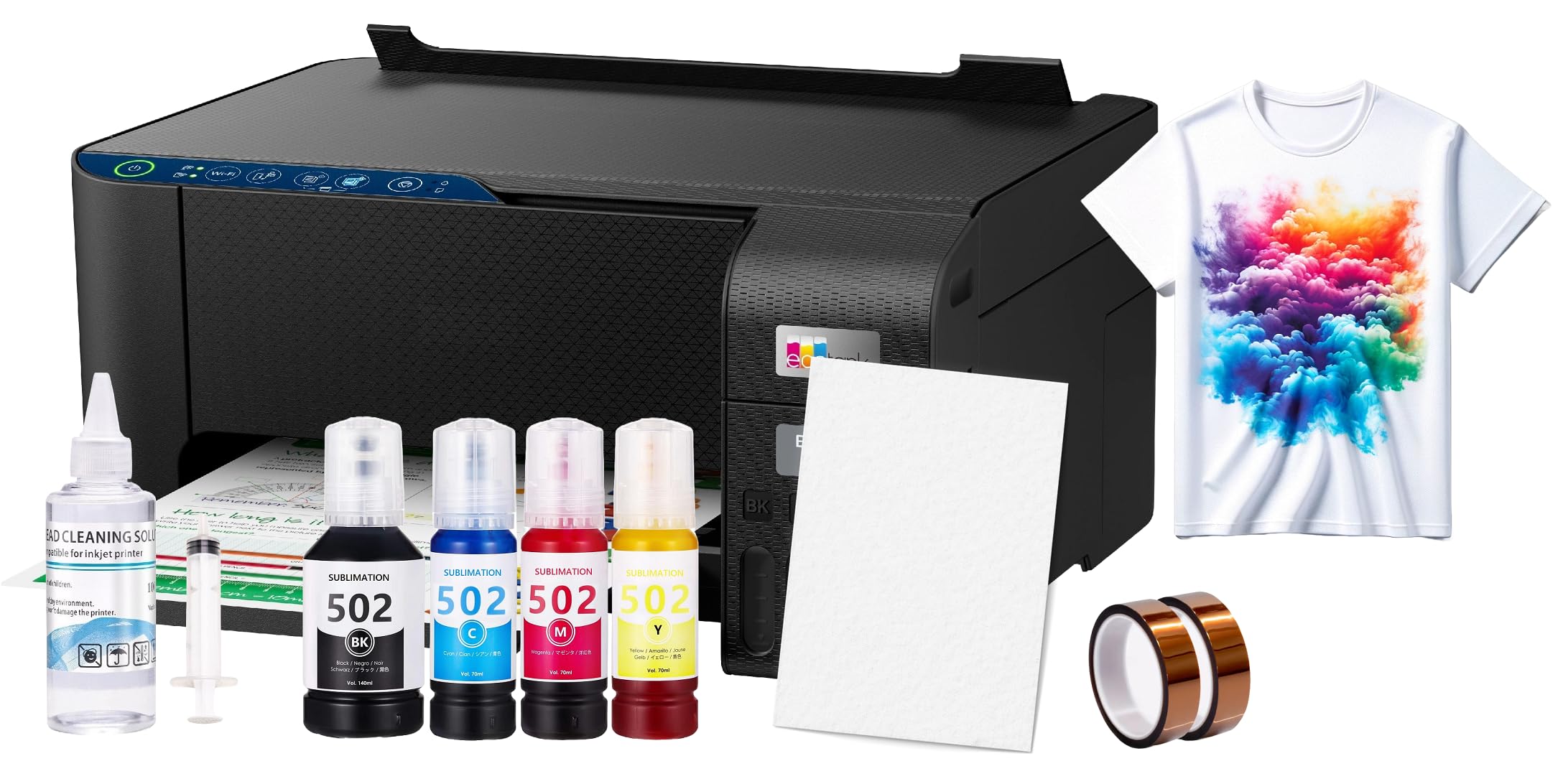
This bundle packages an Epson EcoTank 2400 series printer (a supertank base) with 100 sheets of sublimation paper, heat transfer tape, and a printhead cleaning kit — everything needed to start printing immediately except the sublimation ink itself. The printer is a known conversion platform, and the 15-pound package weight indicates a solid build for the price bracket.
The included cleaning kit and tape are small consumables, but the 100 paper sheets are a tangible value add that lets you test designs without additional supply runs. Users report that the printer performs well for sublimation once the correct software and ICC profiles are installed, outputting vivid colors on polyester fabrics and coated mugs after heat pressing.
Some buyers felt the bundle’s total cost was higher than buying the printer and supplies separately, calling the convenience markup excessive. The ink cartridges (not bottles) included with the bundle are reported as low quality, and users strongly recommend upgrading to a proprietary sublimation ink brand immediately. For users who want a single-order solution and don’t mind swapping inks early, this bundle minimizes shopping friction.
Why it’s great
- 100 sublimation paper sheets included
- Printhead cleaning kit for maintenance
- Epson supertank base is a reliable platform
Good to know
- Included ink quality is sub-par — upgrade recommended
- Bundle price may exceed buying components separately
8. Epson EcoTank ET-2980 Wireless All-in-One

The Epson EcoTank ET-2980 is primarily a high-volume office inkjet with a supertank system that yields up to 6,600 black pages or 5,500 color pages from the included ink set. This is the seventh-generation EcoTank, featuring refillable ink tanks with EcoFit bottles that lock into the ports to prevent spills. It includes a color touchscreen and auto 2-sided printing, missing on many budget sublimation bundles.
For sublimation, the ET-2980 can be converted by flushing the OEM dye ink and replacing it with sublimation ink, though this voids Epson’s warranty and requires careful purging to avoid color contamination. Print quality at 600 DPI is good for documents and passable for transfers, but the 1200 DPI mode may struggle due to limited onboard memory. The printer supports scanning and copying via the Epson Smart Panel app.
Common complaints include a small LCD with a narrow viewing angle and the absence of an Automatic Document Feeder (ADF), requiring manual page-by-page scanning. The printer is also picky about paper feed closure and can throw errors if the output tray isn’t perfectly extended. For sublimation, it requires a conversion that most beginners should skip unless they want a single device for both office print and light custom transfers.
Why it’s great
- Up to 6,600 black pages from included ink
- Auto duplex printing for two-sided documents
- Color touchscreen for easy menu navigation
Good to know
- Needs ink conversion for sublimation — voids warranty
- No ADF for multi-page scanning
9. OIIEE Heat Press Machine 5 in 1 Combo

While not a printer, the OIIEE 5-in-1 heat press is the transfer companion that completes a sublimation workflow. It combines a 15 x 15 inch T-shirt press with attachments for 11 oz mugs, hats, and two plate sizes, all in one unit. The 360-degree swing-away design rotates the heating element fully away from the base, allowing safe one-handed placement of garments and coated blanks without reaching under the hot platen.
The digital LCD controller lets you set precise time and temperature, and the audible alarm signals when the cycle finishes. Double-tube heating elements and a Teflon-coated plate distribute heat evenly across the 15-inch surface, reducing hot spots that cause uneven transfer. Two layers of insulation cotton and a thick silicone pad underneath keep pressure consistent and protect the work surface from heat damage.
At 15 kg (33 lbs), the unit is heavy and requires dedicated bench space — it is not portable. The instruction manual is minimal, and users report a learning curve for pressure adjustment when swapping attachments. The included Teflon sheet and high-temperature silicone pads are useful extras. For sublimation printing, pairing this with any supertank printer above completes a production setup capable of shirts, mugs, and flat panels.
Why it’s great
- 5-in-1 versatility: shirts, mugs, hats, plates
- 360° swing-away for safe, easy placement
- Even heat distribution from double-tube system
Good to know
- Heavy at 33 lbs — requires permanent setup
- Instruction manual lacks detail for beginners
FAQ
Can I use a regular inkjet printer for sublimation?
What paper size should I use for mug sublimation?
How long does sublimation ink last in a supertank?
Final Thoughts: The Verdict
For most users, the best affordable sublimation printer winner is the Sawgrass SG500 because its purpose-built design, auto-maintenance printhead, and SubliJet UHD ink set deliver professional-grade color accuracy and reliability right out of the box. If you want supertank economy and office features like ADF scanning and Ethernet, grab the Pinckney ET-3850 Renewed Bundle. And for a turnkey kit that includes the heat press itself, nothing beats the PC Universal Bundle.