
Finding a laptop with a responsive, vibrant touchscreen that doesn’t demand a premium budget used to mean compromise on processor speed, memory, or build quality. The budget-to-premium line has blurred significantly: modern affordable touch-screen laptops now pack powerful Intel and AMD chips, high-resolution IPS panels, and 360-degree hinges once reserved for + machines.
I’m Min — the co-founder and writer behind Gadgets Feed. I’ve spent months parsing the latest CPU architectures, display panel specs, and real-world battery results to separate the genuinely capable affordable touch-screen laptops from the underpowered outliers.
If you need reliable multitasking, a vivid touch interface, and strong build quality without stretching your budget, this buying guide will help you find the right affordable touch screen laptop for your daily workflow.
How To Choose The Best Affordable Touch Screen Laptop
Touch-screen laptops in the value tier vary wildly in processor power, display quality, and battery endurance. The key is identifying which specs directly affect your daily experience without paying for features you won’t use.
Processor Architecture: N100 vs. Core Ultra vs. Ryzen 5
The Intel N100 is a capable quad-core chip for web browsing and light office work, but it will struggle with demanding multitasking. The Intel Core Ultra 5 225U and Ryzen 5 7520U offer genuine performance headroom for heavier spreadsheet work and video conferencing. The Snapdragon X Elite and Core Ultra 7 155U belong to the premium echelon — fantastic if your budget allows, but overkill for basic productivity.
Display Panel and Resolution
An FHD (1920×1080) IPS panel should be your minimum — the extra pixel density over HD+ (1366×768) and 1600×900 makes a huge difference in text clarity and touch targeting. Look for 250 nits or higher brightness; dimmer panels wash out under typical indoor lighting. AMOLED displays on models like the Samsung Galaxy Book5 360 deliver unmatched contrast but are less common at the value end.
RAM and Storage Configurations
8GB of LPDDR5 is the baseline for Windows 11 to run without stutter. If you keep many browser tabs open concurrently, 12GB or 16GB provides a noticeably smoother experience. For storage, a 256GB NVMe SSD is adequate for moderate use; a 512GB drive provides comfortable headroom for applications and media without external drives.
Quick Comparison
On smaller screens, swipe sideways to see the full table.
| Model | Category | Best For | Key Spec | Amazon |
|---|---|---|---|---|
| Lenovo Yoga 7i | Premium 2-in-1 | Power users & Creators | 16″ 2K IPS Touch, Core Ultra 7 | Amazon |
| Samsung Galaxy Book5 360 | Premium 2-in-1 | Mobile professionals | 15.6″ FHD AMOLED Touch | Amazon |
| Microsoft Surface Laptop | Premium Clamshell | Productivity on the go | 13.8″ PixelSense Touch | Amazon |
| HP OmniBook X FLIP | Premium 2-in-1 | AI & creative multitasking | 16″ WUXGA Touch, Ryzen AI 5 | Amazon |
| Lenovo IdeaPad 5 Flex | Mid-Range 2-in-1 | Students & everyday use | 14″ 1920×1200 Touch | Amazon |
| Dell Inspiron Touchscreen | Mid-Range Clamshell | Business & heavy multitasking | 15.6″ FHD IPS Touch | Amazon |
| Apple MacBook Neo 13 | Mid-Range Clamshell | MacOS ecosystem users | 13″ Liquid Retina Display | Amazon |
| HP 17.3″ Touchscreen | Mid-Range Clamshell | Large-screen media consumption | 17.3″ HD+ Touch | Amazon |
| Dell 15 (Ryzen 5) | Mid-Range Clamshell | Everyday computing | 15.6″ FHD 120Hz Display | Amazon |
| BNCF 11″ 2-in-1 | Budget 2-in-1 | Light work & media | 11″ FHD IPS Touch | Amazon |
| Jumper EZpad V12Pro | Budget 2-in-1 | Students on a strict budget | 12″ 2K IPS Touch | Amazon |
In‑Depth Reviews
1. Lenovo Yoga 7i 2-in-1

The Yoga 7i marries a 16-inch 2K (1920×1200) IPS touchscreen with Intel’s Core Ultra 7 155U, a 12-core processor that handles intensive multitasking without lag. The 16GB of LPDDR5x memory and 1TB NVMe SSD provide generous headroom for creative software, large spreadsheets, and media libraries, while the 360-degree hinge lets you switch between laptop, tent, and tablet modes.
Wi-Fi 6E and Bluetooth 5.2 keep connectivity modern, and the Thunderbolt 4 port supports high-speed data transfer and external displays. The backlit keyboard and fingerprint reader add convenience for business users who value security. Build quality feels dense and premium — the storm grey aluminum chassis resists flex even during heavy typing.
Battery life is solid for a 16-inch model, lasting a full workday under mixed use, though the 2K panel will drain faster under sustained brightness. The Yoga 7i stands as the most versatile touch-screen laptop for users who need raw performance in a convertible form factor.
Why it’s great
- 16-inch 2K IPS touchscreen delivers sharp, vibrant visuals for productivity and media
- Core Ultra 7 155U with 16GB DDR5 provides excellent multitasking performance
- Thunderbolt 4, Wi-Fi 6E, and fingerprint reader cover modern connectivity and security
Good to know
- At 16 inches, it is heavier and less portable than 13- and 14-inch alternatives
- Battery life is good but not class-leading — expect 6-8 hours depending on workload
2. Samsung Galaxy Book5 360

The Galaxy Book5 360 brings Samsung’s renowned AMOLED panel to a 15.6-inch 2-in-1 chassis, delivering deep blacks, vibrant color saturation, and an anti-reflective coating that makes outdoor usability far better than typical glossy screens. The Intel Core Ultra 7 256V processor supports a 47 TOPS NPU, unlocking on-device AI features like AI Select and Photo Remaster within the Galaxy ecosystem.
At just 13.7mm thin and 3.22 pounds, it is the most portable full-size convertible in this lineup. The 16GB of RAM and 512GB SSD handle business multitasking with ease, and Bluetooth 5.4 ensures stable peripheral pairing. The included S Pen support is a genuine bonus for note-takers and digital artists.
Battery life is impressive — expect up to 12 hours of mixed use, though the bright AMOLED panel will demand more power at peak brightness. The Galaxy Book5 360 is the best choice if display quality and ecosystem integration (Galaxy Tab, Samsung phones) are your priorities.
Why it’s great
- FHD AMOLED anti-reflective display offers class-leading contrast and color accuracy
- Extremely thin and light (13.7mm, 3.22 lbs) for a 15.6-inch convertible
- 47 TOPS NPU enables useful on-device AI features like real-time translation
Good to know
- Limited to one USB-A port, which may require a dongle for older peripherals
- Highest brightness levels drain the battery noticeably faster
3. Microsoft Surface Laptop (2024)

Microsoft’s Surface Laptop 2024 is a Copilot+ PC powered by the Snapdragon X Elite, a 12-core ARM processor that delivers exceptional power efficiency. The 13.8-inch PixelSense touchscreen runs at a 3:2 aspect ratio — noticeably taller than 16:9 panels — making it excellent for document editing and web browsing. The 2304×1536 resolution provides crisp text, and the 120Hz refresh rate makes scrolling and touch interactions feel fluid.
The 16GB of RAM ensures smooth multitasking, though the 256GB SSD may feel tight for users with large media libraries. Build quality is excellent: the magnesium-aluminum chassis feels robust, and the hidden vent design keeps the laptop cool and quiet. Windows Hello via IR camera provides instant, secure login.
Battery life is the standout feature — up to 20 hours of local video playback and consistently 10+ hours under real mixed use. ARM compatibility remains a consideration: most web-based and office apps run without issues, but some legacy x64 software and games may exhibit compatibility quirks. For productivity-focused users who need all-day battery, this is the best option.
Why it’s great
- 3:2 PixelSense touchscreen at 120Hz delivers superior document and web browsing experience
- Snapdragon X Elite provides excellent battery life (10+ hours real-world usage)
- Premium magnesium-aluminum build with instant-on Windows Hello
Good to know
- ARM architecture may not run all legacy x86 software and games
- 256GB base storage fills quickly — consider an external SSD for media
4. HP OmniBook X FLIP

The OmniBook X FLIP is HP’s convertible flagship for the Copilot+ PC era, driven by the AMD Ryzen AI 5 340 processor paired with a 50 TOPS NPU for accelerated AI tasks. The 16-inch WUXGA (1920×1200) IPS touchscreen delivers 400 nits of brightness — one of the brightest panels in this group — with excellent viewing angles and responsive touch tracking.
The 16GB of LPDDR5x memory and 512GB PCIe Gen4 SSD provide snappy performance for creative and productivity workflows. The 5MP IR camera with AI noise reduction delivers sharp video calls, and the Poly Studio audio tuning makes voices sound clear in meetings. The 360-degree hinge feels sturdy, and the recycled metal chassis adds an environmental touch without sacrificing build quality.
Battery life is rated up to 21 hours, and real-world mixed use typically yields a full day (8-10 hours). The OmniBook is a well-rounded premium convertible, especially suited for users who want the latest AI features and a bright, large touchscreen for creative work.
Why it’s great
- 50 TOPS NPU enables powerful on-device AI capabilities for Copilot+ PC features
- 400-nit WUXGA touchscreen is one of the brightest in this price tier
- 5MP IR camera with AI noise reduction for superior video conferencing
Good to know
- At 16 inches, it is less portable for frequent travelers
- First-day setup may involve slow background updates before performance normalizes
5. Lenovo IdeaPad 5 Flex 14″

The IdeaPad 5 Flex delivers a genuine 2-in-1 experience with a 14-inch 1920×1200 IPS touchscreen driven by Intel’s Core Ultra 5 225U — a 12-core processor (2P + 8E + 2LPE) that punches well above its price class. The 8GB of soldered LPDDR5x RAM is sufficient for everyday multitasking, though power users may find the ceiling lower than socketed alternatives.
The 512GB PCIe 4.0 NVMe SSD provides fast boot and load times. The convertible hinge transitions smoothly between laptop, tent, stand, and tablet modes, and the compact 14-inch size makes it easy to slip into a backpack. Dolby Audio tuning gives the stereo speakers more presence than typical budget laptops.
One omission is the lack of a backlit keyboard — a notable absence for evening use. Battery life is decent but not exceptional; expect 5-6 hours under mixed Wi-Fi use. The IdeaPad 5 Flex is an outstanding value proposition for students and professionals who need a responsive touchscreen and solid build without paying for unnecessary extras.
Why it’s great
- Core Ultra 5 225U (12 cores) offers excellent performance for the price
- 1920×1200 touchscreen provides more vertical space for productivity
- Convertible design with 360-degree hinge for versatile usage modes
Good to know
- No backlit keyboard — difficult to type in low-light conditions
- 8GB RAM is non-upgradable; heavy multitaskers may hit limits
6. Dell Inspiron Touchscreen (32GB RAM)

The Dell Inspiron Touchscreen is a productivity-focused machine built around an Intel i5-1155G7 quad-core processor with 32GB of DDR4 RAM and a 1TB SSD — a configuration typically found in much more expensive business laptops. The 15.6-inch FHD IPS anti-glare touchscreen reduces eye strain during long work sessions, and the full numeric keypad is a boon for data entry.
This laptop runs Windows 11 Pro, making it ideal for small businesses and professionals who need domain-join capabilities, BitLocker encryption, and remote desktop. The port selection is practical: two USB 3.2 Type-A ports, one USB 2.0, HDMI 1.4, and an SD card reader. Build quality feels solid in a traditional clamshell form factor.
Battery life is average — around 4 hours under real Wi-Fi use — and the 220-nit brightness is adequate for indoor use but struggles in bright environments. The Dell Inspiron is the best choice if you prioritize memory capacity, storage, and Windows 11 Pro over thin design or all-day battery.
Why it’s great
- 32GB RAM and 1TB SSD provide enterprise-level memory and storage headroom
- Windows 11 Pro with numeric keypad suits business and finance workflows
- Anti-glare FHD IPS touchscreen reduces eye fatigue during extended use
Good to know
- Real-world battery life of 3-4 hours is below average for the category
- 220-nit brightness is dimmer than most modern IPS panels
7. Apple 2026 MacBook Neo 13″

The MacBook Neo is Apple’s most affordable entry into the touchscreen laptop space, pairing the A18 Pro chip with a bright 13-inch Liquid Retina display (2408×1506, up to 500 nits). While MacOS does not feature a full touch-native interface, the display supports gesture-based interactions and the overall integration with Apple Intelligence makes it a compelling choice for users embedded in the Apple ecosystem.
The aluminum chassis is rigid and lightweight at 2.71 pounds, and the 1080p FaceTime HD camera with a dual-mic array delivers clear video calls. Up to 16 hours of battery life is exceptional, and the A18 Pro chip handles everyday tasks, light photo editing, and Apple Arcade games with ease. The 8GB unified memory is well-optimized in MacOS but may feel tight for heavy virtual machine usage or large media projects.
The 256GB SSD is adequate for cloud-centric users but will require external storage for local media libraries. The MacBook Neo is the best choice for MacOS users who want a premium build, stellar battery life, and a bright high-resolution display in a highly portable form factor.
Why it’s great
- Liquid Retina display hits 500 nits with excellent color accuracy
- A18 Pro chip delivers smooth performance with up to 16 hours of battery life
- Premium aluminum chassis at just 2.71 pounds is highly portable
Good to know
- MacOS touch support is limited to gestures and Apple Intelligence — no full touch app interface
- 8GB RAM and 256GB storage may require external drives or cloud storage for power users
8. HP 17.3″ Touchscreen Laptop

HP’s 17.3-inch touchscreen laptop offers the largest display in this roundup at a very accessible price point. The HD+ (1600×900) anti-glare touchscreen provides a roomy canvas for streaming, document editing, and web browsing. The Intel N100 quad-core processor paired with 8GB of DDR4 RAM handles basic productivity tasks competently, but the 128GB SSD fills up quickly with modern applications and media.
The full-size backlit keyboard with numeric keypad is comfortable for extended typing sessions, and the fingerprint reader provides convenient Windows Hello login. HP Fast Charge reaches 50% in 45 minutes, which is useful for users who need quick top-ups throughout the day.
The included Microsoft 365 subscription adds value for students and home users. This HP is best suited for users who prioritize screen real estate and a large keyboard over raw performance and pixel density.
Why it’s great
- 17.3-inch touchscreen provides generous screen real estate for productivity and media
- Backlit keyboard with numeric keypad and fingerprint reader for comfort and security
- HP Fast Charge reaches 50% in 45 minutes for quick daily top-ups
Good to know
- HD+ (1600×900) resolution is less sharp than FHD — text and icons look larger
- Intel N100 and 128GB SSD limit multitasking and local storage capacity
9. Dell 15 (Ryzen 5)
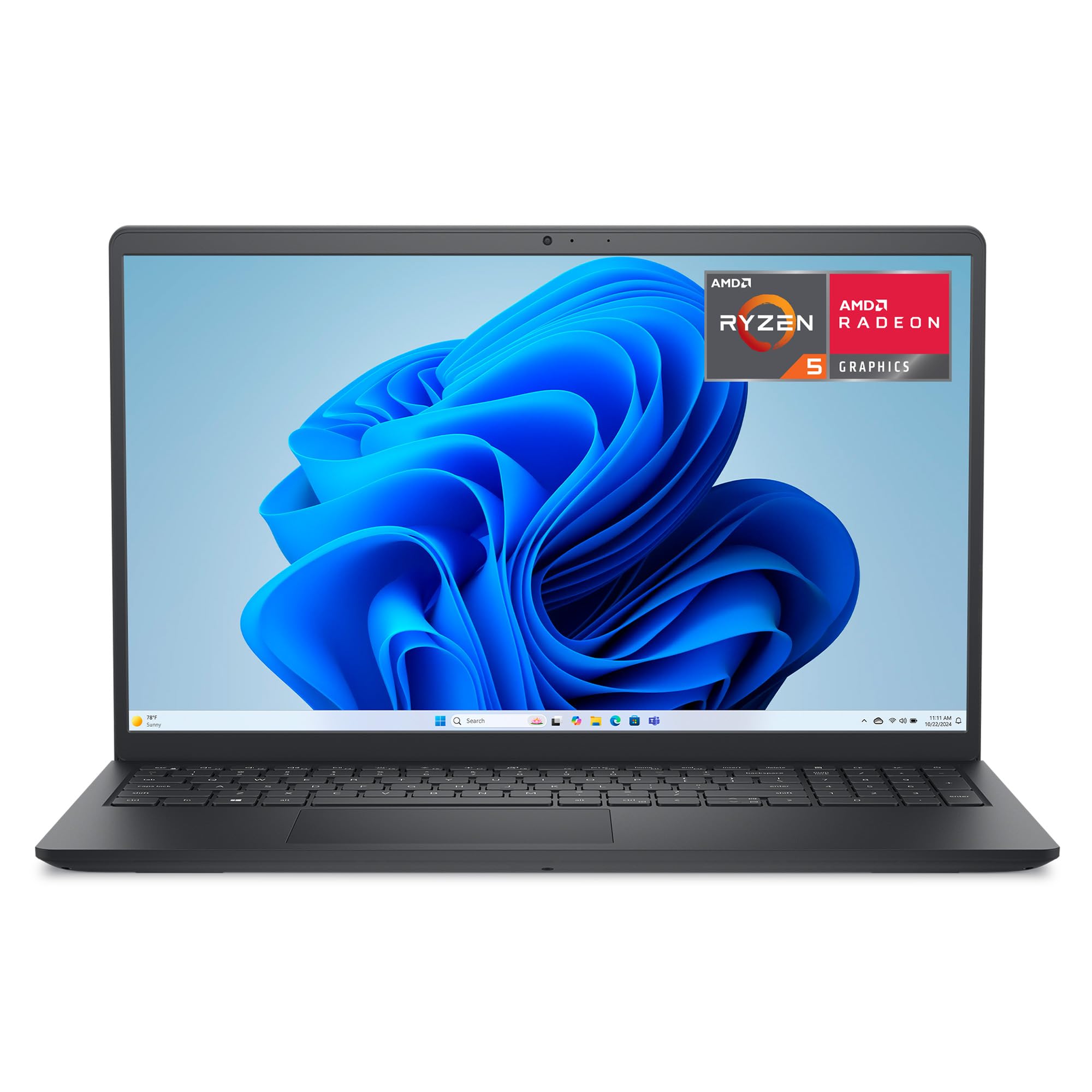
This Dell 15 combines a 15.6-inch FHD display with a smooth 120Hz refresh rate — a rarity at this price point — and an AMD Ryzen 5 7520U processor. The 8GB of LPDDR5 RAM and 512GB SSD provide balanced performance for everyday tasks, from schoolwork to office productivity, without the bloat of unnecessary extras.
The lifted hinge design creates an ergonomic typing angle, and the adaptive thermal system intelligently balances power and fan noise depending on whether the laptop is on a desk or your lap. The 1-year onsite Dell service adds peace of mind for students and remote workers who cannot afford extended downtime.
The 120Hz display makes scrolling and cursor movement feel noticeably smoother than the standard 60Hz panels found in most laptops at this level. Battery life is solid — expect around 7-8 hours of mixed use. The Dell 15 is a straightforward, reliable workhorse for users who need smooth visuals and solid AMD performance without paying for a 2-in-1 hinge.
Why it’s great
- 120Hz FHD display provides exceptionally smooth scrolling and cursor movement
- AMD Ryzen 5 7520U delivers strong everyday performance with adaptive thermal management
- 1-year Dell onsite service adds real value for dependable support
Good to know
- Integrated Radeon graphics are fine for productivity but not for serious gaming
- Some users report real-world battery closer to 6-7 hours than the full-day claim
10. BNCF 11″ 2-in-1 Laptop

The BNCF 11-inch 2-in-1 is a budget-friendly Windows tablet that punches above its price point with 12GB of DDR5 RAM and a 512GB NVMe SSD. The Intel Twin Lake N150 quad-core processor handles light productivity, web browsing, and HD video playback adequately, but its UHD Graphics will require low settings for even mid-range gaming titles.
The 11-inch FHD IPS in-cell touchscreen (1920×1200) delivers sharp and vibrant visuals at this screen size. The detachable magnetic keyboard and kickstand case bring the total weight to 1,106 grams, enabling seamless laptop-to-tablet transitions. Dual USB-C ports, Wi-Fi 6, and HDMI extend connectivity beyond what many budget options offer.
Build quality is decent with a 635g aluminum body, though some users report ghosting issues with the keyboard. The 34.2Wh battery typically lasts 5-6 hours of mixed use. The BNCF is the strongest budget option for users who need a lightweight, highly portable 2-in-1 with generous RAM and storage for basic tasks.
Why it’s great
- 12GB DDR5 RAM and 512GB NVMe SSD provide excellent memory and storage for the price
- FHD IPS in-cell touchscreen delivers sharp, responsive visuals in an 11-inch form factor
- Dual USB-C, Wi-Fi 6, and HDMI connectivity rival more expensive options
Good to know
- Intel N150 processor struggles with demanding multitasking and gaming
- Detachable keyboard may exhibit ghosting — check reviews for individual unit quality
11. Jumper EZpad V12Pro
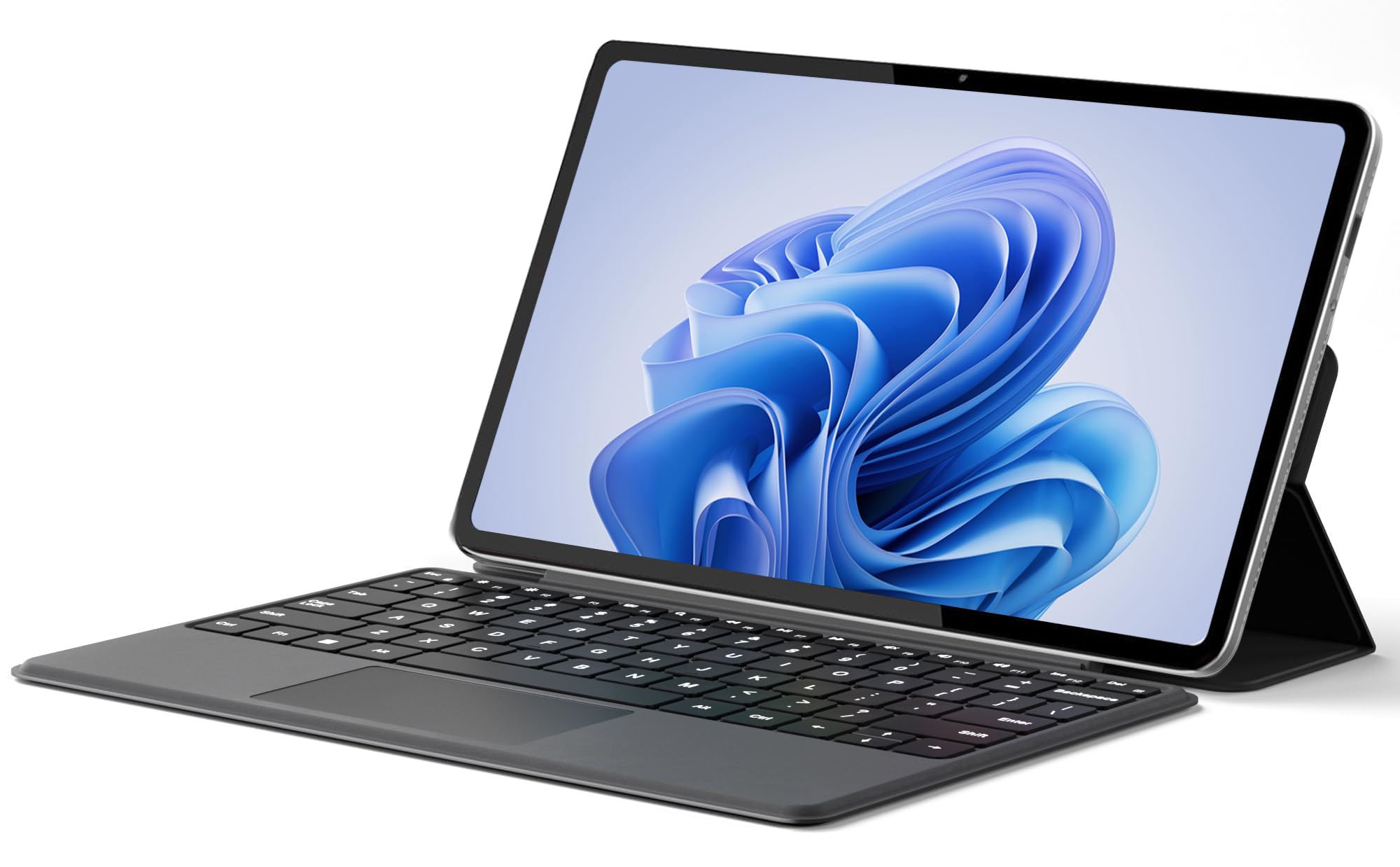
The Jumper EZpad V12Pro stands out in the budget category with a 12-inch 2K (2000×1200) IPS touchscreen that offers significantly sharper visuals than typical budget HD+ panels. The Intel Pentium Gold 6500Y dual-core processor is modest by modern standards but handles web browsing, document editing, and streaming without major complaints, especially with 12GB of RAM supporting the workload.
The detachable magnetic keyboard and 0.64kg premium metal body make this highly portable. Dual USB-C ports support charging, data transfer, and video output, while the 4,300mAh battery provides up to 8 hours of video playback. The dual stereo speakers and 200W/500W cameras are adequate for video calls and media consumption.
The 256GB SSD is smaller than some competitors, but the 2K display and 12GB RAM configuration offer a compelling core experience for budget-conscious users. Build quality feels surprisingly solid for the price point. The EZpad V12Pro is best for students and casual users who prioritize display sharpness and portability over raw processing power.
Why it’s great
- 12-inch 2K IPS touchscreen at this price point offers exceptional pixel density and clarity
- Ultra-light 0.64kg metal body with detachable keyboard for easy portability
- 12GB RAM provides smooth multitasking for everyday applications
Good to know
- Intel Pentium Gold 6500Y is underpowered for heavy multitasking or any gaming above casual
- 256GB SSD fills quickly — consider cloud storage or external drives for media
FAQ
Is 8GB of RAM enough for a touchscreen Windows laptop in 2025?
What is the difference between an in-cell touchscreen and an on-cell touchscreen?
Can an affordable touchscreen laptop handle light gaming or drawing?
Why does battery life vary so much between affordable touchscreen laptops with similar specs?
Final Thoughts: The Verdict
For most users, the best affordable touch screen laptop is the Lenovo Yoga 7i because it delivers the strongest combination of Core Ultra 7 performance, a sharp 2K touchscreen, and generous 16GB/1TB storage for the price. If you prioritize display quality and the Samsung ecosystem, grab the Samsung Galaxy Book5 360 with its stunning AMOLED panel. And for all-day battery life and a premium 3:2 touchscreen experience, nothing beats the Microsoft Surface Laptop for productivity-focused users.