
Our readers keep the lights on and my morning glass full of iced black tea. As an Amazon Associate, I earn from qualifying purchases.
Specs are compiled from manufacturer listings and verified buyer reviews and can change over time — please confirm the key details on the product page before buying.
An affordable wireless printer should end the daily argument with your router and your ink budget, not start one. The cheapest model often hides the highest running costs, while a pricier one can save you hundreds over time. This guide finds models that connect reliably, print cleanly, and keep running costs low.
I’m Min — the founder and writer behind Gadgets Feed. This guide is built by comparing the manufacturers’ published specifications and the patterns across verified customer reviews, so you get each pick’s real strengths and trade-offs instead of marketing spin.
You will learn which features actually matter for home printing, how to spot a hidden ink trap, and which affordable wireless printer balances speed, quality, and running costs for your specific needs.
Our Picks at a Glance


How To Choose The Best Affordable Wireless Printer
Before you hit buy, think about what you’ll actually print. A student printing essays has different needs than a home office printing client invoices with color charts. Your choice depends on three main pillars: the technology inside, the speed it prints, and the cost of the ink or toner it drinks.
Inkjet vs. Laser — The Core Decision
Inkjet printers spray liquid ink onto the page, which makes them excellent for photos and colorful graphics. They tend to be cheaper to buy upfront but can be pricier to run, especially if you use the standard cartridges. Laser printers use toner powder and heat to fuse text onto the page, producing extremely sharp black-and-white documents, and they are usually faster and cheaper per page for text-heavy printing.
Speed: What Does “Pages Per Minute” Actually Mean?
Print speed is measured in pages per minute (ppm). A number like 7.5 ppm black means you’ll wait about eight seconds for a single page, but that speed drops dramatically when you’re printing a 30-page document. If you rarely print more than a few pages at a time, a slower printer is fine. If you regularly print long reports, look for a model with a higher ppm to avoid standing around waiting.
The Hidden Cost of Ink and Toner
The upfront price is the bait; the cartridges are the hook. Before choosing, check the cost of replacement ink and the page yield. A printer that uses a high-yield cartridge (often marked with “XL”) can dramatically reduce the cost per page. Some manufacturers offer subscription services that deliver ink before you run out, which can be a great deal for heavy users but a hassle for those who print once a month.
Quick Comparison
| Model | Best For | B&W Speed | Color Speed | Duplex | Amazon |
|---|---|---|---|---|---|
| Canon PIXMA TR4720★ Best Overall | Home all-in-one with fax | — | — | Automatic | Amazon |
| Epson Workforce Pro WF-3823Top Performer | Speed and high volume | 21 ppm | 11 ppm | Automatic | Amazon |
| HP DeskJet 2827e | Basic home use | 7.5 ppm | 5.5 ppm | Manual | Amazon |
| Brother MFC-J1360DW | Home office with ADF | 16 ppm | 9 ppm | Automatic | Amazon |
| Canon PIXMA TR7120 | Versatile duplex printing | 14 ppm | 9 ppm | Automatic | Amazon |
| Brother HL-L2405W | Sharp B&W text, high volume | 30 ppm | — | Manual | Amazon |
| HP OfficeJet Pro 8135 | Home office professional color | 20 ppm | 10 ppm | Automatic | Amazon |
In‑Depth Reviews
1. Canon PIXMA TR4720 All-in-One Wireless Printer
Our pick — over 4.5★ from 200+ verified ratings; the strongest balance of quality and price.
The rare budget all-in-one that does everything, including faxing, without breaking a sweat.
Most affordable printers force you to give up one feature to get another, but the TR4720 refuses to compromise. It’s a true 4-in-1 that prints, copies, scans, and faxes, making it the centerpiece for a home office or a small therapy practice that needs to send documents. The built-in Auto Document Feeder means you can load a stack of pages and let it scan or copy them hands-free, which is a huge time-saver for multi-page forms.
Setting it up is genuinely painless because you can use the Canon PRINT Inkjet/SELPHY app on your smartphone, so you are not wrestling with a CD-ROM. The heart of the experience is the 2-cartridge hybrid ink system (PG-275 black and CL-276 color), which keeps things simple to replace. Buyers report it “works great for pictures and documents for remote work and for my therapy business,” which speaks to its dual talent for both crisp text and decent photos.
The crowd favorite — 4.6 stars across 200+ ratings — is proof of its no-drama reliability. It is a “must for every home,” as owners put it, finding it easy to set up and a good value for the money. Just know that the starter cartridges included in the box are exactly that — starters — so you’ll want to budget for replacements sooner rather than later.
Why It Wins
- Full 4-in-1 functionality means you won’t need a separate fax or scanner
- Automatic duplex printing saves paper without manual flipping
- Phone-based setup via the Canon app gets you printing in minutes
Reality Check
- The starter ink cartridges are limited and will need replacing quickly
- Maximum media size is A4/Letter, so no tabloid or legal-long prints
Reach for this if: you want one compact machine that handles printing, scanning, copying, and faxing for a busy home or small business.
Think twice if: you need professional-grade photo quality that goes beyond what a standard two-cartridge inkjet can deliver.
2. Epson Workforce Pro WF-3823 Wireless Color All-in-One Inkjet Printer
A speed demon that crushes documents at 21 pages per minute, leaving rivals in the dust.
If you’re tired of waiting for the printer to warm up, the WF-3823 is your answer. It churns out 21 pages per minute in black and 11 in color — that’s a 2.8x gap in black speed over the HP DeskJet 2827e’s 7.5 ppm, and a 2.0x gap in color over the same rival’s 5.5 ppm. This makes it the clear choice for high-volume workloads like a busy home office or a small business printing invoices and forms.
This speed comes from Epson’s PrecisionCore Heat-Free Technology, which also means the printer uses DURABrite Ultra instant-dry pigment inks for professional-quality prints that resist smudging. The 250-sheet paper capacity means fewer refills for large jobs, while the automatic 2-sided printing and a 35-page document feeder streamline your workflow. Navigating it all is simple thanks to the 2.7-inch color touchscreen.
The real-world experience is genuinely mixed, however. Owners mention that setup isn’t always plug-and-play — some find it very easy while others struggle with network connectivity. The recurring gripe is ink cost, with cartridges (T822 series) seen as expensive and running out fast for some owners.
It’s a high-performance workhorse for heavy printing, but setup requires patience. It’s the pick for those who chose Epson to avoid a monthly ink subscription and value crisp, bright color output over a completely frictionless start.
The High-Volume Hero: The 21 ppm black speed is genuinely class-leading at this price, and the 250-sheet tray means you spend less time feeding paper.
The Trade-Off: Setup and wireless connectivity get the most mentions, and they are decidedly mixed — plan for a possible afternoon of configuration.
Ideal for: the heavy user — think student groups, rental properties, or a home office printing dozens of pages daily.
skip it if: you just want a quick, no-fuss printer for a few pages a week and aren’t willing to troubleshoot Wi-Fi.
3. Canon PIXMA TR7120 Wireless Color Inkjet Printer

A duplex-printing all-star with dual-band Wi-Fi that banishes dead zones for good.
The TR7120 tackles the two biggest home-printer annoyances head-on. First, it offers dual-band Wi-Fi (2.4GHz or 5GHz), so you can connect to the less-crowded 5GHz band to avoid interference from your microwave or neighbors’ networks. Second, it has automatic 2-sided printing to slash your paper usage and speed up multi-page jobs.
You also get an Auto Document Feeder for quick scanning of stacks, and an intuitive 1.42-inch Monochrome OLED display to check ink levels and status at a glance. It prints up to 14 ppm in black and 9 ppm in color, both respectable numbers for a home printer. Mobile printing is covered via the Canon PRINT App, Apple AirPrint, and Mopria Print Service, so it plays nice with both iPhones and Android devices.
Owners are complimentary about its speed and build, noting it handles specialty media like 220gsm cardstock without jamming. The clever design also means you can scan via the top feed or use it like a traditional flatbed scanner. Customers note it’s a “great printer for home” with easy installation, and note the auto duplex works well — though one owner flagged that it requires a fixed IP to keep Wi-Fi stable after a restart.
The 4.2-star rating across 400+ owners reflects a reliable performer that replaced an older HP in many homes. The catch is the included demo ink cartridges run out fast, which is standard practice. If you want a compact, stylish white printer that fits smoothly into a workspace and handles a mix of documents and crafts, this is a strong contender.
Standout Features
- Auto duplex printing cuts paper use in half for multi-page docs
- Dual-band Wi-Fi gives a much more stable connection than single-band rivals
- Supports heavy cardstock up to 220gsm for DIY and craft projects
Watch Out For
- No built-in fax function — this is print, scan, and copy only
- One owner found it won’t connect to ARM-based Windows 11 laptops due to missing drivers
The all-rounder for: homes that mix school forms, photo printing, and creative cardstock projects and want a rock-solid wireless link.
Not for: anyone using a Windows ARM laptop as their primary machine — check driver support first to avoid frustration.
4. Brother Work Smart 1360 Wireless Color Inkjet All-in-One Printer

The paper-tray workhorse that keeps costs low and prints fast, ideal for busy home offices.
It prints at up to 16 pages per minute in black and 9 ppm in color, making it one of the quicker inkjets in its class. The automatic duplex printing saves paper without you lifting a finger.
What really separates it is the 20-sheet Automatic Document Feeder (ADF), which lets you load a stack of multi-page documents for hands-free scanning or copying. This is a feature usually reserved for more expensive models, and it’s a genuine time-saver for home offices. The simple-to-use 1.8-inch color display lets you print from and scan to cloud apps like Google Drive, Dropbox, Box, and OneDrive directly.
Buyers praise the print quality most of all — it’s the #1 positive aspect — and note it works great with both Brother and third-party cartridges, which gives you flexibility on running costs. Setup is described as “the easiest I’ve ever had” by some, with guided steps and a solid companion app for phone printing. However, the experience isn’t universal; a few found setup difficult and note the ink life is poor, with one owner getting roughly 100 pages in saving mode before needing a refill.
At 13.5″D x 15.4″W x 7.2″H, it’s compact enough for a desk but substantial enough to feel stable. The consensus is that it’s perfect for light to moderate use, printing and scanning flawlessly, and a couple of owners note they cannot connect via MacBook — so Apple users should verify compatibility first.
What wins people over: The print quality gets the lion’s share of praise — it’s the aspect owners single out more than any other.
The honest catch: Ink consumption is the most-discussed negative, so budget for replacements if you print heavily.
Best for: home offices that scan multi-page contracts and print a moderate volume of everyday documents.
Look elsewhere if: you’re a MacBook-only household, since a couple of owners reported connectivity issues there.
5. HP OfficeJet Pro 8135 Wireless All-in-One Color Inkjet Printer
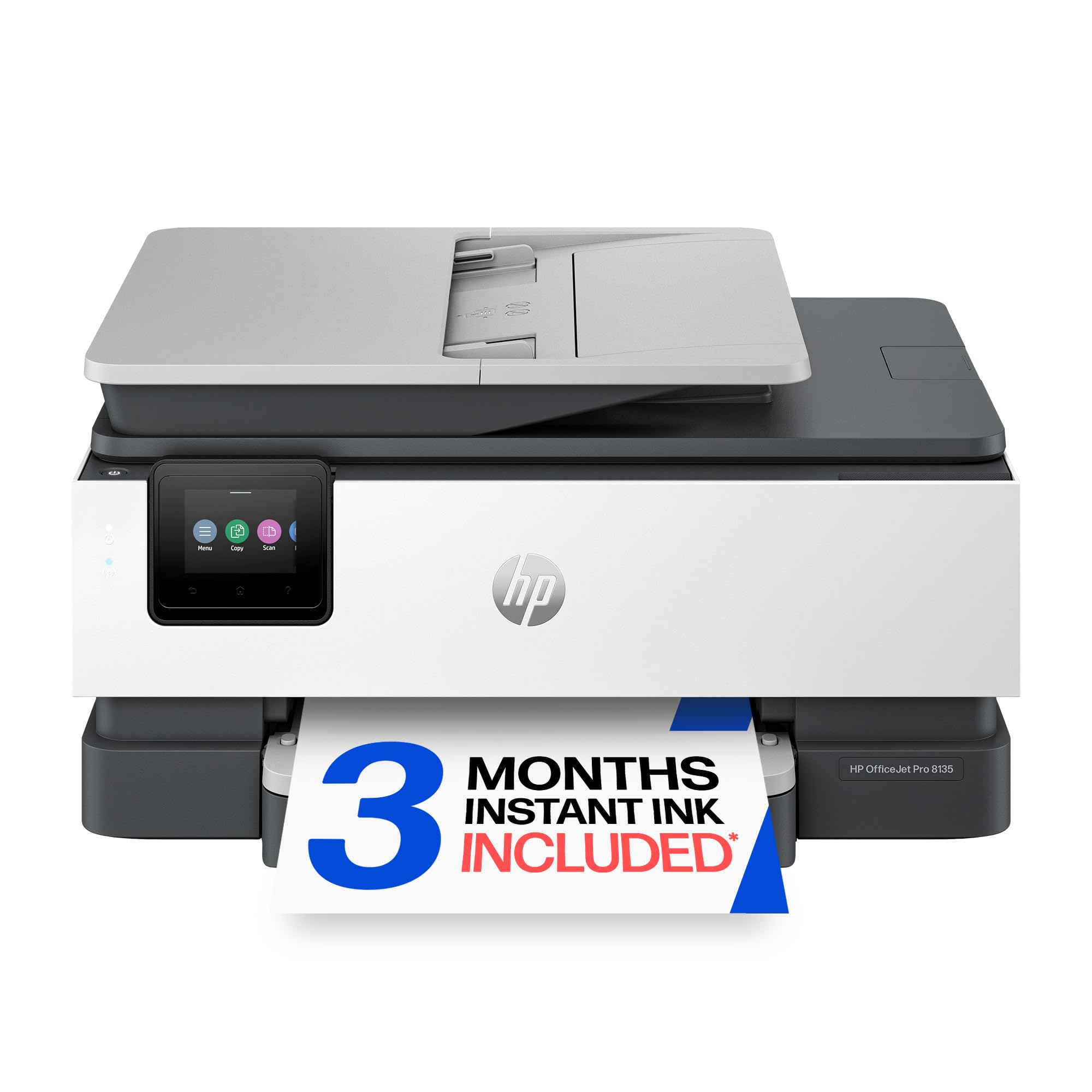
Business-grade color output with a giant touchscreen, built for presentations that impress.
The OfficeJet Pro 8135 is the printer for the home office that needs to look professional. It prints up to 20 ppm in black and 10 ppm in color, so it’s fast enough for reports and presentations. The large 2.7-inch color touchscreen with a phone-like interface makes navigating settings and checking ink levels genuinely pleasant — a far cry from the tiny LED displays on budget models.
This machine is a full 4-in-1, offering print, scan, copy, and fax, plus an auto document feeder and automatic 2-sided printing. The 225-sheet input tray is the largest in this guide, meaning you can load a full ream of paper and not worry about refills for a long time. It also includes dual-band Wi-Fi, which automatically detects and resolves connection issues, and HP Wolf Essential Security to help protect your network from cyber threats.
Buyers are polarized, with some calling it the “best one I have ever had” and one labeling it “the absolute WORST printer that I’ve ever dealt with.” The reviews are genuinely split, which makes it a riskier proposition than the Canon TR4720. One reasonable owner notes the “ink forcing you to HP ink is a let down but let’s be honest and all manufacturers are going that way” — a fair assessment of the industry trend toward proprietary cartridges.
Initial page print time is a snappy 18 seconds, so your first page comes out fast. The color quality for copies drew one note of being “could be better,” but for a professional document printer it’s a capable all-rounder. This is the pick for those who want a high-end feature set — big touchscreen, big tray, fax, and security — and are willing to accept the polarizing owner experience.
The High-End Toolkit
- Large color touchscreen makes operation intuitive and fast
- Huge 225-sheet input tray handles a full ream of paper
- Fast 20 ppm black and 10 ppm color for busy offices
The Catch
- Owner feedback is sharply divided between love and frustration
- Locks you into HP’s proprietary cartridge system via firmware
Pick this if: you need a professional-grade color machine with a big touchscreen, fax, and a massive paper tray.
Consider the alternatives if: you’re nervous about reliability and prefer a model with more uniformly positive owner feedback.
6. HP DeskJet 2827e Wireless All-in-One Color Inkjet Printer

A featherweight home companion that prints from your phone in about 30 seconds a page.
The DeskJet 2827e is the quintessential beginner’s printer, designed for homes printing to-do lists, letters, financial documents, and recipes. It’s light at 7.55 lbs and compact, made to fit any small desk or shelf. It’s a true all-in-one, offering color printing, copying, and scanning, with a 60-sheet input tray for your basic needs.
Its a neat extra is HP’s AI-powered formatting, which removes unwanted content from web pages and emails so you don’t waste paper on awkward layouts. Wireless printing is handled by HP’s “most reliable Wi-Fi,” which claims to automatically detect and resolve connection issues. The HP App lets you print, scan, copy, or fax from your smartphone, PC, or tablet — and reviewers point out a 15-20 minute setup via the app is achievable.
Print speeds are decidedly entry-level at 7.5 ppm black and 5.5 ppm color, so it’s not for bulk printing. One buyer’s take sums it up well: “A fine printer at a fair price. It’s always ready to print, even with my once-in-a-while printing usage.” The 3-month Instant Ink trial is included, which can save you money if you print frequently, but note that after the trial, a monthly fee applies unless you cancel.
The honest downsides: it’s slow for anything over 50 pages, color output is not suitable for photos, and connectivity issues are the most-discussed negative aspect. It also uses manual duplex printing, meaning you flip pages yourself. For the occasional user who wants a no-frills, dependable machine that doesn’t take up space, this fits the bill perfectly.
The Home Essentials
- Compact and light at 7.55 lbs, so it’s easy to move or tuck away
- HP AI cleans up web page printing to save paper
- Simple 15-20 minute setup via the HP App on your phone
The Limitations
- Slow at 7.5 ppm black — not for long documents
- Connectivity issues are the most common owner complaint, so be ready to troubleshoot
Reach for this if: you print occasionally and want the cheapest possible entry into wireless printing with a small footprint.
Look elsewhere if: you print long documents or high-quality photos, or you want a printer with a flawless connection track record.
7. Brother HL-L2405W Wireless Compact Monochrome Laser Printer

A laser-accurate text machine that never smudges, runs 3x faster than budget inkjets.
If your printing is 90% black-and-white text, this is the printer to beat. It’s a monochrome laser, which means it uses toner powder instead of liquid ink, delivering sharp, crisp text on every page. It blazes through documents at up to 30 ppm — a 2.8x gap in speed over the HP DeskJet 2827e’s 7.5 ppm — making it perfect for students printing essays or offices churning out forms.
The HL-L2405W is a print-only machine, so there’s no scanner or copier, but that’s by design. It keeps things simple, focused, and fast. The 250-sheet paper tray holds a full ream, and a manual feed slot lets you print on envelopes and specialty paper when you need to. Dual-band wireless (2.4GHz/5GHz) gives you a stable connection, and it even works with Alexa for voice-activated printing.
Toner costs are where laser really shines. The printer uses Brother Genuine TN830 or TN830XL toner, and with the Refresh EZ Print Subscription, Brother’s Refresh EZ Print Subscription can cut toner costs by up to 50%. This makes the long-term cost per page significantly lower than most inkjets, which is the real reason to choose a laser.
The #1 thing owners rave about is the print quality — it’s the most-discussed positive aspect by a wide margin. Initial page print time is 8.5 seconds, so it’s ready almost instantly. Setup is mixed, with some finding it super easy and others struggling with the QR-code-driven process. It’s also note it’s a chunkier footprint than a compact inkjet, so measure your desk space.
The key benefit: this printer fixes the two biggest inkjet annoyances — smudged text and high cost per page. If you never need color, this is the smartest long-term investment on this list.
The standout spec: 30 ppm laser speed means a 30-page document is done in about a minute, and it won’t smudge.
What wins people over: The crisp, sharp output is the aspect owners praise most — it’s what makes this a better text printer than any inkjet here.
The right choice for: high-volume text printing where sharpness and low cost-per-page matter more than color.
pass on it if: you need any color printing, scanning, or copying — this is strictly print-only.
Understanding the Specs
Pages Per Minute (ppm)
This is the printer’s speed rating, measured in pages per minute. A higher number means less waiting. The catch is that manufacturers test with simple text pages, so real-world speed will be slower with graphics or photos. For light home use, anything above 7 ppm is fine; for a home office, aim for 15 ppm or higher.
Duplex Printing
Duplex means the printer can automatically print on both sides of the paper. “Automatic duplex” flips the page for you, which halves your paper usage and is common on mid-range models. “Manual duplex” means you have to turn the paper over yourself. Automatic duplex printing can halve your paper usage over a year.
FAQ
Is a laser printer cheaper to run than an inkjet?
Will a wireless printer work with my iPhone and Android phone?
What does an Auto Document Feeder (ADF) do?
Should I buy a printer with a subscription ink service?
What is the difference between Wi-Fi and Wi-Fi Direct?
How long does a wireless printer last?
Why does my wireless printer keep losing its connection?
Can I print photos with a budget wireless printer?
Final Thoughts: The Verdict
Across the board, the affordable wireless printer winner is the Canon PIXMA TR4720 because it delivers the most complete all-in-one feature set with a 4.6-star crowd favorite rating and a simple app-based setup. If you want blazing speed and high-volume printing, grab the Epson Workforce Pro WF-3823 with its 21 ppm black speed. And for sharp text on a budget, the Brother HL-L2405W laser is the one to reach for, as it offers the lowest long-term running costs for anyone who prints mostly documents.
How We Picked
We do not accept paid placement. Every pick is matched to a real buyer and a real use-case; we do not hands-on test units.
Sources & Methodology
Specifications: manufacturer listings and product documentation. Review insights: verified customer reviews, as of August 2026. Pricing: not shown on this page (it changes often); check the current price via the retailer link.
As an Amazon Associate, Gadgets Feed earns from qualifying purchases. This does not affect which products we feature.