
A graphics card running hot isn’t just a benchmark concern — it directly dictates in-game boost clocks, fan noise, and the long-term health of your solder joints. When the stock cooler on your GPU starts sounding like a hairdryer or your core temperatures creep past 85°C under load, it is time to look at a dedicated replacement. An aftermarket cooler can drop your GPU temps by 15–25°C while operating at a whisper-quiet volume, transforming your system’s thermal and acoustic profile overnight.
I’m Min — the co-founder and writer behind Gadgets Feed. I’ve spent countless hours dissecting thermal performance data, compatibility charts, and user stress-test results to identify the coolers that genuinely deliver on their promises.
Whether you are aiming for quieter operation, lower junction temperatures, or the ability to push a higher overclock stable, choosing the right best aftermarket video card cooler requires matching the unit to your specific GPU, case dimensions, and noise tolerance.
How To Choose The Best Aftermarket Video Card Cooler
Selecting a GPU cooler involves more than just picking the biggest radiator size. You need to verify physical compatibility, thermal design power (TDP) rating, and whether the cooler targets your specific GPU core layout. A mismatch on any of these three fronts will render the cooler unusable or ineffective.
Physical Compatibility is Non-Negotiable
Measure your graphics card’s PCB length, width, and the exact center-to-center distance of the four mounting holes around the GPU die. Most universal coolers support standard reference PCB designs (NVIDIA RTX 30-series Founders Edition or AMD reference boards), but custom AIB cards often use non-standard layouts that require specific bracket sets or full-card waterblocks. Also confirm that your case has enough width to accommodate a 360mm radiator or a dual-tower air cooler that can exceed 160mm in height.
TDP Rating and Fan Static Pressure
A cooler rated for a 350W TDP will handle an RTX 3080 or RX 6800 XT comfortably, but higher-end cards like the RTX 4090 (450W nominal, spikes higher) need coolers specifically designed for that wattage class. For air coolers, check the fan’s static pressure (mmH2O) — high static pressure fans push air through dense fin arrays, while low static pressure units are better for open-air chassis intakes. For AIO coolers, the pump flow rate and the radiator’s fin per inch (FPI) density determine how much heat can be rejected to the air.
VRAM and VRM Cooling Coverage
Modern graphics cards dissipate significant heat through their memory modules (GDDR6X can exceed 100°C) and voltage regulator MOSFETs. An aftermarket cooler should include thermal pads or a dedicated heatsink that contacts all critical VRAM chips and the VRM bank. If the cooler only covers the GPU core, you risk memory throttling or component failure even if the core runs cool.
Quick Comparison
On smaller screens, swipe sideways to see the full table.
| Model | Category | Best For | Key Spec | Amazon |
|---|---|---|---|---|
| Noctua NH-D15 G2 chromax.black | Air Tower | Ultimate air cooling, near silence | 8 heatpipes, 1500 RPM max | Amazon |
| ASUS ROG RYUJIN III 360 | AIO Liquid | Extreme TDP, VRM fan, 3.5” LCD | Asetek Gen8 V2 pump, 16 dBA | Amazon |
| CORSAIR Nautilus 360 RS LCD | AIO Liquid | 2.1” LCD screen, low noise | 20 dBA pump, convex cold plate | Amazon |
| Cooler Master 360 Atmos | AIO Liquid | R9 / i9 chips, custom top cover | Dual chamber pump, 25 dBA | Amazon |
| NZXT Kraken Core 360 RGB | AIO Liquid | Clean single-frame fans, value | 3100 RPM pump, 75 CFM | Amazon |
| ASUS TUF Gaming LC II 360 | AIO Liquid | Durable build, 6-year warranty | Reinforced tubing, 29 dBA | Amazon |
| Thermalright Peerless Assassin 120 | Air Tower | Budget air, digital display | 6 heatpipes, 1850 RPM, 26 dBA | Amazon |
In‑Depth Reviews
1. Noctua NH-D15 G2 chromax.Black

The second generation of Noctua’s flagship dual-tower air cooler increases fin surface area by 20% and adds two 140mm NF-A14x25r G2 round-frame fans with a speed offset for acoustic fine-tuning. On an AMD Ryzen 9 9950X3D drawing around 230W in Cinebench, this cooler keeps the core at 75°C while operating at an essentially silent 24.8 dBA — a result that rivals many 240mm AIOs without any pump noise or leak risk.
The offset fin stack provides 59mm of RAM clearance in single-fan mode, and the recessed lower fins clear the top PCIe x16 slot on most current motherboards. The included SecuFirm2+ mounting system uses a Torx screwdriver and pre-applied NT-H2 paste, making installation straightforward even in tight mid-tower builds. At 1.81 kg, this is a heavy unit — your case’s motherboard tray needs to be rigid.
For users who prioritize reliability over RGB, the NH-D15 G2 chromax.black delivers premium-grade air cooling that will outlast any pump-based solution. It is an excellent choice for high-TDP GPUs mounted in well-ventilated chassis where water cooling is overkill or unwanted.
Why it’s great
- Outstanding thermal performance matching many AIOs
- Near-silent operation even under sustained load
- Superior build quality with premium mounting kit and paste
Good to know
- Very large dimensions; check case width compatibility
- Heavy weight may flex motherboard if not properly supported
- Premium price positions it above entry-level AIO coolers
2. ASUS ROG RYUJIN III 360 ARGB Extreme

The ROG Ryujin III 360 Extreme uses the latest Asetek Emma Gen8 V2 pump with a three-phase motor for increased flow rate and lower impedance. On an AMD Ryzen 9 9950X3D, it holds idle temperatures around 42°C and keeps gaming loads under 70°C while the embedded VRM fan actively cools motherboard voltage regulators. The 3.5-inch 640×480 LCD screen can display animated GIFs, real-time CPU/GPU stats, or AIDA64-themed overlays.
The thickened ARGB magnetic fans snap together for a clean installation and move high airflow with optimized static pressure. Noise rating sits at 16 dBA — among the quietest in this roundup — but some users report that Armoury Crate software can consume 12% CPU cycles depending on the lighting mode selected.
This AIO is built for enthusiasts who want the highest pump performance, a large customizable display, and active VRM cooling in a single package. It commands a significant premium but delivers top-tier raw thermal numbers and visual presence that justify the investment for extreme builds.
Why it’s great
- Best-in-class Asetek Gen8 V2 pump with high flow
- 3.5-inch LCD with customizable GIFs and live monitoring
- Embedded fan for VRM cooling reduces motherboard temps
Good to know
- Very high price point limits it to premium builds
- Armoury Crate software can be resource-heavy
- Requires 360mm radiator space in case
3. CORSAIR Nautilus 360 RS LCD
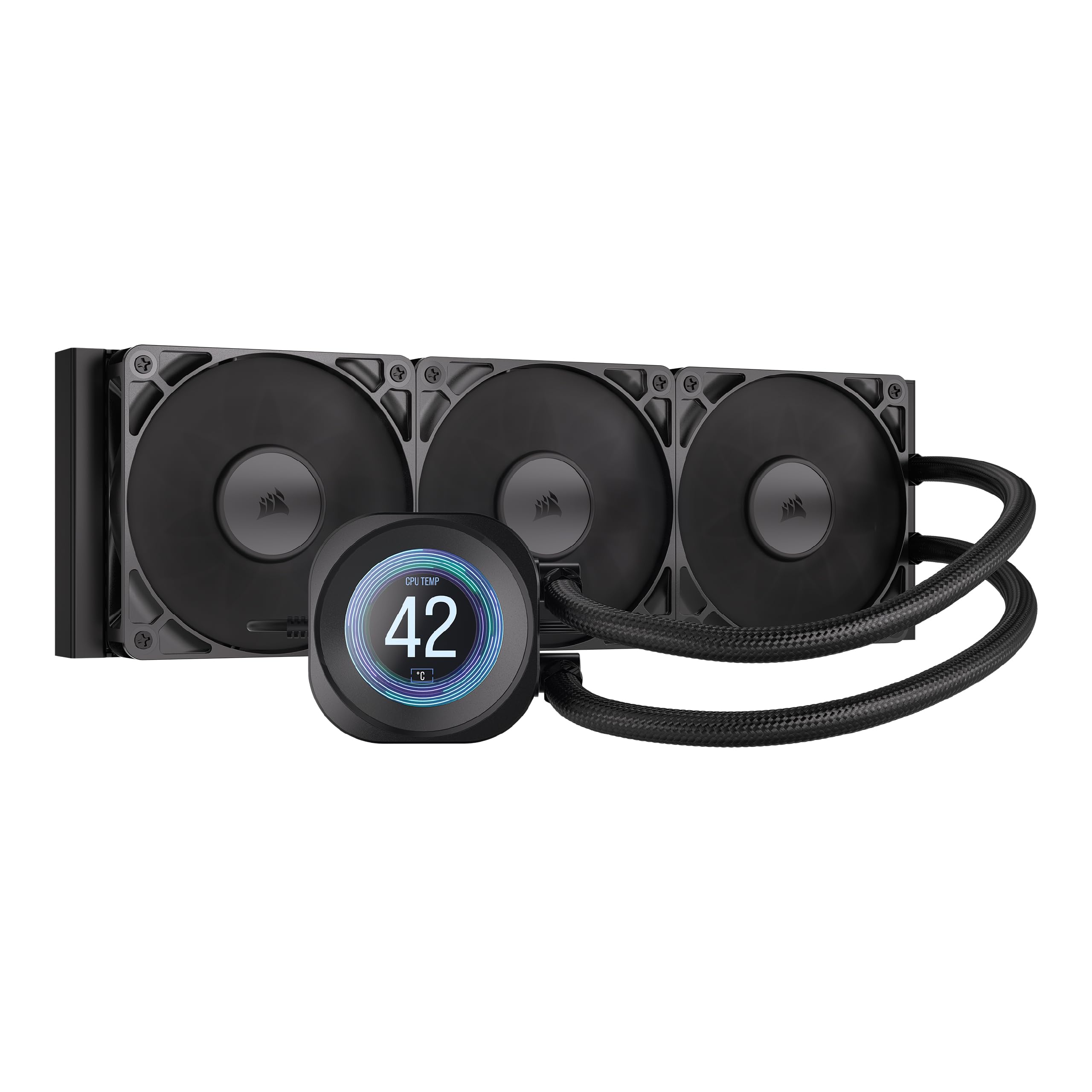
The Nautilus 360 RS LCD combines a whisper-quiet pump running at just 20 dBA with a 2.1-inch IPS LCD screen for real-time system monitoring or custom images and GIFs. The convex cold plate design presses firmly against the CPU’s integrated heat spreader to maximize contact pressure, and pre-applied thermal paste speeds up the unboxing-to-installation process significantly.
The three RS120 fans feature CORSAIR AirGuide technology and Magnetic Dome bearings, pushing high static pressure through the 360mm radiator at up to 2100 RPM. On a Ryzen 9 9800X3D under competitive gaming loads, core temperatures stay below 50°C, and heavy all-core workloads peak around 70°C — excellent results from a unit priced below many competing 360mm AIOs with LCD screens.
The iCUE software suite provides intuitive fan curve tuning and screen customization, though the tubing has some twist memory that requires zip ties for a clean run. Overall, this is a strong mid-range option that delivers premium noise levels and visual features without the flagship price tag.
Why it’s great
- Very quiet pump at only 20 dBA
- 2.1-inch IPS LCD with GIF and YouTube clip support
- Convex cold plate ensures optimal CPU contact
Good to know
- Tubing has twist memory; requires cable management
- Backside mounting bracket can be difficult to access
- iCUE software has occasional minor glitches
4. Cooler Master 360 Atmos

The Cooler Master 360 Atmos targets high-TDP chips like AMD Ryzen 9 and Intel Core i9 processors with its patented dual-chamber pump design that increases water pressure and optimizes flow directly over the CPU hotspot. On an Intel i9-14000F, users report a dramatic temperature drop from 80-94°C on a stock cooler down to 45-61°C under gaming load, with Cinebench peaking at 74°C.
The SickleFlow 120 Edge fans are pre-installed with optimized PWM blades for premium airflow and simplified cabling, running at a maximum of 25 dBA — quiet enough for silence-focused builds. The pump top cover is customizable with user 3D-printed designs, and the unit supports both AMD AM5 and Intel LGA 1851/1700 platforms out of the box.
One notable feature is the “Going Green” initiative: 35% of the metal is recyclable, and the pump top cover uses recycled plastic. The picture-only manual can be confusing for the LED wiring, but overall this AIO delivers exceptional thermal headroom for high-wattage CPUs while remaining impressively quiet.
Why it’s great
- Dual-chamber pump targets hotspot with high pressure
- Very quiet operation at 25 dBA max
- 3D-printable top cover for customization
Good to know
- Picture-only manual makes LED wiring unclear
- Full-speed fan mode is loud like an industrial blower
- Requires 360mm radiator space
5. NZXT Kraken Core 360 RGB
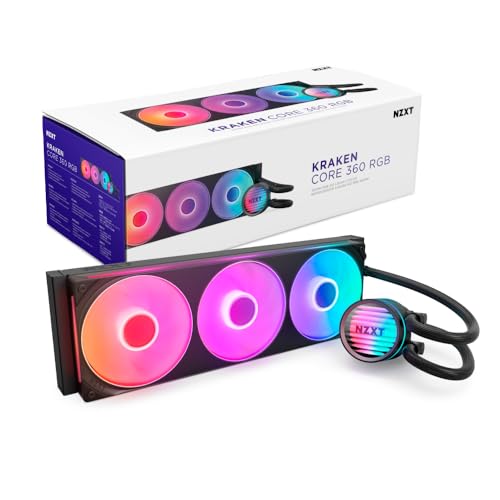
The Kraken Core 360 RGB features a powerful 3100 RPM pump that keeps CPUs cool during heavy multitasking and gaming while minimizing noise, and its three 120mm fans are housed in a single-frame design that reduces screws and cables for a cleaner build. It connects directly to the motherboard without a separate controller, simplifying cable management.
The high static pressure RGB Core (EV-B Version) fans push 75.05 CFM of air through the radiator fins with optimized blade geometry for stronger cooling with less noise. On an overclocked Intel Core i7-11700K running at 5.0 GHz, this AIO keeps temperatures well in check during sustained benchmarks, and the PWM-enabled fans allow precise adjustments via the motherboard BIOS.
Users note that the pump does not display temperature, and the unit requires a 5V RGB header (not 12V) which may necessitate a SATA adapter on older motherboards. At its price point, the Kraken Core 360 offers strong competition to more expensive models by focusing on core cooling performance and build quality rather than display gimmicks.
Why it’s great
- High-flow 3100 RPM pump for demanding CPUs
- Single-frame fan design simplifies installation
- No controller box needed; direct motherboard connection
Good to know
- No pump display for temperature readout
- Requires 5V RGB header (not 12V)
- Not the most silent AIO at full fan speed
6. ASUS TUF Gaming LC II 360 ARGB

The TUF Gaming LC II 360 ARGB builds on ASUS’s durability-focused TUF line with reinforced, sleeved 400mm tubing that resists kinking and is compatible with larger chassis, including full-tower and mid-tower builds. The three upgraded TUF Gaming radiator fans feature brighter ARGB lighting and grooved fins that improve airflow while lowering noise compared to the previous generation.
The decoupled low-noise pump runs quietly at 29 dBA, and the system includes a six-year worldwide warranty that underscores ASUS’s confidence in its longevity. On an Intel Core i7-11700KF, full-load temperatures hover in the high 70s to 82°C range, while idle settles between 25-35°C — a significant improvement over air cooling or smaller 240mm AIOs.
Installation is straightforward with clear instructions, and the unit supports Intel LGA 1700/1200/115x and AMD AM5/AM4 out of the box. The TUF branding on the pump block is not customizable beyond color/effects, but for users building a TUF-themed system, the cohesive aesthetic is a strong selling point.
Why it’s great
- Reinforced 400mm sleeved tubing for durability
- Long 6-year worldwide warranty
- Quiet pump and fans at reasonable noise levels
Good to know
- TUF branding on pump is not fully customizable
- Full retail price can be steep versus competitors
- Requires adequate radiator space in case
7. Thermalright Peerless Assassin 120 Digital ARGB

The Thermalright Peerless Assassin 120 Digital ARGB packs six 6mm copper heat pipes with AGHP 5.0 anti-gravity technology, a pure copper base, and dual 120mm S-FDB bearing fans that spin at 1850 RPM into a compact 162mm tall package. Its magnetic top cover features a digital display that shows CPU or GPU temperature and usage — a feature normally reserved for premium AIOs, here available on a budget-tier air cooler.
On an AMD Ryzen 9 5950X overclocked to 5.0 GHz, this air cooler keeps the processor under 80°C under load, while on a Ryzen 9 7950X3D it maxes at 52°C during Heaven’s Mark testing — outperforming some previous AIO coolers. The 88.89 CFM airflow and 25.6 dBA noise level mean it is both effective and quiet enough for day-to-day use, though the fans can produce a high-pitched tone at certain speeds.
Compatibility covers all major sockets including AM5, AM4, LGA1851, LGA1700, and LGA1200, though AMD installations require the motherboard’s original backplate. The dual-fan setup overhangs memory slots, hiding any RGB RAM beneath it, which is the main trade-off for its excellent price-to-performance ratio.
Why it’s great
- Digital display for GPU/CPU temps at an entry-level price
- Excellent thermal performance rivals some AIO coolers
- 6 anti-gravity heatpipes for orientation flexibility
Good to know
- Dual-fan overhang hides RAM with RGB lighting
- Fans may produce a high-pitched tone at certain speeds
- Does not include AMD motherboard backplate
FAQ
Can I use a CPU cooler on my graphics card?
What does the dBA rating actually mean for GPU cooler noise?
Final Thoughts: The Verdict
For most users, the best aftermarket video card cooler winner is the Noctua NH-D15 G2 chromax.black because it offers class-leading air cooling performance that rivals 240mm AIOs, remains nearly silent, and carries zero risk of pump failure or coolant leaks. If you want a customizable LCD screen and the highest thermal headroom for extreme overclocking, grab the ASUS ROG RYUJIN III 360 ARGB Extreme. And for budget-conscious builders who still want a digital display and exceptional value, nothing beats the Thermalright Peerless Assassin 120 Digital ARGB.