
Loading a 13-billion-parameter model on a card with only 12GB of VRAM means the inference engine constantly swaps data to system memory, tanking your token generation rate to a crawl. The single variable that separates a usable local AI workstation from a frustrating paperweight is video memory capacity, measured in gigabytes. Every GB determines whether your Llama, Mistral, or Stable Diffusion model fits entirely on the GPU — or gets paged out to glacial DDR5.
I’m Min — the co-founder and writer behind Gadgets Feed. I’ve spent hundreds of hours tracking the VRAM bus widths, memory bandwidth, and tensor core counts that define the realistic performance envelope for local AI inference, fine-tuning, and rendering workloads across the current GPU landscape.
This guide cuts through the marketing noise to rank the cards that actually hold a full model context window without spilling into swap, delivering usable tokens per second. Whether you’re running Ollama on a linux server or pushing ComfyUI workflows, these picks define the best ai graphics card for your specific workload.
How To Choose The Best AI Graphics Card
Selecting an AI graphics card requires a different set of priorities than gaming. While frame rates matter, the dominant constraint for local AI workloads is fitting the entire model and its context window into the GPU’s VRAM. A card that cannot hold the model will deliver unusable token rates, regardless of its clock speed or RT core count. Focus on four variables: VRAM capacity, memory bandwidth, software ecosystem, and form factor compatibility with your workstation.
VRAM Capacity and Memory Bandwidth
For LLM inference, a 7-billion-parameter model quantized to 4-bit requires roughly 4GB of VRAM. A 70-billion-parameter model at the same quantization needs about 40GB. If your card has 24GB, you can run 13B models with long context, but 30B+ models will force partial offloading to system RAM, dropping token generation to single digits per second. Memory bandwidth, measured in GB/s, dictates how fast those tokens stream through the GPU. A wider bus (384-bit vs 256-bit) and faster memory (GDDR7 vs GDDR6) directly improve throughput.
Tensor Cores and AI Accelerators
NVIDIA’s Tensor Cores and AMD’s AI Accelerators handle mixed-precision matrix math that forms the backbone of neural network inference and training. Fourth-generation Tensor Cores on Blackwell architecture support FP4 precision, doubling the throughput per watt compared to FP8. For pure inference, the number of Tensor Cores and their operating frequency matter more than the raw CUDA core count. Cards with second-generation AMD AI Accelerators also perform well under ROCm, but NVIDIA’s CUDA ecosystem remains the most mature, with broad support across PyTorch, TensorFlow, and Ollama.
PCIe Generation and Multi-GPU Support
PCIe Gen 5 doubles the bandwidth compared to Gen 4, which matters when transferring large model weights from system RAM to GPU memory at load time. For multi-GPU setups, blower-style coolers that exhaust heat out of the chassis prevent thermal throttling in dense workstation configurations. Professional cards like the RTX PRO 6000 Blackwell support Universal MIG, which partitions a single GPU into isolated instances for concurrent workloads — a feature absent from consumer GeForce cards.
Quick Comparison
On smaller screens, swipe sideways to see the full table.
| Model | Category | Best For | Key Spec | Amazon |
|---|---|---|---|---|
| NVIDIA DGX Spark | AI Appliance | Local 200B parameter models | 128GB unified memory / 1 PFLOPS FP4 | Amazon |
| NVD RTX PRO 6000 Blackwell | Workstation | Enterprise AI / 70B+ models | 96GB GDDR7 ECC / 1.8 TB/s bandwidth | Amazon |
| PNY VCNRTXA6000-PB | Professional | LLM inference / multi-GPU | 48GB GDDR6 / 384-bit bus | Amazon |
| ASRock Radeon AI PRO R9700 | Professional | AI development / ROCm workflow | 32GB GDDR6 / 2920 MHz boost | Amazon |
| PNY GeForce RTX 5080 Epic-X | High-End Consumer | AI + 4K gaming combo | 16GB GDDR7 / 2775 MHz boost | Amazon |
| ASUS TUF Gaming RTX 5080 OC | High-End Consumer | Durable AI workstation | 16GB GDDR7 / 2730 MHz boost | Amazon |
| STORMCRAFT Skyhawk PRO | Prebuilt Desktop | Plug-and-play AI + gaming | RTX 5070 Ti / 16GB GDDR7 | Amazon |
| NVIDIA GeForce RTX 3090 FE (Renewed) | Previous Gen | Budget 24GB AI entry | 24GB GDDR6X / 19.5 Gbps | Amazon |
| NVIDIA Titan RTX | Workstation Hybrid | Deep learning / ray tracing | 24GB GDDR6 / 576 Tensor Cores | Amazon |
| GIGABYTE GeForce RTX 5070 Ti AERO OC | Mid-Range Consumer | DLSS 4 AI upscaling | 16GB GDDR7 / 256-bit bus | Amazon |
| ACEMAGIC M1A Pro Mini PC | Compact Workstation | Space-saving AI prototyping | ARC A770 8GB / 32GB DDR5 | Amazon |
| Gigabyte GeForce RTX 4070 AERO OC | Entry-Level | Light AI / 1080p gaming | 12GB GDDR6X / 192-bit bus | Amazon |
| Thermaltake LCGS Quartz i1460 | Entry-Level Desktop | Starting AI / standard gaming | RTX 5060 / 8GB GDDR7 | Amazon |
In‑Depth Reviews
1. NVIDIA DGX Spark

The DGX Spark is not a graphics card — it is a complete personal AI supercomputer built around the NVIDIA GB10 Grace Blackwell superchip. With 128GB of unified memory and up to 1 petaFLOP of FP4 AI performance, it handles models up to 200 billion parameters entirely on-device, something no single discrete GPU can match without multi-GPU setups. The integrated ConnectX-7 Smart NIC and 4TB NVMe with self-encryption make it a self-contained AI research appliance.
Real-world feedback confirms it runs 27B parameter models via Ollama and Opencode for codebase review, and supports full local fine-tuning workflows. The compact, energy-efficient design eliminates the need for a multi-GPU tower. Users note a non-obvious boot delay and the absence of a power indicator LED, but performance is described as reliable and fast for local LLM research.
The proprietary DGX OS, based on Linux, is less flexible than a standard Ubuntu setup, and one reviewer flagged concerns about long-term support. For users who prioritize raw inference speed per dollar, a discrete RTX 5090 system can outperform it in throughput, but no single card matches the Spark’s ability to hold a 200B model in a unified memory space without PCIe bottlenecks.
Why it’s great
- 128GB unified memory fits 200B parameter models locally.
- 1 PFLOPS FP4 performance accelerates fine-tuning and inference.
- Silent operation in a compact desktop footprint.
Good to know
- Proprietary DGX OS may limit future software compatibility.
- Slower per-token throughput than a top-tier discrete GPU for smaller models.
- No power indicator LED can make boot status ambiguous.
2. NVD RTX PRO 6000 Blackwell

The RTX PRO 6000 Blackwell represents the absolute ceiling of single-GPU VRAM capacity at 96GB of GDDR7 ECC memory. Its 1.8 TB/s memory bandwidth, enabled by a 512-bit bus, can feed massive 70B+ parameter models entirely on-card without any offloading. The 5th-gen Tensor Cores support FP4 precision for faster local fine-tuning, and Universal MIG allows partitioning the card into isolated GPU instances for concurrent workloads.
Early adopters report excellent performance with 70B models on Ollama and ComfyUI workflows, noting the card uses a single 600W power connector and occupies only two slots. The double-flow-through cooling design handles sustained 600W loads effectively, though hot air exhausts into the chassis interior, requiring strong case airflow. The 4th-gen RT Cores deliver up to 100X more ray-traced triangles for visualization tasks.
At this price tier, the card ships in OEM packaging without retail branding. One reviewer reported a defective unit from a third-party reseller that shipped with malware-adjacent diagnostic software, so purchasing from an authorized distributor is critical. Software support on Linux requires at least driver version 575, and ecosystem maturity is still catching up to the hardware’s capabilities.
Why it’s great
- 96GB ECC GDDR7 loads massive models entirely on-card.
- Universal MIG enables secure multi-tenant GPU partitioning.
- 1.8 TB/s bandwidth delivers industry-leading token throughput.
Good to know
- Hot air exhausts into the case interior, not the rear I/O.
- OEM packaging lacks retail box and accessories.
- Linux driver support is still maturing for new Blackwell architecture.
3. PNY VCNRTXA6000-PB

The NVIDIA RTX A6000, sold by PNY, offers 48GB of GDDR6 on a 384-bit memory bus, delivering 768 GB/s of bandwidth. While based on the older Ampere architecture, its VRAM capacity is still highly competitive for LLM inference tasks where model size matters more than Tensor Core generation. The card is architecturally similar to an RTX 3080 but with triple the VRAM, making it a specialized tool rather than a gaming GPU.
The blower-style cooler exhausts heat out the back, making it ideal for dense workstation builds. It includes four DisplayPort 1.4 outputs and supports PCIe 4.0 x16.
The card is slower than a 4090 for 3D rendering and slower than a 3090 Ti for pure rendering workloads, so it is not a general-purpose upgrade. Its strength is purely in AI inference where VRAM capacity is the bottleneck. The high asking price reflects the professional-market VRAM premium, not raw compute performance.
Why it’s great
- 48GB VRAM fits 30B-40B parameter models with long context.
- Blower cooler exhausts heat out of the chassis for multi-GPU setups.
- Lower power draw than equivalent consumer cards at similar VRAM.
Good to know
- Older Ampere architecture lacks Blackwell’s FP4 and DLSS 4 support.
- Slower than 4090 for rendering and training tasks.
- Professional pricing carries a significant VRAM premium.
4. ASRock Radeon AI PRO R9700 Creator 32GB

The ASRock Radeon AI PRO R9700 is one of the few AMD-based professional cards with a genuine place in the AI workflow. Its 32GB of GDDR6 memory on a 256-bit bus and 64 Compute Units with second-gen AI Accelerators make it a capable alternative for users committed to the ROCm ecosystem. The 2920 MHz boost clock and PCIe 5.0 interface ensure data transfers keep pace with the compute units.
User reviews highlight its effectiveness as an LLM server, with one user running models via Ollama on an old T480 connected over Thunderbolt 3. Another confirmed solid performance with Qwen models generating Python, C#, and Java code. The blower-style cooler is louder than consumer designs — described as similar to an air purifier — but standard for professional single-slot exhaust setups.
ROCm support for this newer card requires some troubleshooting, particularly around context length settings to prevent CPU offloading. Coil whine is reported as an occasional issue. The card is not ideal for pure gaming, but for AI development on a budget where 32GB of VRAM is sufficient, it offers a compelling value proposition against NVIDIA’s professional lineup.
Why it’s great
- 32GB VRAM at a lower price point than equivalent NVIDIA pro cards.
- PCIe 5.0 support for fast model loading and data transfer.
- Blower design enables dense multi-GPU workstation configurations.
Good to know
- ROCm driver ecosystem requires more manual setup than CUDA.
- Blower fan noise is noticeable under sustained AI loads.
- Coil whine reported in some units.
5. PNY GeForce RTX 5080 Epic-X ARGB OC
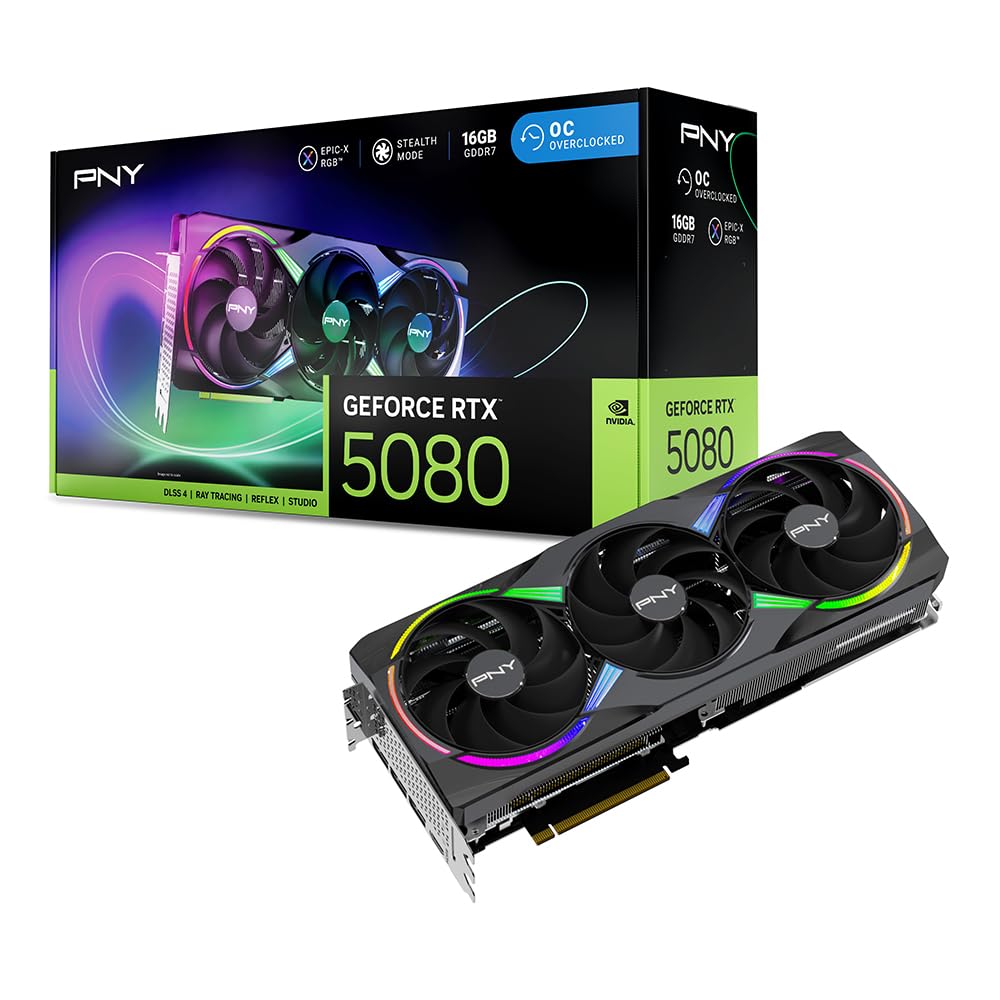
The PNY RTX 5080 Epic-X OC brings NVIDIA’s Blackwell architecture to the consumer segment with 16GB of GDDR7 memory on a 256-bit bus, boosting to 2775 MHz. The fifth-gen Tensor Cores unlock DLSS 4 Multi Frame Generation and FP4 precision support, making this card exceptionally fast for AI inference on models that fit within the 16GB VRAM envelope. Its 2.99-slot triple-fan cooler with ARGB lighting keeps temperatures manageable under sustained compute loads.
Customer feedback confirms the card delivers phenomenal gaming performance and handles AI workloads with ease where VRAM allows. The included support bracket and 16-pin to four 8-pin power adapter simplify installation. One user upgraded from an RTX 5060 8GB and noted transformative gains in both gaming FPS and AI rendering tasks. The card runs quietly and reliably.
The 16GB VRAM ceiling is the primary limitation for AI work — it cannot hold a 30B+ parameter model without offloading. For smaller models (7B-13B) or batch inference, the raw Tensor Core throughput is excellent. The price reflects the consumer market premium, but it significantly outperforms a used RTX 3090 in per-watt efficiency for compatible workloads.
Why it’s great
- Fastest Tensor Core throughput in the consumer segment for FP4 inference.
- DLSS 4 Multi Frame Generation for AI-assisted gaming.
- Quiet, efficient triple-fan cooling solution.
Good to know
- 16GB VRAM limits large model support to 7B-13B quantized models.
- Requires three 8-pin power connectors via included adapter.
- Consumer pricing has seen significant markups above MSRP.
6. ASUS TUF Gaming GeForce RTX 5080 OC

The ASUS TUF Gaming RTX 5080 OC emphasizes durability with military-grade components, a protective PCB coating against moisture and debris, and a phase-change GPU thermal pad that outlasts traditional thermal paste under sustained load. Its 3.6-slot design with three Axial-tech fans and a massive fin array keeps the 2730 MHz boost clock stable during long AI inference sessions, with temperatures reported as low as 60°C under gaming loads and only 25°C at idle.
Users upgrading from older generations report massive 4K Ultra performance in demanding games and quiet operation even under AI workloads. The card includes a TUF graphics card holder and magnetic accessories. One reviewer cautioned that current market prices exceed MSRP by over 60%, making it a poor buy at inflated levels — it is only recommended for those who can acquire it near its intended price.
The 16GB GDDR7 is the same capacity limitation as other RTX 5080 cards. For AI users, this card’s advantage lies in its thermal and reliability engineering for 24/7 operation rather than VRAM capacity. The protective coatings make it a solid choice for dusty or high-humidity environments where a workstation runs continuous workloads.
Why it’s great
- Phase-change GPU thermal pad ensures long-term cooling stability.
- Protective PCB coating resists moisture, dust, and debris.
- Very quiet fan operation with excellent thermal headroom.
Good to know
- 16GB VRAM is the same limitation as other RTX 5080 cards.
- Massive 3.6-slot size may not fit smaller cases.
- Current market pricing significantly exceeds MSRP.
7. STORMCRAFT Skyhawk PRO Gaming PC

The STORMCRAFT Skyhawk PRO is a prebuilt desktop that eliminates the assembly headache while delivering strong AI-capable hardware. It pairs a Ryzen 7 9800X3D CPU with an RTX 5070 Ti featuring 16GB GDDR7, 32GB of DDR5 6000MHz RAM, and a 2TB NVMe Gen4 SSD. The 360mm AIO liquid cooler and 850W Gold PSU provide the thermal and power headroom needed for sustained AI compute sessions.
Built and assembled in California, STORMCRAFT includes a 1-year parts warranty, 3-year labor warranty, and lifetime technical support. User reviews highlight the quiet fan operation and well-packaged delivery. One reviewer runs Star Citizen on Ultra settings, confirming the system handles demanding loads. The prebuilt nature means the GPU is already configured in a balanced system with no PCIe riser cable issues.
The 16GB VRAM limit applies here as well — the RTX 5070 Ti cannot accommodate models larger than 13B without offloading. The desktop’s strength is convenience: it arrives ready to run Ollama, PyTorch, or TensorFlow out of the box. One user reported a missing power cord, but this was resolved with their own cable. The front headphone jack showed buzzing interference in one unit.
Why it’s great
- Fully assembled and tested — no GPU installation or driver issues.
- Ryzen 7 9800X3D provides excellent CPU throughput for preprocessing.
- 360mm AIO cooler maintains stable thermals during AI workloads.
Good to know
- 16GB VRAM limits model size to 7B-13B quantized parameters.
- Prebuilt configuration may not match custom-built part selection.
- Minor QC issues reported with front audio jack and fan bearing.
8. NVIDIA GeForce RTX 3090 Founders Edition (Renewed)

The RTX 3090 Founders Edition, available renewed, remains a compelling entry point for AI workloads thanks to its 24GB of GDDR6X memory on a 384-bit bus. While based on the older Ampere architecture with second-gen Tensor Cores, its VRAM capacity is still sufficient for 13B-20B parameter models quantized to 4-bit, making it a popular choice for budget-conscious AI enthusiasts. The 19.5 Gbps memory clock delivers 936 GB/s of bandwidth.
Customer reviews confirm the card works well for AI inference with Ollama and runs demanding VR flight simulators. The renewed units come with an anti-tamper sticker to ensure core memory hasn’t been swapped. One user built a VR-capable rig around this card and reported full performance with solid thermal management, though a defective unit was reported from one seller that caused application crashes.
The card’s 350W TDP is high compared to modern Blackwell cards, and the Ampere architecture lacks DLSS 4 and FP4 support. Availability through renewed channels means seller quality varies significantly — purchasing from a source with a clear return policy is essential. For users on a strict budget who need 24GB of VRAM, this is the most accessible path.
Why it’s great
- 24GB VRAM at the lowest cost of entry in the market.
- 384-bit bus provides high memory bandwidth for inference.
- Widely supported by CUDA, PyTorch, and TensorFlow ecosystems.
Good to know
- Renewed condition means inconsistent seller quality and warranty terms.
- 350W TDP is less efficient than newer Blackwell cards.
- No DLSS 4 or FP4 Tensor Core support.
9. NVIDIA Titan RTX
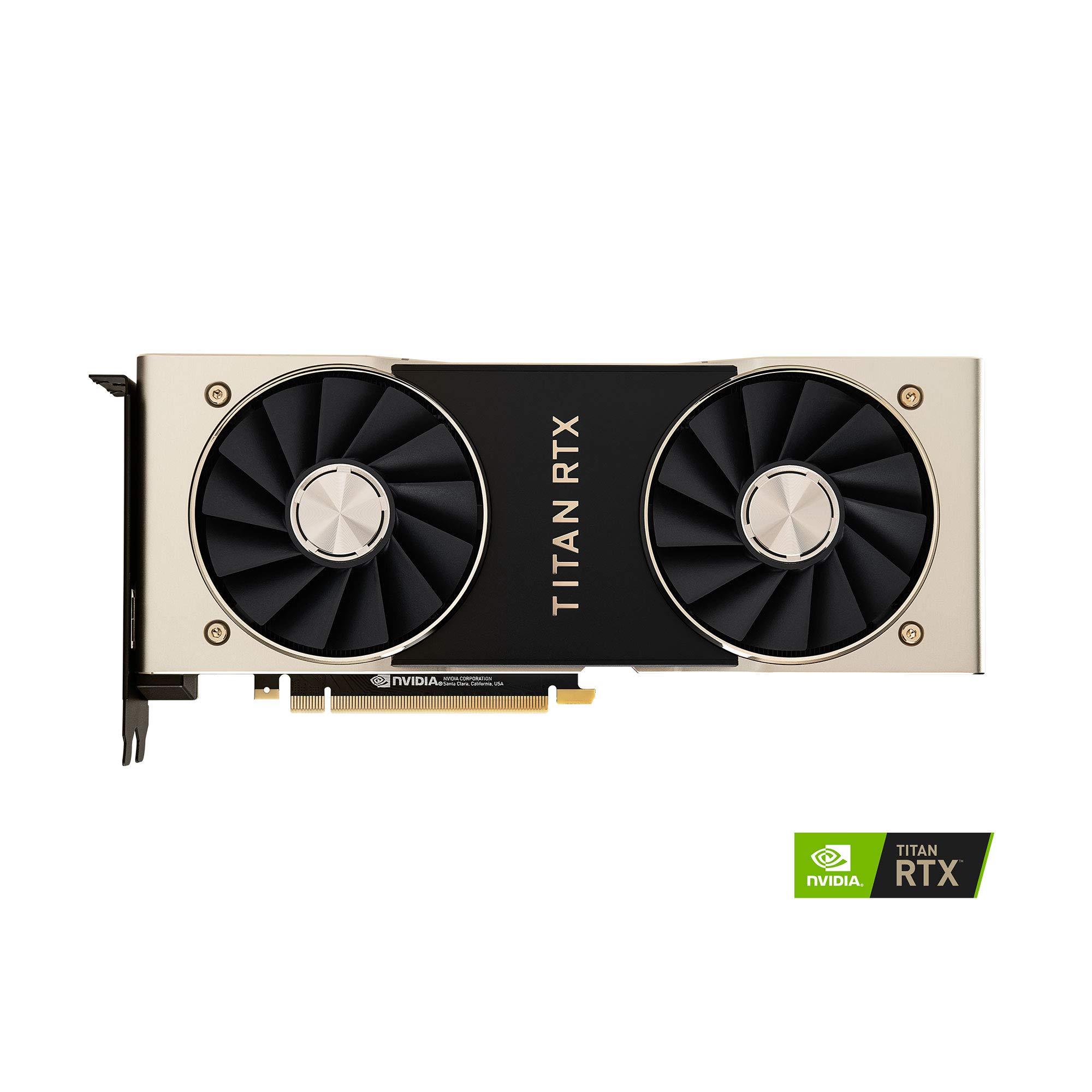
The NVIDIA Titan RTX, built on the Turing architecture, was the first card to combine 24GB of GDDR6 memory with dedicated RT and Tensor cores in a consumer form factor. With 4608 CUDA cores, 72 RT cores, and 576 Tensor cores running at 1770 MHz boost, it was designed as a hybrid workstation card for deep learning and ray-traced rendering. Its 672 GB/s memory bandwidth, while lower than modern cards, still supports many AI models.
User feedback confirms it handles iray rendering twice as fast as previous generation cards and maxes out game framerates. The card runs hot — users recommend a custom fan curve to stay under 84°C to avoid clock speed drops. One reviewer used it successfully for neural network training on both Windows 10 and Linux, noting the 24GB VRAM was maxed out multiple times during large rendering sessions.
Significant coil whine under heavy load was reported in one unit, and the twin-fan blower cooler exhausts heat internally rather than out the backplane, requiring careful chassis cooling design. The Titan RTX is now a legacy product and lacks support for newer features like DLSS 4 or FP4 inference. Its value depends entirely on the requirement for 24GB of VRAM at a lower price than modern professional cards.
Why it’s great
- 24GB VRAM supports 13B-20B models for deep learning.
- 576 Tensor cores accelerate AI inference on older architectures.
- Compatible with both Windows and Linux development environments.
Good to know
- Turing architecture lacks modern FP4 and DLSS 4 support.
- Blower cooler exhausts heat into the chassis interior.
- Coil whine reported in some units under maximum load.
10. GIGABYTE GeForce RTX 5070 Ti AERO OC 16G

The GIGABYTE RTX 5070 Ti AERO OC brings the Blackwell architecture and DLSS 4 to a more accessible price tier, with 16GB of GDDR7 on a 256-bit memory interface. Its WINDFORCE cooling system keeps the GPU quiet and cool, even under sustained load. The card supports PCIe 5.0 and features a white aesthetic that complements white-themed workstation builds.
Users upgrading from an RTX 3080 report significant performance gains with lower noise levels and reduced thermals. One reviewer noted the card requires three 8-pin power connectors via the included adapter, and the adapter is black even on the white card — a minor aesthetic consideration. The card overclocks well, with one user reaching +3200 MHz boost while undervolting to 58-60°C under load.
At 16GB, this card shares the same VRAM limitation as other RTX 5070 Ti and RTX 5080 cards. It is ideal for smaller AI models and workflows where Tensor Core throughput matters more than raw VRAM capacity. The 256-bit bus delivers 896 GB/s bandwidth, sufficient for smooth inference on 7B-13B models without bottlenecking Tensor Core performance.
Why it’s great
- Blackwell architecture with DLSS 4 and FP4 Tensor Core precision.
- WINDFORCE cooling stays quiet and cool even overclocked.
- White design fits aesthetic workstation builds.
Good to know
- 16GB VRAM limits large model support.
- Requires three 8-pin power connectors via included adapter.
- Large physical size may not fit compact or mid-tower cases.
11. ACEMAGIC M1A Pro Mini PC Workstation

The ACEMAGIC M1A Pro is a compact mini PC that integrates an Intel i9-13900HK CPU with a discrete Intel ARC A770 MXM GPU, offering 8GB of dedicated VRAM with Xe HPG architecture and XMX AI engines. It supports up to 96GB of DDR5 RAM and dual PCIe 4.0 NVMe slots, making it a space-saving option for lightweight AI prototyping, code compilation, and content consumption workflows.
User feedback confirms it handles coding environments (Python, MySQL), emulation, and light gaming without issues. The mini PC supports up to four displays via USB4, DP 2.0, and HDMI 2.0, and includes WiFi 6E and 2.5GbE LAN. The 54W sustained thermal design allows continuous workloads without throttling, though the ARC A770 driver support on the factory Windows image was reported as needing a clean install.
The 8GB VRAM ceiling is restrictive — this system cannot run modern 7B+ models without heavy offloading. It is best suited for non-AI development, media playback, or very small models (under 3B parameters). The mini PC form factor makes it ideal for users with limited desk space who need a general-purpose workstation with light AI experimentation capabilities.
Why it’s great
- Ultra-compact form factor fits any desk setup.
- Intel ARC A770 with XMX AI engines for light AI workloads.
- Supports up to 96GB DDR5 and dual NVMe for expansion.
Good to know
- 8GB VRAM cannot run most modern LLMs efficiently.
- Factory Windows image requires driver cleanup for full functionality.
- ARC GPU driver ecosystem is less mature than NVIDIA or AMD.
12. Gigabyte GeForce RTX 4070 AERO OC 12G

The Gigabyte RTX 4070 AERO OC is a solid entry point for users wanting to experiment with AI on a budget. Its 12GB of GDDR6X on a 192-bit bus delivers 504 GB/s bandwidth, which supports 7B parameter models at 4-bit quantization with room for a moderate context window. The Ada Lovelace architecture includes fourth-gen Tensor Cores and DLSS 3 support, making it a capable gaming card that can also run lightweight AI inference.
Users praise the card’s silent operation — the WINDFORCE fans barely spin during light use and remain quiet even at 98% load. One reviewer noted it never exceeded 135°F in an airflow case. The white design with blue AERO logo stands out in white builds. The low 200W TDP means it works fine with a 650W PSU, despite NVIDIA’s 750W recommendation.
The 12GB VRAM and 192-bit bus are the primary bottlenecks for larger models. A 13B parameter model at 4-bit quantization uses approximately 7GB, leaving only 5GB for context windows — which can be restrictive for long-form inference or batch processing. This card is best suited for users whose primary need is gaming, with occasional AI experimentation on smaller models.
Why it’s great
- Ada Lovelace architecture with DLSS 3 and fourth-gen Tensor Cores.
- Very quiet WINDFORCE cooling at all load levels.
- Low power draw works with existing 650W PSUs.
Good to know
- 12GB VRAM limits model support to 7B parameters with limited context.
- 192-bit bus provides lower bandwidth than 256-bit+ alternatives.
- White design carries a price premium over standard black models.
13. Thermaltake LCGS Quartz i1460 Gaming Desktop

The Thermaltake LCGS Quartz i1460 is a prebuilt desktop built around an Intel i5-14400F and an NVIDIA GeForce RTX 5060 with 8GB of VRAM. While the RTX 5060 supports the Blackwell architecture and DLSS 4, the 8GB VRAM capacity is the most restrictive in this lineup — it can only run very small AI models (under 3B parameters) or extremely quantized versions of 7B models with minimal context windows.
Customer reviews highlight the excellent value proposition, with several noting the parts cost more individually. The system runs AAA games at standard settings and handles FPS titles without stuttering. The white case with tempered glass side panel, ARGB tower air cooler, and RGB memory gives the build a polished look. One reviewer reported a DOA unit with bent PCIe slots, but overall satisfaction is high for the price tier.
This system is not a serious AI workstation — its 8GB VRAM and entry-level CPU make it suitable only for the lightest AI experimentation. It is best understood as an affordable gaming desktop that happens to include a modern GPU capable of running the smallest quantized models. Users serious about local AI inference should consider at least the RTX 4070 or a used RTX 3090 for meaningful VRAM capacity.
Why it’s great
- Excellent value for prebuilt parts — cheaper than building individually.
- Modern RTX 5060 supports DLSS 4 and Blackwell features.
- Clean white build with ARGB lighting and tempered glass panel.
Good to know
- 8GB VRAM is insufficient for most local AI models.
- Entry-level CPU limits encode/decode throughput for data preprocessing.
- Some units have reported DOA issues with bent PCIe slots.
FAQ
How much VRAM do I need to run a 7-billion-parameter LLM locally?
Can I use an AMD Radeon card for AI instead of NVIDIA?
Is a used RTX 3090 still good for AI in 2025?
Does PCIe Gen 5 make a difference for AI inference performance?
What is the difference between FP4, FP8, and FP16 inference precision?
Final Thoughts: The Verdict
For most users, the best ai graphics card winner is the NVIDIA DGX Spark because its 128GB unified memory eliminates the VRAM bottleneck entirely for models up to 200B parameters. If you want additive performance for smaller models with full user-serviceability, grab the PNY GeForce RTX 5080 Epic-X. And for enterprise-grade reliability with 96GB of ECC memory that handles 70B+ models without offloading, nothing beats the NVD RTX PRO 6000 Blackwell.