
Most mini 3D printers still demand that you wrestle with bed leveling, slice files, and troubleshoot first-layer adhesion before you ever see a finished part. The new wave of AI-powered machines changes this equation entirely — auto-leveling is now standard, app-based slicing happens in seconds, and voice-to-print or photo-to-print workflows remove the biggest bottleneck for new users. These aren’t just smaller versions of larger printers; they are purpose-built tools for the desktop, classroom, and home workshop.
I’m Min — the co-founder and writer behind Gadgets Feed. I’ve spent hundreds of hours analyzing the technical specifications, user experience, and long-term reliability of compact FDM printers to find the models that actually deliver on the promise of effortless creation without constant tweaking.
Whether you are buying for a curious child or setting up your own hobby bench, this guide breaks down the sensor suites, AI features, and print volumes that separate the true grab-and-go machines from those that still feel like a kit. Read on for the definitive look at the best ai mini 3d printer for every skill level and use case.
How To Choose The Best AI Mini 3D Printer
A mini 3D printer with AI features promises you less tinkering and more creating. But not all “smart” features are created equal. Focus on these three areas to separate the genuinely helpful machines from those that just slap a buzzword on the box.
AI Slicing and Print Preparation
The real bottleneck for beginners is slicing — converting a 3D model into G-code instructions the printer understands. The best AI-enabled mini printers integrate this step directly into their mobile app, letting you tap a model, have the printer auto-generate supports and infill, and start printing without touching a desktop slicer. Look for printers that offer searchable libraries, photo-to-print conversion, or voice-to-model generation as these signal a genuinely smarter workflow rather than a basic file player.
Build Volume vs. Footprint Trade-Off
Mini printers trade build area for portability and desk-friendliness. A build volume around 100mm³ is standard for true pocket-sized machines, while units like the TRONXY CRUX 1S push to 180mm³. Your choice comes down to whether you primarily print small toys, keychains, and figures (100mm³ is fine) or you need room for functional parts and slightly larger models. Every cubic millimeter of extra height saves you from having to split models, so prioritize Z-height if you foresee printing anything taller than a chess piece.
Auto Leveling and Heated Bed
Auto bed leveling is non-negotiable on any AI-claimed mini printer. The best systems — 16-point full-auto leveling found on Geeetech models — actively map the bed and compensate for minor warps rather than just probing a single point. A heated bed, while less common on the cheapest mini options, dramatically improves first-layer adhesion for PLA and eliminates the need for glue sticks or tape. If your printer lacks a heated bed, expect to fight with small parts curling off the build plate during long prints.
Quick Comparison
On smaller screens, swipe sideways to see the full table.
| Model | Category | Best For | Key Spec | Amazon |
|---|---|---|---|---|
| Bambu Lab A1 Mini Combo | Premium | Multi-color & plug-and-play | 10,000 mm/s² acceleration | Amazon |
| AOSEED X-Maker Joy AI+ | Premium | AI creativity & complete starter kit | 0.05 mm precision | Amazon |
| Geeetech M1S | Mid-Range | Reliable high-speed prints | 1:5 gear ratio extruder | Amazon |
| Geeetech M1 | Mid-Range | Compact app-controlled printing | 250 mm/s max speed | Amazon |
| Entina Tina2C | Mid-Range | AI photo-to-print & STEM courses | 3.9″x3.9″x3.9″ build volume | Amazon |
| TRONXY CRUX 1S | Mid-Range | Largest mini build volume | 180 x 180 x 180 mm volume | Amazon |
| HEPHI3D TINA2 Basic | Budget | Entry-level for kids & schools | Auto leveling + dual Z rails | Amazon |
| Entina Tina2 Basic | Budget | Lowest-cost fully assembled printer | 100 x 105 x 100 mm build | Amazon |
In‑Depth Reviews
1. Bambu Lab A1 Mini Combo

The Bambu Lab A1 Mini Combo sets the benchmark for what a smart mini 3D printer should be. It arrives pre-assembled with full-auto calibration that handles Z-offset, bed leveling, and vibration compensation before every print — you never touch a knob. The AMS Lite enables true multi-color printing with up to four filaments, expanding the creative scope far beyond single-color toys.
With 10,000 mm/s² acceleration and active flow rate compensation, this printer delivers clean overhangs and tight tolerances at high speed. The ≤48 dB noise level makes it suitable for a bedroom or shared office, and the 1-Clip quick swap nozzle simplifies maintenance. Bambu Studio and the Handy app offer a massive library of pre-sliced models; cloud integration means you can start a print from your phone while at work.
The trade-off is the price position at the top of the mini category and the need for a rigid surface to suppress vibration during ludicrous mode. The build volume (180mm³) is generous for a mini but can feel limiting if you want to move beyond small functional prints or figurines. For those who value out-of-box perfection and multi-color capability, this is the ultimate desktop companion.
Why it’s great
- Full-auto calibration eliminates all manual tuning
- Multi-color printing with AMS Lite boosts design flexibility
- Very quiet operation (≤48 dB) suits shared spaces
Good to know
- High-speed mode requires a solid, non-wobbly desk
- Filament waste is higher during multi-color purge cycles
- Premium pricing places it above entry-level budgets
2. AOSEED X-Maker Joy AI+

The AOSEED X-Maker Joy AI+ redefines the entry barrier with AI features that actually let children generate printable models from scratch. Voice prompts, text-to-print, and AI Doodle mode convert rough sketches into 3D objects without any CAD knowledge. The built-in library contains over 8,000 digital toy models sorted across 17 themed modules, so kids rarely hit a creative dead end.
Print speed reaches 400 mm/s at peak, with a 0.05 mm layer precision that captures fine detail on small figurines and fidget toys. The printer is leveling-free — the platform self-calibrates on startup — and the enclosed, pinch-resistant design with TÜV Rheinland-tested PLA adds safety for younger users. A built-in camera provides real-time monitoring and auto-generated time-lapse videos that families can share.
The package includes eight rolls of PLA filament, a magnetic build plate, essential tools, and stickers, meaning you are printing within minutes of unboxing. Some early users noted that certain app-generated models had scaling inconsistencies, and thin wall sections on delicate parts can be fragile. For a family seeking a true all-in-one creative hub rather than just a printer, the X-Maker Joy AI+ is unmatched.
Why it’s great
- AI Doodle and voice-to-print require zero design experience
- Enclosed frame and safe materials are ideal for kids
- Comes with 8 filament rolls and full accessories out of box
Good to know
- App-based model scaling can sometimes be inaccurate
- Thin-walled prints may break more easily than expected
- Build volume is tight for larger STEM projects
3. Geeetech M1S

The Geeetech M1S takes the proven M1 platform and improves the extruder with a dual-drive metal gear system offering a 1:5 gear ratio. This gives it enough torque to handle TPU flexibles reliably, a rare trait among mini printers at this level. The 16-point full-auto leveling maps the entire bed rather than just the center, resulting in consistent first layers across the 100mm³ build area.
Print speed is rated at 250 mm/s with a 50W hot-end heating rod that maintains stable extrusion. The PEI print plate provides excellent adhesion when heated, reducing the need for adhesion aids. WiFi connectivity lets you send files from the Geeetech app, and the 2.4″ LCD color screen with high-brightness lighting makes it easy to monitor progress in low-light rooms.
Customer support is responsive — several reviews noted that initial setup issues were resolved quickly with replacement units. The filament holder for 1kg spools is a separate print file, so smaller 500g spools are recommended out of the box. For hobbyists who want a reliable, fast mini printer at a mid-range price without sacrificing print quality, the M1S delivers.
Why it’s great
- High-torque extruder handles TPU and PLA with ease
- Full 16-point auto leveling prevents first-layer issues
- Responsive warranty support from the manufacturer
Good to know
- 1kg filament spools require a printed holder accessory
- Small build volume limits larger functional prints
- WiFi reconnection can be finicky after power cycling
4. Geeetech M1
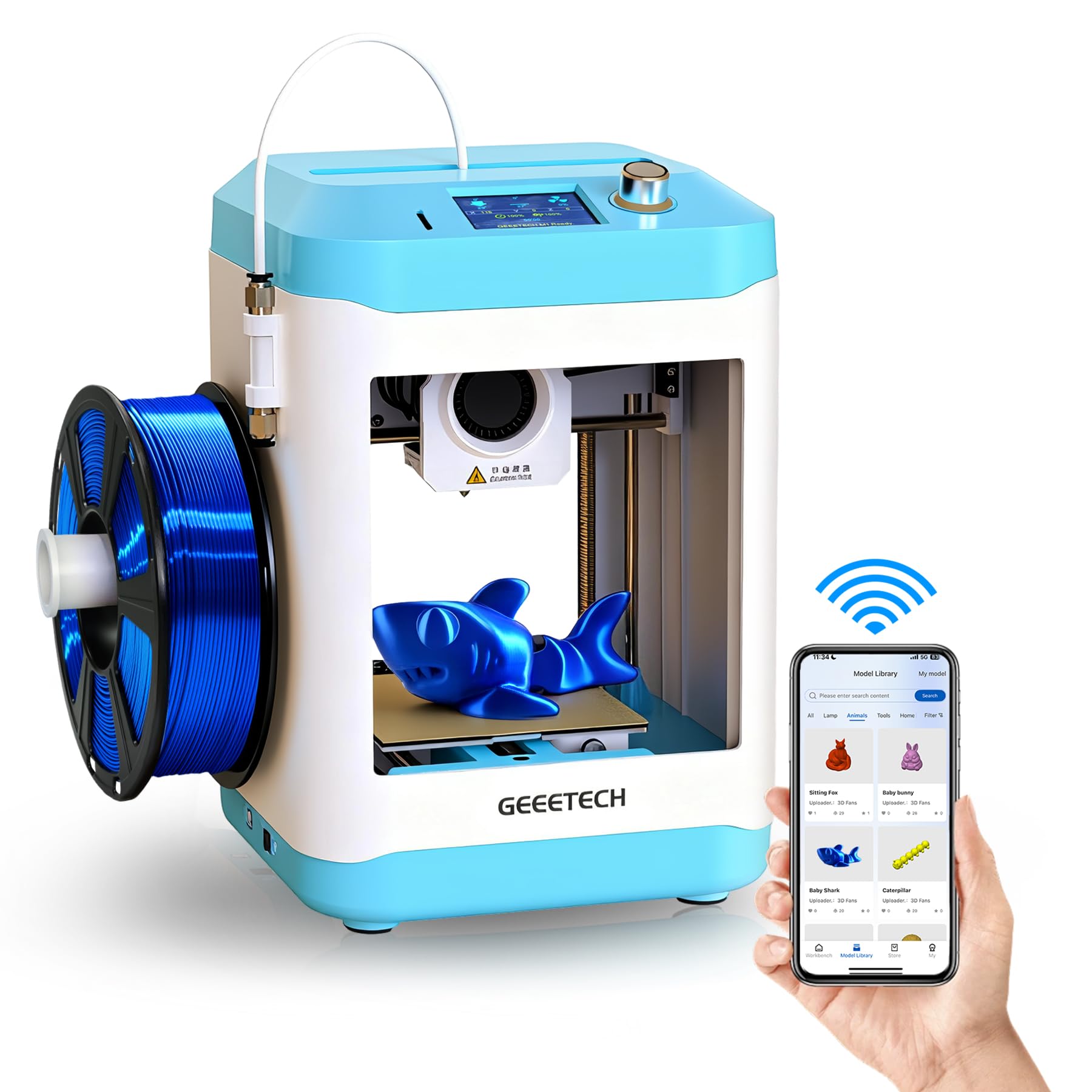
The Geeetech M1 is a fully assembled mini printer designed around simplicity. The knob-based operation and one-button filament loading reduce the learning curve dramatically for absolute beginners. Its 2.4″ LCD color screen and integrated high-brightness lighting provide clear visual feedback, making it a natural fit for classrooms where multiple students rotate through the setup.
Speeds up to 250 mm/s are enabled by the upgraded hot-end nozzle and 50W heater, and the direct-drive extruder maintains consistent extrusion force for TPU as well as PLA. The 16-point auto-leveling ensures each print begins with a calibrated first layer, and the flexible magnetic build plate allows parts to pop off with a gentle flex — no scraping required.
The print volume of 3.94″x4.33″x3.94″ is on the smaller side, so large models must be split into components. The Geeetech app provides a decent library of pre-sliced designs, but you can also use Cura or Simplify3D for more control. For a first printer that lets children print independently within ten minutes of unboxing, the M1 is a safe and capable bet.
Why it’s great
- Fully assembled with minimal setup required
- Knob control and one-button filament change simplify use
- 16-point leveling ensures reliable first layers every time
Good to know
- Small build volume caps the size of printable projects
- App library is smaller than competitors like AOSEED
- Some units have reported intermittent connectivity issues
5. Entina Tina2C

The Entina Tina2C brings genuine AI-assisted creativity to the mini printer segment. The Poloprint Cloud app includes AI-powered search, photo-to-print conversion, and 20+ creative modules that guide kids through the design process. Combined with regularly updated STEM learning courses, this printer functions as an educational platform rather than just a piece of hardware.
Setting it up is exceptionally fast — guided app prompts get you to your first print in roughly eight minutes. Both 2.4G WiFi printing and TF card offline mode are supported, giving flexibility for different classroom or home network conditions. The self-cleaning nozzle design reduces clogging, a common frustration with budget printers, and the quick-swap printhead structure makes maintenance painless.
The print volume is a compact 3.9″ cube, which is fine for the intended audience of small toy and fidget production. Auto-leveling and power-loss recovery help maintain high success rates. The Tina2C is compatible with Windows, macOS, Linux, and Chromebook, so it integrates into almost any school ecosystem. For a printer that puts AI design tools front and center for young learners, this is a compelling choice.
Why it’s great
- Photo-to-print and AI search built into the app
- Very fast 8-minute setup to first print
- Self-cleaning nozzle reduces maintenance headaches
Good to know
- Small build volume limits growth for advanced projects
- WiFi requires 2.4GHz band only
- Filament spool holder is not included
6. TRONXY CRUX 1S
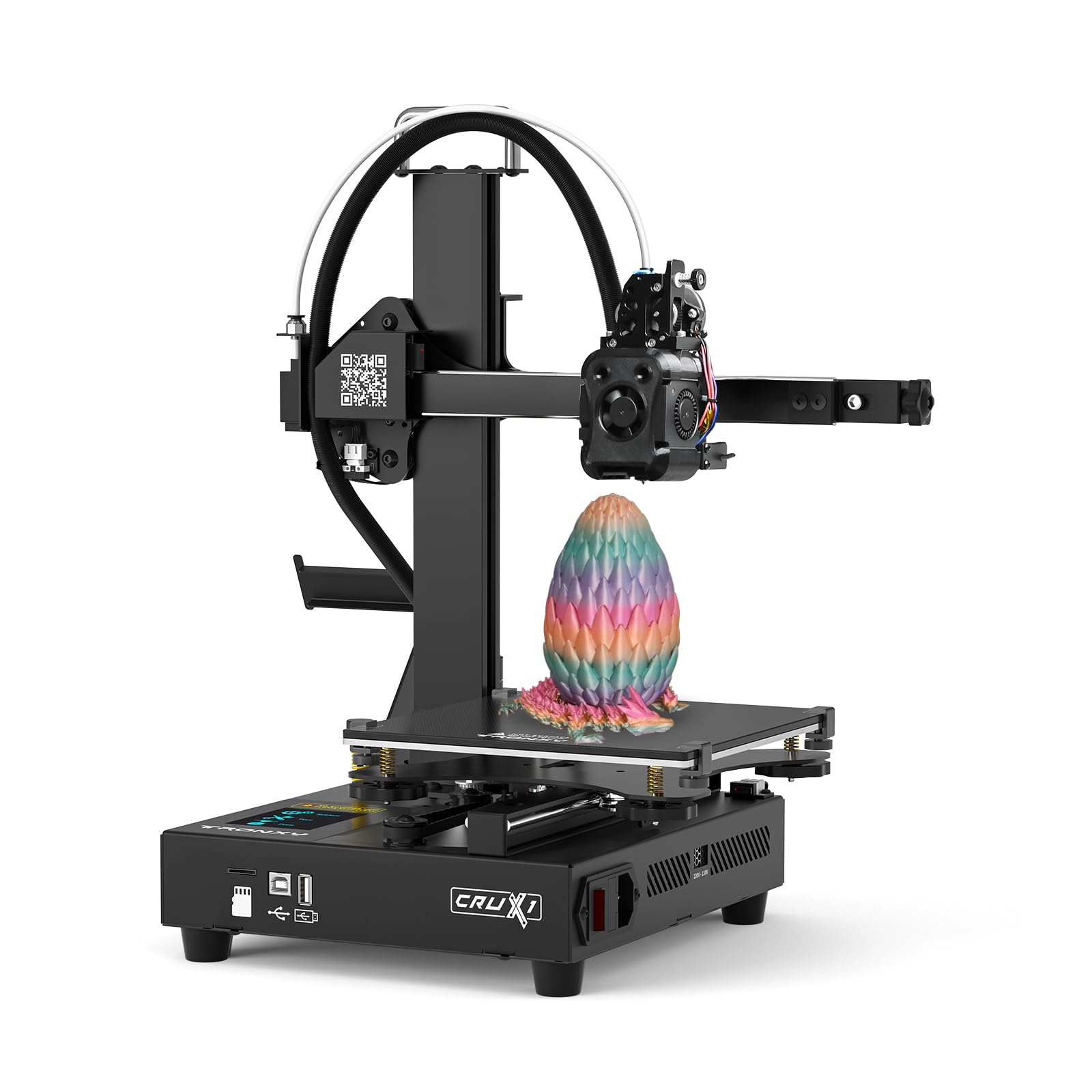
The TRONXY CRUX 1S offers the largest build volume in this roundup at 180 x 180 x 180mm while remaining compact enough to sit on a desk. The dual-axis metal guide rails on the X and Y axes provide smooth, low-noise motion and improved durability over V-slot wheels. Print speed reaches 300 mm/s with a maximum acceleration of 10,000 mm/s², putting it in the same performance bracket as printers costing significantly more.
It arrives 95% pre-assembled, requiring only a few minutes of final assembly. The 2.8″ full-color touchscreen supports eight languages, making it a viable option for multilingual households or international schools. The integrated modular design includes a built-in power supply that reduces wiring clutter and improves safety compared to external brick supplies.
Quality control has been a mixed bag in user reports. Some units arrive with missing screws or SD cards, and the filament sensor can be sensitive to vibration. However, when working correctly, the CRUX 1S produces fine detail and supports a range of materials including PLA, PLA Pro, and TPU. For users who prioritize build volume and speed on a budget, this is the best pick — if you are comfortable with occasional tinkering.
Why it’s great
- Largest build volume (180mm³) among mini printers reviewed
- Dual-axis metal rails improve print quality and longevity
- High speed (300 mm/s) with 10K acceleration
Good to know
- QC issues reported on some units (missing hardware)
- Filament sensor can be unreliable under vibration
- Requires manual Z-offset tuning for best results
7. HEPHI3D TINA2 Basic

The HEPHI3D TINA2 Basic is the entry-level standard for families and schools dipping their toes into FDM printing. It arrives fully assembled with auto bed leveling, eliminating the most intimidating step for new users. The dual Z-axis and dual Y-axis rail system provides surprising stability for its sub- price point, resulting in prints that hold crisp detail on small figures and keychains.
Printing is handled via TF card or USB cable — there is no WiFi, which keeps the cost low but means you need a computer nearby to transfer files. The 2.4″ LCD display and knob interface are straightforward, and the sample PLA filament included in the box allows immediate testing. The removable magnetic build plate bends easily to pop off finished parts without scraping.
The 100 x 105 x 100mm build volume is small, even by mini standards, so this printer is best suited for trinkets, educational samples, and practice pieces. Some users reported confusion with the slicing software workflow on the first attempt. For a no-frills, reliable introduction to 3D printing where price is the primary concern, the TINA2 Basic is a solid starting point.
Why it’s great
- Fully assembled with auto leveling out of the box
- Dual Z and Y rails improve print consistency
- Magnetic flexible build plate for easy part removal
Good to know
- No WiFi — requires TF card or USB for file transfer
- Small build volume limits project size
- Slicer setup can be confusing for total beginners
8. Entina Tina2 Basic

The Entina Tina2 Basic is the most budget-friendly fully assembled mini printer in this guide. It shares the same core architecture as the HEPHI3D version — auto leveling, dual Z-axis rails, and a compact 100 x 105 x 100mm build volume — but comes at an even lower price point. The knob-based operation and one-button filament in/out system are designed for absolute beginners who want to avoid any learning curve.
Printing is done offline via the included MicroSD card, which comes pre-loaded with test models and the Wiibuilder slicer software. The printer supports resume printing after power loss, a feature typically reserved for more expensive models. The safety-first design philosophy includes rounded edges and enclosed wiring, which matters when children are the primary operators.
The trade-offs for the low cost are the lack of WiFi, a smaller build volume compared to the TRONXY, and a basic 2.4″ LCD screen rather than a touchscreen. The print quality is adequate for small toys and fidgets, but fine detail suffers at higher speeds. For families on the tightest budget who just want to see if 3D printing fits their lifestyle, the Tina2 Basic is the most affordable gateway available.
Why it’s great
- Lowest price among fully assembled mini printers
- Pre-loaded SD card gets you printing within minutes
- Power-loss recovery prevents wasted filament
Good to know
- No WiFi or app control
- Small build volume limiting project variety
- Print detail is acceptable but not exceptional
FAQ
What AI features actually matter on a mini 3D printer for beginners?
Why build volume matters more for mini printers than full-size ones?
Can a mini 3D printer handle flexible TPU filament?
Final Thoughts: The Verdict
For most users, the best ai mini 3d printer winner is the Bambu Lab A1 Mini Combo because it combines full-auto calibration, multi-color printing, and whisper-quiet operation in a package that genuinely works on the first try. If you want a complete creative toolkit with AI-powered design features for kids, grab the AOSEED X-Maker Joy AI+. And for the largest mini build volume at a mid-range price, nothing beats the TRONXY CRUX 1S.