
Our readers keep the lights on and my morning glass full of iced black tea. As an Amazon Associate, I earn from qualifying purchases.
Specs are compiled from manufacturer listings and verified buyer reviews and can change over time — please confirm the key details on the product page before buying.
AI and machine learning work demands more from a laptop than most buyers realize. You need serious GPU power to train models, a processor with many cores for data wrangling, and enough RAM to hold entire datasets in memory — all without the system slowing down from heat after ten minutes. This article walks you through exactly what specs matter for ML workflows and which machines deliver them reliably.
I’m Min — the founder and writer behind Gadgets Feed. This guide is built by comparing the manufacturers’ published specifications and the patterns across verified customer reviews, so you get each pick’s real strengths and trade-offs instead of marketing spin.
Whether you are fine-tuning a large language model or running computer vision experiments on a local GPU, finding the right portable workstation means balancing raw compute against thermal headroom and memory capacity — here is your field-tested breakdown of the best ai ml laptop options available right now.
Our Picks at a Glance


How To Choose The Best AI ML Laptop
Picking the right machine for AI and ML work is not about the fastest gaming laptop — it is about sustained compute, professional GPU drivers, and enough VRAM (video memory used to hold model weights) to hold your model weights. Here is what actually matters.
GPU: The Real Engine
For deep learning (training neural networks with many layers), your graphics card is everything. You want the most VRAM you can afford — 12GB is a practical floor for modern model training, and 24GB (on an RTX 5090) is the balance for larger transformer models. Look for NVIDIA RTX-class cards because CUDA and cuDNN (NVIDIA’s software libraries for deep learning) are not well-supported on AMD or Intel Arc GPUs.
RAM: More Than You Think
Loading a large dataset or running a full training pipeline eats RAM fast. 16GB is the absolute entry point, 32GB is comfortable, and 64GB (like the Dell Alienware and HP ZBook carry here) means you can keep your model weights, data loader, and a browser open without swapping to disk (using the slow drive as temporary memory).
Cooling: The Hidden Limiter
A high-spec machine that thermal-throttles (slows itself down to avoid overheating) after five minutes of training is worthless. Look for vapor chamber cooling or advanced thermal solutions — machines like the ASUS ROG Strix G16 with its tri-fan design keep the RTX 5080 feeding compute without choking.
Quick Comparison
| Model | Best For | GPU | RAM | CPU Max Speed | Amazon |
|---|---|---|---|---|---|
| Dell Alienware 18 Area-51★ Best Overall | Max VRAM & Compute | RTX 5090 | 64 GB DDR5 | 5.4 GHz | Amazon |
| ASUS ROG Strix G16 (2025)Top Performer | Best for AI/ML Value | RTX 5080 | 32 GB DDR5 | 5.4 GHz | Amazon |
| HP ZBook X G1i | Certified Workstation | RTX PRO 1000 (8GB) | 64 GB DDR5 | 5.3 GHz | Amazon |
| Alienware X16 R2 | Compact Power | RTX 4080 (12GB) | 32 GB LPDDR5X | 5.1 GHz | Amazon |
| GIGABYTE AERO X16 | Portable Efficiency | RTX 5070 | 32 GB DDR5 | — | Amazon |
In‑Depth Reviews
1. Dell Alienware 18 Area-51 Gaming Laptop
Our pick — 4.5★ from 20+ verified ratings; the strongest balance of quality and price.
The desktop-replacement monster that lets you train large models without compromises.
This hefty 18-inch machine is built for the buyer who refuses to wait — the RTX 5090 paired with 64GB of DDR5 RAM means you can load substantial transformer models and run inference or fine-tuning sessions that would choke lesser laptops. Reviewers report seeing AI Object Mask and Ultra Key processing at 17fps (frames per second, a measure of speed) in Premiere Pro 2026 Beta, which puts it close to a MacBook Pro M4 Max for creative AI workflows.
The Intel Core Ultra 9 275HX pushes up to 5.4 GHz, giving you raw CPU speed for data preprocessing and compilation tasks. Cooling is outstanding with a quiet Stealth Mode that keeps fan noise down even during long training runs — the crowd favorite for heat management, with owners noting the machine “stays nice and cool while not being noisy.” That 2TB (terabyte) PCIe SSD (solid state drive for fast storage) gives you breathing room for large datasets.
The trade-off is physical size: this is a desktop replacement, not a lap-friendly travel companion. It needs its own bag. If absolute portability is the priority, consider the GIGABYTE AERO X16 instead — at 0.65 inches thick, it is far easier to carry. But for raw compute per dollar in a portable format, nothing here outruns it.
What Owners Love
- The 5.4 GHz Intel Core Ultra 9 processor handles heavy compilation and data prep without lag.
- 64GB of DDR5 RAM means you can leave large datasets loaded while debugging (fixing code).
- Quiet cooling even under sustained GPU load — no fan screaming during model training.
The Reality Check
- Very large and heavy — think desktop replacement, not couch-surfing companion.
- Requires a dedicated carrying case; not practical for everyday commuting.
- Buyers report it trails a MacBook Pro M4 Max on some AI video tasks (17fps vs 24fps).
Reach for this if: You train or fine-tune AI models on the go and need the maximum VRAM and RAM available in a portable chassis.
Look elsewhere if: You need a lightweight machine you can whip out on an airplane tray table — the Alienware 18 is a beast to carry.
2. ASUS ROG Strix G16 (2025) Gaming Laptop
The value powerhouse that proves you do not need a workstation budget for serious AI work.
This 16-inch machine hits the balance between the premium Alienware and the budget-tier options. The RTX 5080 with DLSS 4 (Deep Learning Super Sampling, an NVIDIA AI upscaling feature) and the 5.4 GHz Intel Core Ultra 9 275HX deliver real training capability — owners describe it as “outstanding for professional AI/ML work” and note it “far exceeds Dell XPS 16” in performance. That is high praise from someone doing day-to-day model work.
The 32GB of DDR5-5600MHz RAM is enough for most practical workflows unless you are loading massive unbatched datasets. The 240Hz ROG Nebula display with its anti-glare ACR film (a coating that cuts reflections) means you can stare at training logs, loss curves, and Jupyter notebooks (a coding environment often used for data science) for hours without eye strain. Cooling is serious: an end-to-end vapor chamber (a sealed flat heat pipe) plus tri-fan technology with Conductonaut extreme liquid metal keeps the RTX 5080 fed without immediate throttling.
The honest catch? A few owners mention needing a day-one registry fix to avoid crashes on certain games and apps. It is not widespread, but if you want a completely out-of-box experience without any tinkering, the Alienware above is more turnkey. The fan is also loud under sustained load — though for AI work, the productivity gains outweigh the noise.
Why It Wins Praise
- Buyers specifically call it “excellent for AI/ML work” and say it beats the Dell XPS line in raw compute.
- The 240Hz Nebula display reduces glare and makes extended code/notebook sessions comfortable.
- Vapor chamber cooling with liquid metal keeps the RTX 5080 running at peak for longer training runs.
What to Know
- A minority of units ship with software defaults that cause crashes — a quick registry tweak fixes it.
- Armory Crate bloatware can feel intrusive; some owners reinstall Windows clean.
- Fan is loud under sustained GPU load, though that is the trade-off for the thermal performance.
Best for: The AI/ML professional who needs strong GPU compute and good RAM at a mid-premium price — the value-to-performance ratio here is tough to top.
Not for: Anyone who wants a perfectly smooth out-of-box experience with zero initial configuration — budget a half-hour for driver tuning.
3. HP ZBook X G1i Mobile Workstation
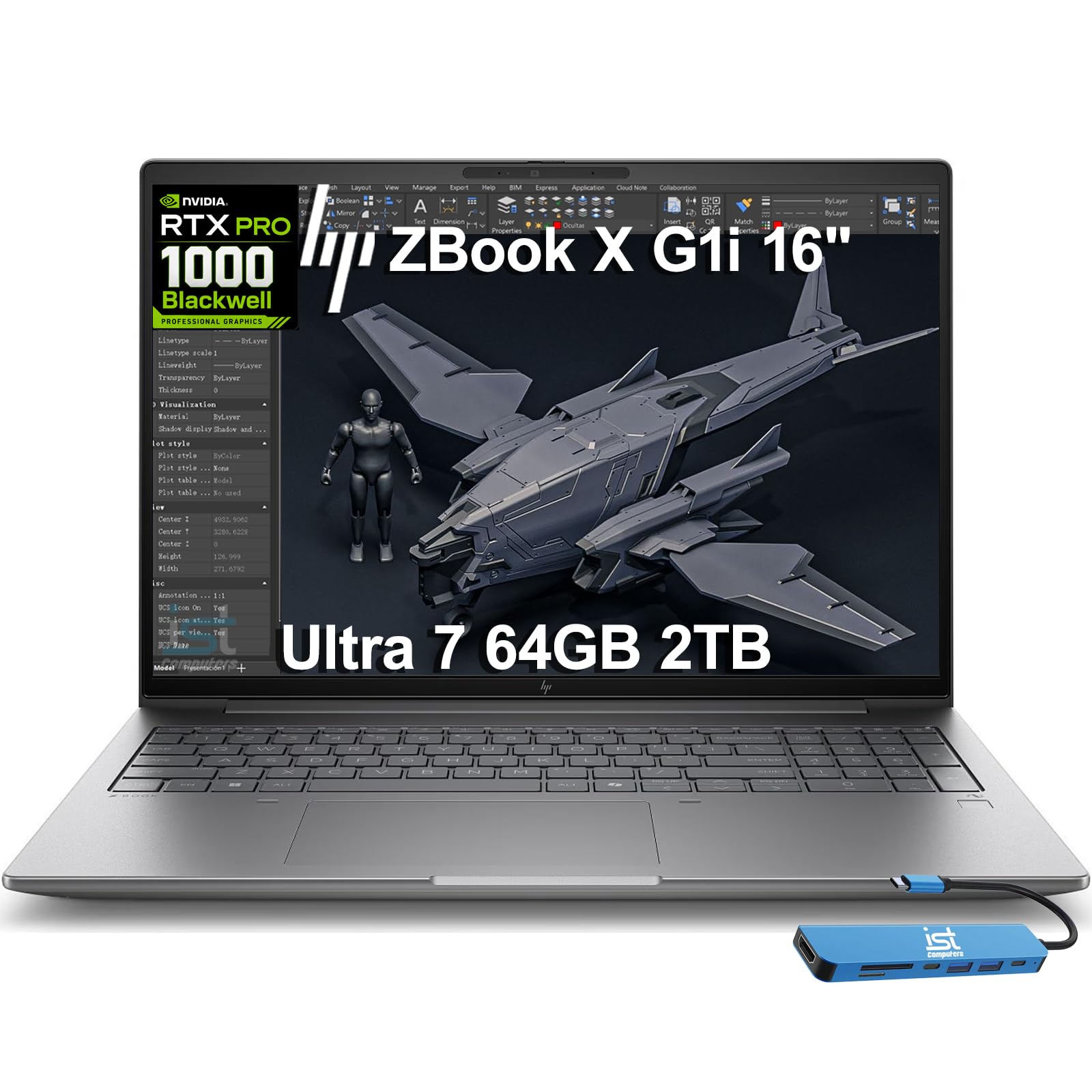
The certified mobile workstation for engineering simulation and AI-enhanced design workflows.
This is the professional’s choice — ISV (Independent Software Vendor) certified, meaning it has passed compatibility tests for applications like AutoCAD, SolidWorks, Revit, ANSYS, and MATLAB. It runs the NVIDIA RTX PRO 1000 Blackwell GPU with 8GB of GDDR7 memory (a type of fast video memory), plus an Intel Core Ultra 7 265H that hits up to 5.3 GHz across 16 cores. The 64GB of DDR5 RAM means you can load full simulation meshes or large training datasets without hitting swap.
Owners confirm it loads large raw photo files “quickly” and handles CPU and memory-intensive processing in Lightroom and On1 with “no lag time.” The 5MP IR webcam with AI Noise Suppression and HP Dynamic Voice Leveling makes remote collaboration clear. With HP Wolf Pro Security included, this is a machine built for data-sensitive environments. The bundled IST Computers 7-in-1 Hub adds extra ports for multi-monitor setups at up to 4K@60Hz (a display resolution of 3840×2160 pixels at 60 refreshes per second).
For large language model fine-tuning or heavy deep learning training, the consumer RTX cards in the other picks will outperform it. One owner reported a blue screen after a Windows Update, though that is an isolated experience. The three-year warranty from HP provides confidence.
Built for Engineers: ISV certifications for MATLAB, ANSYS, and CAD mean you never worry about driver compatibility on professional simulation tools.
VRAM Ceiling: The 8GB RTX PRO 1000 is excellent for inference (running a trained model to get predictions) and smaller models, but larger training jobs will hit the memory limit faster than the Alienware’s 24GB.
Perfect for: Engineers, architects, and data scientists who run ISV-certified simulation tools alongside AI workflows — the reliability guarantee is the feature here.
skip it if: Your primary work is training large deep learning models that need more than 8GB VRAM — in that case, the Alienware or ASUS Strix is a better fit.
4. Alienware X16 R2 Gaming Laptop

A more portable Alienware that still brings serious gaming-grade compute for ML workloads.
With the Intel Core Ultra 9-185H clocking up to 5.1 GHz and the RTX 4080 with 12GB GDDR6, this is a capable mid-point between the massive Area-51 and lighter options. The 32GB of LPDDR5X integrated memory handles multitasking smoothly. The 240Hz QHD+ display (2560×1600 pixel resolution) with 100% DCI-P3 color gamut (a wide color standard) is sharp for data visualization and code work, and the 1080p IR camera is good for meetings.
Customers note that the RTX 4080 runs “most games max settings at 100+ fps,” which translates to solid inference and light training performance. The thermal design vents warm air through the sides and takes in cooler air at the top, keeping the chassis manageable during long sessions. At 16 inches, it is more travel-friendly than the 18-inch Area-51.
The downsides are real: the hardware quality is praised, but the software experience is a mixed bag. Sleep-mode crashes and driver issues appear in a notable share of owner reports. Battery life is limited — about an hour at full gaming load. The 5.1 GHz clock speed versus the 5.4 GHz in the Area-51 means marginally slower CPU-bound preprocessing. This is best for someone who needs RTX 4080 power in a slightly smaller frame but is willing to do some driver management.
Hardware Pros: Premium aluminum chassis with a beautiful QHD+ display; the build quality feels “premium” according to owners.
Software Caveat: Performance reviews are mixed — some units ship with buggy driver suites that cause sleep-mode crashes and require manual reinstalls.
Best for: Someone who wants RTX 4080-class compute in a 16-inch chassis that is more carry-friendly than the 18-inch Area-51.
Not for: Anyone who wants a completely out-of-box stable experience — budget time for driver updates and potential support calls.
5. GIGABYTE AERO X16, Copilot+ PC

The ultra-slim Copilot+ PC that gives you AI features on the go without the gym bag.
At just 0.65 inches thick and 4.18 lbs, the AERO X16 is the machine you actually want to carry daily. The AMD Ryzen AI 9 HX 370 processor handles AI PC tasks natively with the GiMATE assistant, and the RTX 5070 delivers Blackwell architecture with DLSS 4 for accelerated inference and creative workflows. The 14-hour battery life is exceptional for this class — you can take it to a coffee shop and run inference experiments all afternoon.
Owners consistently call it a “solid, fast, well built Laptop of high quality” and praise its “great gaming performance.” The 165Hz 2560×1600 WQXGA (Wide Quad Extended Graphics Array) display is crisp, and the aluminum chassis feels premium. The GiMATE AI interface is intuitive and useful for quick data queries. For light-to-moderate ML workloads — inference, small model fine-tuning, data exploration — this machine is impressively capable given its slim profile.
The RTX 5070’s VRAM is limited compared to the heavier hitters in this list. If your workflow involves training large language models or computer vision networks, you will hit the GPU memory ceiling faster. One owner also reported a BIOS bug affecting Call of Duty compatibility. But as a portable companion for AI-assisted coding, data analysis, and occasional inference tasks, the AERO X16 is the most travel-friendly option here.
What Owners Appreciate
- Extremely portable at 0.65 inches thin — fits in almost any laptop sleeve or bag.
- Exceptional 14-hour battery life, so you can work away from an outlet all day.
- Premium aluminum build quality; owners describe it as high quality and well-built.
Keep in Mind
- The RTX 5070 is fine for inference and light training, but not for large model training workloads.
- A single BIOS bug report exists affecting a specific game, though it seems rare.
- Performance-focused aspects dominate praise — it is not a pure-workstation machine.
Ideal for: The data scientist or AI engineer who needs a lightweight, long-battery machine for coding, inference, and daily portability — not heavy training.
Reach for another if: You need to train large models locally — the VRAM on the RTX 5070 is a hard bottleneck for serious deep learning.
Understanding the Specs
GPU VRAM
Video RAM (the memory on your graphics card) is the single most important spec for deep learning. It determines how large a model you can load for training or inference. The RTX 5090 with 24GB is the king here, while the RTX 4080 with 12GB is adequate for most transformer models. Cards with 8GB like the RTX PRO 1000 are fine for inference but will limit training on larger architectures.
Cooling System
A powerful GPU generates enormous heat during sustained training runs. Machines with vapor chamber cooling, tri-fan setups, or liquid metal (like the ASUS ROG Strix G16) can maintain peak clock speeds longer than single-fan designs. If a laptop thermal-throttles (slows down to cool off), you lose performance — making cooling as important as the GPU itself for ML work.
FAQ
Can I train large language models on any of these laptops?
Do I need an Intel or AMD CPU for AI and ML work?
How much RAM is enough for machine learning on a laptop?
Can a gaming laptop work as an AI ML laptop?
Is the RTX 5070 enough for deep learning?
What does NVIDIA DLSS 4 do for AI and ML work?
Should I get a Copilot+ PC for AI development?
How long do these laptops last for sustained AI training?
Final Thoughts: The Verdict
For most people, the best ai ml laptop overall is the Dell Alienware 18 Area-51 because its 64GB RAM, RTX 5090, and 2TB SSD combination handles the widest range of training and inference tasks without compromise. If you want strong GPU compute at a better price, grab the ASUS ROG Strix G16. And for certified professional reliability with ISV support, the HP ZBook X G1i is the one to reach for.
How We Picked
We do not accept paid placement. Every pick is matched to a real buyer and a real use-case; we do not hands-on test units.
Sources & Methodology
Specifications: manufacturer listings and product documentation. Review insights: verified customer reviews, as of July 2026. Pricing: not shown on this page (it changes often); check the current price via the retailer link.
As an Amazon Associate, Gadgets Feed earns from qualifying purchases. This does not affect which products we feature.