
The single biggest frustration with standard webcams isn’t resolution — it’s that you have to babysit the frame. Lean left, and you’re a floating head. Stand up to grab a notebook, and you vanish entirely. An AI webcam solves precisely this by combining computer vision with motorized or digital tracking so the camera follows you — or the speaker — automatically, without you touching a single setting.
I’m Min — the co-founder and writer behind Gadgets Feed. I’ve spent hundreds of hours analyzing sensor specs, AI-tracking algorithms, microphone arrays, and software ecosystems across every major webcam release to separate genuine hardware intelligence from marketing fluff.
After deep-diving into real-world tracking accuracy, low-light performance, and audio clarity across dozens of models, I’ve assembled the definitive guide to the best ai webcam for every setup and budget.
How To Choose The Best AI Webcam
Buying an AI webcam means moving beyond megapixels. The core value lives in how the camera processes your image — tracking, framing, exposure, and audio — without manual intervention. Three criteria separate the truly intelligent from the merely expensive.
Tracking Type: Motorized PTZ vs. Digital Crop
Motorized PTZ (pan-tilt-zoom) gimbals physically move the camera lens to follow you. This preserves full sensor resolution because the camera moves, not the image. Digital crop tracking simply zooms into a portion of the frame — your resolution drops instantly, and any sudden movement produces a jarring crop. For presentations, fitness streaming, or any dynamic movement, motorized PTZ is the clear winner.
Sensor Size and Low-Light Capability
A larger physical sensor (measured as 1/1.3” or 1/2.8”, for example) captures more light per pixel. This directly impacts how clean your video looks in a home office with window light or a single desk lamp. Many AI webcams now use Sony sensors, but the physical size matters more than the brand name.
Microphone Array Architecture
AI noise cancellation only works if the hardware captures enough directional data. A single-mic webcam can’t isolate your voice from a keyboard clatter. Dual-mic arrays with beamforming can reject side noise. Three-mic arrays add vertical discrimination, which matters if you stand or move around while speaking.
Quick Comparison
On smaller screens, swipe sideways to see the full table.
| Model | Category | Best For | Key Spec | Amazon |
|---|---|---|---|---|
| OBSBOT Tiny PTZ 4K | Premium AI PTZ | Motorized AI tracking | 2-axis gimbal + 1/2.8″ Sony sensor | Amazon |
| Insta360 Link 2 Pro | Flagship AI PTZ | Low-light 4K + Stream Deck | Large 1/1.3″ sensor | Amazon |
| Logitech MX Brio | Premium All-Rounder | Professional meetings | 8.5 MP sensor + Show Mode | Amazon |
| TONGVEO All-in-One | Conference System | Small-to-medium meeting rooms | 3x optical zoom + Bluetooth speaker | Amazon |
| Owl Labs Meeting Owl 3 | 360° Room Camera | Large hybrid meeting rooms | 360° video + 18 ft mic pickup | Amazon |
| EMEET PIXY | Mid-Range AI PTZ | Content creators on a budget | Dual-camera + 310° pan / 180° tilt | Amazon |
| Logitech Brio 500 | Mid-Range Value | Everyday business calls | RightLight 4 + RightSight auto-framing | Amazon |
| Lumina 4K | AI Processing Cam | Software-enhanced video quality | Proprietary AI + 95° wide FOV | Amazon |
| Angetube 4K AI | Entry-Level AI | Budget-first buyers | Sony CMOS + USB 3.0 + remote | Amazon |
In‑Depth Reviews
1. OBSBOT Tiny PTZ 4K Webcam

The OBSBOT Tiny delivers genuine motorized AI tracking — a physical 2-axis gimbal that follows your movement without cropping the frame or sacrificing resolution. Its Sony 1/2.8” sensor outputs 4K at 30 fps or 1080p at 60 fps, with HDR automatic low-light correction that preserves detail in mixed lighting conditions.
Gesture control is genuinely useful here: raise an open palm to enable tracking, then use a pinch gesture to zoom in or out. The companion app adds beauty mode and background bokeh, though the latter is CPU-intensive. For plug-and-play use, no software is required at all — the camera works as a standard UVC device out of the box.
Built-in dual omni-directional microphones with intelligent noise reduction deliver clear audio up to about 10 feet. The included carry bag is a thoughtful addition for mobile presenters. This is the most well-rounded AI webcam for anyone who moves around during calls or streams.
Why it’s great
- True motorized AI tracking preserves full resolution
- HDR and low-light correction work automatically
- Gesture control is responsive and intuitive
Good to know
- Background blur mode is CPU-heavy
- Gestures can be interrupted by flailing hands
2. Insta360 Link 2 Pro

The Insta360 Link 2 Pro uses a large 1/1.3” sensor — significantly bigger than the 1/2.8” sensors found in most competitors. This extra surface area translates directly to cleaner, less noisy video in dim rooms and a natural bokeh effect that mimics a DSLR depth-of-field look without any artificial cutout artifacts.
Its PTZ gimbal physically pans and tilts to track speakers, and the dual-microphone array with beamforming directional pickup isolates your voice from keyboard clicks and room echo. Specialized modes include DeskView for top-down document sharing and Whiteboard Mode, which uses recognition markers to frame a whiteboard automatically.
Elgato Stream Deck integration lets you switch camera presets on the fly — a killer feature for multi-camera streamers. The Link Controller software gives granular control over exposure, white balance, and tracking behavior. The only hardware quirk is the short bundled USB-C cable; you will likely need a longer third-party cord for flexible placement.
Why it’s great
- Largest sensor in its class delivers excellent low-light performance
- Natural bokeh without messy background removal
- Full Stream Deck and gesture control support
Good to know
- Bundled USB-C cable is short
- Not compatible with ARM-based Windows systems
3. Logitech MX Brio

The Logitech MX Brio is the company’s most advanced 4K webcam, packing an 8.5 MP sensor with 70% more pixels than the previous Brio generation. AI-enhanced image quality adjusts exposure, white balance, and noise reduction automatically across varied lighting conditions, and the dual-microphone array uses beamforming and AI noise reduction to minimize background chatter.
Show Mode is the standout collaboration feature: tilt the camera downward by hand to share documents or physical objects on your desk without repositioning the entire mount. The Logi Options+ software allows manual control of ISO, shutter speed, tone, and vibration when you want to override auto mode.
Build quality feels premium with a metal body and a twist-to-close privacy shutter. The USB-C cable is built-in, though no USB-A adapter is included. Some users note that the monitor clip can feel slightly loose on very thin displays, but overall this is the most polished all-rounder for professional environments.
Why it’s great
- Excellent auto exposure and white balance with AI enhancement
- Show Mode enables easy desk-sharing
- Premium build with privacy shutter
Good to know
- Monitor clip can feel loose on thin screens
- No USB-A adapter included in box
4. TONGVEO All-in-One
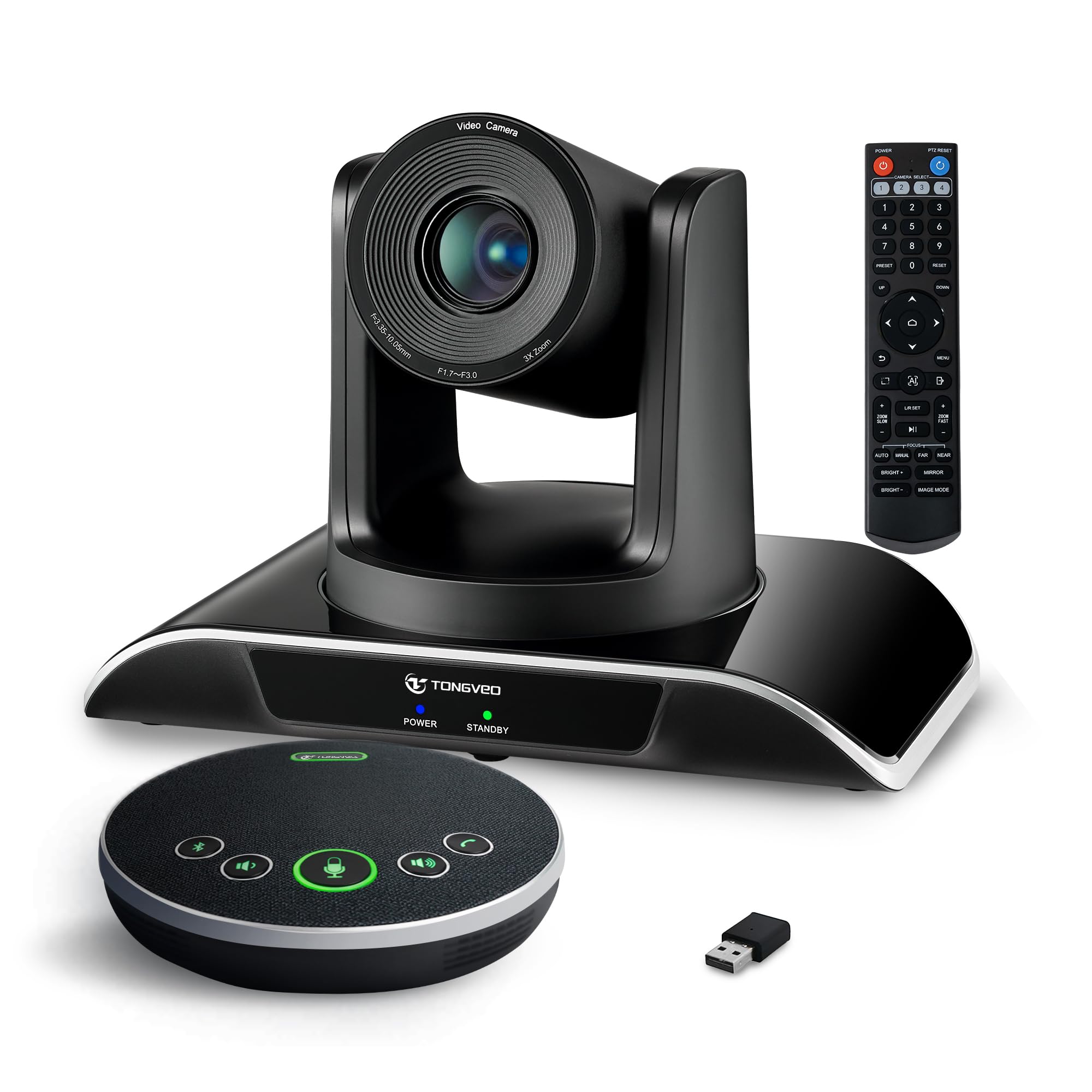
The TONGVEO All-in-One bundles a 1080p PTZ camera with 3x optical zoom and a Bluetooth conference speakerphone into a single kit designed for small-to-medium meeting rooms. The camera uses AI humanoid and face recognition to lock onto and track speakers across a 350° pan and 180° tilt range, outputting uncompressed video via HDMI 2.0 or USB 3.0 at 60 fps.
The included Bluetooth speakerphone features full-duplex echo cancellation and a 16.4-foot pickup range, with a built-in 2400 mAh battery that lasts 6–8 hours of continuous use. No drivers are required — the system is plug-and-play with Zoom, Teams, Webex, and OBS.
This is a true all-in-one solution: the camera is wired, the speaker is wireless, and both work in tandem without needing a separate mixer or hub. For teams that need a dedicated room system rather than a single-person webcam, the TONGVEO delivers professional audio and video in one box.
Why it’s great
- Complete room kit includes PTZ camera and speakerphone
- Optical zoom preserves image quality at distance
- Plug-and-play with all major conferencing platforms
Good to know
- Speakerphone audio quality trails dedicated brands like Anker
- Installation instructions are sparse
5. Owl Labs Meeting Owl 3

The Meeting Owl 3 is designed for one purpose: making remote participants feel like they are in the room. Its proprietary Owl Intelligence System uses visual and audio cues to automatically switch the camera view to whoever is speaking, showing a 360° panoramic view of the entire space. Video is 1080p HD, and the 360° microphone array picks up voices up to 18 feet away.
Setup takes about six minutes from unboxing to first meeting. IT administrators can manage multiple devices through The Nest dashboard for bulk registration and default settings. Two Meeting Owls can be paired for larger rooms, and the system is certified for Microsoft Teams while working with Zoom, Google Meet, Webex, and more.
The 1080p resolution is a limitation on large displays — the video can look soft on a 65-inch conference room TV. But for active hybrid meetings where speaker tracking and room awareness matter more than pixel count, the Owl 3 is in a class of its own.
Why it’s great
- Best-in-class 360° speaker tracking for hybrid meetings
- Very easy setup and fleet management via The Nest
- Durable build — survived heavy use and drops in real-world testing
Good to know
- 1080p resolution looks soft on large conference room TVs
- Premium pricing reflects room-scale design, not personal use
6. EMEET PIXY

The EMEET PIXY is the first consumer webcam to use a dual-camera system: one 4K imaging camera with a 1/2.55” Sony sensor and PDAF autofocus, and a secondary AI camera that detects face position to optimize exposure and focus speed. The result is a claimed 0.2-second autofocus against the 1.1-second average of competitors.
Its 3-chip AI architecture splits processing across imaging, motion prediction, and PTZ control for smoother tracking with 310° pan and 180° tilt. Gesture control activates with a two-second open palm hold. The EMEET STUDIO software offers preset positions, whiteboard mode, and even AIGC-generated shot lists.
The triple-mic array supports three recording modes: Live Mode for steady noise filtering, Noise Canceling Mode for keyboard clicks and sudden sounds, and Original Sound Mode for full ambient capture. This flexibility makes the PIXY a strong mid-range contender for podcasters and streamers who need PTZ on a tighter budget.
Why it’s great
- Dual-camera design enables faster and more accurate autofocus
- Three-mic array with selectable sound modes
- Extensive PTZ range covers nearly every room angle
Good to know
- AI tracking can struggle in dim lighting
- Software setup has some broken links and missing device support
7. Logitech Brio 500

The Logitech Brio 500 brings AI-enhanced auto-framing (RightSight) and automatic light correction (RightLight 4) into a more accessible price tier. At Full HD 1080p, the sensor delivers exceptional clarity for meetings, and the 90-degree field of view provides enough room for natural movement or a second person on camera.
Show Mode lets you tilt the camera downward with one hand to share objects on your desk — the same flagship feature found on the MX Brio, but at a lower resolution. Dual noise-reduction microphones filter out background noise without requiring a separate mic, and the twist-to-close privacy shutter offers physical security between calls.
Logi Tune software allows zoom adjustments, color tuning, and firmware updates. The pink color option is a rare departure from the black-and-gray webcam market. Image quality degrades noticeably in extreme low light, but for normal home office or conference room lighting, the Brio 500 delivers polished performance at a mid-range price.
Why it’s great
- RightLight 4 handles variable window lighting without extra lamps
- Show Mode enables easy desk object sharing
- Twist-to-close privacy shutter is built-in
Good to know
- 1080p only — no 4K option in this model
- Low-light quality drops noticeably compared to Brio 4K models
8. Lumina 4K Webcam

The Lumina 4K takes a different approach to AI: rather than motorized tracking, it uses software-based AI processing through the Lumina Studio App to enhance your appearance in real time. The app offers over 30 settings including exposure, white balance, saturation, background blur, and AI auto-framing via digital crop.
The ultrawide 4K camera with a 95-degree field of view captures more of your background, and the dual microphones eliminate environmental noise while preserving natural voice quality. The aerospace-grade aluminum body in Atomic Grey looks premium on any desk and includes a magnetic privacy cover.
The “Cameraman” face tracking feature works well, though it prefers a widescreen aspect ratio. Be aware that intensive AI processing can push CPU usage to 60% at 720p, which compounds with Zoom’s own processing. This model is best for users who prioritize image correction over physical tracking and have a capable computer to handle the load.
Why it’s great
- Extensive software controls for fine-tuning appearance
- Premium aluminum build with magnetic privacy cover
- Wide 95° FOV captures more background context
Good to know
- AI processing is very CPU-intensive — can cause 60%+ load
- Non-motorized tracking relies on digital crop, reducing effective resolution
9. Angetube 4K AI Webcam

The Angetube 4K AI webcam proves that AI features are no longer exclusive to premium tiers. Its Sony CMOS sensor captures 4K UHD at 30 fps or 1080p at 60 fps, with HDR support for dynamic range correction. The AI-tracking feature uses face detection for auto-framing and includes a presenter tracking mode that follows movement around a room.
A dedicated remote control lets you toggle AI functions, 10X digital zoom, mic mute, and image flip without touching your computer. The USB 3.0 connection delivers uncompressed 5 Gbps throughput, and the USB-C plug works plug-and-play across Windows, Mac, Linux, and Chrome OS with no driver installation needed.
Dual AI noise-canceling microphones pick up clear voice from up to 16 feet away. The build is plastic but functional, and the lack of included mini-tripod is a minor omission. For buyers who want 4K resolution and AI auto-framing at the lowest possible entry point, the Angetube delivers remarkable value.
Why it’s great
- 4K Sony sensor with HDR at a budget-friendly price
- Remote control makes AI toggling effortless
- USB 3.0 ensures uncompressed video
Good to know
- AI tracking uses digital crop, not motorized PTZ
- Software GUI is basic and lacks advanced controls
FAQ
Does an AI webcam work without installing software?
Will an AI webcam track me if I stand up and walk around?
How much CPU does AI processing use on a webcam?
Final Thoughts: The Verdict
For most users, the best ai webcam winner is the OBSBOT Tiny PTZ 4K because it combines true motorized AI tracking, a Sony 1/2.8” sensor with HDR, and gesture control at a price that undercuts premium competitors. If you want the highest-quality low-light image and Stream Deck integration, grab the Insta360 Link 2 Pro. And for professional meeting environments where collaboration and desk sharing matter most, nothing beats the Logitech MX Brio.