
The Ryzen 7 7800X3D is a thermal paradox — it’s remarkably efficient under gaming loads, pulling around 80W, yet its single 3D V-cache die creates an intense hotspot that cheaper coolers struggle to tame. Pairing it with the wrong AIO means leaving performance on the table or dealing with fan ramping that ruins the experience. This guide cuts through the noise to find the liquid coolers that actually match this chip’s unique thermal profile.
I’m Min — the co-founder and writer behind Gadgets Feed. I’ve spent hundreds of hours analyzing AIO cooler specifications, customer thermal reports, and pump/fan noise data specifically for AM5 socket compatibility and the 7800X3D’s idiosyncratic heat density.
After cross-referencing dozens of radiator sizes, pump RPMs, and real-user temperature logs, I’ve narrowed the market to the nine most practical configurations. This is the definitive resource for choosing the best aio cooler for 7800x3d builds, balancing thermals, noise, and visual personality.
How To Choose The Best AIO Cooler For 7800X3D
Choosing an AIO for the 7800X3D is not about brute-force wattage dissipation. Unlike Intel’s Raptor Lake chips that can pull 250W+, this CPU’s strength lies in its cache architecture, not raw power draw. The cooling requirement is about efficiently removing heat from a very small, dense die area. Beginners often overspend on massive 420mm radiators when a well-designed 280mm or 360mm unit with a strong pump and good cold plate contact will deliver identical results.
Radiator Size and Case Compatibility
The 7800X3D’s typical gaming load of 70–85W means a 240mm AIO is technically sufficient, but noise levels factor in. A 360mm radiator allows fans to spin slower for the same thermal performance, making your build quieter. The key is ensuring your PC case has the clearance; some 280mm radiators like ARCTIC’s Liquid Freezer III Pro are 38mm thick and won’t fit in slim cases. Measure your case’s radiator mounting depth before purchasing.
Pump Design and Cold Plate Offset
Not all pumps move fluid the same way. Asetek-based coolers (used in many premium units) and Cooler Master’s dual-chamber design both excel at maintaining consistent pressure. More importantly, some AIOs like the ARCTIC Liquid Freezer III include an offset mounting bracket for AM5, shifting the cold plate to directly cover the CCD (core complex die) hotspot. This offset can drop 7800X3D load temperatures by several degrees compared to a centered cold plate.
Software and Aesthetics — The LCD Factor
The 7800X3D is a popular choice for high-end gaming rigs where visuals matter. Many modern AIOs now feature LCD screens for displaying system stats or custom GIFs. The quality of these displays varies wildly — from simple 2-inch monochrome panels to 6.67-inch AMOLED curved screens. Consider whether you want deep software integration (like Corsair’s iCUE or Lian Li’s L-Connect 3) or a simpler plug-and-play solution with motherboard RGB sync that avoids background bloatware.
Quick Comparison
On smaller screens, swipe sideways to see the full table.
| Model | Category | Best For | Key Spec | Amazon |
|---|---|---|---|---|
| Cooler Master 360 Atmos | 360mm | Silent High-End Builds | 70.7 CFM SickleFlow Edge Fans | Amazon |
| TRYX Panorama SE 360 | 360mm | Ultimate Visual Showpiece | 6.67″ AMOLED Curved Screen | Amazon |
| be quiet! Light Loop 360 | 360mm | Acoustics-Focused Overclockers | 36.8 dB(A) Max Noise | Amazon |
| Lian Li GA II Trinity SL-INF | 360mm | Interchangeable Aesthetics | Asetek 8th Gen Pump | Amazon |
| Thermalright FW360 SE ARGB V2 | 360mm | Budget LCD Screen | 68.9 CFM / 2000 RPM Fans | Amazon |
| ARCTIC Liquid Freezer III Pro 280 | 280mm | Performance in Tight Spaces | 38mm Radiator / 2500 RPM Fans | Amazon |
| MSI MAG Coreliquid A13 360 | 360mm | Reliable All-Rounder | High-Performance Ceramic Bearing Pump | Amazon |
| NZXT Kraken Core 240 RGB | 240mm | Compact & Clean Builds | 75.05 CFM / 3100 RPM Pump | Amazon |
| CORSAIR Nautilus 240 RS LCD | 240mm | iCUE LCD Customization | 2.1″ IPS LCD / 20 dBA Pump | Amazon |
In‑Depth Reviews
1. Cooler Master 360 Atmos

The Cooler Master 360 Atmos uses a patented dual-chamber pump design that significantly increases water pressure directly over the CPU hotspot — a critical feature for the 7800X3D’s dense die layout. Combined with precision-engineered ultra-thin spade fins on the 360mm radiator, this unit handles sustained loads without breaking a sweat. The pre-installed SickleFlow Edge fans deliver 70.7 CFM of airflow at up to 2500 RPM, which is more than enough to keep the radiator cool at low noise levels.
What truly sets the Atmos apart is its acoustics profile. User reports confirm that the pump is practically inaudible below 70°C, and even under full Cinebench loads, the noise remains surprisingly low for a 360mm unit. The redesigned mounting brackets simplify installation on AM5, making it easy to achieve proper contact pressure. The customizable pump top cover also allows for 3D-printed designs, giving you creative freedom over the aRGB Gen 2 lighting.
For the 7800X3D specifically, this cooler excels because it doesn’t need to run at full speed. The dual-chamber design moves fluid efficiently at lower pump RPMs, keeping noise down while maintaining excellent thermal transfer. The 360mm radiator provides enough surface area for passive cooling in idle scenarios, meaning fans often don’t need to spin at all during basic desktop use.
Why it’s great
- Dual-chamber pump design keeps the 7800X3D hotspot under control without aggressive fan curves
- Extremely quiet operation; users report idle temps dropping from 74°C to 25-30°C versus air coolers
- Simplified AM5 bracket installation with included thermal paste
Good to know
- Instructions are picture-only, which can be confusing for first-time AIO installers
- At full blast (100% fan speed), the fans become noticeably loud like an industrial blower
2. TRYX Panorama SE 360
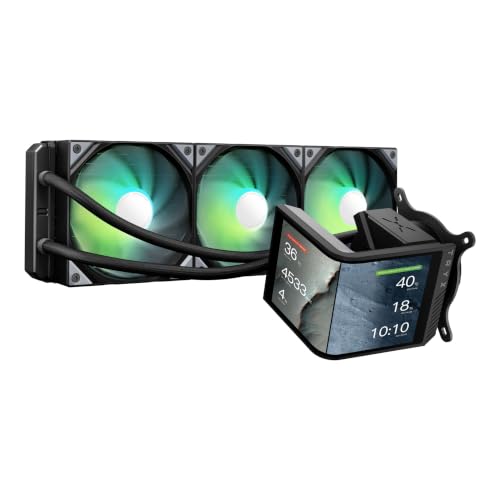
The TRYX Panorama SE 360 is the most visually striking AIO on this list, featuring a rotatable 6.67-inch AMOLED curved screen with a 60Hz refresh rate and 2K resolution at 372 PPI. This is not a gimmick — the 3D anamorphic effect created by the “G2 Curvature” design genuinely makes on-screen content appear to float above the pump block. Underneath the spectacle lies the Asetek Adela pump, rated for 280W TDP cooling capacity, which is overkill for the 7800X3D but ensures silent, efficient operation at lower power draws.
The 27mm high-density fin radiator and three pre-installed ROTA ARGB fans (FDB bearings, 66.09 CFM each) provide excellent thermal headroom. User reports show the 7800X3D idling at 40-45°C and gaming at 50-55°C, while the pump noise stays under 27.86 dBA even at full load. The KANALI software supports split-screen display, allowing you to show system stats alongside custom GIFs or 1080P videos simultaneously.
Installation is straightforward with all-metal mounting hardware for AM5, though cable management requires planning due to the screen’s USB 2.0 connection. The tempered glass cover protects the AMOLED panel from scratches and drops, while the full adhesion technology eliminates air gaps for sharper visuals. For builders wanting the ultimate visual centerpiece without compromising thermal performance, this is the definitive choice.
Why it’s great
- 6.67-inch AMOLED curved screen with 3D anamorphic effects is unmatched in this category
- Asetek Adela pump handles the 7800X3D with massive thermal headroom for silent operation
- Excellent customer support for any screen or fan issues during warranty
Good to know
- Pump can be audible at full speed with a fish-tank-like buzz; requires tuning
- KANALI software has limited slideshow options and no built-in fan/pump control
3. be quiet! Light Loop 360mm
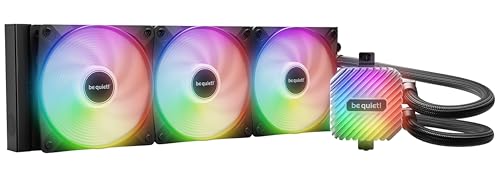
The be quiet! Light Loop 360mm lives up to its brand name with exceptional acoustic engineering. Three Light Wings LX 120mm PWM high-speed fans feature 9 airflow-optimized blades that reduce noise-generating turbulences, and the progressive IC in the pump motor minimizes switching noise. The net result is a cooler that, according to user reports, keeps a 7800X3D (with PBO/undervolt) below 70°C in stress tests while remaining whisper quiet at idle.
The cooling architecture uses a metal jet plate that increases flow speed through the cold plate’s high-density fin stack, maximizing heat transfer from the 7800X3D’s concentrated die area. The 360mm radiator maintains standard 27mm thickness for broad case compatibility. The included ARGB-PWM hub supports up to 6 fans and 6 ARGB components, enabling centralized control through a single motherboard header — essential for clean builds without bloatware.
A standout feature is the refill port with an included coolant bottle, extending the AIO’s lifespan beyond typical sealed units. The 64 total LEDs (16 per fan plus pump LEDs) provide stunning visuals through the Light Wings’ unique blade-scattering design. For users prioritizing near-silent operation and German engineering quality, this unit delivers class-leading noise performance without sacrificing thermal capability.
Why it’s great
- Extremely quiet operation — max 36.8 dBA while handling 7800X3D’s heat load effortlessly
- Refillable design extends longevity and maintains consistent performance over years
- 64 LED ARGB system with hub for centralized control and clean aesthetics
Good to know
- ARGB-PWM hub requires SATA power, adding a cable to manage
- Installation requires consulting the website for clear heatsink attachment instructions
4. Lian Li GA II Trinity SL-INF 360mm

The Lian Li GA II Trinity SL-INF leverages the proven Asetek 8th generation pump (up to 3600 RPM) combined with a 27mm thick radiator and unique UNI Fan SL-INF 120mm fans. The 45-degree tubing connector rotates 360 degrees for flexible routing, and the copper cold plate has 13% larger fin spacing than previous generations to prevent substance buildup over time. The tube diameter is also 20% larger, increasing water flow for faster heat dissipation from the 7800X3D’s hotspot.
What sets this AIO apart is the interchangeable pump cap design — three different looks, each with individually controllable dual-ring RGB lighting. The SL-INF fans themselves feature 16 LEDs per fan with the signature infinite mirror effect, creating stunning visual depth. User reports confirm excellent performance on the 7800X3D, with temps staying below 60°C during gaming loads and the pump remaining nearly silent when tuned down from the default 2300 RPM to 1690 RPM.
Installation is simplified by the uniquely designed mounting backplates and daisy-chain fan design, which reduces cables significantly. The L-Connect 3 software handles screen customization, fan curves, and lighting effects, though some users report occasional software bugs. For those wanting a premium aesthetic that matches Lian Li’s ecosystem, this is the most cohesive option available.
Why it’s great
- Asetek 8th gen pump provides reliable, high-flow cooling for sustained gaming sessions
- Interchangeable pump caps and infinite-mirror fans offer unmatched aesthetic flexibility
- Larger tubing diameter (20% bigger) improves water flow and thermal transfer speed
Good to know
- Pump can be loud at default 2300 RPM; must manually lower speed in software for silence
- L-Connect 3 software can consume CPU resources and occasionally cause game stuttering
5. Thermalright FW360 SE ARGB V2 360mm
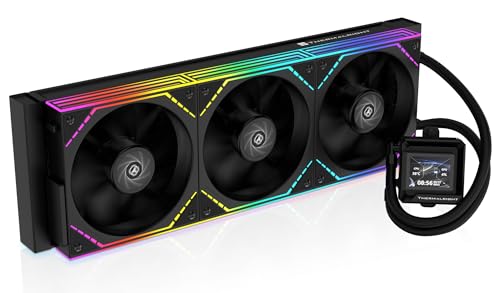
The Thermalright FW360 SE ARGB V2 punches far above its price point by including a 2-inch customizable LCD screen — a feature typically reserved for premium AIOs. The screen supports system status display, custom images, and animated GIFs through Thermalright’s software. Under the hood, a 3000 RPM pump circulates coolant through a 397x120x27mm aluminum radiator, paired with three TL-M12Q 120mm PWM daisy-chain fans that deliver 68.9 CFM at 2000 RPM.
For the 7800X3D, this cooler is more than adequate. Users report keeping their Ryzen 7 chips “nice and cool” during gaming, with the daisy-chain fan design significantly reducing cable clutter in the build. The noise level is rated at a reasonable 28.2 dBA, and the included thermal paste and clear installation manual make it beginner-friendly. The 5-year warranty adds peace of mind for a long-term investment.
The main trade-off at this price is the LCD software, which some users report having minor connectivity issues — though Amazon’s replacement policy covers such cases. The silver bracket on the pump may clash with dark builds, but this is easily painted. For builders wanting both a 360mm radiator and a functional LCD screen without stretching the budget, this represents the strongest value proposition on the market.
Why it’s great
- Includes a 2″ LCD screen for system monitoring and custom GIFs at a budget-friendly price
- Daisy-chain TL-M12Q fans reduce cable clutter and simplify installation
- 3000 RPM pump provides sufficient flow for the 7800X3D’s thermal demands
Good to know
- LCD screen’s USB-C connection can be problematic; some users required Amazon replacement
- Silver pump bracket may need painting for all-black builds
6. ARCTIC Liquid Freezer III Pro 280
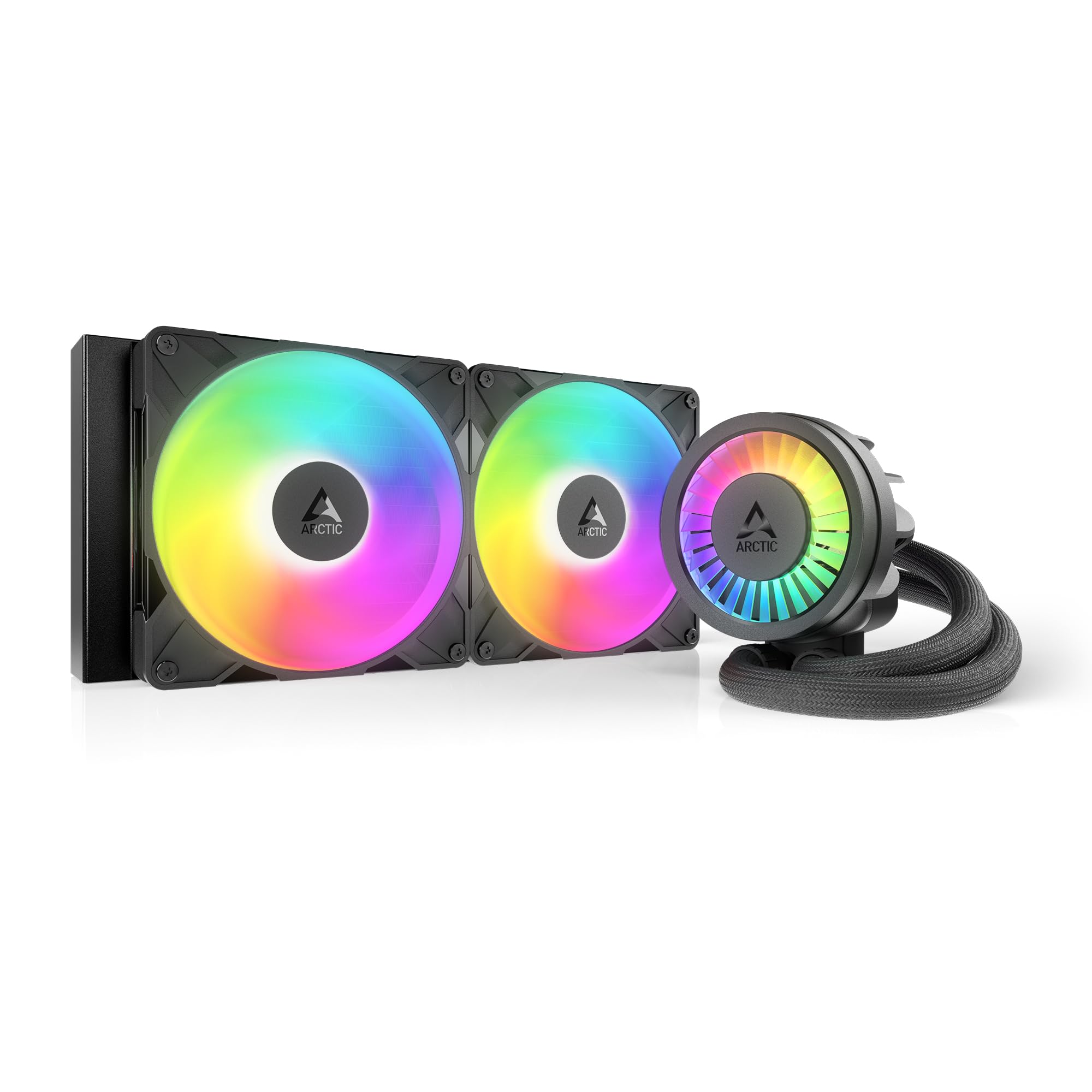
The ARCTIC Liquid Freezer III Pro 280 is a thermal specialist that prioritizes performance density over size. Its 38mm thick radiator is 40% thicker than standard 27mm designs, and the 280mm form factor actually provides 36% more cooling surface area than a 240mm AIO — making it a viable alternative to 360mm units for builds where top-mounted radiator space is limited. The native offset mounting for AM5 shifts the cold plate directly over the CCD hotspot, a critical advantage for the 7800X3D’s thermal profile.
The integrated VRM fan is a unique feature that actively cools voltage regulators, prolonging motherboard longevity under sustained loads. The P14 PRO fans are more powerful and quieter than their predecessors, with a maximum rotational speed of 2500 RPM. User reports confirm that this cooler is “the best performer out there, period,” keeping the 7800X3D ice-cold even during extended gaming sessions. The integrated cable management routes all fan cables through the hose sheathing, leaving only a single visible cable to the motherboard.
The trade-off is case compatibility — the 38mm radiator plus fans creates a total thickness that won’t fit many cases that claim 280mm AIO support. Installation on AM5 requires careful attention to the offset bracket alignment; some users found the mounting system finicky. But for those who can accommodate its thickness, this unit delivers class-leading thermal performance that rivals 360mm competitors in a more compact footprint.
Why it’s great
- 38mm thick radiator provides 36% more cooling than 240mm units, rivaling 360mm performance
- Integrated VRM fan and offset AM5 mounting optimize hotspot heat transfer
- Integrated cable management keeps the build looking clean with minimal visible wires
Good to know
- Thick radiator requires careful case compatibility checking — many cases lack sufficient clearance
- AM5 offset bracket can be tricky to install correctly; some users reported a full day of trial
7. MSI MAG Coreliquid A13 360

The MSI MAG Coreliquid A13 360 features a proprietary split-flow radiator design with an integrated three-phase pump operating at up to 3800 RPM. The ceramic bearings reduce motor resonance while providing long-term durability, and the pump’s 5200 RPM maximum speed (listed spec) ensures aggressive coolant circulation when needed. The triple-layered, evaporation-proof tubing is reinforced with mesh sheathing, rated to last the lifetime of the cooler without coolant loss.
For the 7800X3D, this AIO delivers effective thermal management — one user reported eliminating thermal throttling on a 5800X3D and seeing max package temps of 75°C under load. The three 120mm ARGB PWM fans come pre-installed with daisy-chained connectors, simplifying installation. The included thermal paste and straightforward mounting bracket for AM5 make this a beginner-friendly option that doesn’t sacrifice performance.
The split-flow design internally separates the coolant path, ensuring even temperature distribution across the entire radiator. The noise level is rated at an extremely low 14.4 dBA, making this one of the quietest 360mm AIOs available. The only notable issue is that the MSI logo on the pump head may be misaligned when mounted on AM4/AM5 sockets due to the bracket orientation, which is a minor cosmetic concern.
Why it’s great
- Ultra-quiet 14.4 dBA operation combined with a powerful 3800 RPM pump
- Split-flow radiator design ensures even thermal distribution across the 360mm surface
- Evaporation-proof triple-layered tubing eliminates long-term coolant loss concerns
Good to know
- MSI logo may be misaligned on AM5 sockets due to bracket design
- Some users report the pump’s maximum 5200 RPM creates audible vibration at full speed
8. NZXT Kraken Core 240 RGB
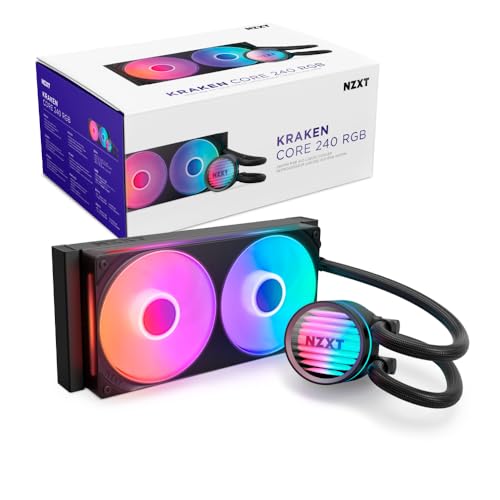
The NZXT Kraken Core 240 RGB proves that small form factors can still pack a punch for the 7800X3D. The 240mm radiator is paired with a single-frame fan design that places two 120mm fans in one solid frame, reducing screws and cables while maintaining 75.05 CFM of airflow. The 3100 RPM pump delivers sufficient flow for the 7800X3D’s 80W gaming loads, keeping thermals in check without excessive noise.
The PWM-enabled fans allow precise speed adjustments, and the direct motherboard connectivity eliminates the need for extra controllers or proprietary software. The optimized fan blades with high static pressure design efficiently push air through the 240mm radiator’s fins, ensuring every square inch of cooling surface is utilized. User reports confirm that this cooler keeps an overclocked i7 11700K at 5GHz cool, demonstrating that its 240mm capacity is more than adequate for the thermally efficient 7800X3D.
At this price point, the Core 240 offers exceptional value for budget-conscious builders or those with compact cases that can’t accommodate 360mm radiators. The single-frame fan design makes installation notably easier than traditional dual-fan setups. The main trade-off is the lack of an LCD screen or pump display — it’s a purely functional cooler without aesthetic flair, though the RGB lighting on the fans provides visual personality.
Why it’s great
- Single-frame fan design simplifies installation and reduces cable management hassle
- 75.05 CFM airflow is excellent for a 240mm radiator, keeping the 7800X3D cool under load
- Direct motherboard connectivity eliminates need for proprietary controllers or software
Good to know
- No pump display or LCD screen — purely functional design without status monitoring
- Fans require a 5V RGB header; may need a SATA-powered RGB adapter if motherboard lacks one
9. CORSAIR Nautilus 240 RS LCD
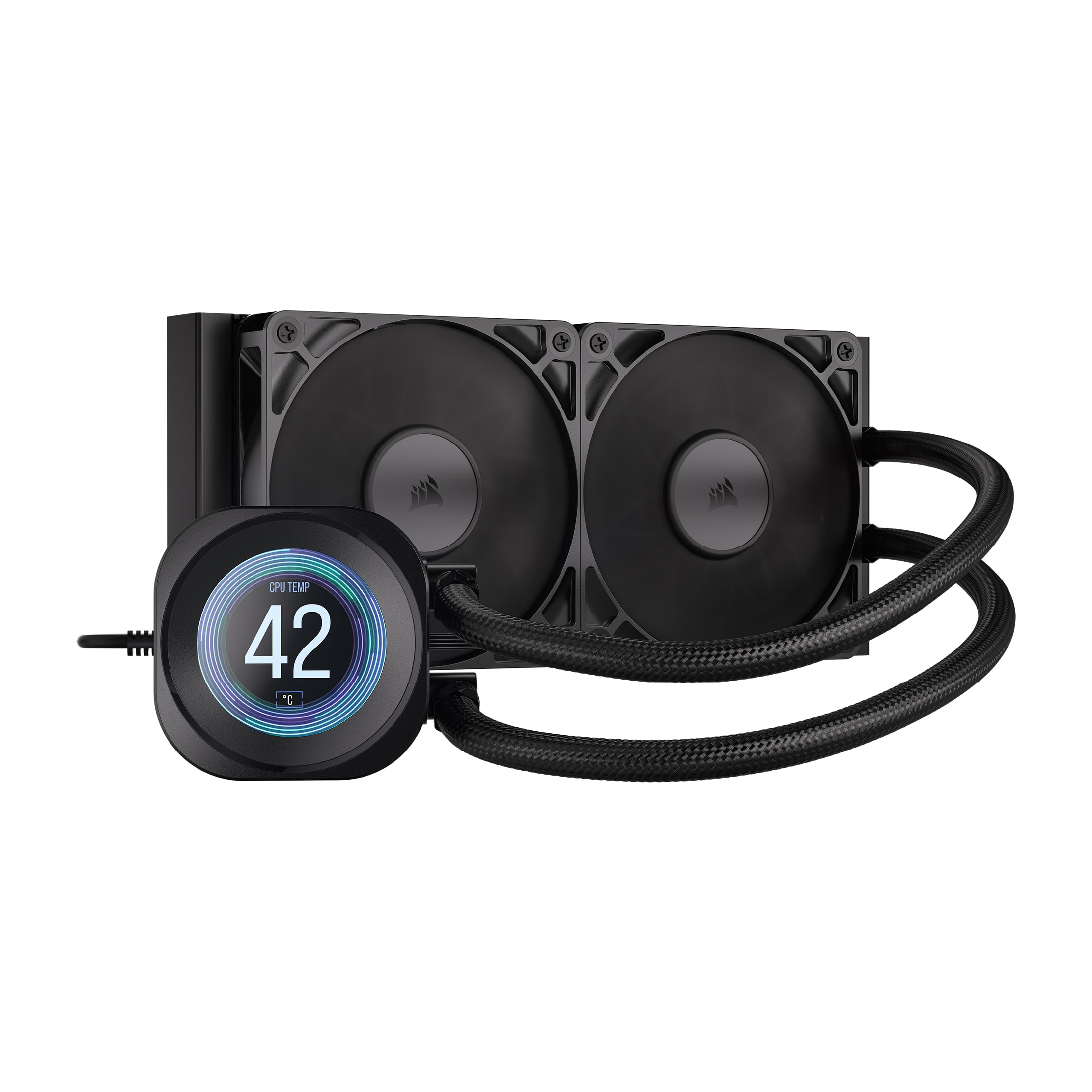
The CORSAIR Nautilus 240 RS LCD combines a compact 240mm form factor with a 2.1-inch IPS LCD screen that supports custom GIFs, 30-second YouTube clips, and real-time system monitoring through iCUE software. The convex cold plate is designed to maximize contact with the CPU’s integrated heat spreader, and pre-applied thermal paste speeds up installation significantly. The pump operates at just 20 dBA, making it practically silent during normal operation.
For the 7800X3D, this 240mm AIO is more than sufficient — one user reports keeping a 9800X3D (higher TDP) below 50°C in competitive games and under 70°C during heavy loads. The RS120 fans use CORSAIR’s AirGuide technology and Magnetic Dome bearings to push air efficiently through the radiator while minimizing noise. The daisy-chain fan design simplifies cable management, and the 5-year warranty provides long-term confidence.
The iCUE software ecosystem is the main differentiator, offering deep customization of the LCD screen, fan curves, and RGB lighting. However, users note that the software can have minor bugs that require reopening the app, and the coolant tubes have a “twist memory” that makes positioning less clean than some competitors. For those already invested in CORSAIR’s ecosystem or wanting a compact LCD AIO, this is a compelling choice that prioritizes silence and visual customization.
Why it’s great
- Whisper-quiet 20 dBA pump with convex cold plate for optimal 7800X3D contact
- 2.1″ IPS LCD screen with deep iCUE customization for GIFs and system monitoring
- Pre-applied thermal paste and daisy-chain fans make installation quick and clean
Good to know
- Coolant tubes have twist memory that can look less clean than competing NZXT Kraken designs
- iCUE software can have minor bugs requiring re-launch for proper LCD functionality
FAQ
Is a 240mm AIO enough for the Ryzen 7 7800X3D?
Does the 7800X3D benefit from an offset mounting bracket on AIOs?
What pump speed should I target for quiet operation with the 7800X3D?
Will a thicker 38mm radiator cause clearance issues in my case?
Final Thoughts: The Verdict
For most users, the best aio cooler for 7800x3d winner is the Cooler Master 360 Atmos because of its exceptional balance between silent operation, dual-chamber pump efficiency for hotspot cooling, and a reasonable entry price for the premium tier. If you want a jaw-dropping visual centerpiece with a 6.67-inch AMOLED display, grab the TRYX Panorama SE 360. And for compact builds where every millimeter counts, the ARCTIC Liquid Freezer III Pro 280 delivers performance that rivals 360mm units in a smaller footprint.