
The relentless heat from a high-performance CPU is the single biggest threat to your system’s longevity and frame rates. An all-in-one liquid cooler directly addresses this, moving thermal energy away from the processor far more efficiently than any air tower can, allowing your chip to boost higher and stay stable under sustained loads. The choice, however, is a battlefield of radiator sizes, pump designs, and noise profiles.
I’m Min — the co-founder and writer behind Gadgets Feed. I’ve spent countless hours dissecting technical specifications, thermal performance data, and real-world user feedback across hundreds of AIO configurations to separate genuine cooling capability from marketing noise in this guide.
This guide breaks down every critical factor to help you select the perfect best aio liquid cooler for your build, balancing raw thermal capacity with acoustic comfort and chassis compatibility.
How To Choose The Best AIO Liquid Cooler
Selecting an AIO cooler is a balance of three core factors: your CPU’s thermal output, your chassis’ physical capacity, and your tolerance for noise. A mismatch in any of these areas will leave you with either a throttling processor or a system that sounds like a server room.
Radiator Size: 240mm vs 360mm
Radiator size is the most immediate spec because it dictates surface area for heat dissipation. A 240mm model is the sweet spot for mid-range builds and chips with TDPs under 180W, fitting easily in most cases and requiring only two 120mm fan mounts. A 360mm radiator offers nearly 50% more surface area, making it mandatory for high-core-count CPUs like the Intel Core i7/i9 or AMD Ryzen 9, especially when overclocking pushes power draw beyond 200W. Always measure your case’s top or front mount clearance — a 360mm radiator is 397mm long and may not fit in smaller mid-tower cases.
Pump Performance and Noise
The pump is the heart of an AIO, circulating coolant between the cold plate and radiator. Two key specs matter here: maximum rotational speed (measured in RPM) and the type of bearing used. Pumps running at 2800–3800 RPM offer higher flow rates but can introduce noticeable noise, especially at 100% duty cycle. Look for pumps with ceramic bearings or PWM control, which allow you to adjust pump speed from the motherboard, reducing noise at idle while ramping up under load. A pump’s noise rating (dBA) is a strong indicator of daily satisfaction — anything below 30 dBA is effectively silent in a standard case.
Cold Plate Design and Compatibility
Heat transfer efficiency depends on the cold plate’s material and its contact with the CPU’s Integrated Heat Spreader (IHS). Copper cold plates are standard, but the fin density and micro-channel design matter more for modern chips with concentrated hot spots. Some coolers now feature an offset mounting design that shifts the cold plate’s center toward the CPU’s actual hotspot, providing measurably lower temperatures on Ryzen X3D and Intel 13th/14th-gen processors. Always verify that the cooler supports your specific socket (LGA 1851, LGA 1700, AM5, AM4) out of the box — adapters are sometimes required for older sockets.
Quick Comparison
On smaller screens, swipe sideways to see the full table.
| Model | Category | Best For | Key Spec | Amazon |
|---|---|---|---|---|
| ID-COOLING FX360 PRO | Mid-Range | High Value 360mm Cooling | 350W TDP / 82.5 CFM | Amazon |
| ARCTIC Liquid Freezer III Pro 240 | Mid-Range | Quiet 240mm Performance | 38mm Radiator / VRM Fan | Amazon |
| be quiet! Light Loop 240mm | Mid-Range | Silent Aesthetics | 34.9 dBA / Refill Port | Amazon |
| Thermalright FW360 SE ARGB V2 | Mid-Range | LCD Screen on a Budget | 2″ LCD / 28.2 dBA | Amazon |
| MSI MAG Coreliquid A13 360 | Premium | 3800 RPM Pump Reliability | 3800 RPM Pump / 14.4 dBA | Amazon |
| CORSAIR Nautilus 360 RS | Premium | Low-Noise 360mm Mainstream | Convex Cold Plate / 36 dBA | Amazon |
| NZXT Kraken Elite 360 RGB 2024 | Premium | Flagship Screen and Cooling | 2.72″ IPS LCD / 640×640 | Amazon |
In‑Depth Reviews
1. NZXT Kraken Elite 360 RGB 2024

The Kraken Elite 360 is the benchmark for flagship AIO performance and visual immersion. Its custom NZXT Turbine pump delivers a 10% performance improvement over the previous generation, demonstrated by users keeping a Ryzen 7 7800X3D cool and quiet under both idle and heavy loads. The pump’s high flow rate and head pressure are specifically designed to handle the extreme heat spikes of modern high-core-count CPUs.
The defining feature is the massive 2.72-inch IPS LCD with 640×640 resolution, a 60Hz refresh rate, and 690 cd/m² brightness. This screen supports real-time system monitoring, GIFs, and integration with Google Photos, Spotify, and YouTube. The F360 RGB Core fan on the radiator simplifies cable management with its single-frame design, while tool-free mounting brackets make installation on LGA 1851, LGA 1700, AM5, and AM4 sockets quick and secure.
Some users note that hose routing can be tight in smaller cases, potentially limiting placement flexibility. The premium price is significant, but the combination of best-in-class cooling, stunning display quality, and robust build makes it the definitive choice for enthusiasts building a showpiece system.
Why it’s great
- Outstanding cooling performance with Turbine pump technology that tames high-end CPUs.
- Large, sharp 2.72″ IPS LCD with bright 690 cd/m² display and broad software integration.
- Tool-free mounting and simple breakout cable make installation very straightforward.
Good to know
- Hose length and stiffness can be restrictive in certain case layouts.
- Premium price positions it as an investment for top-tier builds.
2. CORSAIR Nautilus 360 RS

The Nautilus 360 RS is a masterclass in achieving high thermal performance without acoustic compromise. Its pump operates at a whisper-quiet 20 dBA, a figure that rivals air coolers in silence while still delivering the thermal overhead only a 360mm radiator can provide. Users with a Ryzen 9 9950x reported near-silent operation under light loads and acceptable noise levels under sustained stress, all while maintaining excellent temperatures.
The unique convex cold plate is engineered to maximize contact with the CPU’s integrated heat spreader, improving heat transfer efficiency. The pre-applied thermal paste is laid down in an optimized pattern, speeding up installation. The RS120 fans use CORSAIR’s AirGuide technology to produce the high static pressure needed to push air through the dense radiator fins, and they daisy-chain easily to a single 4-pin PWM header for a clean build.
While some users found that replacing the pre-applied paste with aftermarket thermal compound dropped temperatures by a further 10°C, the stock performance is already excellent for most users. The lack of an RGB variant may disappoint some, but its focus on pure thermal and acoustic performance makes it a top choice for noise-sensitive builders.
Why it’s great
- Extremely quiet pump at only 20 dBA for near-silent operation.
- Convex cold plate ensures superior contact and heat transfer with the CPU IHS.
- Daisy-chain fans and single PWM header simplify cable management.
Good to know
- Pre-applied thermal paste may be outperformed by quality aftermarket compounds.
- No RGB lighting option available for users wanting customizable aesthetics.
3. MSI MAG Coreliquid A13 360

The MAG Coreliquid A13 360 is a robust, no-nonsense liquid cooler built around a high-performance pump that spins at up to 3800 RPM. This pump uses ceramic bearings to reduce motor resonance, achieving an impressively low noise rating of just 14.4 dBA. Users with a 5800X3D found it completely eliminated thermal throttling, keeping the CPU under 75°C under sustained load, which is a direct benefit of the powerful pump and split-flow radiator design.
The aluminum radiator features a unique split-flow water cooling system that directs coolant through two separate channels, increasing the surface area for heat exchange. The 390mm triple-layered evaporation-proof tubing is reinforced with mesh sheathing, ensuring long-term reliability in a closed loop. The pre-installed fans and included thermal paste make setup rapid, and the LGA 1851 out-of-box support future-proofs the cooler for Intel’s latest platform.
Some users noted that the MSI logo on the pump head can be misaligned when installed on AM4/AM5 brackets, which is a minor aesthetic complaint. Over six months of hard use, including gaming and AI computing, the cooler has proven to be extremely durable and effective, keeping CPUs cool under sustained heavy loads.
Why it’s great
- Powerful 3800 RPM pump with ceramic bearings for quiet, reliable operation.
- Split-flow radiator design maximizes thermal exchange area for better cooling.
- Evaporation-proof, reinforced tubing provides long-term durability.
Good to know
- Pump cap logo alignment may require adjustment on AMD motherboards.
- Split-flow design may require careful planning for optimal tube routing.
4. ID-COOLING FX360 PRO

The FX360 PRO shatters the assumption that effective 360mm cooling requires a significant budget. Rated for a 350W TDP — enough to handle a heavily overclocked Ryzen 9 or Core i9 — it delivers thermal performance that rivals coolers costing twice as much. Users with a 5900X reported idle temperatures of just 29°C at a 17°C ambient, while a 9800X3D stayed at 32°C idle and 60°C under gaming load, proving the 2900 RPM pump circulates coolant effectively.
The three 120mm fans produce 82.5 CFM of airflow with 2.55 mmH₂O of static pressure, using a daisy-chain connector to reduce cable clutter. The all-black layout and CD pattern on the water block give it a clean, understated aesthetic that blends into any dark build. Installation is straightforward across Intel LGA 1851/1700/1200/115X and AMD AM4/AM5 sockets, with the included Frost FX45 thermal grease being a welcome addition.
Some users note the stock fans, while solid, operate at 1200 RPM during normal use and are quiet. The cooler lacks any RGB lighting, which is a plus for users wanting a stealthy build but a limitation for those chasing aesthetics. For pure, uncompromised thermal performance at an entry-level price, the FX360 PRO is exceptional.
Why it’s great
- Exceptional 350W TDP rating provides ample thermal headroom for high-end CPUs.
- Excellent real-world temperatures, idling high-core-count CPUs in the 29-32°C range.
- Daisy-chain fans and clean all-black design for a simple, tidy installation.
Good to know
- No RGB lighting included for users wanting customizable aesthetics.
- Short fan cables may require careful placement in large cases.
5. Thermalright FW360 SE ARGB V2
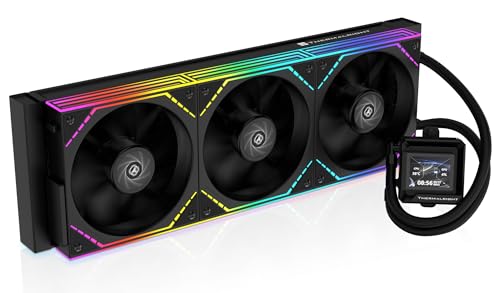
The FW360 SE ARGB V2 is the standout option for builders who want a customizable LCD display without paying flagship-tier prices. Its 2-inch LCD screen supports system status monitoring, custom images, and animated GIFs through Thermalright’s software, adding a significant visual flair. Users report keeping a Ryzen 7 7800X3D efficiently cool, with the 3000 RPM pump and 2000 RPM TL-M12Q fans maintaining both strong airflow and quiet operation at only 28.2 dBA.
The 360mm aluminum radiator measures 397x120x27mm and is paired with three TL-M12Q 120mm PWM fans that support daisy-chaining. These fans each push 68.9 CFM with 2.21 mmH₂O of static pressure, a balanced spec that ensures good radiator penetration without excessive noise. The comprehensive compatibility with Intel LGA 1851/1700/1200/115X and AMD AM5/AM4 platforms, along with the 5-year warranty, provides peace of mind for long-term use.
A few users have reported intermittent issues with the LCD’s USB-C connection, though Amazon’s replacement process resolved this quickly. The included thermal paste and a thorough manual make installation straightforward, even for first-time builders. For those wanting a vibrant display and solid cooling performance at a mid-range price, this is a compelling choice.
Why it’s great
- 2″ customizable LCD screen supports GIFs, images, and system monitoring.
- Very quiet operation at 28.2 dBA with effective 68.9 CFM airflow.
- Five-year warranty and broad socket compatibility for long-term reliability.
Good to know
- LCD screen’s USB-C connection may have reliability issues requiring Amazon support.
- Silver mounting bracket may not match all builds and may need painting.
6. ARCTIC Liquid Freezer III Pro 240 A-RGB
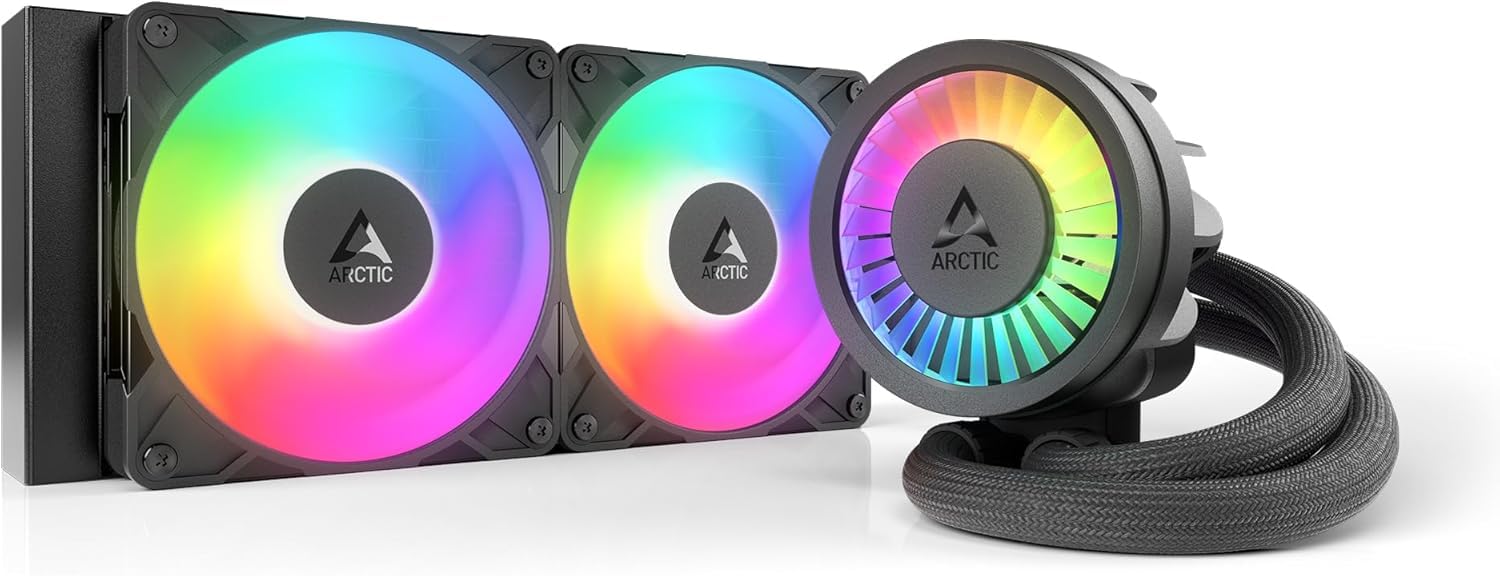
The Liquid Freezer III Pro 240 is engineered for maximum efficiency in a compact 240mm form factor, leveraging a 38mm thick radiator — 13mm thicker than the standard 25mm. This additional thickness provides significantly more surface area for heat dissipation, allowing it to compete with some 360mm units. Users reported a drop from 72.4°C to 68.2°C on a Ryzen 7 7800X3D compared to a previous Coolermaster ML240, with the PWM-controlled pump and P12 Pro fans operating impressively quietly.
The integrated VRM fan is a standout feature, directing airflow over the motherboard’s voltage regulators to keep them cool under heavy loads. The P12 Pro fan uses a unique design that delivers more performance at every speed than the standard P12, especially at low speeds where it remains virtually silent. The included contact frame for Intel LGA 1851 and LGA 1700 optimizes contact pressure distribution, improving both cooling and CPU longevity.
Installation requires extra caution due to the thicker radiator and fan combo, which measures roughly 12mm thicker than standard 240mm units. Some users found mounting the cooler to the processor required more force than usual. However, the performance-per-dollar is exceptional, making it a top-tier choice for noise-sensitive users with smaller cases.
Why it’s great
- Thick 38mm radiator provides 240mm-class cooling that rivals some 360mm AIOs.
- Integrated VRM fan actively cools motherboard voltage regulators.
- PWM-controlled pump and P12 Pro fans deliver outstanding quiet performance.
Good to know
- Thicker radiator/fan combo requires 12mm extra clearance in the case.
- Mounting the pump to the CPU may require more force than standard AIOs.
7. be quiet! Light Loop 240mm White
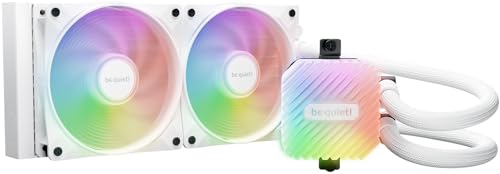
True to its name, the Light Loop 240mm prioritizes near-silent operation without sacrificing cooling capability. The 34.9 dBA noise level is among the quietest in its class, driven by the Light Wings LX 120mm PWM high-speed fans that use nine airflow-optimized blades to minimize turbulence. Users with a Ryzen 7 9800X3D reported temperatures staying below 65°C during heavy gaming and never exceeding 70°C in stress tests, while the fans remained nearly inaudible with custom BIOS fan curves.
A unique engineering highlight is the refill port, which allows you to top off the coolant over time — a rarity in closed-loop AIOs that typically suffer from slow evaporation. The included coolant bottle makes this process safe and extends the cooler’s lifespan significantly. The 48 total LEDs (32 in the fans, 16 in the pump block) provide stunning A-RGB illumination that syncs with the included ARGB-PWM-Hub, which supports up to 6 PWM fans and 6 ARGB components.
The pump’s progressive IC reduces switching noise, ensuring the pump stays quiet even when running at higher speeds. Some users found the heatsink attachment process required checking the be quiet! website for guidance, but the overall installation is rated as easy. For a white-themed build that demands both silent operation and excellent cooling, this is a great option.
Why it’s great
- Exceptionally quiet operation at 34.9 dBA with efficient thermal performance on high-end CPUs.
- Refill port with included coolant bottle extends the AIO’s usable lifespan.
- 48 total LEDs with ARGB-PWM-Hub provide extensive lighting customization.
Good to know
- RGB hub requires a separate SATA power connection for operation.
- Heatsink attachment process may need additional guidance from the be quiet! website.
FAQ
Is a 240mm AIO enough for a Ryzen 9 7950X?
What does PWM control on a pump actually do?
How do I know if a 360mm radiator fits my case?
What is the difference between a split-flow and standard radiator?
Can I replace the thermal paste on a pre-applied AIO?
Final Thoughts: The Verdict
For most users, the best aio liquid cooler winner is the NZXT Kraken Elite 360 RGB 2024 because it delivers class-leading cooling performance, a stunning custom LCD display, and reliable build quality that justifies its flagship status. If you want absolute silence and premium cooling without the LCD screen, grab the CORSAIR Nautilus 360 RS. And for the best performance-to-cost ratio, nothing beats the ID-COOLING FX360 PRO, which offers 360mm thermal headroom at a price that undercuts everything else.