
The marriage of processor cooling and personal expression has never been more literal. An AIO with a customizable screen is no longer just a thermal solution; it is the centerpiece of your build’s visual identity, a dashboard for real-time system vitals, and a canvas for your digital artistry, all while keeping your CPU temperatures in check under intense loads.
I’m Min — the co-founder and writer behind Gadgets Feed. I’ve spent hundreds of hours dissecting cooling performance metrics, analyzing screen panel specifications, and evaluating customization software ecosystems to present only the most capable and visually striking units on the market.
Whether you seek a massive AMOLED canvas for anamorphic effects or a crisp IPS panel for critical system monitoring, this guide to the best aio with customizable screen will help you make an informed investment in both performance and personalization.
How To Choose The Best AIO With Customizable Screen
Selecting the right AIO with a screen goes beyond just checking the cooling capacity. You are balancing thermal performance, display technology, and software stability. The wrong choice can leave you with a beautiful but noisy cooler, or a silent one with a buggy screen that fails to connect. Here are the critical factors to weigh.
Screen Technology and Resolution
The display is the defining feature of these coolers. IPS panels offer good color accuracy and viewing angles with a standard 60Hz refresh rate, while premium units employ AMOLED technology for infinite contrast ratios and deeper blacks, enhancing anamorphic 3D effects. Look for a high pixel density (PPI) — a 480×480 resolution on a 3.4-inch screen is significantly sharper than 320×320 on the same size. A higher refresh rate (60Hz) ensures smooth animations for custom videos and GIFs.
Pump Architecture and Thermal Capacity
All AIOs are not created equal under the hood. The pump is the heart of the cooler. The Asetek 8th Gen solution is a widely trusted standard, known for its powerful 3-phase motor and reliability. Some manufacturers use proprietary designs that can offer competitive performance but may lack the same long-term track record. The Thermal Design Power (TDP) rating and radiator thickness (e.g., 27mm vs. a slimmer 24mm) directly correlate with how much heat the cooler can dissipate, which is crucial for high-core-count CPUs like the Intel Core i9 or AMD Ryzen 9.
Software Ecosystem and Customization
The screen is only as good as the software that powers it. A premium AIO can feel frustrating if the companion software is buggy, crashes frequently, or fails to recognize the display. Look for software that offers intuitive layers for custom images, GIFs, and system monitoring data (CPU temp, clock speed, pump RPM). Some advanced suites allow screen recording and video editing within the app. Compatibility with your motherboard’s RGB ecosystem (ASUS Aura Sync, Gigabyte RGB Fusion, MSI Mystic Light) is also a key consideration for a cohesive build.
Quick Comparison
On smaller screens, swipe sideways to see the full table.
| Model | Category | Best For | Key Spec | Amazon |
|---|---|---|---|---|
| TRYX Panorama SE 360 | Premium | Visual Showcase | 6.67″ AMOLED Curved Screen | Amazon |
| NZXT Kraken Elite 360 RGB | Premium | High-End Performance & Clarity | 2.72″ 640×640 IPS LCD | Amazon |
| Lian Li GA II LCD 360 | Premium | Software & Build Quality | 2.88″ IPS LCD Screen | Amazon |
| CORSAIR Nautilus 360 RS LCD | Mid-Range | Quiet Operation | 2.1″ IPS LCD Screen | Amazon |
| Lian Li Hydroshift II-S LCD 360 | Premium | Tube Management & Aesthetics | 3.4″ 480×480 IPS LCD | Amazon |
| PF 360 CPU Water AIO Cooler | Mid-Range | Large Screen on a Budget | 5.5″ 480×960 LCD Screen | Amazon |
| ASUS ROG RYUO III 240 ARGB | Premium | Compact Build & Anime Content | Anime Matrix LED Display | Amazon |
| Thermalright Peerless Vision 360 ARGB | Mid-Range | Value & Thermal Performance | 3.95″ 480×480 IPS LCD | Amazon |
| darkFlash DV360S | Budget-Friendly | Entry-Level Customization | 3.2″ 320×320 IPS LCD | Amazon |
In‑Depth Reviews
1. TRYX Panorama SE 360 ARGB
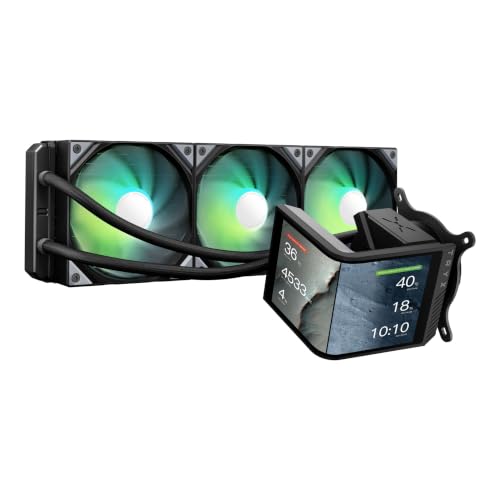
The TRYX Panorama SE 360 is the undisputed king of visual flair, packing a massive 6.67-inch AMOLED curved screen — a spec that dwarfs every other cooler in this category. With a 2K resolution, 400 nits brightness, and a 1,000,000:1 contrast ratio, the display delivers anamorphic 3D effects that are simply unmatched. The G2 curvature and full-adhesion technology minimize reflections, making this the centerpiece your build deserves.
Under the hood, the Asetek Adela pump solution provides a solid 280W TDP cooling capacity, easily handling an overclocked Ryzen 9 or Intel Core i9. The pre-installed ROTA ARGB fans with FDB bearings keep noise down to a very quiet 27.86 dBA, even under full load. Temps on a high-end chip like the 9950X3D remain impressively low, with users reporting idle temps around 40-45°C and gaming loads barely breaking 55°C.
The KANALI software is the main point of contention. While it allows for split-screen displays and uploading custom media (MP4, GIF, PNG), user reports indicate it can be buggy and the installation instructions are lackluster. However, for the sheer visual spectacle and robust cooling, early adopters and customer support have largely resolved initial hardware issues, making this a top-tier choice for those who prioritize an immersive display.
Why it’s great
- Unrivaled 6.67″ AMOLED curved screen with stunning 3D anamorphic effects
- Excellent cooling performance backed by Asetek Adela pump
- Very quiet operation with pre-installed ARGB fans
Good to know
- KANALI software can be buggy and lacks clear instructions
- Premium price point requires a serious budget
2. NZXT Kraken Elite 360 RGB 2024

The NZXT Kraken Elite 360 RGB 2024 model defines the premium standard for screen quality and cooling reliability. Its 2.72-inch IPS LCD screen boasts the highest pixel density in this roundup at a crisp 640×640 resolution, driven by an ultra-bright 690 cd/m² backlight. The 60Hz refresh rate ensures buttery-smooth animations, and the custom NZXT Turbine pump delivers a claimed 10% performance boost over previous generations with less noise.
Installation is straightforward thanks to pre-applied thermal paste and tool-free mounting brackets for both Intel LGA 1851/1700 and AMD AM5/AM4 sockets. The CAM software is stable and allows deep integration with Google Photos, Spotify, and YouTube, alongside real-time system monitoring. Users with a Ryzen 9 9950X3D report idle temps of 44-45°C, with the CPU never exceeding 75°C under heavy gaming loads.
The main consideration is that some users have reported longevity issues with NZXT AIOs over multiple generations, though this 2024 model features an updated, more robust pump design. The 420mm version is also available for those building in full-tower cases. For a combination of the best-in-class display clarity, excellent thermals, and a polished software experience, the Kraken Elite is a top contender.
Why it’s great
- Highest resolution 640×640 IPS screen with exceptional brightness
- Powerful and quiet NZXT Turbine pump
- Stable CAM software with deep third-party integrations
Good to know
- Premium price is among the highest in the category
- Some user reports of reliability concerns in past generations
3. Lian Li GA II LCD 360

The Lian Li GA II LCD 360 is powered by the trusted Asetek 8th Gen pump solution, capable of 3600 RPM for exceptional cooling efficiency. Its 2.88-inch IPS LCD screen is one of the best for software integration, as the L-Connect 3 software is widely considered the most intuitive and feature-rich in the market. It allows for a four-layer customizable dashboard, screen recording, and video editing, giving you total control over your display.
Cooling performance is top-tier. The 360mm radiator paired with three pre-installed UNI Fan SL-INF fans (200-2100 RPM) keeps even an i9-14900K under 80°C during Cinebench, with users reporting gaming temps between 50-65°C. The fans are remarkably quiet, with minimal pump noise, especially when the pump is tuned down from its default speed. The daisy-chain design of the fans makes cable management a breeze.
The primary drawback is the price, which sits firmly in the high-end bracket. Some early batches had issues with pump noise, but Lian Li has released firmware updates to address this. A few users have also reported software crashes causing stuttering in games. However, for a user who values a powerful, silent cooler with the best software ecosystem, the GA II LCD is a phenomenal choice.
Why it’s great
- Excellent Asetek 8th Gen pump for top-tier cooling
- Best-in-class L-Connect 3 software with deep customization
- Very quiet operation with daisy-chain fans
Good to know
- Premium price may not fit all budgets
- Software, while great, can occasionally cause system stutters
4. CORSAIR Nautilus 360 RS LCD
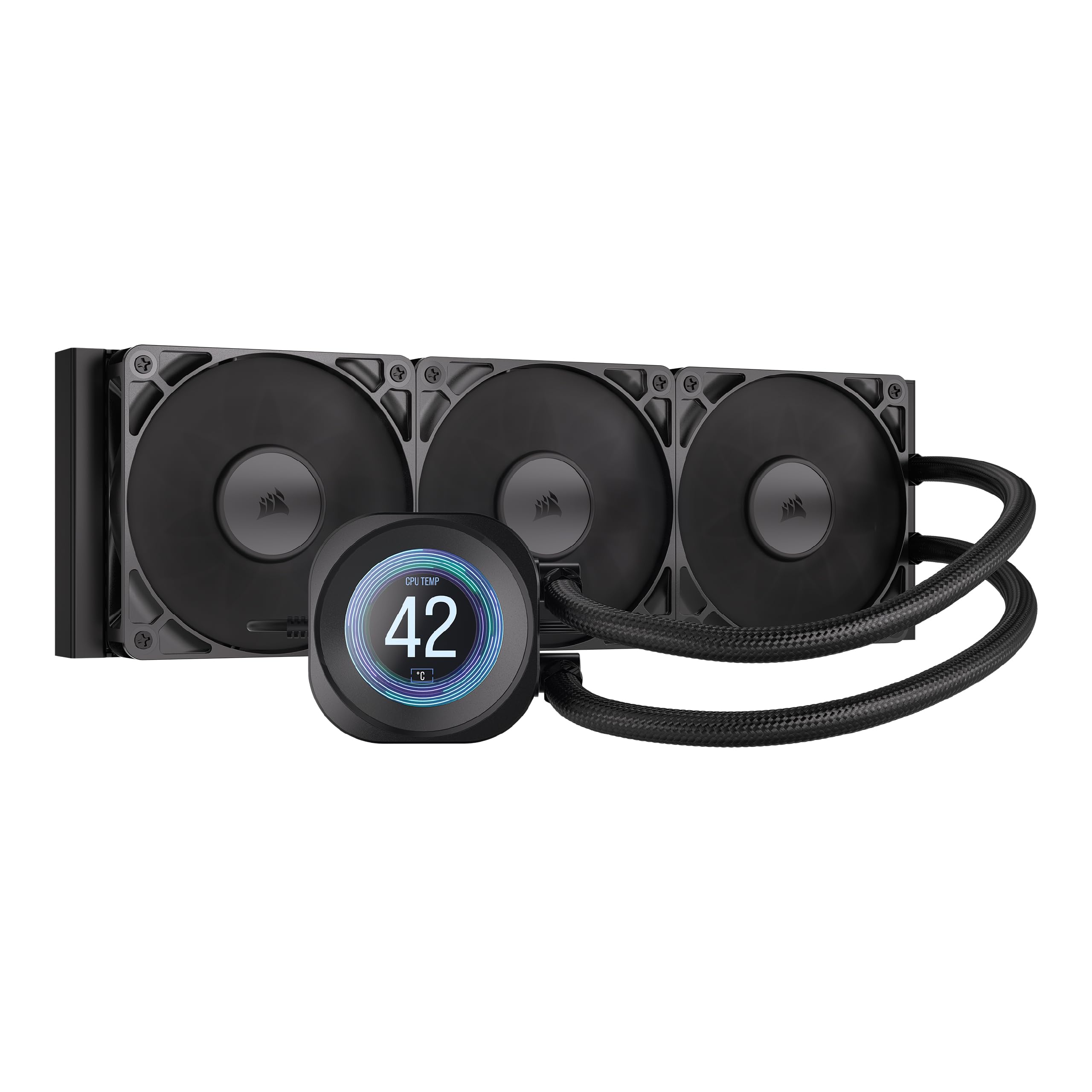
The CORSAIR Nautilus 360 RS LCD is engineered for users who demand near-silent operation without sacrificing screen customization. The pump is whisper-quiet at just 20 dBA, making it the quietest pump in this comparison. The 2.1-inch IPS LCD screen is smaller than many competitors, but it is more than adequate for displaying a custom GIF, real-time CPU temperatures, or your system usage stats.
Thermal performance is robust thanks to a convex cold plate designed for maximum contact with the CPU’s integrated heat spreader. The three RS120 fans utilize CORSAIR AirGuide technology and Magnetic Dome bearings to push air efficiently through the 360mm radiator. Users report keeping a 9800X3D below 50°C in competitive games and under 70°C under high synthetic loads, all while remaining virtually inaudible.
The main compromise is the screen size and software. The iCUE software is generally reliable, but some users report minor glitches that require a restart. The smaller 2.1-inch screen might feel underwhelming compared to the massive panels on other units. Additionally, the cooler lines have some “twist memory” from packaging, which can require zip ties to manage neatly. For the quietest operation in the category, this is a strong mid-range option.
Why it’s great
- Exceptionally quiet pump at only 20 dBA noise level
- Solid thermal performance with convex cold plate design
- Pre-applied thermal paste simplifies installation
Good to know
- Smaller 2.1-inch screen compared to competitors
- Cable and tube routing can be slightly awkward
5. Lian Li Hydroshift II-S LCD 360
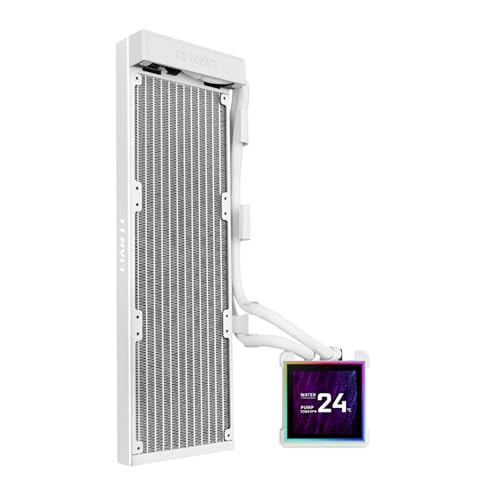
The Lian Li Hydroshift II-S LCD 360 is a masterclass in design engineering, focusing on cable management and a clean aesthetic. Its innovative sliding tube clamp allows for precise tube alignment along the radiator, hiding the power cables from view. The 3.4-inch IPS LCD screen offers a sharp 480×480 resolution with a 60Hz refresh rate and 500 nits of brightness, and it is hot-swappable via a magnetic pogo-pin connection, allowing you to remove the display without powering down your system.
The cooler features a slim 24mm thick radiator, which makes it compatible with a wider range of cases, though it sacrifices some thermal capacity compared to the standard 27mm radiators. Despite this, the cooling is impressive, with users reporting the 9800X3D staying under 79°C in Cinebench R23 with a +200 MHz overclock. The L-Connect 3 software allows for wireless mode control or a comprehensive USB-connected mode for full customization.
The main trade-off is the thinner radiator, which may not suit extreme overclocking on a 14900K as well as thicker units. Some users also note that the L-Connect software may require a SATA power adapter for full functionality. For builders who prize a hidden-cable look and a clean overall build, the Hydroshift II-S LC is a top-tier option that doesn’t compromise on screen quality.
Why it’s great
- Innovative sliding tube clamp for clean cable management
- Hot-swappable 3.4″ magnetic screen with pogo-pin design
- Slim 24mm radiator improves case compatibility
Good to know
- Slimmer radiator may not be ideal for extreme overclocks
- L-Connect software setup can require extra power connection
6. PF 360 CPU Water AIO Cooler
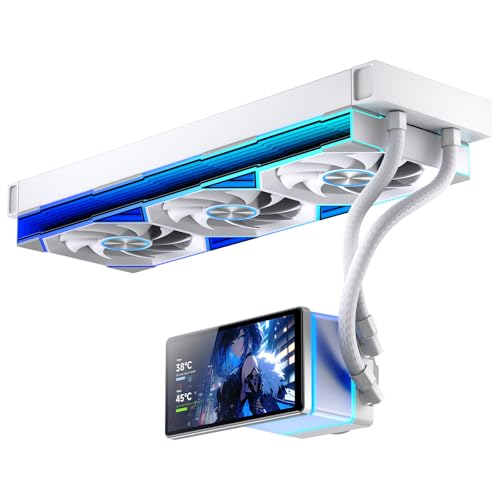
The PF 360 from Jungle Leopard offers the most screen real estate for the price, featuring a massive 5.5-inch LCD screen with a 480×960 resolution. This display dwarfs most premium competitors, offering a unique vertical orientation that can display a very long system monitoring dashboard or a large custom background. The 270° rotation and magnetic design make installation flexible, fitting a variety of case layouts.
Thermally, this cooler is no slouch. It is rated for a 320W TDP, making it suitable for high-end CPUs. The three 120mm ARGB infinity mirror fans spin up to 2000 RPM and deliver a combined airflow of 165.1 CFM. Performance on a 7800X3D is solid, with idle temps around 45-55°C and load temps staying under 70°C. The Siamese ARGB synchronization with your motherboard ensures a unified lighting effect.
The primary issues are software-related and a hardware quirk. The customization software is functional but not as polished as L-Connect or iCUE. More importantly, some users report that the screen has a magnetic/pogo pin connection that can be sensitive to mechanical seating, occasionally disconnecting under load. Also, the screen may stay powered on after the PC shuts down, requiring a physical unplug. For the price, the screen size is unparalleled, but you may need to tinker.
Why it’s great
- Unbelievably large 5.5″ LCD screen at a mid-range price
- High 320W TDP rating for demanding CPUs
- Bright ARGB infinity mirror fans included
Good to know
- Software is less polished than premium competitors
- Screen connection can be physically sensitive and may stay lit after shutdown
7. ASUS ROG RYUO III 240 ARGB

The ASUS ROG RYUO III 240 ARGB offers a unique alternative to standard LCD screens with its Anime Matrix mini-LED array. Instead of a high-resolution photo, this display excels at showing ROG-exclusive anime content, core system stats, and customizable animations using an 8×8 grid of LEDs. It is a smaller 240mm radiator, making it ideal for more compact builds or for users who prioritize a unique aesthetic over a large photo-realistic screen.
Despite the smaller radiator, the Asetek 8th Gen pump solution delivers excellent cooling. Users report keeping an overclocked i9-12900K at 26°C idle and under 60°C during gaming sessions. The three-phase motor pump is both powerful and quiet, and the included ROG AF 12S ARGB fans (1200 RPM max) move air efficiently. The aluminum masterpiece craft and vacuum coat lens give the pump head a truly premium, flagship feel.
The main limitation is the display itself. The Anime Matrix is a pixelated, low-resolution screen by nature, so it cannot display detailed images or crisp video. The Armoury Crate software is also known to be buggy, occasionally causing audio or RGB issues. For ROG fans building in a small form factor case who want a distinctive animated display, this is a premium choice, but it is not for those seeking a high-res photo screen.
Why it’s great
- Unique Anime Matrix LED display for animated themes
- Excellent cooling for a 240mm radiator with Asetek pump
- Premium build quality and compact form factor
Good to know
- Pixelated screen cannot display high-resolution images
- Armoury Crate software can be buggy
8. Thermalright Peerless Vision 360 ARGB Black
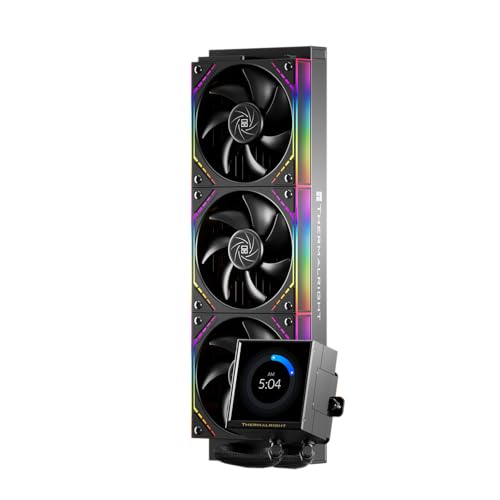
The Thermalright Peerless Vision 360 ARGB is a true value contender, delivering a large 3.95-inch IPS magnetic screen with a sharp 480×480 resolution and a 60Hz refresh rate at a remarkably accessible price point. The magnetic pump head is a clever design touch, allowing for quick installation and removal. The screen supports video, animation, and screen projection through the TRCC software, providing robust customization options.
Cooling performance is where this cooler truly shines. It effortlessly beats many more expensive competitors, keeping a 7800X3D under 65°C full load and even taming the 12900K to under 60°C in Cinebench. The three TL-M12Q 120mm fans feature S-FDB bearings for reduced friction and vibration, running at up to 2000 RPM with a noise level of only 28.2 dBA. The combination of a thick 360mm radiator and high-static-pressure fans provides excellent thermal headroom for any modern CPU.
The major drawback is the software. The TRCC software is widely reported as a “nightmare to configure,” being buggy and unintuitive, often failing to load backgrounds properly. Installation also requires some firm hand pressure to get the screws aligned correctly. If you can tolerate janky software, this cooler offers the best thermal performance and screen size combination for the price, making it a top pick for budget-conscious performance enthusiasts.
Why it’s great
- Outstanding cooling performance that beats many premium coolers
- Large 3.95″ magnetic screen with high resolution
- Exceptional value for the thermal performance offered
Good to know
- TRCC software is buggy and difficult to use
- Installation requires significant force for mounting screws
9. darkFlash DV360S
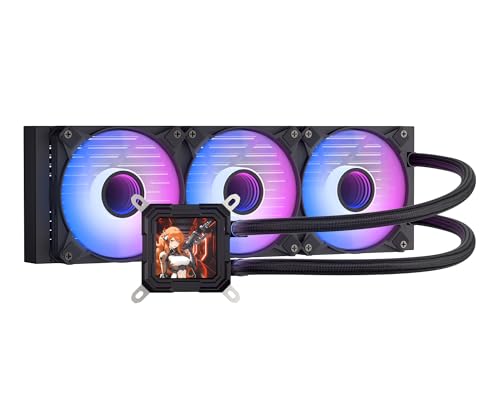
The darkFlash DV360S serves as an excellent entry point into the world of customizable screen AIOs. It features a 3.2-inch square IPS display with a 320×320 resolution, which is sharp enough for displaying system monitoring data and simple graphics. The magnetic attachment allows for 270° rotation, making it easy to orient the screen perfectly in any build. ARGB sync with major motherboard brands (ASUS, Gigabyte, MSI) is seamless.
Under the hood, a 3-phase 9-pole motor drives the pump, using a new fluid impeller and micro-tooth technology for efficient and stable cooling. The three PWM ARGB fans spin up to 1800 RPM with noise levels at or below 30 dBA. The high-density 360mm radiator and high polymer rubber hose ensure low resistance and effective heat dissipation. This cooler is an ideal replacement for stock coolers or older budget AIOs, offering a significant upgrade in both looks and performance.
The biggest risks here are reliability and fitment. There are reports of the cooler failing after approximately one year due to coolant leakage, a risk inherent to budget AIOs. Additionally, AM4 users should be aware that the included bracket may not fit older motherboards and a separate updated bracket (typically under ) may be needed. The software can also be unstable at times, with occasional USB recognition issues. For a first-time buyer on a tight budget, it offers good value, but be aware of the potential longevity trade-offs.
Why it’s great
- Very affordable entry into AIOs with customizable screens
- Sharp 3.2″ magnetic LCD display with 270° rotation
- Effective cooling with a 3-phase 9-pole motor pump
Good to know
- Reliability concerns with reports of coolant leakage after ~1 year
- AM4 compatibility may require a separate bracket purchase
- Software can have minor connectivity issues
FAQ
What is the difference between a 640×640 and a 480×480 screen resolution on an AIO?
Can I use any GIF or video on my AIO’s customizable screen?
Does a 240mm radiator with a screen cool as well as a 360mm radiator without a screen?
Final Thoughts: The Verdict
For most users, the best aio with customizable screen winner is the TRYX Panorama SE 360 because its massive, unmatched 6.67-inch AMOLED curved screen redefines what a display on a cooler can be, while still providing excellent thermal performance. If you want a flawless software experience and a stunning high-resolution traditional screen, grab the NZXT Kraken Elite 360 RGB. And for the best balance of performance and price without sacrificing screen size, nothing beats the thermal value of the Thermalright Peerless Vision 360 ARGB.