
Our readers keep the lights on and my morning glass full of iced black tea. As an Amazon Associate, I earn from qualifying purchases.
Specs are compiled from manufacturer listings and verified buyer reviews and can change over time — please confirm the key details on the product page before buying.
When your graphics card starts sounding like a hairdryer and hitting thermal throttling (where the GPU slows itself down to avoid overheating), you have a choice: spend hundreds on a new GPU or spend pocket change on an add-on air cooler that breathes fresh life into your existing card. These bolt-on fan units mount directly under or beside your GPU using the PCI slot bracket, blasting cool air right where it is needed most.
I’m Min — the founder and writer behind Gadgets Feed. This guide is built by comparing the manufacturers’ published specifications and the patterns across verified customer reviews, so you get each pick’s real strengths and trade-offs instead of marketing spin.
What follows are four very different approaches to the same problem — the air cooler for gpu adds targeted airflow to rescue failing fans, tame hot-running cards, or cool adjacent components without replacing your hardware.
Our Picks at a Glance

How To Choose The Best Air Cooler For GPU
An add-on GPU cooler lives below your graphics card in a PCI Express slot. You give up one expansion slot, but you gain direct, focused airflow across your card’s heatsink, memory modules, and VRM (voltage regulator module — the components that deliver clean power to the GPU chip). The right pick depends on your case space, your tolerance for fan noise, and if you want fan speeds to adjust automatically.
Fan Count and Airflow Volume
More fans generally push more air, measured in cubic feet per minute (CFM). A single 80mm or 92mm fan is fine for a modest temperature shave. Three 92mm fans at high speed — around 167 CFM — can make a dramatic difference on a hot-running card or a RAID controller (a device that manages multiple hard drives). The trade-off is always noise; higher airflow almost always means more fan whirr.
Speed Control: PWM vs Fixed Voltage
PWM (pulse-width modulation) fans have a four-pin connector. The motherboard sends a tiny on-off signal that lets it ramp fan speed up and down based on a temperature sensor — the fan spins faster when your GPU is gaming hard, and nearly silent when idle. Cheaper coolers use a three-pin connector with a multi-voltage cable, letting you pick 5V (quiet, weak airflow), 7V (a middle ground), or 12V (maximum cooling, maximum noise).
Bearing Type and Noise Level
The bearing is the tiny mechanism inside the fan hub that lets the blades spin. Double ball bearings can last 65,000 hours (roughly seven years of 24/7 use) but tend to be slightly noisier. Sleeve bearings are quieter initially but wear out faster. Rated noise levels around 24-25 dBA (A-weighted decibels — a human-ear-adjusted loudness measurement) are whisper-quiet — barely audible inside a case. At 30 dBA you will hear a gentle hum. At 3000 RPM some fans become genuinely loud.
Quick Comparison
| Model | Best For | Airflow | Max RPM | Noise Level | Amazon |
|---|---|---|---|---|---|
| AsiaHorse 3x80mm★ Best Overall | Dramatic temp drops | 0.05 m³/s | 3000 rpm | 25 dBA | Amazon |
| GDSTIME Dual 92mm | Reliable budget fit | 39.8 CFM x2 | 1800 rpm | 24.8 dBA | Amazon |
| SCCCF Triple 92mm | Maximum airflow | 167.7 CFM | 3000 rpm | 30 dBA | Amazon |
| SCCCF Dual 92mm PWM | Smart quiet cooling | — | 1800 rpm | 30 dBA | Amazon |
In‑Depth Reviews
1. AsiaHorse Graphics Card Cooler with ARGB and Three 80mm Fans
Our pick — over 4★ from 100+ verified ratings; the strongest balance of quality and price.
The AsiaHorse triple-fan cooler delivers a confirmed 20°C GPU temperature drop in real-world use. — and it stops your card from sagging at the same time.
The AsiaHorse unit comes with three 80mm fans and a sliding GPU support brace, so it does two jobs at once: cooling your graphics card and holding its sagging weight off the motherboard. It delivers 0.05 m³/s (cubic meters per second) of air at up to 3000 RPM, so your GPU’s heatsink gets a strong, steady breeze — enough to keep it from throttling. The fans use PWM (pulse-width modulation — your motherboard automatically speeds them up when the GPU heats up and slows them down when cool), so you never have to adjust a dial. At maximum speed the noise hits 25 dBA, which owners describe as “super quiet” — barely a whisper inside a tower case.
Buyers report a single install dropped their GPU from 85°C to 50°C., saving an otherwise failing card. The RGB (red-green-blue LEDs) runs through 13 independent LEDs per fan and syncs with a 5V 3-pin ARGB (addressable RGB — a lighting standard that lets each LED be controlled separately) motherboard header. The catch: it is 11 inches long, so you need to check your case has clearance below the GPU.
What wins people over
- Wildly effective cooling — a consistent 20°C drop reported
- Speed ranges from 800 RPM (silent idle) to 3000 RPM (max cooling)
- PWM lets the motherboard take over, so you never have to touch a knob
- Alloy steel brace protects the motherboard from heavy GPU sag
- Bright ARGB lighting syncs with the rest of your build
Worth knowing
- Runs 4 inches wide and 11 inches long — check your case dimensions first
- Some owners note that the included legs feel slightly short for larger tower cases
Grab this for: Anyone whose GPU fans are dying or whose card is pushing 80+°C — this is the only pick here that combines a metal brace, PWM, RGB, and a proven 20°C temp drop.
Think twice if: Your case is cramped or you have zero interest in lighting effects — the simpler dual-fan GDSTIME below is shorter and costs less.
2. GDSTIME Dual 90mm 92mm PCI Slot VGA Cooler
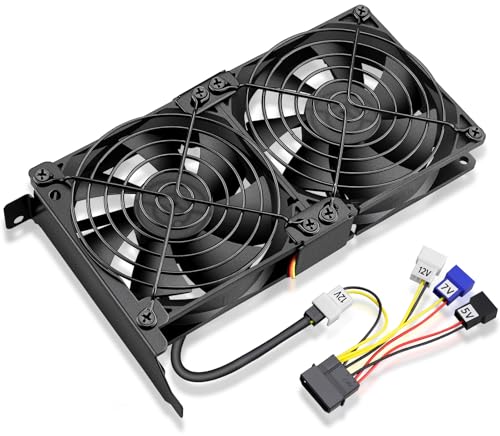
At only 7.28 inches, the GDSTIME dual-fan is the compact, quiet workhorse that drops 24°C from a hot storage controller.
Two 92mm fans on a sturdy metal bracket — this GDSTIME cooler uses a combined 3-pin connector so you plug one cable into your motherboard and both fans run. One buyer who strapped this onto an LSI 9300-16i HBA (a storage controller card that connects many hard drives) saw it drop from 70°C to 46°C — a 24-degree improvement. That makes it an effective choice for cooling not just GPUs, but any hot expansion card where you need reliable airflow.
Reliability gets the most positive mention among owners, and cooling performance is second. The included 4-pin Molex power adapter lets you choose 5V, 7V, or 12V manually for fixed-speed control. At 24.8 dBA, the GDSTIME is quieter than the 30 dBA SCCCF dual-fan PWM model, so it is better for a quiet build. Its 7.28-inch length is much shorter than the 11-inch triple-fan options, making it a far easier fit in compact cases. The downsides are a plastic construction and mixed feedback on long-term durability — an occasional owner reports a fan developing noise after a month, though reliability remains the most-praised aspect overall.
Why it stands out
- Compact dimensions — at 7.28 inches long it fits mini towers
- Quiet at full speed, near-silent at low RPM
- Motherboard fan control works through a standard 3-pin header
- Multiple voltage options for tuning noise vs. cooling
The trade-off
- Plastic bracket feels less sturdy than metal alternatives
- Mixed reports on fan bearing longevity — some hear noise after a few months
Reach for this if: You want the most affordable, compact, and quiet dual-fan cooler for a standard mid-tower or a secondary controller card.
Look elsewhere if: You need massive airflow for a very hot GPU — the triple-fan SCCCF below moves over four times more air at 167.7 CFM versus 39.8 CFM.
3. SCCCF Triple 92mm Graphic Card Fans PCI Slot Cooler

Three 92mm fans at 3000 RPM — the SCCCF pushes a total of 167.7 CFM, more than four times the volume of the GDSTIME dual-fan unit.
This SCCCF cooler stacks three 92mm fans side by side, producing a total of 167.7 CFM of airflow. The fans spin up to 3000 RPM, meaning you get serious wind under your graphics card. There is no PWM control here; instead, a multi-voltage cable lets you pick 5V, 7V, or 12V to balance speed and noise manually. The double ball bearings (a long-lasting fan mechanism) are rated for 65,000 hours of continuous use, which is roughly seven years of running 24/7.
One reviewer noted their RTX 3080 dropping from 74°C to 64°C — a 10°C improvement. that keeps that power-hungry card well below its thermal throttle limit. The noise is the main conversation point. At 30 dBA and full speed, owners disagree: some find it “a little below average for three fans” and tolerable, while others call it “loud.” The physical size is also significant — it spans 11 inches across and stands 4.72 inches tall, so it needs a roomy case and may block other PCI slots.
What you get
- 167.7 CFM — the highest airflow in this lineup by a very wide margin
- Double ball bearings rated for 65,000 hours
- D-type interface cable with 5V, 7V, and 12V taps for manual speed tuning
- Includes a mini screwdriver and fixing screws
What to know
- No PWM — you adjust speed by swapping the voltage cable, not automatically
- 30 dBA at top speed is noticeably louder than the quieter 24-25 dBA units
- 11-inch length needs a full-size case and blocks neighboring PCI slots
Best for: Enthusiasts who need brute-force airflow on a hot RTX 3080 or a multi-GPU setup and are fine with manual speed tuning.
Not for you if: You want automatic fan speed control — the AsiaHorse above gives you PWM for more and runs 5 dBA quieter.
4. SCCCF Dual 90mm & 92mm PWM VGA Cooler with Metal Mesh

This SCCCF dual-fan is the quiet PWM choice that RTX 3080 Founders Edition owners use to stop their card from frying without adding manual hassle.
This SCCCF unit uses two 92mm fans with a true 4-pin PWM connector, so your motherboard can vary the speed smoothly from idle whisper to full-chat cooling. The fans spin at a modest 1800 RPM and produce a noise rating of 30 dBA — a touch louder than the GDSTIME unit at 24.8 dBA, but owners consistently describe it as “quiet” and “effective.” A 4-pin PWM extension cable is included for when motherboard headers are already occupied.
Reports of a 10–20°C temperature drop are common., and one RTX 3080 Founders Edition owner in an NZXT H10 case says this cooler lets the card run much quieter than the stock fans at full speed. The side-facing black metal mesh guard protects fingers and cables from the spinning blades — a rare safety feature for this category of cooler. At 12 volts and just 3 watts of power draw, it sips electricity. The build is slightly wobbly according to a few owners, and at 30 dBA it is audible — but not offensive — in a room with a running PC.
Standout features
- True 4-pin PWM — automatic, dynamic speed control is built in
- Metal mesh guard is a rare safety feature for this category
- Double ball bearings rated for 65,000 hours
- 3-watt power draw is negligible on any PSU
Minor caveats
- 30 dBA is audible in a silent room — the GDSTIME is quieter at 24.8 dBA
- Some owners note a slight wobble; the bracket is not the most rigid
Choose this for: A Founders Edition card where automatic PWM control and a metal guard matter more than maximum raw CFM.
Pass if: You need higher airflow — the triple-fan SCCCF pushes 167.7 CFM compared to this unit’s unspecified single-fan figure.
Understanding the Specs
Airflow (CFM)
Cubic Feet per Minute tells you how much air the fan moves — think of it as the volume of a breeze. A higher number means more cool air hitting your GPU heatsink. The triple-fan SCCCF at 167.7 CFM is in a completely different league from the GDSTIME’s 39.8 CFM per fan, which is why the former suits hot cards and the latter is fine for moderate cooling needs.
Fan Speed and PWM
Revolutions Per Minute (RPM) is how fast the blades spin. 1800 RPM is typical and moderate; 3000 RPM is fast and loud. PWM (pulse-width modulation) is a smarter system: your motherboard sends a signal to vary the fan speed automatically based on a temperature sensor, so the fans spin fast only when your GPU is actually hot. Without PWM, you pick a fixed voltage and the fans spin at that speed all the time — or you swap cables to change speed manually.
FAQ
Will an add-on GPU cooler fit my graphics card?
Can this replace my GPU’s broken stock fans?
How much of a temperature drop should I expect?
What is the difference between 3-pin and 4-pin fan connectors?
Will this cooler work with a card that has a backplate?
How loud is 30 dBA compared to 25 dBA in real use?
Can I control these fans with software like MSI Afterburner?
Will a triple-fan GPU cooler block my other PCI slots?
Final Thoughts: The Verdict
Across the board, the air cooler for gpu winner is the AsiaHorse triple 80mm because it combines PWM, a metal GPU brace, vivid ARGB, and a proven 20°C drop — the whole package that saves a card without compromise. If you want extreme airflow for a hot RTX 3080 and you do not mind manual speed control, the SCCCF triple 92mm moves 167.7 CFM, more than four times the volume of the GDSTIME dual-fan unit. And for a compact, quiet solution that fits a mini tower, the GDSTIME dual 92mm is the proven budget entry that still drops temperatures 7-10 degrees reliably.
How We Picked
We do not accept paid placement. Every pick is matched to a real buyer and a real use-case; we do not hands-on test units.
Sources & Methodology
Specifications: manufacturer listings and product documentation. Review insights: verified customer reviews, as of July 2026. Pricing: not shown on this page (it changes often); check the current price via the retailer link.
As an Amazon Associate, Gadgets Feed earns from qualifying purchases. This does not affect which products we feature.