
Navigating a smart TV, Android box, or HTPC from the couch often means juggling a standard remote that can’t handle a web browser, a YouTube search bar, or a media player interface. The air mouse keyboard solves this by combining a QWERTY keyboard, a gyroscopic motion-sensing mouse, and a traditional IR remote into one device that lets you point and click anywhere on screen.
I’m Min — the co-founder and writer behind Gadgets Feed. For this guide, I analyzed customer reviews, technical specifications, and real-world compatibility reports across seven distinct air mouse keyboard models to identify which units deliver reliable gyro tracking, usable keyboard layouts, and lasting build quality.
Whether you are setting up a living room PC, a projector-based movie system, or an Android TV box, choosing the wrong best air mouse keyboard can leave you with erratic cursor behavior, useless voice commands, and buttons that fail within weeks — making the selection process critical for your home theater or media setup.
How To Choose The Best Air Mouse Keyboard
An air mouse keyboard is a specialized remote that replaces both a standard TV remote and a wireless keyboard-mouse combo. Your choice depends on three factors: the gyroscope accuracy, the connectivity type, and the build quality of the key switches.
Gyroscope Precision and Sensor Axis Count
The gyroscopic sensor is the heart of any air mouse. A 6-axis gyroscope provides smoother, more responsive cursor movement compared to older 3-axis designs. This translates to less drifting and more natural hand-to-pointer translation during media browsing or gaming on an Android TV box or HTPC.
Connectivity: Bluetooth vs 2.4GHz RF vs IR
Most air mouse keyboards offer dual-mode connectivity. 2.4GHz RF via a USB dongle provides the lowest latency and works with devices that lack Bluetooth — including many older projectors and mini PCs. Bluetooth 5.0 is convenient for phones, tablets, and newer smart TVs. Infrared (IR) is reserved for learning TV power, volume, and input controls and operates independently from the wireless data connection.
Keyboard Layout and Key Travel
The physical keyboard is the primary input method for text entry. Look for a layout with tactile feedback — scissor-switch or membrane keys with defined travel — rather than flat silicone pads that cause typos. A backlight with ambient-light activation is helpful for dark home theater rooms. Avoid models where the number row requires multi-key combinations like ESC+Q to type a single digit.
Quick Comparison
On smaller screens, swipe sideways to see the full table.
| Model | Category | Best For | Key Spec | Amazon |
|---|---|---|---|---|
| Dupad story G60S Pro | Premium | TV & PC Media | 6-Axis Gyro + Touchpad | Amazon |
| Pepper Jobs Fly Mouse | Premium | Windows HTPC | 34 IR Learning Keys | Amazon |
| Phistone Mini Keyboard | Mid-Range | Portable Use | 100-Hour Battery Life | Amazon |
| iPazzPort 7200 | Mid-Range | Android TV Boxes | 7-Color RGB Backlight | Amazon |
| iPazzPort Universal | Mid-Range | Multi-Device Setups | Dual-Mode BT/2.4G | Amazon |
| Dupad story MX3 Pro | Budget | Basic IR Combo | 5 Programmable IR Keys | Amazon |
| ULSOU K599/M599 | Budget | Mac & iPad Users | Scissor-Switch Keys | Amazon |
In‑Depth Reviews
1. Dupad story G60S Pro

The G60S Pro combines a 6-axis gyroscope sensor with a multi-touch touchpad and a full backlit QWERTY keyboard, all powered by a rechargeable lithium-ion battery with roughly two months of real-world use between charges. The dual-mode connectivity — 2.4GHz RF via USB dongle and Bluetooth 5.0 — ensures compatibility with devices ranging from an Nvidia Shield and Android TV boxes to Windows PCs and projectors. The gyro mouse delivers smooth, responsive cursor control that stays accurate after the initial calibration, making it suitable for both media browsing and light gaming on Android TV.
The touchpad supports gestures for scrolling and navigation, though the lack of palm rejection can occasionally cause cursor jumps when your hand rests on it while using the gyro. The six-button IR learning system handles TV power, volume, and mute after a straightforward programming sequence, replacing the need for a separate original TV remote. The USB-C charging port is a welcome upgrade over older micro-USB or AAA-powered designs, and the included dongle allows plug-and-play operation on devices that lack Bluetooth.
Some users report that the “Home” button sends a Back command by default rather than returning to the Android TV launcher — a remapping workaround with third-party software can fix this. There is no dedicated mute button, and the microphones for voice input work primarily with apps that support Google Assistant voice-to-text, but not for system-wide voice commands. Overall, this unit delivers a strong balance of gyro accuracy, build quality, and connectivity options for most home theater setups.
Why it’s great
- 6-axis gyro gives lag-free, precise cursor tracking on Android and Windows devices
- USB-C charging and rechargeable battery eliminate ongoing AAA battery costs
- IR learning successfully clones TV power, volume, and mute from most brands
Good to know
- No dedicated mute or Home button — needs remapping software for proper function
- Touchpad lacks palm rejection; accidental touches can displace mouse cursor
2. Pepper Jobs Fly Mouse for Windows

The Pepper Jobs Fly Mouse was designed specifically for Windows 10 and Windows 11 HTPCs, featuring a double-sided backlit keyboard and a 6-axis gyroscope navigation system. Its standout feature is the ability to learn up to 34 IR commands from your existing TV and soundbar remotes, allowing this single device to fully replace your original remotes for power, input switching, volume, and channel control. The TV/WIN mode switch lets you toggle between IR TV functions and RF computer functions without re-pairing.
The gyro mouse requires a short adjustment period — some users note the auto-sensor for side switching can misfire when you are using it from a reclined position in bed. The backlighting has a power-saving timer that shuts off LEDs after five seconds of inactivity, which helps conserve battery life from the two AAA batteries. Windows-specific hotkeys include media playback controls, volume, and modifier keys like Shift, Alt, Ctrl, and the Windows key, all accessible through the compact 34-button layout.
Reported durability concerns include key double-tapping after 6-12 months of use and occasional wireless dropout intervals lasting 1-5 seconds every 20-30 seconds. The lack of F1-F12 function keys limits its use for some productivity software, and the USB dongle has no onboard storage slot. For dedicated Windows media center users who value deep IR learning capabilities, this is the most capable PC-specific air mouse keyboard on the market.
Why it’s great
- 34-key IR learning handles full TV and soundbar remote replacement
- Optimized Windows 11/10 hotkeys include Win, Ctrl, Shift, and media buttons
- Double-sided backlit keyboard with auto-off timer improves dark-room typing
Good to know
- Keys may develop double-click issues after 6-12 months of regular use
- No F1-F12 keys or dedicated scroll function
3. Phistone Mini Keyboard
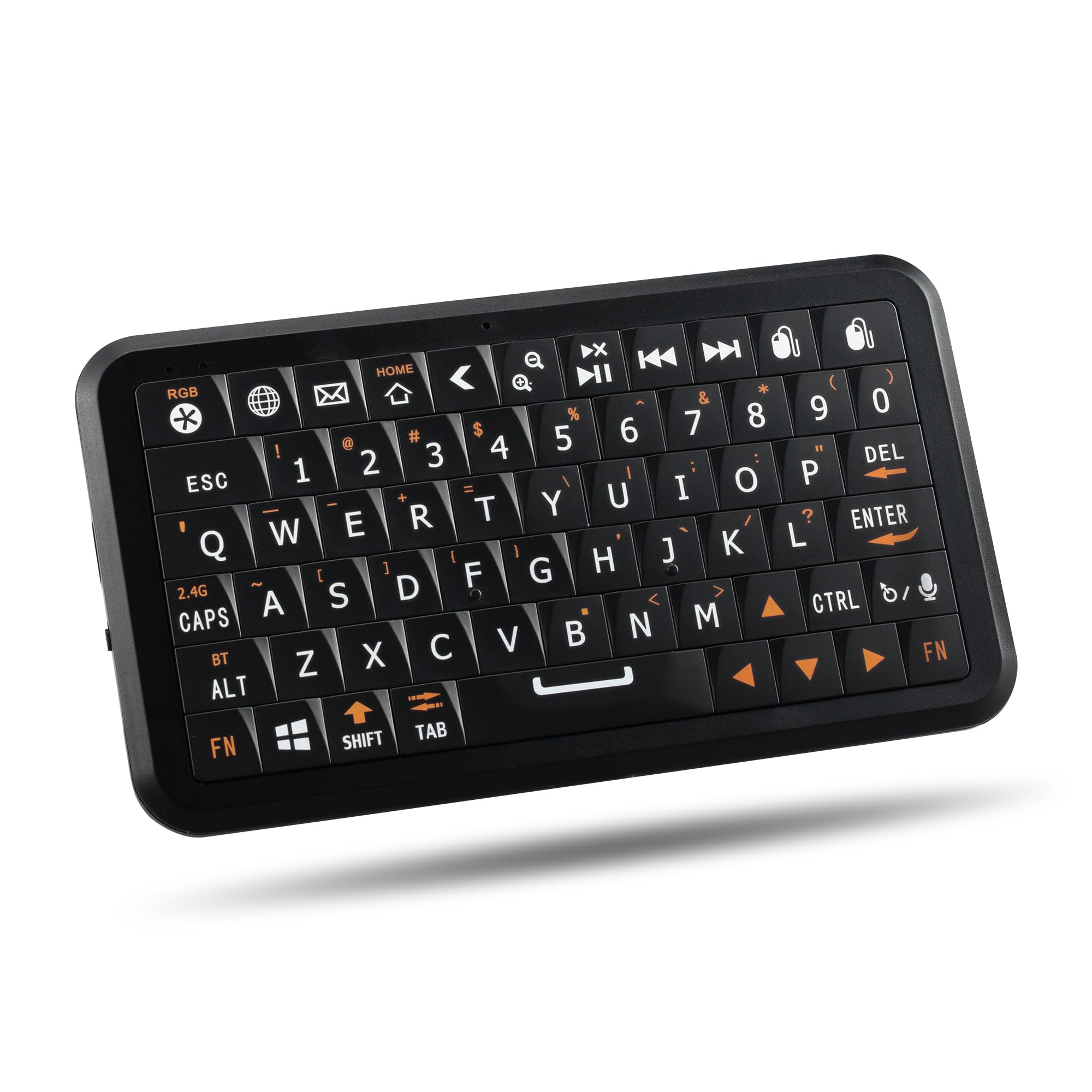
The Phistone Mini Keyboard distinguishes itself with an advertised 100-hour battery life (with backlight off) and USB-C fast charging — roughly five times the endurance of typical AAA-powered air mouse keyboards. Weighing just 84 grams and measuring 5.28 inches across, it is the most portable option in this guide, fitting easily into a pocket or laptop bag. The solid-state keycaps provide a tactile snap similar to classic mobile keyboards, which helps reduce typos compared to flat silicone membranes.
The built-in air mouse uses a 6-axis gyroscope, but several users note that the gyro mouse cannot be disabled when using the keyboard — typing triggers unintended cursor movement that can be distracting. The smart ambient light sensor automatically activates the 7-color RGB backlight in low light, eliminating the need to manually toggle it. Dual-mode connectivity through Bluetooth 5.0 and 2.4GHz RF allows pairing with up to four devices simultaneously, switching between them instantly.
The flat key profile lacks pronounced edges, making touch-typing difficult without looking at the keys — some users found the F and J key bumps insufficient for home-row orientation. One unit was reported with a poor adhesive on the internal battery, requiring a foam shim to hold it in place. For users who prioritize long battery life and ultra-portability above all else, the Phistone delivers the best endurance of any model reviewed.
Why it’s great
- 100-hour battery life with USB-C fast charging outlasts AAA-based models 5x over
- Ultra-light 84g design and remote-like size fit easily in any bag
- Auto-activating RGB backlight with ambient sensor works seamlessly in dark rooms
Good to know
- Gyro mouse cannot be turned off, causing cursor drift during keyboard typing
- Flat recessed keycaps with minimal F/J bumps make touch-typing harder
4. iPazzPort 7200
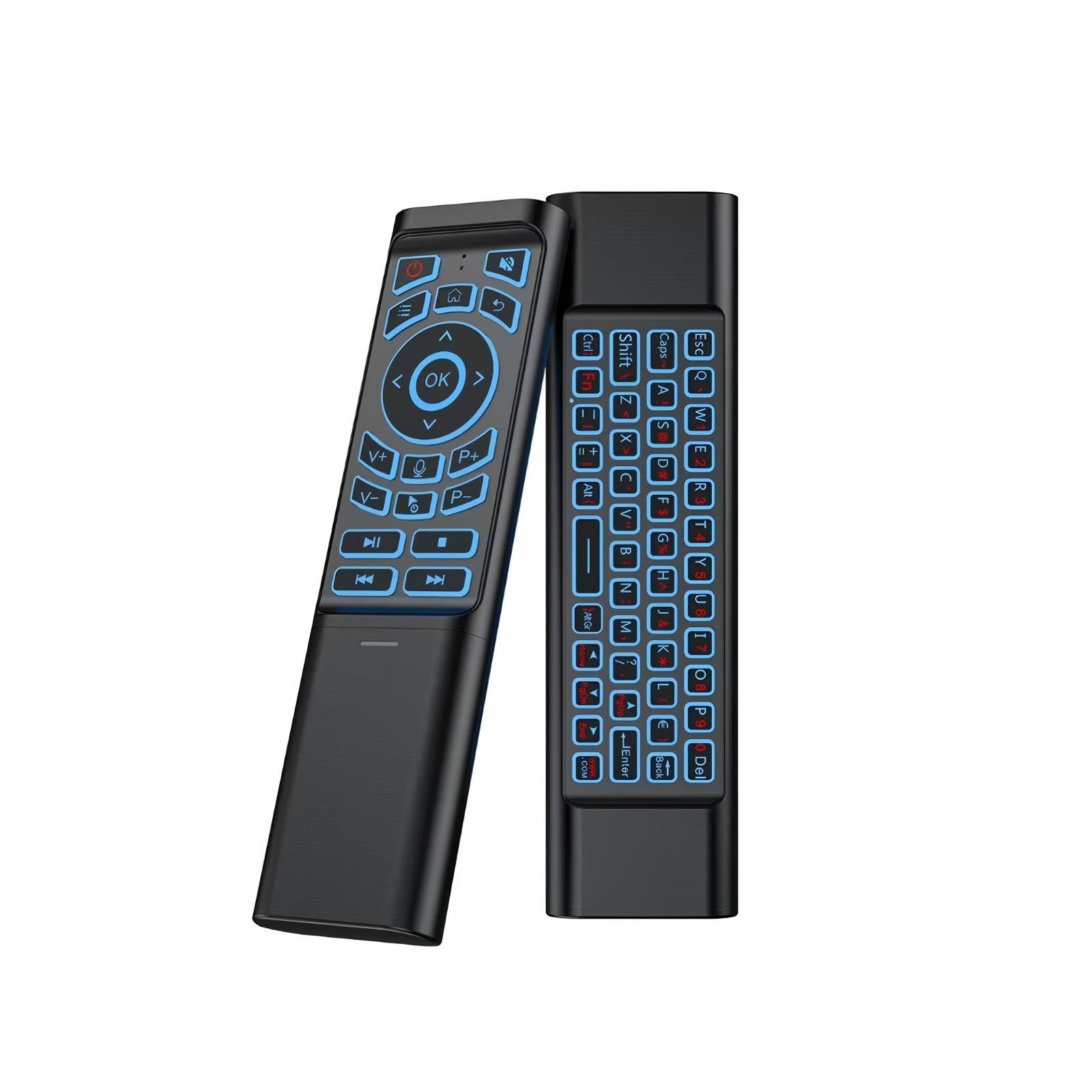
The iPazzPort 7200 features a 7-color RGB backlight with light-press membrane buttons that require less force to actuate than most competing air mouse keyboards. The 6-axis gyroscope sensor provides accurate cursor control with no noticeable lag, and the ergonomic single-handed design makes it comfortable for extended browsing sessions on the couch. Dual-mode 2.4GHz RF and Bluetooth connectivity ensures compatibility with Android TV boxes, projectors, PCs, and laptops.
One IR learning key allows cloning of TV power, channel, and volume functions, though the process requires the original TV remote and a specific button sequence documented in the manual. The dedicated Play/Pause/Stop/Previous/Next media transport buttons are a rare find in this form factor and are recessed slightly to prevent accidental presses when the remote is lying flat. The keyboard retains its last-used mouse mode between power cycles, saving you from re-selecting settings each time.
Some units have shown reliability issues — the “ok” button can become hard to press after a month of use, and one report described the mouse pointer drifting vertically on its own after two months, independent of battery changes or PC reboots. The device is powered by two AAA batteries, adding ongoing operational cost compared to rechargeable models. For users who value responsive keys with a vivid RGB backlight for dark home theater rooms, the iPazzPort 7200 offers the best illumination experience.
Why it’s great
- 7-color RGB backlight with light-press buttons improves visibility in pitch-black rooms
- Dedicated media transport keys (Play/Pause/Stop) are rare in air mouse keyboards
- Remembers last mouse mode across power cycles for consistent behavior
Good to know
- Button failures reported after 1-2 months of use; warranty window may expire
- AAA battery power adds ongoing cost compared to rechargeable alternatives
5. iPazzPort Universal

The iPazzPort Universal air mouse keyboard combines 2.4GHz RF and Bluetooth 5.0 connectivity with a built-in rechargeable battery, eliminating the need for AAAs. The compact QWERTY layout includes a dedicated IR learning button for programming TV power and volume controls, though the documentation is sparse — several users report success only after experimenting with button sequences found in online forums. The 6-axis gyro delivers serviceable cursor accuracy for media browsing, and the keyboard disables itself when the remote is in mouse mode to prevent accidental text input.
Linux users note plug-and-play compatibility with no driver installation required, making it a strong option for Raspberry Pi and home server setups. The microphone supports voice input through Google Assistant or similar apps, but the feature is limited to text-search fields and does not function as a system-wide assistant. At this price tier, the inclusion of a rechargeable battery and dual-mode wireless in one package offers solid value for multi-device households.
The bar-of-soap shape has been criticized for being unintuitive to hold, and Bluetooth mode produces noticeable lag compared to the 2.4GHz dongle. Some units fail to establish TV IR control, leaving the remote unable to adjust volume on certain smart TVs. The documentation describes a different model in the photos, creating confusion during initial setup. For buyers who want a rechargeable dual-mode air mouse at a budget-friendly price and are comfortable troubleshooting connections, this is a capable entry-level option.
Why it’s great
- Rechargeable battery with dual-mode (2.4G + BT) avoids AAA waste and limits lag
- Works out of box with Linux, Raspberry Pi, Android TV, and Windows
- Voice input feature works with Google Assistant for text search fields
Good to know
- Documentation inaccurate — shows different model and lacks clear setup steps
- Bluetooth mode has noticeable lag; 2.4GHz mode is significantly more responsive
6. Dupad story MX3 Pro

The Dupad story MX3 Pro is one of the most popular air mouse keyboard designs on the market, featuring a 2.4GHz RF connection, a 6-axis gyroscope, and voice input via a built-in microphone. Its 81-button layout includes a double-sided backlit keyboard that makes typing in the dark more accurate than single-sided alternatives. Five programmable IR learning keys allow you to clone TV power, input, and volume controls from older non-smart TV models, with many users reporting successful programming on 2012-era LG and Sony units within five minutes.
The air mouse cursor speed can be adjusted between three settings, though the lowest speed is still considered too fast for precise targeting by some users. The voice input works specifically with apps that support internal voice-to-text — it does not function as a system-wide assistant like Alexa or Google Assistant. Some Android TV users report that the voice button opens Google Assistant on the home screen but has no compatibility with apps like YouTube for voice search.
Compatibility is limited with modern smart TVs from Samsung, Sony, LG, TCL, and Roku — the MX3 Pro is primarily designed for Android TV boxes, mini PCs, projectors, and HTPCs. The keyboard lacks a backlight for the number row and special characters, which appear as blue-on-black printing that is invisible in the dark. Several units have been reported with erratic air mouse behavior and flimsy buttons that require hard presses. This is a functional entry-level unit best suited for older Android TV boxes where advanced smart TV features are not needed.
Why it’s great
- 81-button layout with double-sided backlit keyboard aids night-time typing
- 5 programmable IR keys work flawlessly with older LG, Samsung, and Sony TVs
- Voice input reaches Google Assistant on Android TV home screen
Good to know
- Not compatible with modern Samsung, Sony, LG, TCL, or Roku smart TVs
- Number row and special characters lack backlight — nearly invisible in dark
7. ULSOU K599/M599
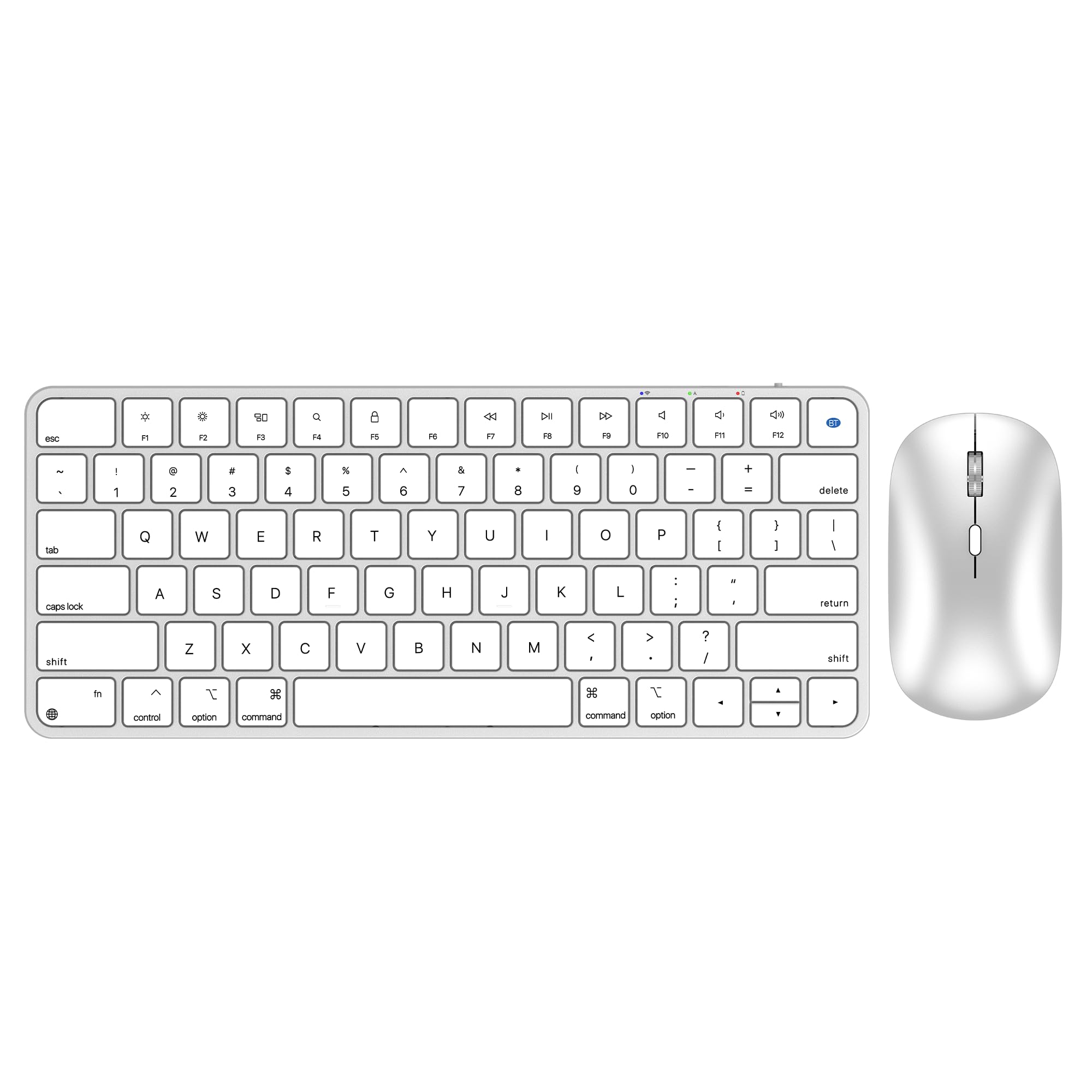
The ULSOU K599/M599 is a Bluetooth-only keyboard and mouse combo designed specifically for Mac, iPad, and iPhone users, mimicking the layout and key spacing of Apple’s Magic Keyboard. The scissor-switch keys provide a quieter, more responsive typing feel compared to rubber dome or membrane mechanisms, with 78 keys laid out exactly as Mac users expect. The mouse features 4-level adjustable DPI (800/1200/1600/2400) and optical tracking that works on most smooth surfaces, with an ambidextrous shape suitable for left- and right-handed users.
Setup is genuinely plug-and-play for MacOS 13 Ventura and later — Bluetooth pairing takes under 30 seconds without any dongle. The rechargeable battery is rated for three months of use on a full charge, with an auto-sleep function that activates after 10 minutes of inactivity. The keyboard includes 11 multimedia shortcut keys that control brightness, volume, media playback, and Exposé directly from MacOS.
Some units have experienced keyboard failure after three to four months, with the Command button becoming unresponsive and the keyboard disappearing entirely from the Bluetooth device list. The mouse includes a USB-A fob for 2.4GHz connectivity, though the keyboard does not support this mode. The ergonomic mouse is on the smaller side, potentially uncomfortable for users with large hands over extended sessions. This combo is best suited for Mac and iPad users who want a compact desktop input setup that mirrors Apple’s native hardware experience at a competitive price.
Why it’s great
- Scissor-switch keys match Apple Magic Keyboard feel with quieter operation
- 4-level DPI optical mouse tracks smoothly on most surfaces, ambidextrous shape
- Rechargeable battery with auto-sleep lasts months for daily classroom or office use
Good to know
- Keyboard failure reported after 3-4 months — Command key stops responding
- Mouse body is small; may cause hand fatigue during extended productivity sessions
FAQ
Does an air mouse keyboard work with Samsung or LG smart TVs?
Can I use the voice input on an air mouse keyboard with any app?
Final Thoughts: The Verdict
For most users, the best air mouse keyboard winner is the Dupad story G60S Pro because its 6-axis gyroscope, touchpad, USB-C rechargeable battery, and dual-mode connectivity deliver the most complete feature set for Android TV boxes, PCs, and projectors. If you want maximum Windows HTPC integration with 34-key IR learning, grab the Pepper Jobs Fly Mouse. And for extreme portability and 100-hour battery life, nothing beats the Phistone Mini Keyboard.