
Our readers keep the lights on and my morning glass full of iced black tea. As an Amazon Associate, I earn from qualifying purchases.
Specs are compiled from manufacturer listings and verified buyer reviews and can change over time — please confirm the key details on the product page before buying.
The struggle is real: you’re sprawled on the couch, the TV box is hidden, and you’re jabbing arrow keys to hunt for a button you can’t see. An air mouse remote fixes that by turning your wrist movement into an on-screen cursor, so you can point and click instead of pecking. This guide breaks down the best air mouse remotes for Android boxes, PCs, and projectors, focusing on which ones are actually worth your money.
I’m Min — the founder and writer behind Gadgets Feed. This guide is built by comparing the manufacturers’ published specifications and the patterns across verified customer reviews, so you get each pick’s real strengths and trade-offs instead of marketing spin.
You’ll see which remote handles voice search, which ones glow in the dark, and which ones work with your Nvidia Shield or Android TV box. This is the definitive breakdown for anyone ready to buy an air mouse remote that won’t end up in a drawer.
Our Picks at a Glance

How To Choose The Best Air Mouse Remote
Buying an air mouse remote isn’t complicated once you know what to check. The core idea is simple: you wave the remote in the air, and a sensor translates that motion into a cursor on your screen. But not all remotes are created equal, and the biggest mistakes come from ignoring compatibility and connection types.
Connection Type: 2.4G RF vs. Bluetooth
Most of these remotes connect two ways. A 2.4G connection uses a small USB dongle that you plug into your device for a fast, stable link. Bluetooth connects without a dongle, which is handy if your USB ports are full, but some buyers report a slightly slower response. Check whether your device has a free USB port if you plan to use the dongle.
Compatibility Is The Real Deal-Breaker
This is where you must read the fine print. Most universal remotes work with Android TV boxes, but many explicitly do NOT work with Fire Stick, ROKU, or Apple TV. Some have trouble with specific TV brands like Samsung, LG, or Sony. Before you buy, make a mental list of every device you want to control and check it against the manufacturer’s compatibility list.
Quick Comparison
| Model | Best For | Connection | Range | Key Feature | Amazon |
|---|---|---|---|---|---|
| BOXPUT BPR1S Plus | Universal Android TV control | BT & 2.4G RF | 10 meters | Full IR Learning | Amazon |
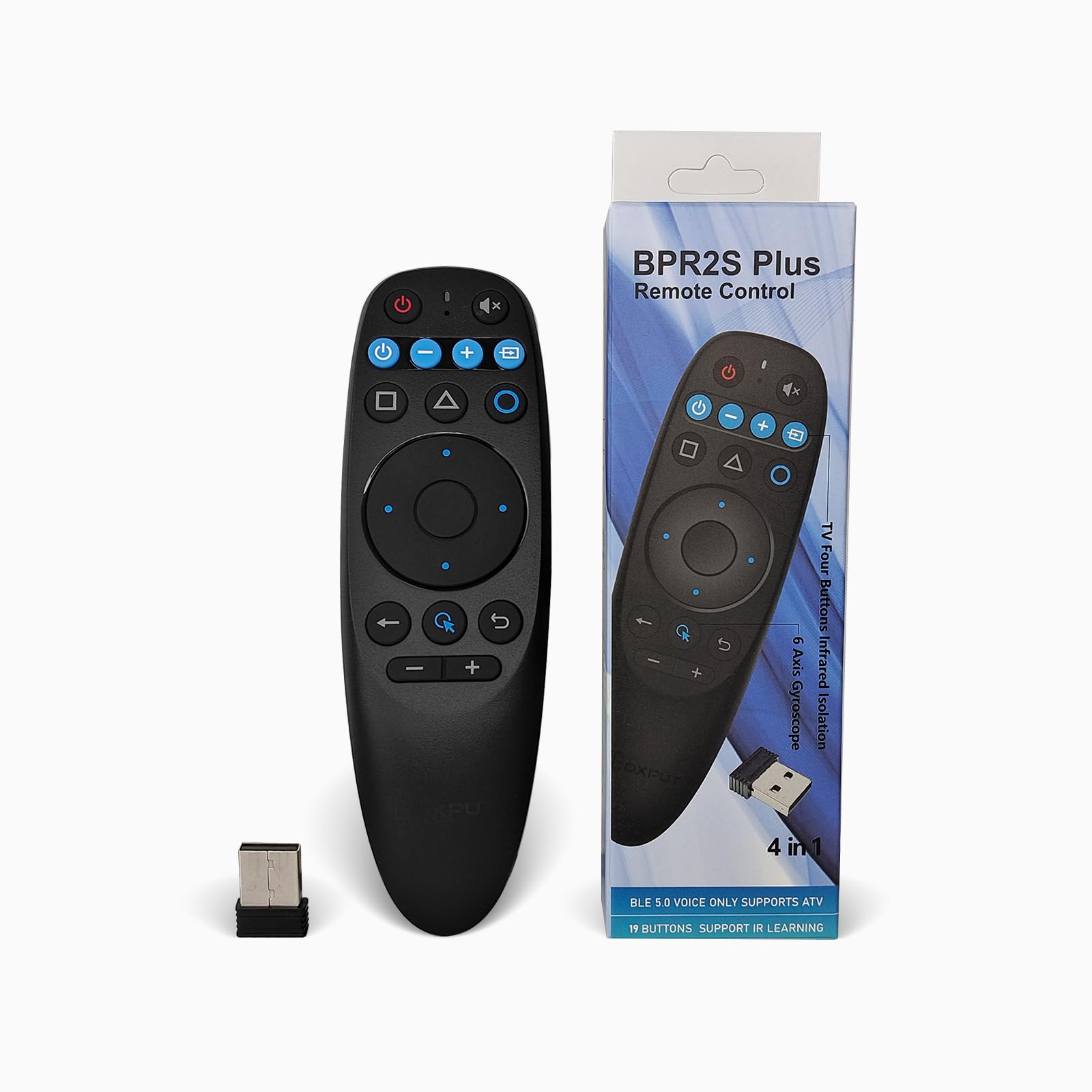
| BOXPUT BPR2S Plus | Nvidia Shield & streaming | BT & 2.4G RF | 10 meters | 2 Devices at once | Amazon |
| Dupad story G20S | Nvidia Shield (pre-2019) | 2.4G RF | 32.8 feet | 18 Buttons | Amazon |
| RUPA G20BTS Plus | Backlit night use | BT 5.0 & 2.4G | 50 feet | Backlit keys | Amazon |
| Dupad story MX3 Pro | QWERTY keyboard typing | 2.4G RF & IR | 10 meters | 38-key keyboard | Amazon |
| iPazzPort Universal | Living room PC control | BT & 2.4G RF | — | Rechargeable battery | Amazon |
| Dupad story G20S Pro Plus | Backlit Android TV control | BT 5.0 & 2.4G | 10 meters | Backlit keys | Amazon |
In‑Depth Reviews
1. BOXPUT BPR1S Plus Air Mouse Remote
The all-rounder that learns your TV’s buttons so one remote rules them all.
You can teach this remote almost any command from your original TV remote thanks to full IR learning (infrared, the same signal your old remote uses). Owners mention it works smoothly with Mekotronics Android mini PCs, Projectivy Launcher, and Kodi, so it can replace several remotes on your coffee table. Once you program the power button, it prioritizes sending IR signals, letting you turn your TV on and off like normal.
Setup is genuinely plug-and-play: you plug in the USB receiver, pop in two AAA batteries (not included), and you’re done. The 6-axis gyroscope (a sensor that detects tilt and movement) turns your wrist into a cursor, and you can control devices from up to 10 meters away. It’s a longer, slimmer shape than the BPR2S Plus below — 6.47″L x 1.6″W x 0.78″H — which many find comfortable to hold for long viewing sessions.
There’s a firmware split worth knowing about: the default works with TV boxes and sticks, but you can switch to PC mode by holding “OK” and “Mouse” together until the light blinks. That flexibility is why buyers bought it three times over. The main honest drawback is compatibility — it will not work with Fire Stick, ROKU, MAG Box, LG, or Samsung TVs, so it’s strictly for Android and AOSP setups. Some owners also note the button layout is a mixed bag, with occasional reports of a finicky center button.
What wins people over
- Full button IR learning to replace your original TV remote
- True plug-and-play setup with the included USB receiver
- Dual firmware for TV box and PC/tablet use
Who should look elsewhere
- Not compatible with Fire Stick, ROKU, LG, or Samsung TVs
- Center button behavior gets mixed feedback from owners
Your best bet if: you have an Android TV box or mini PC and want one remote that can also learn your TV’s power and volume buttons.
The real catch: skip it if you’re on a Fire Stick or a Samsung/LG TV — it simply won’t talk to them.
2. BOXPUT Android Universal Remote (BPR2S Plus)
A rock-solid Shield companion with soft-touch buttons and a genuinely comfortable grip.
This is the remote that Nvidia Shield owners keep coming back to, and the reason is simple: it feels stable and sturdy in the hand, with soft-touch buttons that don’t feel cheap. It’s smaller than the BPR1S Plus — 5.58″L x 1.76″W x 1.17″H — which makes it a more compact fit for smaller hands or tighter coffee tables. The 6-axis gyroscope gives you smooth, precise cursor control for clicking through Android TV menus.
The big differentiator here is that it can control two devices at once, which is a 2.0x jump over the BPR1S Plus’s single-device limit. Four blue TV buttons use IR learning to control a secondary device, like your TV, while you still run your main box over BT or 2.4G. That means you can adjust volume or switch inputs without juggling two remotes. The range is solid too, with owners noting great response even when the box is tucked away behind the TV unit at 5-6 meters.
Real-world feedback is glowing about the dongle setup — “the dongle plus remote is a life saver” — because it solves the laggy Bluetooth remotes that often ship with streaming boxes. IR learning works on all buttons, though some customers note the volume buttons weren’t fully programmable in every case. It’s an honest caveat, but for most people the core functions — volume, power, and gyro — work exactly as needed.
Why it earns the spot: for the price, you get dual-device control, a comfortable soft-touch body, and a dongle that just works. The thing everyone raves about is the stable connection and sturdy feel.
Reach for this if: you have an Nvidia Shield or Android box and want a reliable, comfortable remote that also controls your TV’s volume.
Look elsewhere if: you need every single button to be fully programmable — a few owners found the volume keys couldn’t be copied.
3. Dupad story G20S Voice Remote Control

A 10-meter RF champ built for Nvidia Shield owners who want dedicated media keys.
This is the remote that Nvidia Shield owners swear by, and it’s easy to see why. It connects via a 2.4GHz USB dongle with a range up to 32.8 feet, so you can genuinely snuggle into the couch and still control your setup.
The weight is a notable feature at 60 g, which makes it feel substantial without being heavy. Build quality gets consistently high marks, with owners describing it as “well-made” and a “great value replacement” for the original Shield remote. The Kodi menu key works from the start, which is a huge win for anyone running that media center software. The built-in high-fidelity microphone handles voice search well within the built-in search box or apps.
Compatibility is the honest catch here. It works perfectly with Nvidia Shield and standard Android TV boxes (like Sony), but it’s not a universal solution. Samsung TVs only get direction and OK button functionality, and some factory-encrypted Nvidia Shield versions won’t connect at all. Battery life is impressive at 2+ months, though a few owners mention a tight battery door. Range can also be finicky, with some users fixing reception issues using a USB extension cable.
The big trade-off: the highest praise is quality and value for money, but the most-discussed topic is compatibility. If you’re on a Shield or a standard Android TV, this is a near-perfect replacement. If you’re on a Samsung, you’ll only get basic direction controls.
Best for: Nvidia Shield owners who want dedicated media keys and reliable 2.4G performance over Bluetooth.
Think twice if: you own a Samsung TV or a factory-encrypted Shield — it likely won’t fully work.
4. RUPA G20BTS Plus Wireless Bluetooth 5.0 Voice Remote

The night-owl’s remote with backlit keys and a massive 50-foot connection range.
If you watch TV in the dark, this is the remote to beat. It features a backlight that lets you see every key clearly at night, which is a small feature that makes a huge difference when you’re fumbling for the mute button during a late-night movie. It connects via both Bluetooth 5.0 and 2.4G wireless, and the maximum range is an impressive 50 feet — far beyond the 10-meter standard of most other picks.
The 6-axis gyroscope works as expected for air mouse control, and reviewers point out long battery life with standard AAA batteries. It’s one of the few air mice that runs on replaceable batteries instead of a built-in rechargeable pack, which some buyers actively prefer to avoid planned obsolescence. It works well with Android TV boxes, with one owner specifically praising it for use with the Ugoos AM9 Pro and CoreELEC, including a working pause button.
The honest challenges are real though. Compatibility is explicitly limited — it’s not compatible with SONY, Samsung, LG, Fire TV Stick, or Panasonic TVs. Several shoppers say the Enter button not working, and Bluetooth mode can lose the pause function. The 2-button IR learning can replace an old remote, but it’s not a full universal solution. This one requires a patient buyer who checks compatibility first.
Where it shines: the backlight is the top reason owners pick it, and the 50-foot range (about 15 meters) beats every other pick in this list. But functionality is the most-discussed topic and it’s mixed, so treat this as a targeted buy, not a universal one.
Reach for this if: you want a backlit remote with 50 feet of range for an Android box like the Ugoos or CoreELEC setups.
Look elsewhere if: you own a Sony, Samsung, or LG TV — this remote explicitly won’t work with them.
5. Dupad story MX3 Pro Voice Mini Keyboard

The 3.52-ounce keyboard remote for those who type URLs more than they click icons.
This is the pick for anyone who wants to do more than just click. The MX3 Pro packs a 38-key mini QWERTY keyboard into a remote body, so you can type in a search term, enter a password, or punch in a YouTube URL without hunting for an on-screen keyboard. It weighs just 3.52 ounces, which keeps it light enough to hold comfortably for a full movie. The double-faced backlit design means you can see the buttons in a dark room, which is a huge win for late-night typing.
It’s a 2-in-1 device: a mini wireless keyboard plus a 6-axis gyration motion system, with a 3-Gyro + 3-G sensor setup that handles motion-sensing games accurately. The five programmable IR learning keys let you teach it common TV functions like power and volume. It works with Windows, Android, Mac OS, and Linux, though you’ll need to update PC firmware to avoid compatibility quirks. The transmission distance reaches up to 10 meters via the 2.4GHz RF dongle.
The feedback here is genuinely split. Some owners praise it as “the one to get,” noting it fixes double-click issues and the backlight is whiter and clearer. Others report frustration with the mic not working on Android TV, buttons that don’t respond, and a backlight that’s advertised but hard to see on some units. The IR learning also has its limits — it worked on some older TVs but failed on newer Sony models. This is a powerful tool, but it demands patience with programming.
What makes it unique
- 38-key QWERTY keyboard for real typing, not just clicking
- Double-faced backlit design for dark-room use
- Five programmable IR learning keys for TV control
The honest limits
- Voice mic often incompatible with Android TV
- IR learning doesn’t work with all TV models
- Some units arrive with buttons that won’t respond
Best for the power user: who needs to type on a living room PC or HTPC and wants a backlit keyboard in one hand.
Not for the casual clicker: if you just want to flip channels, the extra buttons add complexity without benefit.
6. iPazzPort Universal TV Air Mouse Keyboard

A rechargeable 4-in-1 that eliminates the AAA battery hunt for good.
This is the remote that finally ditches disposable batteries. The iPazzPort has a built-in rechargeable battery, which means you charge it like a phone instead of swapping AAA cells every few months. It’s a 4-in-1 device: an air remote control, a wireless mini keyboard, a voice search tool, and an IR learning remote. The QWERTY layout is compact, and the keyboard and mouse sides auto-disable when not in use, which saves battery life.
It connects via dual-mode: plug in the USB dongle for 2.4G RF, or unplug it and long-press OK+return to switch to Bluetooth. It’s impressively compatible, working with Windows, Android, Mac OS, and Linux, and it even handles a Raspberry Pi 4 and Xbox 360. One owner uses it for an outdoor TV near a hot tub, operating it through a waterproof phone pouch — proof of its light weight and solid range. It’s an ideal pick for controlling a living room PC or a media server.
The catch is twofold. First, the documentation is widely panned as vague and incomplete — owners say “you have to figure things out on your own.” Second, the IR learning is limited to one key, so you can only teach it a single TV function at a time. The power button also has a quirk: it shuts down the PC rather than the remote, so you’ll need to learn its habits. For a media center enthusiast, the rechargeable battery and wide compatibility make it a compelling choice.
What stands out: the built-in rechargeable battery is a genuine convenience win, and it’s driverless on Linux and Windows. The trade-off is documentation that leaves you experimenting on your own.
Reach for this if: you want a rechargeable, keyboard-equipped remote for a living room PC, Raspberry Pi, or media server.
Look elsewhere if: you need a remote that works with Samsung or LG TVs from the start — this one explicitly doesn’t.
7. Dupad story G20S Pro Plus Bluetooth Voice Remote

A backlit workhorse for Android TV projects that already has key remapping skills.
This remote is a 6.29″L x 1.65″W x 0.7″H backlit option that owners praise for its awesome glow and quick responsiveness. It connects via both 2.4G and Bluetooth 5.0, with a maximum range of 10 meters. The backlight is the top positive aspect here — it’s bright and clear, making night-time viewing genuinely easier. The 6-axis gyroscope gives you air mouse control, and the 2-button IR learning can replace your old infrared remote.
What makes this remote unique is its appeal to tinkerers. One owner runs Android TV OS on an older laptop, turning it into a portable smart TV, and reports it works perfectly. Another notes it’s simple to map automations and scripts to the buttons, which is exactly what a Kodi or home-theater enthusiast wants. The voice mic works for the built-in search input box, though it doesn’t work like an Alexa remote across apps. It’s also one of the only air mice with replaceable AAA batteries, which some buyers strongly prefer.
The honest trade-offs require attention. The most-discussed topic is performance, which is mixed — some buyers report the ‘OK’ button doesn’t work unless you’re in cursor mode, and the cursor mode itself can be choppy. Bluetooth mode won’t work with Windows computers, only 2.4G mode will. A few owners had to return units where the OK button was dead from the start. If you’re comfortable remapping keys in Kodi or similar apps, this is a great budget backlit pick. If you want a zero-fuss replacement, test it immediately.
Why it makes the list: the backlight is the thing everyone raves about, and ease of setup gets consistent praise. The catch is that performance is the most-discussed topic and it leans mixed — be ready to remap keys.
Best for the tinkerer: who runs Kodi or Android TV on a custom box and is comfortable mapping buttons to work around quirks.
Think twice if: you hate troubleshooting — some units need key remapping to get the Enter button working.
Understanding the Specs
6-Axis Gyroscope
This is the sensor that makes an air mouse an air mouse. It detects how you tilt and move the remote in your hand and translates that into on-screen cursor movement. A 6-axis model combines a 3-axis accelerometer and a 3-axis gyroscope, which lets it track both speed and direction. Simply move your wrist in a circle and the cursor follows, letting you point at what you want instead of scrolling arrow keys.
IR Learning
IR stands for infrared, the invisible light signal your original TV remote uses. An IR learning remote can “learn” the specific commands from your old remote and store them. This lets you replace multiple remotes with one, so a single air mouse can control your Android box’s volume and your TV’s power at the same time. The catch is that not every remote learns every button, and some are limited to one or two keys.
FAQ
Will an air mouse remote work with my Nvidia Shield?
Why doesn’t my air mouse remote work with Samsung or LG TVs?
What is the difference between 2.4G and Bluetooth connection?
How long do the batteries last in an air mouse remote?
Does the voice control work like an Alexa voice remote?
Can I use an air mouse remote with my Windows PC or laptop?
What does IR learning actually let me control?
Why does my air mouse cursor drift or feel off-balance?
How far away from the TV can I use the remote?
Is a backlit air mouse remote worth the extra cost?
Final Thoughts: The Verdict
For most people, the air mouse remote winner is the BOXPUT BPR1S Plus because it combines full IR learning with true plug-and-play setup and dual firmware for TV boxes and PCs. If you want a rock-solid remote specifically for your Nvidia Shield, grab the BOXPUT BPR2S Plus. And for control in a dark room at a distance, the RUPA G20BTS Plus is the one to reach for.
How We Picked
We do not accept paid placement. Every pick is matched to a real buyer and a real use-case; we do not hands-on test units.
Sources & Methodology
Specifications: manufacturer listings and product documentation. Review insights: verified customer reviews, as of August 2026. Pricing: not shown on this page (it changes often); check the current price via the retailer link.
As an Amazon Associate, Gadgets Feed earns from qualifying purchases. This does not affect which products we feature.