
Our readers keep the lights on and my morning glass full of iced black tea. As an Amazon Associate, I earn from qualifying purchases.
Specs are compiled from manufacturer listings and verified buyer reviews and can change over time — please confirm the key details on the product page before buying.
If your iPad rides on your knee during a cross-country, every instrument scan means looking up, then down, then up again. The fix is getting the screen onto the yoke or strapped flat to your leg so your charts sit in the same field of view as your panel. Fly with your device where your eyes already are, and the head-bobbing stops.
I’m Min — the founder and writer behind Gadgets Feed. This guide is built by comparing the manufacturers’ published specifications and the patterns across verified customer reviews, so you get each pick’s real strengths and trade-offs instead of marketing spin.
On a Cessna 172 or Piper Cherokee, the mount you choose hinges on clamp diameter, tablet size, and whether it blocks your panel. The right aircraft ipad mount keeps your charts steady through turbulence.
Our Picks at a Glance

How To Choose The Best Aircraft iPad Mount
In a moving cockpit, the mount has to do two jobs at once: hold your tablet still and keep it out of the way of your controls and instruments. Get either wrong and you will be fighting the mount instead of flying the airplane.
Match the clamp to your yoke tube, not just your tablet
A yoke clamp only works if it grips the diameter of your yoke’s tube. Mounts here cover a range of roughly half an inch up to an inch and a quarter, and that number is the one that decides whether the base bites down or slides. If you fly a Cherokee or a Skyhawk, check the tube size before you look at anything else.
Decide where you want the screen: yoke or leg
Neither is wrong — it depends on whether you would rather lose panel space or lose your head-up scan.
Quick Comparison
| Model | Best For | Mount Type | Tablet Support | Clamp Range | Amazon |
|---|---|---|---|---|---|
| Dream Pilot Kneeboard★ Best Overall | Universal cockpit use | Magnetic kneeboard | Phones & tablets, all sizes | — | Amazon |
| Dosvsi Tablet Yoke MountBest Value | Pilot training | Yoke clamp, metal arm | 4–13 inch screens | 0.5″–1.6″ | Amazon |
| MyClipMulti KneeboardCompact Pick | Compact leg mount | Clip kneeboard | 3″–12″ devices | — | Amazon |
| MyClipKneeboard | Multiple devices in one cockpit | Clip kneeboard | 3″–12″ wide | — | Amazon |
| FlightPro ProAviator Yoke Mount | Quick one-hand switching | Yoke clamp, double ball arm | iPhones, Androids, iPad Mini | Opens to 4.2″ | Amazon |
| Flight Outfitters Centerline | Cross-country & IFR flights | Rotating kneeboard | Large fits iPad 5–9, Air 1–4, Pro 9.7″–10.5″ | — | Amazon |
| R Spider Wireless Pilot Kneeboard | Document storage | Rotating kneeboard, aluminum clipboard | 9″–11″ tablets | — | Amazon |
| RAM EZ-Roll’r iPad mini Yoke Mount | Caseless iPad mini 6 | Yoke clamp, EZ-Roll’r cradle | iPad mini 6 and A17 | 0.625″–1.25″ | Amazon |
| RAM X-Grip Yoke Mount | 7″–8″ tablets with cases | Yoke clamp, X-Grip holder | 7″–8″ tablets | 0.625″–1.25″ | Amazon |
In‑Depth Reviews
1. Dream Pilot Kneeboard for iPad, iPad mini, iPhone, Android Phones & Tablets
Our pick — over 4.5★ from 200+ verified ratings; the strongest balance of quality and price.
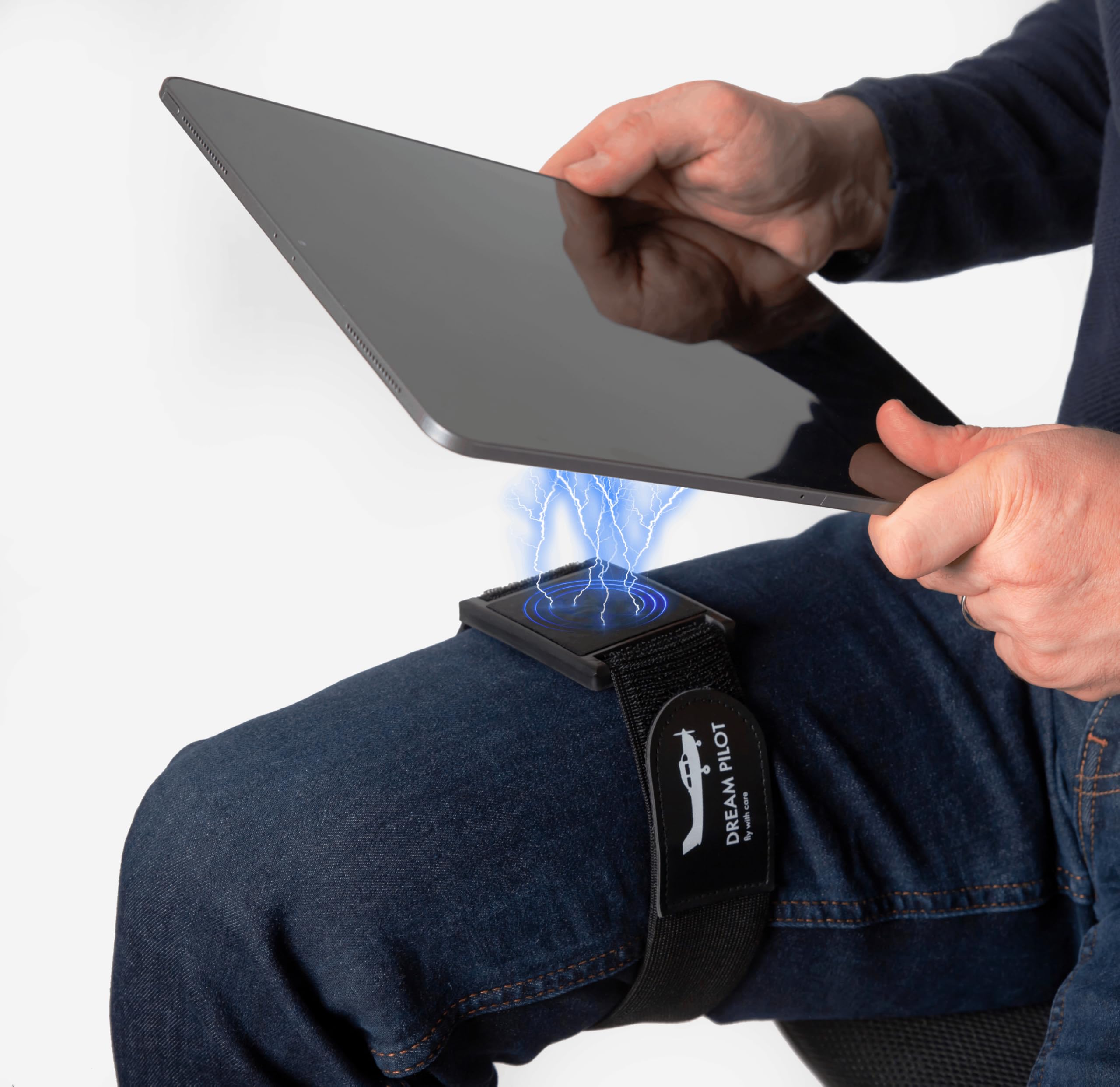
A flat, wide magnetic pad that holds your iPad steady on your knee without wobbling above it.
This is the pick that keeps your screen on your leg and your panel completely clear. It weighs 140 g, so it disappears on your thigh, and the base lies flat and wide instead of perching on a stalk. That flat profile is the whole point — regular magnetic holders let the tablet bob above your leg, while this one stays put through maneuvers.
What wins people over is the magnet. Owners describe the hold as strong enough to keep an iPad Mini secure with no slipping or vibration during C172 maneuvers, and you can attach a MagSafe device directly or use the included metal plates for anything else. Both portrait and landscape orientations work, and you can pull your device off for a quick photo, then drop it straight back on. It is made in the Czech Republic with 3D printing and built to the MIL-STD 810G standard for drops and shocks.
The honest catch sits in the strap. It is a soft elastic velcro affair that adjusts to any leg, but its bulk can eat into the contact patch for larger tablets, and a thin magnetic pad can let a tablet slide when it is mounted upside down. Factor that in if you fly with a big-screen iPad and want it fully inverted.
Where it wins
- Lies flat and wide so the tablet never wobbles above your leg
- Universal fit — phones, iPads, and Android tablets, with or without MagSafe
- Strong magnets hold firm through C172 maneuvers, no slipping or vibration
- 140 g, so it is barely there on your thigh
Where it bends
- Strap protrudes slightly and can reduce contact security for larger tablets
- A small, thin magnetic pad risks dropping a tablet mounted upside down
- Velcro edge could use a pull tab for limited finger function
The buy: the universal kneeboard for pilots who want their panel unobstructed and their device flat on the leg.
Reconsider if: you regularly mount a full-size tablet upside down — the small magnetic pads are less sure in that orientation.
2. Tablet Yoke Mount, iPad Yoke Clamp Mount for Aircraft, Metal Arm
A tool-free yoke clamp that grabs anything from a 4-inch phone to a 13-inch tablet.
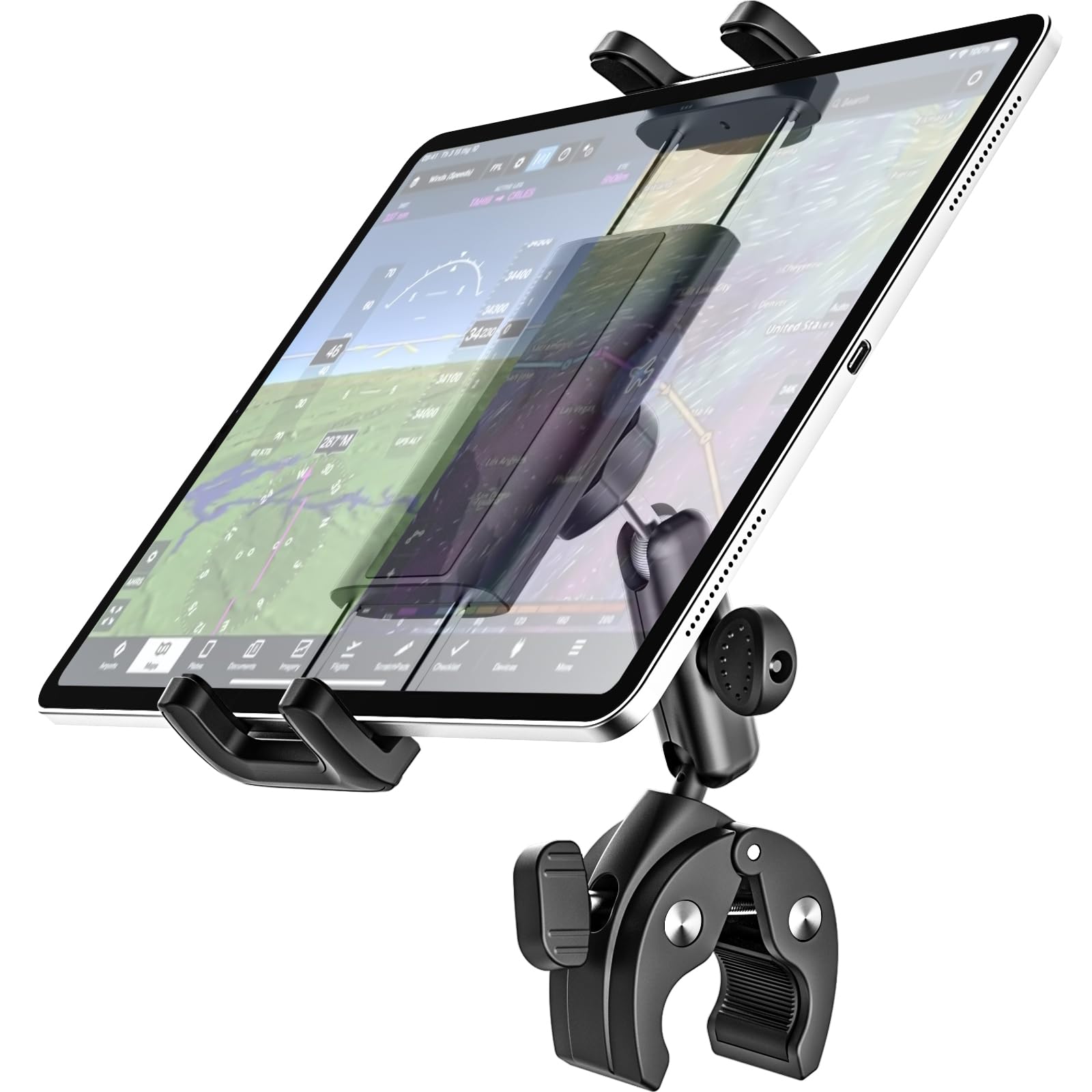
This Dosvsi mount earns its place by spreading the widest possible net. The clamp base bites tubes from 0.5″ to 1.6″, which is a wider range than the RAM yokes here at 0.625″ to 1.25″, and the metal arm reaches 2.7 inches with a 360-degree stainless ball head so you can tilt it away from the instrument panel. Compared to the Dream Pilot kneeboard above, this puts your screen up front in your scan instead of down on your leg.
Buyers report it fits a C172 and has lasted over a year, and the rubber strap that wraps the tablet comes in two sizes — the outer one for 11-to-13-inch tablets and the inner one for 7-to-11-inch screens. The ball head is textured for extra grip, and the aluminum arm mates to the clamp through a metal core, so the joint does not shear in rough air.
The realism here is that it works better on some airframes than others. In a Cessna it is great, but in a Piper it lands in the okay column, and the arma can clip an Apple Pencil’s magnetic attachment unless you clamp the tablet lengthwise at its maximum extension. If you write on your screen in flight, weigh that against the convenience.
What owners say: the top praise is functionality — this mount does its one job reliably — and it shows in the Cessna and Piper cockpit reports.
The counterweight: fitting is where opinions split, so measure your yoke diameter and tablet width before you commit.
Great for: pilots flying a range of aircraft who want one mount to cover multiple tablets and phones.
Think twice if: you fly a Piper and lean on an Apple Pencil — the clamp can sideline the pencil’s magnetic hold.
3. MyClipMulti Kneeboard, Universal Phone & Tablet KNEEBOARD
A bare-bones clip-on kneeboard that lets your tablet support itself on your leg.
Its strength is how little there is to it. The clips take devices from 3″ to 12″ and up to 0.85″ thick, so it holds an iPad mini 6 (8.3″) and an iPad Pro (12.9″) without swapping hardware, and it is built in the USA. There is no board underneath, so the iPad rests flat on your thigh and you still get full leg contact.
Here is a compatibility detail worth knowing before you buy. A 10-inch or larger tablet stays hooked in portrait, but a smaller tablet needs landscape orientation to remain connected — so your preferred reading orientation may not be available. Owners flag that the metal pieces can pop off the fabric when they should not, especially while you are adjusting the tablet, though the same quick-release design is what makes it fast to remove your device mid-flight.
What you gain
- Simple, small, and light — the tablet self-supports on your leg
- Clips span 3″ to 12″ devices and 0.85″ thickness, so it covers most tablets
- Quick attach and release for pulling the device on and off
What to weigh
- Smaller tablets only stay connected in landscape mode
- Metal clips can detach from the fabric during adjustment
- Some buyers feel it is priced high for a simple plastic clip setup
Pick it when: you want the thinnest possible kneeboard and your tablet is 10 inches or larger.
Pass if: you fly mainly with an iPad mini and need portrait reading — landscape is the only way it holds small screens.
4. MyClipKneeboard – Simplest Tablet Kneeboard – Universal

A flexible leg strap that swaps between devices without you moving a single clip.
The quality of the build is what pilots keep coming back to — the plastic and elastic hold up over repeated use, and the velcro stays grippy. It stretches across 3-inch phones up to 12-inch tablets, and you can change the tension or slide the clips mid-flight if something does not sit right. Owners have run it with an iPhone 4 all the way to a Samsung tablet in the same cockpit, which says a lot about how broadly it spreads.
What gets the most positive response is ease of use. The clips grab the tablet and release it fast, the velcro wraps your leg snugly, and there is room to leave a protective case on — a LifeProof case fits the hooks well. The velcro is a touch gentler than some would like, though it can be replaced by sewing if you want a firmer hold.
The one gripe is that the two clips that anchor the device are fairly narrow, so getting a tablet that lives in a thick case seated takes some fiddling. Stability is the area where feedback is split, which is exactly why the strap tension is worth testing before a long flight.
Standout trait: the 3-to-12-inch clip span means switching from a phone to a full-size tablet needs no extra parts.
Worth noting: narrow clips make cased tablets harder to seat, so test your specific case for fit at home first.
Best for: pilots who fly with different devices on different days and want one kneeboard that covers them all.
Consider elsewhere if: your tablet lives permanently in a thick rugged case — the narrow clips fight you on seating.
5. FlightPro ProAviator Yoke Mount – iPad Pro, Mini, Phones
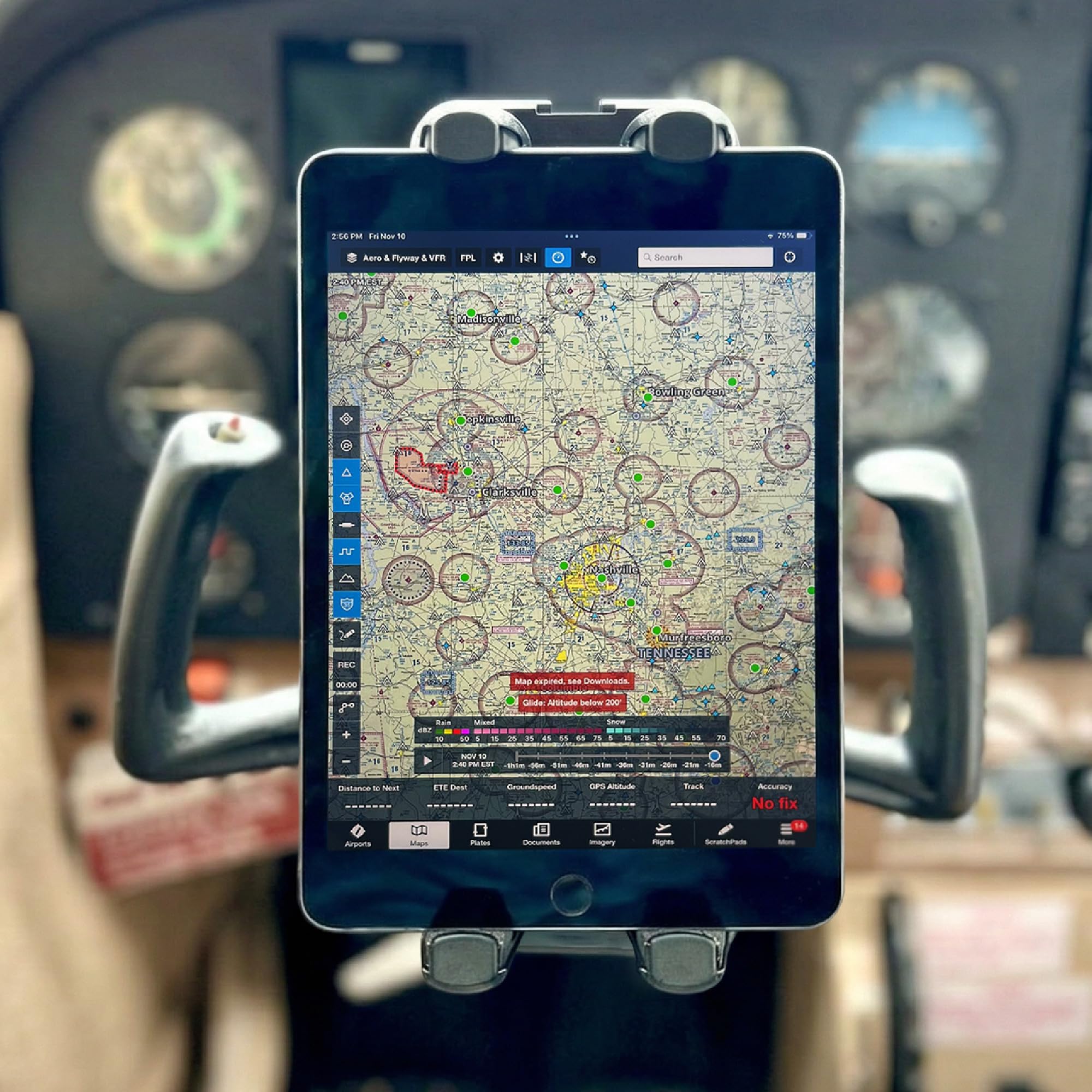
A paddleboard-hand switch that flips your iPad from portrait to landscape with one hand.
This yoke mount is built around a double ball head arm that runs 4.5 inches, and it adjusts one-handed in flight — handy for toggling between charts and a checklist when you are also flying. The clamp opens to 4.2 inches wide, which is roomy enough for a phone or iPad with a thick case on, and the seat works around Cessna, Piper, Mooney, and Beechcraft yokes without any center-stack modifications.
What earns the good word here is build quality. The 4.5-inch double ball head arm holds the tablet steady in the kind of turbulence that rattles loose mounts, and you can often be airborne-ready in under 30 seconds without touching a single tool. It fits iPad Pro 12.9″ down to an iPhone, and with the tablet rotated into vertical you can fly ForeFlight in a Cessna 172 without it in the way.
The compromise comes over time. A few owners notice the spring in the clamp loosens after some weeks and the grip weakens, and one warns that unscrewing the stud when loosening the wing nut can let the whole clamp fall apart. It is an easy fix to keep an eye on the stud, but worth knowing.
Reasons to like it
- One-hand clamp opens to 4.2″ and rotates portrait to landscape mid-flight
- Double ball head arm holds steady through heavy turbulence
- Fits Cessna, Piper, Mooney, and Beechcraft with no cockpit mods
Reasons to pause
- Spring tension can soften after a few weeks of use
- Loosening the wing nut too far can drop the stud out of the clamp
- One reviewer found it less secure in some cockpit positions
Your match if: you want to flip your screen one-handed without ever leaving the controls.
Look past it if: you want a clamp that will still feel as tight in year three as it did on day one.
6. Flight Outfitters Centerline Kneeboard Compatible with iPad mini, iPad Air, iPad Pro for Professional Pilots, General Aviation, Large

A rotating kneeboard with a fold-down sidecar shelf for your phone or notepad.
This is the kneeboard for the pilot doing long cross-country and IFR legs who wants everything in reach. The holder rotates around the iPad’s center of mass, so you can swing the screen into any angle, and a fold-down platform on the side of your leg takes an iPhone or a notepad. The custom-molded board is rigid enough to write on but soft enough to tuck away, and there is a stylus pocket in that sidecar.
The leg fit is better than it looks. Despite a bulky appearance, the high-friction back fabric grabs your leg, two padded strips contour the flat board to your thigh, and the elastic strap locks it down — owners find it takes cross-countries comfortably. The silicone attachment mechanism leaves more screen visible than a full cradle would.
Two things to size carefully. The large fits iPad 5-9, iPad Air 1-4, and iPad Pro 9.7″–10.5″, but a thick case can push an iPad mini out of the small and into the large; and the leg strap runs long, so once it is snug there is little velcro left on some legs. The strap can also fold under the side pocket and push it out.
The standout: the center rotating point lets the iPad spin to any angle without you repositioning the whole board.
Buying note: order a size up if you keep a case on your iPad mini — the thick case is what forces the jump to large.
Suits: cross-country and IFR pilots who want a writing surface, a phone shelf, and a rotatable iPad all on one leg board.
Only if: you have the leg length for its strap — shorter legs may find the velcro runs out when cinched tight.
7. Pilot Kneeboard, Includes Aluminum Clipboard. Fits iPad Pro 9.7″, 10.5″, 11″, iPad and iPad Air 1/2/3/4/5/6, and Any Other 9″-11″ Tablets, Adjustable

A clipboard-and-tablet hybrid that holds your iPad, your charts, and your pens in one rig.
If your kneeboard has to double as a filing cabinet, this is the one. It fits iPad Pro 9.7″ through 11″, the iPad Air 1 through 6, and any 9-to-11-inch tablet, and the tablet holder rotates a full 360 degrees. A sturdy aluminum VFR clipboard rides on a flip cover, and there is a metal clip and pen holder for charts and documents, plus an eyelet strip on velcro with four iron loops.
The storage is the selling point. A large pocket and pen holder on the right side take a phone, headphones, pens, and cards, and you can slot notes under the clear plastic cover so your pre-written lists are always visible. The elastic velcro strap adjusts to fit any leg — one buyer flying a Comanche 250 reports it fits a 6’4″, 280-lb frame.
Two usability quirks are worth flagging. A top-right retainer can sit right over the iPad’s power button and risk standby, and the side phone pocket runs small, so an iPhone can slip out of the short velcro. Pen pockets are not sized for an Apple Pencil either.
What it nails
- Aluminum clipboard, pen holder, and eyelet strip for charts and notes
- 360-degree tablet rotation with support for 9″–11″ screens
- Leg strap adjusts to fit a range of body sizes
Where it fumbles
- Top-right retainer can press the iPad power button and trigger standby
- Side phone pocket velcro is short, so phones can slide out
- Pen pockets are not built for an Apple Pencil
The fit: pilots who want one board carrying tablet, clipboard, charts, and pens together.
Not the fit: flyers who rely on an Apple Pencil or a large phone they need the pocket to hold securely.
8. RAM MOUNTS EZ-Roll’r iPad mini Yoke Mount for iPad mini 6 and A17

A cradle molded for one tablet only, built from marine-grade aluminum to last the life of your airplane.
The EZ-Roll’r is an iPad mini 6 cradle and nothing else. It rolls a caseless iPad mini 6 into place under spring clips for one-hand insertion, and the yoke clamp grips rails from 0.625″ to 1.25″ in diameter. A 3-inch arm sets your viewing distance. It is powder-coated marine-grade aluminum and high-strength composite, and RAM backs it with a lifetime warranty — a rare promise in a category full of plastic parts.
Since the cradle is sized to one tablet, it fits perfectly and grabs the sides without touching the buttons, and owners flying 172s and 182s describe steady, everyday use. It was more expensive from the pilot shop, owners mention, so the value read changes once you are not buying in a flight-school FBO. The one adjustment is that positioning the clamp takes a little playing with to find the cleanest spot.
The real limit is compatibility: buy this only if your tablet is an iPad mini 6 or the A17 model, and only if you fly caseless, since the cradle is molded for a bare device.
The core fact: one cradle, one tablet — the iPad mini 6 and A17 fit; nothing else does.
Choose it when: you fly a caseless iPad mini 6 and want a cradle engineered for it alone.
Look elsewhere when: you fly any other iPad or keep a case on your mini — the cradle will not seat either.
9. RAM MOUNTS X-Grip Yoke Mount for 7″-8″ Tablets with Yoke Clamp

A spring-loaded X holder that keeps a cased 7-to-8-inch tablet gripped through steep turns.
This is the full kit — a yoke clamp base, a double socket arm, and a spring-loaded X-Grip holder sized for 7-to-8-inch tablets. It weighs 14.56 ounces, the clamp covers 0.625″ to 1.25″ rails, and it is built from powder-coated marine-grade aluminum and high-strength composites with a lifetime warranty. Unlike the EZ-Roll’r above, the X-Grip expands to swallow a tablet with or without a case, which is why it works so well with an iPad mini in an Otterbox Defender (lid off).
The thing pilots rave about is the hold. The X-Grip clamps down and customers note it keeps a 7-inch tablet firmly seated through turbulence and steep turns with no slip, and it holds up on flight-school Cherokee and Cessna yokes just as well. The arms release fast when you want the tablet out, so it is quick on and off between flights.
The usual trade-offs show up if you use an Apple Pencil — the X-Grip arms can sit over the magnetic attachment and block it, though the tablet itself stays rock-solid. Some also find a full-size tablet here can obscure a G1000 view depending on where you set the clamp, which is why positioning takes a minute of patience.
Why pilots keep it: the X-Grip’s spring clamp holds tablets through turbulence and steep turns, and it squeezes over cases.
Know before flying: the holder arms can cover the Apple Pencil’s magnetic spot, and a large tablet may crowd a G1000 panel.
The buy for: pilots who want their cased 7-to-8-inch tablet held firmly and released fast, backed for life.
Not for: flyers who sketch with an Apple Pencil in flight and need the magnetic mount unobstructed.
Understanding the Specs
Clamp Range and Yoke Diameter
The clamp range tells you the tube diameters a yoke mount can bite — the RAM and Dosvsi clamps here cover roughly 0.5″ to 1.6″, while several kneeboards use a strap instead and do not care about tube size. A clamp that only grips wide bars will wobble on a narrow yoke, so know your yoke’s diameter before you buy. A mount that says it fits rails from 0.625″ to 1.25″ in diameter is speaking directly to your Cessna or Piper tube.
Tablet Size and Case Clearance
Your tablet size decides which holders will grip it. A cradle molded for one model — like the iPad mini 6 cradle — will not take any other tablet. A clip or X-Grip that spans a range, such as 3″ to 12″ or 4 to 13 inches, covers far more. Case thickness is the hidden variable: a thick case can push a tablet out of one size and into the next, and narrow clips can fight you when a case is on.
FAQ
Will these mounts fit a Cessna 172 yoke?
Can a yoke mount block my view of the instrument panel?
Do these mounts work with a case on the tablet?
Should I get a yoke mount or a kneeboard?
Will a yoke mount interfere with an Apple Pencil?
Are the magnets strong enough to hold an iPad in turbulence?
How much leg strap does a kneeboard have?
Can I use these mounts in a helicopter or other aircraft?
Do I need to remove my tablet’s protective case to use a yoke mount?
Will a larger tablet fit a kneeboard built for an iPad mini?
Final Thoughts: The Verdict
For most pilots, the aircraft ipad mount winner is the Dream Pilot Kneeboard, because its flat, wide magnetic base holds your tablet steady on your leg while keeping the whole panel clear — no yoke clutter, no wobble. If you would rather have your screen in your forward scan and want one mount that covers a 4-to-13-inch range, grab the Dosvsi Tablet Yoke Mount. And for a bare iPad mini 6 flown caseless with a cradle built for it alone, the RAM EZ-Roll’r is the one to reach for.
How We Picked
We do not accept paid placement. Every pick is matched to a real buyer and a real use-case; we do not hands-on test units.
Sources & Methodology
Specifications: manufacturer listings and product documentation. Review insights: verified customer reviews, as of September 2026. Pricing: not shown on this page (it changes often); check the current price via the retailer link.
As an Amazon Associate, Gadgets Feed earns from qualifying purchases. This does not affect which products we feature.