
Our readers keep the lights on and my morning glass full of iced black tea. As an Amazon Associate, I earn from qualifying purchases.
Specs are compiled from manufacturer listings and verified buyer reviews and can change over time — please confirm the key details on the product page before buying.
You know the feeling. You bank into a turn, and the mouse or gamepad just breaks the spell. For a few seconds you are not flying; you are wrestling with a controller. The right hardware puts you inside the cockpit, not just at the controls. But with prices spanning from entry-level to serious-investment, Choosing the right set can feel overwhelming without a clear guide.
I’m Min — the founder and writer behind Gadgets Feed. This guide is built by comparing the manufacturers’ published specifications and the patterns across verified customer reviews, so you get each pick’s real strengths and trade-offs instead of marketing spin.
This guide will help you sort through the throttle quadrants, yokes, and HOTAS systems to find the set of aircraft simulator controls that best match your sim, your space, and your style of flying, with no jargon and no guessing.
Our Picks at a Glance
How To Choose The Best Aircraft Simulator Controls
The first fork in the road is matching the control type to your sim style. A spacious throttle quadrant with an autopilot panel is fantastic for an airliner simmer who spends hours at FL350. If your passion is dogfighting in War Thunder or space combat in Elite Dangerous, a fully featured HOTAS (hands on throttle and stick) gives you the rapid-twitch control you need.
Yoke vs. Joystick (Stick)
A yoke simulates the steering wheel of a commercial or general aviation aircraft, offering a large range of motion (often 180 degrees) and a solid, wheel-like grip. A joystick is more compact and responsive, ideal for combat sims where you need quick, extreme inputs. Many simmers end up with both, but starting with the one that matches your primary sim saves money and desk space.
Compatibility Check (PC vs. Xbox)
Xbox compatibility is a specific feature — not all flight controls plug into a console. If you are on PC, nearly every product works with Microsoft Flight Simulator, X-Plane, or Prepar3D, but you should check the product’s listed compatible devices before you buy. For Xbox simmers, look for the official Xbox endorsement in the product description.
Build Quality and Feel
Look for materials, especially in the internal mechanism. A 100% metal internal structure on a yoke or a steel shaft with dual linear bearings translates to years of smooth, consistent flights. A cheap plastic base with no heft will slide around your desk, especially when you pull back hard on the stick during a carrier landing.
Quick Comparison
| Model | Best For | Control Type | Compatibility | Programmable Controls | Amazon |
|---|---|---|---|---|---|
| Honeycomb Bravo Throttle Quadrant★ Best Overall | All-in-one cockpit versatility | Throttle Quadrant | PC, Mac | 7 programmable keys + panel switches | Amazon |
| Flight Sim Stuff Vernier Controls TPMAuthentic GA Feel | Authentic GA control feel | Vernier TPM | Windows, Mac | Built-in axes | Amazon |
| PXN-2119Pro Flight Simulator ControlsBudget Stick | Budget entry with vibration | Flight Stick + Throttle | PC (Windows only) | 16 programmable buttons | Amazon |
| Thrustmaster T-Flight Full Kit HOTAS | All-in-one HOTAS + pedals | HOTAS + Rudder Pedals | PC, Xbox Series X|S | 14 mappable buttons | Amazon |
| Logitech G X56 H.O.T.A.S. | Space and combat sim precision | HOTAS | PC (Windows 7/8.1/10/11) | 189 programmable controls | Amazon |
| Logitech G Pro Flight Yoke + Rudder Pedals | Complete yoke/rudder bundle | Yoke System + Pedals | Windows | 14 button controls | Amazon |
| Thrustmaster TCA Yoke & Quadrant Boeing Edition | 787 Dreamliner replica feel | Yoke + Throttle Quadrant | PC, Xbox Series X|S | 35 action buttons | Amazon |
| Honeycomb Alpha & Bravo Bundle | Premium yoke/throttle combo | Yoke + Throttle Quadrant | PC, Mac | 13 programmable buttons | Amazon |
| Honeycomb Alpha, Bravo + USB Hub | Complete flight deck plus hub | Yoke + Throttle Quadrant | PC, Mac | 13 programmable buttons | Amazon |
In‑Depth Reviews
1. Honeycomb Bravo Throttle Quadrant
Our pick — over 4.5★ from 1,500+ verified ratings; the strongest balance of quality and price.
This cockpit-in-a-box handles everything from a Cessna to a 747.
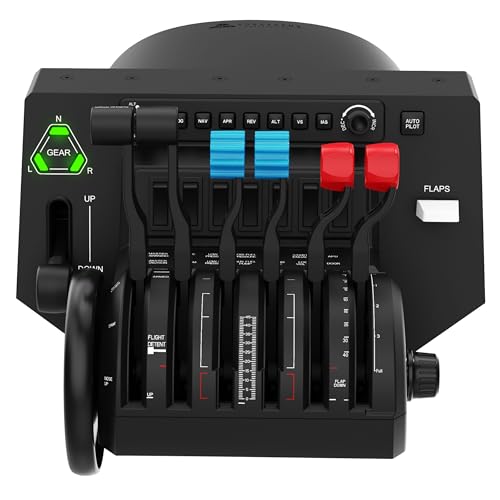
This is the crowd favorite for a reason — a fully configurable throttle quadrant that caters to single-engine general aviation all the way up to four-engine commercial jets. The thing that wins people over is the quality of the build, with aerospace-grade components and a feel that owners call “outstanding construction” and “truly plug and play” with MSFS 2024. The 14-light annunciator panel and the dedicated autopilot panel put critical flight status directly in your line of sight.
The unit is substantial — its dimensions measure 12.44 x 17.64 x 9.33 inches — so it demands desk space, but owners say the realistic throttle tension and the sheer number of configurable buttons and switches make it worth the footprint. Someone who owns it sums it up as the “best do it all throttle on the market.”
The trade-off to note: the trim wheel is digital rather than analog, and the small airliner handles take some getting used to. Some buyers report issues with lights not working, and a few find the initial setup more fiddly than expected. If your sim is X-Plane 12, check compatibility before buying, as full support is not guaranteed.
What owners rave about
- Build quality and realistic throttle tension get the loudest praise — 60 owners mentioning quality alone.
- smooth integration with MSFS 2020/2024 and easy binding setup.
- Switches easily between single-piston, twin-turboprop, and quad-jet configs.
What to consider
- Trim wheel is digital, not analog, which is a surprise for some.
- Bulky — you need dedicated desk space for its dimensions (12.44 x 17.64 x 9.33 inches).
- Lights on the annunciator panel have intermittent issues reported by a minority of owners.
Reach for this if: you want one throttle quadrant that can handle your whole hangar — from a single-prop to a four-engine heavy — and you value build quality above all.
Look elsewhere if: you need fully analog controls or your sim of choice is X-Plane 12, where support is incomplete.
2. Flight Sim Stuff Vernier Controls TPM
A compact, Cessna-authentic throttle, prop, and mixture panel that just works.
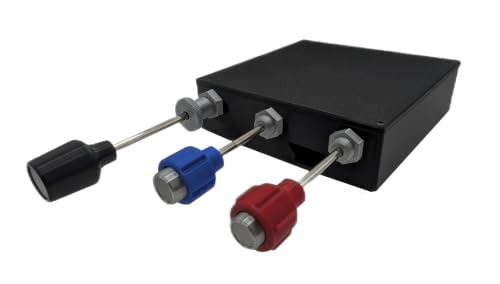
If you primarily fly general aviation aircraft like the Cessna 172, this is the most authentic-feeling dedicated TPM (Throttle, Propeller, Mixture) unit on this list. It uses a true vernier mechanism — you push the button for large adjustments, twist for fine-tuning — and the throttle includes a friction lock nut so you can dial in a power setting and lock it there. One owner reports it “works like Cessna 172 throttle after 3 months,” which says a lot about its staying power.
The module is small — just 7 x 5.75 x 2 inches (and 1.5 pounds) — meaning it fits easily next to a yoke or joystick without crowding your desk. It is compatible with Windows and Mac and works in MSFS 2020/2024 and X-Plane right from the start with no drivers needed. Setup takes just a few minutes, and the seller (Shawn) is described by owners as extremely responsive and helpful.
The recurring observation from a couple of owners is that the knobs can feel “very hard to pull” fresh from the start, though the seller was quick to offer a replacement. This is a niche, single-purpose controller — it handles only throttle, prop, and mixture — so you will still need a yoke or joystick for the rest of your flying.
Who this clicks with: GA simmers who want genuine vernier feel for their Cessna or Piper panel without spending over, and value one-on-one customer support.
Who should pass: anyone flying multi-engine or airliners — this unit covers just one engine’s controls.
Your best bet if: you live in the pattern at a virtual KLAF in a 172 and crave that real-world twist-and-pull motion.
Not for you if: you need a lot of buttons or switch banks — this is a focused, no-frills control.
3. PXN-2119Pro Flight Simulator Controls
An entry-level stick and throttle that works for some sims but demands patience.
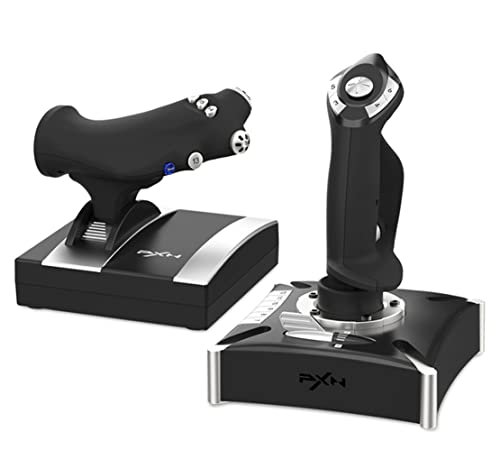
This is the most affordable complete flight stick and throttle combo on the list, and it targets the absolute entry-level pilot. It includes built-in dual vibration motors that simulate airflow and turbulence, plus a separate throttle unit with 16 programmable function keys and an 8-way POV hat switch. For the price, it offers a lot of features: 4-axis precision, rapid-fire trigger, and a heavy-duty base with suction cups to keep it stuck to your desk during maneuvers.
However, the setup process is the most controversial aspect of this unit. Multiple owners mention that the drivers from the included disk are flagged as harmful by Windows and Norton, and that getting the unit recognized by Microsoft Flight Simulator 2020 is a challenge. One owner considered it an “unidentifiable controller” that prevented games from launching. If you are willing to navigate the driver installation and key mapping through the PXN software, some do find it a great value — but it is not a plug-and-play experience.
Note this unit does not work with Xbox or PS5, despite what some research may suggest, and does not support Mac systems.
What works for some
- Sturdy stick with steady speed control and extra buttons for maneuvers.
- Good value for the money if you manage to get the drivers working.
The honest caveat
- Driver download and installation is the most common pain point — 13 owners flagging driver compatibility issues.
- Not compatible with MSFS 2020 from the start for many buyers.
- Malware concerns around the driver software are a recurring alarm.
Consider it only if: your budget can handle the risk and you are tech-savvy enough to manually set up drivers outside of Windows security warnings.
skip it if: you want a reliable, zero-fuss setup for MSFS 2020 or 2024, or if you value security confidence.
4. Thrustmaster T-Flight Full Kit HOTAS with Rudder Pedals

This is the most complete HOTAS + pedal bundle that works on both Xbox and PC.
This is a true all-in-one package: you get the stick, the detachable throttle, and the TFRP rudder pedals with Thrustmaster’s S.M.A.R.T. slide rail system for smooth, jerk-free yaw control. For Xbox simmers, this is a standout — it features dedicated Guide, View, and Menu buttons so you never need to reach for your console controller. On PC, owners say it works great with Ace Combat 7, X-Plane 12, and War Thunder. The pedals also feature an ergonomic full-foot design with removable heel rests for long sessions.
Build quality is a highlight — 18 owners single it out positively — and the system boasts 14 programmable buttons, 5 axes, and a rapid-fire trigger. For the price, it is widely considered the best affordable HOTAS for Xbox and PC. One owner called it “amazing for the price” because it plugged right into their Xbox Series S and allowed full button customization in MSFS 2024.
The honest upside is that the throttle can feel slightly loose toward the 3/4 travel point, and some owners note the product is not the most durable over the long haul — one owner reported failure after two years of sporadic use. The throttle also has a detent halfway through its travel, which some love and some find annoying for precision work.
The highlight: The only bundle on this list that gives you a full HOTAS plus rudder pedals in one box, with console-native Xbox support and 14 programmable buttons, all at a price that owners consistently praise as great value.
The real trade-off: Long-term durability is a question mark — treat it as a fantastic entry-to-mid-level kit rather than a piece of gear you expect to last a decade.
Perfect for: Xbox Series X|S simmers who want a single, affordable purchase that covers stick, throttle, and pedals without needing to hunt down separate components.
Less ideal for: high-hours daily simmers who need a system rated for heavy, consistent use over many years.
5. Logitech G X56 H.O.T.A.S.

This HOTAS is built for Elite Dangerous, DCS, and anyone who wants 189 controls at their fingertips.
This is the high-button-count champion of the list, with a stupefying 189 programmable controls split between the stick and the twin throttles. It uses a 16-bit aileron and elevator axis with Hall-effect sensors, offering precise, drift-free input. The stick has an adjustable 4-spring system so you can dial in the resistance, and the twin throttles include a friction adjuster and a lock. For VR simmers, the layout is designed so that subtle differences in button feel help you navigate the control set without looking.
The X-56 is a large, heavy HOTAS — owners note it has a substantial footprint and that mounting is nearly essential, especially because the throttle is very stiff even at its lowest tension setting. The consensus is that it works best for Elite Dangerous, where all those programmable hats and switches can be mapped to a spaceship’s countless systems. A powered USB hub is strongly recommended to avoid ghost inputs (spurious button presses).
The most common gripe — and the reason for the mixed quality score — is that the build is more plastic than some expect at this price, and the throttle stiffness can be a genuine issue. Some customers note the stick developing “spiking” or ghost inputs that break the immersion. If you have small hands, the stick height may make reaching the top hats difficult.
The sheer capability
- 189 programmable controls — more than any other product on this list.
- Adjustable stick force with a 4-spring system and Hall-effect sensors for precision.
- Split twin throttles with friction adjuster and lock.
The known downsides
- Throttle stiffness is a recurring complaint — even at the lowest setting, some find it too heavy.
- Ghost inputs (spurious commands) on some units, even with a powered USB hub.
- Plastic construction feels cheaper than the price tag implies for some owners.
Ideal for: space simmers who need hundreds of bindings for Elite Dangerous or Star Citizen, and who plan to mount both units to a desk or cockpit rig.
Think twice if: you want a soft, smooth throttle or prefer a metal-heavy build for that premium feel.
6. Logitech G Pro Flight Yoke System + Rudder Pedals Bundle

A yoke and rudder pedal set that gives a student pilot the muscle memory for the real thing.
This Logitech G bundle brings together their Pro Flight Yoke System and Pro Flight Rudder Pedals in one purchase. The yoke offers smooth self-centering control, a POV hat, 14 button controls, and a 3-position mode switch that open up 54 programmable controls. The rudder pedals have differential toe brakes, allowing you to control left and right braking independently when you bring your aircraft to a stop on the runway. The footrests also adjust to accommodate different shoe sizes and include non-slip material.
Owners who fly with this system often mention it is a solid, affordable way to get yoke-and-pedal control, especially for someone training to be a pilot. One owner noted their grandson, “training to be a pilot, found the system quite good.” The unit connects via USB and works with Windows PCs, and the bundle saves you the hassle of buying the yoke and pedals separately.
The honest assessment is that the build is mostly plastic and the yoke can suffer from significant friction that makes small corrections trickier than they should be. It is also reported to be “unusable for X-Plane” by one owner, while working better with Microsoft Flight Simulator. This is an entry-to-mid-level yoke system — it gets you flying with proper controls, but you will feel its limitations if you are a high-fidelity simmer.
Who this clicks with: student pilots who want a cost-effective yoke and pedal set to practice flows and build muscle memory at home, and who fly Microsoft Flight Simulator primarily.
Who should look higher: simmers who want buttery-smooth yoke travel, who fly X-Plane, or who are willing to spend more for metal internals.
Good for: a first yoke-and-pedal setup that doesn’t break the bank, especially for someone learning real-world flying.
Not the right fit for: experienced simmers who need low-friction, high-precision yoke movement and cross-platform compatibility.
7. Thrustmaster TCA Yoke & Quadrant Boeing Edition
An officially licensed 1:1 replica of the 787 Dreamliner yoke that brings the airliner cockpit home.
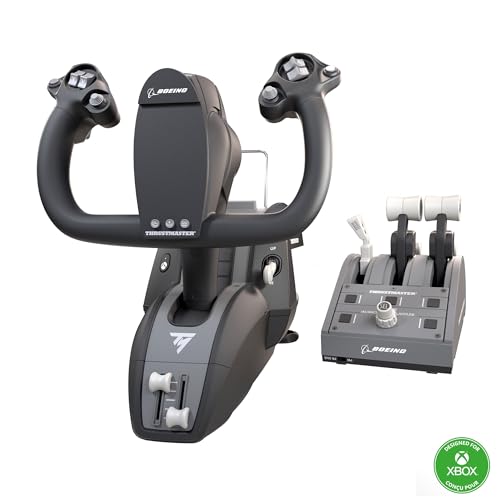
This Thrustmaster TCA Yoke Pack is a officially-licensed Boeing product, meaning it matches the look and feel of the real 787 controls. The yoke uses a PENDUL_R mechanism that replicates the pendular motion of the Dreamliner, with an 8.3-inch (21-cm) range. It is built with a 100% metal internal structure, giving it a balanced weight and professional feel. The included throttle quadrant features an iconic Boeing-style autopilot function that controls altitude, airspeed, and heading.
The sheer number of controls is impressive — 35 action buttons, plus 2 additional axes using magnetic technology (Hall-effect sensors) for maintenance-free precision. It works on both PC and Xbox Series X|S, making it a rare high-end option for console simmers. One owner calls it the “best yoke, throttle and rudder for Xbox Microsoft flight simulator” and praises the Hall-effect sensors for eliminating the drift issues common with older potentiometer-based gear.
The measured take from the owner community is that while the yoke itself is high-quality, smooth, and accurate, the throttle unit feels less sturdy — levers are “wobbly” and the autopilot knob can be slow or jumpy. The hat switches on some units malfunction (runaway input), and the clamp design struggles with thick desks. This is a fantastic yoke for commercial jet simmers, but the throttle is the weak link in an otherwise premium package.
What stands out
- Officially licensed 1:1 scale replica of the 787 Dreamliner yoke — class-leading realism for Boeing fans.
- 100% metal internal structure for durability and a premium feel.
- Hall-effect sensors on both the yoke and the throttle axes.
What falls short
- Throttle quadrant is the weaker half — levers feel wobbly and the autopilot knob is not smooth.
- Hat switch issues (runaway commands) reported by a few owners.
- Clamp won’t fit desks thicker than standard.
Reach for this if: you are a dedicated airliner simmer who wants the most realistic Boeing yoke on the market, especially on Xbox.
Hold off if: you require a perfect throttle unit from the start, or if your desk is unusually thick.
8. Honeycomb Alpha Yoke and Bravo Throttle Quadrant Bundle

This is the reference standard for yoke-and-throttle combos, built for serious PC simmers.
This bundle pairs the Honeycomb Alpha Flight Controls Yoke with the Bravo Throttle Quadrant, arguably the most popular premium pairing in the sim world. The Alpha yoke features a steel shaft and dual linear bearings with damped self-centering and a full 180 degrees of rotation for that deep, realistic pull. The Bravo quadrant gives you the same all-in-one cockpit system from product #1 — configurable from single-engine GA to four-engine commercial, with an autopilot panel, annunciator panel, gear and flap lever, and a trim wheel.
Owners consistently describe it as “very well built” and “solid, professional feel,” a huge upgrade from entry-level options. It works as a plug-and-play system with MSFS 2024, and the throttle quadrant’s ability to switch between single-engine and multi-engine configs is a highlight. The fact that 27 owners single out the quality as the top positive aspect is a strong endorsement.
The recurring feedback: some owners find the throttle levers smaller than expected, and the switches can become inaccessible when the throttles are advanced. A small number of units arrive dead or are not recognized by the computer, and there is no phone-based customer support. Also, this bundle is PC/Mac only — it does not work with Xbox, so console simmers need to look elsewhere.
The highlight: 27 owners specifically name the quality as the best thing about this bundle — the steel shaft, damped centering, and configurable quadrant are in a different class from mid-range gear.
The real trade-off: The price, plus a small risk of a dead-on-arrival unit with limited support if it happens. If you get a good one, it is the best you can buy without climbing into true professional hardware.
Ideal for: PC simmers who want a one-stop premium purchase that covers yoke and throttle, and who prioritize build quality and versatility over everything.
Not for: Xbox owners, anyone on a tighter budget, or people who want phone support for potential setup issues.
9. Honeycomb Alpha Yoke Plus Bravo Throttle Quadrant and 4 Port USB Hub

The same premium yoke and throttle, now with a USB 3.0 hub to keep your cockpit tidy.
This bundle includes the same Honeycomb Alpha Yoke and Bravo Throttle Quadrant as product #8, but adds a Knox Gear 4-Port USB 3.0 Hub to the package. The yoke itself features 13 programmable buttons, smooth 180-degree rotation with no dead zone, and dual mounting options so you can use it with or without clamps on various desks. The throttle quadrant gives you the same configurable cockpit system with multiple levers, an autopilot panel, and landing gear indicator lights.
The addition of the USB 3.0 hub is a practical bonus — it allows you to connect other peripherals (rudder pedals, a head tracker, a mouse) right from your cockpit area without running more cables to your PC. The hub is especially useful if you are building toward a full sim pit and need extra ports.
The honest word from owners is that the yoke requires clamping to a stationary surface — one owner needed 20 lbs of weights on the desk to keep it in place on carpet. There is also a note that the yoke does not fully return to neutral after turns, requiring a small opposite input to straighten out. While the quality is praised by 21 owners, a few report the throttle quadrant lights not working and the setup process for MSFS 2024 requiring some work.
What you get extra
- The same premium Alpha and Bravo gear with the added convenience of a 4-port USB 3.0 hub.
- 13 programmable buttons, smooth operation, and sturdy construction praised by 21 owners.
What to think about
- Yoke does not self-center perfectly — needs a slight nudge back to neutral after turns.
- Clamps need a stationary, thick desk; carpet setups may require weights.
- Setup in MSFS 2024 can take some configuration work.
Grab this bundle if: you are already buying the Alpha and Bravo and want a USB hub to simplify your cable management for a growing sim pit.
Stick with the standard bundle if: you already have a USB hub or plan to buy a higher-quality one separately.
Understanding the Specs
Control Type: Yoke vs. HOTAS
The first big choice is between a yoke (the steering-wheel-like control for airliners and GA planes) and a HOTAS (a joystick and throttle unit for fighters and space sims). A yoke offers pendular motion and a more realistic feel for commercial flying, while a HOTAS puts all the essential combat controls at your fingertips. Many serious simmers eventually own both, but your primary sim genre should guide your first purchase.
Hall-Effect vs. Potentiometer Sensors
These are the tiny components that translate your physical input into the sim. Hall-effect sensors use magnetic fields for contactless sensing — they never wear out, never drift, and need zero maintenance. Older potentiometer (pot) based controls are cheaper but prone to “jitter” and calibration drift over time as the internal wiper wears down. For long-term ownership, gear with Hall-effect sensors is almost always worth the premium.
Number of Programmable Controls
This number tells you how many buttons, switches, and axes you can assign a function to. A yoke with 14 buttons and a 3-position mode switch can technically give you 54 distinct commands, which is plenty for a GA flight. A HOTAS with 189 controls is overkill for a Cessna but perfect for a space sim where every docking clamp, shield generator, and weapon group needs its own binding. More is not always better — it just means more complexity to set up.
Compatibility: PC, Mac, and Xbox
Not all flight controls work on all platforms. Xbox compatibility is a specific feature that must be stated by the manufacturer — you cannot assume a USB controller will work on a console. Mac support is also rarer than you think; many high-end yokes and throttles are Windows-only. Before you buy, check the “Compatible Devices” line in the product specs: if it says “PC” and nothing else, it is Windows only.
FAQ
Will these controls work with Microsoft Flight Simulator 2024?
Can I use a yoke and a HOTAS together?
What is the difference between a throttle quadrant and a HOTAS throttle?
Do I need rudder pedals or can I use twist-grip yaw?
How do Hall-effect sensors improve a flight controller?
What desk space do I need for a yoke or HOTAS system?
Are these controls compatible with X-Plane 12?
What is the typical lifespan of a flight sim controller?
Can I mount these to a sim rig or do they need to sit on a desk?
What is the best setup for someone learning to fly in real life?
Final Thoughts: The Verdict
Across the board, the aircraft simulator controls winner is the Honeycomb Bravo Throttle Quadrant because it delivers the most versatile and highest-quality throttle experience at a price that serious simmers will find fair. The build quality and sheer breadth of aircraft types it covers — from single-engine to four-engine — make it the one piece of gear you can build your entire cockpit around. If you want an authentic general aviation feel with vernier controls that mimic a Cessna 172, grab the Flight
How We Picked
We do not accept paid placement. Every pick is matched to a real buyer and a real use-case; we do not hands-on test units.
Sources & Methodology
Specifications: manufacturer listings and product documentation. Review insights: verified customer reviews, as of July 2026. Pricing: not shown on this page (it changes often); check the current price via the retailer link.
As an Amazon Associate, Gadgets Feed earns from qualifying purchases. This does not affect which products we feature.