
Our readers keep the lights on and my morning glass full of iced black tea. As an Amazon Associate, I earn from qualifying purchases.
Specs are compiled from manufacturer listings and verified buyer reviews and can change over time — please confirm the key details on the product page before buying.
If you are shopping for an aircraft simulator yoke, the thing that actually matters is how the pitch axis feels under your fingertips — because a sticky or dead-feeling yoke ruins landings faster than any graphics setting. The short answer: the Honeycomb Alpha Flight Controls Yoke Bundle gives you the most realistic bang for your buck, while the Thrustmaster TCA Yoke & Quadrant Boeing Edition takes the crown for Xbox owners and anyone who wants a 1:1 Boeing 787 replica on the desk.
I’m Min — the founder and writer behind Gadgets Feed. This guide is built by comparing the manufacturers’ published specifications and the patterns across verified customer reviews, so you get each pick’s real strengths and trade-offs instead of marketing spin.
Below you will find every major yoke-style controller sorted by real-world use, from budget PC starters to full cockpit bundles, plus the specs that actually change how your plane handles. If you want the shortcut to the best aircraft simulator yoke, the comparison table and reviews below break down every trade-off before you buy.
Our Picks at a Glance

How To Choose The Best Aircraft Simulator Yoke
A yoke is not a joystick with a different shape. It is a desk-mounted control column that mimics what you grip in a Cessna or a Boeing, and the differences between entry-level and premium units live almost entirely in three things: how far the yoke rotates, how the pitch axis resists your hand, and what sensors track your input.
Rotation Range and Self-Centering
The roll axis on a real aircraft turns through a wide arc — the Honeycomb Alpha LITE and the Turtle Beach VelocityOne both offer 180° rotation, which is the figure serious simmers look for. A shorter throw, by contrast, makes small corrections feel twitchy. Self-centering matters too, since a yoke that snaps back to neutral by spring lets you fly with fingertips instead of wrestling the column back into position every time you let go.
Sensors: Hall Effect vs. Potentiometers
A hall effect sensor measures the yoke’s position with a magnetic field and never physically wears against a track, so there is no potentiometer to clean or replace. Potentiometer-based yokes still work fine for casual flying, but they can develop a dead spot over years of use. If you plan to fly daily, hall effect is worth prioritizing.
Desk Clamping and Stability
Every yoke in this list clamps to a desk or tray, and how securely it sits changes everything. A yoke that shifts mid-turn turns a gentle bank into a wrestling match, and several premium bundles weigh enough that they need a sturdy surface underneath. Check the clamp depth and the total weight before you buy, especially if you fly from a folding table or a carpeted lap tray.
Quick Comparison
| Model | Best For | Button Quantity | Yoke Rotation | Compatible Platforms | Amazon |
|---|---|---|---|---|---|
| Honeycomb Alpha Flight Controls Yoke Bundle★ Best Overall | Serious PC flight simmers who want a full cockpit | 2 | — | Windows (PC) | Amazon |
| Logitech G PRO Flight Yoke System (Renewed)Budget Champion | Budget-conscious PC simmers | 14 | — | PC, Mac | Amazon |
| Honeycomb Alpha LITE | Entry-level PC simmers and VR pilots | 4 programmable buttons + 2 rocker switches | 180° | PC (MSFS 2020 & 24) | Amazon |
| Turtle Beach VelocityOne Flight Universal Control System | Xbox and PC owners who want an all-in-one | 26 | 180° | Xbox Series X|S, Xbox One, Windows 10/11 | Amazon |
| Logitech G Pro Flight Yoke + Rudder Pedals Bundle | Student pilots practicing muscle memory | 14 | — | Windows (PC) | Amazon |
| Thrustmaster TCA Yoke & Quadrant Boeing Edition Flight Pack | Xbox and PC simmers who want a Boeing replica | 35 | — | Xbox Series X|S, Windows | Amazon |
| Thrustmaster TCA Yoke Pack Boeing Edition | Boeing fans and airliner-style flying on Xbox | 16 | — | Xbox Series X|S, Xbox One, PC | Amazon |
In‑Depth Reviews
1. Honeycomb Alpha Flight Controls Yoke Bundle
Our pick — 4.5★ from 250+ verified ratings; the strongest balance of quality and price.
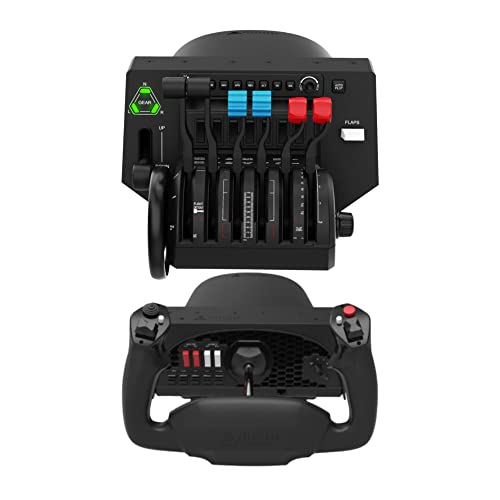
Two boxes in one purchase — a yoke plus a Bravo throttle quadrant that covers single-engine props to four-engine airliners.
If your home cockpit needs to feel like an actual cockpit, the Honeycomb Alpha Flight Controls Yoke Bundle is the one to beat. It pairs the Alpha yoke with the Bravo Throttle Quadrant, an all-in-one cockpit system that carries its own autopilot, annunciator panel, gear and flap lever, and a dedicated trim wheel — the exact controls that let you stop reaching for the keyboard mid-approach. The gear lever even carries LED landing gear indicator lights, so your instrument panel reads correctly without a second screen. Heavy is the point here: this bundle adds up to 12.13 kg of hardware on your desk, which keeps the yoke planted during sharp banks but means you need a genuinely sturdy surface underneath it.
The build quality is what wins people over, and it shows in how the controls feel under your hands. Construction and control feel rate as the most praised traits by buyers, and the recurring theme is that serious flight simulator use is exactly what this setup was made for. One buyer summed up the ownership experience simply: “Sturdy Material, well and careful package, it comes with accessories for commercial and general aviation, easy to install and set it, it worth every penny.” Microsoft Flight Simulator auto-detects the yoke, so getting airborne takes minutes even if you need to configure a few buttons afterward.
The honest trade-off sits inside the Bravo quadrant. Getting its LED indicator lights to work consistently across different airframes — both Asobo’s built-in planes and third-party add-ons — can demand real technical patience, and the setup process frustrates enough buyers that ease of use lands as a mixed point rather than a strength. This is a bundle for someone who genuinely wants to learn their cockpit, not for a casual flier. If you just want to grab a yoke and buzz around VFR, the Honeycomb Alpha LITE covers that for far less complexity.
One thing every reviewer discovers: the Honeycomb yoke does not spring back to dead center on its own. You trim, you counter-steer, you fly the aircraft — which is exactly how a real yoke behaves, but it surprises buyers expecting a gamepad-style snap-back. There is also a clamp issue worth planning for; several owners found the assembly light enough that it needed to be anchored to something heavy, with one resorting to holding the tray down with weight to keep it from sliding on carpet.
The Cockpit-On-Your-Desk Case
- Bravo quadrant adds autopilot, annunciator panel, gear lever, flap lever, and a trim wheel
- LED landing gear indicator lights on the gear lever
- 12.13 kg of ballast keeps the yoke stable during sharp turns
- Rated a top performer with 4.5 stars across 251 ratings
What Buyers Flag Before Purchase
- LED lights can require real technical skill to configure across different aircraft
- The yoke does not self-center to neutral — it needs opposite input to return
- Heavy enough that the assembly may need clamping to something sturdy
Best for: PC simmers building a permanent cockpit who want the trim wheel, gear lever, and autopilot all within arm’s reach.
Hold off if: you expect plug-and-play LED indicators across every third-party airframe, or you fly from a lightweight folding table.
2. Logitech G PRO Flight Yoke System, Professional Simulation Yoke and Throttle Quadrant (Renewed)
A stainless steel shaft and 14 buttons for the simmer who wants to fly tonight, not build a cockpit over the weekend.
The Logitech G PRO Flight Yoke System is the entry point most PC simmers step onto first, and it earns that role with hardware that punches above its tier. The stainless steel yoke shaft gives you smooth, accurate control of your virtual aircraft — a tangible upgrade over the mushy plastic feel of cheaper alternatives. A POV hat, 14 button controls, and a 3-position mode switch open up at least 54 programmable controls, so most of your aircraft’s functions sit under your fingertips without a keyboard shortcut in sight. Where the Honeycomb Alpha LITE goes all-in on a 180° rotation sweep, this yoke trades that range for pure button density — and the table reflects that gap, 14 vs. 2 buttons against the Honeycomb bundle.
The included 2-position desk clamp mounts securely to a wide range of desks with a sturdy, secure clamping force — a real practical win over yokes that need weights to stay put. It works on Mac as well as PC, which is rarer than it should be in this category and a genuine selling point for Mac-based simmers. Buyers consistently note it feels like a real yoke, with the stainless shaft doing the heavy lifting on smoothness.
The clear limitation to understand before buying: this is a PC-and-Mac yoke, full stop. Buyers who tried it with Xbox Microsoft Flight Simulator returned it after testing, and the recurring advice from owners is that this suits budget PC simmers — those chasing the last word in realism for serious sim work will want to step up to a higher-tier yoke. If you fly on console, this is not your yoke.
For renovation-averse buyers, keep in mind this is a renewed unit rather than new-in-box stock — a trade worth weighing if cosmetics matter to you as much as function. On the flip side, one recurring owner observation is that refurbished units often arrive looking new and working perfectly, with buyers reporting the item was well packaged and arrived before the projected delivery date. At 4.0 stars across 100 ratings, buyers rate it a working tool rather than a showpiece.
Reach for this: PC or Mac simmers who want stainless shaft smoothness and 54 programmable controls without stepping into premium pricing.
Think twice if: you fly on Xbox — owners confirm MSFS 2020 on console will not accept it, and they returned the unit after testing.
3. Honeycomb Alpha LITE
The 180° roll travel is the number that changes your landings — and this is the most affordable way to get it.
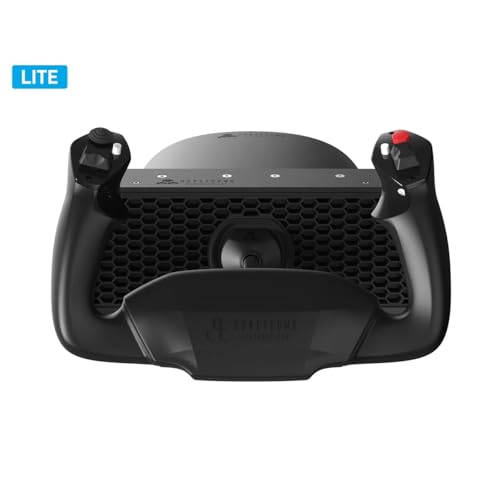
Honeycomb’s Alpha LITE exists because not every simmer wants a desk full of switches. It strips the yoke down to the essentials — a POV switch, a 2-way rocker, and two programmable buttons on each grip — and puts the money instead into a 180° yoke rotation with a self-centering mechanism and minimal dead zone. That rotation range is the spec buyers rave about, because it translates directly into smoother, more realistic roll input. One thing I’ll highlight upfront: for sim pit builders and VR pilots, the absence of extra switches is actually a feature — nothing on the yoke interferes with reaching for your own panel, and the clean surface allows precise cockpit replication.
For general aviation practice — Cessna, Piper, VFR, IFR — the feel is the point. Owners who fly GA profiles praise the smooth, realistic motion and note the pitch axis requires more force the further you deflect it, just like a real control column. The 180° roll travel beats what you get from a Logitech yoke with its limited range and center detent. The LITE weighs just 9.9 pounds, so it is more manageable on a desk than the full Alpha bundle. Despite the stripped-down spec sheet, quality is the most-praised trait here, followed by value for money — at 4.5 stars across 62 ratings, buyers are by and large very happy with what they got.
The hassle comes with software, not hardware. Setup in MSFS 2024 is not plug-and-play — the yoke’s switches may respond first while the elevators and ailerons need manual programming. The fix is straightforward once you know about it: download the XML profiles from Honeycomb’s website and tune sensitivity in-game, after which the yoke performs beautifully. Buyers report it works PnP in MSFS 2020, and that the 2024 quirk appears to sit with the simulator rather than the yoke.
Two things are note for buyers weighing it against the Alpha bundle. The top surface can take a small keyboard, but it is curved, so it may not sit comfortably. And there is no power or status indicator — a small oversight some owners found surprising. Flight simulators are demanding, and for entry-level simmers with limited desk space who already have a switch panel, the LITE packs serious realism into the smallest footprint.
Why it wins on value: 180° roll travel, self-centering, and a minimal dead zone for an entry-level price — the essentials without the extras.
Budget for setup time: expect to spend an evening with the XML profiles before your first smooth takeoff in MSFS 2024.
Made for: entry-level GA pilots, VR flyers who need a clean grip-free yoke, and simmers with a narrow desk who want 180° rotation without the Alpha bundle’s footprint.
Not your yoke if: you want plug-and-play in MSFS 2024 from the start, or you need a bundled switch panel included.
4. Turtle Beach VelocityOne Flight Universal Control System
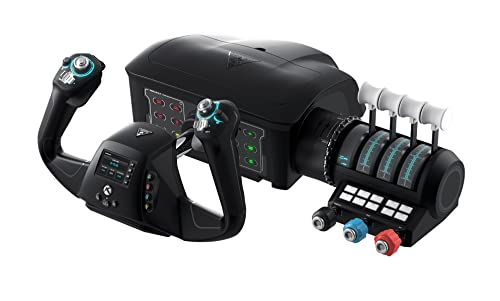
A yoke, throttle quadrant, trim wheel, and rudder controls bolted into one console-ready unit — no armful of accessories required.
The Turtle Beach VelocityOne is the only yoke in this list that answers the console question head-on, and it does so with an all-in-one design that packs throttle quadrant, trim wheel, and yoke into a single piece of hardware. True to life 180° yoke handle rotation runs on a non-contact hall effect sensor — the same magnetic, wear-free tech that owners of the Thrustmaster Boeing pack deliberately chose over potentiometer-based yokes. It carries 26 buttons, 12 analog axes, two POV switches, and two 4-way HAT switches, plus a dedicated pitch trim wheel and integrated rudder and brake controls at your fingertips. The full-color flight management display helps you learn and configure the system without clawing through a manual.
Its desk footprint, at 19.01 x 7.2 x 19.5 inches, is substantial but the secure clamping system is designed to fit a variety of home setups — and clamping is a strength owners repeatedly call out, with the VelocityOne’s grip being among the most solid in this group. The modular throttle quadrant lets you swap lever handles and buttons to mimic your preferred aircraft layout, and it works across airliners, GA, and helicopters. With Microsoft Flight Simulator 2024 and 2020 both supported, you’re covered on the software side whether you’re on Xbox Series X, Xbox Series S, Xbox One, or Windows 10 and 11.
Student pilots comparing it to a real cockpit note that the yoke feels like a Cessna 172 once dialed in, and the dedicated trim, flaps, throttle, and autopilot controls genuinely reduce how often you reach for the keyboard. Where it earns its keep is that combination — nothing else here ships with the full set of controls pre-rigged for a console-or-PC setup.
The catch worth knowing: quality here lands as mixed, and the buyer feedback splits two ways. Owners who love it describe smooth, precise controls and a solid build, while others find the internals less refined — rattling parts and jerky springs that make fine adjustments harder. Ergonomics and adjustability are recurring friction points as well, so the personal fit of the layout is worth weighing, not just the spec sheet. There is also a firmware step: Xbox owners need to install the Turtle Beach app on the console to update firmware. The huge 2,514-rating base means plenty of voices on both sides, which is normal at this scale.
What the all-in-one design buys you: 180° hall effect yoke rotation, 26 buttons, 12 analog axes, integrated rudder pedals, and a full-color flight management display in a single unit.
Worth planning around: the Xbox route needs a console app for firmware, and setup rewards care over haste.
Buy this if: you want one box that covers Xbox and PC, with keyboard-free flying out of the gate.
Consider stepping up if: you demand the absolute last word in build refinement — the mixed quality signals here are honest, not hidden.
5. Logitech G Pro Flight Yoke System + Pro Flight Rudder Pedals Bundle
Pilots who learn to steer with their feet before they ever sit in a real cockpit.
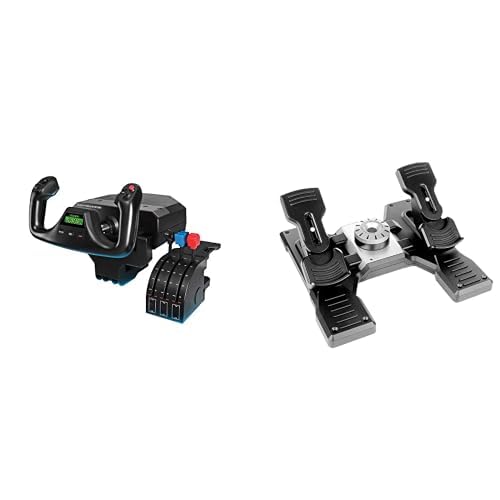
The moment you add rudder pedals, yoking stops being a two-finger activity and starts becoming a whole-body skill. This bundle pairs the Logitech G PRO Flight Yoke System — POV hat, 14 button controls, 3-position mode switch, at least 54 programmable controls — with the Logitech G Pro Flight Rudder Pedals. That’s the pair that makes training feel like training. The pedals themselves are smooth and accurate with a self-centering mechanism, and the differential toe brakes deliver the full control you need when bringing your aircraft up to a stand on the runway. The foot rests adjust to fit a wide range of sizes and carry non-slip material — genuinely useful if you have people of different heights sharing the setup.
The bundle’s reputation is built on what it teaches, and functionality is the most praised trait here, with the yoke’s value as a training tool running a close second — a reflection that simmers and their families see real progression using it. Buyers describe learning to steer with the feet as an interesting, eye-opening experience, and student pilots relate strongly to the muscle-memory angle. It’s also refreshingly simple to set up — the setup is plug-and-play, which is not something you can say about every yoke in this category.
The one honest wrinkle riders will notice: the yoke sensitivity needs a little extra roll input before the simulator registers it, which you’ll feel until you dial it in. It’s not a defect so much as a calibration habit, and it won’t bother anyone using the yoke for training rather than precision aerobatics. Where the Honeycomb Alpha LITE spoils you with 180° rotation, the Logitech platform’s tighter range is the concession you make for the bundled pedals at a mid-range tier.
Why it trains you right: yoke plus differential toe brake pedals give you the full pilot input set for muscle-memory work.
Small adjustment required: expect to over-rotate slightly until you’ve tuned the sensitivity to taste.
Grab this for: student pilots and families training toward real flight, where the bundled pedals teach coordinated turns from day one.
Better elsewhere if: you already have pedals and only need the yoke, or you want the widest possible roll travel in this price tier.
6. Thrustmaster TCA Yoke & Quadrant Boeing Edition Flight Pack – Xbox & PC
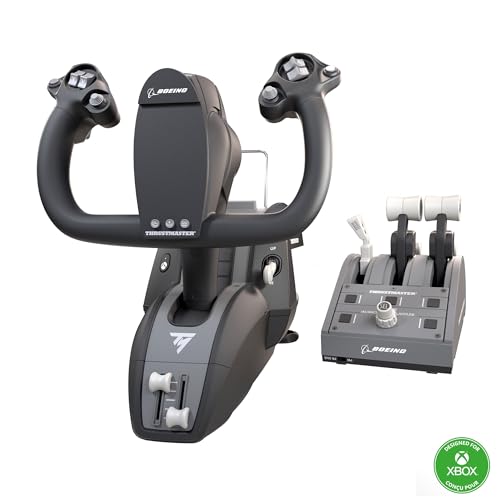
A 1:1 scale Boeing 787 yoke built around a 100% metal internal structure and 35 action buttons.
The officially-licensed Boeing yoke from Thrustmaster brings the Dreamliner cockpit to your desk with hardware that looks the part and mostly plays it. Its signature spec is the PENDUL_R mechanism — a suspended, pendular pivot that replicates the way a real 787 yoke swings through an 8.3-inch (21-cm) range of travel. Around that sits a 100% metal internal structure for durability and balanced weight, plus adjustable spring tension and 2 extra axes with magnetic technology for each main axis. The bundle includes a throttle quadrant with the iconic Boeing autopilot function covering altitude, airspeed, and heading. It ships compatible with PC, Xbox Series X, and Xbox Series S.
Yoke quality is the clear standout here — the most-praised trait by a wide margin — and owners back it up with descriptions of smooth, accurate axes and quality materials. One buyer who compared it directly against the alternatives put it bluntly: “Chose Thrustmaster over Honeycomb/Turtle Beach for Xbox MSFS due to Hall effect sensors (no potentiometer maintenance). Highly customizable buttons/axes; solid yoke movement.” That Hall effect detail matters long-term, because there is no potentiometer track to wear down or clean. The 35 buttons and 2 extra axes give you a full range of maneuvers — takeoffs, landings, aerobatics — without tabbing through menus.
Here’s the trade-off buyers should plan for: the throttle quadrant draws consistent criticism. Multiple owners describe it as less sturdy than the yoke, with wobbly levers, no tension adjustment, a jumpy and slow autopilot knob, and a plastic feel. Reverse thrust being just a button rather than a proper axis is another limitation many point out. The yoke is the star of the show; the throttle is the supporting act, and buyers who primarily fly airliners should manage expectations there. There is also a known workflow quirk — you may need to remove the 5% null zone, adjust sensitivity, and swap in an extra spring to get the feel dialed in just right.
For Xbox owners especially, this is currently one of the few premium yokes with real Hall effect sensors — a point several owners make as the deciding factor over the Logitech or Turtle Beach alternatives. For VR flying and PC workloads, it holds up well too, though some report X-Plane and MSFS don’t fully map every function by default. The bottom jaw digging into the stomach is a real ergonomic note if you fly in an upright position, and there’s no dedicated storage solution for the bulky unit. At 4.4 stars across 457 ratings, the overall picture is strongly positive.
Where The Yoke Earns Its Keep
- PENDUL_R mechanism with smooth 8.3-inch (21-cm) range of travel
- 100% metal internal structure with adjustable spring tension
- 35 action buttons and magnetic technology on the main axes
- Officially licensed by Boeing and Xbox — 1:1 scale 787 replica
- Hall effect sensors with no potentiometer maintenance required
Where It Falls Short
- Throttle quadrant described as less sturdy than the yoke
- Autopilot knob slow and jumpy compared to yoke feel
- Reverse thrust is a button, not a dedicated axis
- Bottom jaw can dig into the stomach at certain seat heights
Set your livery on this: Xbox or PC simmers who want a Boeing 787 cockpit replica with a metal yoke core and 35 buttons, and who treat the throttle as a bonus rather than the headline.
Fly past it if: throttle axis quality is your top priority — the quadrant is the weakest link buyers consistently point to.
7. Thrustmaster TCA Yoke Pack Boeing Edition – Xbox Series X|S / Xbox One / PC
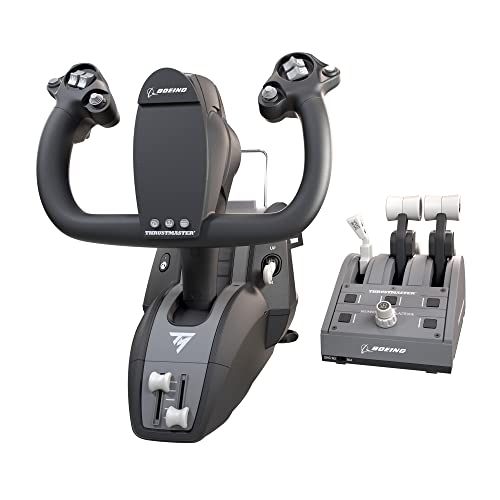
The premium Boeing yoke pack for Xbox owners who want the biggest, heaviest, most authentic-feeling control column.
If the standard Boeing pack felt too modest, this premium variant doubles down on the iconic features. It’s an officially-licensed Boeing yoke and throttle quadrant built as 1:1 scale ergonomic replicas of the 787 Dreamliner, with the suspended PENDUL_R mechanism reproducing the pendular sensation of the real aircraft across an 8.3-inch (21-cm) range of travel. Adjustable yoke springs let you tune between smooth motion and flexible linear resistance. Inside, a 100% metal internal structure adds sturdiness and balanced weight distribution. The throttle quadrant bundles the Boeing autopilot feature covering altitude, airspeed, and heading, with four total levers so you can swap the throttle levers with the speed brake and flaps.
The controls integrate automatically with Microsoft Flight Simulator on Xbox Series X|S and PC, with magnetic technology across each of the main axes. With 16 buttons on the throttle quadrant side and the same premium yoke mechanism as its sibling, this is a serious piece of gaming hardware — not a starter unit. The weight distribution is the number-one reason owners mention the yoke feels so solid underhand.
The honest trade-off is twofold. First, this thing is huge — reviewers describe it as big enough to be a genuine problem in tight setups, and if you don’t have an adjustable chair, the lower jaw of the yoke can contact you in uncomfortable places during long flights. Second, there are reliability signals worth knowing about: a small minority of customers note sensor drift or left-side yoke vibrations that can disrupt heading hold, and the support experience varies by region. The 4.2-star rating across 506 ratings suggests the vast majority are flying happily — but as always, this is a fit question as much as a quality one.
Where it excels is the physical grip and motion. Owners describe the yoke as the best control yoke they’ve owned for pure feel, and the large swing radius means smooth, pilot-like inputs once you’ve dialed in sensitivity. It’s a heavier commitment in both desk space and discipline, but for a dedicated airliner simmer with a permanent flying station, the immersion per dollar is tough to top in this category.
What the premium price buys: 8.3-inch (21-cm) PENDUL_R travel, adjustable springs, 100% metal internals, and four swap-ready levers.
Watch the dimensions: the 1:1 scale means real space required — and the front lip can meet your midsection on a low or fixed chair.
Step up if: you want the most authentic Boeing feel available on Xbox and you have the desk, chair, and commitment to accommodate it.
Look elsewhere if: you have limited space, prefer a lighter control column, or you need absolute certainty on long-term sensor reliability.
Understanding the Specs
Yoke Rotation Range
The roll axis sweep determines how much precision you get in a bank. 180° rotation — used by the Honeycomb Alpha LITE and Turtle Beach VelocityOne — matches what real GA and airliner controls offer, so small corrections map to smaller control-column movements. Shorter throws make the same correction feel twitchy.
Hall Effect vs. Potentiometer Sensors
A hall effect sensor reads a magnetic field to measure the axis position, so nothing rubs or wears. A potentiometer relies on physical carbon-track contact, which can develop dead zones with age. Yokes like the Turtle Beach VelocityOne and the Thrustmaster Boeing packs use hall effect — a long-term reliability edge.
Button Count and Programmable Controls
More buttons mean fewer keyboard shortcuts mid-flight. The Logitech G PRO yoke offers 14 button controls open up at least 54 programmable functions via its 3-position mode switch, while the Thrustmaster Boeing pack carries 35 action buttons. Choose based on how many switches you want to fly without leaving the yoke.
Desk Clamping and Overall Weight
How well the yoke stays put matters as much as the electronics. Heavier yokes like the Honeycomb Alpha bundle at 12.13 kg resist shifting during hard banks, while lighter units may need extra ballast. All yokes in this category clamp to a desk or tray — check that your surface can take the load.
FAQ
Will an aircraft simulator yoke work with Microsoft Flight Simulator 2024?
Do I need rudder pedals with a yoke?
Which yoke has the best hall effect sensors?
Is a 180° yoke rotation really important?
Which aircraft simulator yoke works with Xbox?
How much desk space does a yoke need?
What is the difference between a yoke and a joystick?
Do yokes need calibration after setup?
Which yoke is best for a beginner pilot on PC?
Will a yoke mount onto any desk?
Final Thoughts: The Verdict
For most PC simmers, the aircraft simulator yoke winner is the Honeycomb Alpha Flight Controls Yoke Bundle because it packs a yoke and a full Bravo throttle quadrant — autopilot, gear, flap levers, trim wheel — into one serious cockpit setup. If you fly mostly on Xbox and want a Boeing replica with 35 action buttons and hall effect sensors, grab the Thrustmaster TCA Yoke & Quadrant Boeing Edition Flight Pack. And for general aviation pilots building muscle memory for Cessna-style flying, the Honeycomb Alpha LITE delivers 180° rotation in the most compact footprint. Match the yoke to your platform and desk, and you will spend your time flying, not fighting the hardware.
How We Picked
We do not accept paid placement. Every pick is matched to a real buyer and a real use-case; we do not hands-on test units.
Sources & Methodology
Specifications: manufacturer listings and product documentation. Review insights: verified customer reviews, as of September 2026. Pricing: not shown on this page (it changes often); check the current price via the retailer link.
As an Amazon Associate, Gadgets Feed earns from qualifying purchases. This does not affect which products we feature.