
A PC case with a solid glass front panel might look clean on your desk, but it is suffocating your components. Every degree of extra heat forces your GPU fans to spin faster and shortens the lifespan of your CPU cooler. The difference between a chassis that breathes and one that chokes can be tens of degrees during a gaming session.
I’m Min — the co-founder and writer behind Gadgets Feed. I’ve spent hundreds of hours analyzing thermal performance data, fan configurations, and mesh density ratings to separate the cases that deliver real airflow from those that just market it well.
Whether you are upgrading to a high-wattage RTX 40 series card or simply want lower noise from slower-spinning fans, finding the right best airflow computer case is the single most impactful cooling upgrade you can make without touching your hardware.
How To Choose The Best Airflow Computer Case
Thermal performance in a case comes down to three interconnected factors: the resistance of the intake path, the static pressure capability of the fans, and the unobstructed exhaust volume. A case that scores high on one metric but fails on another will still leave your components hot.
Mesh Density and Ventilation Ratio
The percentage of the front panel that is open mesh rather than solid material directly dictates how much air the intake fans can pull. A panel with roughly 50% ventilation, like the Montech AIR 903 MAX, allows fans to operate at lower RPMs while moving the same volume of air as a choked design with fans running at full speed. Look for cases that advertise a specific mesh density or use hexagonal or honeycomb patterns that maximize open area without sacrificing structural rigidity.
Fan Configuration and Size
Two 140mm fans can move more air at lower noise levels than three 120mm fans because their larger blades generate higher volume per revolution. Cases that ship with 140mm fans, such as the LIAN LI LANCOOL 216, usually deliver better out-of-the-box thermal performance. Pay attention to whether included fans are standard or reverse-blade — reverse fans on the side or bottom intake positions create a cleaner aesthetic without the visible motor hub spines, but they do not change airflow direction.
Component Clearance and Radiator Support
A case can have perfect airflow but be useless if your 360mm AIO radiator or 400mm GPU does not fit. Measure your CPU cooler height allowance (typically 160mm to 180mm) and GPU length clearance (anything under 350mm will struggle with modern flagship cards). The best airflow cases also include a dedicated bottom intake fan mount for direct GPU cooling, a feature the NZXT H5 Flow popularized with its angled fan design.
Quick Comparison
On smaller screens, swipe sideways to see the full table.
| Model | Category | Best For | Key Spec | Amazon |
|---|---|---|---|---|
| Montech AIR 903 MAX | Mid Tower | Best Overall Airflow | 51% mesh ventilation, 4x 140mm fans | Amazon |
| LIAN LI LANCOOL 216 | Mid Tower | Premium Build Quality | 2x160mm front fans, 140mm rear fan | Amazon |
| NZXT H5 Flow RGB | Mid Tower | GPU Thermal Focus | Dedicated angled bottom GPU fan | Amazon |
| MUSETEX Y6 | Mid Tower | Best Visual Showcase | 6 pre-installed PWM ARGB fans (2 reverse) | Amazon |
| MSI MAG Forge 112R | Mid Tower | Budget-Friendly Entry | 4x included ARGB fans, mesh front panel | Amazon |
| FOIFKIN F1 | Mid Tower | Value Fan Package | 6x 120mm PWM ARGB fans, dual-chamber design | Amazon |
| Montech XR-B | Mid Tower | Compact High-End Build | 3x ARGB PWM fans, dual tempered glass panels | Amazon |
In‑Depth Reviews
1. Montech AIR 903 MAX

The Montech AIR 903 MAX is the gold standard for thermal performance at this price tier. Its front mesh panel achieves a 51% ventilation rate — meaning nearly half the panel is open space for air to pass through with minimal resistance. This allows the three included 140mm ARGB PWM front fans to move massive volumes of air at lower RPMs, keeping noise levels comfortable even under sustained gaming loads.
Beyond raw airflow, the case supports E-ATX motherboards, coolers up to 180mm tall, and GPUs up to 400mm long. The four pre-installed 140mm fans (three front intake, one rear exhaust) come with a built-in PWM and ARGB hub, simplifying cable management. The top panel accommodates 360mm radiators, and both the top and front mesh panels are magnetic for easy dust filter removal.
Some users report the stock exhaust fan produces a mild coil whine at higher RPMs, which is noticeable in quiet rooms. Replacing the rear fan with a third-party model is a simple fix. For the combination of fan count, fan size, mesh density, and component clearance, this case offers unmatched out-of-box cooling.
Why it’s great
- 51% mesh ventilation is the highest ratio at this price
- Four 140mm PWM fans included with integrated hub
- Fits E-ATX boards and massive 400mm GPUs
Good to know
- Stock exhaust fan may exhibit coil whine under 20% PWM
- Very large footprint — measure your desk space
2. LIAN LI LANCOOL 216

Lian Li engineered the LANCOOL 216 with an unconventional front fan setup — two 160mm ARGB PWM fans — that delivers higher volumetric airflow than any case relying on multiple 120mm fans. The 160mm blades move more air per revolution at lower noise levels, making this case nearly silent at idle and whisper-quiet under moderate loads. The front, top, and PSU shroud panels are all fine mesh, ensuring unrestricted intake across the entire front face.
The case includes an innovative rear PCIe fan bracket that lets you mount a 120mm fan directly behind the motherboard tray for additional GPU exhaust. Air cooling mode supports CPU coolers up to 180mm tall, while water cooling handles 360mm radiators up top. Cable management is simplified by built-in velcro straps, routing clips, and a grommet bar. The modular motherboard I/O plate can be moved to a higher position to free space for thick radiators.
At this price point, the LANCOOL 216 delivers the sturdiest build quality of any case in its class, with a 4.0mm tempered glass side panel and a heavy-duty steel frame. The only compromise is the flat black power button that can be hard to locate by feel in the dark.
Why it’s great
- Unique 160mm front fans deliver exceptional airflow at low noise
- Rear PCIe fan bracket for dedicated GPU exhaust
- Tool-less glass panel and superb cable routing
Good to know
- Power button blends into chassis visually
- SSD bracket access requires removing the rear panel
3. NZXT H5 Flow RGB

NZXT solved a persistent problem in mid-tower cooling with the H5 Flow: the rear exhaust fan pulls air across the CPU but does little for the GPU. This case includes a dedicated 120mm fan mounted at an angle beneath the GPU slot, drawing cool air from the bottom intake and directing it straight onto the graphics card. Real-world testing shows GPU temperatures dropping by roughly 10-15°C compared to the previous H510 series.
The perforated front and top panels allow filtered airflow through the two included F140 RGB Core fans. These 140mm fans connect to a standard 5V ARGB header for motherboard synchronization. The case supports radiators up to 280mm in the front and 240mm in the top, with GPU clearance up to 400mm — enough for most RTX 40 series cards. The compact footprint makes it suitable for desk placement without dominating the workspace.
Build quality is excellent with a steel frame and tinted tempered glass side panel. The interior is spacious enough for easy cable routing using the pre-installed Velcro straps. Some builders note that the bottom fan screws can be tricky to seat without losing them, and the case ships without individual fan direction indicators, so verifying intake vs exhaust orientation is a manual process.
Why it’s great
- Dedicated angled bottom fan provides direct GPU cooling
- Two 140mm ARGB fans included with standard 5V header
- Compact mid-tower design fits on most desks
Good to know
- Fan orientation indicators are not printed on the frames
- Bottom fan screws can be fiddly during installation
4. MUSETEX Y6

The MUSETEX Y6 prioritizes visual impact without sacrificing airflow. Its 270-degree dual tempered glass panels reveal every component from two sides, while six pre-installed 120mm PWM ARGB fans (two of which are reverse-blade side intakes) create a bright, uniform lighting arrangement. The reverse-blade design positions the fan hub out of sight, keeping the air intake stream clean-looking through the glass.
Internally, the Y6 supports ATX, Micro-ATX, and Mini-ITX motherboards, with GPU clearance up to 400mm and CPU cooler height up to 176mm. The top panel mounts a 360mm radiator, and the dual-chamber layout separates the PSU and drives into a rear compartment for cleaner cable management. The front I/O includes a USB 3.2 Type-C port and a USB 3.0 port, meeting modern peripheral bandwidth needs.
The clear white version is particularly striking and breaks the black-case monotony common in this category. Builders should plan their fan cable routing before installing the motherboard, as the stock fan cables are short and the rear chamber is tight for full ATX boards. The fans use a ribbon connector that does not support per-fan individual color control, which is fine for unified lighting themes but limiting for granular customization.
Why it’s great
- Six PWM ARGB fans included — exceptional value for RGB builds
- Reverse-blade side fans improve aesthetic and airflow
- 270° glass panels display full interior
Good to know
- Fans use ribbon connectors — no per-fan color control
- ATX motherboard installation requires careful cable planning
5. MSI MAG Forge 112R

MSI’s MAG Forge 112R delivers solid airflow fundamentals for budget-conscious builders. The full mesh front panel provides a clear intake path for the four included 120mm ARGB fans — three front intake and one rear exhaust. While the fans are not PWM, they run at a fixed speed that is adequate for mid-range components like a Ryzen 5 or Core i5 paired with a mid-tier GPU.
The case supports ATX, M-ATX, and ITX motherboards with a 4mm tempered glass side panel held by tool-less thumb screws. Radiator support tops out at 240mm, which is enough for most single-fan AIO coolers. GPU clearance is generous enough for triple-fan cards, and the dedicated PSU shroud hides cabling at the bottom. The clean front I/O includes two USB 3.0 ports, audio jacks, and a LED control button for the ARGB fans.
The metal panels feel thinner than premium cases, and some units ship with missing motherboard screws. The non-PWM fans cannot be controlled via the motherboard, so their speed is fixed. For builders on a tight budget who need decent airflow and RGB lighting without spending extra, this case works well — just budget for a few replacement thumb screws and have spare fan headers on the motherboard.
Why it’s great
- Full mesh front panel ensures unobstructed intake
- Four ARGB fans included for immediate lighting
- Tool-less tempered glass side panel
Good to know
- Included fans are non-PWM — speed cannot be adjusted
- Metal panels and expansion slot covers feel less substantial
- Some units arrive without sufficient motherboard screws
6. FOIFKIN F1
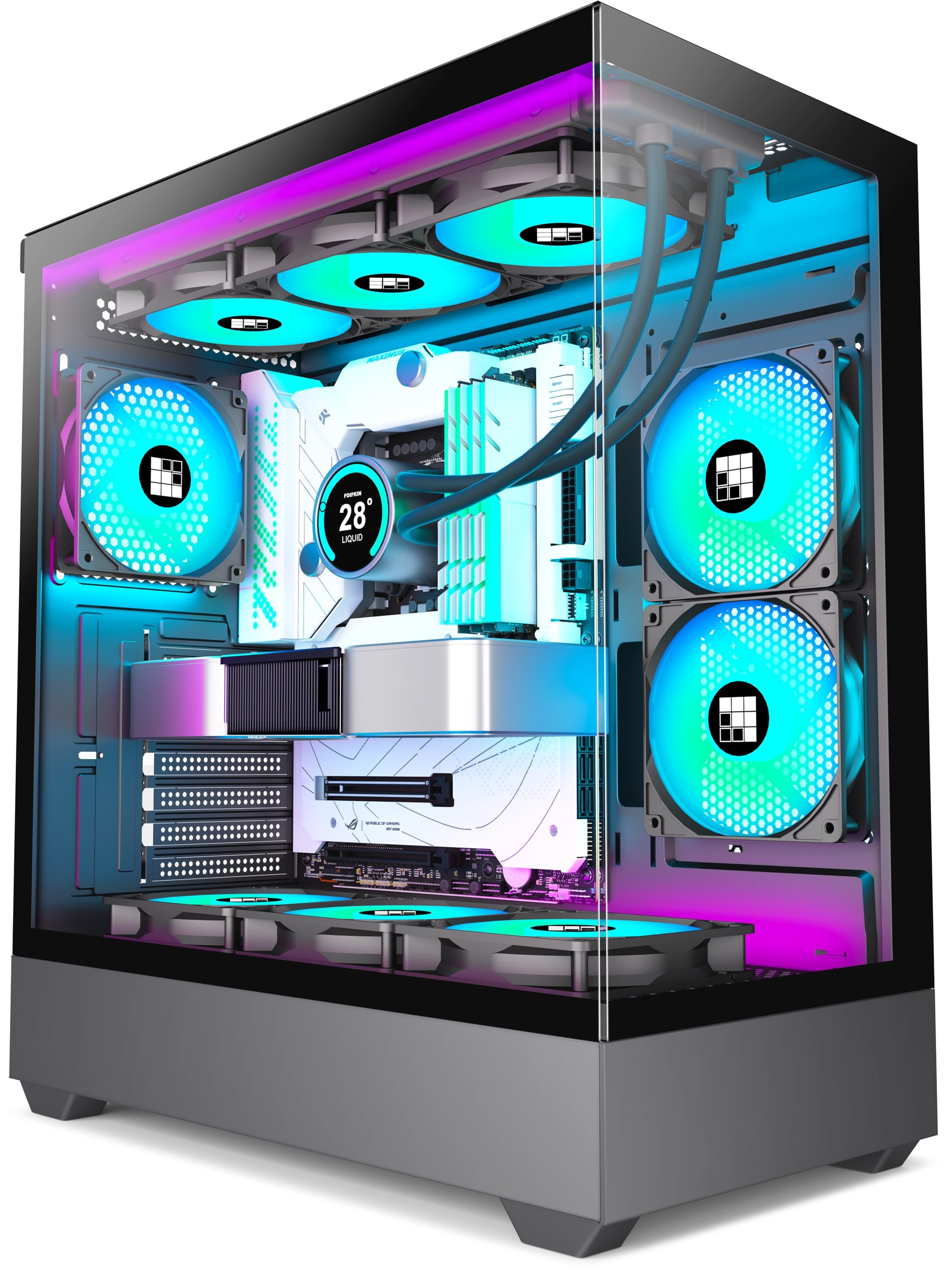
The FOIFKIN F1 is a budget-friendly case that punches above its weight class with six pre-installed 120mm PWM ARGB fans — five reverse-blade and one standard. This fan count is rare at this price point, and the PWM capability means you can control fan speed curves from the motherboard, optimizing noise versus cooling. The dual-chamber design isolates the PSU and drive bays behind the motherboard tray, creating a cleaner main chamber and better airflow paths.
The case supports ATX, M-ATX, and ITX motherboards, with GPU clearance up to 400mm and CPU coolers up to 170mm tall. The top panel fits a 360mm radiator, and the front I/O includes a USB 3.0 Type-C port, USB 3.0, and two USB 2.0 ports. The tempered glass side panel is fully transparent, letting the six fans’ ARGB lighting shine through without obstruction.
The PSU fan cables on the reverse fans use a non-standard connector that may not work directly with some motherboard headers without an adapter. The bottom fan locations can obstruct motherboard header access, so install those fans last. Builders should also note the metal panels are thin and can flex slightly under pressure.
Why it’s great
- Six PWM ARGB fans included at a budget-friendly price
- Dual-chamber design improves cable management and airflow
- Full 360mm radiator support and 400mm GPU clearance
Good to know
- Reverse fans use non-standard connectors — adapter may be needed
- Bottom fans can block motherboard header access
- Metal panels are thin with some flex
7. Montech XR-B

Montech’s XR-B is a compact mid-tower that squeezes in full ATX support with dual tempered glass panels for a panoramic view of the interior. It ships with three pre-installed 120mm ARGB PWM fans — two reverse-blade side intakes and one standard rear exhaust — that are daisy-chained for simplified wiring. The wood-grain design I/O panel adds a unique natural aesthetic to the front bezel.
The case supports a 360mm radiator at the top and fits high-end 40-series GPUs despite its relatively small 17.1-inch depth. The mesh filters on the top, bottom, and side panels provide dust protection without restricting airflow. The tool-less glass panels use push-in clips for quick removal, and cable management is handled by rubber-gasketed routing holes in the motherboard tray.
The side glass panel fits tightly and requires careful alignment to avoid cracking the glass. Some units arrive with dust or minor scratches on the glass from packaging. The included fans are bright and vibrant, but the case supports up to nine fans total, so expansion is straightforward if you need more cooling.
Why it’s great
- Compact design fits ATX boards and 360mm radiators
- Daisy-chained reverse-blade ARGB fans simplify cabling
- Wood-grain I/O panel is a distinctive design touch
Good to know
- Glass panels are tight-fitting and may require force
- Some units arrive with cosmetic glass imperfections
- No front intake fans — relies on side intake and rear exhaust
FAQ
Is a mesh front panel always better for GPU temperatures?
How many case fans do I actually need for good airflow?
Does a case with more fans always run cooler than one with fewer fans?
Can I use reverse-blade fans as regular intake fans?
Final Thoughts: The Verdict
For most users, the best airflow computer case winner is the Montech AIR 903 MAX because its 51% mesh density and four 140mm PWM fans deliver superior thermal performance straight out of the box. If you want premium build quality and unique 160mm front fans, grab the LIAN LI LANCOOL 216. And for dedicated GPU-focused cooling in a compact mid-tower, nothing beats the NZXT H5 Flow RGB.