
Our readers keep the lights on and my morning glass full of iced black tea. As an Amazon Associate, I earn from qualifying purchases.
Specs are compiled from manufacturer listings and verified buyer reviews and can change over time — please confirm the key details on the product page before buying.
A graphics card can only cool itself with the air your case actually feeds it. A sealed glass front photographs well but starves your components of air, which is why a mesh-front, high-airflow case is the cheapest thermal upgrade for an existing build. Below are nine chassis that all breathe properly, sorted so the genuinely best one sits at the top.
I’m Min — the founder and writer behind Gadgets Feed. This guide is built by comparing the manufacturers’ published specifications and the patterns across verified customer reviews, so you get each pick’s real strengths and trade-offs instead of marketing spin.
You are about to see how fan size, GPU clearance, and radiator support separate a good tower from a great one. The goal is simple: match an airflow case to your exact parts list without paying for fan mounts you will never use.
Our Picks at a Glance


How To Choose The Best Airflow PC Case
A high-airflow case gives your CPU cooler and graphics card an unobstructed front-to-back and front-to-top path for cool air. With that path, your fans hold the same temperatures at lower RPM, so the build runs quieter. Without that path, your fans just spin against a solid panel and recirculate warm air.
Start with the front panel, not the lights
The front panel is where the air enters, so it decides most of your cooling. A mesh panel — a fine woven screen — lets air pass almost freely, while a solid glass or steel slab forces your fans to pull through tiny side gaps. Every case on this list uses a mesh or perforated front for that reason. Some go further with a stated ventilation rate, and one Montech model in this roundup publishes a 51% figure, meaning roughly half the front is open to air.
Match fan size to the job
A 140mm fan moves the same air as a 120mm fan at lower RPM, and lower RPM means less noise. A 140mm fan is the common balance, but 160mm front fans — found on one Lian Li pick here — push a wider column of air across your graphics card. What matters more than raw size is how many mounts a case gives you: a tower that supports up to 9 or 10 fans lets you run all of them slow and near-silent instead of a couple at full tilt.
Check GPU and radiator clearance before you buy
Clearance is where builds go wrong. Long flagship cards and thick liquid coolers need room, so look for the published GPU length limit and radiator sizes the case accepts. A case that fits a 355mm card is fine for most builds, but a 410mm or 400mm limit gives you headroom for the largest cards and a front-mounted radiator at the same time. Always subtract radiator thickness from the GPU figure if both sit at the front.
Cable management is a cooling feature too
Loose cables block the front-to-back air path and trap heat against the motherboard. Look for routing channels, Velcro straps, and a deep second chamber behind the tray. A case with a dedicated cable channel and pre-installed straps lets you keep the front path clean, so the air your fans pull in actually reaches the components instead of swirling around a tangle of wires.
Quick Comparison
| Model | Best For | GPU Clearance | Included Fans | Max Fan Mounts | Amazon |
|---|---|---|---|---|---|
| Fractal Design North★ Best Overall | Style-first silent builds | 355 mm | 2x 140mm PWM | — | Amazon |
| MONTECH AIR 903 MAXBudget Champion | Big-GPU airflow on a budget | 400 mm | 4x 140mm PWM (3 ARGB) | — | Amazon |
| LIAN LI LANCOOL 207Most Compact | Compact ATX with GPU under-fans | 410 mm | 4 (2x 140mm ARGB + 2x 120mm) | — | Amazon |
| CORSAIR 4000D RS | Modular builds and radiators | — | 3x RS PWM | Up to 200mm front | Amazon |
| be quiet! Pure Base 501 | Quiet, understated offices | — | 1x Pure Wings 3 140mm PWM | Up to 6 | Amazon |
| Antec Flux Wood | Wood-accent E-ATX cooling | — | 5 PWM (3x P12 + P12R + P14) | Up to 9 | Amazon |
| LIAN LI LANCOOL 216 RGB | Large cards, quiet airflow | 392 mm | 2x 160mm ARGB + 1x 140mm | — | Amazon |
| NZXT H9 Flow | Showcase dual-chamber builds | — | 3x F140Q (CV) + 1x F120Q (CV) | Up to 10 | Amazon |
| Antec Performance 1 FT | Full-tower expansion and airflow | 370 mm | 4 PWM | — | Amazon |
In‑Depth Reviews
1. Fractal Design North Chalk White
Our pick — over 4.5★ from 3,500+ verified ratings; the strongest balance of quality and price.
The case that cools like a workhorse and looks like a sideboard
This is the pick for anyone who wants a fast build sitting in a living room without a light show attached to it. The defining number is the GPU limit: a 355 mm card fits with room for a 300 mm card plus a 360 mm front radiator. That front radiator figure is what most builders forget, and having both stated up front saves you a return.
Where the North separates itself from the other towers here is how much it hides. The enclosure is metal, not tempered glass, and it uses a fine-patterned mesh front backed by a full mesh side panel for ventilation. Two 140 mm Aspect PWM fans come pre-installed, so the case pulls air from the very first power-on. The airflow channel runs front to back with a top vented panel handling exhaust.
The build itself is roomy in the ways that matter. The case fits ATX, mATX, and ITX motherboards, and the two included drive mounts cover both 3.5-inch and 2.5-inch drives with two extra dedicated 2.5-inch mounts for SSDs. A reviewer running a 9800X3D with a Phantom Spirit cooler and a 9070XT reported the CPU sitting at 50-60C with the GPU under 60C — and noted the stock fan curve is noisy until you set a custom one in BIOS. One trade-off to know: the wood-and-mesh look is the whole point, so if you want a glass showcase panel to display RGB parts, this is not that case.
Birch wood front
- Mesh front plus full mesh side panel keeps a clear air path
- Two 140mm Aspect PWM fans included, so no extra fan purchase needed
- Fits 355mm GPUs, or 300mm with a 360mm front radiator, both stated clearly
- Metal enclosure and seven bridgeless expansion slots for flexible builds
Chalk white shows dust
- Mesh body is designed for airflow over sound isolation
- Stock fan curve runs loud until you tune it in BIOS
Quiet desk build: you want a quiet-capable, wood-front tower that fits a full ATX build and hides the components.
Need front USB-C: you specifically want a glass side panel to show off RGB parts, since this chassis is metal-bodied.
2. MONTECH AIR 903 MAX
A metal-front E-ATX tower that swallows giant cards without swallowing your budget
The number that earns this case its spot is the GPU clearance: 400 mm length and 190 mm width. That is enough to fit the popular RTX 40-series giants with air to spare, and it is a head start on cards the other picks here cannot match. It is also an E-ATX case that also accepts Micro ATX and Mini ITX boards, so the same chassis serves a small office build or a full workstation.
Airflow is the whole design brief. The front panel is metal with a stated 51% ventilation rate, meaning roughly half the surface is open to incoming air, and the mesh front doubles as a removable dust filter. Four HP140 PWM fans ship installed — three ARGB plus one plain — through an LED/PWM controller with 21 lighting effects. The case supports 360 mm AIO coolers at both front and top and gives 180 mm of CPU tower cooler height. Comparing dimensions, this Montech measures 18.8″D x 9″W x 19.4″H versus the Fractal North at 17.6″D x 8.46″W x 18.46″H, making it the roomier footprint of the two.
Building in it is the part owners keep coming back to. The HDD cage is removable, cable routing has rubber grommets and cutouts, and the inbuilt fan/RGB hub is pre-wired to the front fans. The honest trade-off every owner flags is noise: the front fans push hard but run loud at high RPM. One buyer put it plainly — the fix is a custom fan curve in BIOS, after which the case runs cool and quiet. If you never touch BIOS settings, budget for a louder build.
Four included fans: a metal, 51%-vented face means the fans are not fighting a slab for air, so temperatures drop without spinning everything to maximum.
Plastic front panel: stock fan acoustics. Owners call the default loud, and the standard remedy is a quieter custom curve.
Cheap airflow king: a first or second build around a long, hot graphics card where you want the fans included and the airflow handled.
Want glass front: you want a silent tower straight from the start with no BIOS tuning — the fans need a curve to settle down.
3. LIAN LI LANCOOL 207
A short tower that blows air straight up into the graphics card from below
Here is the case to look at if your desk space is tight but your card is enormous. The LANCOOL 207 has a 410 mm GPU clearance — the longest of any pick on this page, and enough that a 330 mm-plus triple-slot card still has room to spare. It is a genuinely compact ATX footprint, but the layout is reshaped: the power supply moves to the front, the motherboard tray sits recessed, and two of the four included fans blow directly up at the bottom of the graphics card.
Those bottom fans are the clever bit. Two pre-installed 120 x 120 x 25 mm PWM fans run at speeds up to 1950 RPM with 11 blades each, feeding cool air straight to the GPU. The front pair are 140 x 140 x 30 mm ARGB fans capped at 1900 RPM with infinity-mirror centers. The case also takes a 360 mm radiator on top. Rounding it out, a pre-installed GPU anti-sag bracket is adjustable to fit cards of any size, which matters when the card is the heaviest part of the build.
Owners consistently highlight the design and the value, and the included-fans and airflow aspects both land positive too. Downsizing from a full tower into this chassis has become a common story — a full ATX board and a Zotac RTX 5080 AMP Extreme at 330 mm-plus with 3.5 slots still fit with room to spare. What’s worth a caveat is acoustic tuning and cable space: the front fans can hum in a quiet room, and side-panel cable routing wants flat cables to seat cleanly.
Small footprint build: you want the longest GPU support here in the shortest chassis, with bottom fans pointed at the card.
Need many drives: you need lots of side-panel cable slack — flat cables help, and the front fans may want a quieter curve for silent rooms.
4. CORSAIR 4000D RS

A case you can reconfigure as your build grows, with fans that slide where you need them
If you swap parts more often than most people change phone cases, this is the chassis built for that habit. The Corsair FRAME 4000D RS centers on a modular system — the front I/O panel and even the motherboard tray are designed to be upgraded later. The airflow side carries a 3D Y-pattern steel front panel, perforated in three dimensions so cool air meets as little resistance as possible, and the internal panel near the tray works as either a cable cover or a mount point for side fans.
The fan system is the standout. Corsair’s InfiniRail mounting lets you slide a steel rail in the front and roof, so you are not locked to fixed screw holes — front fans can go up to 200 mm, roof fans to 140 mm. Three RS PWM fans come pre-installed in the front with daisy-chainable 4-pin connections and Zero RPM mode, which stops the fans entirely at low load. The case is compatible with reverse-connector motherboards including ASUS BTF, Gigabyte Project Stealth, and MSI Project Zero. Owners note the 4000D RS fits 12 fans or two 360 mm radiators with a 140 mm rear exhaust, and that the earlier white 4000D Airflow won’t fit a top 360 AIO while this frame version will.
The trade-off to weigh is a quality-control pocket. There are scattered reports of the front USB panel arriving broken, and one owner received a dented bottom plate from the factory — though Corsair support replaced the USB panel promptly. On the bright side, the same owners reward the routing channels and tie-downs, and the fans earn praise for running quiet until you push them. It is a genuinely flexible case; just inspect the panels when the box lands.
Tool-free side rails: sliding fan mounts mean you place airflow exactly where your hottest component is, rather than where the case designer guessed.
Panel gaps vary: a small number of units show a broken front USB panel or a factory dent — open it up and test before you build.
First-time builder: tinkerers who want to slide fans to the perfect spot and upgrade the case itself over several years.
Want included fans: you want a set-and-forget box — the modularity is wasted on a build you will never open again.
5. be quiet! Pure Base 501 Airflow
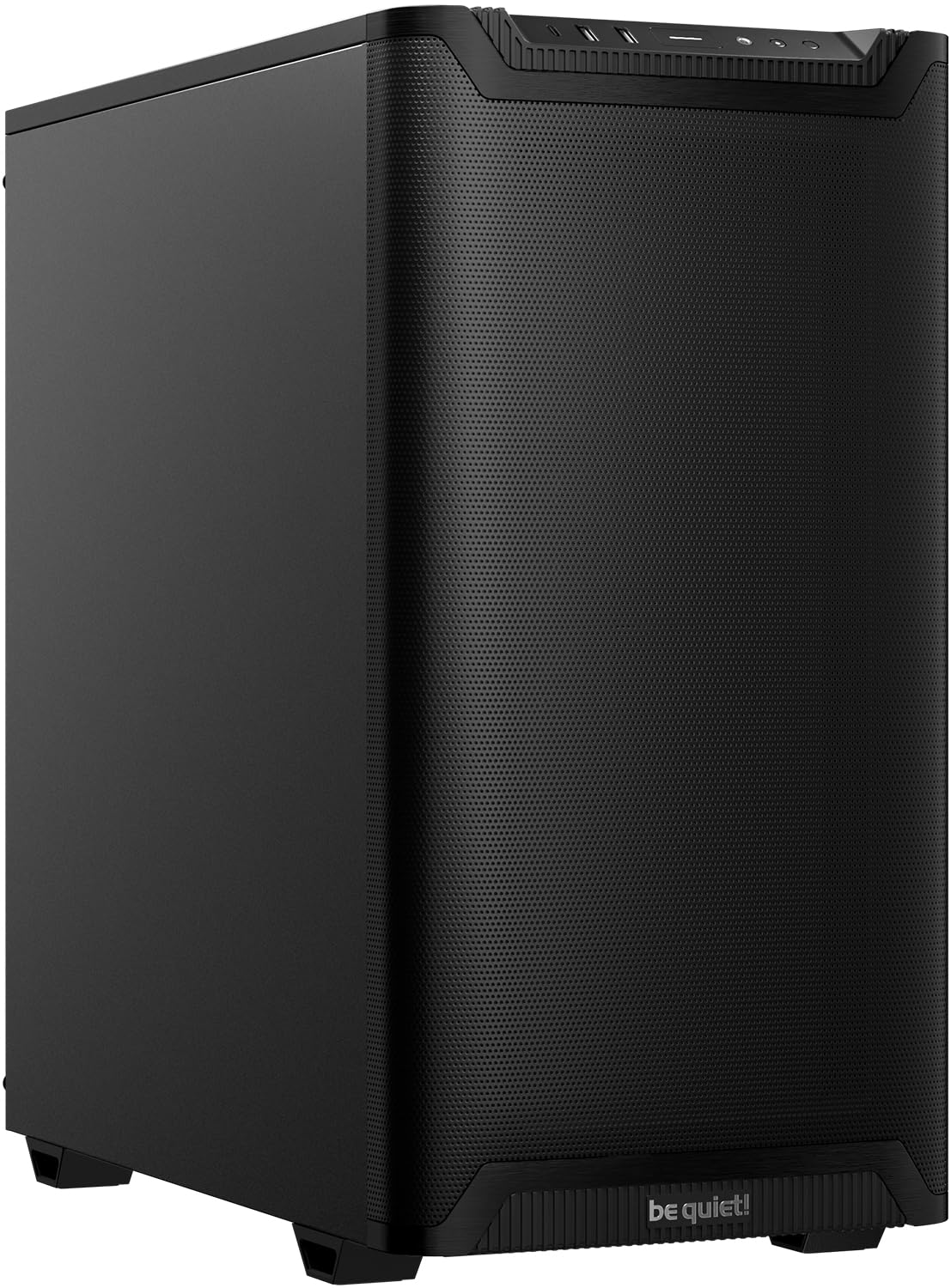
For the living-room or office build where you would rather not hear a thing
This is the case for a quiet room and a plain black box — no windows, no lights, just airflow with the noise dialed down. It is built for quiet operation specifically, using airflow-tune blades and a minimalist design rather than a light show. One Pure Wings 3 140 mm PWM fan ships pre-installed, tuned to cut turbulence and the noise that comes with it.
Where a lot of airflow towers sacrifice silence, this one leans into it from a different angle. The side panels carry sound-dampening material, which lets the fans run without the case amplifying the hum. Cooling capacity is generous: the front can take up to three fans or a 360 mm radiator, and the top fits up to three fans or a 240 mm radiator. For graphics cards, the PCIe slots rotate 90° for vertical mounting, supported by an optional riser cable, which can also fight the sag that heavy cards develop over time.
Owners describe a very quiet machine they barely notice, and report airflow arriving from nearly every direction, with dust filters on the intakes. The recurring gripe is specific and worth knowing: the front USB ports lack a flared entry, making some devices stiff to insert, and at least one owner found a front USB port dead because of a bad internal connection. Everything else — the assembly, the mostly metal sides, the cable options — lands positive. If a rear fan or front-panel USB is critical to your daily use, test those ports early.
Quiet office PC: bedroom, office, or living-room builds where low noise beats seeing the components.
Chase max cooling: only one 140mm fan is included, so plan for extra fans, and check the front USB ports hold devices firmly.
6. Antec Flux Wood

A wood-and-glass E-ATX tower that arrives with five fans already wired up
Five PWM fans included changes the math on a build — you are not buying a single extra fan, and the wiring is already done. The Flux Wood ships with three P12 PWM fans at the front, one P12R PWM reverse fan in the power supply chamber, and one P14 PWM in the rear, and it supports up to nine fans total. That is a lot of moving air for a mid-tower.
The rear fan hub is the detail that matters day to day. Included fans are pre-wired to the hub, so assembly is close to plug-and-play. The case does support back-connect motherboards from the wider market, and its E-ATX format handles large boards alongside three 3.5-inch drive bays. On cooling headroom, the front and top can run a 360 mm radiator each, or a front 420 mm radiator paired with a top 280 mm. The metal, glass, and wood mix builds a texture that most steel-and-RGB cases cannot match.
What owners consistently call out is the build and the airflow, and appearance and ease of assembly both land positive. One buyer who had not built a PC in a decade said the included, pre-wired fans and the rear hub made assembly and cable routing far easier than expected. The noise picture is mixed — most find it quiet with BIOS tweaks, but some front 120 mm fans have arrived making a rattling sound. Antec support has swapped affected fans, so it is worth a listen in the first week.
Warm living room: you want five fans and a hub from the start and a wood-and-glass look, without buying extras.
Prefer all black: the front fans are the weak spot acoustically for a small number of owners — test them early and use the warranty if they rattle.
7. LIAN LI LANCOOL 216 RGB

The one with the big front fans and the deepest track record here
Two 160 mm ARGB front fans and a 140 mm rear fan come pre-installed, and that oversized front pair is the reason this case moves serious air quietly. The chassis supports graphics cards up to 392 mm long and 180 mm tall in air-cooling mode, so the largest NVIDIA 4000-series cards fit with room around them. A modular motherboard I/O lets you shift the board higher or lower depending on whether you are running air or liquid cooling.
The build quality is where this case earns its following. It uses a heavy-duty steel frame and 4.0 mm tempered glass, and mesh panels at the front, top, and PSU shroud side keep the air path open. Cable management is unusually tidy for the tier — a grommet bar, Velcro straps, and small clips, plus a second-chamber layout that keeps routing out of sight. For storage, a total of 2 x 3.5-inch HDDs and 6 x 2.5-inch SSDs can be installed on dedicated mounts, and a bottom-mount power supply keeps the weight low.
What owners reward most is the sheer quality of the case, followed closely by how much room it offers. It fits an ATX board, a Phantom Spirit 120 SE cooler, an RTX 3080 with the included bracket, and an MSI A850GL PSU — and one builder running a 3090 FE with an i9 called the front fans “crazy good” and the negative pressure “perfect.” The caveats are honest and rare: the case is heavy, and a loose dust filter can slide when you lift it. There is also a report of a front audio connector not working on a Linux setup.
Two 160mm fans: 160mm front fans push a wider, slower column of air than standard 120s, so you get strong cooling without the noise penalty.
Heavy empty case: the steel frame and glass make this a two-hand lift, and the dust filter can shift when you carry it.
RGB on a budget: you want proven quality, giant fan mounts, and tidy cable routing in one mid-tower.
Want smaller mid: portability matters — this is a heavy, sturdy box that is not built for carrying around.
8. NZXT H9 Flow

Wraparound glass on the outside, a hidden second chamber on the inside
You buy this chassis when the look of the build is half the reason you built it. The NZXT H9 Flow splits the box into two chambers — the main components live up front behind a smooth, wraparound tempered glass panel, while the power supply and drives hide in the second chamber at the back. That separation improves both thermals and cable management, because the messy part simply disappears behind the motherboard tray.
For airflow, perforated steel panels and angled front-right fans keep cool air moving across high-performance parts. Four fans ship installed — three F140Q (CV) in the front-right and one F120Q (CV) in the rear, and CV here means Case Version, a simple 3-pin DC fan rather than a PWM one. The case supports up to nine 140 mm fans across the top, front-right, and bottom plus one 120 mm in the rear, and it fits radiators up to 420 mm on the top and front-right. It is also back-connect ready for rear-connecting motherboards like ASUS BTF and MSI Project Zero.
Owners appreciate the design and the extra-wide cable channels with built-in Velcro straps, and they fit a 420 mm radiator plus seven fans without fighting the chassis. The trade-offs are real but expected for the size. This is a large, heavy case that may not fit the space you had in mind, and the stock fans are the weaker part — a common move is to swap them for quieter PWM fans. One owner also received a stripped rear thumbscrew, though it surfaced only after the build was finished.
Showcase aquarium: you want a showcase build with wraparound glass and a hidden cable chamber, and you have the desk room for a large tower.
Want cheaper case: you would rather have stronger stock fans from the start and a smaller footprint.
9. Antec Performance 1 FT

A full tower with a temp readout and room to keep growing
This is the pick for a build that will grow: a full tower with a mesh front panel and four PWM fans included, plus a built-in temperature display that shows system status at a glance. The iUnity feature reports your PC specs on the panel, and two cable covers are included for cleaning up the routing. It also carries dual 4 mm tempered glass side panels and a Type-C 10Gbps front port ready for fast transfers.
Size is the point. The case supports E-ATX, ATX, Micro-ATX, and ITX motherboards, and fits graphics cards up to 370 mm — the same class as the biggest cards here. Full-tower dimensions mean tall CPU coolers and full-length cards drop in without wedging, and there is a dedicated compartment for the power supply and drives. Owners note the case fits a thick 360 mm AIO top-mounted, with four drive bays plus room for 3.5-inch and 2.5-inch storage.
What owners return to is the build and the space — and the results. One builder running an RTX 4090 saw it stay under 70C, compared with the 3080 running in the eighties, after moving into this case. The stock 140 mm fans run quiet and provide ventilation without water cooling, and the rubber-padded grommets make clean cable routing straightforward. The honest caveats: this is a very large case that is not desk-friendly, and the temperature display panel is small and needs the iUnity app, which owners find slightly limited.
Full tower space
- Full-tower space for E-ATX boards and cards up to 370mm
- Four PWM fans included, with strong ventilation from quiet 140mm units
- Fits a thick 360mm AIO top-mounted with ease
- Dual 4mm tempered glass panels and a Type-C 10Gbps front port
Heavy and tall
- Very large footprint that is not built for a desk
- Temp display is small and depends on the iUnity app
Water cooling loop: a long-term build with big cards and thick radiators where expansion room beats compact size.
Short on desk: you are short on space — a full tower this size demands its own floor real estate, not a desktop corner.
Understanding the Specs
GPU Clearance
This is the longest graphics card the case will physically accept, measured in millimeters from the rear bracket to the front of the chamber. Buyers check it first because modern flagship cards have grown long and thick, and a case that fits your current card may not fit your next one. The picks here run from 355 mm up to 410 mm — a 410 mm limit means a triple-slot card still has room to spare. Remember to subtract the thickness of any front-mounted radiator from that figure before you commit.
Fan Mounts & Size
Fan size sets your noise floor. A 140 mm fan moves the same air as a 120 mm fan while spinning slower, and larger 160 mm front fans push an even wider column across the graphics card. What matters is total capacity: a case that accepts up to 9 or 10 fans lets you run every one of them slow and quiet instead of a couple at maximum. Look for pre-installed fans and a built-in hub, which cut both the cost and the wiring of a first build.
Radiator Support
The radiator is the metal block that carries heat away in a liquid cooler, and its size is stated in millimeters for each mounting spot. A front 360 mm radiator often shares space with the graphics card, so a case might list a longer GPU figure for air cooling and a shorter one when a front radiator is fitted. Top-mounted radiators clear the graphics card but can clash with tall memory or a tower cooler. Check radiator size and GPU length together, not separately.
Mesh vs Solid Panels
A mesh panel is a fine woven screen that lets air pass almost freely; a solid glass or steel panel blocks it. Since the front is where cool air enters, a mesh or perforated front does most of the cooling work. Some makers state a ventilation rate — one Montech case here rates its front at 51% open. A grill of any kind gathers dust, so removable, washable dust filters keep the air path clear month after month.
FAQ
Will a 360mm radiator fit in a mid-tower airflow case?
How much GPU clearance do I actually need?
Are the stock fans good enough, or should I replace them?
Is a mesh front case louder than a solid panel case?
Do I need a fan hub if I install several fans?
What is the difference between a reverse fan and a regular case fan?
Can I fit a back-connect motherboard in these cases?
Do I need a vertical GPU mount, and does every case support one?
How do I keep a mesh-front case from filling with dust?
Will a full tower like the Antec Performance 1 FT fit under a desk?
Final Thoughts: The Verdict
For most builders, the airflow pc case winner is the Fractal Design North because it pairs a genuine mesh front and full mesh side panel with a metal body that hides the parts, fits a 355 mm graphics card, and ships with two 140 mm Aspect PWM fans ready to go. If you want the most GPU room in the smallest body, grab the LIAN LI LANCOOL 207 with its 410 mm clearance and bottom-mounted fans aimed right at the card. And for a quiet living-room build that barely makes a sound, the be quiet! Pure Base 501 is the one to reach for — if you want the highest-rated overall pick with the deepest track record, the Lian Li LANCOOL 216 RGB is the safe crowd favorite at 4.7 stars across 900+ owners, and its two included 160 mm front fans keep it cool without asking you to swap anything.
How We Picked
We do not accept paid placement. Every pick is matched to a real buyer and a real use-case; we do not hands-on test units.
Sources & Methodology
Specifications: manufacturer listings and product documentation. Review insights: verified customer reviews, as of September 2026. Pricing: not shown on this page (it changes often); check the current price via the retailer link.
As an Amazon Associate, Gadgets Feed earns from qualifying purchases. This does not affect which products we feature.