
Our readers keep the lights on and my morning glass full of iced black tea. As an Amazon Associate, I earn from qualifying purchases.
Specs are compiled from manufacturer listings and verified buyer reviews and can change over time — please confirm the key details on the product page before buying.
Printing from an iPhone, iPad, or Mac should be instant — tap print, walk to the printer, grab your page. No hunting for a USB cable, no waiting for driver downloads. AirPrint (Apple’s built-in wireless print system that works with no extra software) makes that possible, but the real trick is picking a model that actually stays connected and delivers crisp results without hassle.
I’m Min — the founder and writer behind Gadgets Feed. This guide is built by comparing the manufacturers’ published specifications and the patterns across verified customer reviews, so you get each pick’s real strengths and trade-offs instead of marketing spin.
The right airprint enabled printer saves you time and frustration every single day. We have sorted the serious contenders from the frustrating ones based on what real owners actually report after months of use.
Quick Picks
- Canon PIXMA TR7120 — Best Overall
- HP Laserjet Pro 3001dw — Office Workhorse
- MUNBYN Wireless Thermal Printer — No Ink Needed
- Canon MG6821 — Compact All-in-One
How To Choose The Best AirPrint Enabled Printer
AirPrint makes wireless printing from Apple devices simple, but the printer itself still needs to be reliable, fast enough for your workload, and economical to run. These three factors separate the daily-drivers from the headaches.
Wireless Reliability
A printer that constantly shows “offline” is worse than no printer at all. Look for dual-band Wi-Fi that can lock onto either the 2.4GHz (the commonly used band that penetrates walls well) or 5GHz (faster but shorter range) band in your home. Pay attention to reviewers who mention whether the connection stays stable over weeks and months — not just during the initial setup.
Running Costs (Ink or No Ink)
Many budget printers come with starter ink cartridges that run out fast. If you print high volumes of black-and-white documents, a laser printer uses toner cartridges that last far longer per page than inkjets. If you only print shipping labels, a thermal printer uses no ink at all — you just feed it labels and the printer heats the paper to form the image.
Features That Save Time
Automatic duplex printing (printing on both sides of the page) cuts paper use in half. An Auto Document Feeder (ADF) lets you scan or copy a stack of pages without standing at the machine. A fast first-page-out time means you are not waiting around for a single label or document.
Quick Comparison
| Model | Best For | Technology | Print Speed (B&W) | Duplex | Amazon |
|---|---|---|---|---|---|
| Canon PIXMA TR7120 | Home color printing with scanning | Inkjet (2-cartridge hybrid) | 14 ppm | Automatic | $172.99Amazon |
| HP Laserjet Pro 3001dw | Office black-and-white document printing | Laser (toner) | 35 ppm | Automatic | $199.00$249.00Amazon |
| MUNBYN Wireless Thermal Printer | Shipping label printing (no ink) | Thermal (no ink/toner) | 150 mm/s | N/A (Simplex) | $199.98$249.99Limited time dealAmazon |
| Canon MG6821 | Home all-in-one with touch screen | Inkjet | 15 ppm | Automatic | $498.15$523.99Amazon |
In‑Depth Reviews
1. Canon PIXMA TR7120

Dual-band Wi-Fi keeps this color all-in-one alive and connected — it does not drop offline mid-job the way many Wi-Fi printers do.
This Canon gets the basics right in a way many printers stumble on. It connects via dual-band Wi-Fi (2.4GHz or 5GHz) so it can pick the less crowded band, and buyers report that unlike their old HP, it “hasn’t been offline while being on/asleep one time.” That alone is worth considering if you have ever stood at a printer pressing buttons trying to wake it up.
It prints 14 pages per minute (ppm) in black and 9 ppm in color, which is fine for a home office or schoolwork. The automatic duplex (double-sided printing) saves paper, and the Auto Document Feeder (ADF) — a tray that pulls in a stack of pages automatically — handles multi-page scanning without you feeding each sheet. One reviewer noted they printed nearly 500 pages right after buying it and had “not a single jam.” The paper tray holds about 50-100 sheets, so it is best for moderate daily use rather than high-volume office runs.
The trade-off shows up in running cost. The color ink comes in a single cartridge, meaning if one color runs out you replace the whole assembly. This is less flexible than the Canon MG6821, which uses separate ink tanks. Buyers also point out that off-brand ink cartridges are not much cheaper than Canon’s own, unlike some competitors where third-party options save real money.
What Keeps It Running
- Dual-band Wi-Fi stays connected and ready
- 14 ppm black and 9 ppm color for home-speed printing
- Auto duplex and ADF save time on multi-page jobs
The Ink Reality
- Single color cartridge means replacing all three colors at once
- Paper tray is limited to around 50-100 sheets
- Starter ink runs out quickly, as one reviewer discovered after 500 pages
Reach for this if: you want a color printer that simply works over Wi-Fi for typical home tasks like return labels, homework, and photos.
Look elsewhere if: you print heavy volumes in color every week — the single-color cartridge and small tray will frustrate you.
2. HP Laserjet Pro 3001dw

If your printing is mostly black text on white paper, this laser is far faster than the Canon TR7120 — 35 ppm versus 14 ppm — and cheaper to run.
This HP is built for speed and low running costs. It prints 35 single-sided pages per minute and delivers your first page in about 6.6 seconds, so you are not waiting around. One reviewer replaced a 15-year-old LaserJet with this one and called the connection and setup easy, hoping it “lasts as long as its predecessor.”
Unlike the Canon inkjet above, this uses toner cartridges that last far longer per page, making it cheaper to run over time for high-volume mono printing. It supports AirPrint, Ethernet (a wired network connection), USB, and Bluetooth — but it does not have a color screen or a network-selection button. Some buyers found the Wi-Fi setup frustrating because you need the HP Smart App and a temporary Ethernet cable to configure it the first time. One reviewer described the initial Wi-Fi connection as “a nightmare” before finding a workaround.
The print quality is sharp at 600×600 DPI (dots per inch — this is a standard measure of print resolution) with PCL 6 and PostScript 3 support (printer languages that ensure documents from different apps look correct). It includes HP Wolf Pro Security for data protection. It is a print-only machine — no scanner or copier built in — so if you need those functions, you need a separate device.
The Speed Advantage
- 35 ppm black-and-white — far faster than the Canon TR7120 at 14 ppm
- First page out in ~6.6 seconds for quick jobs
- Auto duplex saves paper on multi-page documents
Setup Reality Check
- WiFi setup requires a hard-wired Ethernet cable initially — not instant
- No screen on the printer, so all configuration goes through the app
- Print-only unit — no scanner or copier
Who it suits: small teams or heavy-home users who print mostly black text and need speed without the high cost-per-page of inkjets.
The single caveat: be ready to run an Ethernet cable during setup if your Wi-Fi does not pair immediately — it is not a plug-and-play wireless device from the start.
3. MUNBYN Wireless Thermal Printer

Never buy ink again for label printing — this thermal printer heats the paper to form the image and connects to your iPhone via AirPrint.
If you run a small ecommerce business, this printer changes the game because it prints shipping labels directly from your phone or computer and never needs ink. It uses heat to form the image on thermal labels. The MUNBYN supports Apple AirPrint after a one-time setup through the Munbyn Print app, and the data says with 203 DPI resolution (dots per inch — a standard resolution for thermal printers), “labels print clearly for easy scanning and reading.” One reviewer called it “the best thermal printer by far compared to leading brands,” noting that WiFi connects instantly with no lag.
This printer runs at 150mm per second (about 72 sheets of 4×6 labels per minute), which is faster than most label printers at this price. It also supports multiple devices — up to 10 at the same time — and works with Amazon, Shopify, eBay, Etsy, UPS, and FedEx platforms. At only 3 pounds, it tucks easily into a small home office corner, unlike the bulkier HP and Canon units above.
The catch is consistency. One buyer mentioned that print quality became faint after a week, and another described the 203 DPI output as “faint and choppy.” While MUNBYN offers phone, live chat, and remote desktop support, you may need to contact them if the quality drops — the same responsive support that won over a reviewer whose firmware upgrade fixed iPhone and iPad issues.
The Ink-Free Advantage
- No ink or toner to replace — just add labels and print
- AirPrint works beautifully for iPhone, iPad, and Mac after simple app setup
- Fast print speed at 150mm/s (about 72 labels per minute)
Quality Concerns
- Some owners mention print quality fading after a week of use
- WiFi setup needed multiple restarts for a few users
- Feeds an extra blank sticker after each label according to one review
Best for: anyone shipping products daily who wants to skip ink entirely and print from an iPhone or Mac with AirPrint.
Not ideal if: you print documents or photos — this is a label-only thermal printer, not an all-in-one.
4. Canon MG6821
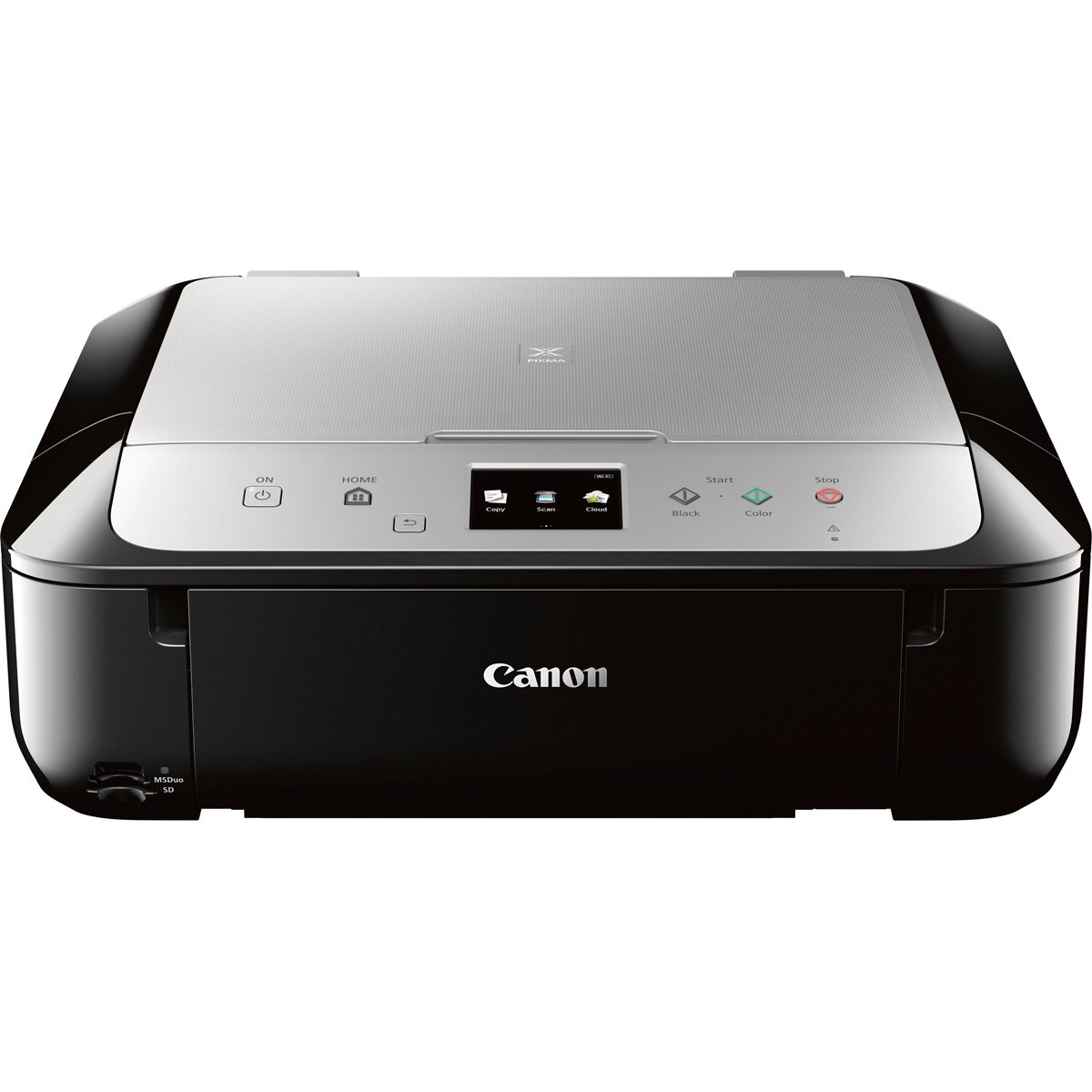
An older color all-in-one with a built-in touch screen — some customers note wireless and duplex worked “straight out of box,” but network setup frustrated many others.
The MG6821 is an older model still on shelves that offers color printing, scanning, and copying in a compact black-and-silver body. It prints 15 pages per minute in black, which is similar to the TR7120 above, and it adds a built-in LCD touch screen for navigating settings. Reviewers point out that duplex printing and wireless worked “straight out of box” — which is rare enough that multiple reviewers pointed it out as a pleasant surprise.
It supports AirPrint, Google Cloud Print, and the Canon PRINT app, so you can print from any iPhone or iPad without extra software. One owner who bought it in 2016 called it reliable until a 2021 driver update caused constant error codes, which highlights that long-term support for older models can be hit-or-miss. Another reviewer described the network setup as taking “hours” and called it the least intuitive printer they had used, so your mileage may vary depending on your home network.
The real downside is the price — it sits at a premium tier compared to the other color inkjet in this list. Buyers also warn that it is an “ink hog” not meant for volume printing, and the scanning function over WiFi only works through cloud services, not directly to your computer.
What Works Well
- LCD touch screen for easy navigation through settings
- Wireless and duplex both worked immediately from the start per some buyers
- 15 ppm black speed is on par with the newer TR7120
Where It Falls Short
- Running cost is high — it is described as an “ink hog”
- Network setup frustrated many buyers, with hours needed to connect
- Cannot scan to computer over WiFi — only through cloud or wired connection
Who it fits: occasional home users who already know Canon’s ecosystem and want a physical touch screen to navigate menus.
The big drawback: the high ink consumption and frustrating network setup make it a hard sell against the newer TR7120 for most people.
Understanding the Specs
Automatic Duplex Printing
This means the printer flips the page over and prints on the second side automatically. You do not have to stand there and manually turn pages. Every printer in this list except the MUNBYN thermal label printer offers it, and it cuts your paper consumption roughly in half over the life of the machine.
Dual-Band Wi-Fi
A printer that supports both 2.4GHz and 5GHz bands can switch to the less crowded channel in your home. Printers stuck on 2.4GHz often drop offline when the band gets congested with other gadgets. The Canon TR7120 has it, and shoppers say it never shows “offline” — a big reason why.
FAQ
Do all AirPrint printers work directly from an iPhone without an app?
How do I know if a printer supports AirPrint before buying it?
Can I use AirPrint over a 5GHz Wi-Fi network?
Why does my AirPrint printer keep showing “offline”?
Is a laser printer better than an inkjet for AirPrint?
Can I print shipping labels from my iPhone using AirPrint?
How long does a toner cartridge last compared to an ink cartridge?
Do all AirPrint printers scan and copy too?
Final Thoughts: The Verdict
For the majority of shoppers, the airprint enabled printer winner is the Canon PIXMA TR7120 because it combines stable dual-band Wi-Fi with color printing, scanning, and automatic duplex at a mid-range cost that makes sense for a home. If you need fast black-and-white documents for an office, grab the HP Laserjet Pro 3001dw. And for shipping labels with no ink ever, the MUNBYN Wireless Thermal Printer is the only choice that skips cartridges entirely.
How We Picked
We do not accept paid placement. Every pick is matched to a real buyer and a real use-case; we do not hands-on test units.
Sources & Methodology
Specifications: manufacturer listings and product documentation. Review insights: verified customer reviews, as of July 2026. Pricing: not shown on this page (it changes often); check the current price via the retailer link.
As an Amazon Associate, Gadgets Feed earns from qualifying purchases. This does not affect which products we feature.
Product prices and availability are accurate as of the date/time indicated and are subject to change. Any price and availability information displayed on Amazon at the time of purchase will apply to the purchase of this product. As an Amazon Associate I earn from qualifying purchases.
CERTAIN CONTENT THAT APPEARS ON THIS SITE COMES FROM AMAZON. THIS CONTENT IS PROVIDED "AS IS" AND IS SUBJECT TO CHANGE OR REMOVAL AT ANY TIME.
Amazon and the Amazon logo are trademarks of Amazon.com, Inc. or its affiliates.