
Our readers keep the lights on and my morning glass full of iced black tea. As an Amazon Associate, I earn from qualifying purchases.
Specs are compiled from manufacturer listings and verified buyer reviews and can change over time — please confirm the key details on the product page before buying.
If your iPhone, iPad, or Mac is the center of your home office, you want a printer that talks to your Apple gear without a single cable and without a headache. AirPrint does exactly that — it lets you hit print from any Apple device straight to the machine. The real decision is choosing between the forever-cheap inkjet and the pricier-upfront laser, because that choice decides your cost per page for years.
I’m Min — the founder and writer behind Gadgets Feed. This guide is built by comparing the manufacturers’ published specifications and the patterns across verified customer reviews, so you get each pick’s real strengths and trade-offs instead of marketing spin.
We break down the best AirPrint printer options by speed, running costs, and reliability so you can match one to your actual printing habits.
Our Picks at a Glance


How To Choose The Best AirPrint Printer
Before you pick, decide what you will actually print. A student printing essays and worksheets has different needs than a home office printing invoices and labels. That single decision points you toward either an inkjet or a laser, and it determines what you will spend on supplies over the machine’s life.
Match the technology to your volume
Laser printers use toner powder that lasts far longer than inkjet cartridges. The catch is the higher upfront cost. If you print a few pages a week, an inkjet’s cheaper entry price wins. If you print daily or in batches, a laser’s long-lasting toner becomes the better deal quickly. The review pages for the imageCLASS LBP172dw sum it up: “Toner ink lasts WAY longer than ink jet and you probably don’t need color.”
Decide between print-only and all-in-one
If you only need paper copies, a single-function printer does one job — printing — and does it faster for the money. An all-in-one adds scanning and copying, which helps if you regularly digitize documents. Before paying for that extra hardware, ask yourself how often you actually scan; most people do it rarely and can use their phone instead.
Check the speed number that fits your day
Pages per minute (ppm) tells you how fast the engine runs. A 30 ppm machine chews through a 60-page packet in two minutes, while a 13 ppm machine takes nearly five. Home users rarely notice the gap on short jobs, but anyone printing school packets or work documents will feel it.
Quick Comparison
| Model | Best For | Speed (ppm) | Type | Functions | Amazon |
|---|---|---|---|---|---|
| Canon MF264dw★ Best Overall | Reliable all-in-one laser | 30 | Monochrome Laser | Print, Scan, Copy | Amazon |
| Canon LBP172dwSpeed Champion | Fastest budget laser | 35 | Monochrome Laser | Print Only | Amazon |
| Canon LBP646Cdw | Color laser printing | 26 | Color Laser | Print Only | Amazon |
| Canon TS5320a | Budget all-in-one inkjet | 13 | Inkjet | Print, Scan, Copy | Amazon |
| Canon MG6821 | Family photo inkjet | 15 | Inkjet | Print, Scan, Copy | Amazon |
In‑Depth Reviews
1. Canon imageCLASS MF264dw
Our pick — over 4★ from 950+ verified ratings; the strongest balance of quality and price.
The all-in-one laser that survives a year of daily abuse and still prints crisp Apple-sourced pages.
If you need one machine to print, scan, and copy from your Mac or iPhone, this monochrome laser is the crowd favorite — roughly 4 stars held across nearly a thousand owners. It rips through documents at 30 pages per minute, automatic duplex (two-sided printing) is built in, and AirPrint means your iPhone sends jobs straight over. Owners consistently praise the crisp, readable text that remains sharp even after a full year of daily use.
Setup is the other big win, with most owners configured in under five minutes. Buyers report it “works with Apple devices” from the start, and the wireless scan function is a genuine bonus most lasers skip. The toner situation is friendly too — generic cartridges work fine, which keeps your long-term cost per page low. Voice control even lets you run it through Amazon Alexa.
The trade-off to know: legal-size paper can jam unless you manage the output tray carefully, and a few owners had to update firmware on day one to stabilize the WiFi. It is also a black-and-white machine — if you need color, this is not the one. But for a dependable workhorse that handles the family’s daily document flow, this is the pick that wins people over.
Why it earns the top spot
- Fast 30 ppm speed with automatic duplex
- Proven durability beyond a year of use
- Works with generic toner to cut costs
Where it asks for patience
- Legal paper needs careful output tray handling
- Some units need a firmware update for stable WiFi
Reach for this if: you want one reliable black-and-white machine for printing, scanning, and copying from Apple devices at a strong speed.
Look elsewhere if: you regularly print color documents, since this laser is strictly monochrome.
2. Canon imageCLASS LBP172dw
A 35 ppm monochrome laser that sets up in minutes and leaves inkjet owners wondering why they waited.
This is the fastest pure printer on the list, hitting 35 pages per minute in black and white. It beats the MF264dw above by a solid margin — 35 ppm versus 30 ppm — which makes it the better fit if you print long packets and hate waiting by the tray. The 250-sheet standard cassette (the main paper holder) keeps you refilling less often, and automatic two-sided printing cuts your paper use in half.
Setup is famously quick, with most owners connected to WiFi in under four minutes. Owners mention the easiest install they have done, with toner pre-installed and the machine linked to WiFi in under four minutes. It uses Toner 072 standard or high-capacity cartridges, and the high-capacity option stretches your cost per page further. The Chromebook compatibility means schoolwork prints straight from a student’s device without drama.
The trade-off is that this model is print-only, lacking a built-in scanner or copier. Reliability gets mixed feedback in the review pool — most owners are happy, but a few describe units failing within days. One owner’s caution about a bundled app collecting data is worth noting; you can uninstall it without breaking the printer. For a fast, simple, black-and-white document machine at a budget-laser price, this delivers.
The speed call: 35 ppm makes this the quickest pick here, and the toner cost per page beats any inkjet over time.
The fit note: skip it if you also need scanning and copying — this machine prints and nothing else.
Grab it if: you want the fastest, simplest black-and-white printing with the lowest long-term running costs.
Think twice if: your workflow depends on a built-in scanner, which this model does not include.
3. Canon Color imageCLASS LBP646Cdw

The color laser that nails decent photos on plain paper and keeps the office away from inkjet refills.
Color printing without the inkjet headache — that is the promise here, and it delivers. This single-function laser prints up to 26 ppm in both color and monochrome, with a first page out in about 10.3 seconds. It uses Canon Genuine Toner 075 in standard or high-capacity sizes, and the starter cartridges alone have lasted some owners two years of light use. The 5-line LCD screen (a small text display for navigating menus) keeps settings manageable.
Print quality is what wins people over, with owners praising the ability to print decent photos on plain paper — something most color lasers choke on. Automatic duplex is standard, so two-sided color documents come out ready to file. It is Chromebook compatible, works with the Canon PRINT app, Apple AirPrint, and Mopria Print Service, so every device in the house connects.
There are real caveats. Reliability gets mixed feedback, with a small number of owners describing failures after a few weeks. The WiFi setup is easier on a 2.5G network than a 5G one, and some Windows users had to tinker with drivers after system updates. Genuine Canon toner is pricey, though compatible alternatives exist. This is a color specialist for print-only offices — no scan, no copy — and it does that one job well.
What stands out: fast color at 26 ppm with duplex and a quick 10.3-second first page.
Who should pause: anyone wanting a scanner or copier built in, since this model is strictly print-only.
Choose it for: crisp color prints and labels at laser speed, especially from Apple devices.
pass on it if: you need one machine to also scan and copy documents.
4. Canon TS5320a

A compact all-in-one inkjet that keeps the entry cost low and lets your phone run the whole show.
If you want printing, scanning, and copying in one small machine without a laser’s upfront price, this is the budget-friendly route. It prints at 13 ppm in black and 6.8 ppm in color, with a 4800 x 1200 DPI resolution (the sharpness measure for print detail) that keeps text and photos looking crisp. The flatbed scanner hits 1200 x 2400 DPI, and a 1.44-inch OLED screen with a status bar shows you what is happening at a glance.
The dual paper inputs are the quiet hero here — a front cassette and rear tray each hold up to 100 plain sheets, plus trays sized for 4 x 6 and 5 x 7 photo paper. That means you can keep plain paper loaded and swap in photo stock without reloading everything. AirPrint, Google Cloud Print, and PictBridge cover Apple devices, Google web, and digital cameras, while Amazon Alexa and Google Assistant voice commands let you talk to the printer.
The main drawbacks are high ink consumption and mixed reports on long-term durability. Customers note the machine drinks ink fast — two XL sets lasted under 300 pages for one owner — and reviews page memory notes “Canon Printers only last about a year.” Quality feedback is genuinely mixed, so this fits light, occasional printing rather than heavy daily use.
The affordable appeal
- Print, scan, and copy in one compact unit
- Dual paper trays handle plain and photo stock
- Voice control via Alexa and Google Assistant
The cost reality
- Ink consumption runs high on heavier use
- Build quality and longevity get mixed reviews
Best for: occasional home printing where the lowest entry price matters more than per-page cost.
Not for: heavy users who will feel the ink costs and durability limits quickly.
5. Canon MG6821
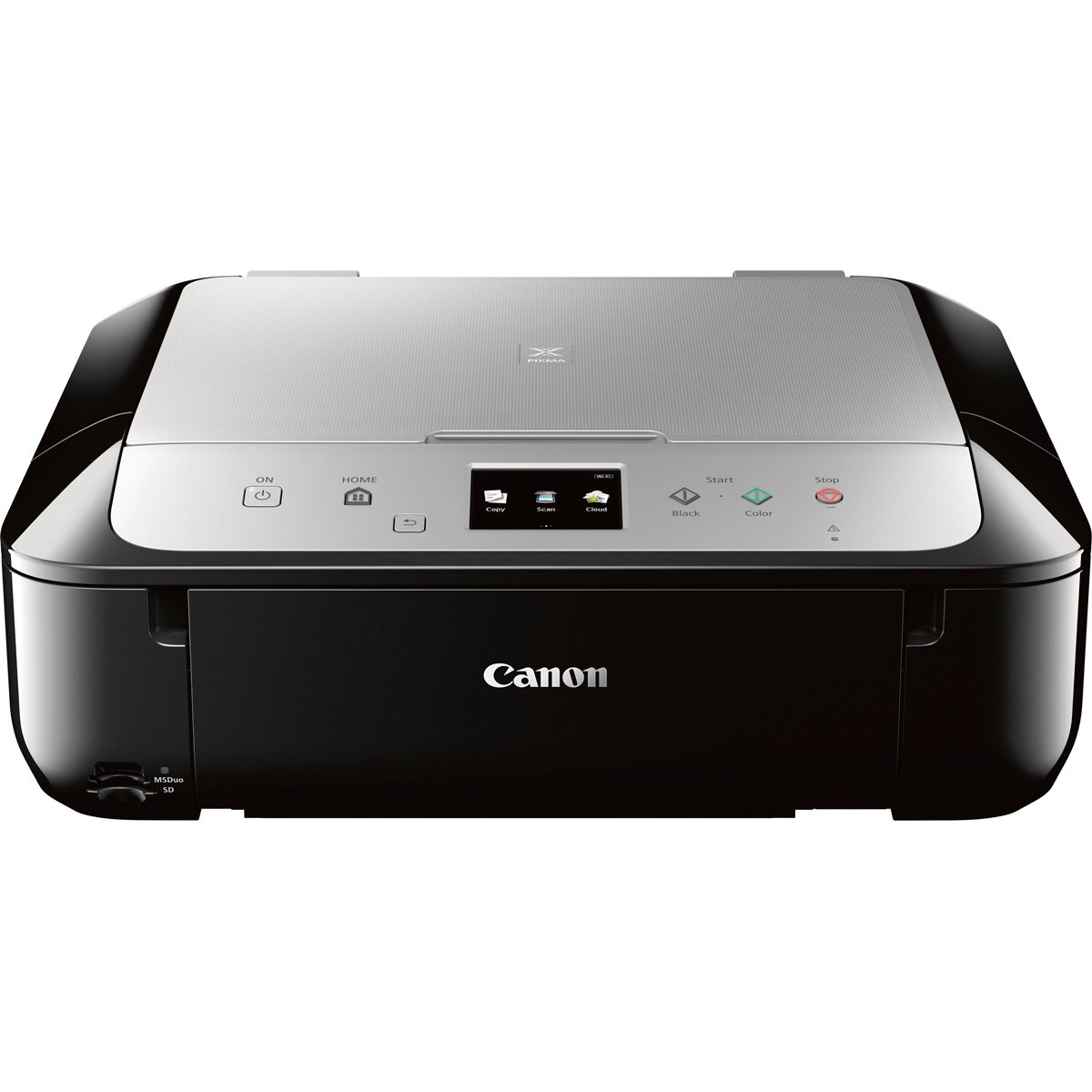
A wireless all-in-one that prints straight from Instagram and Facebook photos, built for the family table.
This is the social-media-friendly choice. It prints directly from your iPhone, iPad, or Android, and it is built to pull photos off Instagram and Facebook without a computer in the chain. AirPrint, Google Cloud Print, Mopria, and the Canon PRINT app give you more ways to send a job than any other pick here. It hits 15 ppm in black and white, with a 24 bpp color depth (a measure of color detail) for richer-looking images.
Setup is the strongest praise this machine earns, with owners calling it easy and noting it works from the start. The built-in duplex printing is a highlight — automatic two-sided pages with no extra fiddling. The touchscreen interface is more modern than the older buttons on budget models, and it is a sturdier, larger unit than the price suggests.
The drawbacks include intermittent wireless connectivity and higher ink costs for photo printing. Wireless reliability draws mixed feedback, with some owners fighting offline issues, and paper jamming and noise come up as negative mentions. The ink costs sting, especially if you print photos regularly. This is a feature-rich family printer for moderate use, not a high-volume office workhorse.
What families love
- Direct photo printing from social media apps
- Automatic duplex and easy setup
- Multiple wireless printing standards included
Where it stumbles
- Wireless drops are the most-reported frustration
- Ink costs climb fast with photo volume
Pick it for: a household that prints photos and documents wirelessly from phones and tablets.
Avoid it for: high-volume office printing where speed and per-page cost matter most.
Understanding the Specs
Pages Per Minute (ppm)
This is the engine speed rating — how many pages the machine spits out in one minute of continuous printing. A 35 ppm laser finishes a 70-page packet in two minutes, while a 13 ppm inkjet takes over five. For short home jobs the gap barely registers, but for school packets or work documents it is the difference between waiting and wandering off.
AirPrint and Wireless Standards
AirPrint is Apple’s built-in wireless printing protocol, so your iPhone and Mac find the printer without installing any app or driver. Most of these also support Mopria Print Service (the Android equivalent) and Canon’s own PRINT app. Voice control via Amazon Alexa or Google Assistant is an extra on some models, letting you start a job by talking to the printer.
FAQ
Will an AirPrint printer work with my iPhone and Mac automatically?
Is a laser or inkjet cheaper to run for home printing?
What does duplex printing actually save me?
Should I buy a print-only or all-in-one AirPrint printer?
Can I use generic or off-brand toner in these Canon printers?
How fast should my AirPrint printer be for school work?
What is the difference between a 1200 DPI and 4800 DPI printer?
Are these AirPrint printers compatible with Chromebooks and Android phones?
Final Thoughts: The Verdict
For the majority of shoppers, the best AirPrint printer is the Canon MF264dw because it combines fast 30 ppm laser speed, proven durability past the one-year mark, and print-scan-copy versatility in one dependable machine. If you want the fastest black-and-white printing and lowest running costs, grab the LBP172dw at 35 ppm. And for a household that prints photos straight from their phone, the TS5320a is the one to reach for.
How We Picked
We do not accept paid placement. Every pick is matched to a real buyer and a real use-case; we do not hands-on test units.
Sources & Methodology
Specifications: manufacturer listings and product documentation. Review insights: verified customer reviews, as of August 2026. Pricing: not shown on this page (it changes often); check the current price via the retailer link.
As an Amazon Associate, Gadgets Feed earns from qualifying purchases. This does not affect which products we feature.