
Our readers keep the lights on and my morning glass full of iced black tea. As an Amazon Associate, I earn from qualifying purchases.
Specs are compiled from manufacturer listings and verified buyer reviews and can change over time — please confirm the key details on the product page before buying.
Renting an apartment means you can’t drill into walls or hardwire a security system, but that doesn’t mean you have to leave your place unprotected. The right wireless alarm system for an apartment uses peel-and-stick sensors, a loud siren, and smart alerts to keep you safe, then packs up cleanly when you move. This guide focuses on what actually matters for renters: easy installation, no permanent damage, and reliable notifications — not just raw specs.
I’m Min — the founder and writer behind Gadgets Feed. This guide is built by comparing the manufacturers’ published specifications and the patterns across verified customer reviews, so you get each pick’s real strengths and trade-offs instead of marketing spin.
You’ll discover the best alarm system for an apartment with simple DIY kits that arm and disarm from your phone, giving you security without the installation hassle.
Our Picks at a Glance

How To Choose The Best Alarm System For Apartment
Choosing a security system for a rental is different from buying one for a house you own. You’re looking for protection that you can take with you and install without leaving marks. Focus on installation method, connectivity, and how much you want to spend monthly.
The Renter’s First Rule: Installation Must Be Reversible
Most good apartment kits use self-adhesive tape or screw mounts that are optional. Look for “no-drill” or “wireless DIY” in the description. A system that sticks on with adhesive strips comes off cleanly later, protecting your security deposit. Door and window sensors are typically small battery-powered units that you stick on the frame, so no wires run through walls.
Connectivity: Why Cellular or Offline Alerts Matter
If your Wi-Fi goes out, a Wi-Fi-only system goes silent. Some units offer a dual network — usually Wi-Fi plus 4G/GSM (a cellular network using a SIM card) — so they keep working when the internet drops. This is a useful backup feature if you want reliable, round-the-clock monitoring. Also consider if you want alerts sent as app notifications, SMS texts, or phone calls.
Monitoring: Free vs. Professional
Many modern kits are self-monitored: you get a push alert on your smartphone and decide what to do. Others allow an optional paid subscription for 24/7 professional monitoring, where a call center dispatches police or fire if an alarm triggers and you don’t respond. Decide if you want that extra layer of help. For renters, a self-monitoring setup with no monthly fee often provides enough confidence.
Quick Comparison
| Model | Best For | Kit Contents | Connectivity | Monitoring | Amazon |
|---|---|---|---|---|---|
| Ring Alarm 8-Piece★ Best Overall | Amazon Echo Owners | Base, Keypad, 4 Sensors, Motion, Extender | Wi-Fi + Cellular Backup | Optional 24/7 Pro | Amazon |
| OSI Go Gen 2Pro-Grade Pick | Large Kit, No Fees | 7″ Screen, 5 Sensors, 2 Motion, Siren | 4G + Wi-Fi | Optional 24/7 Pro | Amazon |
| PGST 24-PieceMost Expandable | Maximum Coverage | 24 Pcs Kit | Wi-Fi + GSM/4G | No Monthly Fee | Amazon |
| SimpliSafe 11-Piece | Live Guard Protection | Base, Camera, Keypad, 2 Motion, 6 Sensors | Wi-Fi + Cellular | Optional 24/7 Pro | Amazon |
| YBJ 16-Piece | Budget Entry Kit | Host, 6 Sensors, 3 Motion, Siren | Wi-Fi + 4G | No Monthly Fee | Amazon |
| PGST 16-Piece | Loud Siren Alerts | 16 Pcs Kit | Wi-Fi + 4G GSM | No Monthly Fee | Amazon |
| XUK 13-Piece | Touchscreen Control | 4.3″ Screen, 4 Sensors, 2 Motion, Siren | Wi-Fi + 4G | No Monthly Fee | Amazon |
| Splenssy WiFi GSM | Budget Friendly Price | 10 Pcs Kit | Wi-Fi + GSM | No Monthly Fee | Amazon |
| ADT Blu | Professional Monitoring Plan | Base, 3 Sensors, Motion, Sign | Cellular Backup, Bluetooth | Plan Required | Amazon |
In‑Depth Reviews
1. Ring Alarm 8-Piece Kit (Like-New)
Our pick — over 4.5★ from 800+ verified ratings; the strongest balance of quality and price.
The whole-home starter kit that makes apartment security feel easy and dependable.
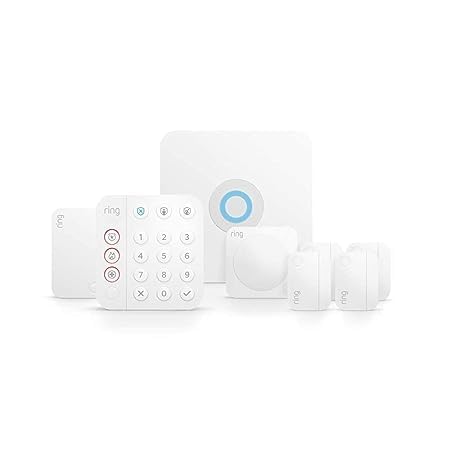
This kit is the crowd favorite — 4.7 stars across 800+ owners — and it’s easy to see why. It arrives in like-new condition (refurbished, tested, and certified by Amazon) with a base station, a keypad, four contact sensors, one motion detector, and one range extender — enough for a 1-2 bedroom apartment. The contact sensors are what detects when a door or window opens, and the motion detector is pet-friendly, so your cat won’t trigger a false alarm.
The setup is genuinely simple: buyers report a clean 45-minute install using the Ring app, and the adhesive backing means no drilling. You can arm and disarm with the keypad or your voice through Alexa. What wins people over is the functionality — the app guides you through everything, sends instant phone alerts when a sensor is triggered, and works smoothly if you already own Echo devices. The like-new units come with a charged backup battery so the system keeps working if power goes out, and owners mention they couldn’t even tell the unit was refurbished.
The real upgrade path here is optional: a Ring Protect Plan (sold separately) adds 24/7 professional monitoring for police, fire, and medical response, plus cellular backup so alerts still arrive if your Wi-Fi drops. Without it, you still get strong self-monitoring through the app. The primary trade-off is that you need that subscription to open up the full feature set, including voice control via Alexa.
What Makes It the Top Pick
- The app-guided setup earns consistent praise — buyers call it easy even for first-timers.
- All-in-one coverage for small homes: six separate alarm entry points included.
- Like-new refurbished units arrive pristine with new adhesives and screws.
What to Weigh First
- The best features (voice control, cellular backup) require a paid Ring Protect plan.
- Some owners found the door/window sensors fussy to pair in the app initially.
Reach for this if: you want a trusted, proven system that grows with you and plays nicely with Alexa.
Look elsewhere if: you refuse to pay any monthly fee and want all features open up from the start.
2. OSI Alarm System Gen 2 (4G), 11pc
A premium-feeling alarm with a 7-inch touchscreen and a free self-monitoring option.
The OSI Gen 2 stands out immediately with its large 7-inch control panel — that’s a tablet-sized screen that shows system status at a glance, with an HD 1024 x 600px anti-fingerprint display. It’s a more polished interface than the basic keypads on most kits. The 11-piece set includes a control panel, 2 motion sensors, 5 contact sensors, a wireless strobe siren, and 2 remote controllers, so you get generous coverage for an apartment.
The flexible monitoring is the big draw. You can self-monitor for free through the Smart Life app with no SIM card and zero monthly fees, or opt into 24/7 professional monitoring starting at /month. A retired security manager and a former professional installer both praised it as the best DIY system they’d tested, citing the interactive setup wizard and responsive touchscreen. The system runs a 24-hour backup battery, so it stays armed through blackouts, and the SOS button is conveniently placed on the display, app, and remote.
If you rent out your place or have roommates, the multiple user access levels are a standout feature: one administrator account has full control while five user accounts have restricted access — useful for Airbnb guests or children. The trade-off is that some found the plug-in siren takes two sockets and the “disarm” wording is a bit confusing. Motion sensors get mixed feedback regarding placement, so follow the guide carefully.
Why it stands out: The 7-inch anti-fingerprint touchscreen and the wizard-driven setup make this feel like a professional system, minus the complexity — with a genuine no-cost self-monitoring path.
Pick this for: a feature-rich control center with an interface that’s clear enough for kids and guests.
Consider the catch: the cheap plug-in siren design and occasionally finicky motion sensor placement require a bit of patience.
3. PGST Alarm System for Home Security, 24Pcs
The 24-piece kit that blankets a larger apartment with sensors and alerts.
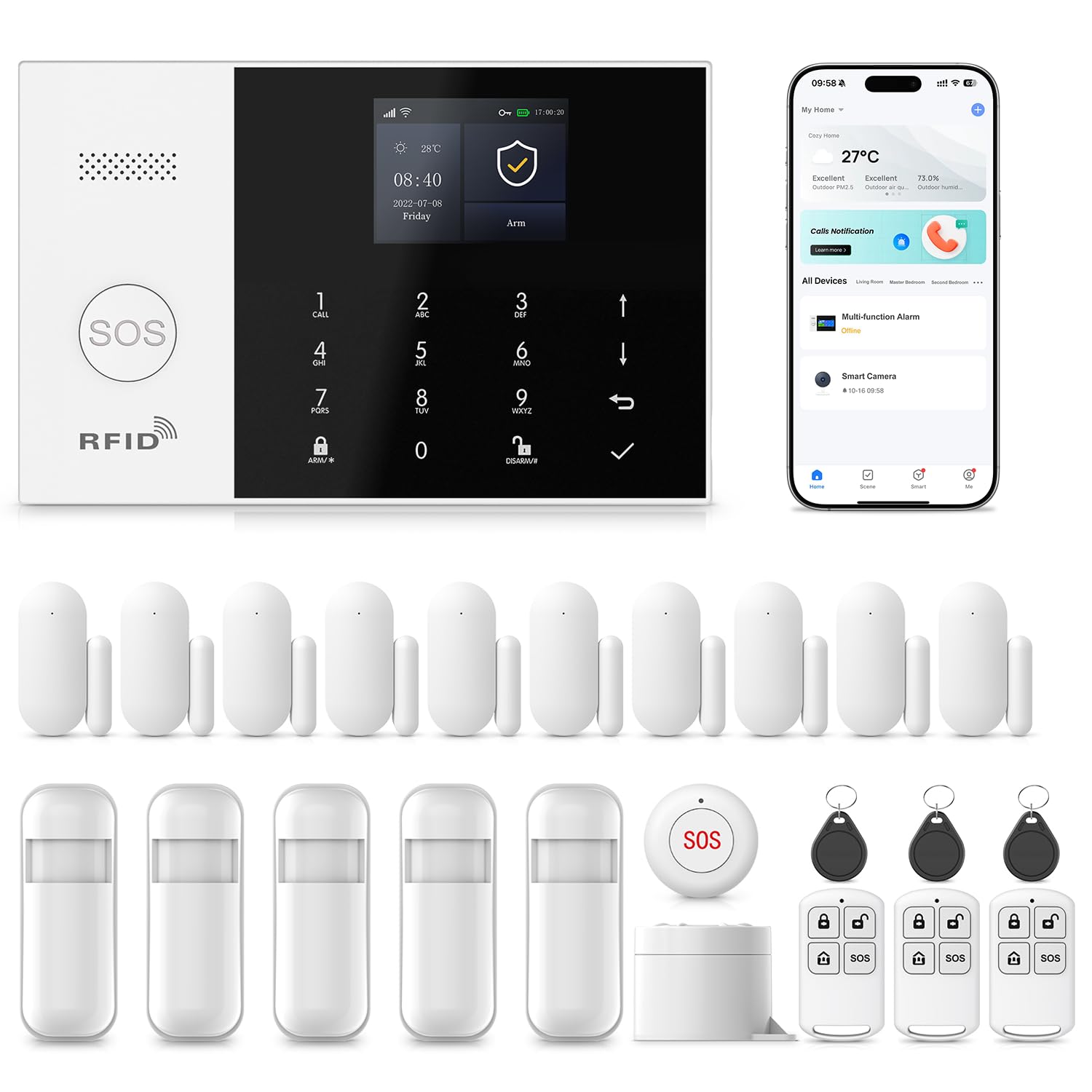
If your apartment has multiple entry points, a sliding glass door, and a few windows, the 24-piece PGST kit gives you the coverage without needing to buy add-ons later. from the start, it supports a sturdy dual-network connection — Wi-Fi (2.4GHz) and GSM/4G — so it keeps working through the 4G network if your internet fails. You command it through the free Smart Life or Tuya app, and each accessory can be individually named so you see exactly which door or window triggered the alarm right on your phone.
The setup is genuinely renter-friendly: no professional installer needed, just the included screws, and one person can finish in about 10 minutes. The loud alarm hits 110 db (about as loud as a chainsaw or a rock concert), which is enough to scare off an intruder and alert your neighbors. It also includes a compact emergency SOS device — press it to trigger an alarm, ideal for elderly family members or kids home alone.
A word on expansion: this system has 100 wireless storage locations, so you can add motion detectors, door sensors, outdoor alarms, and SOS buttons as needs change. Owners highlight precise motion detection and long range, with some noting a multi-day battery backup on the central unit. One limitation: the system pairs with 433MHz sensors specifically, so it’s not compatible with all third-party Wi-Fi sensors — stick with the included accessories or PGST-branded add-ons.
Solid if: you’ll use the generous 24-piece bundle now and may expand to 100 accessories later — all with zero monthly fees.
Reach for this if: you want the most complete kit for a larger apartment or a house with many windows.
skip it if: you already own Wi-Fi-based sensors from another brand, as this hub speaks a different protocol.
4. SimpliSafe 11 Piece Gen 3 with Camera

The system that adds live agents who can see and speak to intruders.
SimpliSafe stands apart with its optional Live Guard protection: with 24/7 professional monitoring, agents at a central station can actively view the live feed from the included indoor camera and talk directly to an intruder through the two-way audio. That’s a meaningful step up from passive alerts. The 11-piece kit includes a base station, one wireless indoor camera, a keypad, two motion sensors, and six entry sensors — substantial coverage for a 2-bedroom apartment.
The system is famous for its plug-and-play simplicity: plug in the base station, stick the sensors where you want, and start protecting. The motion sensors detect movement within 35 feet, have a 90-degree field of view, and ignore pets under 60 lbs (about the size of a medium dog or small labradoodle), so you can set them up in a corner for full room coverage without constant false triggers from your dog. The keypad is “smash-safe” — even if an intruder smashes the keypad, the system still alerts the monitoring center.
The main consideration is value: at its price point, it’s a premium option, but customers note it performs as well as more expensive professionally-installed systems. It works with weak Wi-Fi, per one owner’s experience, and integrate simply with Alexa or Google Assistant for voice arming. Some noted the motion sensors occasionally need a manual reset after going offline. Choose the monitoring plan that fits — Live Guard is exclusive to SimpliSafe, but self-monitoring via the app is also an option.
What Stands Out
- Two-way audio and live agent intervention during an alarm is a genuine security upgrade.
- The pet-friendly motion sensor (under 60 lbs) means fewer false alarms for dog owners.
- The 11-piece kit offers deep coverage for the price.
Consider This
- Some owners had to reset motion sensors that went offline.
- The higher price tag reflects the premium features and brand reputation.
Choose this for: an active guard who can intervene in real-time, especially if you travel or are away often.
Think twice if: you’re on a strict budget — this is the premium end of the list.
5. YBJ Alarm System for Home Security, 16-Piece Kit

A surprisingly complete kit with dual Wi-Fi/4G backup at a budget-friendly price.
The YBJ kit delivers exceptional value for renters watching their budget. For a price well under the premium options, you get an alarm host, 3 PIR motion detectors (these sense body heat to detect movement), 6 door/window sensors, 2 remote controls, 2 RFID cards (tap-to-arm tags), an alarm siren, and an SOS button — 16 pieces total, all with batteries included. It connects to both 2.4GHz Wi-Fi and 2G/3G/4G through a SIM card (sold separately), so it has a backup connection if your internet goes down.
The timing arm and disarm feature is genuinely handy for apartment dwellers with a routine. Set a schedule through the app or keyboard — such as arming automatically at 11 p.m. — so you never forget to secure the door at night. You can also set a delay time before the alarm activates, preventing false triggers as you leave or enter. It works with Alexa and Google Assistant, so you can arm the whole system with a voice command on your way out.
Reviewers point out it’s extremely useful and easy to set up, with a battery that lasts a few hours when the main power is lost — the review pages sum it up: “easy to install and set up.” The trade-off is that programming can be tough for a beginner — instructions are described as a bit vague, and getting it programmed not to trigger in home mode took one owner two days. This is a system for someone patient with app-based configuration.
Smart buy if: you want real dual-network security with a siren and SOS button without committing to a monthly subscription.
Reach for this if: you’re budget-conscious and comfortable learning the app.
Be aware: the manual is weak, so budget an afternoon for setup, not 10 minutes.
6. PGST Home Security Systems 16-Piece
A seriously loud 120 dB siren and instant phone alerts for a small-space fortress.
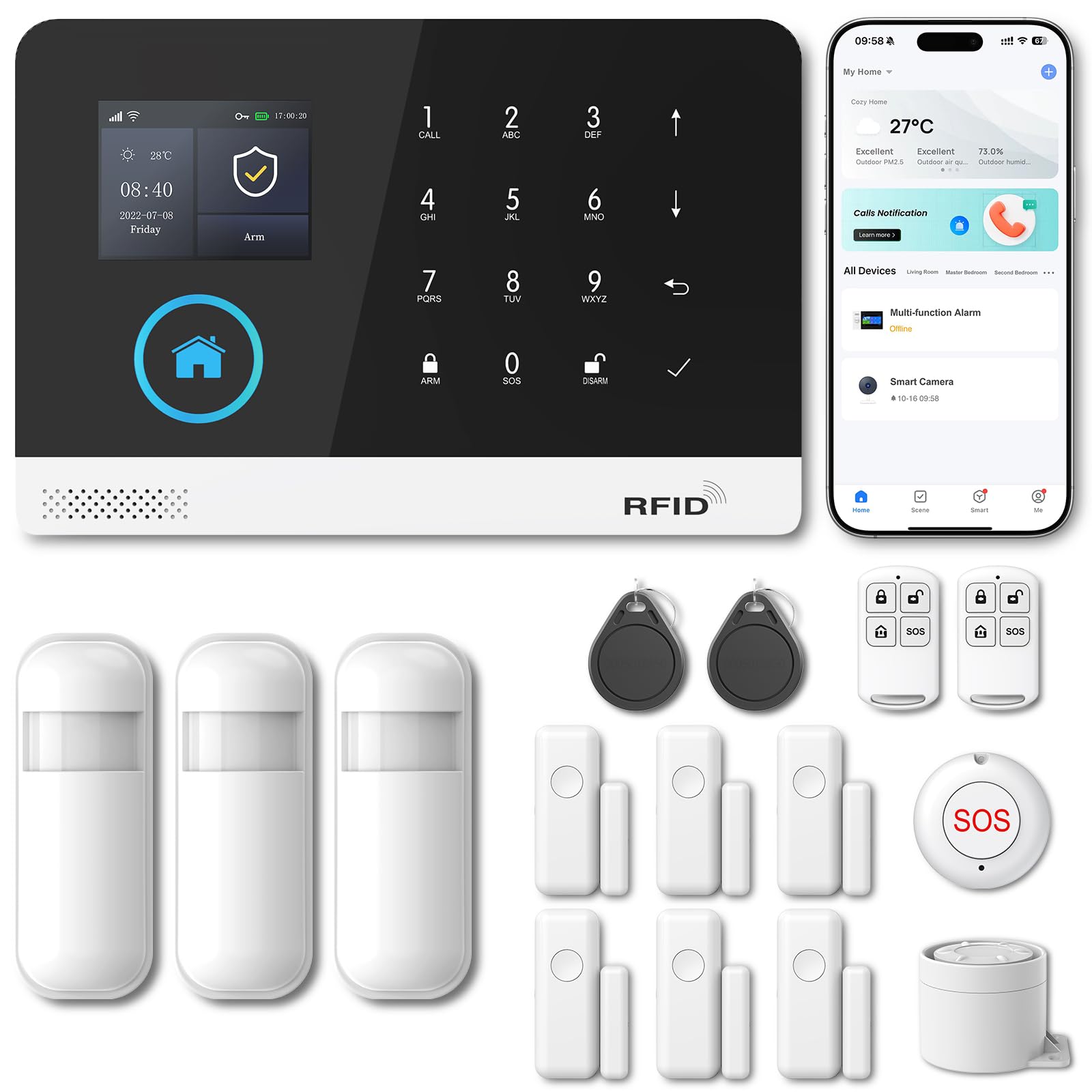
The PGST 16-piece kit is built around one simple promise: when a sensor trips, you’ll hear it and your phone will ping instantly. The siren peaks at 120 dB — that’s the threshold of physical pain for human ears (about the level of a jet engine taking off) — which is an aggressive deterrent for a would-be intruder in a hallway apartment. It also supports dual connectivity via Wi-Fi and 4G GSM, so you can maintain control and get alerts even if your broadband hiccups.
The kit uses the free Smart Life or Tuya app, letting you arm/disarm, set modes, and get push notifications from anywhere without a monthly fee. You can name up to 12 alarm types (like “main door” or “hall”), which makes the push notifications more informative. It supports up to 100 wireless storage locations for accessories like motion detectors, remote controls, door sensors, and outdoor sirens — plenty of room to grow.
The physical unit is pleasantly compact at 3.9 x 3.1 x 2.3 inches and weighs about 1.5 pounds (0.7 kg), so it tucks discreetly on a shelf or entry table. Shoppers say it’s easy to program and has good range, connecting to existing 433 MHz alarm accessories without a hitch. The recurring gripe is the included double-sided adhesive tape, which didn’t stick well to door trim for some; a dab of stronger adhesive solved it. Plan on reinforcing the tape if your trim is textured.
Customizable: Name the sensors and alarm types for clear alerts, set up to 5 groups of phone numbers for SMS or voice calls, and control by app, PC, or tablet.
Best for: renters who want maximum noise deterrence and instant push alerts without subscription costs.
Worth noting: the adhesive tape is the weak link — keep stronger tape on hand.
7. XUK WiFi Wireless Alarm System 13-Piece
An accessible 4.3-inch color touchscreen that makes security simple, even for kids.
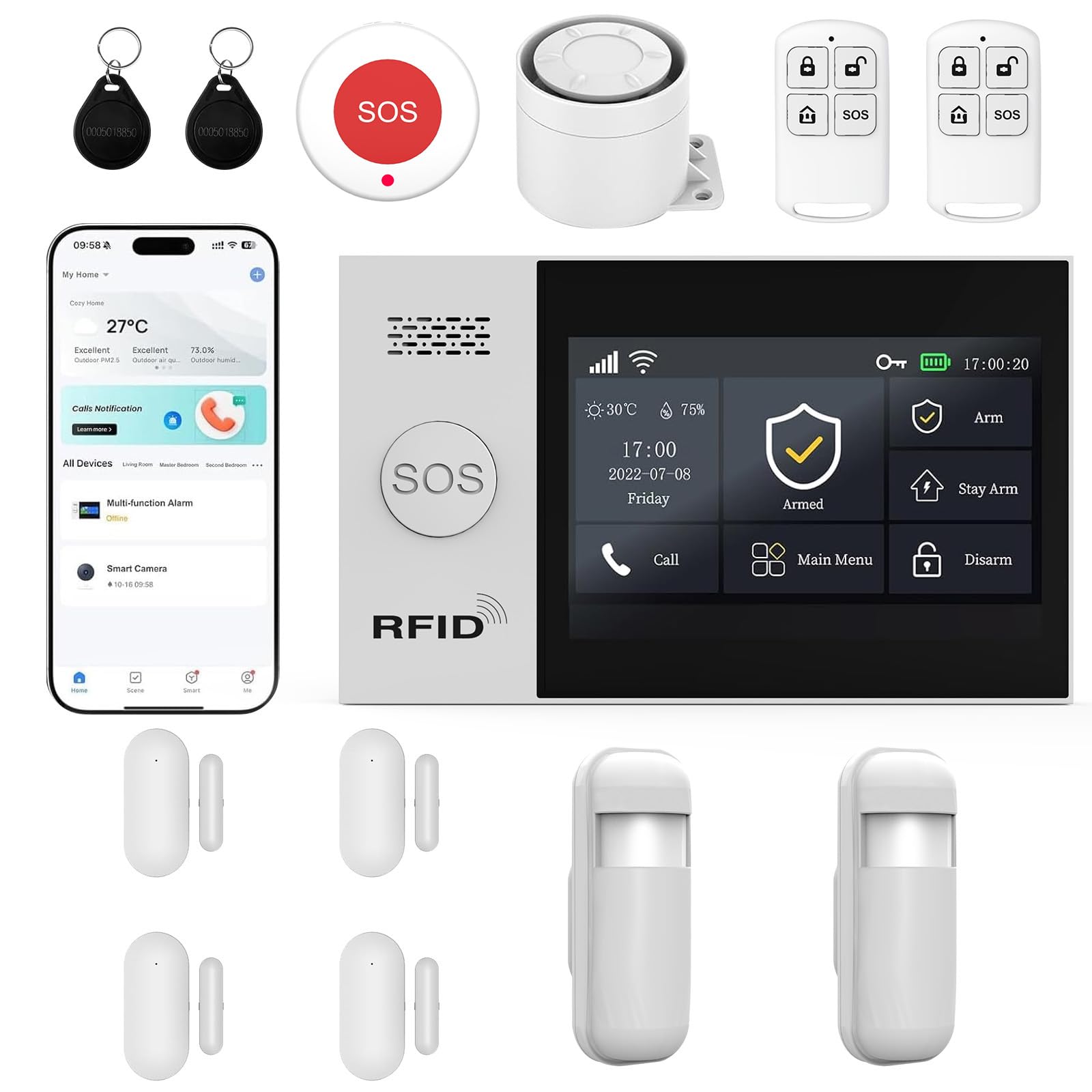
The XUK system is the most approachable of the budget-to-mid kits thanks to its 4.3-inch color touchscreen interface, which replaces a jargon-heavy keypad with clearly displayed status and alerts. This is a meaningful upgrade if you have elderly family members or children who need to arm and disarm the system — the manufacturer designed the multilingual menu specifically to be easy for them, so there’s no fumbling with numbered codes.
For its price tier, it packs a full feature list: dual connectivity via 2.4GHz Wi-Fi and 2G/4G (5G not supported) means persistent alerts via app, SMS, or voice call. The kit includes a central unit with the touchscreen, 2 PIR motion detectors, 4 door/window alarms, a 120dB siren (that’s about the loudness of a military jet takeoff, well into the pain threshold), 2 remote controls, 2 RFID keychains, and an SOS button. Installation is genuinely fast — the kit claims 10-15 minutes with no wiring, using self-adhesive mounting.
A real buying consideration is the 2-year after-sales assistance from XUK for troubleshooting, which adds confidence at this price. However, be cautious with this pick: buyers report mixed feedback on functionality, with some praising ease of setup and instant alerts, but a few encountering false alarms or a flaw where unplugging the unit once leaves a flashing “unplugged” light that doesn’t reset. A security-minded owner also flagged default passwords (1234/6666) — change them immediately after setup.
Why it’s distinct: It’s one of the few kits in its range with a true color touchscreen plus battery backup that keeps the system online through blackouts.
Choose this if: you value accessibility and want a touchscreen display for the whole family.
Be careful: check and update default passwords — this model has documented security quirks if left as-is.
8. Splenssy WiFi GSM 10-Piece Kit

A truly entry-level, no-frills system that gets the basics done for very little money.
If you’re on a tight budget and just want a working deterrent with smartphone control, the Splenssy 10-piece kit is the cheapest path in this lineup. The kit’s fundamental difference is its size — the main panel measures just 7.3 x 4.9 x 0.6 inches and weighs about 8 ounces, so it’s the most compact hub here. It includes a 2.4-inch TFT LCD color screen that displays system status and provides voice prompts for operations, which is a thoughtful touch at this level.
The system supports SMS and dialing alarms to up to 5 preset phone numbers, and you can toggle SMS on/off and dial on/off separately. It pairs with Wi-Fi and GSM (cellular) networks, so even if your Wi-Fi is down, it can send an alert via the cellular network (with a SIM card). It’s compatible with Alexa and Google Home for voice control, and you can arm or disarm remotely via the app, including intercom and voice monitoring functions.
This system is honest about its limits. The most important one: there is no password required to disarm — anyone can press disarm on the panel. That’s a genuine security flaw for some owners, and the customer support reportedly struggles with language barriers. The siren is also wired to the panel, so it has to stay close to where the panel is mounted. Buyers confirm it’s “great for the price” and easy to use, though some never got the door sensors working properly. It’s a starter system that works best in addition to a good deadbolt and smart locks, not as your only line of defense.
Why Buy It
- The lowest entry price of any kit here; great for testing if a smart alarm suits you.
- A compact panel with a real LCD screen that fits in tight rental spaces.
- Command via app, Alexa, or Google Home; supports up to 100 wireless zones.
The Honest Catch
- The lack of any password requirement to disarm is a serious flaw for security-minded users.
- Setup is complicated and the siren must stay wired to the panel.
Reach for this if: the budget is the absolute priority and you’ll treat this as a visible deterrent.
pass on it if you need to restrict who can disarm the alarm — this unit won’t stop a determined press of the button.
9. ADT Blu Home Security Starter Kit
A trusted brand name that scales from a tiny starter to a full smart home.
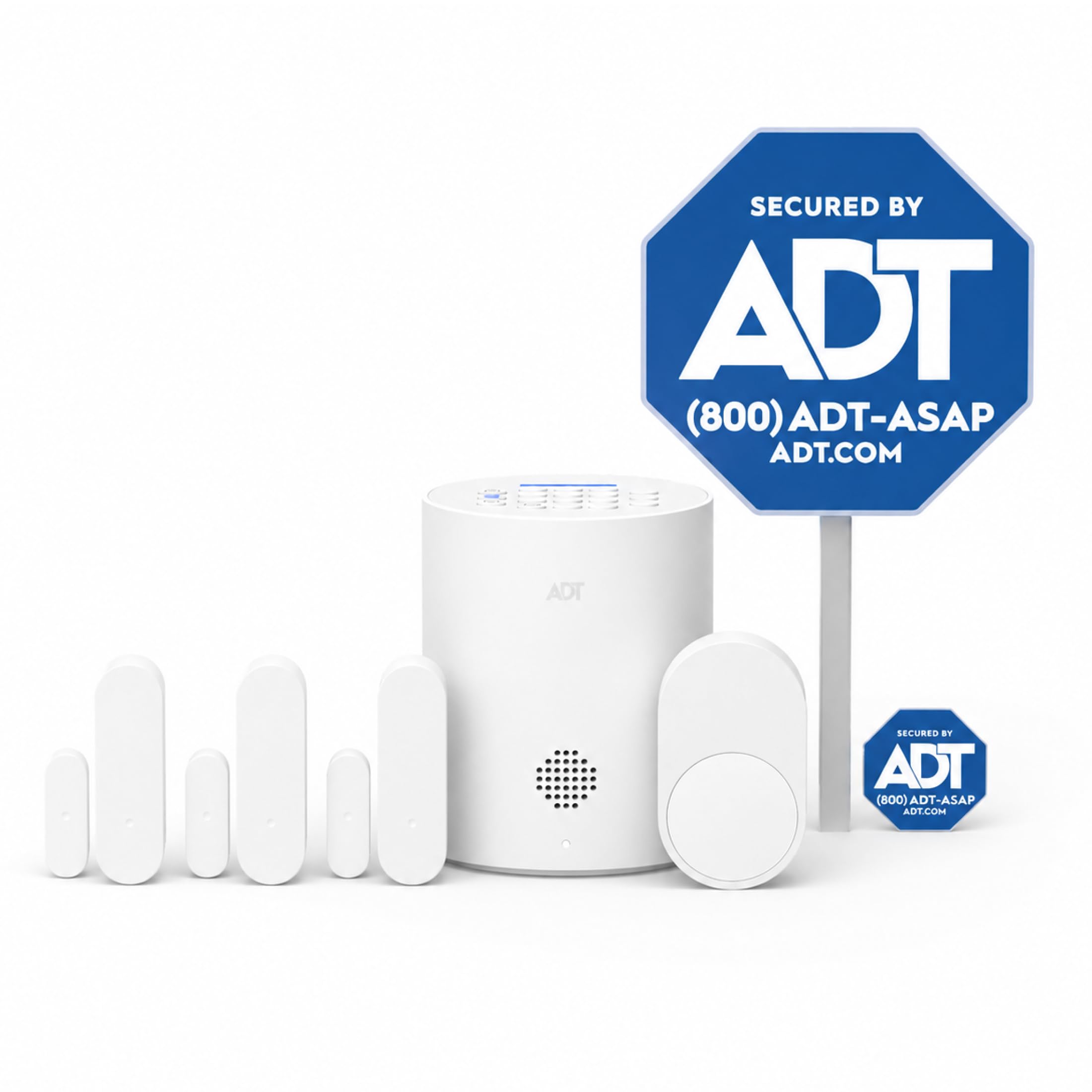
The ADT Blu is the kit to consider if you value the confidence that comes with a 140-year-old security brand name. This starter kit includes one base hub, 3 door/window sensors, 1 pet-friendly motion sensor, 1 yard sign, and 4 window stickers, which is on the smaller side — best for a studio or a very small 1-bedroom. The sticker kit is a nice psychological deterrent, signaling to passersby that the home is protected.
Its defining feature is the dual-monitoring design. You get 30 days of free monitoring when you choose a paid subscription plan that is month-to-month with no long-term contracts — you can cancel anytime. The Self-Protect plan gives you app-based alerts, while the Pro-Protect plan adds 24/7 professional monitoring with emergency dispatch. The base hub includes cellular backup, so even if your Wi-Fi is cut (by a smart thief or an outage), the system can still phone home through the cellular network — a critical feature most budget kits lack.
The setup process is genuinely renter-friendly: mount with screws or adhesive tape, no heavy tools or wiring required. The companion ADT+ app guides you through setup and sends real-time phone alerts the moment a sensor triggers. It’s designed to grow with you, allowing additions of indoor cameras, doorbell cameras, and glass break sensors. Buyers praise the easy sensor placement but the primary complaint is that onboarding can be frustrating — some spent over an hour on the phone with ADT support to get the system registered. Also, there’s a known one-minute delay between a door opening and the siren starting to sound, which might feel like an eternity if you’re relying on the audible alarm over the app notifications.
Best if: you want the reassurance of ADT’s name and smooth cellular backup with professional monitoring.
Keep in mind: the setup experience is inconsistent — have patience with the registration process.
Choose this for: a starter kit that easily expands with cameras and sensors through a famous brand.
Consider: the siren has a noticeable delay and the initial setup could require a support call.
Understanding the Specs
Contact vs. Motion Sensors
Contact sensors come in two parts: a magnet and a switch. You stick them on a door or window frame, and when the gap separates, the alarm triggers. Motion sensors, often called PIR (passive infrared), detect body heat and movement in a room. For a small apartment, contact sensors on all entry doors and windows are the most reliable. A single motion sensor in a main hallway adds room-level protection if someone gets inside.
Many kits specify a pet-friendly motion sensor, which ignores movement below a certain weight threshold (like under 60 lbs on the SimpliSafe) so your cat or dog doesn’t trip it. This is a feature worth checking if you have pets that roam at night.
Dual Network Connectivity
This means the alarm connects two ways: through your home Wi-Fi router and through a cellular network (often labeled GSM or 4G). The cellular part typically requires a SIM card (which you usually buy separately from a carrier). If a thief cuts your internet line or your router fails, the system can still send an alert over the cellular network. For a small apartment, this is a “nice to have” safety net, not a must, but it’s becoming more common across kits.
FAQ
Will a wireless alarm system damage my apartment walls?
Can I move the alarm system to a new apartment when I relocate?
What does the decibel rating on a siren actually mean for an apartment?
Do I need a monthly subscription for these apartment alarms?
Will a motion detector set off false alarms when I have a pet?
What happens if my Wi-Fi goes down — will my alarm still work?
How many sensors do I need for a typical 1-bedroom apartment?
Can I arm and disarm the alarm with my voice?
What is the difference between an RFID card and a remote control?
Final Thoughts: The Verdict
For most renters, the top choice for an alarm system for apartment is the Ring Alarm 8-Piece Kit because it pairs the easiest guided setup with broad coverage and dependable smart home integration. If you want zero monthly fees and a huge 7-inch touchscreen control center, the OSI Gen 2 is the one to beat. And if active professional intervention — agents who can see and speak to an intruder — matters most to you, the SimpliSafe 11-Piece is the most compelling premium upgrade of the group.
How We Picked
We do not accept paid placement. Every pick is matched to a real buyer and a real use-case; we do not hands-on test units.
Sources & Methodology
Specifications: manufacturer listings and product documentation. Review insights: verified customer reviews, as of September 2026. Pricing: not shown on this page (it changes often); check the current price via the retailer link.
As an Amazon Associate, Gadgets Feed earns from qualifying purchases. This does not affect which products we feature.