
Our readers keep the lights on and my morning glass full of iced black tea. As an Amazon Associate, I earn from qualifying purchases.
Specs are compiled from manufacturer listings and verified buyer reviews and can change over time — please confirm the key details on the product page before buying.
If your home security system lives inside a phone app, you know the nightly routine: fumble for the phone, open the app, wait for it to load, and finally arm the alarm. A dedicated keypad on the wall fixes that by giving you a one-touch button in a fixed spot, so arming and disarming takes seconds instead of a staring contest with your lock screen. The real question is which one belongs in your home, and the answer depends entirely on which alarm system you already own.
I’m Min — the founder and writer behind Gadgets Feed. This guide is built by comparing the manufacturers’ published specifications and the patterns across verified customer reviews, so you get each pick’s real strengths and trade-offs instead of marketing spin.
Whether you are adding a second control point or replacing a tired old panel, the right alarm system keypad turns a good security setup into one you actually use every day.
Our Picks at a Glance


How To Choose The Best Alarm System Keypad
Before you fall for a nice design or a long range number, you have to check one thing first: does it talk to the alarm panel you already own? Most keypads only work with their own brand’s system, so a beautiful keypad that does not pair with your panel is just an expensive paperweight on your wall.
Match the Keypad to Your Panel First
Security brands build closed ecosystems. A SimpliSafe keypad only talks to a SimpliSafe base station, a Wyze keypad only works with the Wyze Home Security Core Kit, and a Honeywell keypad wires into a Honeywell or Ademco Vista panel. Figure out your panel’s brand and generation before you shop, or you will buy a unit that cannot do the one job you need it for.
Wireless Freedom vs Wired Reliability
Wireless keypads run on batteries, so you can stick them anywhere — a hallway, a bedroom, a back door — without running cables. The trade-off is you eventually have to replace those batteries. Wired keypads draw power from the alarm panel itself, so they never need a battery swap, but you are limited to spots where you can run or hide the wire.
Look for Emergency Features That Fit Your Life
A dedicated panic or SOS button can call for help in one press, which matters if you live alone or have young kids. Some keypads add a duress code — a special PIN that looks normal but silently triggers an alarm when you are forced to disarm under threat. Others let you set different chime tones per door, so you can hear whether the front or the garage just opened without looking.
Quick Comparison
| Model | Best For | Connectivity | Key Feature | Power Source | Amazon |
|---|---|---|---|---|---|
| SimpliSafe Wireless Keypad★ Best Overall | SimpliSafe Gen 3 owners | Wireless | Touch-to-Wake | Battery | Amazon |
| Wyze Wireless KeypadBest Value | Wyze Core Kit owners | Wireless | 500ft range | Alkaline battery | Amazon |
| Seco-Larm SK-1011-SDQAccess Control Pro | Gates and doors | Wired | 1,000 codes | 12-24 VDC/VAC | Amazon |
| eufy Keypad E10 | eufy HomeBase owners | Wireless | SOS + duress code | 4 AA batteries | Amazon |
| Honeywell 6160 Alpha | Vista panel upgrades | Wired | Alpha display | Panel powered | Amazon |
| Napco RP1054E | Napco system swaps | Wired | 3 panic keys | Panel powered | Amazon |
| Honeywell 6160RF | Adding wireless sensors | Wired + RF | Built-in transceiver | Panel powered | Amazon |
| DSC PK5500 | DSC PowerSeries owners | Wired | 64-zone display | Panel powered | Amazon |
| DSC PTK5507 | DSC modern upgrades | Wired + HDMI | 7″ touchscreen | Panel powered | Amazon |
In‑Depth Reviews
1. SimpliSafe Wireless Keypad
Our pick — over 4.5★ from 950+ verified ratings; the strongest balance of quality and price.
The crowd-tested wall button that arms SimpliSafe in under two minutes
If you already own SimpliSafe, this keypad is the one you buy a second time for placement freedom. It has no plug and no wire, so you can mount a second unit by the back door and never walk across the house to disarm again — buyers report adding it to their system in less than 2 minutes. The Touch-to-Wake Technology (a feature that keeps the surface dark until your hand gets close) lights up the keys just when you need them, so you can see them in a dark hallway.
Buyers consistently praise the solid build and strong value for the price. It pairs with the SimpliSafe Gen 3 home security system, and the wireless design means it draws power from batteries rather than the wall. Even if an intruder smashes the keypad itself, the system still alerts the authorities — so this is a control point, not a single point of failure. Connectivity feedback is mixed: pairing is either flawless or occasionally fussy depending on the setup.
One detail that stands out: leave with an entry sensor open and the system tells you exactly which window is open, right on this keypad. That turns a daily annoyance into a two-second fix at the door. If you already run SimpliSafe, this is the natural way to add a second control point without touching the main base.
What Wins People Over
- Wireless and battery-powered, so placement is completely flexible
- Touch-to-Wake keys light up only when you approach
- Alerts the authorities even if the keypad itself is smashed
Fair Warning
- Only pairs with SimpliSafe Gen 3 systems, not other brands
- Connectivity pairing can occasionally be fussy
- Requires battery changes eventually
Grab this if: you already own SimpliSafe and want a second arming point by another door.
Look elsewhere if: your system is from a different brand — this will not talk to it.
2. Wyze Home Security System Wireless Keypad
A budget keypad that reaches across the whole house and arms on sight
For Wyze owners, this keypad is the cheapest way to stop pulling out your phone every time you leave. Its fully wireless range reaches 500ft/152m, which covers most sized homes, and the backlit keys turn on automatically when motion is detected nearby. The built-in emergency button is the standout — one press sends for emergency first responders without fumbling through an app.
You get a self-adhesive mount that sticks where you want it, and no assembly is required, so you can set it up in minutes. The two-year manufacturer warranty covers you for that period. The honest caveat: it only works with the Wyze Home Security System Core Kit, not standalone, and a few owners mention units failing after two months—check your return window.
If you are already in the Wyze ecosystem, this is a nearly easy add-on that arms and disarms faster than the app ever will. The motion-activated backlight means you never have to hunt for the keys in a dark hallway either.
Smart buy: the cheapest way to add a wall-mounted control point to an existing Wyze setup, with a real emergency button on board.
Reach for this if: you have the Wyze Core Kit and want quick arming from a wall.
Think twice if: you need a device that works on its own — this demands the Wyze system.
3. Seco-Larm Enforcer Access Control Keypad
A stainless-steel workhorse built for gates, not bedrooms
This one is a different animal — it is an access control keypad for gates and doors, not a home alarm panel. The stainless-steel face and 12-button always-on backlit layout are built for outdoor weather, and it holds 1,000 permanent codes plus 50 guest codes at 4-8 digits each. A built-in clock lets you auto-disable access at specific times, so you can lock down entry outside working hours.
Buyers install it for condo gates and latch releases, praising how easy the wiring and programming are — the directions and schematic get called out by name as genuinely useful. The egress input lets someone exit without entering a code, and the auto-adjusting 12-24 VDC/VAC operation means it adapts to whatever power you feed it. The mixed note: this is not a security alarm keypad, so if you expect it to beep like an alarm you will need a custom circuit with a buzzer or relays.
At 8 ounces and roughly 2.88 inches tall, it is compact enough to mount almost anywhere. If your need is controlling who gets through a gate or a door, this does the job the way a home alarm keypad cannot.
Built for gates: heavy on code capacity and scheduling, light on alarm-style features — know the difference before you buy.
Choose this for: gate or door access control with thousands of codes and time-based lockout.
Not for: a home alarm system — it will not beep like a security panel.
4. eufy Keypad E10
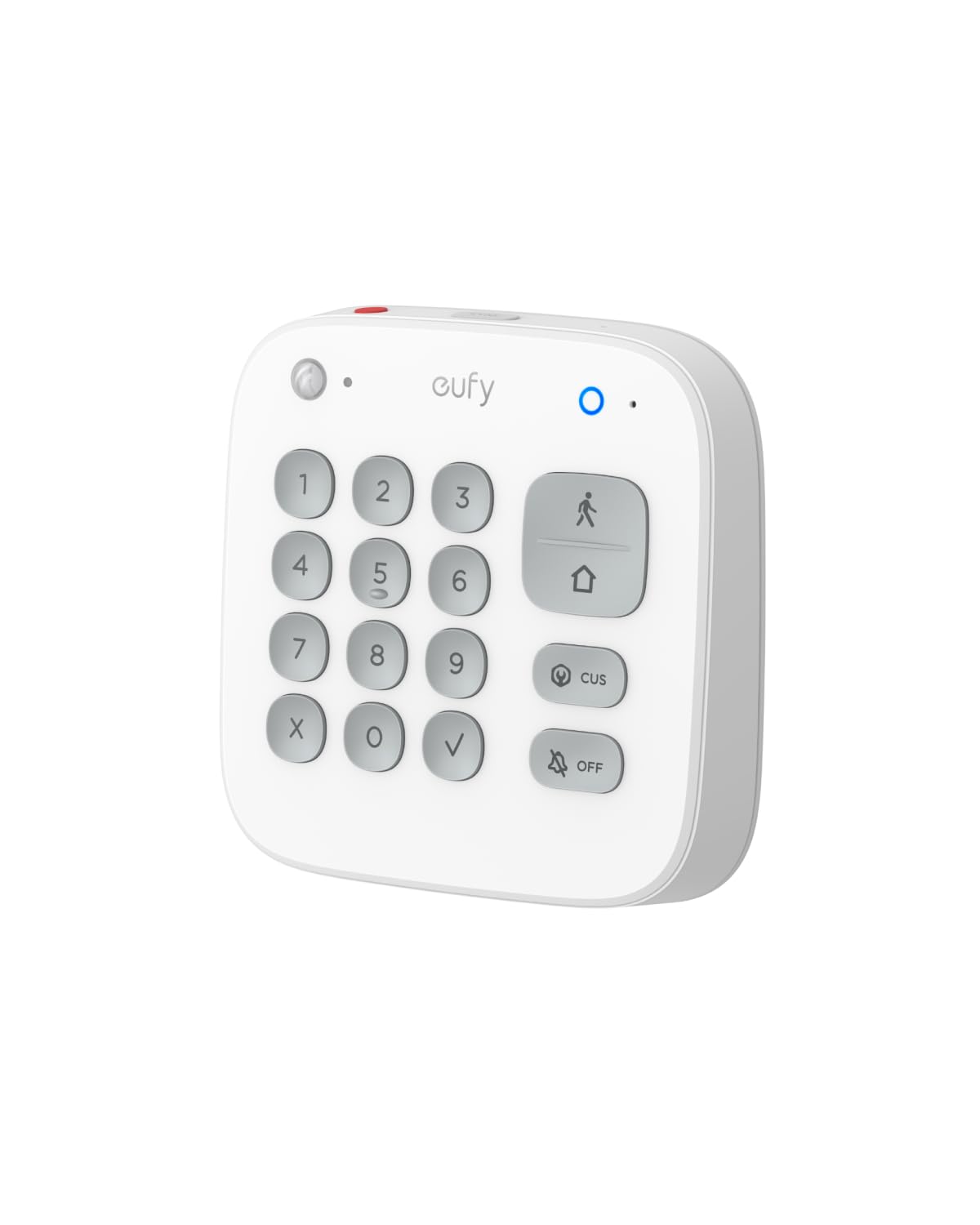
The keypad that thinks like a security pro, with a hidden duress alarm
eufy packs safety tricks into the E10 that most keypads skip entirely. The Covert Duress Alarm lets you enter a preset duress code that looks like a normal disarm but silently triggers an emergency dispatch — a genuine protection if someone forces you to disarm at gunpoint. The One-Touch SOS button on top only needs a 2-second press to raise an alarm and call for help fast.
It runs on 4 AA batteries, so placement is flexible, and the communication range with a HomeBase reaches up to 656 ft in open air. It works with HomeBase 2, HomeBase 3, and HomeBase Professional, and sends instant smartphone alerts. The catch: setup requires the app, but once configured, members without the app can still arm, disarm, or change system status.
It weighs 1.28 pounds and measures 4.9 x 4.85 x 1.1 inches, so it sits like a small console on a table or wall. For eufy households, the duress code alone justifies the add.
Safety-first design: the duress code and SOS button are features you will never test but will be glad exist.
Pick this if: you want duress protection and app-free control for the whole family.
Watch for: early failures on some units — buy knowing reliability is a mixed bag.
5. Honeywell Security 6160 Ademco Alpha Display Keypad

The wired upgrade that makes older Honeywell panels far easier to live with
If you have an older Honeywell or Ademco Vista panel, this is the keypad that owners swap in to modernize the whole experience. The Alpha Display shows actual words instead of cryptic codes, which customers note simplifies programming and daily use noticeably. It self-installs with clear instructions, and people report replacing a broken unit in just a few minutes by reusing the wall holes and wiring it the same way.
Installation is the most frequently praised aspect, with value for money following closely. It is compatible with Ademco Vista alarm panels and works with Safewatch 3000 systems too. Owners love being able to set the keypad address by holding 1+3, copying the old unit’s setting so the panel picks it up flawlessly. The recurring trade-off: the chime is softer than the old keypads, closer to a car door than a sharp beep.
Weighing 14.88 ounces with dimensions of 5 x 2 x 8 inches, it mounts flat against the wall and reads clearly from across a room. If your installer quoted you hundreds to replace your whole system, this keypad solves the control problem for a fraction of that.
Why Owners Swap It In
- Alpha display shows words, not cryptic panel codes
- Reuses existing wall holes and wiring for a fast DIY swap
- Works with Ademco Vista and Safewatch 3000 panels
The Known Trade-Off
- Chime is noticeably softer than older keypads
- Wired only — placement limited by wiring runs
- Some find the installation instructions confusing
Best for: Honeywell and Vista panel owners who want plain-language menus without replacing the whole system.
skip it if: you need a wireless or battery-powered keypad.
6. Napco RP1054E Backlit Digital Display Keypad
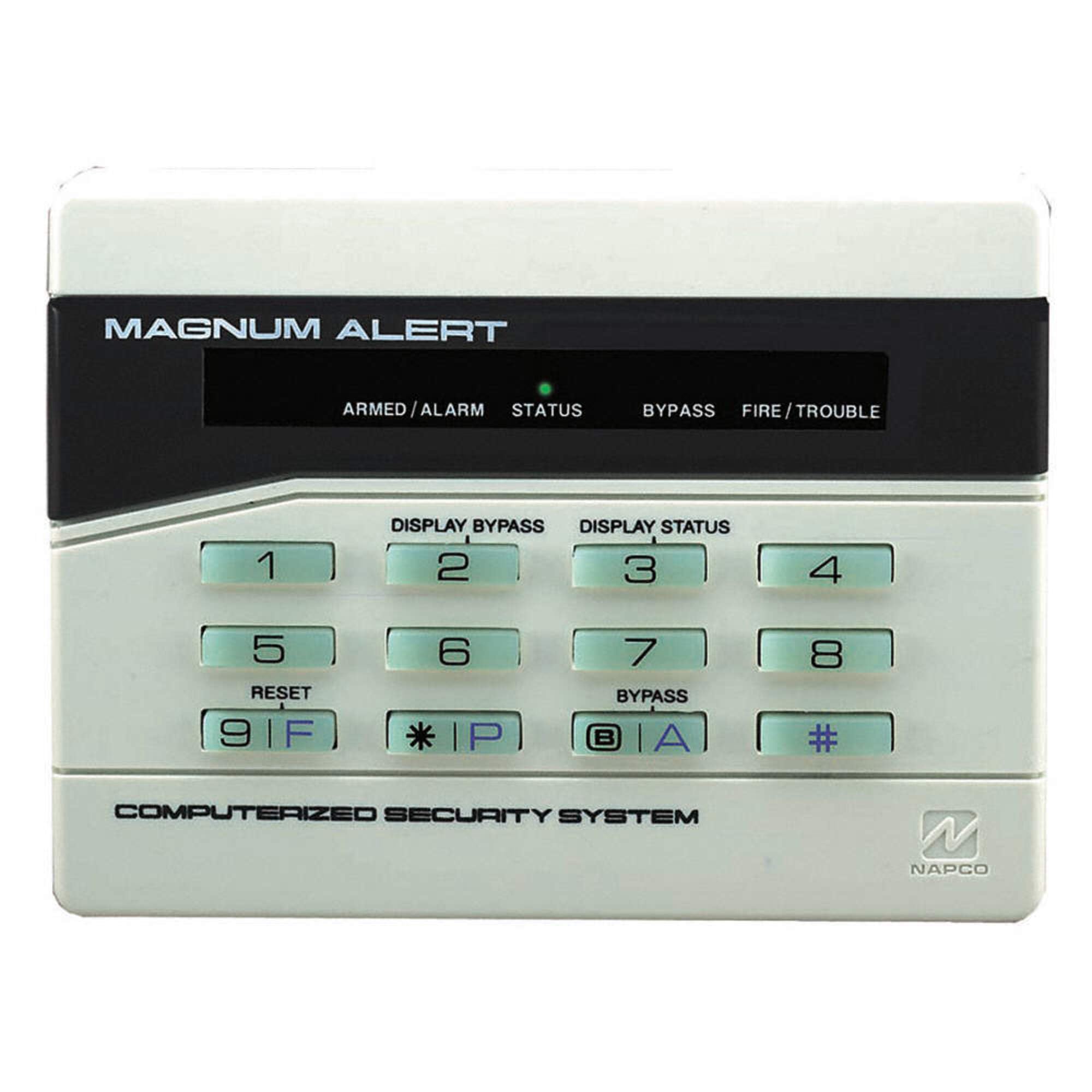
The replacement that outlives the original — one lasted 25 years
Napco systems are the old guard, and this keypad is the drop-in replacement owners reach for when the original finally gives up. The standout story: an original keypad lasted 25 years as the primary entrance and exit control, and owners expect this replacement to do the same. It works with MA-1000E and 1008 controllers, pairing with older systems like the Magnum 854 without issue.
The 3 F-P-A (Fire – Panic – Auxiliary) panic keys put emergency triggers right at your fingertips, and the backlit digital display keeps everything readable in the dark. At 16 ounces, it feels solid, and the wiring is simple enough that buyers describe a four-wire hookup as genuinely easy. Compatibility is mixed: most units work without reprogramming, but some systems fail to recognize it.
This is not a glamorous keypad, and that is exactly the point. It is a proven, no-nonsense replacement for a long-serving Napco system, with the durability record to back it up. If your panel is Napco, this is the safe, time-tested choice.
Built to last: a straightforward replacement with panic keys and a durability record measured in decades.
Reach for this if: you need a dependable swap for an older Napco panel.
Check first: confirm your specific Napco controller — most pair up, but not all.
7. Honeywell 6160RF Custom Alpha Integrated Keyboard/Transceiver

The keypad that quietly adds wireless sensors to a wired Honeywell panel
This is the keypad that makes an older Honeywell panel wireless-ready. The built-in transceiver lets you add wireless sensors without a separate receiver module, and owners call it a great panel for exactly that — adding sensors is a breeze once it is in. The alpha display shows zone names in plain words, and the larger, clearer LED is a real step up from the older 6150 models.
Reviewers most often highlight the value for money, with wireless connectivity as a close second. It works with Vista 20P and other Honeywell panels, comes preset to address 16, and uses simple color-coded wiring that buyers describe as easy to connect. The honest feedback: the buttons feel a bit cheap to some, and the chimes get mixed reactions — a few owners find them annoyingly loud, while others report them softer than the 6150.
At 16 ounces and 8 x 6 x 2 inches, it is a substantial wall unit that reads well from a distance. If you want to grow a wired Honeywell system with wireless sensors, this one keypad replaces both a keypad and a receiver in one step.
The Big Win
- Built-in transceiver adds wireless sensor support without extra hardware
- Alpha display shows zone names in plain language
- Preset to address 16 with simple color-coded wiring
What To Expect
- Button feel is cheaper than the price suggests
- Chime volume is a coin flip — loud to some, soft to others
- Wireless range depends on your panel and home layout
Pick this if: you want to add wireless sensors to a wired Honeywell or Vista 20P system.
Consider others if: you already have a separate wireless receiver and only need a plain keypad.
8. DSC PowerSeries PK5500 Alarm Keypad

A slim landscape keypad that speaks plain English about your whole zone map
DSC calls this their newest style 64-zone programmable alpha LCD keypad, and the plain-language display is the whole story. It shows system troubles, programming menus, and the event buffer in readable words instead of codes, which makes programming and setup noticeably easier. The enlarged buttons and five programmable function keys give quick access to the actions you use most.
Owners highlight the per-zone chime control as a favorite — you can make the front, back, deck, and garage doors chime differently, so you instantly know which door just opened by sound alone. It supports 8 languages, shows global partition status, and has adjustable backlight and keypad buzzer. The individual FAP keys put Fire, Auxiliary, and Panic triggers at your fingertips, and the dual wall-mount and front cover tamper add physical security.
The honest catch is compatibility: this is a wired keypad for DSC PowerSeries panels, not a universal device. At 9.6 ounces with 7 x 5 x 2 inch dimensions, the landscape shape sits flatter against the wall than tall portrait keypads. For DSC owners who like to tinker, the 32-character programmable phrases make this the most customizable option in its class.
Power-user keypad: deep programming power and per-door chimes that genuinely change how you hear your home.
Best for: DSC PowerSeries owners who want full zone visibility and custom chime tones.
Skip if: you do not have a DSC panel — the wiring is specific.
9. DSC PTK5507 PowerSeries TouchScreen Security Interface

A 7-inch touchscreen that turns a dated DSC panel into a modern smart wall console
This is the keypad that makes a DSC PowerSeries system feel current. The 7-inch full-color display runs at 800×480 resolution, and the picture frame feature lets it blend into your wall as a digital photo frame when the alarm is not being used. It works with PC1864, PC1832, and PC1616 control panels, offering a customizable home screen and wallpaper plus output control right from the touchscreen.
Owners call it a worthy upgrade that is easy to install and program, praising its quality and ease of use. The virtual keypad, installer programming, and menu user programming are all there, and the network copy feature lets you duplicate settings across multiple units. One hidden bonus: it reveals user codes that were buried in the system, so owners discover codes they did not know existed. The mixed note is the display — some find it crisp while others describe it as washed out.
At 16 ounces, it is heavy for a keypad, and the mounting holes do not always match older keypad locations, so expect some fresh drilling. The clock resets after a touch and the chime does not wake the display, which annoys some. For DSC owners who want the wall console to look as modern as their phone, this is the pick.
The Appeal
- Full-color 800×480 touchscreen with picture frame mode
- Customizable home screen and wallpaper
- Reveals hidden user codes in your DSC system
The Reality
- Display quality splits owners — crisp to some, washed out to others
- Mounting holes often do not match older keypads
- Clock resets after touch; chime does not wake the display
Choose this for: a DSC system you want to look and feel modern at the wall.
Manage expectations: it is an aesthetic upgrade — you will still need a separate module for smart-home features.
Understanding the Specs
Wireless Range
The distance a wireless keypad can sit from its base station and still communicate reliably. A 500ft/152m specification like the Wyze keypad covers most homes comfortably, while a 656ft figure from eufy gives even more margin. Walls and floors shrink the real-world range, so treat the number as a ceiling, not a guarantee.
Alpha vs Numeric Display
An alpha display shows words instead of numbered codes. The Honeywell 6160 and DSC PK5500 both use alpha displays, which means you read “FRONT DOOR OPEN” instead of decoding a two-digit error. If you are new to security systems, an alpha display removes the learning curve entirely.
Duress Code and Panic Keys
A duress code is a special PIN that looks normal when typed but silently signals an emergency, like the eufy E10’s covert duress alarm. Panic or FAP keys (Fire, Auxiliary, Panic) trigger specific alarms in one press — the Napco RP1054E and DSC PK5500 both carry them. These features matter most if you live alone or want one-touch emergency access.
Wired vs Battery Power
Wired keypads draw power from the alarm panel itself, so they never need battery changes but require a wire run. Battery-powered keypads like the SimpliSafe and Wyze units mount anywhere with no cabling, at the cost of eventual battery swaps. The right choice depends on whether placement freedom or zero-maintenance matters more to you.
FAQ
Will any keypad work with my existing alarm system?
What is the difference between a wireless and a wired keypad?
What does an alpha display mean on an alarm keypad?
What is a duress code and why would I want one?
How long do wireless keypad batteries last?
Can a keypad replace my entire alarm system?
What is the difference between an alarm keypad and an access control keypad?
How hard is it to install a wired keypad myself?
What are FAP or panic keys on a keypad?
Can a keypad add wireless sensors to my wired system?
Final Thoughts: The Verdict
Across the board, the alarm system keypad winner is the SimpliSafe Wireless Keypad because it pairs easy wireless placement with true security durability — it even alerts the authorities if the keypad itself is smashed. If you want to add wireless sensor support to an existing wired panel, the Honeywell 6160RF is the one to reach for. And for the budget-minded Wyze owner, the Wyze Wireless Keypad delivers a wall-mounted control point with a real emergency button at an entry-level price.
How We Picked
We do not accept paid placement. Every pick is matched to a real buyer and a real use-case; we do not hands-on test units.
Sources & Methodology
Specifications: manufacturer listings and product documentation. Review insights: verified customer reviews, as of August 2026. Pricing: not shown on this page (it changes often); check the current price via the retailer link.
As an Amazon Associate, Gadgets Feed earns from qualifying purchases. This does not affect which products we feature.