
Our readers keep the lights on and my morning glass full of iced black tea. As an Amazon Associate, I earn from qualifying purchases.
Specs are compiled from manufacturer listings and verified buyer reviews and can change over time — please confirm the key details on the product page before buying.
Renting an apartment means you want security without drilling holes, without a long contract, and in a space that’s likely under a thousand square feet with thin shared walls. The best apartment alarm systems mount with adhesive tape instead of screws, and peel off the wall when your lease ends. This guide matches each kit to your floor plan, your router’s band, and how much setup work you want to do.
I’m Min — the founder and writer behind Gadgets Feed. This guide is built by comparing the manufacturers’ published specifications and the patterns across verified customer reviews, so you get each pick’s real strengths and trade-offs instead of marketing spin.
Below you will find the systems that install in under an hour, talk to your phone, and fit rental rules — everything you need to choose the best alarm systems for apartments without voiding your lease.
Our Picks at a Glance


How To Choose The Best Alarm Systems For Apartments
An apartment alarm is a different animal from the system your parents had in a house. Every sensor goes on with tape, not screws. The siren needs to be loud enough to bother a neighbor but not so loud the whole building shows up. And you need to be able to pull it all off the walls in an afternoon when your lease ends.
Installation has to be zero-damage
Since you probably cannot drill, look for self-adhesive mounting and a kit that needs no wiring at all. Most of the picks here go up with peel-and-stick pads or simple counter-top placement, which means you can reposition a sensor the moment it triggers false alerts instead of patching drywall later.
Wi-Fi, cellular, or neither?
A pure Wi-Fi alarm is the simplest to set up but also the easiest to defeat — cut the internet and it goes quiet. A dual 4G plus Wi-Fi system stays connected to your phone even when your home network drops. Some kits skip wireless entirely and use their own radio signal, which means no router headaches but no phone app either.
Understand the range limits of a small apartment
Apartment kits reach their sensors over different radio types. A 433MHz sensor setup pushes through walls and rebar more easily than a Wi-Fi sensor, which is worth knowing if your base station sits in a back bedroom and your front door is a long way off. Most 2.4GHz-only systems also refuse to connect to a 5GHz network, so check your router before you buy.
Quick Comparison
| Model | Best For | Pieces | Siren | Connection | Amazon |
|---|---|---|---|---|---|
| Ring Alarm 5-Piece Kit★ Best Overall | Renters who want 24/7 pro monitoring | 5 pieces | — | Wi-Fi + optional cellular | Amazon |
| WiFi Door Alarm System, 10-Piece DIY KitBudget Champion | Budget owners who want an app and no fees | 10 pieces | 120 dB | 2.4GHz Wi-Fi only | Amazon |
| Wuloo 6-Piece Expandable KitBest No-WiFi Setup | Driveway and doorbell coverage, no Wi-Fi | 6 pieces | — | Wireless (no Wi-Fi) | Amazon |
| 24pcs Wireless DIY Burglar Alarm | Max sensors for a big flat or small shop | 24 pieces | — | 4G / Wi-Fi / GSM | Amazon |
| 15-Piece WiFi Home Security System | Full door coverage on one budget kit | 15 pieces | 120 dB | 2.4GHz Wi-Fi only | Amazon |
| XUK 24 pcs Touch Screen System | Hands-on control with a real touchscreen | 24 pieces | 120 dB | 2G/4G + 2.4GHz Wi-Fi | Amazon |
| OSI Alarm System Gen 2 (4G) | Airbnb hosts and renters who want flexibility | 11 pieces | — | 4G + Wi-Fi | Amazon |
| Like-New Ring Alarm 8-Piece Kit | Anyone OK with certified refurbished value | 8 pieces | — | Wi-Fi + optional cellular | Amazon |
| SimpliSafe 11-Piece Gen 3 | Full-room protection with a live camera | 11 pieces | 95 dB | Wi-Fi | Amazon |
In‑Depth Reviews
1. Ring Alarm 5-Piece Kit (newest model)
Our pick — over 4.5★ from 5,000+ verified ratings; the strongest balance of quality and price.
The five-piece kit built for a condo hallway, with pro monitoring on tap.
For a renter who wants the option of a human being watching the alarm around the clock, this is the pick to start with. You get one Base Station, one Keypad, one Contact Sensor, one Motion Detector, and one Range Extender — exactly the pieces a one or two-bedroom apartment needs, nothing more. The Contact Sensors detect when doors or windows open, and the Keypad arms and disarms the whole thing at the door without your phone.
The Range Extender is what keeps a sensor at the far end of a long hallway connected. It lets the system reach sensors placed at the far end of a long hallway, so you are not stuck with a dead zone in the back bedroom. Everything talks to the Ring app, and you can arm and disarm by voice through Alexa once a Ring Protect subscription is active. Buyers report that the setup was straightforward and that it plugs into a broader smart home setup without drama.
The trade-off: 24/7 monitoring and remote arming require the optional Ring Protect Plan, so from the start you get self-monitoring only. There are also scattered notes on the base station struggling to hold a connection over Ethernet or Wi-Fi in some homes, so give it a strong signal or check your Router placement before you mount it. If you want a system that can grow into a whole-home setup, this one expands with more sensors at any time.
What you actually get
- Five pieces cover a typical apartment entry, hallway, and one room
- Range Extender keeps distant sensors connected
- Voice arm/disarm through Alexa with an active Ring Protect plan
- Expandable whenever you want more coverage
The fine print
- 24/7 monitoring and remote arming need a Ring Protect subscription
- Some units fight to stay connected over Ethernet or Wi-Fi
Reach for this if: you want the option of a monitored apartment without buying a whole-house system.
Think twice if: you want zero subscriptions and never plan to add monitoring.
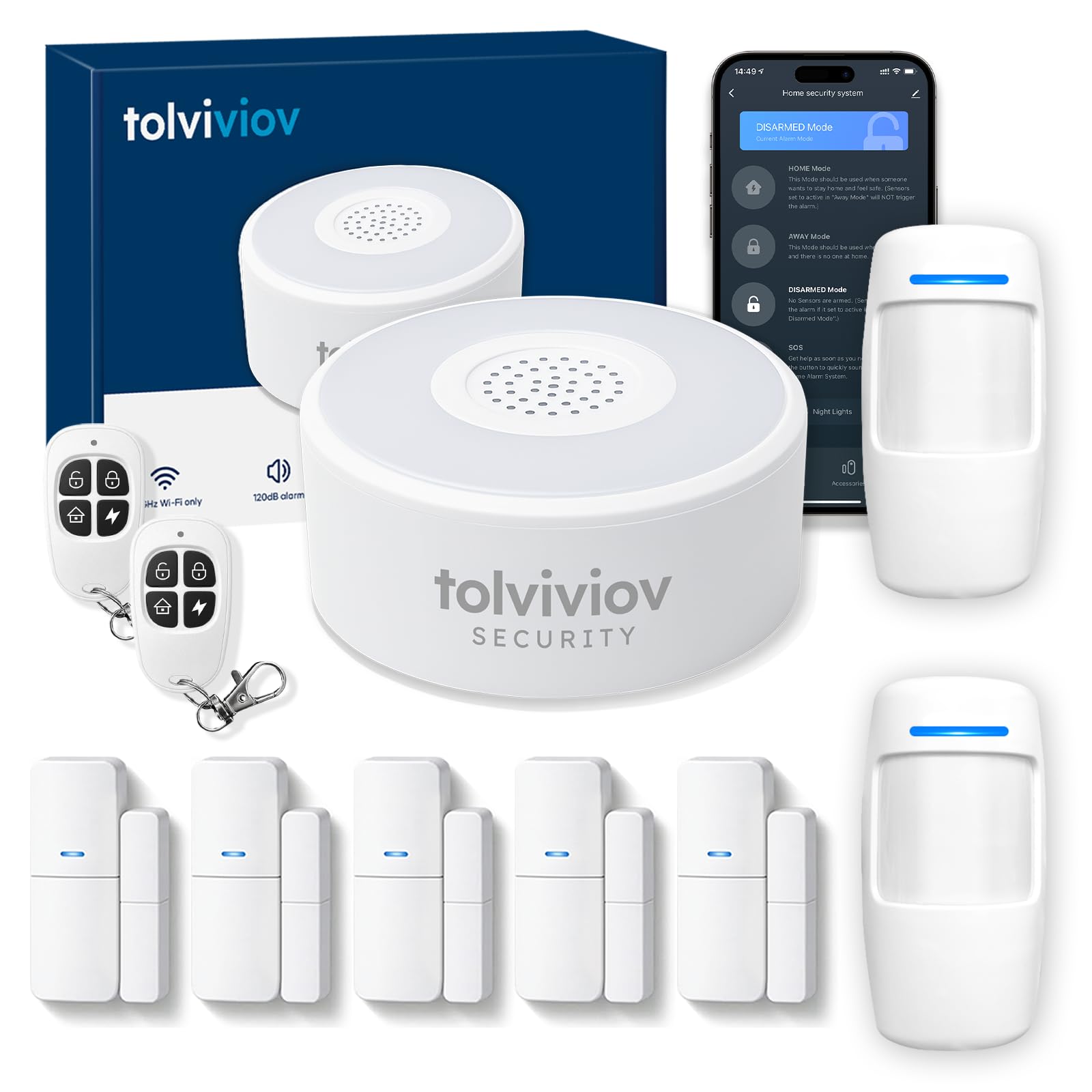
2. WiFi Door Alarm System, 10-Piece DIY Wireless Alarm Kit
Ten sensors, a 120 dB siren, and zero monthly fees for the entry-level shopper.
For budget buyers, this kit delivers a lot of coverage: a Wi-Fi alarm base station (the hub that connects everything to your home network), two motion sensors, five door sensors, and two remote controls. It supports expansion up to 20 sensors plus 5 remote controls or keypads, so you can add rooms as needed. At 0.78 kg, it’s one of the lighter kits here—easy to mount sensors on a rental door without a heavy base station getting in the way.
The 120 dB siren (a sound level about as loud as a chainsaw) is genuinely piercing—owners mention that a door or window breach triggers a loud app alarm and sends instant notifications to your phone. There’s no monthly fee at all. The catch: it connects only to 2.4GHz Wi-Fi, so a 5GHz-only router needs that band switched on or a plug-in extender.
Reliability is where customers note problems. Reviewers point out the siren and alert chain can degrade over time—one worked with consistent daily alerts for a stretch, then dropped to a single beep per event, and a reset didn’t fix it. Others find adding new sensors to the app fiddly, with accessories hard to identify. That’s a real risk if you want a permanent solution, so this kit suits a short-term rental or a second space rather than a system you never think about again.
Siren and coverage: The loud 120 dB alarm and ten included sensors give you more pieces for the money than most kits near this tier, and there is no monthly fee to keep it running.
The WiFi catch: It only speaks to the 2.4GHz band, so you need a router broadcasting on that frequency — and the reliability complaints cluster around units that stopped alerting reliably after a couple of months.
Suits a renter wanting the most pieces for the least money: the loud siren and no-subscription model are hard to argue with.
Not for you if: you want a set-and-forget system that will still be alerting strong two years in.
3. Wuloo Wireless Alarm System 6-Piece Expandable Kit
No router, no contract — a wireless kit that earns its keep out on the driveway.
This six-piece set stands out: no Wi-Fi and no monthly fees. Instead of a phone app, it runs on its own wireless signal and includes a doorbell, a door alarm, and a solar driveway alarm. All sensors have a rechargeable battery, and the solar driveway sensor can keep working for about 24 months after a full charge—the kind of hands-off power you want for an outdoor piece you’ll rarely touch.
Setup is refreshingly simple — the factory finishes the settings before shipping, so you charge it, switch it on, test it, and mount it. The sensor sensitivity is adjustable, you can set different chimes for different sensors, and the door alarm has three work modes. The kit is heavier than the 10-piece Wi-Fi option — the comparison facts put it at 1.32 kg versus 0.78 kg for the tolviviov, so it is a bit less toss-in-a-bag portable.
Range is where this shines. Shoppers say it reaching out to a large property and a detached garage without trouble, and the setup supports linking 8 separate units. The motion sensors ship at their highest sensitivity by default, so dial them down before you mount them or you will get chimes you did not ask for. The clearest limit buyers flag is that they wish the set could link more than 8 units to a single receiver — fine for most apartments, tight for a sprawling property.
Why renters like it
- Runs with zero Wi-Fi and zero monthly fee
- Solar driveway sensor runs about 24 months per full charge
- Adjustable sensitivity and per-sensor chimes cut false alerts
- Charges with 5 included Lithium Polymer batteries
Where it frustrates
- No phone app — alerts are chime-based only
- Motion sensors default to highest sensitivity from the start
- Caps out at 8 linked units on one receiver
Pick this if: you want local chime alerts and no cloud, router, or subscription in the loop.
Leave it if: you need push notifications to your phone when you are away.
4. 24pcs Wireless DIY Home Burglar Alarm System, 4G WiFi GSM
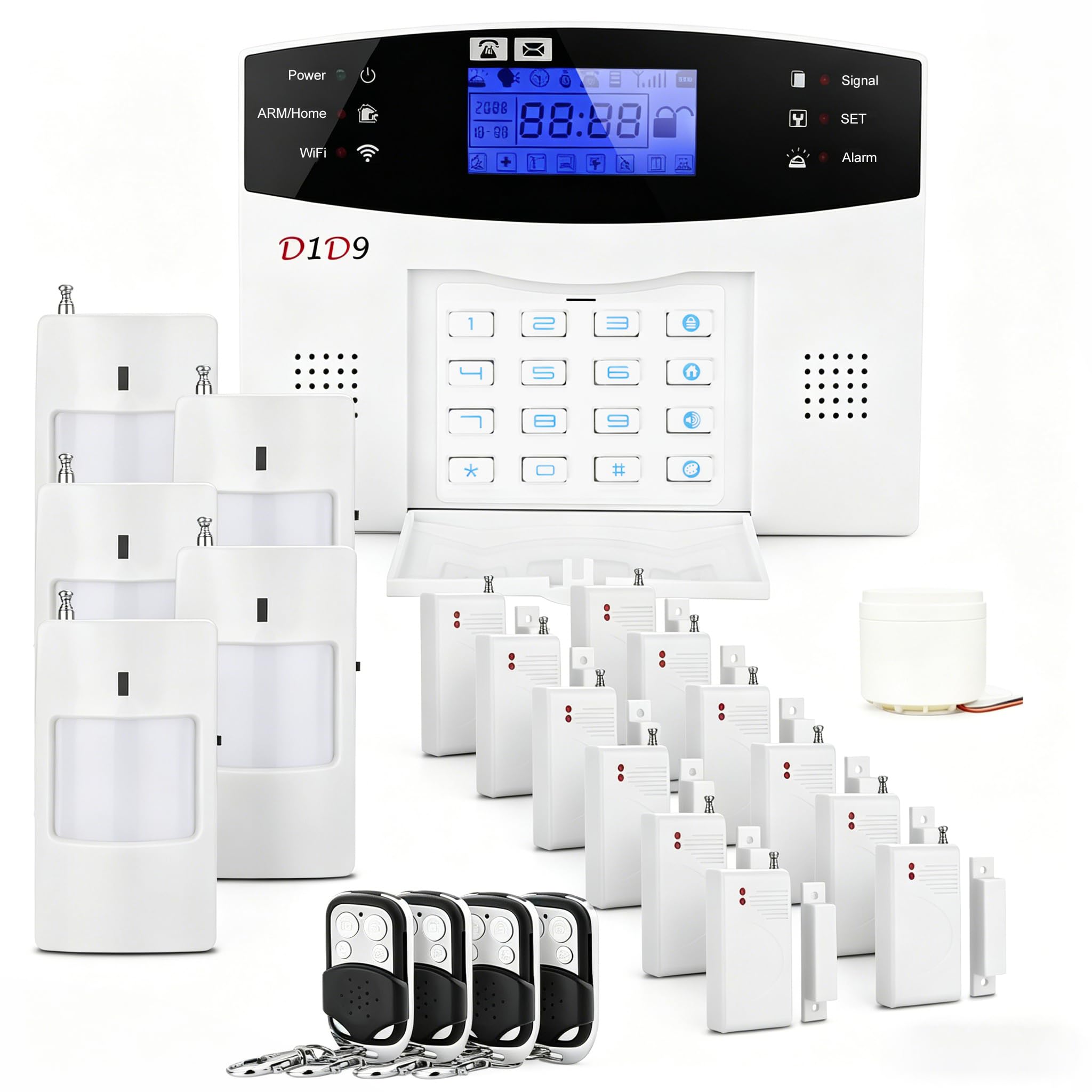
Twenty-four pieces that blanket a whole floor — if the notifications hold up.
If your apartment has many entry points, the piece count is the draw: door and window sensors, motion detectors, a remote control, and a siren, all peel-and-stick, with the manufacturer claiming a 30-minute setup. It uses a 4G connection (cellular data) or Wi-Fi to keep phone alerts flowing, and there’s no monthly subscription fee—good for a renter who doesn’t want a bill any more than a drill.
What works best for owners is the breadth of coverage. Buyers fit the whole set across their main doors and windows without running out of sensors, and the motion and magnetic contacts report consistently once placed. The maximum range reaches 80 meters, which is more than enough for a single flat. Many report that setting it up was trouble-free — and that the panel makes home and away modes easy to flip.
The trade-off is the alarm reliability side. The built-in siren is described as too quiet to hear outside, and the separate remote siren can cut in and out, which undercuts the whole point of an alarm. Add that the included batteries sometimes arrive dead or drained, and you will want a fresh set on hand before you rely on this as the core of your apartment security. It is a lot of coverage for the cost, but it rewards the buyer willing to test every sensor themselves.
Coverage and setup: Twenty-four pieces for a single apartment is generous, and the peel-and-stick install plus 80-meter range makes full-floor coverage realistic.
The siren risk: Buyers frequently call out that the siren is not loud enough outside and the remote siren can misbehave, so treat the alarm sound as a bonus rather than the anchor of your setup.
A fit for: a renter with lots of windows and doors who wants maximum sensors and is happy to proof-test each one.
Skip this one if: you are counting on a loud, dependable siren to scare off an intruder.
5. 15-Piece WiFi Home Security System, DIY Wireless Alarm Kit

Fifteen pieces of no-fee coverage, tuned for the renter who wants a loud alarm.
On paper this kit looks mid-pack, but the box contents punch above their weight: a Wi-Fi base station, a keypad, one motion sensor, ten door sensors, and two remote controls. Ten door sensors is a lot for an apartment, so you’ll likely have spares for windows and a patio door. The 120 dB siren is loud enough to carry, and there’s no monthly fee to keep the system running.
Buyers consistently say it goes up fast: setup takes under an hour with no professional install, the app sends instant notifications the moment a sensor trips, and the system tracks a backup battery for outages—a real plus in a building where power or the router can flicker. The recurring snag is its 2.4GHz Wi-Fi requirement: if your router runs 5GHz, you’ll need a plug-in extender to bridge it, and buyers report that fix works.
The one small fit issue is the door contact sensors. On doors with thick trim, the two halves of a contact sensor can sit unevenly, which can leave the sensor fussy — one buyer found the trim made the pieces misaligned. The good news is that the sensors install with adhesive strips or mounting hardware, so you have flexibility in how you seat them. For an apartment with standard doors and a 2.4GHz network, this is one of the more complete sub–style kits here.
What wins people over: a 120 dB alarm and ten door sensors make full coverage easy, and the app delivers quick, instant alerts with no recurring bill.
Worth knowing: this Wi-Fi kit needs a 2.4GHz band, and thick door trim can throw its contact sensors slightly out of alignment.
Best for: renters with a standard 2.4GHz router who want the most door coverage for a mid-range price.
Pass if: your home network is locked to 5GHz and you do not want to add an extender.
6. XUK 24 pcs WiFi Wireless Alarm System with 4.3″ Touch Screen
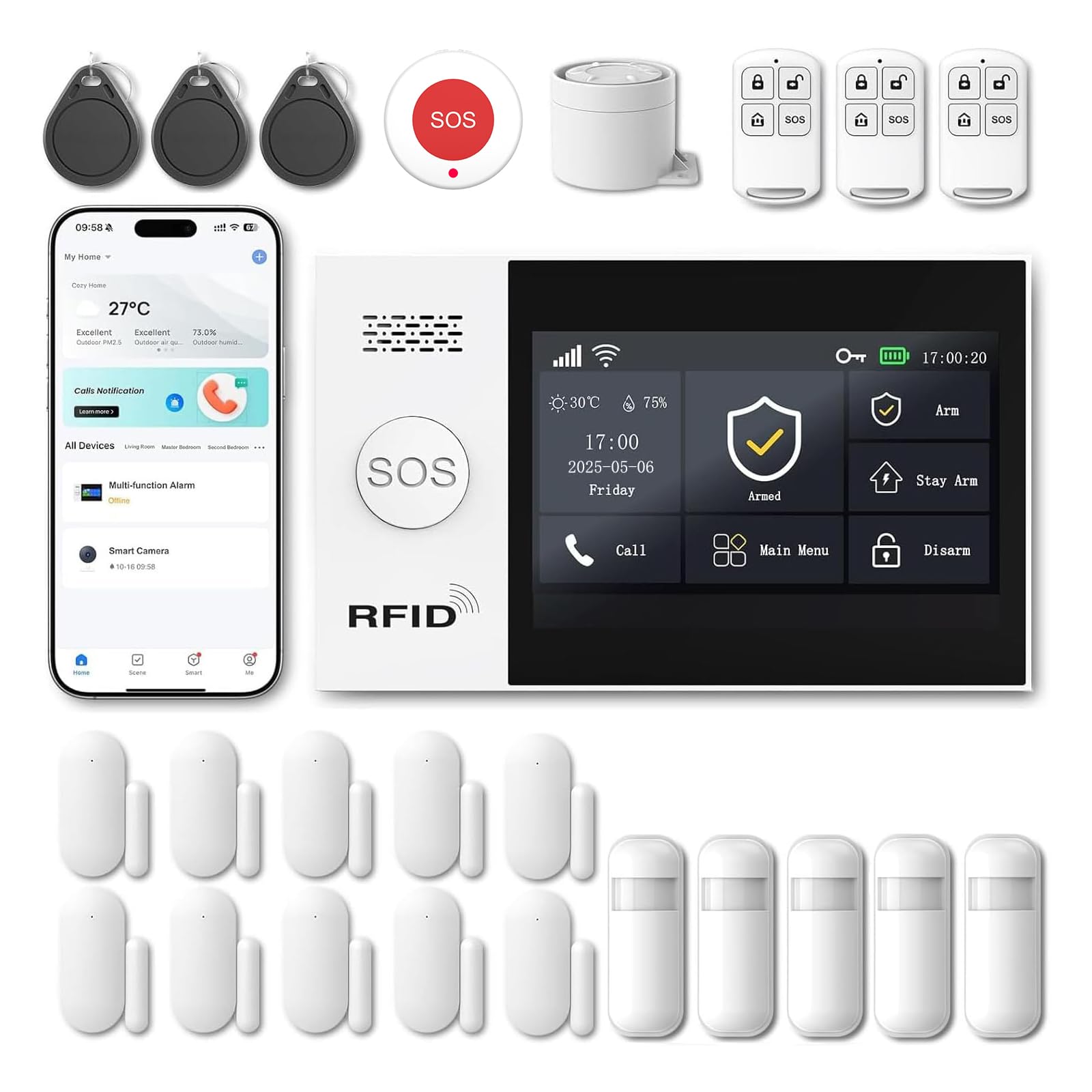
A 4.3-inch color touchscreen and 24 pieces — a lot of hardware for hands-on renters.
Most apartment kits use a bare keypad, but this one has a 4.3-inch color touchscreen on the central unit that shows alarm status, time, and alerts in real time—easier for guests or family to read than a number pad. It comes with a serious haul: five motion detectors, ten door and window alarms, a 120 dB siren, an SOS button, three remotes, and three RFID keychains (tap-to-disarm tags). It scales up to 100 sensors and 10 RFID keychains, so it can grow well past a single flat.
For renters who worry about losing a signal, dual connectivity is the standout: it runs on 2.4GHz Wi-Fi and 2G/4G, sending alerts by app, SMS, or voice call even when your home network drops—as long as you have a SIM card (a small chip for cellular service), since SMS and voice intercom need one. Setup is billed as a 10-minute no-wire job, and the touchscreen supports voice control through Alexa and Google Assistant.
The honest note is on security defaults. Buyers flag default passwords like 1234 and 6666, admin access without a code, and unplugging the unit disarming it without a password — fixable, but it means you should change the credentials the moment you set it up. There are also some false alarms reported, which is common when motion sensors are placed near a window or heat source. Treat the smart setup as a project, not a plug-and-forget.
Why it stands out
- 4.3-inch color touch screen instead of a basic keypad
- Dual 2.4GHz Wi-Fi and 2G/4G keeps alerts live during an outage
- Scales to 100 sensors and 10 RFID keychains
- 120 dB siren plus an SOS panic button
Watch out for
- Default passwords ship from the start and must be changed
- Unplugging the unit disarms it without a password
- Some owners mention false alarms and a fiddly setup
Choose it for: a large flat or multi-story home where a touchscreen and cellular backup are worth the extra hand-on setup.
Look elsewhere if: you want a system that is locked down by default with zero configuration.
7. OSI Alarm System Gen 2 (4G), 11pc

A setup wizard, a 7-inch screen, and monitoring you can turn on or off at will.
For the renter who wants options, this Gen 2 kit doesn’t lock you into one way of monitoring. You can run free self-monitoring through the Smart Life app with no SIM card and no monthly fee, or opt into 24/7 professional monitoring with emergency dispatch, SMS, and phone confirmation—and cancel anytime, with no long-term contract. The kit itself is generous: a control panel with a 7-inch screen, two motion sensors, five contact sensors, a wireless strobe siren, and two remote controllers.
The daily-use touches are what keep owners happy. Multiple user access levels let you set up one administrator account and five user accounts — ideal if you have an Airbnb, a partner, or kids you want to keep out of the settings. A 24-hour backup battery keeps the system alive during a power cut, and the SOS button on the display, app, and remote sounds the siren and notifies anyone you have shared access with. The 433MHz sensors respond immediately, even through concrete and rebar, which is a genuine advantage in a reinforced apartment building.
The nagging points are around polish rather than security. The app can run slow, sensors can be fussy to name, and a couple of buyers mention the siren is only so-so in real use. The rechargeable controller also leans on a hardwired setup for consistent power. Room to grow is real here — it supports up to 160 sensors, 6 controllers, 6 doorbells, and 6 keypads — so a growing household will not hit a ceiling.
Best for flexibility: It is one of the few kits here that lets you start free and upgrade to professional monitoring later without a contract.
Honest limit: the siren is not the loudest of the group, and the app interface has rough edges that some owners find frustrating.
Go for this if: you want the freedom to self-monitor now and pay for monitoring only when you actually need it.
Consider another pick if: you are chasing the loudest alarm or the slickest phone app.
8. Like-New Ring Alarm 8-Piece Kit (newest model)
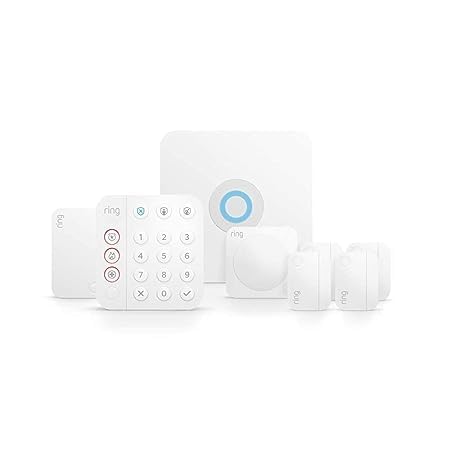
Refurbished Ring, more sensors, same warranty — your best value on the platform.
If you want Ring but hate paying full sticker, this certified refurbished 8-piece is the smarter buy. It is tested and certified to look and work like new and carries the same limited warranty as a new device, though it may ship in generic Amazon-branded packaging. Inside, you get one base station, one keypad, four contact sensors, one motion detector, and one range extender — a great fit for a one or two-bedroom apartment.
The reported experience is that the refurbished units arrive in like-new condition. Buyers describe a roughly 45-minute setup guided by the app, adhesive mounts, responsive sensors, pet-immune motion, and full Alexa voice control. The base station, keypad, four contact sensors, motion detector, and range extender all work together, and the whole thing expands with additional sensors anytime. For the money, that is a lot of coverage compared to a new-in-box kit.
Two caveats, both worth planning for. Professional monitoring is optional and needs a Ring Protect subscription, and if you want the alarm to trigger a police or fire response, you generally have to register with your county and factor in that extra cost. A few buyers mention the door and window sensors being fussy to set up in the app, though they work fine once paired. None of that is a dealbreaker for a renter — it is just the reality of the Ring ecosystem.
Value story: Certified refurbished means like-new hardware at a lower tier than the standard 8-piece kit, with the same warranty — a clean win for renters on a budget.
Two things to sort first: monitoring stays optional behind a Ring Protect plan, and police/fire response may need county registration.
Ideal for: the renter who wants a trusted brand name without paying full retail for it.
Not the pick for: anyone who wants the alarm and full monitoring included with no extra subscription at all.
9. SimpliSafe 11 Piece Wireless Home Security System Gen 3

An 11-piece kit with a wireless camera and optional live guard — no contract.
This is the kit to look at if you want video in the mix, not just sensors. Alongside the base station, keypad, two motion sensors, and six entry sensors, you get an indoor wireless camera, and the base station arms and disarms from the SimpliSafe app anywhere. Each motion sensor watches a 35-foot range with a 90-degree field of view and is tuned to coexist with pets under 60 lbs — useful in a small apartment where one sensor has to cover a whole room.
The camera brings a feature the other kits here cannot match: with 24/7 live guard protection, monitoring agents can see and speak to an intruder through the camera’s two-way audio during an alarm. The kit needs no wiring or drilling. Support and setup are consistently well-reviewed, with buyers praising an easy install and an intuitive app, plus the flexibility to add sensors and sirens later if you want to hide the base station.
The recurring gripe is range to the base unit. Door and window sensors sit the furthest from the base station, and customers note that a weak battery can cause their signal to drop out, forcing a physical reset. Cameras occasionally go offline too, though they usually recover on their own. Since it leans on Wi-Fi, a dropped router hits functionality — so in a thick-walled apartment, keep the base station central and budget for fresh alkaline batteries.
Video plus sensors: The indoor camera with two-way audio is what sets this kit apart, and the whole set installs with zero wiring or drilling.
The reliability nuance: Sensors and cameras can drop offline from a weak signal or battery, so placement and fresh batteries matter more here than on a hardwired system.
The right call for: a renter who wants camera coverage inside the flat and value their ability to add devices over time.
Think again if: you want a system that never relies on a home Wi-Fi network to stay alert.
Understanding the Specs
Connection type: Wi-Fi vs. cellular vs. neither
Wi-Fi is the easiest to set up and lets your phone get the alert — but if your router drops, so does the alarm’s link to you. Cellular (4G) keeps alerts flowing even when your home internet is out, which is why a dual Wi-Fi-plus-cellular kit is the safer bet in a building with spotty service. A few kits here skip both and run on their own radio signal, which means no router headaches but no phone app at all. Note that 4G/SMS kits need a SIM card for those functions.
Siren loudness and the 2.4GHz gotcha
Siren loudness is measured in decibels (dB), a measure of sound intensity. The kits here range from 95 dB up to 120 dB, and louder is not always better for an apartment — a 120 dB siren can bother neighbors and could run afoul of a lease noise clause. The bigger trap is the band: most of these kits only run on 2.4GHz Wi-Fi, so a 5GHz-only router will not connect without a plug-in extender. Check your router’s settings before you buy.
FAQ
Can I install an alarm system in a rented apartment without damaging the walls?
Do I need a monthly subscription for an apartment alarm?
Will my alarm system work if my apartment Wi-Fi goes down?
Do these apartment alarm kits work with 5GHz Wi-Fi?
How loud is the siren and will it bother my neighbors?
How long does the backup battery last during a power cut?
Can I expand an apartment alarm system if I move to a bigger place?
Do I need to register with police or fire services for monitoring to work?
Final Thoughts: The Verdict
For most renters, the best alarm systems for apartments winner is the Ring Alarm 5-Piece Kit—five pieces that fit a condo, an expandable platform, and the option to add 24/7 monitoring when you want it. If full door coverage at the lowest tier is your priority, grab the 15-Piece WiFi Home Security System with its ten door sensors and can’t-miss 120 dB siren. And if you want a camera watching the room with two-way audio, the SimpliSafe 11-Piece Gen 3 is the one to reach for. Whatever you choose, buy fresh batteries and test every sensor the day it arrives.
How We Picked
We do not accept paid placement. Every pick is matched to a real buyer and a real use-case; we do not hands-on test units.
Sources & Methodology
Specifications: manufacturer listings and product documentation. Review insights: verified customer reviews, as of September 2026. Pricing: not shown on this page (it changes often); check the current price via the retailer link.
As an Amazon Associate, Gadgets Feed earns from qualifying purchases. This does not affect which products we feature.