
The Alice layout looks strange at first glance — a split, angled columnar design that seems to have been melted and pulled apart. But that visual oddity is the whole point. By separating the two halves and rotating them slightly, an Alice keyboard forces your shoulders to relax, your wrists to straighten, and your fingers to move in their natural vertical plane instead of stretching sideways across a traditional staggered row. The result is less ulnar deviation, less forearm pronation, and a typing experience that feels like your hands just exhaled.
I’m Min — the co-founder and writer behind Gadgets Feed. This guide is the result of hundreds of hours spent cross-referencing switch types, mounting structures, connectivity protocols, and real user feedback to separate the truly ergonomic Alice keyboards from the ones that just look the part. I track how each board’s internals — plate material, dampening layers, PCB flex cuts — translate into the tactile and acoustic signature that defines a modern mechanical keyboard.
Whether you’re a developer logging ten-hour coding sessions or a writer chasing that perfect thock, the right split layout can fundamentally change how your hands feel at the end of the day. This guide breaks down the best alice layout keyboard options across every budget and use case so you can find the one that fits your workflow and your wrists.
How To Choose The Best Alice Layout Keyboard
The Alice layout market has exploded, offering everything from budget-friendly plastic builds to precision-machined aluminum art pieces. Your choice should be guided by four critical factors that determine whether the keyboard will actually improve your comfort or just look cool on your desk.
Mounting Structure and Flex
Gasket mount is the gold standard in the enthusiast space because it isolates the plate from the case with soft silicone or foam gaskets, creating a bouncy, forgiving feel with a deeper sound profile. Top mount offers a stiffer, more consistent keystroke with less plate flex — popular on boards like the EPOMAKER Glyph. Tray mount, common on cheaper boards, screws directly into the case standoffs and produces a harsher bottom-out. If typing comfort is your priority, prioritize gasket mount boards with multi-layer dampening (PORON, IXPE, silicone) to eliminate hollow cavity noise.
Connectivity and Battery Capacity
An ergonomic keyboard is often used across multiple devices — laptop, desktop, tablet. Look for tri-mode connectivity (Bluetooth, 2.4 GHz, USB-C) with the ability to pair with at least three devices and switch instantly. Battery capacity matters: 4000 mAh is adequate for a work week, but 7500 mAh (like in the RK ROYAL KLUDGE A72) pushes that to several weeks of heavy use. Polling rate in wireless mode also matters — 1000 Hz over 2.4 GHz eliminates perceptible latency for both typing and gaming.
Switch Type and Hot-Swap Compatibility
Pre-lubed linear switches (like RK Cream or LEOBOG Barbie) deliver smooth, quiet keystrokes ideal for long typing sessions. Tactile switches provide bump feedback without the click, helping prevent accidental keypresses. Hot-swappable PCBs supporting both 3-pin and 5-pin switches let you experiment without soldering. The Keychron Q13 Max and HHKB Studio both offer hot-swap capabilities, but the HHKB’s factory Kailh silent switches are notably softer and quieter.
Build Materials and Keycaps
Full aluminum chassis (Keychron Q13 Max, ASUS ROG Azoth Extreme) provide mass, stability, and resonance dampening — critical for reducing ping and achieving a clean acoustic signature. Plastic builds are lighter and cheaper but often require additional foam and silicone to control sound. For keycaps, Cherry-profile PBT is the standard for long-term durability and oil resistance. The EPOMAKER Glyph uses uniform-height round PBT keycaps, which eliminate the fatigue of traditional sculpted rows while delivering a consistent feel across all fingers.
Quick Comparison
On smaller screens, swipe sideways to see the full table.
| Model | Category | Best For | Key Spec | Amazon |
|---|---|---|---|---|
| Keychron Q13 Max | Premium Metal | Premium All-Metal Build | Double-gasket, 6063 aluminum | Amazon |
| EPOMAKER Glyph | Retro Typewriter | Style & Screen Customization | Top-mount, 5-layer sound stack | Amazon |
| RK ROYAL KLUDGE A72 | Feature-Rich Value | Massive Battery & Macro Keys | 7500 mAh, 5 macro keys | Amazon |
| YUNZII QL75 | Retro Typewriter | Vintage Aesthetic & Tablet Stand | Stepped typewriter rows, QMK/VIA | Amazon |
| LEOBOG A75 | Budget Entry | Creamy Sound on a Budget | 4000 mAh, gasket mount | Amazon |
| HHKB Studio | Minimalist Ergo | Trackpoint & Gesture Pads | 60-key layout, silent switches | Amazon |
| ASUS ROG Azoth Extreme | Gaming Flagship | 8K Polling & OLED Screen | Carbon-fiber plate, 1600h battery | Amazon |
| Kinesis Advantage360 Pro | Medical-Grade Ergo | Serious Wrist Pain Relief | Concave keywells, tenting | Amazon |
| ESI Xkey 37 Air | MIDI Controller | Music Production On-the-Go | 0.6″ thin, poly AT | Amazon |
In‑Depth Reviews
1. Keychron Q13 Max Alice Layout
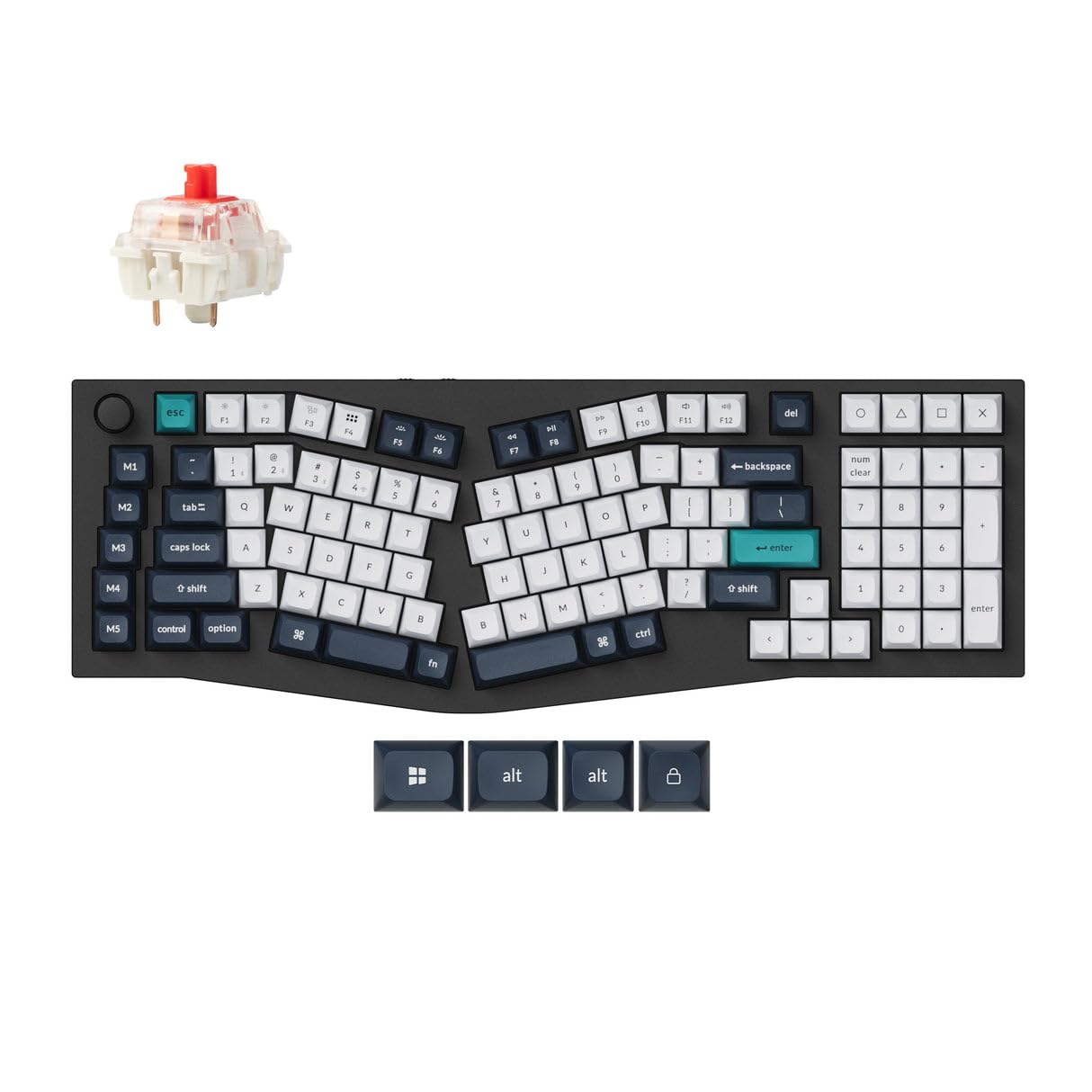
The Keychron Q13 Max is the gold standard for anyone who wants the pure Alice layout experience without compromise. Its entire body is machined from 6063 aluminum through a 24-step CNC process, giving it a weight and solidity that plastic boards simply can’t match. The Double Gasket Design adds silicone pads between the top and bottom cases on top of the plate gaskets, which nearly eliminates acoustic resonance — no ping, no hollow reverb, just clean, focused keystrokes.
Under the hood, an ARM Cortex-M4 chip with 256K Flash delivers 1000 Hz polling over both 2.4 GHz and wired modes, and 90 Hz over Bluetooth 5.2. The hot-swappable PCB supports both 3-pin and 5-pin switches, so you can swap in silent tactiles for the office or clicky linears for home. Users consistently praise the smooth, responsive feel of the pre-lubed Red switches and the complete absence of stabilizer rattle — a direct result of the double-gasket isolation.
The Q13 Max’s 96% Alice layout fits a numpad into the split design without stretching the hand span too wide, making it a rare full-function ergonomic board. The PBT keycaps resist shine even after months of heavy use.
Why it’s great
- Double-gasket design eliminates all case resonance for a pure acoustic signature
- Full 6063 aluminum chassis provides unmatched rigidity and premium feel
- 1000 Hz polling over 2.4 GHz and wired for latency-free typing and gaming
- Hot-swappable PCB compatible with nearly any MX-style switch
Good to know
- No translucent keycap legends — backlight does not shine through the lettering
- Only one 2.4 GHz receiver included in the box
- The web-based configurator does not work with Safari; requires Chrome
2. EPOMAKER Glyph Wireless Typewriter Retro Keyboard
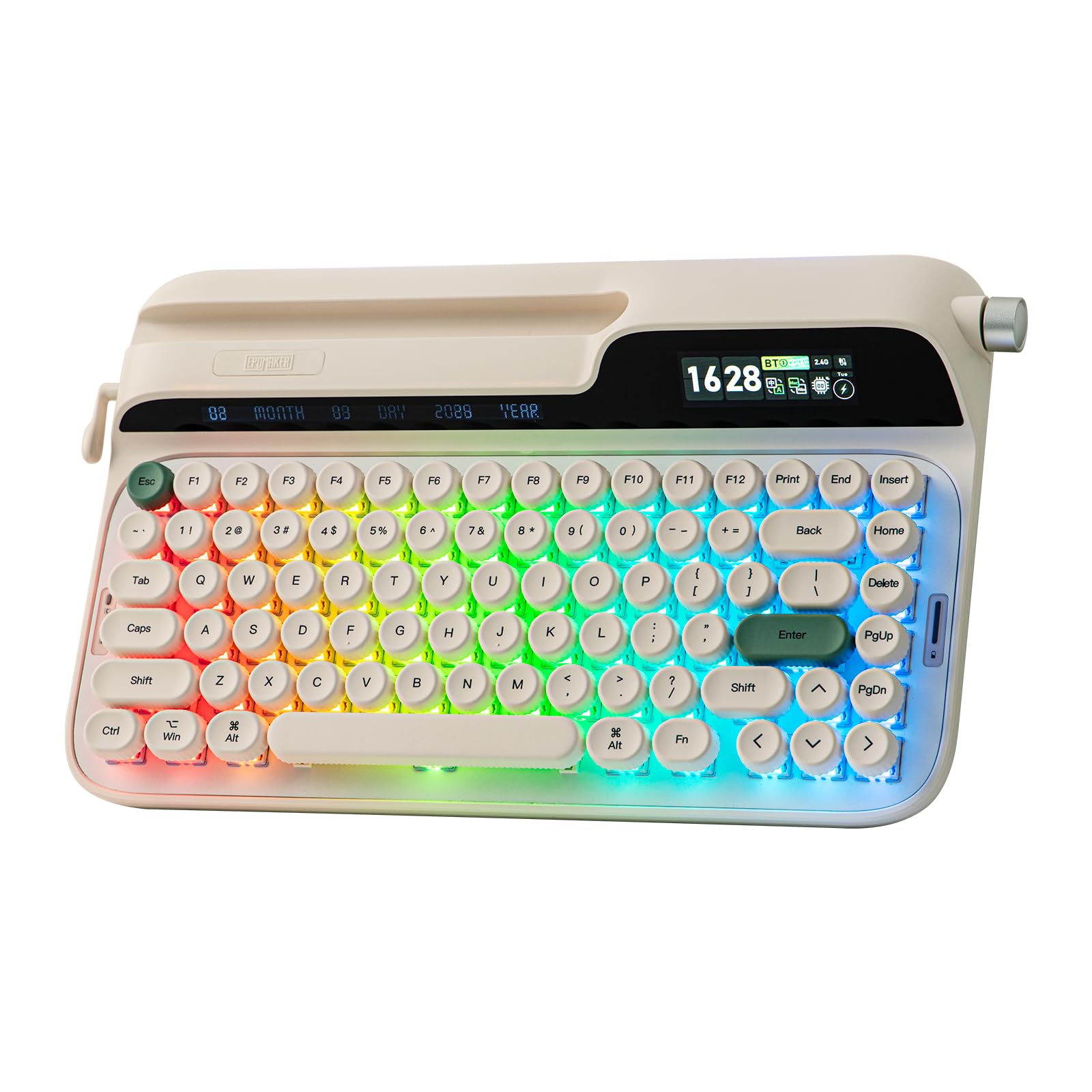
The EPOMAKER Glyph bridges the gap between retro typewriter aesthetics and modern mechanical performance with a clever 83-key Alice-ish layout that uses uniform-height round PBT keycaps. Instead of the uneven stepped rows of traditional typewriter-style keyboards, the Glyph’s uniform keycap height eliminates the finger fatigue that comes from constantly adjusting to different row angles. Each concave keycap hugs the fingertip naturally, and the factory-lubed linear switches at 46gf actuation prevent accidental presses while keeping long sessions light on the hands.
What sets the Glyph apart is its top-mount structure combined with a five-layer sound-dampening stack. Unlike gasket mount which can feel too soft for some, the top mount distributes pressure evenly across the frame for a firm, consistent keystroke. The ABS-aluminum hybrid plate adds just enough flex to soften the bottom-out impact without sacrificing responsiveness. The result is a deep, marble-like thock that users describe as meditative and rhythmic.
The smart screen on the Glyph shows battery status, time, and customizable GIFs, while the dual-mode knob controls volume in media mode and navigates the onboard display. The integrated tablet holder supports both portrait and landscape orientations. The silicone wrist rest is plush and color-matched, and the flip-out silicone feet offer two incline angles. It is a showstopper for the desk, but the round keys take a short adjustment period for touch typists used to sculpted rows.
Why it’s great
- Uniform-height round PBT keycaps eliminate finger fatigue from sculpted rows
- Top-mount with five-layer foam stack produces deep, creamy thock
- Smart screen supports custom GIFs and shows real-time keyboard status
- Includes plush silicone wrist rest and adjustable tablet holder
Good to know
- Round keycaps require adjustment for touch typists used to sculpted profiles
- Time and date settings are only adjustable via EPOMAKER 3.0 software
- Some users report overly sensitive keys in stock form; may need switch swap
3. RK ROYAL KLUDGE A72 Alice Keyboard
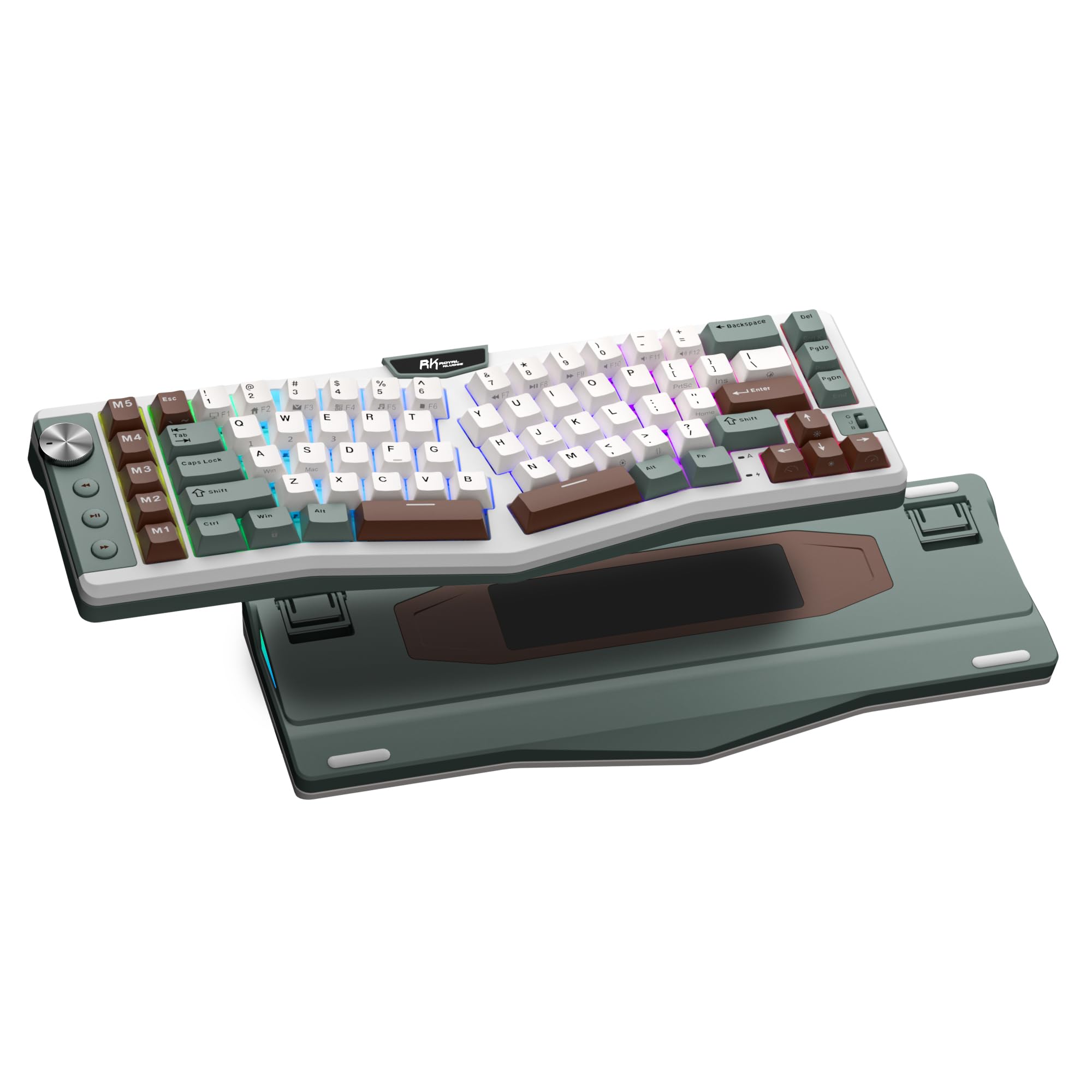
The RK ROYAL KLUDGE A72 packs a massive 7500 mAh battery that delivers up to 550 hours of use with RGB off and 54 hours with RGB on — the longest runtime of any Alice keyboard at its price point. The 72-key 68% layout saves significant desk space while retaining dedicated arrow keys and a row of five M1-M5 macro keys on the left edge, giving you programmable shortcuts for common tasks without needing layers or software.
The gasket-mounted structure uses five layers of dampening material — dual sound-absorbing foam, IXPE switch pad, silicone dampener, and PET film — to eliminate hollow sounds and cavity noise. The Cherry-profile PBT keycaps are thick and oil-resistant. Pre-lubed RK Linear Cream Switches provide a smooth, creamy feel out of the box. Users consistently note the soft, cushioned typing experience and the complete absence of spring ping or stabilizer rattle.
The touch-sensitive nameplate on the front edge can be set to launch websites, trigger macros, or open the web-based driver for on-the-fly reconfiguration. The driver runs in the browser without installation, compatible with both Windows and macOS. The only practical shortcoming is the lack of backlit keycaps, which makes the legends hard to read in low light. But for battery life and feature density, the A72 is unmatched in the mid-range.
Why it’s great
- 7500 mAh battery provides best-in-class wireless runtime — weeks between charges
- Five dedicated macro keys for productivity shortcuts without layer toggling
- Five-layer gasket dampening produces a soft, creamy acoustic profile
- Cherry-profile PBT keycaps resist shine and maintain texture over long use
Good to know
- Keycaps are not backlit — legends difficult to read in dark environments
- The touch-sensitive nameplate can accidentally trigger functions when bumped
- No Linux support for the web-based driver configuration
4. YUNZII QL75 Wireless Typewriter Keyboard
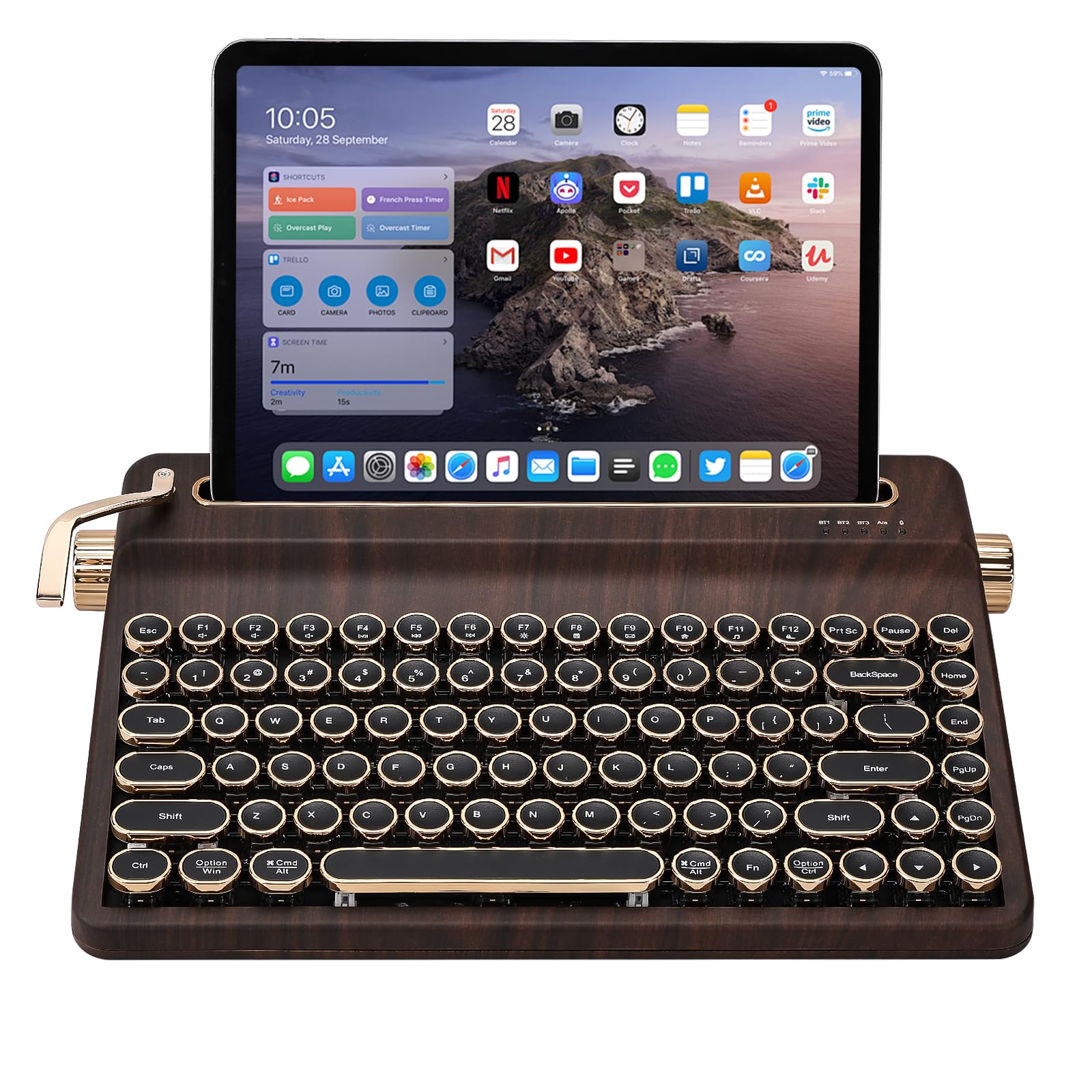
The YUNZII QL75 is a love letter to the vintage typewriter era, with stepped key rows that gradually ascend in height for a retro feel that also happens to be ergonomically sound. Each row’s increasing angle mirrors the curved finger reach of a traditional typewriter, reducing the need to lift your entire hand to hit top-row keys. The round electroplated keycaps look fantastic and the pre-lubed Cocoa Cream V2 switches produce a satisfying thocky sound.
Tri-mode connectivity (2.4 GHz, Bluetooth 5.0, USB-C) lets you switch between up to five devices seamlessly, and the built-in tablet stand at the rear holds your phone or tablet firmly in either portrait or landscape orientation. The QL75 also supports QMK/VIA programming for full key remapping and macro customization — a rare feature for a typewriter-styled keyboard under a mid-range price. The metal knobs for volume and mode switching add to the tactile gratification of the design.
Users consistently rate the build quality as exceptional for a plastic-board at this level, with solid stabilizers and no rattling keys. The heavy weight keeps it planted during fast typing. The main downsides are the plasticky feel of the case compared to metal options and the stepped keycaps which can feel tall to flat-hand typists. For someone who wants the look and sound of a vintage typewriter with modern wireless convenience, the QL75 delivers.
Why it’s great
- Stepped typewriter key rows provide natural ergonomic curve for finger reach
- QMK/VIA programmable for full key remapping — rare in retro-styled boards
- Built-in tablet stand holds devices in portrait and landscape orientations
- Metal knobs for volume and mode switching add tactile satisfaction
Good to know
- Plastic case feels less premium than aluminum alternatives in the same range
- Stepped keycaps may feel tall for flat-hand typists; requires adjustment
- Wired mode can show a blinking red light issue on some units
5. LEOBOG A75 Wireless Mechanical Keyboard
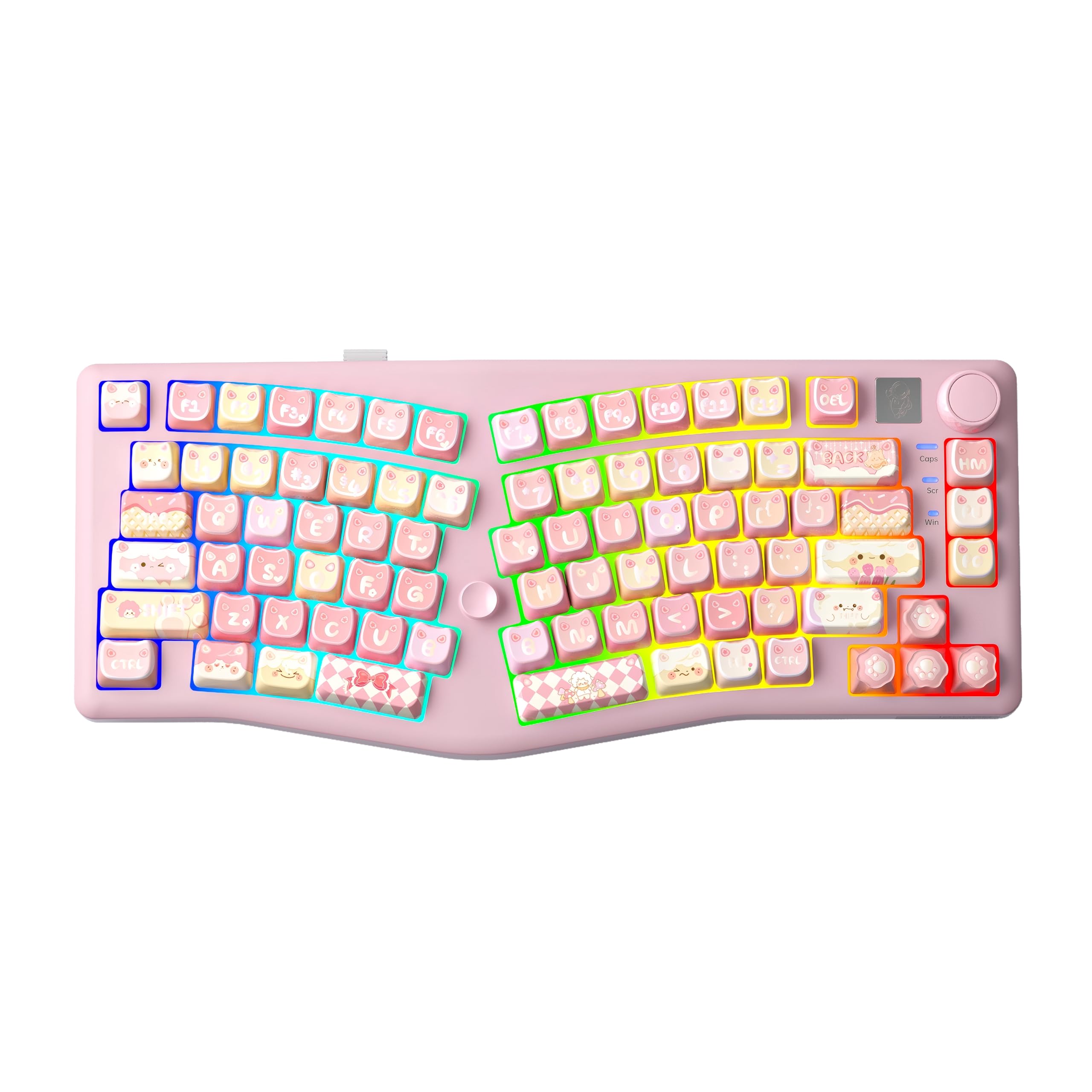
The LEOBOG A75 proves that you don’t need to spend a lot to get a genuinely good Alice layout experience. It uses a gasket-mounted structure with four layers of sound-dampening foam — including PO foam and silicone pad — that produce a creamy, thocky sound signature typically found on boards costing twice as much. The 1.2 mm flexible hot-swappable PCB adds bounce to each keystroke, softening the bottom-out feel.
Tri-mode connectivity spans Bluetooth 5.0, 2.4 GHz, and USB-C, with a 4000 mAh battery that handles a full work week of mixed use. The function knob adjusts volume and RGB brightness, and the joystick on the front edge can be remapped to arrow keys or other shortcuts — a unique feature at this price. Users consistently describe the sound as creamy and the stabilizers as perfectly lubed out of the box, with no ticking or scratching.
The Cherry-profile PBT keycaps are five-sided dye-sublimed for crisp legends and lasting durability. The magnetic circular stand flips to two height angles. The biggest trade-off is the plastic case, which lacks the weight of more premium boards, and some users report minor switch defects that are easily fixed with the included tools. For anyone entering the Alice layout world on a tight budget, the A75 is a fantastic entry point.
Why it’s great
- Gasket mount with four-layer dampening delivers surprising creamy thock at low cost
- Joystick can be remapped to arrow keys — a unique and useful feature
- 4000 mAh battery handles a full work week of mixed wireless use
- Cherry-profile PBT keycaps are thick, durable, and resist shininess
Good to know
- Plastic case lacks the heft of premium aluminum or steel builds
- Some switches may arrive with minor damage; easily replaceable
- Joystick function is underutilized with limited driver support
6. HHKB Happy Hacking Keyboard Studio

The HHKB Studio takes a completely different approach to ergonomics: rather than splitting the halves, it uses a 60-key symmetrical layout with a built-in pointing stick and three mouse buttons below the spacebar. This eliminates the need to move your hand to a mouse or trackpad entirely. The four touch-operated gesture pads above the arrow cluster can be customized for window switching, scrolling, or complex macros. It’s a minimalist, all-in-one productivity tool.
The silent linear switches from Kailh are factory-lubed and noticeably quieter than even the HHKB Type-S. The hot-swappable PCB supports standard MX switches. Bluetooth multi-pairing lets you switch between up to four devices instantly. The keyboard is powered via USB-C and has no internal battery, which means slightly less portability but also no battery degradation over time. The onboard memory stores up to four keymap profiles.
User feedback is polarized: enthusiasts rave about the trackpoint accuracy, quiet operation, and build quality, while others find the factory switches mushy and the gesture pads unresponsive. The layout requires a significant adjustment period, especially for the split columnar curve which is subtle compared to dedicated Alice boards. For someone who values total desk minimalism and wants to reduce mouse dependency, the HHKB Studio is a niche masterpiece. But it is not a traditional Alice keyboard.
Why it’s great
- Built-in trackpoint and mouse buttons eliminate the need for a separate mouse
- Customizable gesture pads offer unique shortcut capabilities
- Hot-swappable switches with onboard memory for four keymap profiles
- Silent linear switches are among the quietest mechanical options available
Good to know
- Not a traditional split Alice layout — more of a compact symmetrical design
- Factory switches feel mushy and loose to some users
- Gesture pads may be unresponsive; firmware updates help but not fully
- No internal battery — requires USB power even for Bluetooth operation
7. ASUS ROG Azoth Extreme

The ASUS ROG Azoth Extreme is a 75% keyboard built around a solid aluminum chassis with a carbon-fiber positioning plate — a material choice that delivers crisp, controlled keystrokes without the ping of steel or the mush of plastic. The result is an incredibly precise typing feel that sits between gasket bounce and top-mount rigidity. Three layers of dampening (dual PORON foams and a silicone pad) eliminate virtually all echo and cavity noise.
Wireless performance is class-leading: the ROG Polling Rate Booster pushes 8000 Hz in both wired and wireless modes. The ROG NX Snow linear switches are pre-lubed and deliver a smooth, thocky sound. The 1.47-inch OLED touchscreen displays battery, system stats, and animations, while the multifunction knob controls volume, lighting, and modes. ROG SpeedNova technology provides up to 1600 hours of battery life with both OLED and RGB off.
The included silicone wrist rest with aluminum base adds to the premium feel. Speed Tap Mode enables instant directional changes in FPS games. Hot-swap supports 3-pin switches. The main drawbacks are the extremely high price and the software: Armoury Crate is notoriously sluggish and sometimes buggy. A few users have reported battery calibration glitches after extended use. For competitive gamers who want the absolute best wireless performance and build quality, the Azoth Extreme is a statement piece.
Why it’s great
- Carbon-fiber plate provides exceptional crisp keystroke feel without ping
- 8000 Hz polling rate over both wired and wireless — class-leading latency
- 1.47-inch OLED touchscreen with knob for intuitive control and displays
- 1600-hour battery life with OLED and RGB disabled
Good to know
- Armoury Crate is necessary for full customization and has known stability issues
- No Hall-effect switches despite the premium price
- Some units report battery calibration drifts after months of use
8. Kinesis Advantage360 Professional

The Kinesis Advantage360 Professional is the most extreme ergonomic keyboard on this list. It is not an Alice layout in the traditional sense — it uses fully separated concave keywells that scoop each finger into a bowl shape, eliminating the need to stretch or extend your fingers. The columns are vertical rather than staggered. The keywells can be tented to three different heights, placing your hands in a natural handshake posture that drastically reduces forearm pronation.
The thumb clusters relocate high-frequency keys (Enter, Space, Backspace, Delete) from your weak pinky fingers to your stronger thumbs. The keyboard is fully programmable via open-source ZMK firmware, though the remapping process requires a GitHub account and some technical familiarity — it is not plug-and-play like QMK boards. Bluetooth works flawlessly with Mac and PC, and the internal battery lasts about two weeks on a full charge with moderate use.
Users with carpal tunnel, tendinitis, or chronic wrist pain consistently report that the Advantage360 provides immediate and significant relief. The learning curve is steep — expect one to two weeks to regain normal typing speed. The ABS keycaps are lower quality than PBT and get shiny quickly. The palm pads are sold separately. For someone whose wrist pain prevents them from typing at all, this keyboard is a medical device as much as a peripheral. For everyone else, the size, price, and learning curve are hard to justify.
Why it’s great
- Concave keywells and columnar stagger eliminate finger stretching and ulnar deviation
- Adjustable tenting with three heights accommodates different arm positions
- Thumb clusters redistribute heavy keys from weak pinkies to strong thumbs
- Fully programmable via open-source ZMK firmware
Good to know
- Steep learning curve — expect 1-2 weeks of reduced typing speed
- ZMK programming requires GitHub account and technical comfort
- ABS keycaps are low quality and develop shine quickly
- Very large footprint — takes significant desk space
9. ESI Xkey 37 Air
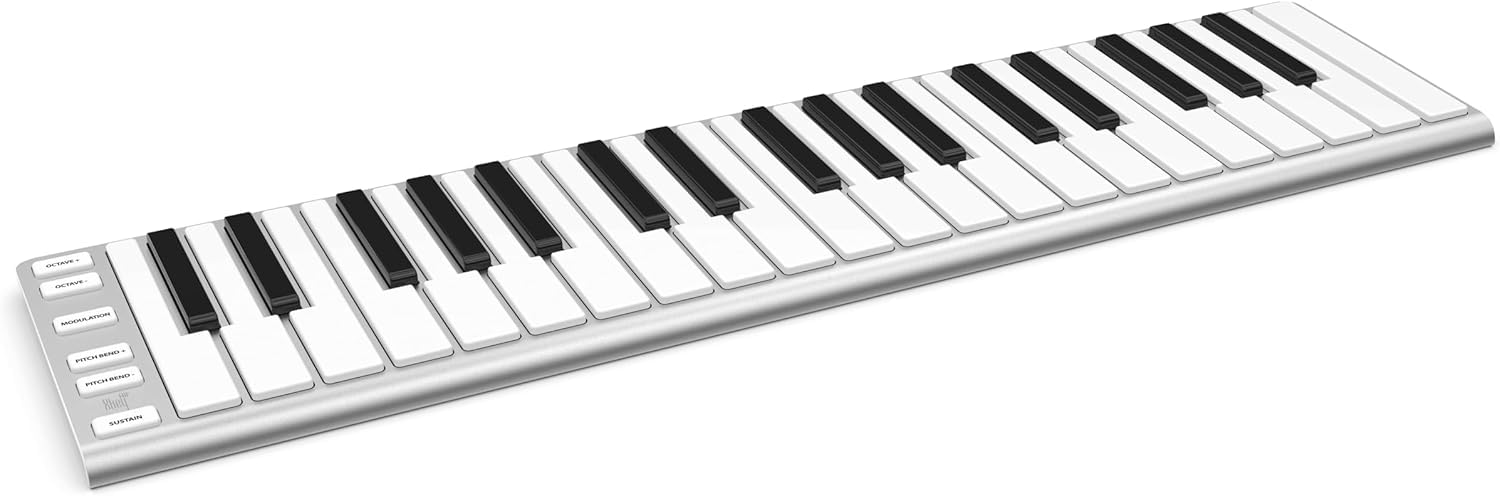
The ESI Xkey 37 Air is not a traditional Alice keyboard — it is a MIDI controller with 37 full-size velocity-sensitive keys designed for music production. Its ultra-thin profile of 0.6 inches and weight under two pounds make it the most portable keyboard on this list. The anodized aluminum unibody feels premium and sturdy. Polyphonic aftertouch, configurable via the Xkey Plus app, enables nuanced expressive control over synthesizers and virtual instruments.
Bluetooth wireless connectivity is ultra-low-latency and plug-and-play across Mac, PC, iOS, Android, and Linux — no drivers required. The 5-pin DIN MIDI output and connectors for expression and sustain pedals (Xcable adapter sold separately) expand its professional capabilities. The keys have a very short travel similar to a laptop keyboard, which is polarizing: some musicians love the fast, shallow response for quick passages, while others find the lack of travel and loud clacking unsatisfying for nuanced playing.
The included software bundle — Bitwig Studio 8-Track, Cubasis LE, and WAVELB LE — provides immediate production capability out of the box. The three-year warranty and 24/7 support from the US and German teams add peace of mind. For mobile musicians who need a full-size, zero-compromise MIDI keyboard that fits in a backpack, the Xkey 37 Air is unmatched. But its key feel and purpose are completely different from the typing keyboards that dominate this list.
Why it’s great
- Ultra-thin 0.6-inch profile slides into any backpack or suitcase
- Polyphonic aftertouch enables expressive control over virtual instruments
- Bluetooth works with no drivers across all major operating systems
- Includes Bitwig Studio 8-Track, Cubasis LE, and WAVELB LE software
Good to know
- Ultra-short key travel feels more like a laptop keyboard than weighted piano keys
- Loud clacking from the keys may not suit quiet studio environments
- Polyphonic aftertouch triggers immediately with no headroom — hard to control precisely
FAQ
What is the difference between an Alice layout and a standard staggered keyboard?
How long does it take to adjust to an Alice layout keyboard?
Can I use an Alice layout keyboard for gaming?
Final Thoughts: The Verdict
For most users, the best alice layout keyboard winner is the Keychron Q13 Max because its double-gasket aluminum chassis, 1000 Hz wireless polling, and perfectly tuned acoustic profile deliver the purest Alice experience with zero compromise. If you want a retro aesthetic and smart screen customization, grab the EPOMAKER Glyph. And for serious wrist pain relief — the kind that makes you consider a new career — nothing beats the Kinesis Advantage360 Professional.