
Our readers keep the lights on and my morning glass full of iced black tea. As an Amazon Associate, I earn from qualifying purchases.
Specs are compiled from manufacturer listings and verified buyer reviews and can change over time — please confirm the key details on the product page before buying.
The best all-around 3D printer automates setup and stays reliable so you can focus on creating. It auto-levels, prints quickly, and maintains consistent reliability across long sessions. This guide evaluates top models on speed, build volume, and ease of use for everyday printing.
I’m Min — the founder and writer behind Gadgets Feed. This guide is built by comparing the manufacturers’ published specifications and the patterns across verified customer reviews, so you get each pick’s real strengths and trade-offs instead of marketing spin.
From high-speed CoreXY workhorses to multi-color systems, here are the top contenders for the title of all around 3d printer worth your time and money.
Our Picks at a Glance


How To Choose The Best All Around 3D Printer
Picking a first or next 3D printer used to mean accepting a steep learning curve. The best modern machines have flipped that, automating the fiddly parts so you can focus on designing and printing. To find your match, you need to weigh a few core specs against your goals.
Speed vs. Quality
Print speed is measured in millimeters per second (mm/s), the speed at which the print head moves. A machine rated at 500mm/s or 600mm/s sounds dramatically faster than an older model, and it is. But remember that the advertised speed is a top-end figure; real-world prints often run slower to keep quality high. Look for a printer that pairs high speed with features like input shaping or vibration compensation to keep details crisp at pace.
Build Volume and Footprint
Build volume is the largest size object the printer can create, usually given as three dimensions (e.g., 220x220x220mm). If you plan to make functional parts or large props, a bigger volume is essential. However, a larger machine takes up more desk or shelf space. Check the printer’s physical footprint, not just its build volume, to ensure it fits your space. Some compact models are perfect for a home office but limit your project size.
Multicolor and Material Support
Multi-color printing typically requires an accessory like an AMS (Automatic Material System) that can swap filaments mid-print. This adds cost and complexity but open up vibrant, multi-material designs. For materials, consider what you’ll print. Basic PLA, PETG, and TPU work on nearly any machine. If you want tougher stuff like ABS, ASA, or carbon-fiber composites, you’ll need a printer with an enclosed build chamber and a hotend that can reach higher temperatures (300°C or more).
Quick Comparison
| Model | Best For | Max Speed | Build Volume | Chamber | Amazon |
|---|---|---|---|---|---|
| Bambu Lab A1★ Best Overall | Beginners & Reliability | 10,000 mm/s² accel. | Large 256mm³ | Open | Amazon |
| FLASHFORGE 5MBest Value | Value & Speed | 600 mm/s | 220x220x220 mm | Open | Amazon |
| Creality K1CTop Performer | Carbon Fiber & AI | 600 mm/s | 220x220x220 mm | Enclosed | Amazon |
| FLASHFORGE AD5M Pro | Quiet & Filtration | 600 mm/s | 220x220x220 mm | Enclosed | Amazon |
| Creality K2 SE 4C | Compact Multi-Color | 500 mm/s | Compact 4-color | Open | Amazon |
| ELEGOO Centauri Carbon 2 | Tech & Ecosystem | 500 mm/s | Large 4-color | Enclosed | Amazon |
| QIDI Q2 | Engineering Materials | 600 mm/s | Large 16-color | Heated 65℃ | Amazon |
| Bambu Lab P1S Combo | Multi-Color Powerhouse | 500 mm/s | Up to 16 colors | Enclosed | Amazon |
| QIDI PLUS4 | Large-Format Parts | CoreXY High-Speed | 12 x 12 x 11 in | Heated 65℃ | Amazon |
In-Depth Reviews
1. Bambu Lab A1 3D Printer
Our pick — over 4.5★ from 600+ verified ratings; the strongest balance of quality and price.
The crowd favorite for its easy setup and reliable, high-quality prints from day one.
The Bambu Lab A1 is the one that converts skeptics. Its defining feature is full-auto calibration, which handles the Z-offset and bed leveling for you. That means your first layer sticks, your prints finish, and you spend your time creating instead of tweaking. Owners with a 10-year-old confirm the ease of use, reporting the printer needs no babysitting.
It’s also genuinely fast, with an acceleration of 10,000 mm/s². That acceleration is the metric behind its speed, letting the head reach high speeds quickly without sacrificing detail. The 1-Clip quick-swap nozzle makes maintenance a 30-second job. For multi-color, you can add the AMS lite, but it’s sold separately.
Weighing 22 pounds, it’s a full-size machine, but it’s quieter than most, thanks to active motor noise canceling. The recurring gripe, however, is the assembly: most find it simple, but a few report errors. Despite setup quirks, buyers report high reliability and low maintenance after months of daily use.
Why It Wins
- Performance is the most-praised feature; it just works reliably.
- Full-auto calibration removes the hardest part of 3D printing.
- Active noise canceling keeps it quiet enough for a home office.
Keep In Mind
- Assembly experiences are mixed, with occasional errors reported.
- Multi-color requires buying the AMS lite separately.
Your Best Bet: If you want a printer that works flawlessly from day one with minimal fuss, this is it.
The Trade-Off: You’ll want to set aside a little patience for the initial setup before the magic starts.
2. FLASHFORGE Adventurer 5M 3D Printer
A fast, dependable workhorse that proves you don’t need to spend big for quality.
The FLASHFORGE Adventurer 5M is a speed demon with a CoreXY structure that hits a maximum speed of 600mm/s. This makes it 52% smaller footprint wise than the Bambu A1, but it’s built for getting prints done quickly. One-click auto-leveling ensures a perfect first layer, which is the foundation of a successful print.
The direct extruder with a quick-detachable 280°C nozzle makes it easy to switch filaments. It also has a filament run-out sensor and power loss recovery, so a power cut won’t ruin a long print. The 50W heating power brings the nozzle to 200°C in 35 seconds, getting you from unboxing to printing in about 10 minutes.
Owners mention it is easy to set up and beginner-friendly. The main trade-off is the print quality, which gets mixed feedback — some achieve flawless results, while others report adhesion problems. It’s a solid choice if you value speed and simplicity, but be prepared to learn the quirks of bed adhesion.
Solid Performer: Owners praise its ease of use and speed, making it a great entry point.
Honest Caveat: Print quality is the most-discussed issue, requiring some patience to dial in perfectly.
3. Creality K1C 3D Printer
The enclosed speedster that’s ready for carbon fiber and keeps an AI eye on your prints.
The Creality K1C steps up with a fully enclosed chamber, which is key if you want to print materials like ABS or ASA. It pushes a maximum speed of 600mm/s with 20,000mm/s² acceleration. But its a neat extra is the clog-free direct extruder with a steel-tipped copper nozzle and titanium alloy heatbreak, which lets it handle carbon-fiber filaments without jamming.
It comes with an AI camera as standard, giving you real-time monitoring and timelapse photography. Silent mode brings noise down to ≤45dB, so it won’t disrupt your work. At 23.8 pounds, it has a more compact footprint than the Bambu A1, though it’s a bit heavier.
Reviewers love the print quality and speed, with one noting it made them enjoy 3D printing again compared to their older Ender 3. The main concerns are reliability and value, with some mixed reports on long-term durability. It’s a feature-rich machine for hobbyists who want to explore advanced materials.
Standout Features
- Enclosed chamber for high-temp and carbon fiber filaments.
- AI camera for remote monitoring and timelapse.
- Quiet silent mode at ≤45dB.
Mixed Feedback
- Reliability gets mixed reviews, with some failures reported.
- Connectivity is a common negative point.
Who It’s For: The tinkerer who wants an enclosed machine to experiment with carbon fiber without the DIY hassle.
Consider Otherwise: If you prefer a simpler machine with fewer features and a stronger reliability track record.
4. FLASHFORGE AD5M Pro 3D Printer

You get a quiet, enclosed printer that filters the air as it prints, so you can run it indoors without worrying about fumes.
The FLASHFORGE AD5M Pro is the refined sibling to the 5M. It adds a fully enclosed design and dual filtration system with a HEPA13 and activated carbon filter. Its HEPA13 and activated carbon filters capture 99% of particulate matter and VOCs, making it safe for home or classroom use. It also runs at a standard mode of 50dB, with an even quieter low-speed mode for uninterrupted focus.
It packs the same CoreXY speed, hitting 600mm/s. The advanced auto-leveling system uses distance measurements to calculate offsets, eliminating manual Z-axis calibration for a flawless first layer. It comes with a bundle of 0.4mm and 0.6mm nozzles, and supports a wide range of materials from TPU to PETG-CF.
Owners call it a “dream machine” that’s fun to watch. The biggest praise is the quality, which is the most-mentioned positive aspect by far. However, it’s not a point-and-click toy; some note a steep learning curve and warn it can be an “expensive mistake” if you’re not ready to learn. Connectivity issues with the monitor cable also pop up.
Quality First: The most-praised feature is overall quality, with owners calling it exceptional.
Learning Curve: It’s beginner-friendly in setup but not in mastering; expect to research filament settings.
5. Creality K2 SE 4C 3D Printer
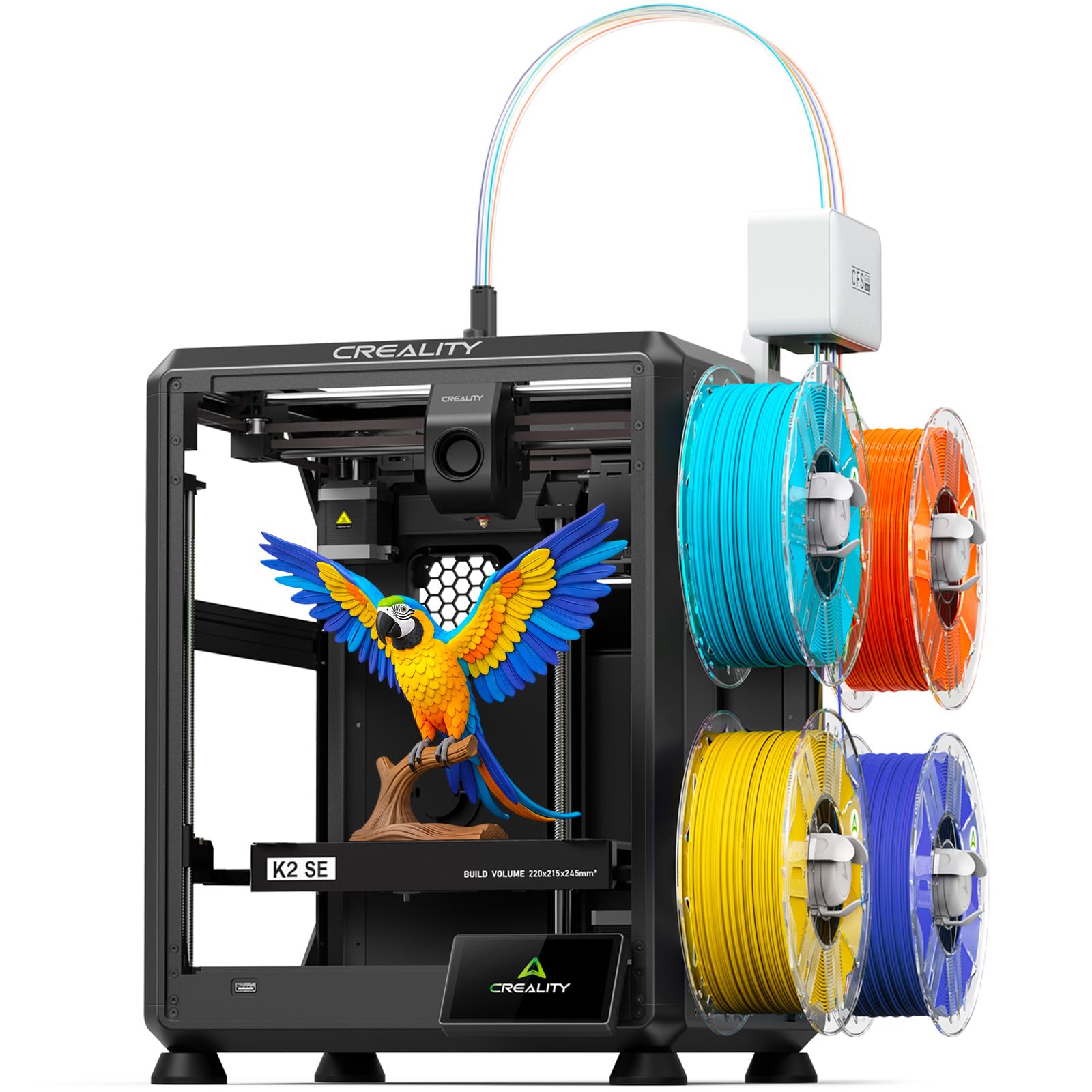
A multi-color machine with a compact footprint that’s perfect for home offices and classrooms.
The Creality K2 SE 4C brings 4-color multi-color printing right from the start with no complicated upgrades. Its compact design occupies 37% less space than traditional multicolor systems. This makes it ideal for smaller workspaces where a bulky multi-color setup won’t fit.
It’s a fast CoreXY printer, reaching up to 500mm/s with 20,000mm/s² acceleration. Intelligent auto bed leveling probes only the active print area, reducing setup time. For beginners, the smart features like filament run-out sensor, tangle detection, and power loss recovery help prevent failed prints.
Feedback highlights it as a great beginner model with easy setup. One owner called it a great upgrade from an Ender 3, noting flawless prints and spot-on auto-leveling. The trade-off is that build quality and reliability get mixed reviews, and some require a glue stick for bed adhesion. It’s less DIY-friendly than the Ender 3 line, which is a pro for some and a con for tinkerers.
Beginner Champion: The printer quality is the most-praised feature, making it a solid entry point.
Reliability Check: Some customers note instability, so it’s not without its quirks.
6. ELEGOO Centauri Carbon 2 Combo 3D Printer

A tech-packed machine with a 4-color CANVAS system that makes multicolor printing easy.
The ELEGOO Centauri Carbon 2 is a premium-feeling machine that builds on the Centauri Carbon. Its headline feature is the CANVAS system, which provides 4-color printing with instant color switching and smart filament detection, including auto-refill and tangle detection. It reads RFID tags on filament for automatic settings.
It’s designed for speed with a CoreXY system hitting up to 500mm/s and 20,000mm/s² acceleration. The rigid aluminum frame keeps it stable, and active vibration compensation ensures smooth surfaces. The print quality is its most-praised aspect, with one owner calling it the best benchy they’ve ever printed.
Set up takes about 45 minutes, and owners describe it as quiet with no vibration. However, reliability is a point of contention. Some report it works flawlessly, while others describe a “glob of death” incident after a firmware update. It’s a fantastic printer when it works, but the software updates can be a gamble.
Tech Highlights
- RFID filament detection for easy setup.
- Quiet operation with fast color swaps.
- Print quality is the most-praised feature.
Risks
- Firmware updates have been reported to cause issues.
- Network connectivity is a common negative point.
For The Tech-Savvy: This is a powerful, feature-rich printer for those who enjoy being on the cutting edge of the ecosystem.
Think Twice If: You want a set-and-forget machine and prefer stability over new features.
7. QIDI Q2 3D Printer

A professional-grade machine that open up advanced engineering materials for serious makers.
The QIDI Q2 is built for those who need more than just PLA toys. Its defining feature is the 2nd-generation PTC heated chamber that reaches 65℃, minimizing warping and ensuring strong layer adhesion for high-temp materials. The 370℃ high-temp nozzle open up advanced materials like PPS-CF and PA-CF.
It prints fast—up to 600mm/s—thanks to a full-metal CoreXY frame (a rigid structure that moves the print head smoothly) and precision linear rails (metal guides that keep motion accurate). The nozzle doubles as the leveling sensor, so your first layer sticks evenly every time. For air safety, it has a triple filtration system: a G3 pre-filter (catches large dust), an H12 HEPA (traps fine particles), and activated carbon (absorbs odors), so you can print in a bedroom or office without the smell.
Owners are impressed with its ability to handle engineering materials, with one citing it as their choice over a Bambu P2S specifically for PA-CF and PC printing. The support is also highly praised, with quick replacements sent when issues arise. The main mixed point is print quality, which is the most-discussed but not universally praised aspect — it requires tuning. It’s a brilliant machine, but it’s not for the faint of heart.
Material Master: The heated chamber and high-temp nozzle are its standout features for advanced printing.
Fit Note: Print quality is the most-discussed aspect with mixed results, so expect a learning curve.
8. Bambu Lab P1S Combo 3D Printer

The enclosed powerhouse that brings multi-color printing to the masses with its included AMS.
The Bambu Lab P1S Combo is the complete package. It includes the AMS (Automatic Material System), allowing for multi-color and multi-material printing with up to 16 colors. It also features a fully enclosed design, which improves print performance for advanced filaments like ABS and ASA. It’s a set-up-and-go machine that takes about 15 minutes to assemble.
It hits a true high speed of 500mm/s with 20,000mm/s² acceleration, and the auto bed leveling ensures high-quality, successful prints. Owners love the user-friendly app and the print quality, with one noting tolerances of ±0.003 inches, which is impressive. Its user-friendly app and smooth ecosystem are its biggest strengths, simplifying the entire printing process.
Its multi-color capability and print quality offer strong value, with one owner noting it could pay for itself in months. The performance and build quality are excellent across the board. The main issue is that some units arrive with broken front handles—a shipping and quality control issue. But the software and support are solid, and the printing experience is top-notch.
Why It Shines
- AMS included for easy multi-color printing.
- Exceptional print quality with tight tolerances.
- User-friendly app and software.
Watch For
- A few units arrive with broken front handles.
- Some find the on-printer screen primitive.
The Complete Choice: For anyone who wants multi-color and a premium experience without the hassle, this is the one to grab.
Possible Issue: Just check the unit for shipping damage upon arrival.
9. QIDI PLUS4 3D Printer

A heavyweight machine with a large build volume and a powerful heated chamber for big, tough parts.
The QIDI PLUS4 is all about size and strength. It offers a large print size of 12 x 12 x 11 inches, allowing you to print multiple models at once. The second-generation active chamber heating system has a 400W heating power with air circulation and dual-layer insulation for consistent temperatures, reducing warping on large prints.
It comes with an 80W high-temperature hotend that reaches a maximum of 370°C, supporting high-temp filaments like PPS-CF and PPA-CF. The independent dual motor-driven Z-axis and 6mm thick aluminum bed ensure high precision and flatness. It also has a HD camera for remote monitoring and time-lapse.
Owners praise it as a reliable workhorse with amazing print quality, with some buying a second unit after being impressed. The heated chamber is a big plus for high-temp materials, though it takes longer to heat up. The reliability gets mixed reviews, and a few reviewers point out defects like bent rails and Z-banding. It’s a pro-level machine for serious makers who need a large format.
Big Builds: The large 12 x 12 x 11 inch volume and 400W heated chamber are its standout specs.
Quality Control: Some units arrive with defects, so be prepared to check it thoroughly.
Understanding the Specs
CoreXY vs. Bed Slinger
CoreXY is a motion system where the print head moves on a gantry with belts, resulting in faster and more precise movement. It’s the standard for high-speed printers like the ones on this list. A bed slinger moves the print bed forward and backward, which is simpler but slower and can cause the print to wobble.
Acceleration and Speed
Speed is measured in millimeters per second (mm/s), but acceleration (mm/s²) is just as important. A high acceleration means the print head reaches its top speed quickly, reducing print time. These two specs work together to define how fast a printer feels in real use.
Heated Chamber and High-Temp Nozzle
A heated chamber keeps the air around the print warm, which prevents warping and cracking in materials like ABS and ASA. A high-temp nozzle (300°C+) is required to melt engineering filaments like carbon-fiber composites and polycarbonate. If you plan to print basic PLA and PETG, you don’t need these, but they are essential for advanced materials.
Auto Bed Leveling
Auto bed leveling uses sensors to measure the print bed and compensate for any unevenness. This is a standout for beginners, as it removes the tedious and frustrating manual leveling process. It ensures the first layer sticks properly, which is the foundation of a successful print.
FAQ
How do I know if an enclosed printer is right for me?
What does the acceleration number like 10,000 mm/s² actually mean for my prints?
Is multi-color printing worth the extra cost and setup?
What is the ideal build volume for a beginner?
How fast should a modern 3D printer be for a beginner?
What is the difference between a direct drive and a Bowden extruder?
Can printers with a 280°C hotend print carbon fiber filaments?
Why do some reviews mention the need for a glue stick on a build plate?
Final Thoughts: The Verdict
Across the board, the all around 3d printer winner is the Bambu Lab A1 because its full auto-calibration and reliability remove the barriers to entry, making printing a joy rather than a chore. If you want multi-color printing, grab the Bambu Lab P1S Combo. And for engineering-grade materials, the QIDI Q2 is the one to reach for.
How We Picked
We do not accept paid placement. Every pick is matched to a real buyer and a real use-case; we do not hands-on test units.
Sources & Methodology
Specifications: manufacturer listings and product documentation. Review insights: verified customer reviews, as of August 2026. Pricing: not shown on this page (it changes often); check the current price via the retailer link.
As an Amazon Associate, Gadgets Feed earns from qualifying purchases. This does not affect which products we feature.