
Our readers keep the lights on and my morning glass full of iced black tea. As an Amazon Associate, I earn from qualifying purchases.
Specs are compiled from manufacturer listings and verified buyer reviews and can change over time — please confirm the key details on the product page before buying.
An all-glass PC case is a display case for your hardware, and the wrong one traps heat, hides your cables, or arrives with glass clips cracked in the box. The right one shows off your parts and still moves enough air to keep them cool. This guide covers the glass-panel mid-towers that get both jobs right, and which one fits your board, your graphics card, and your cable routing.
I’m Min — the founder and writer behind Gadgets Feed. This guide is built by comparing the manufacturers’ published specifications and the patterns across verified customer reviews, so you get each pick’s real strengths and trade-offs instead of marketing spin.
You do not need the biggest case or the most fans — you need one whose glass, clearance, and cable room match your build. Whether you are moving a full-size ATX board into a showcase or starting a first build, this breakdown covers the fit numbers, the airflow paths, and the quirks owners actually live with.
Our Picks at a Glance


How To Choose The Best All-Glass PC Case
Glass cases live or die on clearance, because a beautiful window is useless if your graphics card will not go in. Before you fall for the photos, check five numbers against the parts you already own.
Clearance: the numbers that decide your build
Your graphics card length is the first gate. A card over the case’s GPU limit simply will not seat, and the limit is measured from the rear bracket to the front panel. CPU-cooler height matters next: a tall air tower needs the panel to close over it. Power-supply length is the third number, since modular PSUs with thick cable bundles need more depth in the chamber behind the motherboard. A fourth figure, radiator size, decides whether you can run an all-in-one liquid cooler. If the case lists a top 360mm radiator, that is a 360mm-long liquid cooler that mounts under the roof.
Why dual-chamber changes the airflow story
A dual-chamber case puts the power supply and the bulk of your cabling in a second compartment behind the motherboard, not in the main viewing area. That buys two things: a cleaner view through the glass, and a clearer path for air to move across the graphics card and CPU cooler. A single-chamber glass case can still cool well, but the cables and PSU sit in the same space as the hot parts, so the airflow has more obstacles to get around.
Fans and controllers: what you get in the box
Many glass mid-towers ship with pre-installed fans and a built-in controller, and some include reverse-blade fans that present their lit faces inward so the frame does not block the view. An ARGB fan is one with addressable RGB lighting — individually lit LEDs you can set to different colors. A PWM fan is one whose speed is controlled by the motherboard via a pulse-width signal rather than running flat out. Check whether the included controller lets you pass fan speed to the motherboard or runs its own curve, because that determines how much control you get.
Glass thickness and how it is held
Panel thickness is a real quality marker. A 4mm tempered glass panel resists flex better than thinner acrylic, and tempered glass is the version that is heat-treated so it does not shatter into sharp shards. Tool-free or quick-release retention is the second marker: screwless panels make routine cleaning and part swaps much faster. If a case uses snap clips, handle them evenly, since clips are the most common thing to arrive damaged.
Quick Comparison
| Model | Best For | GPU Clearance | Cooler Height | Fans Included | Amazon |
|---|---|---|---|---|---|
| MONTECH King 95 PRO★ Best Overall | Showcase builds with big radiators | 420 mm | 175 mm | 6 ARGB | Amazon |
| FOIFKIN F300Budget Champion | Budget panoramic glass builds | 400MM | 170MM | 4 non-LED | Amazon |
| MONTECH XR PanoramicHigh-Airflow Glass | High-airflow glass on a budget | 420 mm | 175 mm | 3 ARGB PWM | Amazon |
| Thermaltake View 380 TG | First-time builders, clean cable routing | 415mm | — | 4 ARGB | Amazon |
| CORSAIR 3500X | Mini-ITX to EATX flexibility | — | — | None | Amazon |
| Antec C5 ARGB | Fishtank look with the most included fans | — | — | 7 ARGB PWM | Amazon |
| Lian Li O11 Vision Compact | Three-panel glass with a premium feel | — | — | None | Amazon |
| HYTE Y70 | Vertical GPU showpieces | — | — | None | Amazon |
| Hyte Y60 | Panoramic glass with a dedicated vertical mount | — | — | None | Amazon |
In-Depth Reviews
1. MONTECH King 95 PRO Curved Dual-Chamber ATX PC Case, 6 ARGB Fans, Black
Our pick — over 4.5★ from 500+ verified ratings; the strongest balance of quality and price.
Curved glass, six pre-wired fans, and a second chamber that swallows the cables.
If your build already has a big graphics card and you want to see all of it, this is the case the crowd keeps pointing at. The defining number is 420 mm of GPU clearance — that is the length of graphics card that physically fits inside — which covers the largest current cards with room to spare. Pair that with 175 mm of CPU-cooler height, enough for a tall air tower, and 185 mm of power-supply length, 24% more PSU depth than the MONTECH XR Panoramic allows. For a shopper, that extra PSU depth means a modular unit with thick cable bundles slides in without a fight.
What wins people over here is the look. Curved 4 mm tempered glass spans the front and side with no corner pillar, so the interior reads as one continuous window, and the panels are quick-release — you pop them off without hunting for a screwdriver. Six fans come pre-installed: two 140 mm RX140 side fans, three 120 mm RX120 bottom fans, and one 120 mm AX120 rear fan, all running through an included 1-to-10-port controller. Behind the motherboard, the dual-chamber layout keeps the power supply and the wiring out of the viewing area, which is also what gives the airflow a clear run at the hot parts. Storage and cooling support are generous: up to five 3.5-inch hard drives or eight 2.5-inch SSDs, plus radiators up to 360 mm on top, 240 mm on the side, and 120 mm at the rear, with a premium mesh panel in the box if you would rather vent the front than glaze it.
The honest catch is the fans. The illuminated blade faces are not all presented the same way, so a few builds end up with the less pretty side of a fan showing through the glass. It is a visual nit on an otherwise complete package, and one that reversing a fan or two fixes. The other thing to plan for is interior volume — the whole point of the space is that it is genuinely large, so measure your desk before you commit.
Where it wins
- 4 mm curved tempered glass front and side with no corner pillar and quick-release removal
- Six pre-installed ARGB fans run off one included 10-port controller
- 420 mm GPU, 175 mm cooler, and 185 mm PSU clearances cover high-end hardware
- Dual-chamber layout separates the PSU and wiring from the motherboard and GPU
What to plan around
- Fan faces do not all point the same way, so the lit side is not always the visible side
- Large footprint and heavy at 10000 g, so it needs real desk space
- Top-mounted CPU coolers can stop the lid latching fully depending on the cooler
Get this one if: you are building a showcase system with a large graphics card and want fans and cable routing handled from the start.
Think twice if: your desk is tight — the interior room that makes it easy to build in is the same thing that takes up space.
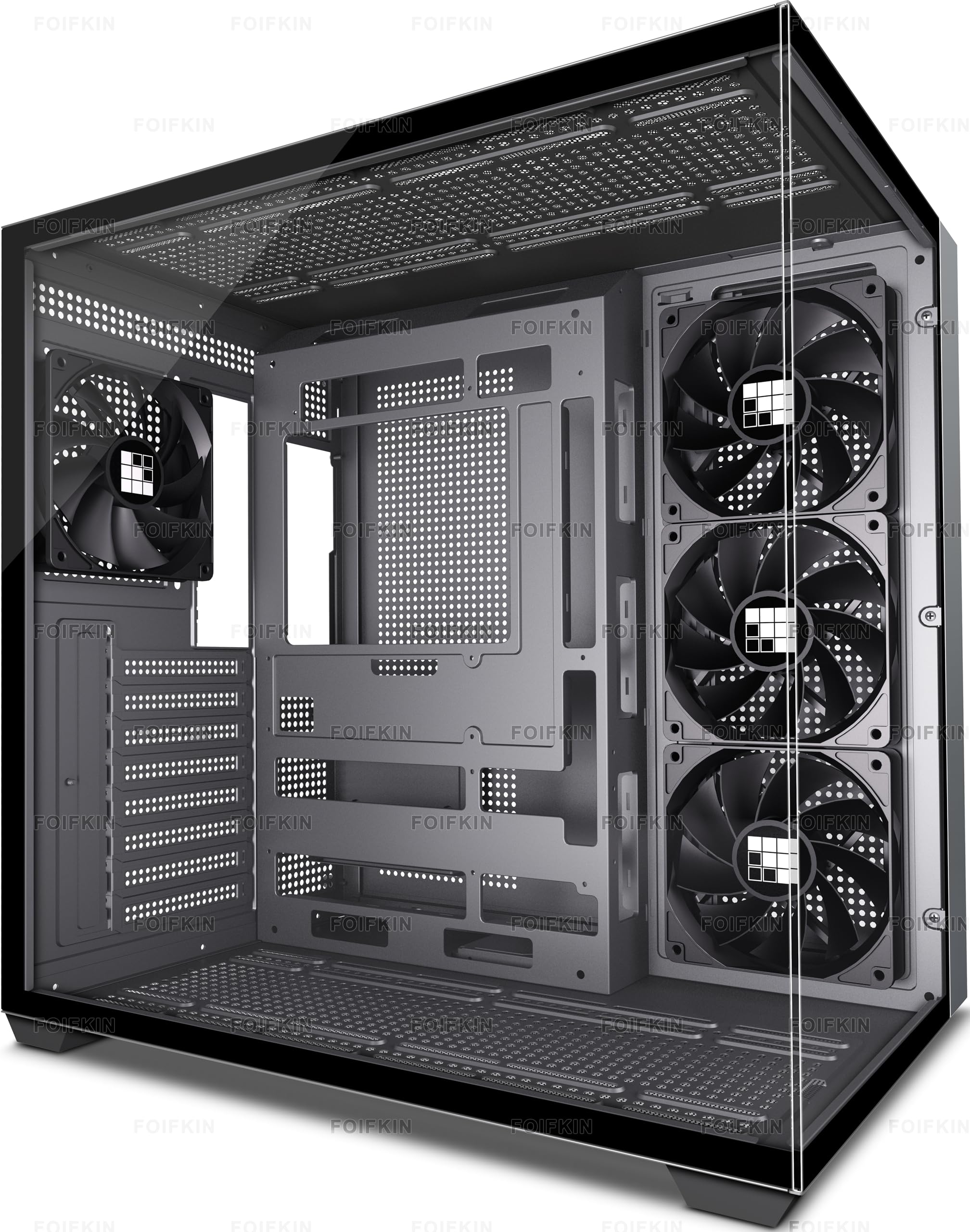
2. FOIFKIN F300 (2025) PC Case – Pre-Installed 4 No RGB Fan, ATX Mid-Tower, 270° Panoramic Glass with Type-C
The budget pick that makes a mid-range build look like a much pricier machine.
This is the case to look at if you want the panoramic glass look without stretching your build budget. The headline is a 270° panoramic tempered glass panel — a single curved sheet that wraps the front and one side so you see your hardware from two angles at once. It supports ATX, Micro-ATX, and Mini-ITX motherboards, takes graphics cards up to 400MM, and fits CPU coolers up to 170MM. If you compare it to the MONTECH XR above, the XR gives you a little more GPU room at 420 mm, while this one keeps the price at the friendlier end. ATX power supplies up to 220MM slot in behind the motherboard, and the tool-free glass panel comes off without a screwdriver.
What buyers rave about is how the thing looks on the desk for what it cost — several describe a system that reads far more expensive than the parts inside it. Cooling is handled by four pre-installed non-LED fans, and the case will take up to 10 x 120mm fans plus 3 x 360mm liquid coolers if you want to scale up later. The front I/O keeps a Type-C 3.0 port alongside USB 3.0 and USB 2.0, plus microphone and audio jacks. Storage runs 1 HDD and 2 SSD mounts, or 3 SSD if you skip the hard drive, across 7 expansion slots.
Here is the part worth knowing before you buy: the included fans are the weakest link. They are standard non-LED units rather than the addressable RGB set on the pricier picks, so if a light show matters to you, budget for a fan upgrade. The rest of the package is honest for the tier — solid material mix, a case quality that carries the highest mention of any trait in its reviews, and a clean look that makes the glass worth having.
What the money buys: a 270° glass panel, four working fans, Type-C on the front panel, and enough interior room for a full-size MSI B550 board and a Dell 3080-class card. Buyers report fitting exactly that combination with a 240mm AIO moved to a side intake.
Best match for: a first panoramic build where the glass view matters more than fancy fan lighting.
Skip past it if: you want addressable RGB fans included — the four here are plain non-LED units.
3. MONTECH XR Panoramic ATX Gaming PC Case, Mid Tower, 3 ARGB PWM Fans, Black
Reverse-blade fans that show their lit faces inward instead of the plastic frame.
The trick that earns this case its place is small but smart: two side-mounted reverse-blade ARGB PWM fans are built so the illuminated blade faces point at the interior rather than pressing the support frame against the glass. The result is a cleaner front-of-house view than you get from ordinary fans of the same size. It pairs that with panoramic front and side tempered glass, and a wood-grain I/O area that breaks up the black chassis. Clearances are the same story as its stablemate above — 420 mm for a graphics card, 175 mm for a CPU cooler — while the 230 mm power-supply allowance is the deepest in this roundup. That deeper PSU bay is the figure to note if you run a long modular unit and hate a tight squeeze.
Design is what carries the reviews here, and the numbers back it up: it is the single most-praised trait. The layout is built to be expanded too — three 120 mm ARGB PWM fans come installed, and the case takes up to 9 fans or a top 360 mm radiator if you want to add a liquid cooler down the line. USB-C and two USB 3.0 ports sit within easy reach, and the removable magnetic filters at the top, side, and bottom make routine dust cleanup a friction-free job.
The one consistent gripe is panel screws that ship tight, and a fan set that some find noisier than they would like at speed. Neither is a reason to pass — the airflow and the pre-installed ARGB layout are the reason people buy it — but if quiet is your priority, plan on setting a fan curve or swapping the rear unit. Its 360 mm radiator support is worth flagging against the Lian Li further down: both swallow a 360, and in each case it is a snug fit rather than a roomy one.
Why the view works: reverse-blade side fans plus panoramic glass mean you look at lit blades, not fan frames.
The trade-off to know: tight panel screws and fan noise at full tilt are the recurring complaints.
Pick this if: you want a high-airflow glass case with a genuinely different interior look and the deepest PSU bay here.
Look elsewhere if: silent running is non-negotiable from the start.
4. Thermaltake View 380 TG ARGB Black ATX Case, 4x120mm ARGB Fans, Dual Tempered Glass

A pillarless glass front and a back-connect board pairing that keeps cables out of sight.
This is the pick for someone who wants the glass view but also wants the cable mess to disappear entirely. It is a dual-chamber case with a pillarless front and side tempered glass panel — no vertical bar breaking the window — and it is compatible with hidden-connector motherboards from ASUS and MSI, the kind where the power and data plugs sit on the back of the board so nothing blocks the view through the glass. Four hydraulic-bearing 120mm ARGB Lite fans come pre-installed, which means the bearings are fluid-lubricated for quieter, longer-running operation than a plain sleeve fan. Graphics cards up to 415mm long fit, and radiators up to 360mm will mount up top.
The design is the thing buyers respond to first, and it comes with a compact footprint for a mid-tower: it is shorter than most of its rivals here at 16.14″H, and the power supply mounts behind the motherboard tray, which is what keeps the height down. Ports on the front include Gen.2 USB 3.2 Type-C, two USB 3.0, and an HD audio jack. Builders report no trouble getting components seated, threaded holes lining up cleanly, and the included fans running quietly at full speed for a long stretch without complaint.
One quirk to know before you build: the PCI slot covers are mesh knockouts rather than standard screw-in covers. That means you push them out rather than unscrew them, and doing that before the motherboard goes in avoids scraping your board. It is a small sequence detail, not a flaw. Backed by a 3 year warranty, it holds up well against the MONTECH XR’s glass-and-fans formula — where the XR leans on reverse-blade aesthetics, this one leans on clean back-connect routing.
What makes it beginner-friendly: four pre-installed ARGB fans, a compact 16.14″H body, and a rear-mounted PSU that simplifies the layout.
Do this first: knock out the PCI slot covers before installing the motherboard to avoid scratches.
Suits you if: you plan a back-connect board build and want the cable-free glass look with fans already in place.
Not for you if: you prefer standard screw-in PCI covers you can reinstall as your card setup changes.
5. CORSAIR 3500X Mid-Tower ATX PC Case, Panoramic Tempered Glass, Reverse Connection Compatible, Black

The board-flexibility champion — it takes anything from Mini-ITX to full EATX.
If your motherboard is on the large side, this is the case to check first. It supports form factors all the way from Mini-ITX up to EATX — EATX being the extra-large board size that most mid-towers cannot swallow. It also validates with reverse-connection boards like ASUS BTF and MSI Project Zero, where the cables plug into the back of the board, so your view through the wraparound glass stays uncluttered. Cooling headroom is unusual for the footprint: side, roof, and PSU mounting points together take up to 10x 120mm fans, and it supports radiators up to 280mm and 360mm in the roof plus 360mm in the side, with Corsair’s own H60, H100, H115, and H150 liquid coolers listed as compatible. Note that no fans are included, so plan your airflow setup as part of the build.
Owners single out the wraparound glass as the standout — a smooth front-to-side window with no corner pillar framing the view — and the build quality earns strong marks for fit and rigidity. Cables route easily thanks to the depth behind the board, and builders report it holds cool through long gaming sessions with the side intakes and bottom fan mounts feeding the graphics card fresh air.
The honest trade-off is space for the biggest hardware. Fit is the one area that draws mixed feedback: a very large graphics card paired with bottom-mounted fans can crowd the PCI slots, and the rear cable channel is snug if you run a large-format power supply. For a typical single-GPU build there is room to spare, but if you are packing the most extreme components, go in knowing the limits. It is also a fairly heavy case at 8.6 kg, so it stays where you put it rather than moving around easily.
Reasons to choose it
- Takes boards from Mini-ITX all the way to EATX
- Wraparound glass with no corner pillars for a smooth display
- Supports up to 10x 120mm fans plus roof and side radiators up to 360mm
- Validated for ASUS BTF and MSI Project Zero reverse-connection boards
What to weigh
- No fans included, so you buy and mount your own
- Very large GPUs can crowd the PCI slots when bottom fans are fitted
- Rear cable channel is snug with a large-format PSU
Reach for this if: your motherboard is large or you run a back-connect board and want maximum component flexibility behind glass.
Look elsewhere if: you want fans already in the box — this one comes empty.
6. Antec C5 ARGB Mid-Tower ATX PC Case, 7 ARGB PWM Fans, Black

Seven illuminated fans come pre-wired, six of them reversed for the clean-facing view.
No other case on this list arrives this fully equipped on the cooling side. Seven ARGB PWM fans are pre-installed, including six reverse fans — the kind built so their lit blades face the interior instead of showing a frame against the glass. All of them run through a built-in ARGB and PWM fan controller, so the wiring is largely handled for you. The chassis is a dual-chamber mid-tower with a smooth-edge front and side panel for a 270° view, and it supports back-connect motherboards as well as E-ATX, ATX, M-ATX, and ITX boards. There is room for a 360mm radiator, and the design takes 120mm and 140mm fans if you want to add more.
The fishtank aesthetic is the draw, and it lands: owners describe a sleek look with customizable ARGB lighting and quiet running. The generous interior takes an ATX board without a fuss, and a 280mm AIO mounts at the top without an argument. Airflow holds up even without top fans fitted, which matters because it means you are not forced into a full fan package to keep thermals in check.
Where you should slow down is the front-panel access. With the huge fan count, a couple of builders find the bottom fans crowd the bottom I/O, making those plugs awkward to reach, and the snap-on front and side panels take a firm, even hand to seat. Neither undercuts the value of getting seven controllers, fans, and a dual-chamber layout in one box — it just means you plan your front-panel connections before you snap the glass on.
Where it pulls ahead: seven included ARGB PWM fans and a built-in controller mean the lighting and cooling are essentially done on arrival.
Where to slow down: bottom fans can block the lower I/O, and the snap panels want an even push to seat.
Choose this if: you want the fullest fan loadout from the start and a fishtank look with addressable lighting handled for you.
Choose differently if: you plan to keep swapping front-panel cables often.
7. Lian Li O11 Vision Compact ATX PC Case, Back-Connect, Black (O11VPX)

Three glass panels and a hidden-tube trick that turns a build into a display piece.
The defining feature is the glass count: tempered panels on the front, top, and left side, which together give an uninterrupted view of the components from the front, above, and beside. It is a patented three-panel tempered glass design built around a SECC steel frame — SECC being a zinc-coated steel that resists corrosion better than plain steel. The clever bit for liquid-cooling builds is a design that conceals your AIO tubing inside the second chamber when the cooler is mounted on the side, so the tube runs disappear instead of draping across your view. It supports back-connect motherboards and ATX and Micro ATX boards with a bottom-mounted power supply, and a top mesh panel is included in the box so you can swap the top glass for airflow when you fit a 360 AIO.
Case quality is what lands first with buyers — the most-praised trait — followed closely by appearance. The practical read is a case that feels premium in the hand, takes large graphics cards and 360mm radiators without a fight, and removes panels easily thanks to a tool-free design. Cable management gets repeated credit for its hitches and hooks, with owners describing the layout as intuitive to strip down and rebuild.
Two things to plan for. Cable routing rewards advance thought — the tidy result comes from aligning runs before you close the side — and the front I/O is on the lean side. If you like a spine of ports across the front panel you will notice the difference. Weigh that against the panels and the hidden-tube routing, though, and it is the most considered build here. One builder described it as the best case in two decades of putting systems together.
The standout: patented three-panel tempered glass with side AIO tube routing that hides the plumbing in the second chamber.
The trade-off: plan your cable runs before closing up, and expect a minimal front I/O.
Made for: builders chasing a showcase-class glass display with liquid cooling and a back-connect board.
Pass on it if: you rely on a packed front I/O panel of ports.
8. Hyte Y70 Modern Aesthetic Gaming PC Case, Panoramic Glass, Dual Chamber, PCIe 4.0 Riser Cable, Snow White
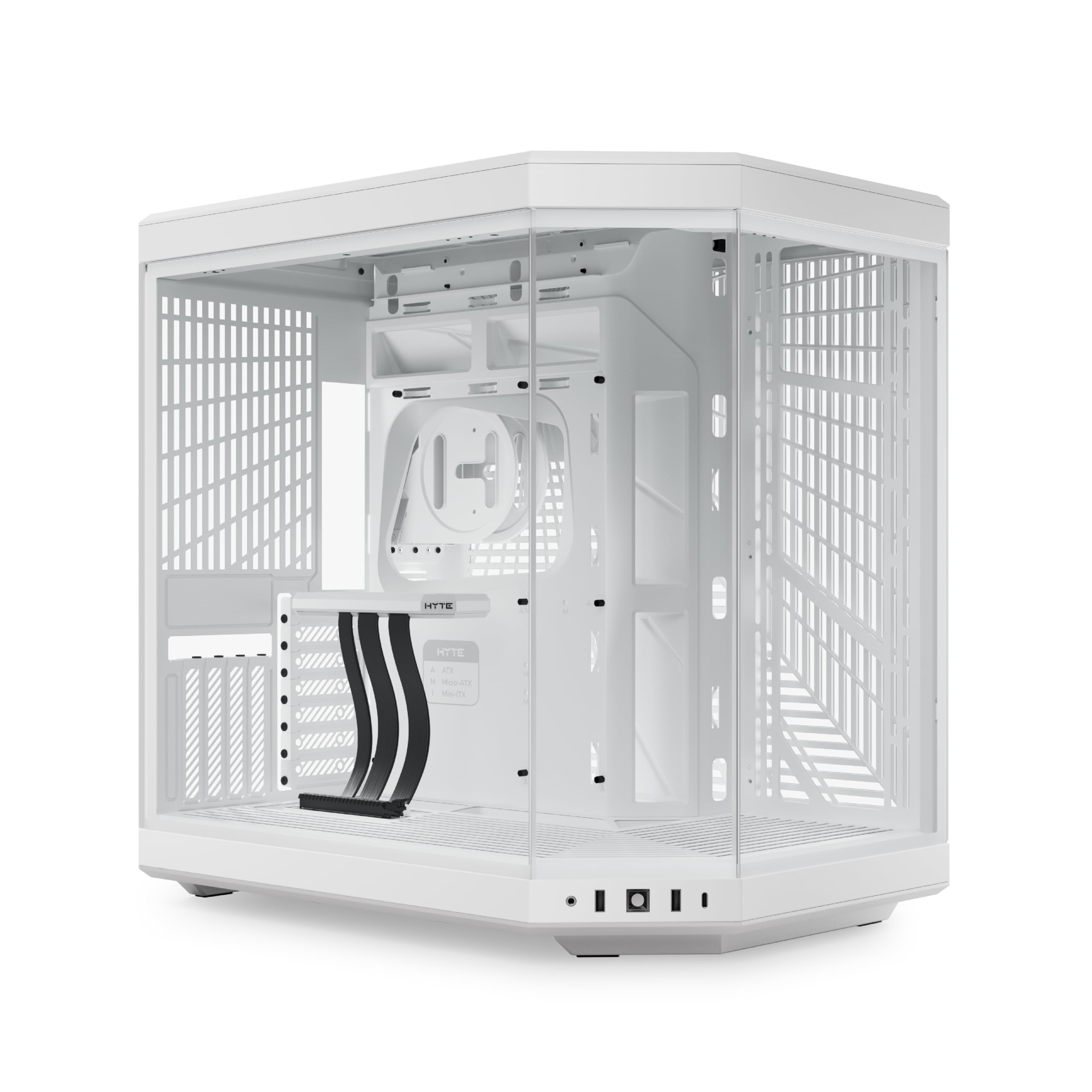
A four-slot vertical graphics mount and a riser cable come in the box, not as an extra.
Buy this if you want your graphics card standing vertically behind the glass, which is the whole point of the design. It ships with a PCIe 4.0 x 16 riser cable — the flat ribbon that lets a card plug into a vertical slot instead of lying flat — and a color-matched canopy so the cable does not spoil the view. That riser is a luxury item you would otherwise buy separately, and it sits behind a massive four-slot vertical graphics setup. The three-piece panoramic glass and dual-chamber interior frame the whole thing, and the case is available in four colorways including Snow White.
Cooling capacity is the other big number: up to a 360mm radiator on the side at 125mm thick, plus an adjustable top radiator mount up to 68mm thick, with cold floor cooling that fits either three 120mm or two 140mm fans up to 32mm thick below. In plain terms, that is enough room for a serious liquid-cooling loop or a stack of fans pulling air up from the floor. Details are handled well too — helpful labels, reusable Velcro straps, floating storage sleds, and a clicky blue power switch — and the tool-less panels and deep rear chamber make the build experience orderly.
Two caveats worth knowing. No fans are included, so budget for those, and depending on your setup you may need splitters or a fan controller to run up to 10 of them. Second, going vertical means airflow around the card behaves differently than a horizontal mount, and fitting the riser takes care — one owner called it a scary install. Neither is a dealbreaker for someone who wants the vertical showpiece, but it is the difference between this and a straightforward horizontal build.
Why it stands out: a PCIe 4.0 x 16 riser cable and four-slot vertical GPU mount are included, with room for a 10-fan or 360mm radiator setup.
What to budget for: no fans included, and the vertical riser install rewards a steady hand.
This is your case if: a vertical graphics card display is the centerpiece you are after and you want the riser included.
Look at the horizontal picks if: you would rather skip riser installation and buy fans on a tighter schedule.
9. Hyte Y60 Modern Aesthetic Dual Chamber Panoramic Tempered Glass Mid-Tower ATX Case, PCIE 4.0 Riser Included, Snow White

Three pieces of glass, no corner pillar, and a graphics card meant to stand up.
The feature that sets this apart is a 3-piece panoramic tempered glass design with no corner pillar — meaning you can turn the case to view it from the left or right side of your desk and still get a clean look at the interior. Graphics card mounting is exclusively vertical, and a PCIE 4.0 riser cable is included, with a protective shroud that integrates into the case and allows half-height PCIE cards behind the vertical card. Its antechamber construction separates the cables from the thermal components so the visible side stays tidy, and cold floor cooling runs sweeping lateral vents from fans tucked into the base to reduce hot spots.
What buyers keep coming back to is the look and the airflow. One description that sums up the ownership experience calls it a tank disguised as modern art, and the design is the most-mentioned positive by a wide margin. In practice that means ample room for components and cables, an easy assembly process, and the top section taking a three-fan AIO cooler without trouble. This is the smaller, more affordable sibling of the Y70 above, and cost is the clearest split between them.
What to know going in: the vertical-only GPU mount governs your whole build, and the riser cable can block access to some of the fan, front-panel, and audio connectors until you remove the bottom panel for clearance. Working with up to eight fans and reverse-blade intake fans is the balance for the layout. Stepping down to the Y60 versus stepping up to the Y70 is mostly about size, price, and that riser-driven interior.
What earns it a spot
- 3-piece panoramic glass with no corner pillar in Snow White
- Exclusive vertical GPU mount with an included PCIE 4.0 riser cable
- Antechamber construction keeps cables separate from thermal components
- Cold floor cooling with sweeping lateral vents to reduce hot spots
What to know first
- Graphics cards install vertically only — no horizontal alternative
- Riser cable can block some fan and front-panel connectors until the bottom panel is freed
- Cable area behind the board gets tight with 2 NVMe, 2 HDD, and a PSU
Suits the builder who: wants the panoramic, no-pillar look and a vertical card as the centerpiece at a lower cost than the Y70.
Think again if: you need a horizontal GPU mount or roomy rear cable space for a dense drive setup.
Understanding the Specs
GPU Clearance
This is the maximum length of graphics card the case can hold, measured from the rear bracket to the front panel. When you see 420 mm, that is the longest card that physically fits. Cards near the limit can still crowd the front panel or block a front-mounted radiator, so leave a little margin if you plan to add one. A card under the limit slides in cleanly, which is why clearance is the first number to check against the GPU you own.
CPU Cooler Height
This is the tallest air-cooling tower the side panel will close over. If the figure is 170 mm, a cooler taller than that will press against the glass. Tall air towers are where this number matters most; a low-profile cooler or a liquid-cooling block fits almost anywhere. Check it before you buy an air tower, because no amount of airflow tuning fixes a panel that will not shut.
Power Supply Length
This is how much depth the case leaves for your PSU behind the motherboard. A modular supply — one with detachable cables — needs extra room for the cable bundles at the connector side. More depth here means a long unit slides in without wrestling. If the number is tight for your supply, loop your cables before you seat the PSU instead of fighting them afterward.
Radiator Support
A radiator is the finned heat exchanger in a liquid-cooling loop, and its size is written in millimeters like 360mm or 240mm. Support for a top 360mm radiator means a 360mm-long cooler fits under the roof. Radiator room often competes with the graphics card for the same space, so verify both fits together rather than checking each in isolation.
FAQ
Will my graphics card fit an all-glass ATX mid-tower?
Is 4mm tempered glass better than thinner acrylic panels?
What does dual-chamber mean on a glass PC case?
Can I run a 360mm liquid cooler in these cases?
Do I need to buy extra fans if a case ships with some?
What is a reverse-blade fan and why does it matter in a glass case?
Can IMONTECH XR Panoramic take a 360mm radiator on top?
Do these cases support back-connect or hidden-connector motherboards?
How do I keep dust off the hardware in a mostly glass case?
Is an all-glass front going to cook my components?
Final Thoughts: The Verdict
For most builders, the all-glass pc case winner is the MONTECH King 95 PRO because it pairs curved 4 mm tempered glass with a dual-chamber layout, six pre-installed ARGB fans, and clearances generous enough for a large graphics card, a tall cooler, and a long PSU — the whole package arriving ready to show off, and the case with the highest owner rating in this group. If you want the most fans and lighting handled straight from the start, reach for the Antec C5 ARGB. And if your motherboard is a large EATX or a back-connect board, the CORSAIR 3500X is the one built to take it.
How We Picked
We do not accept paid placement. Every pick is matched to a real buyer and a real use-case; we do not hands-on test units.
Sources & Methodology
Specifications: manufacturer listings and product documentation. Review insights: verified customer reviews, as of September 2026. Pricing: not shown on this page (it changes often); check the current price via the retailer link.
As an Amazon Associate, Gadgets Feed earns from qualifying purchases. This does not affect which products we feature.