
Our readers keep the lights on and my morning glass full of iced black tea. As an Amazon Associate, I earn from qualifying purchases.
Specs are compiled from manufacturer listings and verified buyer reviews and can change over time — please confirm the key details on the product page before buying.
You want to ditch the tower sitting under your desk, but you are worried that an all-in-one PC might not have the power to get real work done. The fear is that you are trading performance for a cleaner desk. The truth is that the best modern 24-inch models pack surprising muscle behind that one slim screen, handling daily tasks, video calls, and streaming without the cable mess. This guide cuts through the spec sheet noise to show you exactly which one fits your workload and your budget.
I’m Min — the founder and writer behind Gadgets Feed. This guide is built by comparing the manufacturers’ published specifications and the patterns across verified customer reviews, so you get each pick’s real strengths and trade-offs instead of marketing spin.
For the home office, student work, or a tidy family computer, we have zeroed in on the specific hardware choices that separate a smooth experience from a frustrating one in the all-in-one 24 inch pc category.
Our Picks at a Glance


How To Choose The Best All-In-One 24 Inch PC
The most important part of picking an all-in-one is understanding that you are stuck with the internal hardware. You cannot easily swap the processor or the graphics chip like you can with a desktop tower. Your money should go into the parts that will determine the computer’s speed for years to come.
Processor and Cache: The Engine and Its Fuel
The CPU is the brain, but the cache is the short-term memory the brain uses to work fast. A bigger cache on the chip means it holds more instructions close by, making the system feel snappier when you open apps or jump between browser tabs. The data shows that a high-end chip with a 16 MB cache feels far quicker than an entry-level chip with a 1.5 MB cache, even if their clock speeds seem close on paper.
Memory and Storage: The Difference Between Wait and Go
You need at least 8 GB of RAM for a tolerable experience on Windows 11. If you like having twenty browser tabs open while your spreadsheet is running, 16 GB is the balance. For storage, a PCIe SSD is mandatory — it boots Windows in seconds. A 128 GB SSD is enough for a family member who mainly uses the web, but a 512 GB drive gives you room to install software and keep your personal media.
Video Call and Display Quality: The Work-From-Home Reality
Since an all-in-one is a single-screen setup, the built-in webcam and speakers need to be decent. Look for an IPS display with a resolution of 1920×1080 FHD so colors stay consistent when you lean left or right. A pop-up privacy shutter for the camera is a nice bonus, and a noise-reduction microphone array matters a lot when you are on a call in a busy room.
Quick Comparison
| Model | Best For | Processor / Cache | RAM / Storage | Screen Feature | Amazon |
|---|---|---|---|---|---|
| Dell 24 EC24250★ Best Overall | Top Performer | Intel Core 3 (10 MB Cache) | 8 GB DDR5 / 512 GB SSD | FHD IPS, 99% sRGB | Amazon |
| HP Ryzen 7 7730UTop Performance | Best Performance | AMD Ryzen 7 7730U (16 MB Cache) | 16 GB / 512 GB SSD | FHD, 89% Screen Ratio | $845.00Amazon |
| HP Ryzen 5 7520U | Premium Pick | AMD Ryzen 5 7520U (4 MB Cache) | 8 GB / 256 GB SSD | FHD, Micro-Edge Display | Amazon |
| Lenovo 24 16GB RAM | Memory Value | Intel N100 (6 MB Cache) | 16 GB / 128 GB SSD | FHD IPS, Anti-Glare | Amazon |
| Lenovo IdeaCentre | Best Value | Intel N100 (6 MB Cache) | 8 GB / 512 GB SSD | FHD IPS, Anti-Glare | Amazon |
| Core Innovations 24 | Budget Choice | Intel Celeron N5095 (1.5 MB Cache) | 4 GB / 128 GB | FHD IPS Display | Amazon |
In-Depth Reviews
1. Dell 24 All-in-One Desktop EC24250
Our pick — over 4.5★ from 200+ verified ratings; the strongest balance of quality and price.
The desktop that hides its power behind a crisp screen and a quiet fan.
You notice the Dell EC24250 for its all-around polish — it does not have the highest cache (10 MB), but its Intel Core 3 processor reaches a 4.7 GHz max speed and uses DDR5 RAM, which is a generation ahead of the DDR4 memory still common in this class. The 512 GB SSD gives you plenty of space for your programs, and the FHD IPS display covers 99% sRGB for colors that look accurate whether you are editing a photo or streaming a movie.
Buyers report that the 5 MP IR webcam with HDR makes you look well-lit during video calls, even when your room is dim. The Dell ComfortView Plus feature reduces blue light, which helps your eyes feel less tired after a day of work. It also comes with 1 Year Onsite Service, meaning a technician will come to your home if something goes wrong.
If you compare it to the HP Ryzen 7 model below, the Dell has a smaller processor cache (10 MB vs 16 MB), but it makes up for that with a faster top clock speed of 4.7 GHz and a newer memory standard. The main trade-off here is the 8 GB of RAM — you might want to look at the HP if you know you are a power user who keeps dozens of tabs open.
Polished daily driver: Perfect for a home office or a student who wants a reliable, great-looking machine with a solid webcam and strong support. One bottleneck: The 8 GB RAM might feel tight if you are a heavy multitasker with many applications open at once.
Reach for this if: You value a premium screen, a fast processor for daily apps, and the confidence that comes with on-site repair service. Look elsewhere if: You need 16 GB of RAM and a bigger processor cache for heavy-duty multitasking.
2. HP 24 inch All-in-One, AMD Ryzen 7 7730U
The powerhouse option that chews through heavy workloads without breaking a sweat.
The HP with the Ryzen 7 7730U is the one you pick when you want everything to feel instant. It has a 16 MB processor cache (the short-term memory on the chip that helps apps load fast), at 16 MB compared to the Core Innovations’ 1.5 MB cache. That gap translates to noticeably faster app loading when you jump between programs. It also comes with 16 GB of RAM and a 512 GB SSD — the combination that allows you to keep dozens of browser tabs, a music app, and a video call all running at the same time without any lag.
Buyers appreciate the tiltable pop-up privacy camera, which physically covers the lens when you are not on a call. The dual array microphones with advanced noise reduction technology help your voice come through clearly, even if there is background noise in your room. The display has an ultra-slim three-sided micro-edge design with up to an 89% screen-to-body ratio, which makes the computer feel smaller on your desk than its size suggests.
The catch here is that the Dell model above has a faster processor clock speed on paper (4.7 GHz vs the HP’s unspecified top speed). But the HP wins on overall performance and capacity — more cache, more RAM, and more storage. It is ready for business productivity right from the start.
What you get
- 16 GB RAM is excellent for multitasking
- Massive 16 MB processor cache for snappy performance
- Pop-up privacy camera and advanced noise reduction mics
The trade-off
- Higher investment for the top-tier specs
- Average clock speed is lower than some Intel rivals
For the power user: Ideal if you run demanding office software, handle large spreadsheets, or just want a computer that will feel fast for the next five years. skip it if: Your needs are limited to light web browsing and email, where a simpler machine is a better fit for your budget.
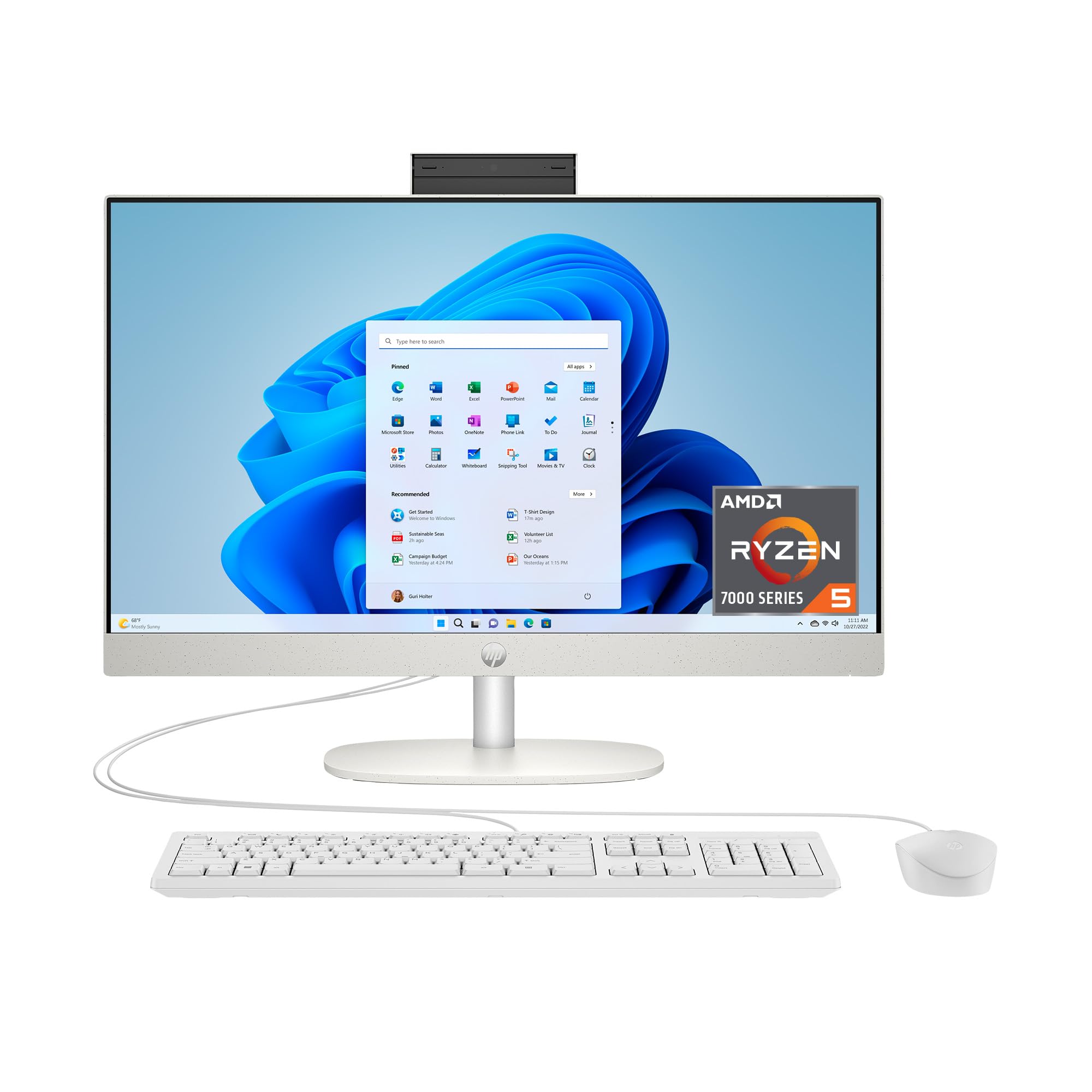
3. HP 24 inch All-in-One, AMD Ryzen 5 7520U
The balanced mid-ranger that brings AMD reliability to your desk without the premium price.
The HP Ryzen 5 sits in the middle of the pack with a capable AMD Ryzen 5 7520U processor and a 4 MB cache. It has 8 GB of RAM and a 256 GB SSD. This setup handles the core tasks — web browsing, Microsoft Office, streaming video, and video calls — with ease. It is a step up in processor performance compared to the Lenovo models below, especially if you are running multiple applications at once.
Like its bigger brother the Ryzen 7, this model features the tiltable pop-up privacy camera, HP Video Controls, dual array microphones, and advanced noise reduction. The display is a 23.8-inch FHD LED panel with an ultra-slim three-sided micro-edge design. You get the same clean desk aesthetic and call quality as the top-tier model, but with a smaller price tag attached.
The main difference between this and the top HP pick is the 8 GB vs 16 GB RAM and the 256 GB vs 512 GB SSD. If you do not keep a lot of local files or run heavy data software, the 256 GB SSD is plenty. One reviewer noted the SSD speed makes Windows 11 feel very responsive.
Sensible mid-range: Great all-around choice for anyone who wants an AMD processor and a pop-up webcam but does not need the maximum RAM. The limit: Storage space is smaller than the competition — if you store many games or videos locally, you might want the 512 GB version.
Best for: The family computer or general home office worker who wants quality video call features and a tidy setup. Not for: Creative professionals or power users who need to store large project files on the internal drive.
4. Lenovo 24″ FHD All-in-One (16 GB RAM)

The multitasker’s secret — 16 GB RAM at a price that usually gets you only half.
This Lenovo model makes its case by focusing entirely on memory. While many computers at this level come with 8 GB of RAM, this one gives you 16 GB DDR4, which is exactly what you need to run a dozen browser tabs, a music stream, and office documents without a single stutter. It uses the Intel N100 processor, a 4-core chip that can turbo up to 3.4 GHz and has a 6 MB cache.
The display is a 23.8-inch FHD IPS anti-glare panel with 250 nits brightness. The anti-glare coating is a practical feature — it cuts down reflections from a window or lamp so you can see the screen clearly. It comes with a wireless keyboard and mouse, Wi-Fi 6 for fast internet, and Bluetooth 5.2 for wireless headphones.
You do make a trade-off in storage. The 128 GB PCIe SSD is fast for launching programs and booting Windows, but it is not big enough if you download a lot of games or keep years of photos on the local drive. For the price, this is a smart choice if you prioritize smooth multitasking over having a huge media library on the system itself.
Smart allocation
- 16 GB RAM is outstanding for this price point
- Anti-glare IPS display is easy on the eyes
- Comes with wireless mouse and keyboard
Know the limit
- 128 GB SSD fills up fast with local files
- Intel N100 is not as powerful as the Ryzen or Core i3 options
Perfect for: The office worker who keeps everything in the cloud and just wants a fast, ram-jammed machine for running applications. Look elsewhere if: You need to store large files locally, because the 128 GB drive will feel cramped quickly.
5. Lenovo IdeaCentre All-in-One (8 GB / 512 GB)

The best balanced deal — enough storage for your life with a processor that keeps up.
The Lenovo IdeaCentre hits a balance for the average buyer. It has the same Intel N100 processor with a 6 MB cache as the other Lenovo model, and the same 23.8-inch FHD IPS anti-glare display with 99% sRGB color coverage. But this configuration uses 8 GB of RAM and a much larger 512 GB PCIe SSD, which is the storage amount most people actually need for everyday use.
You get a lot of connectivity for the money. It includes Intel Wi-Fi 6 for fast internet, Bluetooth 5.2, and a full set of ports including a USB-C port with 10Gbps speed, two USB-A 10Gbps ports, and an HDMI-out for a second monitor. The system supports up to 32 GB of RAM total, so you could upgrade the memory yourself later if you wanted more.
The difference between this and the other Lenovo is simple: you trade half your RAM (8 GB vs 16 GB) for quadruple the storage (512 GB vs 128 GB). The 8 GB is adequate for browsing, streaming, and office work, but you will notice the difference if you try to keep fifty tabs open. One reviewer called it a “practical choice for home office and student work” — and that sums it up perfectly.
Smart storage choice: Ideal for the buyer who downloads apps, stores photos, and wants room to grow without paying a premium. The trade-off: 8 GB RAM is fine today but might feel tight in a few years as software demands grow.
Reach for this if: You want a reliable machine for daily tasks and need the ample storage space right now. pass on it if: You are the kind of user who has 30+ browser tabs open constantly — the other Lenovo with 16 GB RAM is a better fit.
6. Core Innovations 24″ All-in-One Desktop PC

The entry-level unit that gets you a full FHD screen for the lowest cash outlay.
The Core Innovations machine is the budget entry into this category, and you can feel the difference in the specs. It runs a 2.9 GHz Intel Celeron N5095 processor with only a 1.5 MB cache — compared to the 16 MB cache on the HP Ryzen 7, that is a gap from 1.5 MB to 16 MB in the chip’s internal memory. The 4 GB of RAM and 128 GB of storage are the absolute minimum for Windows 11 to function.
On the positive side, it does include a 24-inch 1920×1080 FHD IPS display, which is the same panel quality as many of the more expensive picks here. It comes with a keyboard and has Wi-Fi supporting both 2.4GHz and 5GHz bands. For the price, you get a big, clean-looking screen and a computer that can handle the very basics: checking email, watching YouTube, and typing documents.
The reality check is that this machine is not ready for heavy work. Buyers should expect some lag when opening multiple browser tabs. It is best treated as a dedicated screen for a specific light task rather than a general-purpose family computer. The 128 GB of storage will also limit how many apps you can install before getting a “disk full” warning.
What works
- Full FHD IPS display at the lowest possible investment
- Comes with a keyboard included in the box
- Simple setup for basic browsing
What to expect
- 4 GB RAM is very limited for modern multitasking
- 1.5 MB processor cache leads to slower app loading
- 128 GB storage fills up fast
One specific use: A good secondary screen for a child doing homework or as a very simple web kiosk.
Understanding the Specs
Processor Cache (L3 Cache)
The processor cache is a small pool of high-speed memory built directly onto the CPU chip. It holds the data the processor needs right now, so it does not have to fetch it from the slower system RAM. A larger cache, like the 16 MB on the HP Ryzen 7, means the chip can keep more active instructions ready to go, making the system feel snappier than its clock speed alone suggests. A small cache, like the 1.5 MB on the Celeron chip, forces the processor to wait more often for data, which creates lag.
FHD IPS Display
FHD stands for Full High Definition, which is a resolution of 1920×1080 pixels — the standard for crisp, clear text and video. IPS stands for In-Plane Switching, a screen technology that gives you consistent colors and brightness even when you view the screen from an angle off to the side. An IPS panel looks much better than an older TN panel if you plan to watch movies or share your screen with someone sitting next to you.
FAQ
Can I upgrade the RAM or storage in an all-in-one PC?
Is 4 GB of RAM enough for an all-in-one PC running Windows 11?
What is the difference between a 23.8-inch and a 24-inch screen?
Can I use an all-in-one PC as a monitor for a separate laptop?
Which processor is better for an all-in-one, Intel or AMD?
What does 99% sRGB mean for the display?
Do all all-in-one PCs come with a keyboard and mouse?
How important is Wi-Fi 6 for an all-in-one PC?
Can I watch 4K video on a 24-inch FHD display?
What is a pop-up privacy camera?
Final Thoughts: The Verdict
For most buyers, the all-in-one 24 inch pc winner is the Dell EC24250 because it wraps a very fast processor and a great screen in a white design with home service support. If you want raw performance and the most RAM for heavy multitasking, grab the HP Ryzen 7. And for the best balance of storage and value, the standout is the Lenovo IdeaCentre.
How We Picked
We do not accept paid placement. Every pick is matched to a real buyer and a real use-case; we do not hands-on test units.
Sources & Methodology
Specifications: manufacturer listings and product documentation. Review insights: verified customer reviews, as of July 2026. Pricing: not shown on this page (it changes often); check the current price via the retailer link.
As an Amazon Associate, Gadgets Feed earns from qualifying purchases. This does not affect which products we feature.
Related Guides
Product prices and availability are accurate as of the date/time indicated and are subject to change. Any price and availability information displayed on Amazon at the time of purchase will apply to the purchase of this product. As an Amazon Associate I earn from qualifying purchases.
CERTAIN CONTENT THAT APPEARS ON THIS SITE COMES FROM AMAZON. THIS CONTENT IS PROVIDED "AS IS" AND IS SUBJECT TO CHANGE OR REMOVAL AT ANY TIME.
Amazon and the Amazon logo are trademarks of Amazon.com, Inc. or its affiliates.