
Scrolling through endless tower specs, worrying about cables, and trying to predict how well a clunky desktop will fit your space — that’s the real headache of shopping for a compact, integrated system. You want a screen that doesn’t compromise on size, enough memory to keep your workflow fluid, and a design that doesn’t scream “office cubicle.” That’s exactly the challenge an all-in-one solves: a single, clean machine that hides the components behind the display, giving you a powerful computer without the messy footprint.
I’m Min — the co-founder and writer behind Gadgets Feed. For years, I’ve analyzed the technical specifications and market positioning of hundreds of all-in-one computers to understand which configurations deliver real-world speed, reliable connectivity, and long-term value.
Whether you’re outfitting a home office, a dorm room, or a shared family workstation, the right integrated desktop cuts through the noise. I’ve gathered the top contenders to help you find the all in one computer under 1000 that matches your needs without forcing costly trade-offs on performance or screen quality.
How To Choose The Best All In One Computer Under 1000
Finding the right all-in-one under this ceiling means balancing screen size, processor power, and memory without blowing your budget. A 24-inch FHD display is the sweet spot for most home users, while a 27-inch panel offers more real estate for creatives and multitaskers. Memory and storage are where you feel the speed: 16GB of RAM keeps your apps from stuttering, and a 512GB or 1TB SSD ensures near-instant boot times.
Screen Size and Panel Quality
An IPS panel beats standard TN or VA panels every time for color accuracy and viewing angles. Look for at least 250 nits of brightness and anti-glare coating if your room has bright windows. Touchscreen adds convenience but can push the price up; decide whether you’ll actually tap and swipe your monitor daily.
Processor and Graphics Balance
Modern Intel Core i5 or AMD Ryzen 5/7 series processors handle Office apps, web browsing, and media streaming without breaking a sweat. Integrated graphics from Intel UHD or AMD Radeon are fine for 4K video playback and light photo editing, but don’t expect smooth 1080p gaming at high settings. If you need to edit video or run design software, prioritize a Ryzen 7 with Radeon Graphics or a newer Intel Core i5 with Iris Xe.
Quick Comparison
On smaller screens, swipe sideways to see the full table.
| Model | Category | Best For | Key Spec | Amazon |
|---|---|---|---|---|
| Acer Aspire C27 | Premium | Power users & light gaming | AMD Ryzen 7 5700U, 27″ 120Hz | Amazon |
| ASUS V470 | Premium | Touchscreen & Intel performance | Intel Core i5, 27″ touch, 16GB DDR5 | Amazon |
| Dell 27 EC27250 | Premium | Professional workflows & comfort | Intel Core 5, 27″ FHD, 16GB DDR5 | Amazon |
| HP 27 Touch (Ryzen 5) | Premium | Touchscreen & big storage | AMD Ryzen 5, 27″ touch, 1TB SSD | Amazon |
| HP 24 Touch (Intel N100) | Mid-Range | Touchscreen on a budget | Intel N100, 24″ touch, 1TB SSD | Amazon |
| HP 27 Pro (Ryzen 5) | Premium | Windows 11 Pro & large screen | AMD Ryzen 5, 27″ touch, 1TB SSD | Amazon |
| HP 24 (Intel Core i5) | Premium | Intel power in 24-inch | Intel Core i5-1334U, 24″ FHD IPS | Amazon |
| HP 24 (AMD Ryzen 7) | Mid-Range | Ryzen 7 multi-tasking | AMD Ryzen 7 7730U, 24″ FHD | Amazon |
| Dell 24 EC24250 | Mid-Range | Dell reliability in 24-inch | Intel Core 3, 24″ FHD, DDR5 RAM | Amazon |
| Lenovo 24 (Office 365) | Budget | Extra storage & value | Intel N100, 24″ FHD, 1TB combo | Amazon |
| Lenovo 24 IdeaCentre | Budget | Entry-level simplicity | Intel N100, 24″ FHD, 16GB RAM | Amazon |
In‑Depth Reviews
1. Acer Aspire C27

The Acer Aspire C27 stands out with its 27-inch Full HD IPS display running at a silky 120Hz — a rarity in this segment. That higher refresh rate makes scrolling through documents and web pages feel noticeably smoother, and even light gaming becomes more fluid. Under the hood, the AMD Ryzen 7 5700U octa-core processor paired with 16GB of DDR4 RAM and a 1TB PCIe SSD delivers snappy performance for demanding multitasking, from spreadsheets to streaming 4K video.
Acer included Wi-Fi 6 for fast wireless connectivity and a 2MP webcam with a privacy shutter, plus dual microphones for clear video calls. The 90.71 percent screen-to-body ratio gives it a modern, bezel-less look that fits well on any desk. Front I/O ports — including USB-C — make plugging in peripherals easy without reaching behind the monitor.
One detail to note: the display uses an LCD panel, and some users reported the image quality isn’t quite as vibrant as premium Dell or Samsung alternatives. The USB ports on the bottom can be slightly awkward to access if the stand sits flush on your desk. Still, for the price, you get a powerful processor and a 27-inch screen with a 120Hz refresh rate that few competitors match.
Why it’s great
- 27-inch IPS display with 120Hz refresh rate
- AMD Ryzen 7 octa-core processor and 16GB RAM
- Fast Wi-Fi 6 and front USB-C port
Good to know
- LCD panel not as color-rich as higher-end options
- USB ports on the bottom can be inconvenient
- Integrated graphics limit gaming potential
2. ASUS V470 All-in-One

The ASUS V470VA brings a 27-inch Full HD anti-glare touchscreen that makes navigation intuitive — whether you’re scrolling through recipes in the kitchen or pinching to zoom on a design mockup. Powered by a 13th-gen Intel Core i5-13420H processor with 16GB of DDR5 RAM and a 1TB PCIe SSD, this machine handles heavy workloads without hesitation. The DDR5 memory offers faster data transfer speeds than DDR4, which helps with demanding apps and large file transfers.
ASUS outfitted this model with Wi-Fi 6E and Bluetooth 5.3, ensuring the latest wireless standards for future-proof connectivity. The 1080p Full HD camera includes a privacy shutter, and the built-in speakers support Dolby Atmos for immersive sound. AI noise-canceling technology helps keep your voice clear during video calls, even if there’s background noise at home.
On the downside, the ASUS V470 comes with wired keyboard and mouse, which can feel restrictive if you prefer a clutter-free desk. The display’s height is non-adjustable, so you may need to prop it up or adjust your chair for the best viewing angle. Some users also noted a bit of pre-installed bloatware, though that’s common in this category.
Why it’s great
- 27-inch touchscreen with anti-glare coating
- Intel Core i5-13420H and 16GB DDR5 RAM
- Wi-Fi 6E and Bluetooth 5.3 for modern connectivity
Good to know
- Wired keyboard and mouse included
- Display height is not adjustable
- Some bloatware pre-installed
3. Dell 27 EC27250

The Dell 27 All-in-One EC27250 combines a large 27-inch FHD IPS display with Dell’s ComfortView Plus technology, which reduces harmful blue light without washing out colors. The panel covers 99 percent of the sRGB color gamut and offers 50 percent higher contrast than previous generations, making it well-suited for photo editing, design work, and enjoying streaming content. A 5MP+IR camera with HDR technology ensures you look clear in video calls, and the pop-up design keeps your privacy secure when not in use.
Under the hood, the Intel Core 5 120U processor with 16GB of DDR5 RAM and a 512GB SSD provides fast, responsive performance for daily multitasking. Dell includes 1 Year Onsite Service, meaning a technician can come to your home if hardware issues arise — a valuable safety net. The innovative stand can house the keyboard underneath the display, helping keep your workspace tidy.
The main trade-off here is the 512GB SSD, which is half the storage of some competitors at a similar price point. And while the display is non-touch, the vivid IPS panel and strong build quality justify the premium positioning. Some users found the wireless keyboard and mouse functional but a bit basic.
Why it’s great
- 27-inch IPS with ComfortView Plus and 99% sRGB
- 5MP IR camera with HDR and privacy pop-up
- 1 Year Onsite Service for peace of mind
Good to know
- Storage limited to 512GB SSD
- Non-touch display
- Keyboard and mouse feel basic
4. HP 27″ Touch All-in-One (Ryzen 5)

HP packs a 27-inch Full HD IPS touchscreen into a sleek white chassis, making this one of the more visually appealing options in the list. The touch interface works well for browsing, signing documents, and interacting with apps in Windows 11. Powered by an AMD Ryzen 5 7520U processor with 16GB of RAM and a generous 1TB SSD, it easily handles everyday productivity, media streaming, and light creative tasks. The 1TB storage gives you ample space for files, photos, and software without needing external drives.
Connectivity is robust with USB-C, multiple USB-A ports, Ethernet, and HDMI outputs. The micro-edge, anti-glare display offers 250 nits of brightness and three-sided edgeless design for a more immersive look. HP includes a wireless keyboard and mouse in the box, plus a PLUSERA 8-in-1 hub, which adds extra port options for connecting peripherals.
Some users reported that the touchscreen could be unresponsive in specific browser contexts offline, and the wireless mouse exhibited erratic cursor behavior at startup. The Ryzen 5 7520U is a quad-core processor, so it won’t match the multithreaded performance of higher-end chips for heavy video editing or 3D rendering. Still, for most home and school users, this is a strong touchscreen pick at a competitive price.
Why it’s great
- 27-inch touchscreen with 1TB SSD storage
- Includes wireless keyboard, mouse, and hub
- USB-C and multiple USB-A ports
Good to know
- Touchscreen can be inconsistent in some apps
- Quad-core Ryzen 5 limits heavy multitasking
- Wireless mouse reported as erratic at logon
5. HP 24 Touchscreen All-in-One (Intel N100)

The HP 24 Touchscreen brings a 23.8-inch IPS Full HD display with responsive touch input, perfect for family members who prefer tapping and swiping over a mouse. Powered by an Intel N100 quad-core processor with 16GB of DDR4 RAM and a spacious 1TB PCIe SSD, it offers enough speed for browsing, schoolwork, and video streaming. The 1TB storage is a standout at this tier — plenty of room for family photos, movies, and documents without worrying about running out of space.
The included HP True Vision 720p HD privacy camera with temporal noise reduction helps you look presentable on video calls, and the integrated dual array microphones pick up your voice clearly. With Realtek Wi-Fi 6 and Bluetooth 5.3, it supports fast wireless speeds and pairing with modern accessories. The white design and compact 24-inch size fit well in bedrooms, home offices, and dorm desks.
The Intel N100 is a budget-focused processor, meaning it can struggle with heavy multitasking — opening dozens of browser tabs or running demanding software will show occasional lag. The 720p camera is decent but not as crisp as 1080p options found on pricier models. If your workflow is basic web-based tasks and you want the convenience of touch, this is a solid entry-level machine.
Why it’s great
- 24-inch IPS touchscreen with anti-glare
- 16GB RAM and 1TB SSD for fast storage
- Wi-Fi 6 and Bluetooth 5.3 included
Good to know
- Intel N100 processor struggles with heavy multitasking
- Only 720p webcam
- Wired keyboard and mouse may not suit everyone
6. HP 27 Pro (Ryzen 5 / Win 11 Pro)

This HP 27-inch model comes pre-loaded with Windows 11 Pro, giving business users and IT professionals advanced features like BitLocker encryption, Remote Desktop, and Group Policy management. The 27-inch Full HD IPS touchscreen is bright at 250 nits and supports 99 percent sRGB, offering good color accuracy for presentations and media. Under the hood, the AMD Ryzen 5 7520U with 16GB of LPDDR5 RAM and a 1TB SSD ensures fast boot times and ample storage for large files.
HP includes a wireless keyboard and mouse combo, and the 1080p FHD IR tilt privacy camera with temporal noise reduction helps you look sharp in meetings. The camera can tilt down when not in use for privacy. Dual-array microphones keep audio clear during calls. Wi-Fi and Bluetooth connectivity are onboard, and the ports include USB-C for fast data transfer.
The LPDDR5 RAM is soldered on the motherboard, so it’s not upgradeable later — you’re locked into 16GB for the life of the machine. Some users experienced motherboard failures within months, though others reported long-term reliability. It also pushes the upper boundary of the budget, so consider whether the Pro OS features are essential for your work.
Why it’s great
- Windows 11 Pro for business and security features
- 27-inch touchscreen with 99% sRGB
- 1080p IR camera with tilt privacy
Good to know
- RAM is soldered and not upgradeable
- Reports of motherboard failures in some units
- Higher price point near budget limit
7. HP 23.8″ Intel Core i5
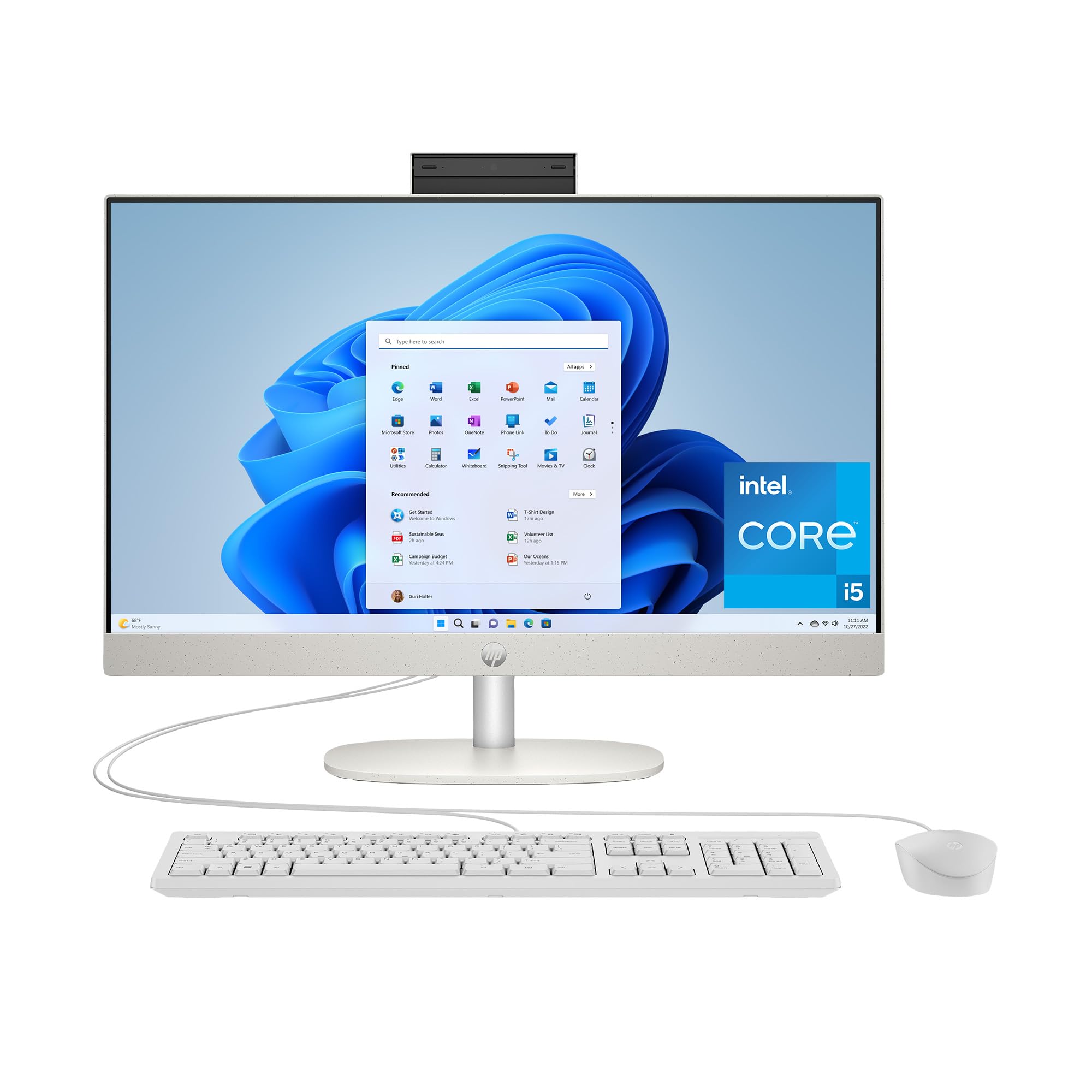
The HP 23.8-inch All-in-One with an Intel Core i5-1334U processor hits a sweet spot for those who want Intel performance without paying for a larger screen. The 13th-gen i5 handles multitasking with ease, from running Office suites to streaming 4K content via Intel Iris Xe graphics. The 16GB of RAM is ample for most users, and the 512GB SSD provides fast storage for daily work files and media.
The ultra-slim three-sided micro-edge display offers an 89 percent screen-to-body ratio, making the 23.8-inch panel feel larger than its size suggests. HP includes dual 2W speakers for clear audio and a full set of ports including USB-C, USB-A, RJ-45 Ethernet, and HDMI. The Shell White finish gives it a clean, modern look that fits into home offices and kitchens.
Storage at 512GB is the main limitation — power users who store lots of photos, games, or video files may need to add external drives. The included wired keyboard and mouse are functional but basic. Some users also noted difficulty getting used to Windows 11, though that’s a software adjustment rather than a hardware concern.
Why it’s great
- Intel Core i5-1334U with Iris Xe graphics
- Micro-edge display with 89% screen-to-body ratio
- 16GB RAM and USB-C connectivity
Good to know
- 512GB SSD is limited for heavy storage needs
- Wired keyboard and mouse included
- No optical drive
8. HP 24″ AMD Ryzen 7

The HP 24-cr0032 is powered by an AMD Ryzen 7 7730U processor, which offers eight cores and sixteen threads — excellent for heavy multitasking, running virtual machines, or photo editing. Combined with 16GB of RAM and a 512GB SSD, it handles demanding productivity tasks much better than the Intel N100 or entry-level Core i3 options. The integrated AMD Radeon graphics provide decent performance for 720p gaming and smooth 4K video playback.
The 23.8-inch FHD display features a three-sided micro-edge design with an 89 percent screen-to-body ratio and 250 nits of brightness. HP includes a pop-up privacy camera that physically hides when not in use, and the dual-array microphones with noise reduction technology help ensure clear audio during calls. The Shell White design blends into a modern workspace.
The non-adjustable stand is a limiting factor — you can’t tilt or raise the screen to your preferred viewing height, which may cause neck strain over long sessions. The 512GB SSD is also on the smaller side for a machine this capable; you’ll likely need external storage for large media libraries. Some users reported receiving defective units, though positive reviews are abundant for those with working hardware.
Why it’s great
- AMD Ryzen 7 7730U with 8 cores for heavy productivity
- Pop-up privacy camera with noise reduction
- Micro-edge display with 89% screen-to-body ratio
Good to know
- Stand is not height-adjustable
- 512GB SSD is limited for a Ryzen 7 machine
- Some reports of defective units
9. Dell 24 EC24250

The Dell 24 EC24250 proves that you don’t need a huge budget to get a well-built all-in-one. It features a 23.8-inch FHD IPS display with 99 percent sRGB coverage and ComfortView Plus, which reduces blue light without a yellow tint. The panel also offers 50 percent higher contrast than previous Dell AIOs, making text and images look punchy. The Intel Core 3 100U processor with 8GB of DDR5 RAM is a step up from the N100, handling everyday tasks like web browsing, email, and Office apps with ease.
The 5MP+IR camera with HDR and a tiltable design (0 to 20 degrees) helps you look your best in video calls, even in mixed lighting. Dell includes dual Bluetooth speakers with Dolby Atmos for clear spatial audio. The 512GB SSD keeps boot times fast, and the 1 Year Onsite Service provides home repair support if something goes wrong. The white chassis with a keyboard storage slot under the stand helps reduce desk clutter.
The main compromise here is the 8GB of RAM — while fine for basic use, power users who keep many tabs open or run heavier software may find it limiting. The storage is also 512GB, so you’ll need to manage your files carefully. The wireless keyboard and mouse are functional but feel less premium than standalone peripherals.
Why it’s great
- Dell build quality with ComfortView Plus display
- 5MP IR camera with HDR and tilt
- 1 Year Onsite Service included
Good to know
- 8GB RAM may be limiting for heavy multitasking
- 512GB SSD requires file management
- Wireless peripherals feel basic
10. Lenovo 24″ with Office 365

Lenovo offers an interesting configuration here: a 512GB internal SSD plus a 512GB external drive, giving you a total of 1TB of storage without needing to open the case. The 23.8-inch FHD IPS display is anti-glare with 250 nits of brightness and covers 99 percent sRGB, delivering vivid colors for a budget-friendly machine. The Intel N100 processor is paired with 16GB of DDR4 RAM, which is generous for the price and helps keep multiple apps running smoothly during daily use.
This model comes with Office 365 for the web, so you can work on documents right away. Wi-Fi 6 and Bluetooth 5.2 provide modern wireless connectivity. The cloud grey finish looks clean and professional. Lenovo includes a wireless keyboard and mouse combo, though some international units shipped with UK-layout or Arabic keyboards — check the listing carefully if you’re expecting US layout.
The Intel N100, while efficient, won’t excel at heavy multitasking or creative software. A few users reported boot failures or defective hardware within the first days, highlighting the importance of checking return policies. The external drive is an extra piece that can be lost or disconnected, so treat it as a bonus rather than a permanent fixture.
Why it’s great
- 1TB total storage (512GB internal + external)
- 16GB DDR4 RAM for smooth multitasking
- 99% sRGB IPS display with Wi-Fi 6
Good to know
- Intel N100 processor is budget-tier
- Keyboard may be non-US layout
- Some reports of early hardware failures
11. Lenovo 24 IdeaCentre

The Lenovo IdeaCentre 24 is the most budget-conscious option, offering a 23.8-inch FHD IPS anti-glare display with 16GB of DDR4 RAM and a 512GB PCIe SSD. For basic computing tasks — browsing the web, streaming Netflix, checking email, and using Office programs — this machine performs admirably. The Intel N100 quad-core processor may not win any speed records, but it’s more than adequate for a family or student who doesn’t push heavy workloads.
The Ebony Black design is understated, and the included wired keyboard and mouse get you started out of the box. Wi-Fi 6 and Bluetooth 5.2 ensure snappy wireless connectivity. The 250-nit display is clear enough for most indoor lighting, and the 16:9 aspect ratio works well for watching movies. Users consistently praise the easy setup and quiet operation.
The N100 processor and integrated graphics mean you should stay away from video editing, large spreadsheets, or any gaming beyond casual web titles. The 16GB RAM is generous for this class, but the processor is the bottleneck. If you simply need a clean, clutter-free computer for light use, this is the most affordable way to get into an all-in-one with a modern spec sheet.
Why it’s great
- Very affordable entry into all-in-one computers
- 16GB RAM with 512GB SSD
- Wi-Fi 6 and Bluetooth 5.2 included
Good to know
- Intel N100 processor is entry-level
- Not suitable for gaming or heavy creative work
- Wired keyboard and mouse included
FAQ
Is an Intel Core i5 or AMD Ryzen 5 better in an all-in-one under this budget?
Can I upgrade the RAM or SSD in most all-in-one computers under 1000?
What kind of games can I play on an all-in-one computer with integrated graphics?
Final Thoughts: The Verdict
For most users, the all in one computer under 1000 winner is the Acer Aspire C27 because it delivers a rare combination of a large 27-inch display, a 120Hz refresh rate, and a powerful AMD Ryzen 7 processor at a competitive price. If you need a touchscreen with plenty of storage, grab the HP 27″ Touch Ryzen 5. And for the best balance of build quality, eye comfort, and service support, nothing beats the Dell 27 EC27250.