
Our readers keep the lights on and my morning glass full of iced black tea. As an Amazon Associate, I earn from qualifying purchases.
Specs are compiled from manufacturer listings and verified buyer reviews and can change over time — please confirm the key details on the product page before buying.
Picking an all-in-one CPU liquid cooler means choosing between a whisper-quiet system and a jet engine on your desk, between a CPU that throttles under load and one that hums along through a 12-hour render session. The right AIO can drop your chip’s temperature by 20°C or more, which directly translates to higher clock speeds, smoother gaming, and longer component life. Forget the marketing spin about RGB and “extreme cooling” — what actually matters here is radiator size, fan static pressure, pump speed, and how easily the thing mounts in your case without a second pair of hands.
I’m Min — the founder and writer behind Gadgets Feed. This guide is built by comparing the manufacturers’ published specifications and the patterns across verified customer reviews, so you get each pick’s real strengths and trade-offs instead of marketing spin.
If your Intel Core i9 or Ryzen 9 runs hot, you need a cooler that keeps it fast without sounding like a jet engine. This guide picks the best all-in-one cpu liquid cooler for your build and your budget, starting with the one that gives you the most for your money.
Our Picks at a Glance



How To Choose The Best All-In-One CPU Liquid Cooler
An AIO liquid cooler uses a sealed loop with a pump, radiator, and fans to carry heat away from your CPU more efficiently than most air coolers. The three main specs that decide how well it works for you are the radiator size, the pump’s flow rate and speed, and the fan’s static pressure and noise output.
Radiator Size: 360mm, 280mm, or 240mm
The radiator is where heat dissipates. A larger radiator with more surface area — a standard 360mm (three 120mm fans) — handles high thermal loads much better than a 240mm. A 280mm radiator uses two 140mm fans, which can move more air at lower speeds while being quieter, but it is less common and can be trickier to fit in standard cases. Always check your case’s clearance for radiator width, length, and thickness before buying.
Pump Speed and Noise
Measured in RPM (revolutions per minute), the pump circulates the coolant between the cold plate and the radiator. Higher speeds, like 3000 RPM or 3800 RPM, generally mean better heat transfer, but they can also introduce pump whine. Look for a cooler with a quiet, high-quality pump and check reviews for reports of gurgling or grinding noises at low speeds.
Fan Quality and Static Pressure
Fans must push air through the tight fins of the radiator, which requires high static pressure (measured in mmH₂O or cfm). Low-noise fans around 20-30 dbA with good static pressure keep your system cool without sounding like a vacuum cleaner. Many modern fans also use daisy-chain connectors to reduce cable clutter.
Quick Comparison
| Model | Best For | Radiator | Fan Speed | Noise Level | Amazon |
|---|---|---|---|---|---|
| be quiet! Light Loop 360mm★ Best Overall | Silence & RGB | 360mm | 2100 rpm | 36.8 db | Amazon |
| ARCTIC LF III Pro 280Top Performer | Raw Cooling Power | 280mm | 2500 rpm | 0.08 sones | Amazon |
| Cooler Master 360L CoreBest Value | Value & Simplicity | 360mm | 1800 rpm | 27.2 db | Amazon |
| Thermalright FW360 SE V2 | LCD Display & Value | 360mm | 2000 rpm | 28.2 db | Amazon |
| Lian Li GA II LITE 240mm | Compact Builds | 240mm | 2500 rpm | 34.8 db | Amazon |
| MSI MAG Coreliquid A13 360 | Ultra-Quiet Operation | 360mm | — | 14.4 db | Amazon |
| Corsair Nautilus 360 RS | Build Quality & Ease | 360mm | 2100 rpm | 36 db | Amazon |
| NZXT Kraken Elite 360 RGB | Premium Display & Build | 360mm | 2800 rpm | 33.88 db | Amazon |
In‑Depth Reviews
1. be quiet! Light Loop 360mm
Our pick — over 4.5★ from 350+ verified ratings; the strongest balance of quality and price.
The crowd favorite that keeps your chip cool without making you hear it.
This is the cooler that earns the highest praise from owners, and the reason is simple: it combines near-silent operation with serious cooling power. The fans run at a maximum of 2100 rpm, yet buyers report it keeps a Ryzen 7 9800X3D around 84°C under full load and stays “sub 60c” during normal gameplay. The sound level sits at 36.8 db — audible under stress but described by owners as “ninja quiet” compared to stock coolers.
The built-in ARGB controller handles up to 6 fans and 6 lighting components, so you can unify your entire build’s look without extra hubs. The pump uses a metal jet plate to speed up coolant flow across a high-density fin stack, which is what makes those temperature drops possible. A thoughtful touch often missed: the refillable tank comes with coolant in the box, which is rare in this segment and gives the cooler a longer service life than sealed-only units.
Owners mention that the RGB fan controller needs a SATA power connection, which can be mildly annoying to route, but the trade-off is that everything else is plug-and-play. The real story here is in the numbers: at 61.8 cfm of airflow, it leads the competition in volume pushed, but it does so without the high-pitched whine that plagues less refined fans. The consensus from hundreds of owners is clear — this is the one to beat for a feature-rich, quiet, and powerful build.
The Silence is Real
- Incredibly quiet even under load — owners call it “whisper quiet”
- Refillable tank with coolant included extends the cooler’s lifespan
- Strong 61.8 cfm airflow with 9 tune fan blades reduces turbulence noise
A Minor Cable Catch
- The RGB controller needs a SATA power cable, adding a wire to route
Reach for this if: You want the top-rated 360mm AIO that runs whisper-quiet while still handling high-end CPUs like the 9800X3D with ease.
Look elsewhere if: The daisy-chain controller cable is a dealbreaker for your minimalist build — the extra SATA wire may annoy you.
2. ARCTIC Liquid Freezer III Pro 280
The brute-force cooler that drops your CPU temps by 20°C+ under load.
If raw cooling performance is your only metric, this is the pick. The ARCTIC LF III Pro 280 pushes 110 cfm of air through its 38mm-thick radiator — that is a massive 78% more airflow than the be quiet! Light Loop 360mm. And it shows in the real-world results: customers note their Ryzen 9850x3D dropped from a throttling 90-95°C to a cool 60-70°C under load after upgrading from a 240mm cooler. The 2500 rpm maximum fan speed is the highest in this lineup, which explains the immense cooling capacity.
ARCTIC packs in several design advantages that other coolers lack. There is an integrated VRM fan (a small PWM-controlled fan that actively cools the voltage regulators around the CPU socket, so the motherboard stays stable during overclocking). The cold plate has a native offset mounting that shifts it toward the CPU’s hotspot for more efficient heat transfer. And the cable management is clever — the PWM cables for the radiator fans run inside the hose sheathing, leaving only a single visible cable to the motherboard.
The main catch is fitment. At 12.4″ x 5.4″ x 1.5″, the 280mm radiator is thick and stiff-hosed, which means it will be a tight squeeze in many mid-tower cases. Reviewers point out the installation is mixed: some find it straightforward, others label the AMD bracket difficult and complain about a web-only manual. The VRM fan can also ramp up audibly. But for sheer heat-shedding ability at a mid-range price, this is a genuine heavyweight contender.
The Heat-Transfer King: The 110 cfm airflow beats nearly every 360mm cooler here, and the 38mm thick radiator plus VRM fan make it ideal for overclocking or high-TDP CPUs like the i9-14900K and Ryzen 9. The trade-off is fitment — measure your case carefully before buying.
3. Cooler Master 360L Core
A 360mm AIO that delivers premium cooling without the premium price.
This is the budget champion that punches well above its weight. The 360L Core uses a Gen S dual-chamber pump with an improved copper base to target hot spots more precisely. The fans spin at up to 1800 rpm and push 71.93 cfm of air, yet the noise rating is just 27.2 db — noticeably quieter than many competitors. Buyers confirm temps drop significantly compared to air coolers, and the system runs “quietly even under load.”
Cooler Master includes its premium CryoFuze thermal paste, which has a thermal conductivity of 14W/mK and remains stable from -50°C up to 250°C. This saves you the step and expense of buying separate paste. The frosted fan blades are designed to diffuse ARGB lighting evenly, and owners say the RGB syncs easily with other components. One experienced builder noted the radiator is slightly larger than 360mm due to end reservoirs, so check your case’s mounting depth before assuming a perfect fit.
The biggest praise from the community is the sheer value: buyers call it “quality for a bargain” and report it lasting up to 4 years. A recurring point note is that some users report minor compatibility issues with AM4 sockets, so verify your specific motherboard’s mounting hole pattern before ordering. As one owner put it, the 360L Core “delivers on every promise” without the premium price tag.
The Smart Budget Choice: You get a full 360mm radiator, ARGB lighting, quiet fans, and great thermal paste included for a price that undercuts most competitors. The trade-off is a radiator that is slightly oversized, requiring careful case fitment verification.
4. Thermalright FW360 SE ARGB V2

The budget-friendly 360mm AIO that adds a customizeable LCD screen.
You get a 2-inch LCD screen on the pump — rare at this price. The FW360 SE V2 shows system stats, custom images, or animated GIFs through Thermalright’s software. It cools your CPU with a 3000 RPM pump and three daisy-chain fans that spin up to 2000 RPM, pushing 68.9 cfm of airflow (cubic feet per minute, a measure of how much air moves through the radiator). The radiator is a standard 360mm aluminum unit measuring 397x120x27mm, so it fits most modern cases without modification.
Installation is straightforward enough for first-time AIO users. The package includes a thorough manual and pre-applied thermal paste. Shoppers say excellent results: one owner keeps their Ryzen 9 at comfortable temperatures and another says their RTX 5080 OC build runs at just 55°C. The daisy-chain fans reduce cable clutter, and the 28.2 db noise level is nearly silent during normal use.
The LCD screen is the headliner, but it is also the source of the most feedback. While many owners love the customization options and the 640×640 resolution, a few report issues with the USB-C connection or software glitches. One reviewer noted the silver bracket on the pump may need painting to match a black motherboard. For the price, you are getting a solid 360mm cooler with a feature that normally costs significantly more — just go in knowing the display software isn’t as polished as premium-tier options.
LCD at This Price
- 2-inch customizeable LCD screen is a fantastic value feature
- Daisy-chain fans reduce cable mess and improve airflow
- Quiet 28.2 db operation even under moderate load
Display Nuances
- Some buyers report USB-C connection issues with the LCD screen
- The silver bracket may clash with a black motherboard theme
Reach for this if: You want a 360mm AIO with an LCD display for system monitoring and GIFs, and you’re looking for the best value in that niche.
Look elsewhere if: You need a rock-solid, bug-free screen experience — the software is less refined than NZXT’s CAM or Corsair’s iCUE.
5. Lian Li GA II LITE 240mm
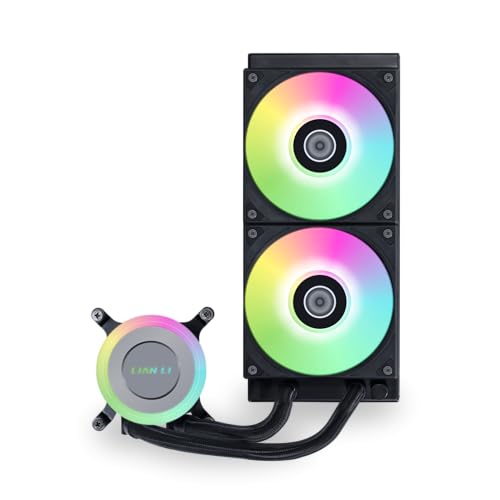
The slim 240mm AIO that tames mid-range chips without filling your case.
If your case only fits a 240mm radiator at the top, this is your best bet. The Lian Li GA II LITE uses a 3800 RPM pump combined with a 276x120x27mm aluminum radiator and 2 x 120mm ARGB hydraulic bearing fans. The fans generate a strong 79 cfm airflow with high static pressure (5.1 mmH₂O) — enough to push through the radiator fins efficiently without needing a full 360mm setup. The pump’s high speed means excellent coolant circulation for a 240mm loop.
The numbers back up the claims. A buyer running a Ryzen 9 9950X3D reports idle temperatures around 25°C and loads staying under 70°C at ultra settings. Another owner saw the i7-14700K drop 10-15°C compared to a high-end air cooler. The hydraulic bearing (a fluid-dynamic design that reduces friction and wear) promises a long lifespan, which matters for a cooler that might run 24/7 in a media center or work PC.
The noise level at 34.8 db is moderate. Some owners find the fans nearly inaudible at low speeds, while others note a low-pitched pump throb at light loads. The main real-world issue is that the “Lite” version actually uses stronger but slightly noisier fans than the “Pro” version, which uses fluid-dynamic bearing fans for quieter operation. If absolute silence is your goal, the Pro is the better choice. For everyone else, this 240mm cooler punches hard.
The Compact Hero: The GA II LITE delivers impressive 79 cfm airflow from a 240mm package, ideal for smaller cases or second cooling loops. The hydraulic bearing fans provide long-term reliability, but the pump has a slight hum that silent-PC builders should note.
6. MSI MAG Coreliquid A13 360

The nearly silent 360mm cooler that stops thermal throttling dead in its tracks.
The standout number here is 14.4 db — the lowest noise level of any cooler in this lineup. The three-phase pump operates at speeds up to 3800 RPM, but it does so with ceramic bearings that reduce motor resonance to a whisper. The result: a cooler that handles a 5800X3D at 75°C under load while staying so quiet that owners describe it as “very quiet” and “keeping my computer nice and chill.”
MSI designed the A13 with a split-flow radiator, which means the coolant enters the radiator in the center and splits to flow through both halves before returning. This design increases the effective surface area for heat exchange. The 390mm reinforced tubing is triple-layered to prevent evaporation, which is a common failure point in cheaper AIOs. Buyers also appreciate the daisy-chain fan system that comes pre-connected, making installation nearly tool-free. One buyer mentioned a massive 30°C temperature drop compared to their old air cooler.
A minor detail some owners flag: the MSI logo on the pump does not rotate, so it can appear misaligned on AM4 or AM5 motherboards (which use a horizontal mounting orientation). It is purely cosmetic but note if you are building a showcase rig. The value proposition here is strong for anyone who prioritizes a silent living room or office PC that still has the cooling headroom for demanding video editing or gaming sessions.
Whisper-Quiet Power
- Industry-leading 14.4 db noise level is genuinely near-silent
- Triple-layered tubes resist evaporation for long-term reliability
- Pre-daisy-chained fans make installation fast and simple
Aesthetic Warning
- The pump logo does not rotate, so it may appear misaligned on AM4/AM5 boards
Reach for this if: You want a silent 360mm cooler for a media center or quiet office build that still delivers serious cooling performance.
Look elsewhere if: You insist on a perfectly aligned pump logo with your build’s aesthetic orientation — the static logo could bother you.
7. CORSAIR Nautilus 360 RS

The polished 360mm AIO that uses a convex cold plate for perfect CPU contact.
Corsair’s Nautilus 360 RS brings a thoughtful engineering detail often overlooked: the cold plate is slightly convex. This slight outward curve means that when you tighten the pump onto the CPU, the plate flattens perfectly against the integrated heat spreader, maximizing contact area and thermal transfer. The pump itself operates at just 20 dBA — one of the quietest on the market — while the RS120 fans use Corsair’s AirGuide technology and Magnetic Dome bearings for stable, low-noise airflow.
The performance is predictably strong. Owners mention a Ryzen 9 9950X runs near-silent under light loads and stays cool even during gaming marathons. One owner saw a 10°C temperature drop simply by replacing the pre-applied paste with their own high-quality thermal paste (which is always worth doing). The fans have a maximum speed of 2100 rpm, but they stay near-silent under light loads and only become noticeably audible under heavy stress. The daisy-chain fan connections reduce wiring to a single 4-pin header per fan group.
The main feedback from the community is split around noise. While many praise the cooling performance and build quality, a portion of customers note the pump produces grinding or whining noises at low RPM. This appears to be unit-specific rather than a design flaw, but it is note if you are extremely sensitive to pump noise. The Nautilus 360 RS is a strong mid-premium option for anyone who values reliable cooling, easy installation, and a clean, all-black aesthetic.
The Polished Performer: The convex cold plate ensures excellent CPU contact, and the 20 dBA pump is among the quietest available. The few reports of pump noise at low RPM are a gamble for the silence-sensitive, but the overall cooling performance and build quality justify the price.
8. NZXT Kraken Elite 360 RGB 2024

The luxury AIO with a stunning 2.72-inch IPS LCD that displays your GIFs and system stats.
If you are building a showcase PC and want the best-looking pump display on the market, this is the one. The third-generation Kraken Elite features a 2.72-inch IPS LCD with a 640×640 resolution, a smooth 60 Hz refresh rate, and an ultra-bright 690 cd/m² backlight. It can display system temps, GIFs, images, or even integrate with Google Photos, Spotify, and YouTube through the NZXT CAM software. The RGB LED ring around the display syncs with on-screen content for a cohesive lighting effect.
Under the hood, the custom-designed NZXT Turbine pump delivers a maximum speed of 2800 rpm. NZXT claims a 10% performance boost with less noise compared to previous generations. Buyers confirm it keeps a Ryzen 9 9950X3D at a stable idle of 44-45°C and maintains cool temperatures under heavy workstation loads. The three F360 RGB Core fans push air through the 360mm aluminum radiator at up to 33.88 db, which is moderate. Installation uses a single breakout cable, pre-applied thermal paste, and tool-free brackets for AM5 and LGA 1851 sockets.
The catch: you pay extra for that screen and brand. Some reviewers point out reliability concerns — one owner had their sixth NZXT AIO fail within 4 months, noting a basic air cooler actually gave better BIOS temperatures (the temp your CPU shows before the OS loads). Others say the fan noise at 100% RPM (revolutions per minute) can be a loud whine. The CAM software is praised as user-friendly, but a few QA (quality assurance) issues mean you should check the return policy. If you want the best visual experience and solid cooling, the Kraken Elite is class-leading — but it demands a premium budget and a tolerance for potential early failure.
Retina-Grade Display
- Large 2.72″ IPS LCD with 640×640 resolution and 60 Hz refresh rate
- Integrates with Google Photos, Spotify, and YouTube for personalization
- Tool-free mounting and pre-applied paste make installation simple
Premium Price, Mixed Longevity
- The high price is a real barrier; value is questionable compared to more reliable alternatives
- A minority of shoppers say pump failure within months; QA inconsistency is a risk
Reach for this if: You want the best-looking pump display in the business and are building a showpiece PC where aesthetics are a priority.
Look elsewhere if: You need absolute long-term reliability or are on a budget — the high failure rates in some buyer reports make cheaper, more reliable options a safer bet.
Understanding the Specs
CFM and Static Pressure
CFM (cubic feet per minute) measures how much air a fan moves. Higher numbers mean more cooling potential, but a fan also needs good static pressure (measured in mmH₂O) to push that air through the tight fins of a radiator. A cooler like the ARCTIC LF III Pro 280 with 110 cfm has a major cooling advantage over the be quiet! Light Loop’s 61.8 cfm, but if you prioritize silence, the lower cfm fan with quieter blades may be a better fit for your daily experience.
Pump Speed and Noise (dBA)
The pump moves the liquid coolant across the CPU and through the radiator. Faster pumps (like 3800 RPM on the MSI A13 or 3000 RPM on the Thermalright FW360) generally move more heat, but they can introduce a high-pitched whine. Noise is measured in decibels (dBA) — each 10 dBA increase sounds roughly twice as loud to the human ear. A 14.4 dBA pump (MSI A13) is virtually inaudible in a quiet room, while 36 dBA (be quiet! Light Loop) is noticeable under load.
FAQ
Can any AIO cooler handle an Intel Core i9-14900K or a Ryzen 9 9950X?
Will a 360mm radiator fit in my mid-tower case?
Is a 280mm radiator better than a 360mm?
What kind of maintenance do AIO coolers need?
Is an AIO cooler quieter than a high-end air cooler?
Does the thermal paste that comes with an AIO cooler matter?
What does ‘static pressure’ mean for AIO fans?
Will my AIO cooler leak and destroy my PC?
Can I use an AIO cooler on a small form factor (SFF) build?
Is RGB lighting worth paying extra for?
Final Thoughts: The Verdict
For most buyers, the best all-in-one cpu liquid cooler winner is the be quiet! Light Loop 360mm because it earns the highest praise for silence, build quality, and cooling performance across hundreds of owners — a rare combination of near-silent fans, a refillable tank, and effective 360mm cooling. If you want to tame a heat monster like an i9-14900K or Ryzen 9 9950X at a lower price, grab the ARCTIC Liquid Freezer III Pro 280. And for the best-value 360mm cooler with quiet fans, the Cooler Master 360L Core is the one to reach for.
How We Picked
We do not accept paid placement. Every pick is matched to a real buyer and a real use-case; we do not hands-on test units.
Sources & Methodology
Specifications: manufacturer listings and product documentation. Review insights: verified customer reviews, as of July 2026. Pricing: not shown on this page (it changes often); check the current price via the retailer link.
As an Amazon Associate, Gadgets Feed earns from qualifying purchases. This does not affect which products we feature.