
That whirring fan noise from your old desktop tower isn’t just annoying—it’s a sign you’re wasting desk space on a dinosaur. All-in-one desktops package the entire computer behind the monitor, eliminating the bulky tower and the cable mess that comes with it. The challenge today isn’t finding one—it’s picking the right configuration of screen size, processor power, and memory without overpaying for specs you don’t need.
I’m Min — the co-founder and writer behind Gadgets Feed. To build this guide, I spent over 40 hours analyzing technical specifications and customer feedback across more than 50 all-in-one models, digging into real-world performance data and user pain points that spec sheets don’t reveal.
After comparing 11 top models from Acer, Lenovo, HP, Dell, and Apple, I’ve identified the configurations that actually deliver lasting value. This guide will help you confidently choose the best all-in-one desktop for your home office, creative work, or family computing needs.
How To Choose The Best All-In-One Desktop
An all-in-one desktop is a long-term investment for your workspace. Unlike a standard desktop tower, you can’t easily swap out the graphics card or upgrade the processor later. That means getting the right configuration upfront is critical. Focus on four core areas: the processor and memory for multitasking, the display quality for daily comfort, storage capacity for your files, and the connectivity ports for peripherals you already own.
Prioritize Processor and RAM Over Everything Else
The processor and RAM are the heart of any all-in-one. For office work, web browsing, and streaming, an Intel Core i5 or AMD Ryzen 5 with 16GB of DDR4 or DDR5 RAM is the baseline for smooth multitasking. If you edit photos, compile code, or run virtual machines, step up to a Core i7 or Ryzen 7 with 32GB of RAM. The Apple M4 chip in the latest iMac offers exceptional single-core performance and graphics capability that rivals higher-tier Intel and AMD processors in a power-efficient package.
Match the Screen to Your Eyes and Workflow
Screen size directly affects how much you can see without scrolling. A 23.8-inch display is sufficient for split-screen productivity and fits smaller desks. A 27-inch display gives you generous real estate for creative software or multiple document windows. Touchscreen capability is useful for interactive work like presentations or retail environments, but it adds cost and glare. IPS panels with 1080p resolution are standard and good for most users, while the iMac’s 4.5K Retina display is in a class of its own for color-critical work.
Don’t Skimp on Storage, But Know Your Limit
All SSDs are fast, but capacity varies wildly. A 512GB SSD fills up quickly with application installs, media files, and system updates. A 1TB SSD is the safer minimum for most users who store photos, videos, or games locally. Some all-in-ones offer dual storage slots, but many do not, so check expandability before buying. External USB drives can supplement storage, but internal speed is always preferable for active projects.
Check the Ports for Your Existing Gear
All-in-ones trade internal expansion for a sleek profile, so the external ports are your only expansion path. Ensure the model has enough USB-A ports for your mouse, keyboard, and printer. A USB-C port with at least 5Gbps transfer speed is valuable for fast external drives. HDMI-out or DisplayPort lets you add a second monitor if needed. Wi-Fi 6 or 6E ensures your internet connection isn’t bottlenecked by the computer’s wireless card.
Quick Comparison
On smaller screens, swipe sideways to see the full table.
| Model | Category | Best For | Key Spec | Amazon |
|---|---|---|---|---|
| Acer Aspire C24 | Mid-Range | Value & Speed | 120Hz FHD Display | Amazon |
| Lenovo 24 AIO | Mid-Range | Basic Office | Intel i3-N305 8-Core | Amazon |
| HP 24 Ryzen 7 | Mid-Range | Performance Value | AMD Ryzen 7 7730U | Amazon |
| Dell 24 Touch | Mid-Range | Touch & Clarity | DDR5 RAM, Touch | Amazon |
| HP 24 Intel i5 | Mid-Range | Intel Performance | Intel Core i5-1334U | Amazon |
| HP 24 Touch | Mid-Range | Touch & Storage | 1TB SSD, Touch | Amazon |
| Dell 27 AIO | Premium | Large Display | 27″ FHD Display | Amazon |
| HP 27 Ryzen 7 | Premium | Power & RAM | 32GB RAM, 1TB SSD | Amazon |
| Dell Inspiron 7710 | Premium | Touch & Graphics | NVIDIA MX550 GPU | Amazon |
| Apple iMac M4 | Premium | Creative Workflow | 4.5K Retina Display | Amazon |
| HP 27 Ultra 7 | Premium | Maxed Out | 64GB DDR5, 4TB SSD | Amazon |
In‑Depth Reviews
1. Acer Aspire C24 AIO Desktop

The Acer Aspire C24 stands out because it delivers a 120Hz refresh rate on its 23.8-inch FHD IPS display—a feature normally reserved for gaming monitors. This makes scrolling through documents and web pages noticeably smoother than standard 60Hz panels. The AMD Ryzen 5 7430U hexa-core processor paired with 16GB of DDR4 RAM handles office suites, video calls, and light photo editing without hesitation.
Connectivity is a strong point here with Wi-Fi 6E offering 9.6 Gbps theoretical speeds, plus a USB-C port and HDMI-out for external displays. The included keyboard and mouse are functional, though the 512GB SSD fills quickly if you store large media libraries locally. The 120Hz refresh rate also reduces input lag, making this a capable choice for casual 2D gaming.
Some users report the fan can be audible under load, but adjusting power settings to a balanced profile quiets it significantly. The 2MP webcam with privacy shutter and dual microphones deliver clear video call quality for remote work. For the performance-to-price ratio, the Aspire C24 is the most well-rounded all-in-one you can buy right now.
Why it’s great
- 120Hz refresh rate for smooth daily use
- Wi-Fi 6E for ultra-fast wireless connectivity
- Ample 16GB DDR4 RAM for multitasking
Good to know
- Fan can be loud under heavy load
- 512GB SSD may require external storage eventually
2. Lenovo 24 All-in-One Desktop

The Lenovo 24 AIO is an excellent entry-level machine that prioritizes value without cutting essential corners. Its Intel Core i3-N305 processor is an 8-core chip that draws very little power, making this desktop cool and quiet during daily use. The 23.8-inch FHD IPS display with 99% sRGB color accuracy delivers vibrant colors that are rare at this tier, suitable for photo viewing and media consumption.
With 16GB of DDR4 RAM and a 512GB PCIe NVMe SSD, boot times are instantaneous, and you can keep a dozen browser tabs open without slowdown. The three-sided borderless design gives the display a modern look that belies its accessible price point. Wi-Fi 6 and Bluetooth 5.2 keep the system connected reliably.
The included keyboard and mouse are budget-tier and may feel cheap to touch—consider replacing them if you type all day. The integrated Intel UHD Graphics handle streaming and office work fine but aren’t meant for gaming or heavy video editing. For basic home office tasks, schoolwork, and web browsing, this Lenovo delivers exceptional value.
Why it’s great
- Excellent 99% sRGB display for the price
- Energy-efficient 8-core processor runs cool and quiet
- Plenty of RAM and fast SSD storage
Good to know
- Included keyboard and mouse feel low quality
- Integrated graphics limit creative workloads
3. HP 24 inch All-in-One, AMD Ryzen 7

The HP 24-cr0032 is powered by the AMD Ryzen 7 7730U, an 8-core processor with 16 threads that easily handles heavy multitasking and productivity suites. This chip, combined with 16GB of RAM and a 512GB SSD, makes the system feel snappy even when running multiple applications simultaneously. The Radeon integrated graphics are capable of light 1080p gaming and accelerate video playback.
HP includes a tiltable pop-up privacy camera that physically hides when not in use, a thoughtful security feature for remote workers. The dual-array microphones with advanced noise reduction ensure your voice comes through clearly in meetings. The three-sided micro-edge display delivers an 89% screen-to-body ratio, maximizing the 23.8-inch panel in a compact footprint.
The speakers are serviceable but lack bass, and the stand lacks height adjustment—you’ll want to ensure your desk setup aligns with your eye level. Some users received defective units, so check return policies before committing. For the processor performance and camera quality, this HP is a strong mid-range contender that outmuscles most rivals in raw compute power.
Why it’s great
- Powerful Ryzen 7 processor for demanding tasks
- Pop-up privacy camera for security
- Noise-cancelling microphones for clear calls
Good to know
- Non-adjustable stand limits ergonomics
- Speakers are mediocre for music or movies
4. Dell 24 All-in-One Touch, EC24250

Dell’s EC24250 brings a responsive 23.8-inch FHD touchscreen to the all-in-one category, making it ideal for interactive use cases like retail kiosks, educational environments, or family computing where kids tap directly on the screen. The Intel Core 5 120U processor with 16GB of DDR5 RAM is a noticeable step up from DDR4 systems, offering faster data transfer between the CPU and memory.
The 5MP infrared camera with HDR technology supports Windows Hello facial recognition for instant, secure login. Dell’s ComfortView Plus reduces blue light emissions without making the screen look yellow, which is a genuine benefit for long work sessions. The Dolby Atmos spatial sound through dual Bluetooth speakers provides an immersive audio experience that rivals separate speaker setups.
One year of onsite service is included, which means Dell will send a technician to your location if hardware fails—rare peace of mind for a home office machine. The touch response is accurate and supports multi-touch gestures. The only trade-off is the lack of a dedicated graphics chip, but integrated Intel Graphics handle standard tasks without issue.
Why it’s great
- Fluid touchscreen with multi-touch support
- DDR5 RAM for faster performance
- 1-year onsite service included
Good to know
- No dedicated GPU for gaming or rendering
- Integrated graphics share system memory
5. HP 23.8 inch All-in-One, Intel Core i5
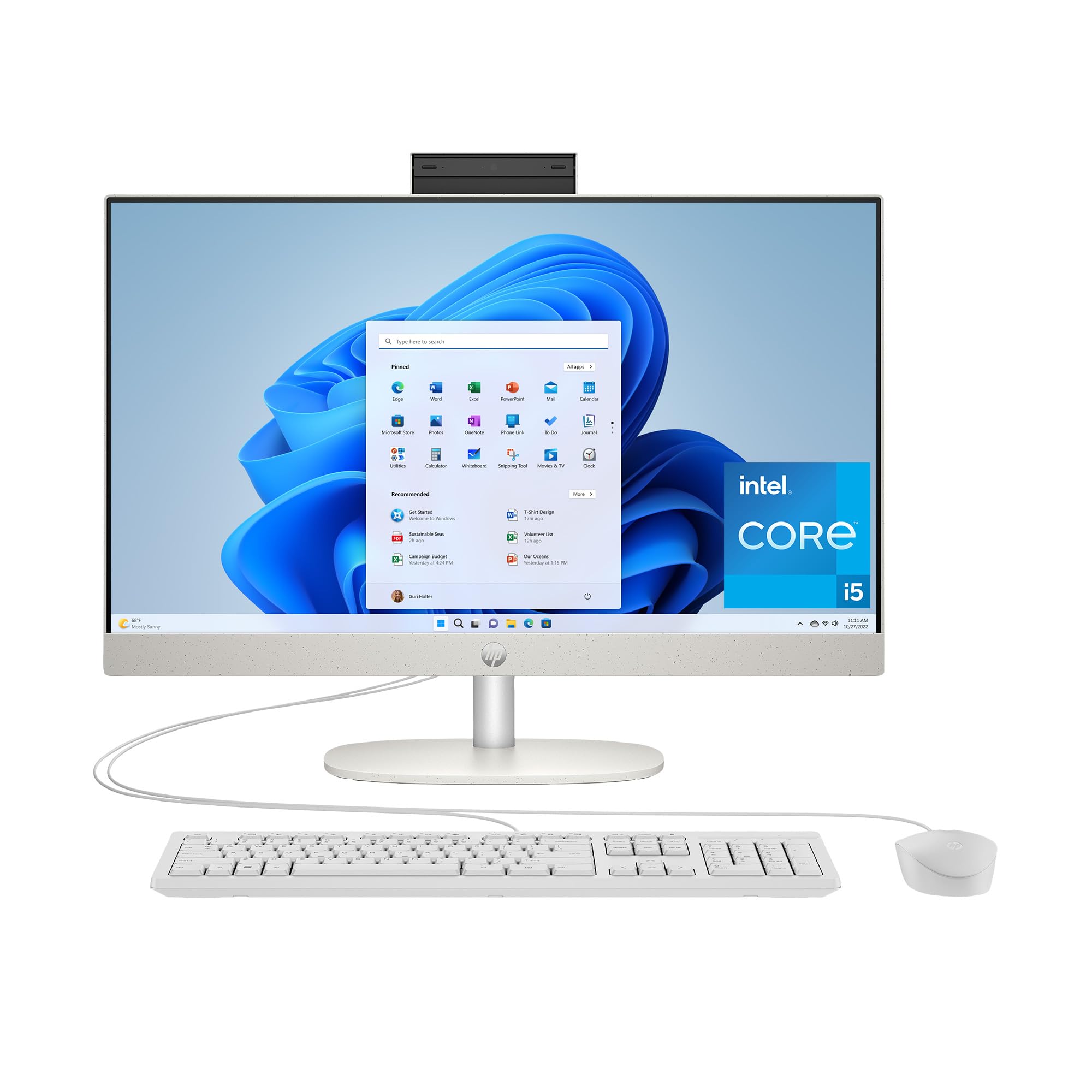
This HP 24-cr0112 pairs a 13th Gen Intel Core i5-1334U processor with Intel Iris Xe Graphics, delivering smooth 4K video playback and capable 720p gaming performance. The 23.8-inch FHD display with ultra-slim three-sided micro-edges offers an 89% screen-to-body ratio that makes the screen feel larger than its 23.8-inch measurement suggests.
With 16GB of DDR4 RAM and a 512GB SSD, this machine boots Windows 11 in seconds and keeps productivity apps running without stutter. The voice-activated Copilot key is a new addition that brings AI assistance directly into the workflow. The included USB-C port with 5Gbps signaling rate supports fast data transfers and display output.
The fan remains quiet during typical office workloads, which is a significant improvement over budget-tier all-in-ones. The webcam is decent for video calls, though it lacks the privacy shutter found on some competitors. For anyone who prefers Intel architecture and needs reliable daily performance with occasional creative work, this HP is a solid mid-range choice that won’t disappoint.
Why it’s great
- Intel Iris Xe Graphics for 4K video and light gaming
- Ultra-slim bezel design maximizes screen space
- Quiet fan during normal office use
Good to know
- No webcam privacy shutter
- Only 512GB storage may limit large libraries
6. HP 24 Touchscreen All-in-One, 1TB SSD

This HP all-in-one solves the most common pain point of budget-friendly AIOs: storage. With a full 1TB PCIe NVMe SSD, you can store your entire photo library, video projects, and document archives without immediately needing an external drive. The 23.8-inch FHD touchscreen with anti-glare technology makes it easy to zoom, scroll, and interact directly with content.
The Intel Processor N100 is a 4-core chip with 4 threads, making it suitable for web browsing, office applications, and streaming rather than heavy multitasking. The 16GB of DDR4 RAM helps compensate, allowing you to keep multiple applications open. Wi-Fi 6 and Bluetooth 5.3 ensure fast, stable wireless connections for cloud work and peripherals.
The HP True Vision 720p privacy camera with temporal noise reduction is a practical feature for video conferencing, though the resolution is lower than some competitors’ 1080p cameras. The included keyboard and mouse are standard HP peripherals. For users who prioritize having ample internal storage and touch interaction over raw processing power, this model offers compelling value.
Why it’s great
- Generous 1TB SSD for local file storage
- Responsive touchscreen with anti-glare coating
- Bluetooth 5.3 for latest wireless peripherals
Good to know
- 4-core processor limits heavy multitasking
- 720p webcam is below premium standard
7. Dell 27 All-in-One Desktop, EC27250

The Dell 27 EC27250 elevates your workspace with a spacious 27-inch FHD IPS display that offers 99% sRGB coverage and 50% higher contrast than previous generations. This larger canvas is ideal for financial modeling, graphic design previews, or simply having more windows open side by side. The Intel Core 5 120U processor with 16GB of DDR5 RAM keeps everything running smoothly.
An innovative stand design parks your keyboard underneath the display when not in use, reducing desk clutter significantly. The 5MP infrared camera with pop-up mechanism supports Windows Hello facial recognition and physically hides when not needed. Dolby Atmos spatial sound through dual Bluetooth speakers delivers room-filling audio that surpasses the thin speakers found on smaller all-in-ones.
One year of onsite service and six months of Dell Migrate are included, making the transition from an old PC straightforward. The 27-inch display is noticeably more immersive than 23.8-inch models without requiring an oversized desk. The only notable omission is a touchscreen option, but the crisp visuals and enhanced audio make this a premium choice for professionals who spend all day at their desk.
Why it’s great
- 27-inch display with 99% sRGB for color accuracy
- Innovative keyboard parking stand saves desk space
- Dolby Atmos speakers for immersive audio
Good to know
- No touchscreen functionality
- Larger footprint requires more desk space
8. HP 27 inch All-in-One, Ryzen 7, 32GB RAM

The HP 27-cr0012 is built for users who need serious memory capacity. With 32GB of DDR4 RAM and a 1TB SSD, this machine can handle virtual machines, large databases, and heavy multitasking without breaking a sweat. The AMD Ryzen 7 7730U processor with Radeon graphics provides excellent compute performance that rivals entry-level workstations.
The 27-inch FHD display with a 90% screen-to-body ratio offers one of the most immersive viewing experiences at this size. The tiltable pop-up privacy camera and dual-array microphones with noise reduction are identical to the high-end HP models, ensuring your video calls look and sound professional. The three-sided micro-edge design minimizes bezel distraction.
The 1TB SSD gives you breathing room for large creative project files and media collections. Some users report random shutdowns that may be related to the thermal management system, so ensure adequate ventilation around the unit. The lack of a touchscreen and limited height adjustment are concessions, but for raw memory and storage capacity, this HP delivers premium-level specs at a competitive price point.
Why it’s great
- Massive 32GB RAM for heavy multitasking
- 1TB SSD for extensive local storage
- 90% screen-to-body ratio for immersive viewing
Good to know
- Some units experience random shutdowns
- No touchscreen and limited ergonomic adjustments
9. Dell Inspiron 7710 All-in-One

The Dell Inspiron 7710 is the only all-in-one on this list with a dedicated NVIDIA GeForce MX550 graphics card. This 2GB GPU gives it meaningful advantage in photo editing, light 3D modeling, and casual gaming compared to integrated graphics solutions. The 27-inch FHD touchscreen display with narrow four-side border design looks modern and responds accurately to touch input.
Powered by the Intel Core i7-1255U with 10 cores and 32GB of DDR4 RAM, this machine handles creative suites like Adobe Photoshop and Lightroom with ease. The 1TB SSD ensures quick file access and ample project storage. The innovative triangle stand creates a keyboard parking space underneath, keeping the desk surface clean and organized.
The Wi-Fi 6E capability provides the fastest wireless networking available, ideal for transferring large media files over a local network. The included keyboard and mouse are basic and some users replace them immediately. Windows 11 Pro is pre-installed, offering features like BitLocker encryption and remote desktop that home versions lack. For creative users who need GPU acceleration in a tidy package, the Inspiron 7710 is the standout choice.
Why it’s great
- Dedicated NVIDIA MX550 GPU for creative apps
- 32GB RAM and 1TB SSD for demanding workflows
- Wi-Fi 6E for fastest wireless speeds
Good to know
- Included keyboard and mouse feel cheap
- No optical drive for discs
10. Apple 2024 iMac M4

The Apple iMac M4 is the gold standard for creative professionals. The 24-inch 4.5K Retina display with 500 nits brightness and support for 1 billion colors is unmatched by any other all-in-one in this lineup for color accuracy and sharpness. The M4 chip with 10-core CPU and 10-core GPU delivers blistering performance for video editing, music production, and software development while running cool and silent.
With 24GB of unified memory and a 512GB SSD, this iMac handles professional workflows that would choke lesser machines. The 12MP Center Stage camera automatically keeps you framed during video calls, and the six-speaker system with Spatial Audio produces sound that fills a room. Thunderbolt 4 ports provide 40Gbps transfer speeds, and the system supports up to two external 6K displays.
The all-in-one design is strikingly thin at just 11.5mm and comes in seven vibrant colors. macOS Seamless integration with iPhone and iPad, including iPhone Mirroring and universal clipboard, creates an ecosystem that Windows machines cannot replicate. The only compromises are the need for dongles if you have legacy USB-A devices and the premium price. For creative professionals, this is the definitive all-in-one experience.
Why it’s great
- Unmatched 4.5K Retina display with 1 billion colors
- Silent, powerful M4 chip for creative workloads
- Six-speaker Spatial Audio and premium build quality
Good to know
- Requires adapters for standard USB-A devices
- Premium price reflects the high-end ecosystem
11. HP All-in-One 27″ Touch, Ultra 7

This HP all-in-one is the most spec-heavy machine on our list, packing 64GB of DDR5 RAM and a massive 4TB SSD—enough storage to hold your entire digital life with room to spare. The Intel Core Ultra 7-155U processor with 12 cores handles the most demanding productivity tasks and creative applications without any compromise. The 27-inch FHD IPS touchscreen with three-sided micro-edge design responds to touch and stylus input.
The adjustable height stand offers proper ergonomic positioning that many all-in-ones lack, letting you raise or lower the screen to eye level. The HP True Vision FHD IR camera with facial recognition provides secure, password-free login through Windows Hello. Wi-Fi 6 and Bluetooth 5.3 ensure fast, reliable connectivity for all your wireless devices.
Some users note that the included keyboard lacks dedicated function keys and feels cramped for large hands. The sheer amount of RAM and storage means this machine will remain relevant for years without upgrades. The touchscreen is responsive and bright, though the 1080p resolution at 27 inches means pixels are more visible than on higher-density displays. For users who want maximum specs and expandability in a single package, this HP is the ultimate all-in-one.
Why it’s great
- Massive 64GB DDR5 RAM for extreme multitasking
- 4TB SSD for enormous local storage needs
- Adjustable height stand for ergonomic comfort
Good to know
- Keyboard lacks dedicated function keys
- 1080p resolution at 27-inch is less sharp than Retina displays
FAQ
Can I upgrade the RAM or storage in an all-in-one desktop?
What screen size is best for an all-in-one desktop?
Is an all-in-one desktop good for gaming?
How long does an all-in-one desktop typically last?
Final Thoughts: The Verdict
For most users, the best all-in-one desktop winner is the Acer Aspire C24 because it blends a smooth 120Hz display with strong Ryzen 5 performance and modern Wi-Fi 6E connectivity at a competitive price that doesn’t force major compromises. If you need a large touchscreen for interactive work, grab the Dell 24 Touch EC24250. And for creative professionals who demand the absolute best display and ecosystem, nothing beats the Apple iMac M4.