
The constant shuffle between mismatched brands, the desk clutter from separate receivers, and the frustration of a dead mouse mid-sentence are the quiet productivity killers of any workspace. An all-in-one keyboard and mouse combo eliminates these headaches by offering a single, unified solution that shares a wireless receiver, a consistent aesthetic, and a synchronized power experience. The best combos go further, integrating ergonomic design philosophies to prevent wrist strain during those long typing sessions.
I’m Min — the co-founder and writer behind Gadgets Feed. I’ve spent countless hours dissecting the technical specifications and user-reported reliability of dozens of keyboard and mouse combos to understand which features genuinely deliver on the promise of a distraction-free, comfortable workflow. This guide is the result of deep research into connectivity protocols, battery capacities, switch mechanisms, and ergonomic claims to separate the truly superior sets from the also-rans.
After analyzing over 200 customer reviews and verifying the key technical specs of seven distinct models, I’ve compiled the definitive analysis for anyone seeking the best all-in-one keyboard and mouse combo that balances comfort, reliability, and lasting performance.
How To Choose The Best All-In-One Keyboard And Mouse
Selecting the right combo means looking past the package and focusing on three core pillars: ergonomics that support your typing posture, connectivity that matches your device ecosystem, and power management that aligns with your work habits. A poor choice in any one of these areas will introduce friction into your daily routine.
Ergonomic Architecture: Wave Keys vs. Split vs. Standard
The keyboard’s shape is the single largest variable affecting long-term comfort. Wave-key designs curve the key rows to follow the natural staggered length of human fingers, reducing the need to stretch and bend. Split or curved keyboards angle each hand outward, promoting a straighter wrist position that can alleviate ulnar deviation. Standard flat keyboards are the most affordable but offer the least support. The right choice depends on whether you are proactively preventing strain or reacting to existing discomfort.
Connectivity Protocol and Multi-Device Support
Most budget and mid-range combos rely on a single 2.4 GHz USB receiver, offering a simple plug-and-play experience but locking you to one device. Premium combos add Bluetooth support, often with the ability to pair with up to three devices and switch between them with a button press. This feature is invaluable for users who divide time between a desktop PC, a laptop, and a tablet. If you switch devices frequently, a multi-device combo will save you the hassle of unplugging and replugging receivers.
Battery Solutions: Rechargeable vs. Disposable
The power source dictates a non-trivial aspect of the ownership experience. Combos that require standard AA or AAA batteries offer the convenience of instant replacement but generate ongoing consumable cost and waste. Rechargeable combos with integrated lithium-ion cells (measured in mAh) eliminate battery purchases but introduce downtime while charging if you forget to plug them in. Look for a “smart auto-sleep” feature with a reasonable activation time — anything under 30 minutes of inactivity is excellent — to maximize charge cycles.
Quick Comparison
On smaller screens, swipe sideways to see the full table.
| Model | Category | Best For | Key Spec | Amazon |
|---|---|---|---|---|
| MEETION Ergonomic Wave Keys Combo | Mid-Range | Natural typing ergonomics | 4 Adjustable DPI Levels (Mouse) | Amazon |
| seenda COE401 Slim Combo | Mid-Range | Multi-device switching | USB-C Rechargeable (90-Day) | Amazon |
| Logitech MK345 Combo | Mid-Range | Brand reliability and battery life | 3-Year Keyboard Battery Life | Amazon |
| ProtoArc KM60 Ergonomic Combo | Premium | Full-size with leather wrist rest | 500mAh / 300mAh Rechargeable | Amazon |
| SABLUTE Backlit Wave Keys Combo | Premium | Backlit keys and large battery | 4000mAh Battery (Keyboard) | Amazon |
| ProtoArc EKM01 Plus Split Combo | Premium | Severe wrist pain relief | Split Curved Keyframe Design | Amazon |
| Logitech MK955 Signature Slim | Premium | Larger hands and quiet operation | SilentTouch 90% Less Click Noise | Amazon |
In‑Depth Reviews
1. MEETION Ergonomic Keyboard and Mouse Wireless Combo
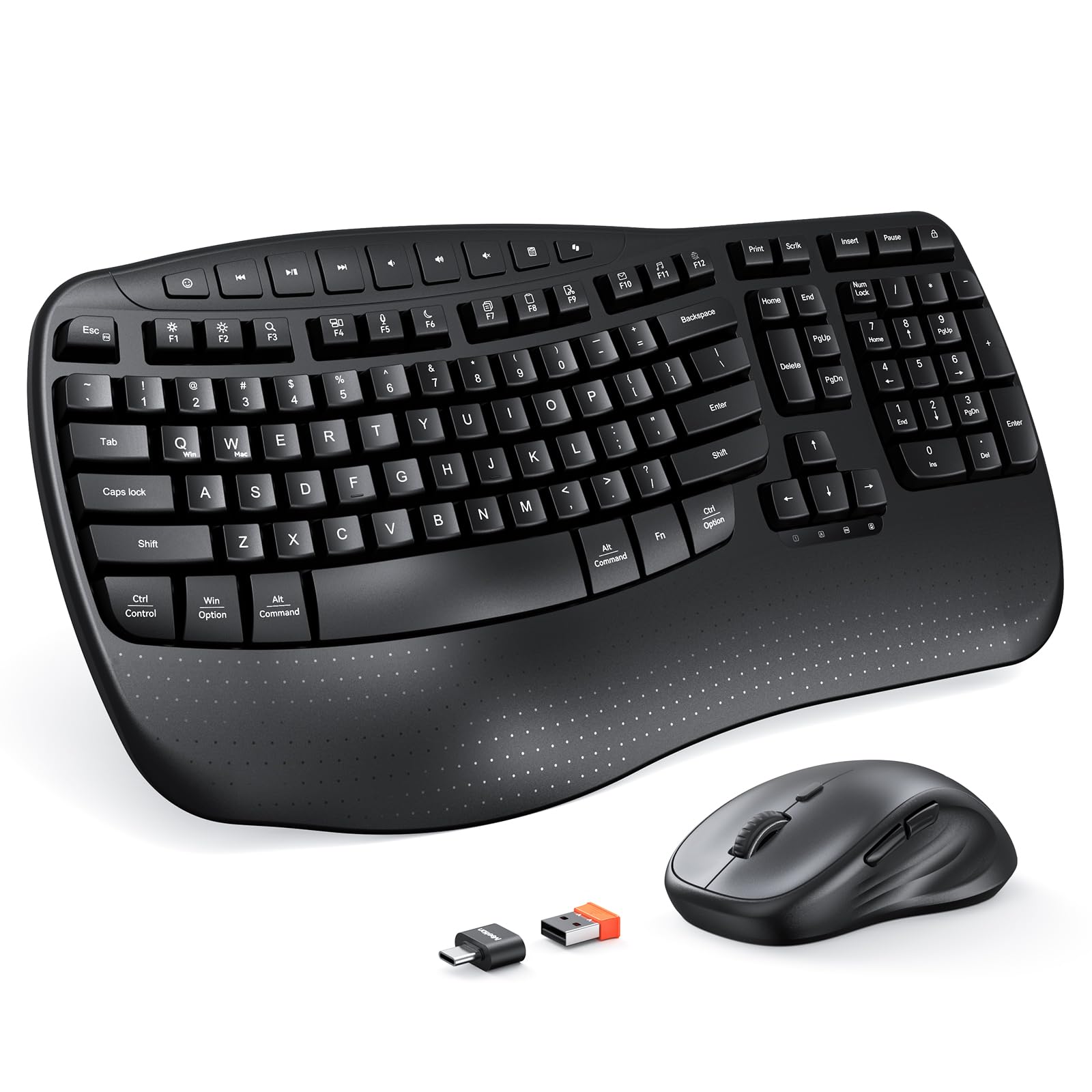
The MEETION combo earns its top spot by delivering genuine ergonomic architecture — wave-shaped keys that follow the natural fan of your fingers — at a price that undercuts most competitors with similar design claims. The keys are notably quiet and responsive, with a tactile feel that avoids the mushy sensation of budget membrane boards. The included hard plastic wrist rest is a firm, non-deformable surface that provides stable support without the compression issues fabric rests develop over time.
The mouse offers four adjustable DPI levels, toggled via a top button, which gives you control over cursor speed for both detailed precision work and fast screen navigation. Connectivity is handled by a single 2.4 GHz USB receiver stored conveniently in the mouse compartment, and the set also includes a USB-C adapter for modern ports. The keyboard runs on two AAA batteries and the mouse on one AA — batteries are not included, so factor that into your initial setup.
Customer feedback consistently highlights the silent keystrokes and the effective wave-shaped layout as transformative for reducing finger fatigue. A few users noted intermittent key sensitivity issues, but the overwhelming sentiment is that this combo offers exceptional value for anyone prioritizing comfort. Its primary limitation is the lack of Bluetooth, which tethers it to a single device via the receiver.
Why it’s great
- Wave-shaped keys dramatically reduce finger reach and fatigue
- Extremely quiet keystrokes suitable for shared workspaces
- Includes USB-C adapter for modern laptops
Good to know
- Requires disposable AA and AAA batteries (not included)
- No Bluetooth connectivity
- Occasional reports of intermittent key input
2. seenda Wireless Bluetooth Keyboard Mouse Combo, COE401
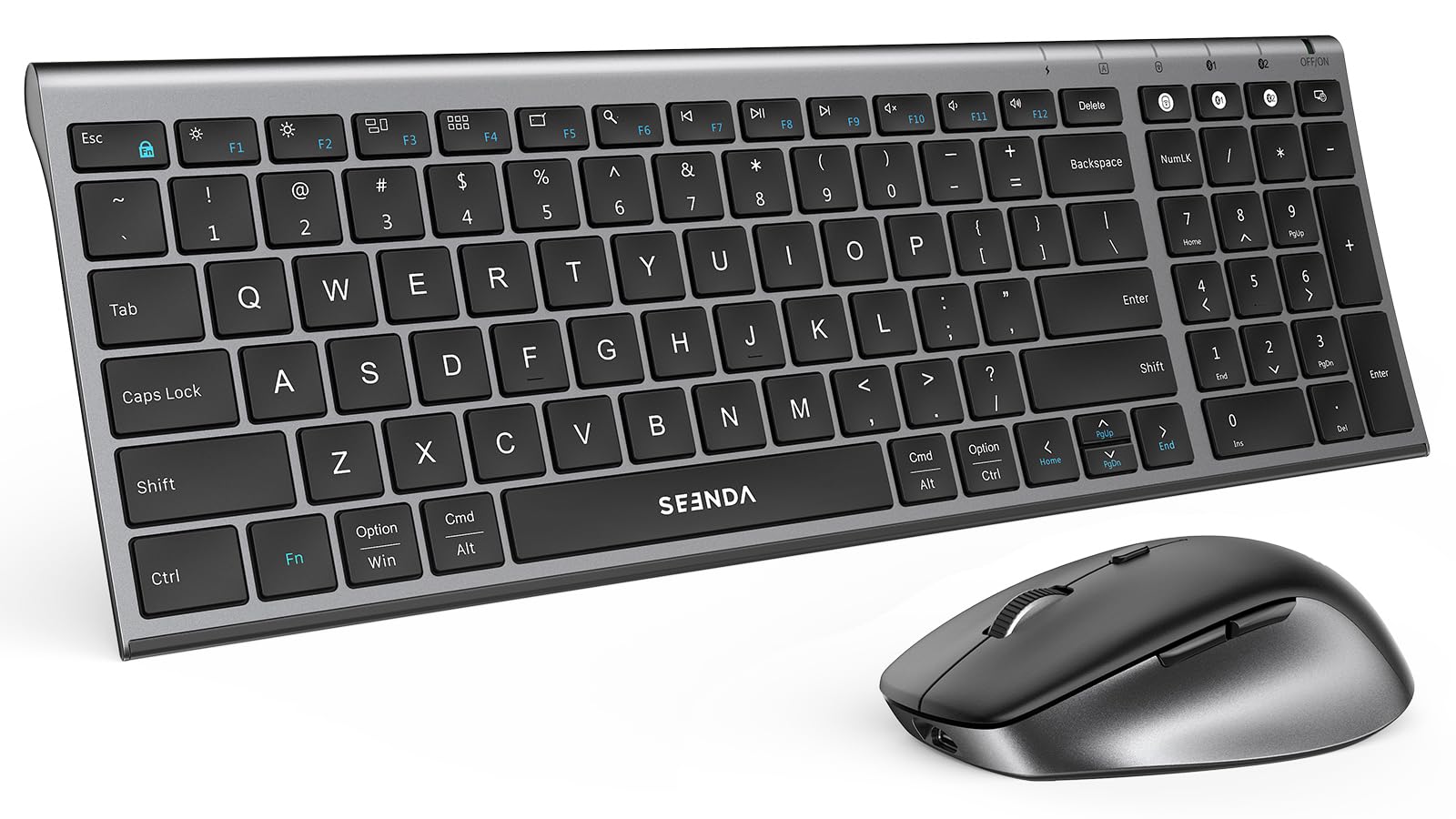
The seenda COE401 is the ideal choice for multi-device users who want to declutter their desks from separate receivers. It supports dual Bluetooth channels plus a single 2.4 GHz connection, allowing you to pair it with three devices and switch between them with a dedicated button. This is a massive productivity boost for anyone who moves between a desktop, a MacBook, and an iPad throughout the day.
The keyboard uses low-profile scissor-switch keys that replicate the feel of a premium laptop keyboard — short travel, crisp actuation, and minimal noise. The mouse features four adjustable DPI levels ranging from 800 to 2400, controlled via a button on the top. The full-size layout includes a numeric keypad, yet the aluminum top case keeps the overall profile thin and modern. The built-in USB-C rechargeable battery promises up to 90 days of typical use, with an auto-sleep mode that engages after 10 minutes of mouse inactivity and 30 minutes of keyboard inactivity.
Users consistently praise the premium feel of the aluminum build and the convenience of not swapping batteries. A common criticism is that to switch the mouse between devices, you must press a button on its bottom, which is less convenient than the keyboard’s top-mounted switch. Also, the arrow keys are slightly cramped due to the compact layout. Overall, it offers a polished, modern experience for a very reasonable price.
Why it’s great
- Seamless 3-device switching via Bluetooth and 2.4 GHz
- Slim aluminum design with scissor-switch keys
- USB-C rechargeable with up to 90-day battery life
Good to know
- Mouse device switch is on the bottom, not the top
- Arrow keys are cramped for heavy navigation users
- No keyboard backlighting
3. Logitech MK345 Wireless Keyboard and Mouse Combo

The Logitech MK345 is the endurance king of this roundup, offering an astonishing three-year battery life for the keyboard and 18 months for the mouse, with batteries included in the box. This set is designed for users who want absolute reliability and zero maintenance — you can literally buy it, plug the receiver in, and forget about power for years. The full-size keyboard includes a generous palm rest and a spill-resistant drain system for added peace of mind.
The typing experience is quiet and comfortable, with a familiar full-width layout and dedicated media keys that give immediate control over volume and playback. The right-handed mouse is contoured for palm support and delivers smooth, precise tracking without any jitter. Connection is via a single 2.4 GHz receiver with a wireless range of up to 10 meters, making it suitable for home theater PCs as well as desk use.
Users frequently cite Logitech’s brand reliability as the primary reason for purchase, and the MK345 delivers on that trust with consistent performance over years. The main trade-off is the lack of modern features — no Bluetooth, no rechargeable batteries, and no multi-device switching. The top function row icons don’t always match standard labels, requiring a quick check of the manual. It is a straightforward, no-frills workhorse.
Why it’s great
- Exceptional multi-year battery life on standard batteries
- Spill-resistant keyboard with palm rest
- Trusted Logitech reliability and build quality
Good to know
- No Bluetooth connectivity
- Lacks rechargeable battery
- Function key icons may not match standard labels
4. ProtoArc KM60 Wireless Bluetooth Keyboard and Mouse
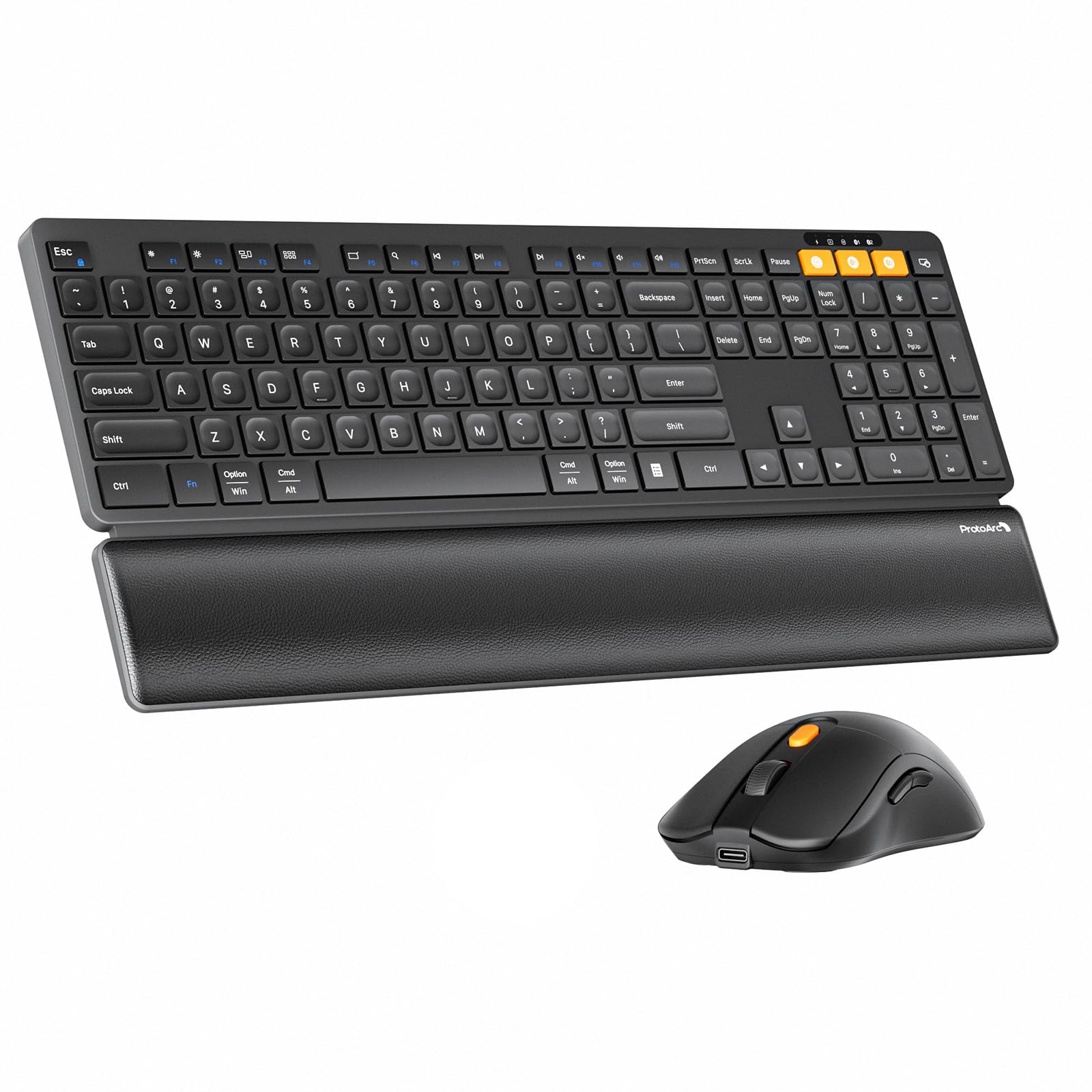
The ProtoArc KM60 elevates the combo experience with a soft leather-textured wrist rest that feels significantly more refined than the plastic or cloth alternatives found on most mid-range sets. The scissor-switch keys provide a responsive, low-profile typing feel that is exceptionally quiet, making this a strong candidate for open-plan offices or late-night work sessions. The adjustable tilt legs let you find a comfortable typing angle, while the full-size layout ensures your fingers never feel cramped.
Connectivity is handled by dual Bluetooth channels and a single 2.4 GHz receiver, allowing you to pair up to three devices and switch with a single button press. The keyboard contains a 500mAh rechargeable battery and the mouse a 300mAh unit, both charged via a single USB-C cable. The mouse is a lightweight 63-gram design that minimizes drag during fast movements, and its three DPI levels allow for sensitivity adjustments. The set automatically enters sleep mode after 60 minutes of inactivity to conserve power.
Reviews are overwhelmingly positive, with many users noting the quality exceeds expectations for the price. The quiet keys and comfortable wrist rest are frequently highlighted as transformative for long typing sessions. A notable drawback is that some Mac users reported key mapping issues in specific macOS versions, and the mouse’s DPI button on the bottom is harder to access than a top-mounted alternative. Overall, it is a near-perfect multi-platform combo.
Why it’s great
- Premium leather-textured wrist rest for all-day comfort
- Ultra-quiet scissor-switch keys
- Rechargeable via Type-C with extended standby time
Good to know
- Potential key mapping issues with some Mac OS versions
- Mouse DPI switch is inconveniently located on the bottom
- No keyboard backlighting
5. SABLUTE Ergonomic Wireless Keyboard and Mouse Combo

The SABLUTE combo is engineered for users who refuse to compromise on battery capacity or aesthetic. Its most defining feature is the 4000mAh rechargeable battery inside the keyboard — a massive capacity that dwarfs the 500mAh found in most competitors, promising weeks of use even with the backlight active. The keyboard offers seven backlight colors (blue, cyan, white, red, green, purple, yellow) that you can cycle through to match your mood or ambient lighting.
The ergonomic design closely mirrors the Logitech K350’s popular wave layout, with impeccably quiet keys and a faux lambskin leather palm rest that feels soft and is sweat-resistant. The mouse has its own 700mAh rechargeable battery, RGB lighting with six fixed colors and five cycle modes, and three DPI levels. Both devices support a claimed 10-million keystroke durability rating, double that of a standard keyboard. The included adjustable front and back stands allow you to tilt the keyboard downward for negative tilt, which can reduce wrist extension.
Customer reviews frequently describe this set as an excellent Logitech K350 replacement with superior battery life and backlighting. The wave-shaped keys and quiet operation receive near-universal praise. A few users noted that the mouse feels slightly slippery and that the left palm rest area could be wider. The set also weighs a hefty 2.7 pounds, so it’s firmly a desktop fixture, not a travel companion.
Why it’s great
- Massive 4000mAh battery eliminates charging anxiety
- Seven-color backlight adds workspace personalization
- Exceptional 10-million keystroke durability rating
Good to know
- Heavy 2.7-pound build is not portable
- Mouse texture can feel slippery
- Left palm rest area may feel too small for some users
6. ProtoArc EKM01 Plus Full Size Wireless Bluetooth Ergo Keyboard Mouse Combo

The ProtoArc EKM01 Plus is the most aggressively ergonomic option in this lineup, featuring a full-size split and curved keyframe that angles each hand outward to encourage a neutral wrist posture. This design is specifically targeted at users suffering from wrist pain, carpal tunnel syndrome, or ulnar deviation. The included cushioned palm rest uses memory foam to conform to your wrists, and four adjustable tilt legs let you fine-tune the angle for either sitting or standing desk setups.
The combo supports connections to three devices simultaneously via Bluetooth and a single USB receiver, with seamless switching controlled by a dedicated key. The keyboard is not backlit, which is a deliberate choice to maximize battery life — the 500mAh battery provides up to 250 hours of use on a single charge. The contoured ergonomic mouse includes a palm and thumb rest designed to keep your hand in a handshake position, reducing tension in the forearm. Its 2000 DPI optical sensor provides precise tracking.
Users who have transitioned from standard keyboards report a significant reduction in wrist and forearm pain, with one reviewer calling it the best keyboard they have ever owned. The build quality feels solid and durable. Critical feedback points to a common issue with the right space bar developing a squeak over time, and the forward/back mouse buttons above the thumb can be accidentally pressed. The combo also occupies a larger desk footprint — nearly 21 inches wide — so measure your space beforehand.
Why it’s great
- Split curved design promotes natural wrist alignment
- Memory foam palm rest provides superior comfort
- Excellent battery life at 250 hours standby
Good to know
- Occupies a large desk footprint (21 inches wide)
- Right space bar may develop a squeak
- Forward/back mouse buttons prone to accidental presses
7. Logitech MK955 Signature Slim Wireless Keyboard and Mouse Combo

The Logitech MK955 Signature Slim is the premium flagship of this comparison, designed for users who want the thinnest, quietest, and most customizable typing and clicking experience available. The keyboard uses Logitech’s Signature Slim technology, which delivers a laptop-style key feel with low travel and excellent stability, all while remaining whisper-quiet. The M750L mouse features SilentTouch technology, which reduces click noise by 90% compared to standard mice, making this the most discreet combo in the lineup.
This set is built for multi-device workflows, allowing you to pair with up to three devices via Bluetooth or the included Logi Bolt USB receiver and switch between them with a single tap. The mouse is specifically designed for larger hands, with a contoured shape that fills the palm comfortably, and its SmartWheel allows you to switch between ratchet scrolling and hyper-fast free-spin scrolling. Customization is a major draw: the Logi Options+ software lets you reprogram keys and buttons, create app-specific profiles, and set up shortcuts like gesture controls and Flow cross-computer copy-paste.
Reviews consistently praise the build quality, the effortless multi-device switching, and the near-silent operation. Users with larger hands find the mouse particularly comfortable. The main considerations are the premium price point and the fact that the keyboard lacks mechanical switch feedback, which some typists prefer. The setup for secondary devices via the Logi Bolt can be poorly documented, but once configured, the experience is seamless and reliable.
Why it’s great
- 90% reduced click noise with SilentTouch technology
- Excellent multi-device switching with Logi Bolt
- Deep software customization via Logi Options+
Good to know
- Premium price point is the highest in the comparison
- Lacks the tactile feedback of mechanical keys
- Secondary device setup documentation could be clearer
FAQ
Can I use a 2.4 GHz keyboard and mouse combo with multiple computers?
How important is a wrist rest for an ergonomic keyboard and mouse combo?
What is the advantage of a wave-shaped or split keyboard design?
Final Thoughts: The Verdict
For most users, the best all-in-one keyboard and mouse winner is the MEETION Ergonomic Wave Keys Combo because it delivers genuine ergonomic wave architecture, silent operation, and a four-level DPI mouse at a mid-range price that other brands reserve for basic flat keyboards. If you want seamless multi-device switching and a rechargeable battery, grab the seenda COE401 Slim Combo. And for users with larger hands who prioritize whisper-quiet operation and deep software customization, nothing beats the Logitech MK955 Signature Slim.