
A laser printer that never smudges, never clogs, and reliably cranks out crisp black text day after day is the quiet workhorse every home office and small team needs. Moving from a messy inkjet to a monochrome laser is one of the most satisfying upgrades you can make, but choosing the right all-in-one means juggling print speed, paper handling, scan quality, and connectivity in ways that matter for your specific workflow.
I’m Min — the co-founder and writer behind Gadgets Feed. I’ve spent hundreds of hours analyzing technical specifications, cross-referencing real user experiences, and mapping the performance trade-offs across the most competitive monochrome laser all-in-one printers on the market today.
Whether you need a compact unit for a cramped desk or a high-speed machine for a busy office, finding the perfect all in one laser monochrome printer comes down to matching speed, duty cycle, and feature set to your actual daily volume.
How To Choose The Best All In One Laser Monochrome Printer
Not all monochrome all-in-ones are built the same. A printer that excels in a single-user home office can feel painfully slow in a five-person team, while a high-volume workhorse might be overkill for occasional print jobs. Focus on these three factors to match the machine to your real workload.
Print Speed and First-Page-Out Time
Pages per minute (ppm) measures sustained speed, but first-page-out time (FPOT) tells you how quickly the printer wakes from sleep and starts a job. For typical office documents, an FPOT under 8 seconds and a sustained speed above 30 ppm will keep short print jobs feeling snappy. If you batch-print multi-page reports, prioritize models with 35+ ppm and automatic duplexing to cut paper use in half.
Paper Handling and Input Capacity
The standard 150- to 250-sheet paper tray works for light use, but once you’re refilling weekly, look for a model with a 250-sheet cassette or the option to add a second tray. The auto document feeder (ADF) is just as critical: a 35-sheet ADF handles multi-page scanning and copying without manual page-feeding, while a 50-sheet ADF is better for high-volume document digitization. Make sure the ADF supports duplex scanning if you frequently handle two-sided originals.
Connectivity and Mobile Support
Dual-band Wi-Fi (2.4 GHz and 5 GHz) ensures a stable connection even in congested wireless environments. Apple AirPrint, Mopria Print Service, and the printer’s own mobile app (like Brother Mobile Connect or HP Smart) are essential for printing from phones and tablets without a computer intermediary. Ethernet remains the gold standard for wired reliability, while USB is fine for single-computer setups.
Quick Comparison
On smaller screens, swipe sideways to see the full table.
| Model | Category | Best For | Key Spec | Amazon |
|---|---|---|---|---|
| Canon imageCLASS D1620 | Premium | High-volume office | 45 ppm print speed | Amazon |
| Lexmark MX431adw | Premium | Secure small business | 42 ppm, duplex scan | Amazon |
| Brother MFC-L2820DW | Mid-Range | Fax-capable small office | 36 ppm, 50-sheet ADF | Amazon |
| Lexmark MS431dw | Premium | High-duty-cycle teams | 42 ppm, steel frame | Amazon |
| HP LaserJet Pro MFP 3101sdw | Mid-Range | Small teams needing reliability | 35 ppm, 50-sheet ADF | Amazon |
| Brother HL-L2480DW | Mid-Range | Compact wireless workspace | 36 ppm, 2.7″ touchscreen | Amazon |
| Canon imageCLASS MF275dw | Mid-Range | Home office with mobile printing | 30 ppm, 35-sheet ADF | Amazon |
| HP LaserJet MFP M234sdw | Mid-Range | Budget-conscious small teams | 30 ppm, dual-band Wi-Fi | Amazon |
| Xerox B225DNI | Budget | Tight-space home office | 36 ppm, duplex print | Amazon |
In‑Depth Reviews
1. Canon imageCLASS D1620

The Canon imageCLASS D1620 is a high-volume monochrome workhorse that cranks out up to 45 ppm, making it the fastest model in this roundup. Its 550-sheet standard paper capacity and optional 2,300-sheet maximum mean fewer refill interruptions during heavy print runs. The 50-sheet ADF supports duplex scanning, so multi-page two-sided documents scan in a single pass without manual flipping.
Setup is straightforward via USB or Ethernet, though the initial USB-A-to-A cable requirement catches some users off guard. Once connected, the D1620 delivers crisp, consistent text output at any volume. The duplex printing is genuinely automatic, and the 3-year limited warranty provides exceptional long-term peace of mind for a purchase in this tier.
The scan-to-email workflow can be frustrating to configure, requiring access to the Remote UI and a call to Canon support for proper setup. For pure scan-to-device or scan-to-folder operations, however, the D1620 performs flawlessly. Users report years of reliable service with no hardware failure, making this a standout choice for small offices that print hundreds of pages weekly.
Why it’s great
- Fastest print speed at 45 ppm
- 550-sheet standard input tray
- 3-year limited warranty included
- Duplex ADF for two-sided scanning
Good to know
- Scan-to-email requires advanced configuration
- Requires USB-A-to-A cable (not included)
- Larger footprint than compact competitors
2. Brother MFC-L2820DW

The Brother MFC-L2820DW strikes an excellent balance between speed, features, and price. Printing at up to 36 ppm with an 8.5-second first-page-out time, it feels responsive in both single-page and multi-job workflows. The 50-sheet ADF enables unattended copying and scanning of entire document stacks, and the 2.7-inch color touchscreen makes navigation intuitive without requiring a computer.
Connectivity is comprehensive: dual-band Wi-Fi (2.4/5 GHz), Ethernet, and USB cover every network scenario. The Brother Mobile Connect app allows printing, scanning, and toner monitoring from anywhere. The MFC-L2820DW also includes fax capability, a feature many competitors omit, which is essential for offices that still send signed contracts and legal documents via phone line.
Setup, while reliable once completed, can be confusing due to sparse printed instructions. Manual Wi-Fi configuration via the touchscreen is straightforward after you ignore the booklet and jump straight into the printer’s network settings. Users consistently praise its long-term reliability, with many reporting trouble-free operation years after purchase and significant savings over inkjet alternatives.
Why it’s great
- Fast 36 ppm with quick first-page-out
- 50-sheet ADF for batch scanning
- Built-in fax and dual-band Wi-Fi
- Intuitive 2.7-inch color touchscreen
Good to know
- Setup instructions are minimal and confusing
- Mobile printing can feel clunky
- Scan speed could be faster for color documents
3. Brother HL-L2480DW

The Brother HL-L2480DW delivers the same 36 ppm engine as its fax-equipped sibling but omits the ADF and fax board, keeping the footprint compact and the cost lower. It’s a 3-in-1 (print, scan, copy) with a flatbed scanner and a 2.7-inch touchscreen, making it an excellent choice for users who rarely scan multi-page stacks but need sharp text output and reliable wireless printing.
Connectivity covers dual-band Wi-Fi, Ethernet, and USB, and the Brother Mobile Connect app handles remote printing and toner tracking without fuss. The 250-sheet paper tray combined with the manual feed slot means you can load standard letter paper while keeping an envelope or specialty sheet ready without swapping trays. Users consistently praise the wireless reliability, noting it connects every time without the dropouts common with older HP models.
The lack of an ADF means you’ll manually scan or copy each page of a multi-page document, which slows down batch jobs. For home offices and small teams that primarily print single documents and occasionally scan a few pages, this trade-off saves significant upfront cost while retaining the core laser printing experience.
Why it’s great
- Fast 36 ppm print speed
- Compact footprint for tight desks
- Rock-solid wireless connectivity
- Low cost per page with high-yield toner
Good to know
- No auto document feeder
- No fax function
- Print quality is text-focused only
4. Lexmark MX431adw

The Lexmark MX431adw is a rugged all-in-one built for small offices that prioritize security and longevity. Its steel frame and long-life imaging components are designed to handle monthly duty cycles far exceeding typical consumer models, while full-spectrum security features protect data on the device, over the network, and during transmission. Print speed reaches 42 ppm with a fast 5.9-second first-page-out time.
Automatic two-sided printing and scanning are both standard, and the touchscreen interface makes walk-up copying and faxing simple. The analog fax line is still present for offices that need it. The MX431adw also supports printing on up to 100% recycled paper and participates in Lexmark’s free cartridge recycling program, adding a sustainability angle to its business-grade durability.
Setup can be challenging without an included printed manual, and some users report needing tech support for initial configuration. A vocal minority has experienced hardware defects requiring multiple unit swaps. The high cost of genuine Lexmark toner cartridges is another ongoing consideration, though third-party alternatives are available and generally compatible.
Why it’s great
- Steel-frame construction for durability
- Duplex printing and scanning standard
- Fast 42 ppm with 5.9s first-page-out
- Built-in analog fax capability
Good to know
- Expensive genuine toner cartridges
- Occasional hardware defect reports
- Setup can require tech support
5. Lexmark MS431dw
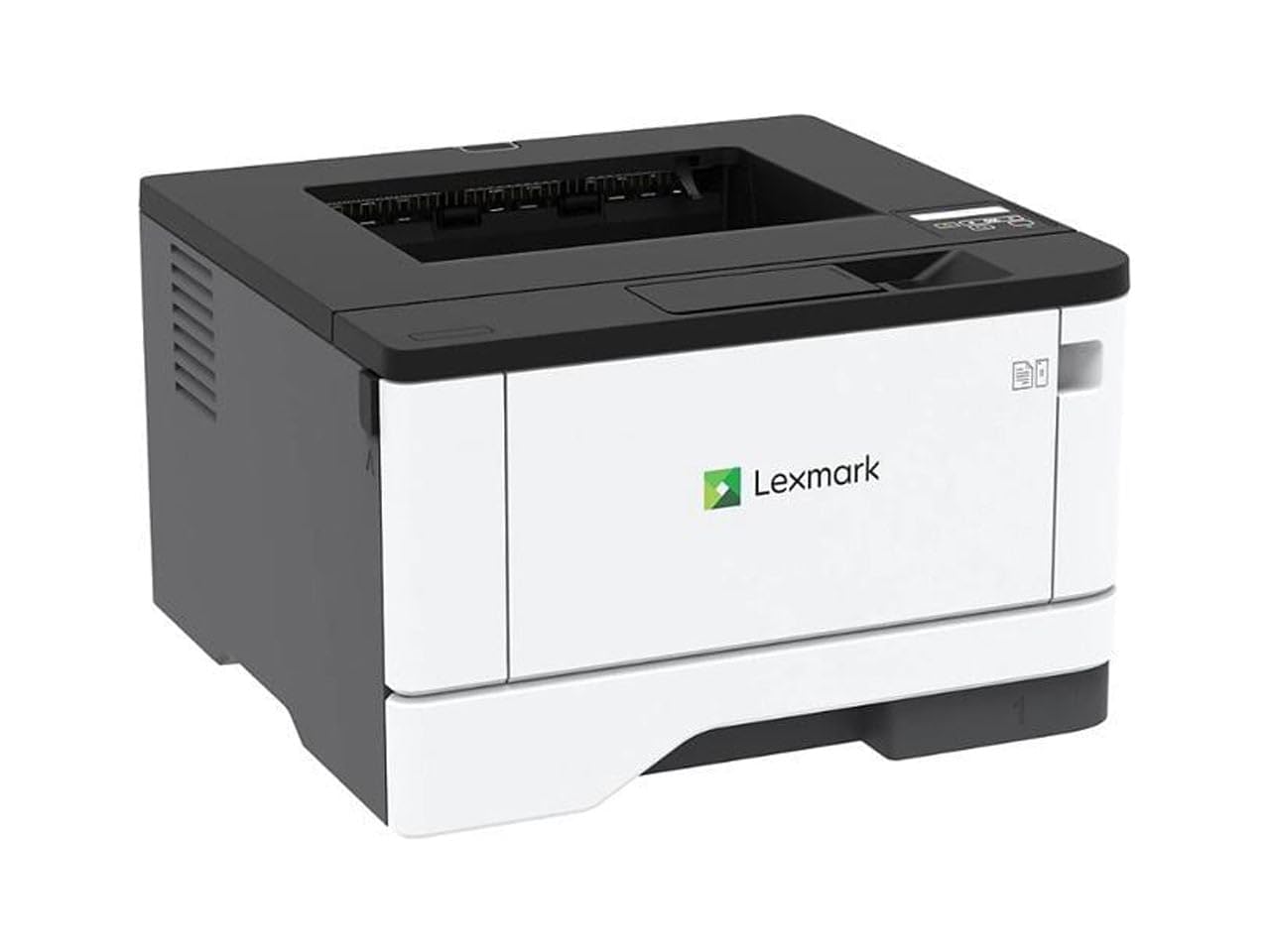
The Lexmark MS431dw brings enterprise-grade build quality to a relatively compact chassis. Its steel frame and durable imaging components support a recommended monthly page volume of 800 to 8,000 pages, far exceeding typical office all-in-ones. Print speed is a brisk 42 ppm, and automatic two-sided printing is standard, supporting both productivity and energy-saving certifications like EPEAT Silver and Energy Star.
Setup is plug-and-play via USB or Ethernet, and the two-line LCD display allows you to monitor system information and toner levels without a computer. The single-function print-only design (no scanner or copier) keeps the footprint small and the cost focused on pure printing performance. Users report excellent compatibility with both genuine and third-party toner cartridges.
The MS431dw lacks scanning and copying capabilities entirely — it is a pure print engine. For users who need a dedicated high-volume printer alongside a separate scanner, this laser stands out for its reliability and speed. The only significant quality concern is an occasional paper jam defect in some units, though most users experience trouble-free operation.
Why it’s great
- Steel frame supports 8,000-page monthly duty
- Fast 42 ppm print speed
- Compact footprint for high-volume output
- Compatible with third-party toner
Good to know
- No scanner or copier function
- Occasional paper jam issues reported
- Two-line LCD is basic compared to touchscreen models
6. HP LaserJet Pro MFP 3101sdw

The HP LaserJet Pro MFP 3101sdw is a well-rounded all-in-one designed for small teams that need professional-quality black-and-white output. Print speeds reach 35 ppm, and the 50-sheet ADF enables efficient multi-page scanning, copying, and faxing without manual feeding. The 250-sheet input tray handles standard reams, and the automatic duplex printing cuts paper usage in half.
Wireless connectivity is managed through HP’s Smart app, which provides remote printing, scanning, and toner monitoring from any mobile device. The self-resetting dual-band Wi-Fi automatically detects and resolves connection drops, a feature that sets it apart from competitors that require manual reconnection. Users consistently report effortless installation and reliable operation over months of daily use.
HP blocks non-HP toner cartridges through firmware updates, so you must use genuine HP cartridges or avoid firmware upgrades to keep third-party options viable. The introductory toner cartridge yields only about 1,000 pages, so budgeting for a high-yield replacement early is wise. Overall build quality is solid, and the printer maintains crisp output even under moderate volume.
Why it’s great
- Self-resetting dual-band Wi-Fi
- 50-sheet ADF for batch scanning
- Professional-quality text output
- Easy setup via HP Smart app
Good to know
- Firmware blocks third-party toner
- Introductory toner is low-yield (~1,000 pages)
- Wi-Fi can drop occasionally without auto-fix
7. Canon imageCLASS MF275dw

The Canon imageCLASS MF275dw delivers reliable 30 ppm monochrome printing with a fast 5.3-second first-page-out time, making it responsive for quick single-page jobs. Its 6-line adjustable touchscreen is easy to read whether you’re sitting or standing, and the 35-sheet ADF lets you copy and scan multi-page documents without standing over the machine. The 150-sheet cassette handles standard letter paper, and duplex printing is automatic.
Mobile printing is well-supported through the Canon PRINT Business app, Apple AirPrint, and Mopria Print Service. Wi-Fi setup can be completed entirely without a computer using the touchscreen interface. The MF275dw also includes fax functionality, a feature that many home-office buyers still require for signed documents and legal correspondence.
Some users report that the B&W scan quality can appear faded compared to color scan output, though text capture remains legible. The 700-page starter cartridge runs out quickly, so budgeting for a high-yield 071 cartridge from the start is recommended.
Why it’s great
- Fast 5.3-second first-page-out
- Adjustable 6-line touchscreen
- 35-sheet ADF for multi-page jobs
- Built-in fax and mobile printing support
Good to know
- 150-sheet paper tray is small for volume
- B&W scan quality can appear faded
- Starter toner cartridge is low-yield
8. HP LaserJet MFP M234sdw

The HP LaserJet MFP M234sdw is a compact all-in-one designed for small teams of one to five people. It prints at up to 30 ppm and offers the fastest two-sided printing in its class, with duplex speeds reaching 19 images per minute. The dual-band Wi-Fi with self-reset capability automatically detects and fixes connection problems, a feature that reduces IT intervention in busy offices.
Wireless printing works seamlessly from any mobile device, PC, or tablet via HP Smart, Apple AirPrint, Android, and Chromebook. The M234sdw also supports Ethernet for wired reliability. Users consistently report effortless setup through the HP Smart app, with one reviewer connecting four computers, an iPad, and three iPhones in under 20 minutes.
The control panel is mounted on the paper output tray, which can feel wobbly when accessing buttons while the tray is partially extended. The printer also uses HP’s firmware-locked cartridge system, meaning third-party toner is blocked unless you avoid firmware updates. The introductory toner yields approximately 700 pages, so a high-yield replacement is necessary for moderate-volume users.
Why it’s great
- Self-resetting dual-band Wi-Fi
- Fastest duplex printing in its class
- Seamless mobile printing across platforms
- Compact footprint for small desks
Good to know
- Control panel on wobbly paper tray
- Firmware locks out third-party toner
- Starter cartridge is very low-yield (700 pages)
9. Xerox B225DNI

The Xerox B225DNI delivers impressive 36 ppm print speed at an entry-level price point, making it one of the fastest budget-friendly monochrome all-in-ones available. It offers print, scan, and copy functions with automatic duplex printing, and its compact white-and-blue design fits easily on a small desk. The 250-sheet standard paper tray handles a full ream, reducing refill frequency compared to 150-sheet competitors.
Wireless connectivity includes built-in Wi-Fi with support for Apple AirPrint, Mopria Print Service, and Chromebook printing, covering the major mobile platforms. The Xerox Print & Scan Experience software simplifies tasks like auto-straightening, receipt scanning, and auto-cropping images. Security features protect access and sensitive data, a consideration often absent at this price tier.
Wi-Fi setup can be unreliable, with some users reporting persistent connection failures that forced them to use a USB cable instead. Scanning lacks a duplex document feeder, so multipage two-sided scans require manual page flipping. The toner life is also a common complaint — the starter cartridge runs out relatively quickly, and replacement cartridges feel expensive relative to the printer’s upfront cost.
Why it’s great
- Fast 36 ppm print speed for the price
- 250-sheet paper tray reduces refills
- Compact design fits small workspaces
- Security features for data protection
Good to know
- Wi-Fi setup can be unreliable
- No duplex scanning
- Short toner life from starter cartridge
FAQ
Is monochrome laser printing cheaper per page than inkjet?
What does the auto document feeder do for a monochrome all-in-one?
How many pages per minute do I really need for a small office?
Can I use third-party toner cartridges in these printers?
Why does my printer’s scanning look faded in monochrome mode?
Final Thoughts: The Verdict
For most users, the all in one laser monochrome printer winner is the Brother MFC-L2820DW because it combines fast 36 ppm printing, a 50-sheet ADF, a responsive touchscreen, and built-in fax in a compact chassis at a fair investment. If you want a higher-volume workhorse with a full 3-year warranty and blazing 45 ppm speed, grab the Canon imageCLASS D1620. And for a budget-friendly option that still delivers 36 ppm and wireless connectivity, nothing beats the Brother HL-L2480DW.