
Getting a true lab-quality print at home means fighting through paper jams, faded colors, and ink costs that can outpace the printer itself within months. The difference between a so-so snapshot and a gallery-worthy 8×10 lies in the print head technology, ink architecture, and color gamut—specs that most all-in-one specs sheets gloss over.
I’m Min — the co-founder and writer behind Gadgets Feed. I’ve spent hundreds of hours dissecting print engine specs, analyzing pigment-versus-dye formulations, and cross-referencing real-world customer image quality reports to separate the true photo performers from the document-only pretenders.
Whether you need vibrant borderless 4x6s or archival-quality fine art prints, this guide breaks down every critical detail to help you find the perfect all in one printer for photos that matches your specific workflow.
How To Choose The Best All In One Printer For Photos
Printing photos at home requires a different set of priorities than printing office documents. Color accuracy, ink formulation, and paper handling become the deciding factors rather than just pages per minute or tray capacity. Here are the three specs that matter most.
Ink Architecture: Dye vs. Pigment and Cartridge vs. Tank
Dye-based inks deliver vivid, glossy prints with smooth transitions, making them ideal for photo albums and frames. Pigment inks offer superior fade resistance and water durability, preferred for archival prints. The hardware choice between traditional cartridges and refillable tanks affects both upfront cost and long-term expense—tank systems dramatically lower the cost per glossy 8×10 but often use pigment inks that trade some vibrancy for longevity.
Color Channels and Print Head Precision
A four-ink system (CMYK) can produce decent photos, but a six-ink system adds light cyan and light magenta to eliminate visible grain in skin tones and skies. The number of nozzles and minimum droplet size—measured in picoliters—determines how fine the detail can be. Printers with dedicated photo black channels handle glossy paper better than those sharing a single black ink for both text and images.
Paper Path and Borderless Capabilities
Not all all-in-ones accept thick photo paper or cardstock. A rear feed slot or dedicated photo tray is critical for 300gsm glossy sheets. Borderless printing at common sizes like 4×6, 5×7, and 8.5×11 requires the printer to overspray beyond the paper edge—check that the model specifically supports borderless at the sizes you actually print.
Quick Comparison
On smaller screens, swipe sideways to see the full table.
| Model | Category | Best For | Key Spec | Amazon |
|---|---|---|---|---|
| Epson Expression Photo XP-970 | Premium Photo | Gallery-quality 6-ink prints | 6-color Claria Photo HD inks | Amazon |
| Canon MegaTank MAXIFY GX2020 | Premium Business | High-volume office + photo combo | Pigment ink MegaTank system | Amazon |
| Epson EcoTank ET-4950 | Mid-Range Tank | Low-cost color + casual photo | 6,600-page black ink bottle | Amazon |
| HP OfficeJet Pro 9730 | Wide-Format | Large 11×17 photo + floorplans | P3 wide color gamut support | Amazon |
| Canon MegaTank GX1020 | Budget Tank | Student/home photo + document | 3,000 color pages per ink set | Amazon |
| Epson EcoTank ET-2980 | Budget Tank | Family printing with low ink waste | Auto-stop ink bottle refill | Amazon |
| HP Envy Photo 7975 | Consumer Photo | Home creative projects + 4x6s | Separate photo tray slot | Amazon |
| HP OfficeJet Pro 8125 | Mid-Range Office | Home office with occasional photos | 20 ppm black print speed | Amazon |
| Canon PIXMA TS7720 | Entry-Level | Budget home photo + casual use | Compact with 2.7″ touchscreen | Amazon |
In‑Depth Reviews
1. Epson Expression Photo XP-970
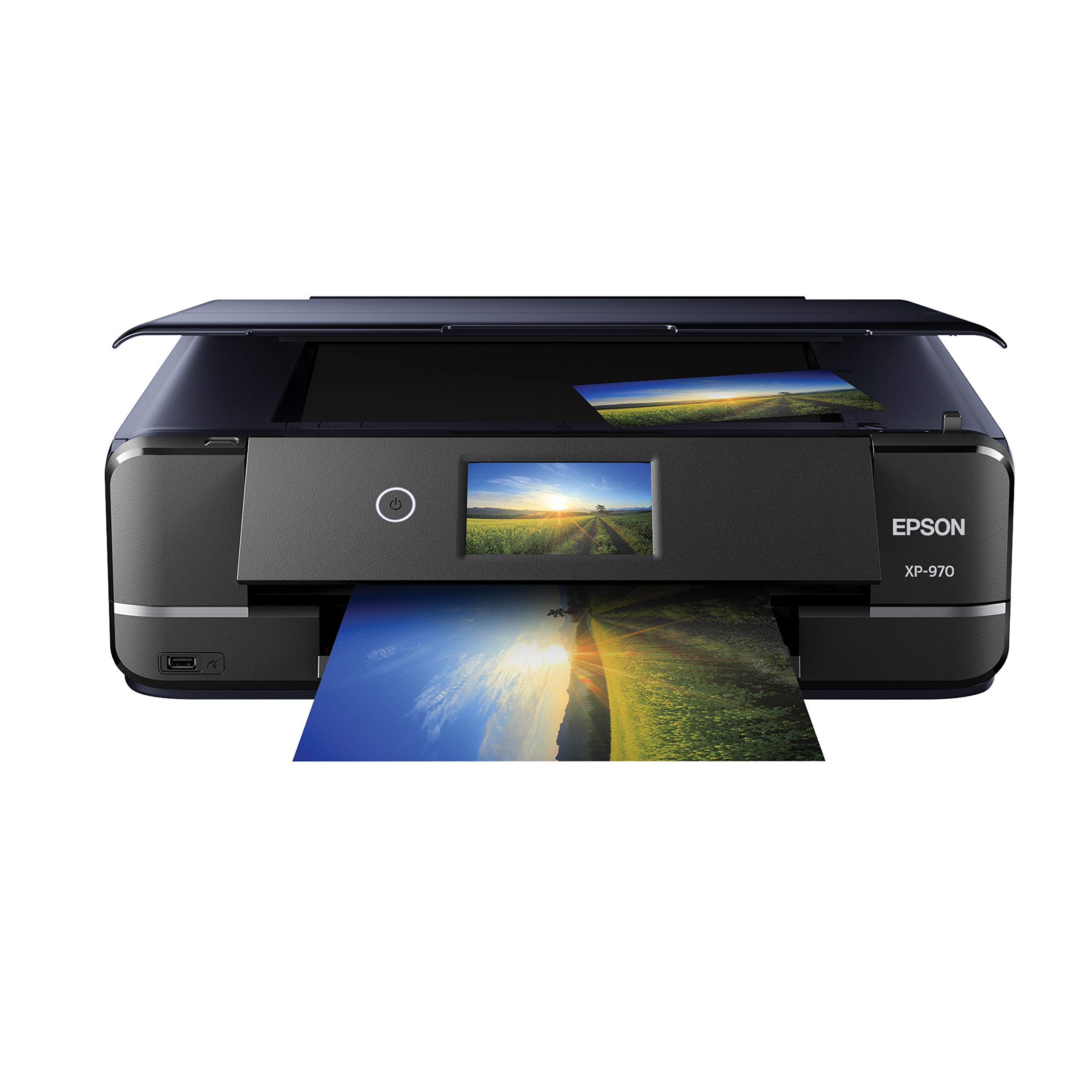
The XP-970 is the only true six-ink photo printer in this roundup, and it shows in every glossy 8×10. The addition of light cyan and light magenta eliminates the dot pattern visible on four-ink outputs, producing skin tones and sky gradients that look continuous rather than dithered. Users report excellent color accuracy on Red River Polar Gloss Metallic paper right out of the box, with minimal calibration needed.
The fold-over scan lid is a clever design touch—it holds thick photo books and documents flat without damaging spines. Setup is straightforward via the Epson website, and Wi-Fi Direct works reliably with both Android and iOS devices. The 6x Claria Photo HD cartridges deliver vivid, long-lasting prints, though the initial fill includes standard-yield cartridges that empty faster under heavy use.
Where this printer struggles is paper handling for unusual sizes: 4×6 labels can feed crooked, and 11×17 requires single-sheet rear loading that slows multi-print jobs. Some users report ink drying on the print head after a few days of non-use, requiring multiple cleaning cycles that waste ink. If you print photos weekly, this is a non-issue; if you leave it idle for weeks, expect to burn through a cleaning cycle.
Why it’s great
- Six-color ink system produces smooth, grain-free photo prints
- Excellent color accuracy on glossy and metallic papers
- Unique fold-over scan lid handles thick books and originals
Good to know
- Large format requires slow single-sheet rear feed
- Print head can clog if printer sits idle for extended periods
- Ink cartridges have lower page yield than tank systems
2. Canon MegaTank MAXIFY GX2020

The GX2020 bridges office productivity and photo print quality with Canon’s pigment-based GI-25 ink. Pigment inks produce crisp text and water-resistant prints, but the trade-off is a slightly narrower color gamut compared to dye-based photo printers. That said, users consistently rate the photo output as “excellent” for vivid colors and sharp detail, especially on Canon’s own glossy photo paper.
The 35-sheet auto document feeder and automatic duplex printing make this a serious home office machine, while the MegaTank system drastically lowers the cost per color page. A single set of GI-25 bottles yields up to 3,000 black and 3,000 color pages. Setup is straightforward, and the tank filling process is mess-free with keyed bottle nozzles that prevent spills.
Some users found the initial setup instructions confusing—the “insufficient ink” prompt that appears during first-time charging is misleading and can be safely ignored. Wi-Fi connectivity issues have been reported at distances over 50 feet or through thick walls, but the printer also supports USB and Ethernet as reliable fallbacks. For mixed document and photo workloads where ink cost matters, this is a strong contender.
Why it’s great
- Extremely low per-page cost with MegaTank ink system
- Pigment inks produce water-resistant, fade-resistant photos
- 35-sheet ADF and auto duplex for office productivity
Good to know
- Color gamut narrower than 6-ink dye-based photo printers
- Wireless range can be unreliable at distance
- Cardstock prints may curl; best for plain and photo paper
3. Epson EcoTank ET-4950

The ET-4950 brings Epson’s cartridge-free EcoTank system into a full-featured all-in-one package with an ADF, fax, and 250-sheet tray. The ink bottles are equivalent to roughly 80 individual cartridges, making this one of the most cost-effective options for heavy photo printing. Print speeds hit 18 ppm black and 9 ppm color with zero warmup time, so the first glossy 4×6 prints out as fast as the hundredth.
Photo quality is good but not class-leading: users describe colors as “vibrant” for casual and family prints, but the lack of extra light ink channels means gradients show more grain than the 6-ink XP-970. For standard 4×6 and 5×7 prints viewed in albums or frames, the quality is more than sufficient. The 2.4-inch color touchscreen is responsive, though the narrow viewing angle can be annoying when standing over the printer.
Some users report that copying and scanning produce slightly off-size output, with edges being cut off by a few millimeters—this appears to be a firmware quirk that requires trial-and-error margin adjustment. The build quality feels slightly flimsy compared to older EcoTank models, but the ink efficiency and wireless reliability offset that concern. For high-volume color printing on a budget, this is a rational choice.
Why it’s great
- Unbeatable ink value: bottles equivalent to 80 cartridges
- Fast 18 ppm black with instant-on technology
- ADF and fax for full office functionality
Good to know
- Photo quality shows visible grain compared to 6-ink printers
- Copy/scan output may have minor edge cut-off issues
- Build feels more plastic than previous EcoTank generations
4. HP OfficeJet Pro 9730

The 9730 is the only wide-format option here, supporting up to 11×17 prints with HP’s first-ever P3 color gamut in this class. That means it can reproduce a wider range of colors than standard sRGB printers, making it well-suited for photographers who print mood boards, spreadsheets with charts, or oversized gallery prints. Print speeds of 22 ppm black and 18 ppm color keep large jobs moving.
The dual 250-sheet input trays can be loaded with different media types, so you can keep photo paper in one tray and plain paper in the other without swapping. The 4.3-inch color touchscreen is the largest in this roundup and makes navigating menus genuinely pleasant. The single-pass duplex ADF scans both sides of a document in one pass, a real time-saver for multi-page contracts.
This printer is physically large—22.9 inches deep—so it demands dedicated desk or cabinet space. Some users report that the printer forgets the Wi-Fi network after sleeping, requiring a wired connection for reliable setup. The Instant Ink trial is aggressively promoted during setup, but you can decline it without losing functionality. For those who need both wide-format photo prints and office productivity, this is the specialist choice.
Why it’s great
- Supports 11×17 prints with P3 wide color gamut
- Dual 250-sheet trays for separate media types
- Single-pass duplex ADF for fast double-sided scanning
Good to know
- Very large footprint requires dedicated space
- Wi-Fi can drop after sleep mode; wired connection recommended
- Instant Ink onboarding is persistent during setup
5. Canon MegaTank GX1020
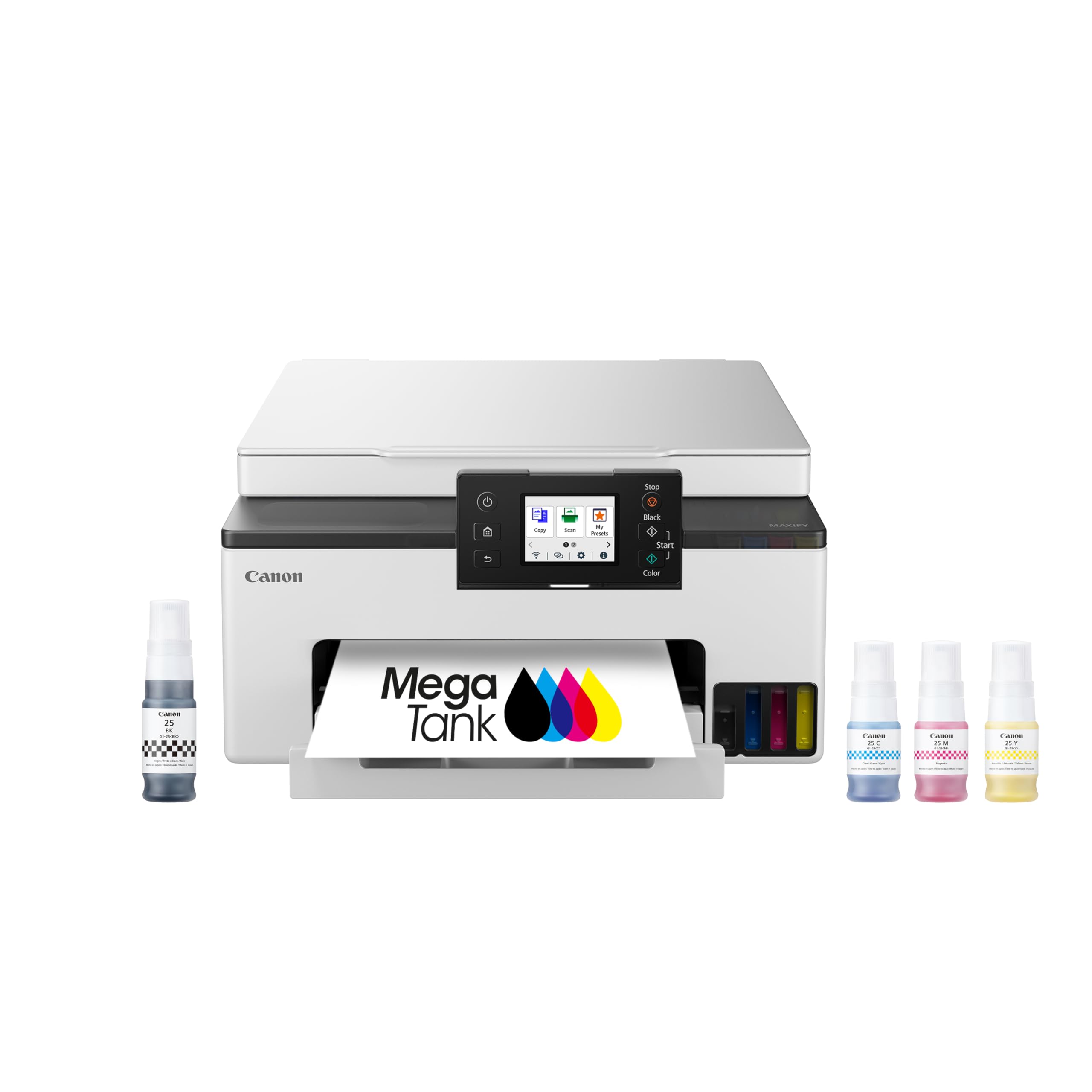
The GX1020 is the entry point into Canon’s MegaTank line, offering a cartridge-free system with pigment inks for document longevity and surprising photo quality for a tank printer. Users report that photos printed on plain paper look “beautiful,” and on Canon’s glossy photo paper, colors are vivid with sharp detail. The 2.7-inch color touchscreen is responsive and makes menu navigation intuitive.
Ink savings are substantial: a single set of GI-25 bottles yields up to 3,000 black and 3,000 color pages. The refill process is clean and keyed to prevent incorrect bottle insertion. Duplex printing works reliably, and the printer handles a variety of media from envelopes to cardstock without jamming. Setup is quick, though the wizard can be misleading with a false “insufficient ink” prompt that should be ignored.
Wi-Fi connectivity is the main complaint—the 2.4GHz band can be unreliable at distances beyond 50 feet or through multiple walls, and AirPrint from iPads sometimes fails, requiring the Canon Print app instead. The 5GHz band is more stable in tests. For a home office or dorm room where the printer sits within 15 feet of the router, these issues rarely surface.
Why it’s great
- Cartridge-free MegaTank with 3,000-page color yield
- Pigment inks produce sharp text and durable photos
- Responsive 2.7-inch touchscreen with intuitive menus
Good to know
- 2.4GHz Wi-Fi can be unreliable at distance
- AirPrint from iPad may fail; Android works more reliably
- Ink bottle level indicators lack chip-based accuracy
6. Epson EcoTank ET-2980

The ET-2980 is Epson’s most compact EcoTank model, making it a good fit for bookshelves and small desks. The patented EcoFit bottles have an auto-stop mechanism that prevents overfilling—you simply insert the bottle and it stops exactly when the tank is full. This eliminates the messiest part of ink refilling entirely. Print speeds of 15 ppm black and 8 ppm color are adequate for home use.
Photo output is described by users as “good for casual family prints” but not up to 6-ink quality. Colors are reasonably accurate on Epson’s glossy photo paper, and 4×6 borderless prints come out clean with no visible banding. The automatic output tray that extends and retracts is a nice touch not found on many budget tank printers.
Setup is time-consuming—the initial ink charging can take 10-15 minutes, and Windows users may need to manually extract driver ZIP files and burn executables if the auto-installer fails. The lack of an ADF is a notable omission for anyone scanning multi-page documents. For users who prioritize low ink costs and small size over photo perfection, this is a solid pick.
Why it’s great
- Auto-stop EcoFit bottles prevent ink overfill mess
- Compact footprint fits small desks and shelves
- Automatic output tray extends and retracts cleanly
Good to know
- No auto document feeder for multi-page scanning
- Setup is lengthy with possible driver installation issues
- Photo quality is adequate but not gallery-grade
7. HP Envy Photo 7975

The Envy Photo 7975 is HP’s dedicated home photo printer, featuring a separate photo tray that holds 4×6 or 5×7 paper so you don’t have to swap media between document and photo jobs. The HP Smart app handles setup in under 10 minutes, and prints come out crisp with good color accuracy for family photos and creative projects. Speeds of 15 ppm black and 10 ppm color keep things moving.
The AI-powered formatting feature automatically cleans up web page prints by removing ads and sidebars, a genuinely useful trick for saving paper. The 2.7-inch touchscreen uses a phone-like interface that is easy to navigate. The Instant Ink trial is included, and while it locks you into HP cartridges, the subscription can save money for moderate-volume home printers who prefer the convenience of auto-shipments.
Reliability is a concern: a significant number of users report paper jams and “out of paper” errors within the first month, along with faint white lines appearing across photo prints. The “quiet print” mode cannot be disabled, making this noticeably louder than competitors. For those willing to take a chance on a specific unit, the photo quality when it works is very good.
Why it’s great
- Dedicated photo paper tray prevents media swapping
- AI-powered web print formatting saves paper
- Fast setup through HP Smart app under 10 minutes
Good to know
- Reports of paper jams and faint line artifacts on photos
- Quiet print mode is always on and adds noise
- Instant Ink subscription is heavily promoted during setup
8. HP OfficeJet Pro 8125

The OfficeJet Pro 8125 is positioned as a home office champion, with print speeds of 20 ppm black and 10 ppm color that keep document workflows efficient. HP Wolf Essential Security adds a layer of network protection that business users will appreciate. The 2.7-inch touchscreen is responsive and the phone-like UI is easy to navigate.
For photo work, this is not a specialist: colors are described as “reasonable” rather than vibrant, and users note that photos look more muted compared to dedicated photo printers. The four-ink system lacks the extra photo channels needed for smooth gradients. However, for occasional photo prints mixed with daily office tasks, the quality is perfectly acceptable.
Setup is straightforward through the HP Smart app, though some users report needing multiple retries to connect on PC while phones connect on the first attempt. The 8125e variant (avoid it per users) has additional issues. The Instant Ink subscription is easy to decline if you prefer to buy cartridges upfront. For a mixed-use office printer, this is a safe, reliable choice.
Why it’s great
- Fast 20 ppm black print speed for office documents
- HP Wolf Security protects your network from threats
- Reliable dual-band Wi-Fi with auto connection repair
Good to know
- Photo quality is muted, not suited for gallery prints
- 4-ink system lacks extra photo channels
- Smaller, cheaper build than previous OfficeJet generations
9. Canon PIXMA TS7720

The TS7720 is Canon’s most affordable all-in-one with a 2.7-inch LCD touchscreen, designed for homes that need occasional photo prints without a large investment. The two-cartridge system (one black, one color) keeps replacement simple, but the tri-color cartridge means that once you run out of one color, you replace the entire color cartridge—wasteful if you print more of one hue than others.
Photo quality is surprisingly decent for the price: users report “good” small 4×6 prints and “OK” 8x10s, though colors can appear muted or hazy compared to printers with dedicated photo inks. Black and white text prints are crisp, making this a passable homework and document printer. The flatbed scanner delivers good quality but lacks an ADF, so multi-page scanning requires manual page turning.
The biggest frustration is the default 4-hour auto-off feature, which can be changed in settings but confuses first-time users. Wi-Fi setup is not truly plug-and-play—most users report needing the manual to connect wirelessly on the first attempt. The trial ink cartridges included in the box empty quickly, sometimes within days under moderate photo use. For the absolute lowest entry cost to photo printing, this works, but expect to upgrade within a year.
Why it’s great
- Lowest upfront cost for an all-in-one photo printer
- Compact design fits tight spaces easily
- Decent 4×6 photo quality for casual prints
Good to know
- Trial ink cartridges empty quickly under photo use
- Tri-color cartridge wastes ink when one color runs out
- Default 4-hour auto-off causes confusion on first use
FAQ
Is a 6-ink printer noticeably better than a 4-ink printer for photos?
Do EcoTank or MegaTank printers produce good photo quality?
What does borderless printing actually require from a printer?
Final Thoughts: The Verdict
For most users, the all in one printer for photos winner is the Epson Expression Photo XP-970 because its six-ink system produces grain-free, gallery-worthy prints that rival dedicated photo labs. If you want the lowest long-term ink cost, grab the Canon MegaTank MAXIFY GX2020. And for budget-friendly casual photo printing, nothing beats the Epson EcoTank ET-2980.